
NZXT Gamma Computer Case GAMA-001BK
NZXT Gamma GAMA-001BK Review
Whether you just need a computer for surfing the web or if you are on a quest to construct the ultimate gaming machine, it all begins with the case. NZXT has recently released a mid-tower case for all arenas: the Gamma. This extraordinarily light case is packed with features normally seen only in high-end (and high-priced) gaming cases, and it brings it all to the table for only $49.99. Benchmark Reviews will take you on a full-spectrum tour of the GAMA-001BK case. NZXT has set a high standard for itself in the performance computing market.
If you have ever built a gaming computer, or know someone who has, you have undoubtedly contemplated a case from NZXT. The company was built by gamers and creates products that they would want to use themselves. NZXT has always held themselves to the highest standards when constructing their products and they strive to bring them to their loyal customers at a price within reach for everyone. The NZXT Gamma Mid-Tower Computer Case is another entrant into the performance-at-an-affordable price venue. The case leaves some of the fancier and flashier features out, but packs in plenty of cooling power and a very thoughtful layout. And it does so at a price that will blow you away.

The NZXT Gamma could be a very influential case if all it's features hold merit. Such an inexpensive entrant into the gaming chassis arena should be very popular, especially when touting the specifications of the Gamma. Let's discover together what NZXT is up to with their new Mid-Tower case.
NZXT Gamma Features
-
6 Fan Capability (One 120mm Rear Fan Included)
-
Black Interior
-
Meshed front panel allows for more airflow
-
Wire Routing: Motherboard punched holes allows for quick CPU bracket removal and optimal wire routing; turned HDD also helps with managing cables
-
Pre-Drilled water cooling holes on the back plate
-
Front mounted USB, Audio, and ESATA ports
-
Support for external dual radiator at the top of the chassis
-
High end graphics card support, the Gamma features space that is especially designed to fit longer, 10" cards
Gamma Mid-Tower Case Specifications
|
MODEL |
GAMMA SERIES |
|---|---|
|
CASE TYPE |
MID TOWER Black interior chassis |
|
FRONT PANEL MATERIAL |
Steel |
|
DIMENSIONS (W x H x D) |
190 X 449 X 508 mm |
|
COOLING SYSTEM |
FRONT, 1 x 120mm SIDE, 2 x 120mm
TOP, 2 x 140/120mm |
|
DRIVE BAYS |
11 DRIVE BAYS |
|
MATERIAL(S) |
Steel Construction |
|
EXPANSION SLOTS |
7 |
|
POWER SUPPLY |
500 WATT PS2 ATX 12V 2.0 ( OPTIONAL ) |
|
WEIGHT |
6 KGS (W/O Power) |
|
MOTHERBOARD SUPPORT |
MOTHERBOARDS: ATX, MICRO-ATX, BABY AT |
About the company: NZXT
NZXT, a company built upon gamer's dreams, hopes to create products that put consumers first. With the objective of designing unique products catered for hardware enthusiasts and gamers, NZXT has grown into a globally renowned brand recognized for dedication towards creating the next great gaming product. NZXT has won numerous awards from media and publications from across the globe with a product line spanning from gaming chassis, power, and gaming input devices. As a corporation formed by gamers, NZXT continues to expand into new horizons and push the limits further with each product unveiling.
Our dedicated sales and customer service team will work diligently to earn your trust and loyalty. All our products are build with high quality material and engineered in the best conditions.
NZXT products are designed and engineered in the United States and manufactured overseas in China and Taiwan. NZXT was established in 2004 in Los Angeles, California.
Closer Look: Exterior
Upon opening the NZXT Gamma case, I found that I was quite pleasantly surprised by the light weight of the case. Not that this makes much of a difference, as the case will almost definitely be in a stationary location while in use. However, while manipulating the case to install all the components, a heavier case can cause some difficulties. With the Gamma, you won't have any of those problems.
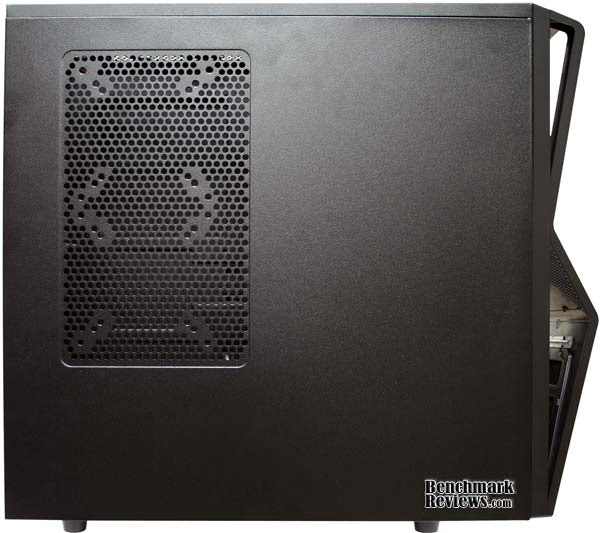
Another very nice, noticeable feature of the NZXT Gamma is the bevel on the face, allowing the external ports to point slightly upward. If you are going to keep your case on top of your desk, this may be somewhat of a hindrance. I keep my case under my desk, and the bevel on the Gamma face gives me ready and easy access to the external ports available. We will talk about the ports a little more further on, but I wanted to mention this subtle yet thoughtful addition to the Gamma case since it was one of the first things I noticed. Many cases, especially in the price range of the Gamma have the ports all the way at the bottom of the case. Even if they are near the middle, having them face slightly upward really makes a difference when it comes to ease of use.
And speaking of ease of use, the Gamma also offers another commodity rarely found in an inexpensive case. The sides of the case are screwed in using thumbscrews. A lot of people are building their own computers recently. They have found that it isn't as hard as it once was to upgrade components and hardware. Some, like me, upgrade constantly or continuously make small adjustments to the inside of the case. Just the other day (before I received the Gamma) I got into my case to unplug the reset button from the motherboard. My daughter has a thing for buttons and kept resetting it. I had been putting off this simple task for quite a while because I didn't have a screwdriver handy to take off the side panel. Thumbscrews would certainly have aided me.

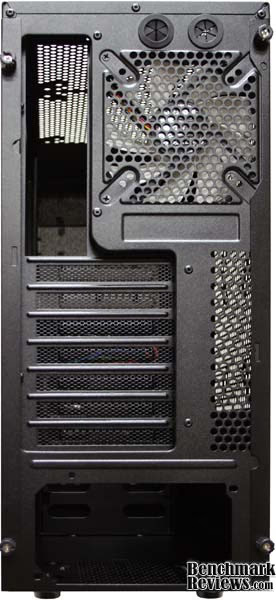
Where cooling is concerned, I could tell right away that the NZXT Gamma was going to be on top of its game. There is a large meshed area on top of the case that will allow for two 120mm or 140mm fans. NZXT says that this area of the Gamma has also been specifically designed for the installation of a radiator for a water cooling system. Just above the rear fan are two small circular openings for the water cooling tubes. You don't find many cases with that kind of capability pre-built, especially at the price of the Gamma.

The only fan that comes with the case is on the rear plate of the case, near the top. It is a large 120mm fan that is actually pretty quiet. The rest of the back plate of the Gamma is almost normal looking, except for a few interesting features. First, the expansion port covers are all mesh, giving the Gamma that added airflow that seems to be the main feature of the case. Also, the power supply (sold separately) is mounted on the bottom of the Gamma. This is a very rare, but very nice, feature that I have seen almost nowhere else; certainly not on a $50 case. We will get into this feature in more detail later.
Detailed Exterior Features
The front panel of the NZXT Gamma Mid-Tower Computer Case is a sight to behold. It's not flashy and extra-terrestrial looking, but at the same time its angular curves hold quite an appeal. The 5.25" drive bay covers are all filtered and meshed, as is the bottom of the front panel. Is anyone else noticing a distinct positive air-flow theme here? The Gamma does away with some of the LED lit trimming that is pretty common on classic NZXT cases. There is still a blue LED strip under the reset button and in the center, under the drive bays, that excentuate the simple and elegant design of the case. It no doubt helps with keeping the cost low as well.
Inside the front panel is a mount for a 140mm fan. You have to take off the front faceplate to get to it, so I would recommend putting it in before you start tucking away all the excess cabling you have. It is a great location for an air-input fan, especially with the filter on the faceplate. One of the things that always gets to me is opening my computer case just to see that it is full of dust. The Gamma has obviously taken this into consideration and placed filters in strategic locations of mass air input throughout the case.

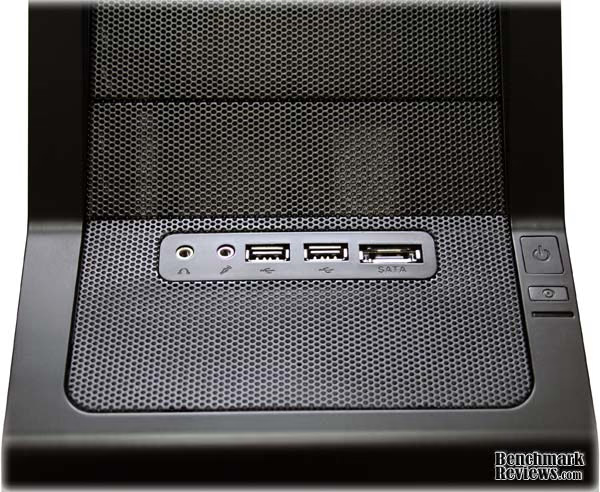
Let's talk a little more about the external ports on the front face plate. The NZXT Gamma supplies you with the two USB ports and audio ports for headphones and a microphone. This is pretty standard now, and most cases will have these ports on them. What a lot of cases won't have is an ESATA port on the front panel. The NZXT Gamma does not disappoint here and follows the tradition of cases normally priced much higher by supporting this option. While ESATA still isn't nearly as widely used as USB, it is rapidly becoming a more viable option. The fact that NZXT would add this feature to a very inexpensive case shows that, while they are willing to drop frills to save on costs, they won't skimp on features for their costumers.
If you flip the Gamma over and take a look at the bottom of the case, you will find a couple of interesting things. The feet on the Gamma are just a little bit bigger than on most other cases I have worked with. This makes the Gamma somewhat taller than other mid-tower cases. There is a purpose behind this madness however. As I mentioned before, the Gamma slots the power supply at the bottom of the case, and as many power supplies have a fan on the bottom, this poses a dilemma. NZXT didn't see it as a problem, though. The Gamma sports a mesh opening for the power supply bottom fan complete with a, yup, you guessed it, filter. Sitting the case a little higher off the ground now makes perfect sense, as it gives the fan quite a bit of increase airflow to pull from while cooling the power supply. I mention this here while discussing detailed exterior features because the filter is on the outside of the case. It is easily removable for cleaning. I must say I am quite impressed by this little, but very thoughtful, feature.

Even from just looking at the exterior of the case, it is clear that NZXT had the customer in mind when creating the Gamma. This isn't an attempt at making a cheap case to sell to the masses for a big profit. A lot of thought went into the Gamma, as we have seen from the massive amounts of cooling area, the layout of the case, and even the option for water cooling built directly into the case. As we delve into the interior of the Gamma, you will see that this same foresight was applied inside as well as out.
Closer Look: Interior
When I opened the NZXT Gamma for the first time, I was almost sure I had gotten the wrong case in the mail. I mean, it said it was a Gamma on the box, but there is no way a $50 case is laid out the way this one is. Well, luckily for you all, I was very wrong. The Gamma case is revolutionary for it's price range. I mentioned already that the entire front panel is filtered, but follow me inside the case to explore the differences the NZXT Gamma brings to the table.

Let's start with the drive bays. As I mentioned above, the Gamma has only 5.25" external drive bays. Finally. Someone has made a low cost case that is keeping up with the times. It is extremely easy to find a 3.5" to 5.25" adapter in the rare case that you do actually still use a floppy drive. But even if you have a floppy drive in your computer, when is the last time you used it? USB drives are a dime a dozen, and hold exponentially more data. Personally, I am glad to see the 3.5" external bay done away with.
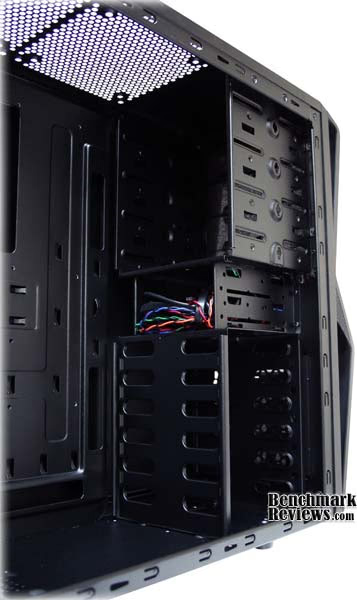
So along with the four 5.25" external drive bays, the NZXT Gamma holds room for seven 3.5" internal drive bays. Two of the 3.5" bays are just below the 5.25" bays, right where you would expect them on a mid-tower case. They face the front panel and we will talk a little more about them in the detailed interior features. The other five drive bays are mounted sideways, facing the side panels. This actually opens up a lot of room inside the case and allows NZXT to make the claim that the Gamma will hold up to 10" video cards. With a front to rear facing hard drive, this is a very tricky feat. Side to side however, and even some of the longest cards will fit pretty easily. Unfortunately, it won't fit your new Radeon 5970!

The motherboard plate for the Gamma Mid-Tower Case is very interesting. With both side panels off, I noticed that there were a lot of large holes in it. We'll get into each of them in the detailed features, but for now I will tell you that NZXT really thought about cable routing, overclocking, CPU tweaking, and cooling when designing the motherboard plate for the Gamma. Each of those gaping holes has a purpose, and that really adds to the overall beauty of the case.
Detailed Interior Features
One of the most interesting features of the Gamma is that all of your drive installation can be done tool-free. The Gamma comes with side plates that fit 3.5" hard drives. They are very slightly magnetized, and fit right into the screw holes on the sides of the drive. Attach one plate to each side of the drive and you are ready to put it in the bay. The drive slides right in and locks into place. To remove the drive, simply apply pressure to both of the side plates at the same time to release the lock and pull the drive out. This sure makes adding drive extremely simple.

The Gamma even provides you with thumbscrews for your 5.25" drives. Very convenient. It's small details like these that make the NZXT Gamma stand out above the crowd. Features that you wouldn't expect, and certainly wouldn't notice if they were absent, are commonplace on the Gamma. Even the black color for the interior of the Gamma shows that the slightest details were not overlooked.

The holes in the motherboard plate for the Gamma are very functional. The large hole that looks like it sits right about where the CPU goes is there because it sits right where the CPU goes. You can see the case here with the motherboard installed. Unfortunately, my motherboard does not have the increasingly common CPU brackets mounted on the backside of the CPU. Your motherboard might however. If you have brackets on the back of the motherboard, they likely hold your cooling device in place from the top of the board. Also, some companies, like Thermalright, make CPU coolers that mount here on the backside of the motherboard. For added ease during the installation and maneuvering of such devices, NZXT has added this hole to the motherboard plate on the Gamma.
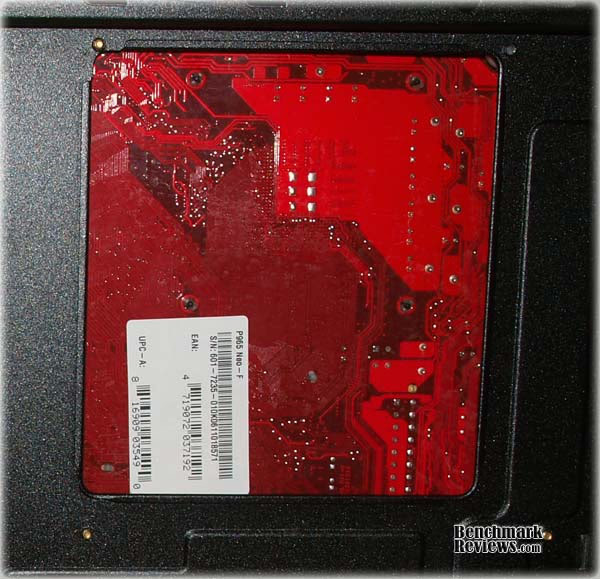
Down at the bottom of the motherboard plate, near where the PSU will be located, you can see another hole. This hole, along with the two holes placed vertically along the drive bays, are for cable routing. All of the cables from the power supply that will be used for your peripherals can be routed through the bottom hole. Since I put my optical drive in the very top drive bay, I had to keep the cable for that on the frontside. All the other cables, including the ones I didn't use, were routed through that hole and attached to the backside of the motherboard.

I even routed the cables coming from the faceplate of the Gamma through those holes. Which brings me to another point. The cables from the faceplate are directed right through top two front-to-back facing 3.5" drive bays. This really makes the drive bays unusable. Not that five drive bays isn't enough, and I'm sure you could reroute the wiring through the front somehow if you really needed those two bays. And while I'm talking about the drive bays, let me quickly mention that the bottom 3.5" drive by has screw holes through the bottom of the Gamma that will fit a 2.5" drive. That is the only bay with built-in accessibility for a 2.5" drive, so if you happen to have multiple notebook drives or solid state disks, you will have to find a conversion kit.

So after routing all the cables through the holes in the motherboard plate on the Gamma, what happens to them? Well, contrary to popular belief, they do not disappear into an endless abyss of unheard of space filled with spare cabling. But that is no problem for the NZXT Gamma, because they have provided small divets on the backside of the motherboard plate that are perfect for twist-ties or zip-ties for tidying up the excess cables. This allows the side plate to slide into place perfectly and effortlessly, and also makes the inside of your case free from low-flying, annoying cables.

There are, of course, a few cables that cannot be routed through the well designed plate on the Gamma. These would include the PSU to motherboard cables, the PSU to video card cables, and in my case, the IDE cable. Yes, my optical drive still uses an IDE cable. So let's explore some of the issues with these cables. One unintentioned drawback of having the PSU mounted on the bottom of the case is that the cables may not be long enough to reach over your expansion cards to the motherboard. I made the mistake of plugging them in before installing my video card and had to unplug them all to get it in. Had my cables been an inch shorter, or if I had another video card, I'm not sure the cables would have reached. On the other hand, I did find out that my MSI NVIDIA 9800 GTX+ does indeed fit nicely inside the Gamma.
NZXT Gamma Final Thoughts
So it appears that NZXT has done it again with the Gamma. They have provided a case obviously geared towards excellent cooling and support for all your gaming gear; and they have done it for $50. Mid-tower cases everywhere are sweating with the release of the Gamma. They have a lot to live up to now. The Gamma provides every opportunity for an enthusiast to make the sky the limit for their power gaming rig. It also allows the less financially endowed PC owner an opportunity to get a performance case at an affordable price. Overclockers will rejoice that the Gamma was built with water cooling in mind. The Gamma offers something for everybody, and no one can complain about the price.
Some of the features that really stand out on the Gamma have to be the filters for incoming airflow, the PSU mounted on the bottom, the cable routing holes in the motherboard plate, and the side-to-side drive bays. Not to mention the tools-free installation of the drives. The adaptation for water cooling systems is very nice as well, but unless you are a hardcore overclocker, the Gamma provides plenty of airflow for the much less expensive price of a few 140mm fans.
The PSU being mounted on the bottom does provide a possible issue with the ever increasing size of the video cards. The cables just might not reach. Also, the cables from the front faceplate being routed directly through the middle drive bays really makes them useless. I could complain about how close together the USB ports are on the front face as well. You certainly couldn't have two fat USB devices plugged in at the same time. Of course, when I was experimenting with this, I noticed that all of my fat USB devices, without fail, came with a very short USB extension cable, thus making this a null point.
GAMA-001BK Conclusion
The NZXT Gamma Mid-Tower Computer Case really upholds the NZXT standard. The case was made for performance. More cooling is just another fan away; or a water cooling system if you are into that sort of thing. The Gamma filters the air coming into the case to protect your components from the dust that plagues computer users everywhere. The Gamma really has something for everybody, gamer, enthusiast, and casual user alike.
While ditching the flashy LEDs and open-view sides that are prevalent on many NZXT cases, the Gamma still maintains a stylish look to it. At the same time, the Gamma might not even be out of place on a cubicle desktop, as many gaming focused cases would be. The case is completely black, minus the two small LED strips on the front panel, offering a professional atmosphere. But the cut of the front panel and obvious attention to cooling power makes this case a great choice for an enthusiast as well.
The NZXT Gamma is made out of steel, but still clocks in at only 11.5 lbs. It's not as light as some of the aluminum cases, but it much more durable as well. There are no hinged port or face covers on the Gamma that may be torn away or ripped off by an adventurous toddler. The Gamma is very sturdy and constructed in manner that lets you know it means business.
Regardless of what kind of computing you will be enjoying, the Gamma offers something for you. It is absolutely one of the most functional cases I have ever worked with. Even ignoring the two drives bays taken out by cables, five 3.5" bays and four 5.25" bays give you plenty of expandability. And speaking of expansion, your overclocking days are drawing nearer with the amount of cooling this case allows. There is even an ESATA port right on the front of the Gamma, begging you to branch out in your computing endeavors.
Newegg.com lists the GAMA-001BK model for only $49.99. This is an excellent price point for a great gaming chassis. Not only does it invite gamers and overclockers to save some money and still maintain all the features of a high-priced case, but it also invites the dreamer to start working on their future power machine without cringing at the pain it will bring to their pockets. With the NZXT name and reputation behind it, the Gamma is an excellent value for its bargain price.
To tell you the truth, I certainly wasn't expecting what I got with the NZXT Gamma. I am still befuddled by the riddle of how NZXT fit so many features into this case and can still sell it for under $50. I highly recommend the Gamma Mid-Tower Computer case for anyone at any level of computing prowess. You will not be disappointed.
Pros:
+ Slots for 6 fans
+ Water Cooling holes pre-drilled
+ Filters on air-input areas
+ ESATA on front panel
+ Cable routing holes in motherboard plate
+ PSU mounted on the bottom of the case
+ Side facing drive bays
+ Supports 10" video cards
+ No tools needed for sides and drives
Cons:
- PSU Cabling somewhat difficult
- Front Panel cables make some drive bays unusable
- USB ports on front panel are too close together
Ratings:
-
Performance: 9.00
-
Appearance: 8.50
-
Construction: 9.00
-
Functionality: 9.50
-
Value: 9.50
Final Score: 9.1 out of 10.
Questions? Comments? Benchmark Reviews really wants your feedback. We invite you to leave your remarks in our Discussion Forum.
Reader comments from the original article
1 comment were posted before commenting closed. They are preserved as written. Original avatars no longer resolve and are shown as a placeholder.
Mr. Sameh Abdel Qawy Permalink:
Hello, Is there a software to test my power supply wattage? I have a Gamma power supply and its wattage is 300W printed on its label but I need to be sure about it by using a software. Is there a way to do that? Thank you a lot. Regards, Sameh Abdel Qawy