
Cooler Master HAF-X Case RC-942-KKN1
Cooler Master HAF-X Computer Case Review
With Cooler Master's recent release of the HAF-X the anticipation culminating since CES 2010 can finally be relieved. This new edition to Cooler Master's "High Air Flow" series is a full tower case truly meant for enthusiasts. Heavy-weight systems packing huge power need a heavy-weight case with mammoth cooling performance. Model RC-942-KKN1 builds on successful features from the past while incorporating some new ideas. The case was designed to do two things extremely well, hold lots of high performance parts and keep them cool. Read on while Benchmark Reviews evaluates the HAF-X.
The HAF-X is the newest product in the HAF series. In 2009 Cooler Master released the HAF AMD and before that the HAF 932. This newest release is technically the HAF 942 but nicknamed HAF-X. As technologies mature their physical designs also morph. GPUs are getting more complex and require larger support boards as well as better cooling support. For example, due to the massive power output generated by Nvidia's GTX 400 series cards they recommend installing an additional fan to assist the integrated fans. In parallel with GPU expansion, SLI and Crossfire have matured to scale performance across more and more cards. The combined effect of these two developments has increased the physical footprint required to take advantage of the highest performance available. Thus motherboard and case designs must adapt to accommodate ever changing hardware.

So far what we've seen is a continuation of past trends. Motherboards have remained 2-dimensional expanding in both width and length. Cases have been expanding in all three directions to accommodate the motherboards and the multitude of support equipment (mainly cooling). Case designs remain extremely rugged while trying to make component installation easier; e.g removable panels, tool-less installation, cable-routing. These high performance cases also tend to include windows and hardware management features to wrangle a potential mess into something that can be put on display. Finally, IO panels have expanded to include more ports and features while retaining a small footprint. The HAF-X continues these themes with only slight variation.
Cooler Master HAF-X Features
- SATA Dock for easy installation without the need of removing side panel
- USB 3.0 on front I/O panel
- Air duct to cool the latest graphic cards
- Up to 1 x 230 mm red LED fan and 3 x 200 mm fans
- 9 slots support triple VGA cards
- Adjustable VGA card holder to support heavier GPU cards
- Power supply partition to conceal cables
- Advanced cable management with rubber grommets
- Spacious interior for larger component parts
- Rugged black coated interior
RC-942-KKN1 Specifications
| Color | Black |
|---|---|
| Material | Steel + Plastic |
| Dimension (W / H / D) | 230 x 550 x 590 mm / 9.1 x 21.7 x 23.2 inch |
| Weight | Net Weight:14.35 kg / 31.6 lbs Gross Weight:16.08 kg / 35.5 lbs |
| M/B Type | M-ATX / ATX / E-ATX / GIGABYTE XL-ATI |
| 5.25" Drive Bay | 6 (2 converted SATA HDD drive bay available) |
| 3.5" Drive Bay | 5 Hidden |
| SATA HDD Drive Bay / 2.5” Drive Bay | 2 (converted from 5.25” drive bays) |
| I/O Panel | USB 3.0 x 2 USB 2.0 x 2 IEEE 1394a x 1 e-SATA x 1 Audio x 1 Mic x 1 |
| Expansion Slots | 9 |
| Cooling System | Front:230 x 30 mm red LED fan on/off x 1 Top:200 x 30mm fans x 2 (one optional) Side:200 x 30mm fan x 1 Rear:140 x 25mm fan x 1 VGA Fan Duct:120 x 25 mm or 120 x 38 mm fan x 1(optional) VGA Holder:80 x 15 mm fan x 1(optional) |
| Power Supply | Bottom / Standard ATX PS2(optional) |
About Cooler Master
Cooler Master was founded with the mission of providing the industry's best thermal solutions. Since its establishment a decade ago, the company has remained faithful to this mission, emerging as a world leader in products and services for companies dealing with devices where heat issues must be resolved.
In pursuing this mission, Cooler Master is absolutely committed to delivering solutions that precisely meet customer requirements for features, performance, and quality. Moreover, we strive to be a reliable long-term partner for our customers that they can truly depend on. It aims to be the first and foremost name that comes to mind for companies around the world seeking thermal solutions, and seeks to build such a reputation through outstanding technology, sophisticated design, and superior service.
Cooler Master's current business encompasses a comprehensive lineup of thermal solutions for a full range of applications. Its products range from heat sinks and fans to component housing, chassis, and ducting for computers, industrial machinery, telecommunications equipment, and many other devices.
Closer Look: Exterior
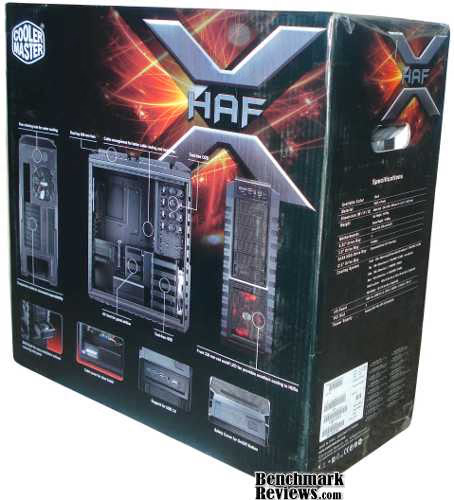
The overall styling of the HAF-X remains consistent with the HAF series. The dimensions are nearly equal to the HAF 932 but slightly wider to better accommodate wide motherboards and graphics cards. The lines on the case are sharp and the styling of the front panel has changed only slightly from the HAF 932 and HAF AMD. The IO panel is practically the same layout but updated for USB 3.0.

Consistent with other cases, the front panels and fan cover include wire mesh filters. There is hardly any visual difference between past models and the HAF when looking from the front. The main difference is the accessibility of the expansion bays. Instead of using push tabs that required two hands, the front covers of the HAF-X can easily be squeezed and removed with one hand.

One ironic difference between the exterior styling of the 932 and the 942 is the right panel. The 932 panel has an X shape while the 942 is a generic square. Seems like the X should have gone on the HAF-X, but it showed up a generation too early.

From the back are seen the 9 expansion slots, PSU and motherboard openings as well as three grommetted ports. One for coolant in, one for coolant out, and one for...? We'll hypothesize on that later. The HAF-X joins a very short list of cases with enough slots or size to run 4-SLI on an XL-ATX motherboard.
Another major difference between HAF models is the arrangement of the top panel. The HAF-X lacks the coolant reservoir of past models but replaces it with dual 200 mm fans, a first for the series. In the next section these features will be inspected more closely.
Detailed Exterior Features
The top four expansion bays are typical 5.25" bays that can be accessed by removing the front cover. The bottom two bays have been converted to sliding trays which accommodate smaller SATA drives. Each tray slides along rails to automatically dock to a SATA port mounted inside the case.

The new latching mechanism for the front panels can also be seen in the image above. Past HAF models used push tabs that were hidden behind large bars on the front of the case. They required two hands or very long fingers to open. In addition, the tab had to be pushed and almost nudged out from the side. The new method simplifies to squeezing the tabs which are visible from the front. Although visible, they blend extremely well with the front of the case. The top four panels can be opened with a single finger, and the bottom two slide trays can be opened with a single hand. The locking tabs are sturdy, high quality (metal) and unlikely to wear out. They are my favorite 5.25" covers to date!
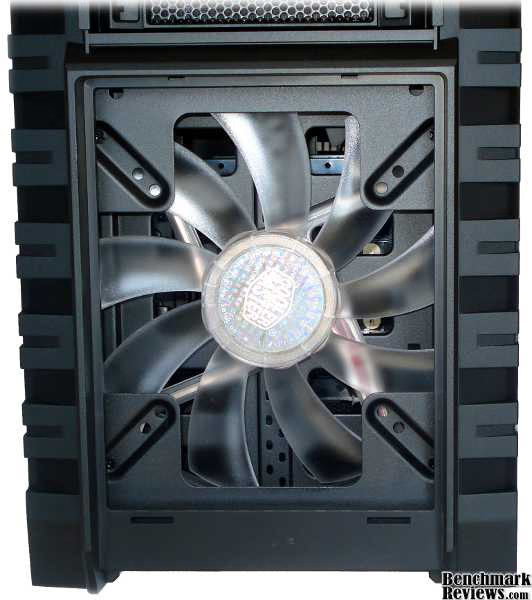
The front fan is the same as seen in past generations. A single 230 mm fan provides cool air input for the case. The front panel is easily removed by pulling a lever on the underside. Choosing when the panel popped off became important when trying to manipulate a heavy case full of components.

The IO panel has the nearly the exact same layout throughout the HAF series which includes a single firewire port, four USB ports, audio input and output, and one e-SATA port. The HAF-X is a good example of cases morphing to meet new technological development. USB 2.0 is so standard that nearly all motherboards include a USB 2.0 header on-board. USB 3.0 is too new to be a standard feature on motherboards much less cases. There have been various approaches to implementing USB 3.0 and from a consumer perspective, nothing that could be considered standard. The most common implementation is through external ports at the back of the motherboard. Cooler Master has provided early USB 3.0 support by using standard cable ends that can be inserted into the external USB 3.0 ports on the motherboard.
In essence, the USB 3.0 ports on the front panel are simply extension cables that move the ports from the back to the front. But even for motherboard lacking USB 3.0 support a PCI card could easily be used to power the front panel. Of course, lacking all these it is still possible to use them as standard USB 2.0 ports.

Above the front IO panel are the power management buttons. A large "POWER" button is accompanied by a smaller "RESET" button and a "FAN LED" button to toggle the LED on the front fan. The buttons can all be protected from accidental toggling by a sliding cover. This is an essential yet often missing component for households with curious children. Despite having a lock on our office door, our newly walking baby still manages to turn the PC's power off about once per month.

Here's a closer look at the two...no three water cooling ports on the back. In, out and...what? Perhaps the third port is meant to be used with the USB 3.0 cables. The cables are plenty long to reach out the hole to be plugged into the external USB 3.0 ports on the motherboard. In the next section Benchmark Reviews will take a closer look at the interior components.
Closer Look: Interior
At first glance there's not much internal difference between the HAF-X and prior models. They use the same layout, drive trays and the same locking mechanisms.

A few differences can be noted. The interior is all black which provides more visual appeal and better contrast when showcasing your hardware. The cable orifices are grommetted for safer cable routing. Two of the bottom 5.25" drives lack the standard locking mechanism, but for reasons that will be seen later. Finally, the PSU supports have also been protected to help dampen noise and vibrations.

Here's another look at the same interior with some optional features included. On the bottom is a cable cover that can be installed to hide the cables where they mount to the PSU. Some PSUs are not modular and may have extra, unused cables that dangle off the back. These can be tied and hidden behind the partition for a much cleaner look. Mounted to the 3.25" drive cage is a duct or fan cowling that can be installed to guide the airflow directly to the video cards. This "VGA Fan Duct" accepts an additional 120 mm fan to accelerate airflow across the graphics cards. Finally, a "VGA Holder" can be installed above the graphics cards to provide additional support and cooling. This holder accepts one 80 mm fan and will adjust its height to fit the cards installed.

The back shot shows the hole in the motherboard tray for installing coolers and also demonstrates that the tray is not removable. Around the perimeter of the tray are several anchors for cable ties (included). There are several slots that give more options for bringing cables to the surface. This means that the cables can be surfaced closer to the connection point so more cable can be hidden.

The HAF-X panels are removed by hinging and pulling instead of sliding then lifting. The fit is secure and in practice I find this much easier to remove and replace then the sliding type. The main panel incorporates a 200 mm fan and the remainder is windowed.

Removing the top panel is no simple task. Unlike many cases, this top panel doesn't simply pop off with applied pressure. I have one case that is hard to move without the top popping off. The HAF-X uses locking tabs to secure the lid in place. There are 6 tabs which must be pressed from the inside to release. The most difficult tab to reach is on the front right near the IO panel. I tried to reach through the left side of the case, but in the end both panels had to be removed to get the lid off. I actually prefer the locking tabs to the pressure release as I handle my cases much more than I remove the top.

Here is another shot of the drive trays for 3.5" and 2.5" drives. The internal cage is the same as previous models while the external trays are an addition new to the HAF-X. Unlike the other drive trays and bays, the tray requires screws to mount the drives, and they have no grommets or rubber to help dampen vibrations. This seems like a hassle for the drive bays I will be accessing most frequently.

One really nice feature of the HAF-X is the rollers in place of rubber knobs. I keep my case on the floor in a relatively narrow space. In order to get inside my case I have to slide it out. The huge rubber feet on my current case makes this sliding an undesirable task. Even though the HAF-X is a larger, heavier case, the wheels make it easy to slide the case back and forth. However, they add 1.5 inches to an already tall case. It won't fit in my other computer desk. Based on the convenience of the wheels I'd rather keep the wheels and buy a new desk. Let's look at the interior more closely in the next section.
Detailed Interior Features
Inside near the front fan sits the drive cage for 3.5" and 2.5" drives. The drive cage, trays and 5.25" bays consume the entire front portion of the case from top to bottom. Five trays pull out using the same mechanism as the HAF 932 and HAF AMD edition. Unlike some other Cooler Master series this drive cage is not changeable or customizable.
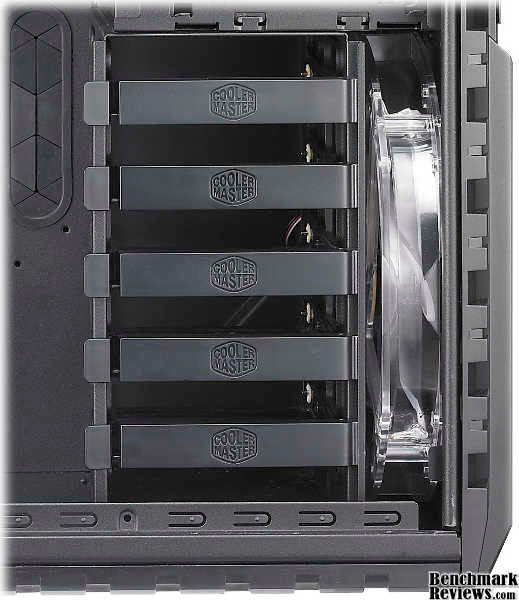
Each tray locks into place using a single plastic tab. The tabs are sturdy and will likely last for some time. Three and one half inch drives are secured to the tray by metal posts seated in rubber grommets which can be removed from the tray. Speaking of grommets, the image also shows one of the grommets which protects the cable through-holes.

Seating a 3.5" drive into the tray is quick and easy, though the hold is not the sturdiest type available. It is strong enough to secure a drive against moderate jars and nudges. Two and a half inch drives can be secured by using an adapter.

The adapter supplied with the HAF-X allows two slim 2.5" drives to be mounted into a single 3.5" slot. In this fashion it is theoretically possible to mount 10 drives into the drive cage. That many drives seems impractical with the large densities available in 3.5" drives and the high costs associated with SSD drives. Three slots would be plenty.

At the top front of the case, above the drive cage, are the 5.25" bays. These bays use a push button to lock the drives into place. A single push and release sets the posts and locks the drive in place. A second push and release frees the drive for quick removal. If, for whatever reason, manual mounting is desired, the locking buttons have access ports forward and back through which screws can be used to secure a drive. As with the 3.5" drive cage, there are more than enough 5.25" bays. Four bays is more then I've ever used. Three could be considered plenty. Four is definitely for the enthusiast.

Between the 5.25" bays and the 3.5" cage lies the SATA trays. Above is an interior shot looking at the back of these trays. A small PCB provides an interface between the motherboard and the SATA trays. While not as convenient as an external SATA port, this is a close second. While benchmarking I frequently swap between drives since I don't always want the overhead (power and otherwise) of running multiple drives. Some of my benchmarking cases have had an e-SATA port that made adding a drive easy, but actually switching between drives required opening the case. With these trays I found it easy to mount two drives at once and slide them in our out before booting. It's not the most elegant solution, but it was an improvement from opening the case on every switch. The trays could be improved by supplying a tool-less mounting mechanism similar to the other bays.
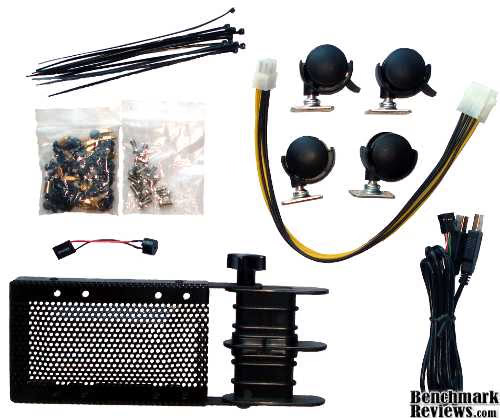
The kit supplied with the case includes cable ties for cable routing, all the necessary mounting screws, a PC speaker, the VGA Holder, four wheels, an 8 pin power extension cable, and a USB 2.0 motherboard cable. The USB 2.0 cable can be used in place of the USB 3.0 cable for an internal motherboard connection. The conversion is accomplished by unplugging the blue USB 3.0 cables from the front IO panel and replacing them with the black USB 2.0 cables. The VGA holder will accept an 80 mm fan in two different locations, but the location probably makes very little difference. The power extension is practically a necessity. Some motherboards put the 8 pin power header opposite of the PSU, and in my experience the PSU 8-pin power is barely long enough, often going right over the expansion cards. The extension cable gives the extra inches needed to go around the backside. Granted the difference is case, motherboard, and power supply dependent, the power extension saves a trip to the store.
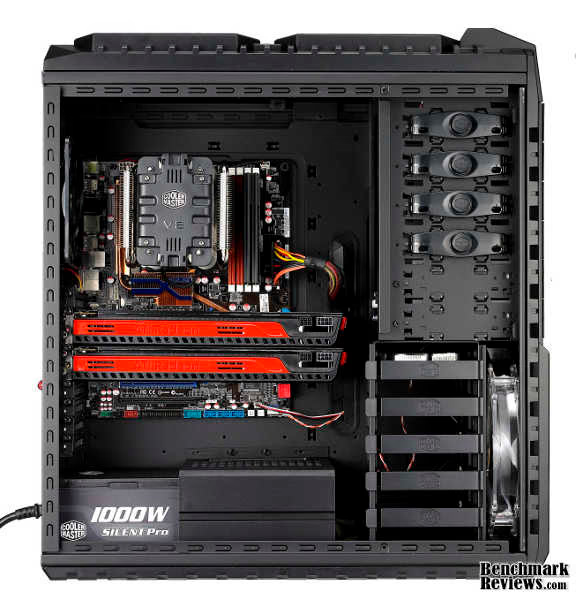
The installation process was straight forward. It takes about an hour to install everything the first time. Much of that time was spent determining the best routing for cables. It's amazing how little cable can be seen in a completed build. Another fun surprise was found in the screw kit. Pliers are usually required to install the motherboard stand-offs, but Cooler Master included a small metal adapter that allows the stand-offs to be installed using a screw driver. I still have my pliers handy to clip the ends off the cable ties and to loosen pesky thumb screws.
During the build I ran into a few small issues. After installing all the parts and connecting the fan on the main panel, closing the panel can be a tricky ordeal. The long power cable for the side fan tended to get pinched when closing the panel. A small inconvenience. Also, when the VGA Holder is mounted (that's the one that sits above the graphics cards) it interferes with the cowling on the side fan preventing the door from fully closing. This made the cryptic message from the manual more clear, "Please install either VGA bracket or side air duct." In other words, don't install both. Another problem occurs with the air flow. With only the stock fans running it seems like too much air escapes out the bottom of the case. Seems like there needs to be at least one more fan installed in the top. Either that or plug up the big holes one the bottom side of the case.
There were some issues I did not encounter. The graphics cards installed easily with plenty of vertical and horizontal room. The PCI slots use thumb screws which caused little of the hassle involved with some attempts at tool-less PCI slots. I had plenty of room for running cables to the drives since the case is extra wide. The power supply fit easily and looked small in the huge case. There was plenty of room around the motherboard so no issues there. Finally, the PSU partition which hides the cables makes a huge difference in the overall appearance. This principle should be more widely employed. Move on to the next section to see the final thoughts, impressions and rating of the HAF-X.
HAF-X Case Final Thoughts
The High Air Flow series by Cooler Master began and has continued a strong theme in computer chassis. This series is designed to accommodate the top end of technology. For now this means four video cards, a huge motherboard, a high performance CPU with cooler to match, and oodles of drives and peripherals. All that stuff needs a PSU to match, lots of cabling, and room to install everything simultaneously. That many parts can add up to a heavy mass. The huge number of electronics also amounts to massive wattage being dissipated. At 90% efficiency there is easily the potential for generating 150 W of pure heat inside the case. To put it in perspective that's 1 cup of boiling hot cocoa every three minutes.
For a chassis running the latest and greatest setup there are thus three main needs; more space, more strength, and more cooling. These are the core components of the HAF series. In addition to the core components Cooler Master has also included other useful feature to add convenience and style. These core components seem to be consistent across the chassis spectrum with various companies and series focusing more on some core components and less on others. As the technology treadmill continues rolling, new developments will continue to push the maximum possible performance. Expect to see the HAF series continue to accommodate this space.
It should be interesting to see whether the technology advancements will continue the same trends of increasing size and power consumption. If the current trend continue then eventually cases will be so mammoth that even enthusiasts will balk. Imagine the case required for a computer that projects life-size 3D immersive games. We'd be back to the '70s when the computer consumes an entire room. So obviously at some point the trend needs to change for even the cutting edge hardware. Maybe the way we see case dimension can change to get rid of the excess space consumed by drive bays. Or perhaps case layout can go 3D and get away from ever expanding footprints. In the short run expect to see more dual chip cards, many large fans and heavy duty cases.
RC-942-KKN1 Conclusion
This case will hold almost any setup you could want. The HAF-X comes with four stock fans and has mounts for three additional fans. The input fans are larger than the output fans making for a positive pressure case and better cooling. Despite the number of fans the case still runs quiet. Large fans at lower RPMs helps push higher volumes with lower noise. The entire system can be setup in under an hour and there were no significant barriers encountered during the install. There was plenty of working space and the kit provided reduced many of the hassle typically experienced during an install.Model RC-942-KKN1 is a big, big chassis. It makes a mid sized case look like a micro ATX. Because the dimensions are proportional to smaller cases it's difficult to comprehend the actual scale from images alone. Despite the size it looks sharp. Hard lines, sturdy metal mesh and a black matte finish give a sturdy, rugged appearance. But the look appropriately projects the actual construction of the case. The interior is also a matte black which provides excellent contrast for the flashy hardware contained inside.
As was just mentioned, the case is built just how it appears. Big, strong and heavy. Since the case is designed to hold so many components it must be strong. It must also be safe to carry under the additional weight. Having panels that remove under low forces is not an option. One nice thing about the HAF-X is that none of the panels or covers will come undone unless you want them to. Everything is secured by sturdy tabs, thumbscrews and levers.You won't have to worry about something slipping and dropping thousands of dollars of precious equipment. But there are finer points that also lend to the high integrity of the HAF-X. The power buttons are covered by a sliding panel which keep wandering fingers from making costly mistakes. There are several options for providing extra cooling and ducting through the provided VGA Holder, VGA Fan Duct, and a large side fan with cowling.
The HAF-X keeps up with the times by providing USB 3.0 along side e-SATA, firewire and USB 2.0.For installation ease many tool-less installation features are also included. Several options are also provided for drive installation. There are the tool-less 5.25" bays, two front sliding trays with interior SATA docks, and a large tool-less drive cage. Every bay can be configured in multiple ways to accept different style drives, some requiring extra mounting hardware. Another welcome addition are locking wheels which can be mounted to the bottom of the tower. These wheels make it much easier to slide the tower into and out of its home. finally, the tool less design is adequate but not overbearing. Drive locks are quick, simple and reliable with the option to fall back on conventional installation. The PCI ports use thumb screws which are proven reliable with any PCI card unlike some tool-less PCI attempts.
What will you pay to store your 4-SLI system? Much less then you shelled out for everything else! Newegg.com now sells the HAF-X for $199.99 pre-shipping, or Buy.com offers the RC-942-KKN1 model for $198.82 shipped. As far as 4-SLI options go the HAF-X falls towards the middle to top of the pricing range. Although we've become accustomed to full tower cases over $200, the recent trend has pushed many sub-$200 cases. These less-expensive cases will get the job done with few if any frills. The HAF-X is well priced based on the features and construction offered. Personally, I feel...safe...keeping my expensive toys in the HAF-X. In addition, the price provides excellent features and style lacking in cheaper cases. Basically, the money spent on the HAF-X is well worth the investment.
Overall the HAF-X is an excellent case which fulfills the anticipation and demand. It has the right balance of construction, features and pricing that will tempt even budgeters to go for a top-end system. If you're going with a 4-SLI setup then you can't go wrong with the HAF-X.
Pros:
+ Sturdy Construction
+ Many Cooling Options
+ USB 3.0 on front IO
+ Two front SATA trays
+ Relatively quiet fans
+ Tool-less drives, panels, PCI
+ Many cable routing options
+ XL-ATX, E-ATX compatible
+ 13.46" allowance for video card
+ Sliding cover for power and reset buttons
+ Locking wheels for easy moving
Cons:
- Really Big
- Really Heavy
- No tool-less or vibration mounting for front trays
- Cooling loss at bottom of case
Ratings:
- Performance: 8.50
- Appearance: 9.00
- Construction: 9.25
- Functionality: 9.25
- Value: 8.75
Final Score: 8.95 out of 10.
Quality Recognition: Benchmark Reviews Silver Tachometer Award
Questions? Comments? Benchmark Reviews really wants your feedback. We invite you to leave your remarks in our Discussion Forum.
Reader comments from the original article
49 comments were posted before commenting closed. They are preserved as written. Original avatars no longer resolve and are shown as a placeholder.
RE: Cooler Master HAF-X Case RC-942-KKN1 David Ramsey Permalink:
It looks as if the video card cooling shroud could not be positioned in the case to cover the two cards shown in your sample build...it looks as if it can only be moved along the height of the hard drive bays. Is this correct?
RE: RE: Cooler Master HAF-X Case RC-942-KKN1 Dan Ferguson Permalink:
That's about right. The cowling is mounted using two thumb-screws. There are four holes in the cowling which mean it can be installed (without modification) as shown in the review and about a half-inch higher. You could get the cowling to cover both cards by only using a single screw.
Differs From The 932? Anon Y. Mouse Permalink:
How does the HAF X differ from the HAF 932, which is what I have, if there is a big difference I may get this as a new case?
RE: Differs From The 932? David Ramsey Permalink:
You can read our HAF 932 review here: /index.php?option=com_content&task=view&id=427&Itemid=61 The HAF X is a "higher end" case with better cooling, but the 932 is still a great case if you're not running dual GTX 480s...
RE: RE: Differs From The 932? Anon Y. Mouse Permalink:
I only have one Radeon HD4870 X2. I plan on getting rid of it eventually and getting two -- or more -- Radeon HD5970 to run in Crossfire. So, it looks like the HAF X will be my new case along with the Tron keyboard & mouse from Razer.
RE: RE: Differs From The 932? Anon Y. Mouses Number One Fan Permalink:
Why would he have needed to read a review for a case he already owned?
Best Value Chassis Robert Johnson Permalink:
One thing I don't understand in your review is that as a con you say it is really big and yet as a pro you say it fits XL-ATX and E-ATX. The chassis has to be large enough to fit 4 way SLI so you really can't make it smaller. I think you have contradicted yourself. As far as I am aware this is one of the cheapest 4 way SLI capable chassis's on the market.
RE: Best Value Chassis Dan Ferguson Permalink:
Just as one example, check out this FAQ from EVGA, check out the case sizes and prices at NewEgg then come back and let me know what you think. ##evga.com/support/faq/afmmain.aspx?faqid=58719 Just because a case needs to hold a large motherboard doesn't mean it HAS to be huge and heavy. It is custom to spec the case height based on mobo + PSU + cooling, then spec the depth based on mobo + graphics + drives. For the HAF X this means the entire front of the case is nothing but drive bays that I'll never in my life fill, even running 4 SLI. To me that's wasted space. Maybe case layout is constrained by some other factors, but I'd like to see some new designs that are more space efficient. A few people may actually use every single slot, bay and peripheral. And that's fine, you can have a different opinion than me.
RE: Cooler Master HAF-X Case RC-942-KKN1 Chris Permalink:
To be honest, I think that this case should be nominated for Benchmark Reviews Editors choice. The target market for this case is for people who enjoy buying big full tower cases. For them, this is an excellent case. That said, your criticisms of heavy are true, although I suppose it could be addressed by making the case with aluminum. This isn't something to carry to LAN parties - its best left fixed in a stationary place. It's meant for power users who have a lot of HDDs, expansion cards, and well, stuff. Dan, could you also clarify what you mean by cooling loss on the bottom? I'm thinking about getting this case, although I am going to wait until a "v2" comes out with 4 full USB 3.0 ports on front. Perhaps the side fan would be best served by being replaceable with 4x120mm as before ... or they could always sell an extra accessory. Other than that, good review as always.
RE: RE: Cooler Master HAF-X Case RC-942-KKN1 Dan Ferguson Permalink:
That brings me back to my final thoughts. At what point will cases become too large and too heavy even for the hardcore users?! Since I'm not that hardcore I feel we are already crossing that line. It's good to have some voice their opinion that their line has not yet been crossed. In the end it will all play out in revenue numbers. Regarding cooling loss, a good portion of the bottom of the case is grated. The PSU covers some of that area. The uncovered holes allows air from the front fan to escape out the bottom. It is most noticeable when the PSU cable partition and wheels are installed. Cool air going out the bottom is air that could have been routed across the motherboard.
RE: RE: RE: Cooler Master HAF-X Case RC-942-KKN1 David Ramsey Permalink:
Hah. The HAF-X probably feels like a piece of Styrofoam? next to the massiveness that is the Thermaltake Level 10.
RE: RE: RE: RE: Cooler Master HAF-X Case RC-942-KKN1 chris0101 Permalink:
The problem with the Level 10 is that it is about $800 US - if they chopped the price by about 75%, perhaps we can consider it, but right now, it seems like a huge ripoff to me. This case is a fair price for what you are getting. I suppose there may be one solution to the cooling loss - put a fan on the bottom, or the simply put a sheet of metal onto it. Either way, how severe should the cooling loss be? Hot air should be flowing upwards, not downwards anyways.
RE: RE: RE: RE: RE: Cooler Master HAF-X Case RC-942-KKN1 David Ramsey Permalink:
The price of the Level 10 is not out of line considering its fabrication costs (it might be out of like for a computer case in general, though). There are a number of complaints I have about the case, though, mostly related to its rather marginal cooling ability.
Great Case! WW_Dagger Permalink:
@David Ramsey: That would be 31.6 pounds for the HAF X and 47.11 pounds for the Level 10. You R right about that. On the other hand to the others whining about the 31.6 pound HAF X being "too heavy" just couldn't think of anything significant to # about on this case. I disagree with the "cooling loss" at the bottom of the case. I really don't think it has any significant detrimental effects with the stock fan setup the way it is. You can cover up the bottom grate, and I would bet hard cash that your temps wouldn't go down at all. The only real negative the case has IMO as a HAF-X owner, is that it only came with ONE 2.5" SSD adapter. I had to buy 2 more so for my system consisting of a Crucial C300 SSD boot drive and 2 Seagate Momentus XT drives in RAID 0 for my programs. EZ 2 Fix
RE: Cooler Master HAF-X Case RC-942-KKN1 David Ramsey Permalink:
Dan, please check my message to you in the Contributing Editors forum...
complaints hurrrr Permalink:
I would have some other complaints about the case.... number one (hideously unattractive)....CM could learn something from Corsair on clean lines and use of metal (why is the front bezel on a $200 case plastic...c'mon) number two ...... don't offer unobtainable fan sizes (230mm front)....or at least offer the option of a Blue LED version (for those that care about that).... number three ..... case feels flimsy and light, compared to the 800d and Lian-Li offerings...and before anyone says it's cheaper....I got my 800d for $230....so I would gladly pay $30 more for the HAF x if it made use of more metal....and yes I do understand the issue of weight....but c'mon this is for a high end build....is an extra pound or two going to kill someones back? (also the case has wheels)
RE: complaints chris0101 Permalink:
Cooler Master will likely release a "blue" version like they did with the HAF 932 in a few months. Lets just hope that it is the same price as the red version (the blue 932 was $30 more - enough for a person to just give up and buy the red 932, and the blue fan, which were $15 + shipping, which meant that it was better to buy the red and just get the blue fan because you'd get an extra fan in case one ever broke). I agree that it should be full metal. I think that we should all hold off, because we want something with 4 USB 3 ports in front (and until proper motherboard headers for USB3 come about). As said above, the other thing is that I hope for the side fan to be switchable with 4 x 120mm like on the HAF 932, which is really good for cooling the GPU. A final complaint would be if a person put a fan on the bottom - no dust filters where they're needed the most.
RE: Cooler Master HAF-X Case RC-942-KKN1 Sam Permalink:
This computer is amazing, I have never owned anything as good as this computer. I save a ton of money too using Newegg coupons online!
RE: Cooler Master HAF-X Case RC-942-KKN1 dave Permalink:
Probably too late to ask a question since the review is a month old, but I really could use some guidance on this case vs. the ACTS 840. With this case, I'd add the extra 120mm fan (do you HAVE to used the cowling?) and maybe the second 200mm at the top. For the ACTS 840, I'd add two 120mm fans behind the HDD cage and a mid-high speed 120mm (or a 140 that fits in a 120 slot) on the bottom. I know that the ACTS doesn't have HDD hot swap or USB 3.0 (not that there's a motherboard with the headers anyway & point less to go to the rear ports IMO. Just get a longer USB 3.0 cable). I just wonder about overall cooling - graphics cards AND CPU. Seems like the HAF-X just concentrates on the GPU(s). Ideally CoolerMaster would release an updated ACTS 840, but not sure I can wait out for that. Thanks.
RE: RE: Cooler Master HAF-X Case RC-942-KKN1 WW_Dagger Permalink:
You really don't need to add any fans on top of what the HAF-X comes with. I'm running an overclocked i7-930 @4.1GHz on air, and a Zotac GTX480 AMP @800MHz-1010mem, & that card exhausts all the hot air inside the case, so I'm displacing 500+ watts of heat into my case, yet the hottest the inside of my case has ever gotten was +7c over ambient (using my motherboard's temp sensor) with the stock setup, both CPU and GPU running at 100% load at the same time (which never happens in regular use). As default, it has a slight positive pressure, which is perfect. If you added another exhaust fan it would create a negative pressure which you don't want. If you put the xtra fan on top blowing INTO the case, it seems to me you would just mess up the air flow pattern, and possibly create a looping vortex of air on top of the case. As far as the ACTS, I have no idea. I just know the HAF-X is the best case I've ever seen out of many many cases.
haf-x Ari Permalink:
my experience with the HF-x is quite the opposite.. I have gotten the highest temps of any case I have ever owned have tried ever fan configuration you could imagine HAF-X is NOT living up to the hype the coolest running case I have ever had is still the Antec 900 (2 SE) and the guy who says 7c above ambient has got to have a faulty sensor unless his ambient temp is over 70c only case i have had that was worse than the HAF-X was the Corsair 800D Antec 900/1200 and Lian-Li pc80 are unbeatable for airflow that has been my personal experience
RE: haf-x WW_Dagger Permalink:
@Ari - Solution: Plug in your fans
hah Ari Permalink:
yeah real cute Mr. 7c above ambient temp. The point of having a case is to actually stick a computer in it. Try doing that and then tell us if it's still 7c above ambient in the case. *rollseyes*
RE: hah WW_Dagger Permalink:
@Ari - Now just to further convince you, look at any HAF-X review online. Look at their temps. Here, I'll give you an example: ##hardwareheaven.com/reviews/1013/pg6/cooler-master-haf-x-case-review-test-system-temperatures.html They got even lower temps than I have. You must be confused. You do know we are talking about air temp inside the case, not CPU temp, right? Not sure how else to prove 2+2=4 to you. You can roll your eyes all you want, but you look pretty silly when your answer is 5.
RE: Cooler Master HAF-X Case RC-942-KKN1 WW_Dagger Permalink:
@Ari - Why is that so hard for you to believe? Try math: The HAF-X is 2.606 cubic feet of volume. The two intake fans are rated at 110/CFM each. That would give you a complete air change 84.45 times per minute. Of course unrestricted airflow of a fan (it's rated CFM) isn't what you see when it's in a chassis though. You have to consider resistance and pressure which makes the fan less efficient. Lets say it cuts it's efficiency in half which is a pretty acceptable efficiency average. That's still 42.23 times per minute. It's not called the "High Air Flow - X" for nothing you know.
RE: RE: Cooler Master HAF-X Case RC-942-KKN1 Ari Permalink:
and you look pretty silly trying to convince me that your mobo sensor is an accurate measure of temperature.... go buy a decent multimeter with a k-probe...and then take the temp in a critical area (like around your first PCIe slot) and then rethink your argument. you are the one who started off here trying to be sarcastic....who are you trying to prove these temperatures to?? like I said follow some realitic testing methodology and stop believing what your mobo sensor and program that read it are telling you example....read your mobo sensor with at least 3 different programs....and then tell me the variance between the readings you get you don't win arguments with sarcasm....try facts
RE: RE: Cooler Master HAF-X Case RC-942-KKN1 Ari Permalink:
p.s. do you even understand CFM ratings? what distance was the displacement measured at? often CFM and dBA ratings are worthless...because there are no standards by which they are rated.... if a manufacture was using an ISO or ANSI standard to measure ok I would believe it.... but you have essentially just quoted specs. from things you read on the internet....yet have no validation or measurments of your own....other than your "mobo" sensor..... that is pedestrian and anyone with testing experience knows it.... you have taken an arbitrary reading...from an arbitrary sensor....in an arbitrary location.... then called it a ballpark fact my GPU temps (measured on the back of the die with a fluke k-probe) in an Antec 900 were 48c.....the exact same GPU with the exact same measurement point and exact same hardware (load etc) in the HAF-x was 74c welcome to science and personal experience
RE: RE: Cooler Master HAF-X Case RC-942-KKN1 Ari Permalink:
p.s.s GPU temps were taken at idle with the exact same OC.... test sample was a gtx480 in case you want to do the research on your own....you might find what I am saying to be 100% accurate I ask that you actually do some testing on your own, with precision instruments....rather than make ballpark statements like "the HAF-x is only 7c above ambient" 7c WHERE!!!! honestly it's laughable.....do you even know where you mobo sensor that you were "reading" is physically located? I don't mean in general....I mean exactly where is it located....and is that location relevant to anything going on in the real world *shakes head* I am posting validated results.....you are basically pissing in the wind and hoping none blows back on you sorry if you are mad about reality, but that is the reality of the HAF x
RE: RE: RE: Cooler Master HAF-X Case RC-942-KKN1 WW_Dagger Permalink:
Well, I'm using THREE temp sensor probes actually, provided by one of the highest rated motherboards on the market, the Asus Rampage III Extreme. One is 3 inches above the top of the power supply, one is sitting right between the RAM and CPU, and the third is in the top left corner of the case. They all are within 2c of each other at any given time. You can't tell me they are wrong. Go read a review on the Rampage III. Testing shows them to be very accurate. I think that is proper enough probe placement. Why are you measuring the backside of your GPU die? You are measuring your GPU temp when you do that, not air inside your case, duahhhh...
RE: Cooler Master HAF-X Case RC-942-KKN1 Ari Permalink:
so it is obvious to me that you have a discrepency in your "test rigs"....which one tests at 7c above ambient... and don't tell me the rampage 3 was used for both intel and AMD chips...we both know that doesn't work out...like I said full of holes... I also notice that you give the HAF-x an almost perfect score on your review...but don't mention ANY problems that other reviews have... go read some other reviews on the HAF-x....I am inclined to believe that you are biased towards the product... and NO sensor on ANY mobo is going to be as accurate as a k-probe at a specific location....also you claim in your review that you can't make "comparisons" to other products....well that is the basis of my original statement....I am comparing the HAF to the Antec 900 and the Lian-LI pc80...
RE: RE: Cooler Master HAF-X Case RC-942-KKN1 Ari Permalink:
your arguments hold no weight at all...you are just full of hot air and snarky comments...and refuse to acknowledge any fact...also your "review" provides no fact...no videos no screenshots no pictures....just a graph... done arguing with you over nothing....enjoy your HAF...I am getting rid of mine for a case that performs well
RE: RE: Cooler Master HAF-X Case RC-942-KKN1 Olin Coles Permalink:
Unless you add constructive commentary to the article, or have an otherwise on-topic discussion, your posts will be removed.
Guys, Guys....!!! BruceBruce Permalink:
Hey Guys, This is your friendly online bartender reminding you of the rules in this establishment. Spirited debate is all well and good, but you two are making this personal. Not good... Please turn down the volume, take it out to the parking lot, or say hello to the bouncer. TIA. and yes, I DID delete your last post. It violated the TOS, and didn't really contribute much to the debate.
RE: Cooler Master HAF-X Case RC-942-KKN1 Ari Permalink:
# haf-x ? Ari 2010-08-22 04:53 my experience with the HF-x is quite the opposite.. I have gotten the highest temps of any case I have ever owned have tried ever fan configuration you could imagine HAF-X is NOT living up to the hype the coolest running case I have ever had is still the Antec 900 (2 SE) and the guy who says 7c above ambient has got to have a faulty sensor unless his ambient temp is over 70c only case i have had that was worse than the HAF-X was the Corsair 800D Antec 900/1200 and Lian-Li pc80 are unbeatable for airflow that has been my personal experience # RE: haf-x ? WW_Dagger 2010-08-22 14:34 @Ari - Solution: Plug in your fans please not the origins of this debate...I posted an opinion..."dagger" finds the need to be rude...I am done arguing with him...I simply posted my opinions about the HAFx...thanks for the review
Inadequate NEtiquette BruceBruce Permalink:
This is one of those times I wish the committee in charge of everything had agreed to adopt the universal internet sign for sarcasm. Perhaps you could have seen some humor here, instead of immediately taking offense. " Sarcasm, Inc (based in Michigan, USA) has come up with an innovative emoticon (if there can be such a thing). It's the SarcMark, which is designed to let people know when you meant something to be sarcastic. This new form of punctuation is like an unfinished circle (or squiggle, if I'm being honest) with a dot in the middle, and can be easily downloaded for "just" $1.99. "
RE: Inadequate NEtiquette Ari Permalink:
I think if the other user had proven it to be sarcasm, by not continuing to throw mud at me...then it would have been appropriate....but it's clear that the other user is full of contempt for my opinions....possibly any that differ from his own? It's somewhat evident in his reply's to his own "review"...which he linked in this thread... It seems anyone that has a difference of opinion about the HAF-x is met with the same contempt as I was... eh it hardly seems worth the effort...physically watching BOTH gtx480's run at 88c under 30-40 % load as I type this....*YIKES*
RE: Cooler Master HAF-X Case RC-942-KKN1 WW_Dagger Permalink:
Ari- Why do you think I'm a reviewer? I'm no reviewer, just an end user. The link I posted was a random google search, not my review, I never said anything like that. I never said anything about AMD chips either, why are you making stuff up? It only discredits what you are arguing for. Please, read the first 10, 20 or even 100 reviews of the HAF-X you find, & you will see they all rate it with a 90% or higher score, & all of them emphasize it's great, enthusiast level airflow & cooling ability. I'm sorry your HAF-X is somehow hotter than most CPUs reach, but it's more likely you are confusing Celsius and Fahrenheit. I'm sorry your GTX 480s run at 88c under only 30% load. Mine runs at 75c under 100% load (OCCT GPU)and idle at 36c. I'm also sorry for doubting your claims, when the 100+ HAF-X reviews online do that for me. But for some reason, I'm now doubting you even own a HAF-X. It seems you have issues but I assure you it's not bec. of the HAF-X.
RE: RE: Cooler Master HAF-X Case RC-942-KKN1 Ari Permalink:
you just can't let it go can you....even after a warning from the mods here?? wow...unreal....doubt whatever you want....you act like a child...honestly....let it go....if you doubt that I own a haf-x fine, honestly I don't know why I am indulging you and I don't know why you are spending the time to argue a totally false point and not address ANY of my valid points or tests....are you 16 or something? If so please stop wasting my time...LET IT GO!!! you are wrong...flat out...I am not going to be so juvenile to look for an excuse to list my system specs. as you have done....you must be very proud indeed
RE: Cooler Master HAF-X Case RC-942-KKN1 WW_Dagger Permalink:
Chassis: Cooler Master HAF-X Full Tower CPU: Intel Core i7-930 ( 4.1GHz 1.26v) CPU Cooler: Noctua NH-D14 TIM: MASSCOOL G751 Shin-Etsu Motherboard: Asus Rampage III Extreme Power Supply: Corsair 1000HX Memory: Mushkin Redline 6GB 998805 (6-8-6-24) GPU: ZOTAC GTX 480 AMP! (800MHz Core, 1010MHz memory, no voltage changes) OS: Windows 7 Home Premium 64-bit HD 1: Crucial RealSSD C300 6Gbps SSD 256GB (Boot, OS & Main App Drive) HD 2&3: Seagate Momentus XT 500GB Solid State Hybrid (RAID 0)(Game and Programs Drive) HD 4: Samsung EcoGreen 1TB (Media & Storage Drive) DVD Burner: LITE-ON Keyboard: Logitech G15 Gaming Keyboard Headset: Creative Labs World of Warcraft Wireless Headset Display: Samsung Syncmaster P2770H 27" Widescreen 2ms Mini-HDMI to HDMI Mouse: Logitech G5 Gaming Laser Mouse Battery Backup: Cyber Power Smart App Sinewave PP1500SWT2 1500VA / 1000Watts Pure Sinewave, Full AVR buck/boost
RE: RE: Cooler Master HAF-X Case RC-942-KKN1 Ari Permalink:
BRAVO!!!! you even listed the TIM, the keyboard, the mouse and the headset....honestly this gives me a very good clue as to the type of person I am dealing with....hahahaha you even listed a UPS...you have that all typed into a macro I bet, just waiting to fire it off...*sigh* LET IT GO my friend...
Enough. Olin Coles Permalink:
@Ari and @WW_Dagger: you two are not allowed to post comments in this thread anymore, unless you want to be banned. You're welcome to post comments on the other articles here at Benchmark Reviews, but not here because we've already heard enough from the two of you regarding HAF-X. I'm not placing blame, I've just had enough.
The Best of All Case Porras de Rata Permalink:
Napakaganda, napakaconvenient ayusin and a lot of feautures that only in Cooler Master lang ang meron.... That problem is?????? It is too much expensive and not available in Manila Philippines.. Thanks
Air flow query ChrisH Permalink:
To those who have used this case with regards airflow. Dan and others, the positive pressure point is made and regarded. Interestingly, with the open space at the floor area it's great that positive pressure is still maintained. So I wonder if adding the second top fan (as an exhaust fan)requires the floor area openings to be covered? I am interested in buying the case for its cooling (and functionality.) As an aside, do you think airflow can be demonstrated with smoke / coloured smoke to depict currents and indicate pressure? Is a second top fan really necessary with dual SLI and the usual enthusiast components. This has bearing on the cooler. For example I have no intention for water cooling. However, the large push pull coolers I think are often too heavy for the board even with a backplate. Bump into the case / drag a chair into it and the initial jarring has potential for damage especially since Intel recommend a maximum weight which the large coolers normally exceed. Olin's points in the thermal paste review ring in my ears. A tall coler may well be mitigated by the upwards airflow? Perhaps, if the maching is good I can run with a CM 212 hyper and no second top fan? Anyone else's experiences with cooling well after the intial review? Thanks.
Haf X case Opinion Cybertendo Permalink:
I picked this one up a couple months ago and although I haven't opened it up from the box yet. I think It's going to be a great case for my dream gaming PC. I seen some review on youtube the guy putting his weight on it, he didn't stand on it or anything he just put all his into his arms and pressed on it from the top. It didn't warp or bend anything. If you want to know what review this was reply to this comment. Anyway It's ruggerd desingn looks great it's diffrant I recon it's unique. Hot swappable bays are great feature. So spear a thought for this case it's affordable, you get good features, and it can house the biggest graphics cards and it comes with a ton of useful accesories (i.e a graphics card holder/fan). The box looks nice as well!!!
RE: Cooler Master HAF-X Case RC-942-KKN1 WW_Dagger Permalink:
Hmmmm... Cooler Master Haf-X still going strong a year and a half after release. Oh, what's this? "2011 Reader Choice Award: Best Chassis"... nice. What happened to Ari's prediction that this case would fail? LoL... pwned.
haf X case opinion Cybertendo Permalink:
What's with Ari? This case is great! whats his problem?
942 and H80i brent Permalink:
I'm wondering if this case and the H80i Corsair are compatible, the Corsair requiring 120mm fan mount.
680 build Zero23 Permalink:
I got a dual GTX 680 build in the works and i was wondering if the large size of this case is really necessary ?
Case Suggesstion Pushkar Permalink:
I am going to run single GTX 560Ti. Will i go with this or mid tower of CM HAF ?