
ECS P55H-AK Intel P55-Express Motherboard
ECS ELITEGROUP P55H-AK Black Series Motherboard Review
It is common knowledge that today's Intel Core i5 and i7 series of LGA 1156 CPU's are capable of achieving the 4GHz milestone. You should also know that to push past that milestone, and remain stable, you will need a high end motherboard designed specifically for that task. ECS EliteGroup have been around for many years but have never really been seen as an enthusiast brand. That may be about to change today, as Benchmark Reviews brings you the ECS P55H-AK Motherboard (P/N 89-206-Y66100), which is part of the Black Series offerings from ECS.
The P55H-AK is at the cutting edge of enthusiast PC technology offering support for USB 3.0 5.0Gb/s and SATA 6Gb/s at the same time as offering Tri-SLI / Tri-CrossFire @ 16/8/8. ECS has doubled up on support chips (2x Marvell SATA 6Gb/s controllers, 2x NEC USB 3.0 controllers and 2x Realtek Ethernet controllers) and has utilized a PLX PEX 8608 PCIe Gen 2 switch and an NVIDIA nForce 200 PCI-Express switch chip with an extra 32 PCIe lanes to bring support for all of these latest features on the P55 platform.
Cramming all of those technologies into one board is by no means cheap though, but if you want to futureproof yourself and have a decent overclocking platform, or maybe you have lots of cash to burn and you want one of the best looking / most feature rich P55 motherboard available, then you should definitely read on and discover what the ECS P55H-AK is capable of.

As is the norm at Benchmark Reviews, we overclock the ECS P55H-AK to its limits and find out just what it is capable of achieving. Today we will be using an Intel Core i5 760 and a 4GB G.Skill RipJaws PC3-12800 CL9 RAM kit with the P55H-AK motherboard, and comparing it to a budget Gigabyte motherboard (GA-P55-US3L) and a previous generation Intel socket 775 Quad Core DDR2 system. Before we get into the brass tacks of this review, please scan through the following pages to learn the features and specifications of the ECS P55H-AK Motherboard, and also get an in depth look at the board itself.
Manufacturer: ECS EliteGroup
Product Name: P55H-AK (V1.0)
Part Number: 89-206-Y66100
Price As Tested:$299.99
Full Disclosure: The product sample used in this article has been provided by ECS EliteGroup.
ECS P55-Express Features
ECS P55-Express FeaturesFeatures: ECS P55H-AKThere are a ton of features included with any motherboard that are not directly associated with the CPU Socket and Chipset. It's those features that help differentiate between product offerings, so let's look at the list of specific features that come with the ECS P55H-AK motherboard.
| SATAII 3.0Gb/s Doubles the transfer speed of SATA, running at speed up to 3.0Gb/s, and fully compatible with the soon-to-be-released SATA HDD, CD-ROM and other cutting-edge devices with NCQ function support. | ||
|---|---|---|
| eDLU - Drivers Live Update Utility ECS eDLU utility makes updating Drivers fast and easy. eDLU Saves time and hassle of searching for Drivers online and avoid complicated steps. With simple and easy steps it checks for new Drivers version on-line and let the user to update the Drivers. | ||
| LGA 1156 Core i7 - Supports the Intel Core i7 Processors in the LGA1156 package. Applying processing power where it's needed most with faster, intelligent, multi-core technology, and delivering an incredible breakthrough in PC performance. | ||
| USB 3.0 - The latest generation Super Speed USB 3.0 Card is able to transfer data 10 times faster than USB 2.0. An innovative power management system provide better energy saving and carry more power to recharge more USB rechargeable devices. USB 3.0 Card is compatible with USB 2.0 to add more convenience and excellent performance. | ||
| ATI CrossFire X - The technology not only combines multi-GPU and motherboard power that soars into a new dimension of graphics capability, but also delivers the highest image quality and screen resolutions, even with the most demanding 3D titles. | ||
| 10X Transfer Speed (Rapid 333) Support latest generation USB 3.0, SATA 3.0(6Gbps)and eSATA 3.0 (6Gbps)high-speed interface technologies that meet the high-capacity and high-speed needs of multi-media publishing and PC gaming. | ||
| EuP Certified - ECS Motherboards have been certified by EuP. EuP certification verifies that ECS motherboards comply with European Union stander to decrease the environmental effects and promote sustainable environment. Save energy and keep healthy environment by choosing ECS motherboards. | ||
| eJIFFY - ECS eJIFFY is a Linux based interface for a fast boot application which is compressed in a CD to install on the hard drive.Within 8 seconds after the computer boots up, eJIFFY is ready to provide users the total enjoyment for web browsing, photo reviewing and on-line chat. Instead of waiting for the regular OS to start up, eJIFFY serves a convenient center to have quick fun or a glance at the hot news in today's fast pace world where nothing can be too quick. | ||
| 8 Channel High Definition Audio Integrated 8-channel HD Audio CODEC delivering advanced multi-channel audio and bringing you the experience of home theater-quality sound. | ||
| PCI EXPRESS 2.0 - The exceptionally increased interconnect bit rate from 2.5GT/s up to 5.0GT/s would effectively eliminates the bottle neck of the system performance and brings the most terrific computing experience from the present to the future. | ||
| LGA 1156 Core i3 - Supports the Intel Core i3 Processors in the LGA1156 package. This family equipped with Intel HD Graphics is the perfect entry point for a fast, responsive PC experience. | ||
| 15μ Gold Contact - ECS 15μ gold technique contains 15μ gold contact on CPU socket and Memory slot pins. It offers 3 times extra anti-oxidation, temperature resistant and scrape protection to ensure motherboards longest lifespan, better reliability and excellent contact. | ||
| 3X Gaming Power (3 Way SLI + Crossfire X) The most advance technologies of multi-graphics processing, supporting both ATI CrossFireX and NVIDIA 3-way SLI to deliver up to a 2.8x performance over a single GPU system. | ||
| ROHS - Choose an environment-friendly, fully RoHS-compliant ECS product as the foundation for keeping harmful substances out of our ecosystem. | ||
| Certified For Windows 7 - Windows 7 platform introduces a number of manageability improvements that can reduce total cost of ownership by helping to increase automation, improve user productivity, and provide flexible administrative control to meet compliance requirements. It is more user-friendly and has been optimized to consume less system resources with Windows 7 as well. Furthermore, the VT technology is enhanced to support real-time multimedia application including video playback and 3D games. | ||
| eBLU - BIOS Live Update Utility ECS eBLU utility makes updating BIOS fast and easy. eBLU saves time and hassle of searching for BIOS online and avoid complicated flashing steps. With simple and easy steps it checks for new BIOS version on-line and safely guides the user to flash the system BIOS. | ||
| USB 2.0 - USB2.0 is the latest connectivity standard which delivers transfer speeds up to 480Mb/s for easy connectivity and ultra-fast data transfers. | ||
| Dual Gigabit LAN - The dual Gigabit LAN design allows a computer managing network traffic between two separate networks and ensures rapid data transfer from WAN to LAN without any latency. | ||
| RAID 0, 1, 5, 10 - Supports RAID 0(Striped disk array), RAID 1(Mirroring disk array), RAID 5(Block Interleaved Distributed Parity), RAID 10 (A Stripe of Mirrors). Provides users the performance and protection. | ||
| SATA 6Gb/s - Doubles the transfer speed of SATA 3G, running at speed up to 6.0Gb/s, and can connect with any other SATA 3Gb/s and 1.5Gb/s devices for backward compatibility. | ||
| NVIDIA SLI Ready - Revolutionary platform innovation intelligently scales graphics performance up to 2x. Combine multiple NVIDIA GeForce-base graphics cards with an NVIDIA nForce SLI-based motherboard. Rigorous testing and certification process for unmatched stability and compatibility. | ||
| LGA 1156 - Supports LGA 1156 CPU-socket interface in the single chipset structure and will supersede LGA775 in the high-end and performance desktop segments. It can tune your system for extra performance and feed your need for speed. | ||
| LGA 1156 Core i5 - Supports the Intel Core i5 Processors in the LGA1156 package. Accelerating in response to demanding tasks, such as playing games and editing photos with intelligent performance, and moving faster when you do. | ||
| NortonTM Internet Security - Simple, Easy-to-Use Interface, delivers fast and comprehensive online threat protection, guarding your PC, network, without slowing you down. Giving you greater insight into downloaded applications, whether they can be trusted, and how they may impact your PC's resources and performance Offering users a safer and more convenient environment than ever ECS recommends the immediate installation of Norton Internet Security of your computer. | ||
| ECS Deep Green - An industry-leading energy saving technology under 0.001 watt power consumption standard at soft off mode. Reduces energy consumption and CO2 production much better than EuP 2013 standard. It means the technology planted 96,500 trees per year. | ||
| ECS M.I.B X (Ultimate BIOS O.C interface) - ECS O.C profile offers 3 sets of O.C values for CPU and DRAM to reach higher performances in a quick, simple and safe way. It keeps users' preferable BIOS settings to regain your last successful O.C configuration to create the most convenient O.C experience. | ||
| eOC - Easy Over Clock Utility. Easy Over Clock Utility is a easy and simply overclocking tools that provides user-friendly windows operation interface for novices and overclockers, with clicking on your mouse only you can get much higher performance of CPU quickly. It is available for download and updated online to get the latest version. Combine with ECS MIB III technology to challenge undiscovered extreme overclocking than ever before. |
ECS P55H-AK Specifications
| CPU | º LGA1156 socket for latest Intel Core i7 / Core i5 / Core i3 high-end desktop processors º Supports Unlocked Intel CoreTM i7 / CoreTM i5 Processors º Support Hyper-Threading Technology CPU º Supports Intel Turbo Boost Technology º Supports Intel Smart Cache |
|
|---|---|---|
| CHIPSET | º Intel PCH P55 / NVIDIA NF200 | |
| Extra Chips |
º NVIDIA nForce 200 PCI Express switch chip with extra 32 PCIe lanes
º PLX PEX 8608 PCIe Gen 2 switch
|
|
| MEMORY | º Dual-channel DDR3 memory architecture º 4 x 240-pin DDR3 DIMM socket support up to 16GB º Supports DDR3 2400 (OC) / 2200 (OC) / 2000 (OC) /1800 (OC) /1600 (OC) / 1333 /1066 DDR3 SDRAM º Supports Intel Extreme Memory Profile (XMP) Due to the operating system limitation, the actual memory size may be less than 4GB for the reservation for system usage under Windows 32-bit OS. For Windows 64-bit OS with 64-bit CPU, there is no such limitation |
|
| EXPANSION SLOT | º 3 x PCI Express Gen 2.0 x16 slots º 2 x PCI Express x1 slots º 1 x PCI slot º PCIE16X_1/PCIE16X_2 /PCIE16X_3 runs at x16/x8/x8 speed |
|
| STORAGE |
º Support by Intel P55
º Support by Marvell 9128
|
|
| AUDIO | º Realtek RTL889 8-Ch High Definition audio CODEC º Capability for "full rate" BluRay DVD/HD DVD support |
|
| LAN | º Dual RealTek RTL8111E Gigabit Fast Ethernet Controllers with Teaming | |
| REAR PANEL I/O | º 1 x PS/2 keyboard/mouse combo port º 2 x RJ45 LAN connectors º 1 x Audio port (Line-in, Line-out, Mic-in) º 1 x SPDIF port º 1 x Clear_CMOS button º 2 x eSATA 6Gb/s ports º 2 x USB 3.0 ports compatible to both USB 3.0 / 2.0 devices º 8 x USB 2.0 ports |
|
| INTERNAL I/O CONNECTORS & HEADERS | º 1 x 24-pin ATX Power Supply connector º 1 x 8-pin ATX 12V Power Connector º 1 x 4-pin power connector for VGA card º 1 x 4-pin CPU_FAN connector º 1 x 3-pin PWR_FAN connector º 1 x 3-pin SYS_FAN connector º 1 x Power on button º 1 x Reset button º 1 x Speaker header º 1 x Front panel switch/LED header º 1 x Front panel audio header º 1 x SPDIF out header º 1 x Clear CMOS header º 1 x Serial Header(COM) º 6 x Serial ATA 3Gb/s connectors º 2 x SATAIII 6Gb/s connectors º 1 x USB 3.0 header supports additional 2 USB 3.0 Ports º 2 x USB 2.0 headers support additional 4 USB 2.0 Ports |
|
| SYSTEM BIOS |
º AMI BIOS with 16Mb SPI Flash ROM
|
|
| FORM FACTOR | º ATX Size, 305mm*244mm |
ECS P55H-AK Motherboard
ECS P55H-AK Motherboard First LookOk, now we have the marketing and technical information out of the way we can get on and look at the ECS P55H-AK Motherboard and see what interesting features it has.
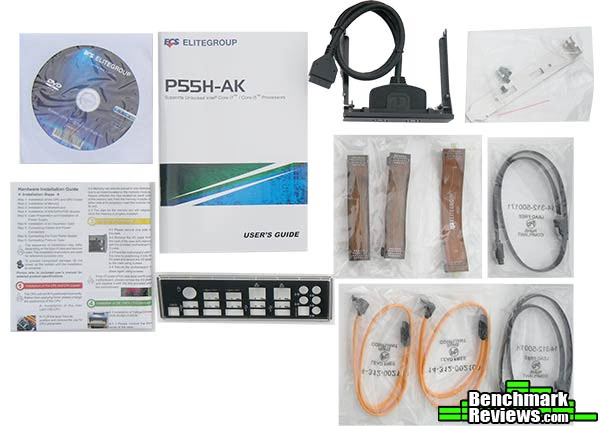
Stored in its own little box, under the motherboard is a more than basic accessory package. You get a driver CD, a full color generic quick install guide, a model specific user's guide, a color coded I/O shield, four SATA cables, three SLI bridges and a rather unique USB 3.0 front panel device with an optional PCI bracket adapter.
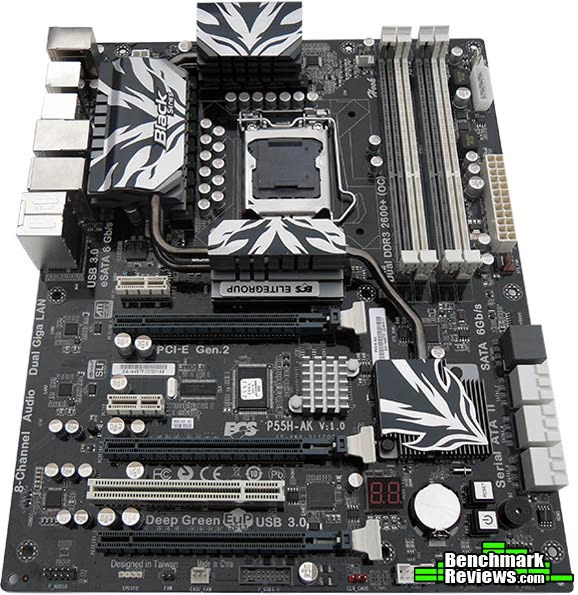
The ECS P55H-AK sports a very nice black and white theme that really stands out, and is definitely a step in the right direction for the ECS design team. ECS have been best known in the past for some really weird color schemes, sometimes with more than four or five colors on one motherboard, but that simply isn't the case here.
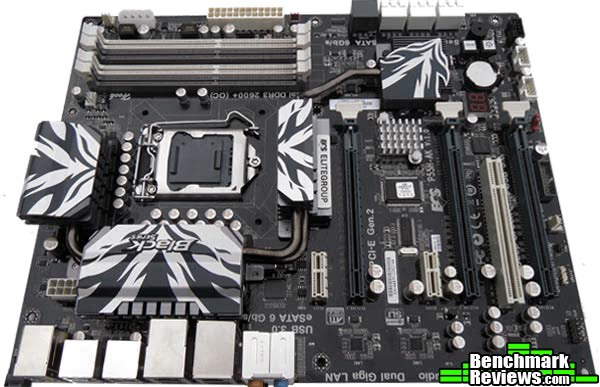
The chipset cooling setup is also very extravagant for an ECS offering, lets hope this isn't just a one off as I really do like this design. The P55H-AK has three PCI-E slots that are very well spaced out for SLI or CrossFire, but if you want to take advantage of the board's capacity for triple card setup's (AMD and NVIDIA) with graphics cards that use dual slot coolers then you will require a case with at least eight PCI slots. You will also lose the PCIX1 slot if you if you were to go with a dual or triple VGA setup, which may or may not be an issue these days as PCIX1 is becoming legacy.
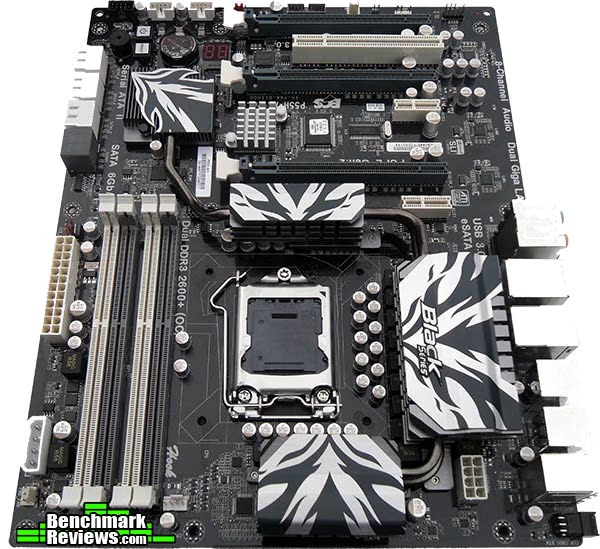
There is plenty of room around the CPU socket for big coolers, I am currently using a Zalman CNPS10X-Flex with two 120mm fans in push-pull and there are no conflicts (thanks also to the dual channel configuration of P55 that has RAM sit in the white slots).
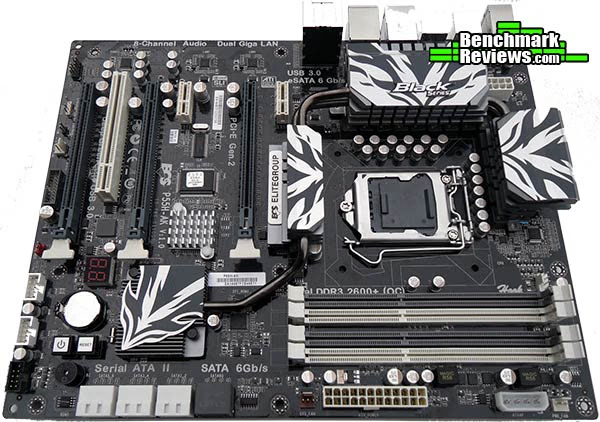
The layout on the P55H-AK gives me no cause to complain, it seems to me like this board layout has been given a lot of thought, it would have been nice to see an IDE slot for ODD support but this is also becoming legacy too these days. In its place are the next generation of disk drive connectivity in the form of six SATA 2 ports (white) supporting RAID0, RAID1, RAID5, RAID 10 configuration, and two SATA 6Gb/s ports (grey) supporting RAID0 and RAID1
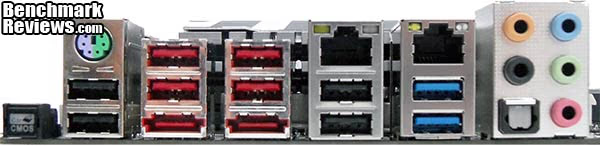
The back panel I/O has a lot going for it, there are eight USB 2.0 ports (black/red) and two USB 3.0 ports (blue), there are two eSATA ports that support the SATA 6Gb/s standard thanks to an extra Marvel SATA support chip. A clear CMOS button is present (glows red when powered up), the PS/2 port has support for mouse or keyboard. There are two gigabit ethernet ports that have support for teaming, and last but not least there is 8 channel HD audio with a SPDIF interface.
ECS P55H-AK Detailed Features
ECS P55H-AK Detailed FeaturesNow we put the camera on zoom and get a closer look at the architecture of the P55H-AK motherboard and its various interesting features.

We are back at the CPU socket again, upon first inspection I thought the heatsinks were too tall and might cause some interference with my CPU cooler. They sit 1.25" tall off the motherboard and slope towards the CPU socket to allow good clearance. I might also add that this is a dual heatpipe setup and is all secured to the mainboard with screws for a really tight and snug fit.
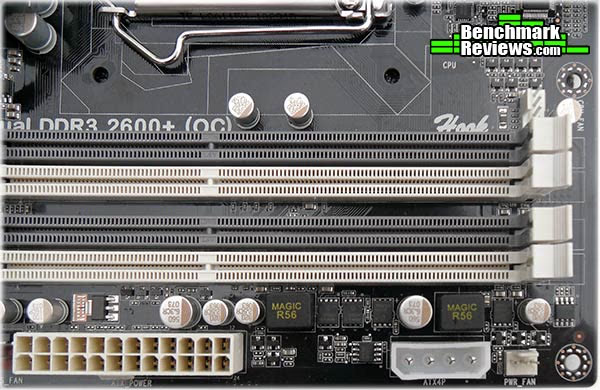
Next to the RAM slots are two power connectors, one more obvious than the other, we have a 24 pin ATX power connection and a 4 pin molex header which is for VGA card stability, the manual was very vague about this header and didn't specify the parameters of when to use this port or not (only that instability can occur) but since I had a molex connection line for my top and front fans in this vicinity it wasn't a problem for me to hook up this slot with some extra juice.
Just above the RAM slots ECS boats support for Dual DDR3 2600+ (OC), this is a frequency that is typically out of bounds on most P55 boards, the ECS P55H-AK allows a 2:12 RAM ratio at BIOS level which would mean reaching 2600MHz would require a BCLK of 216/217 (which is no easy task to reach). This is only possible with a Core i7 CPU or a 'K series' unlocked multiplier Core i5 655K.
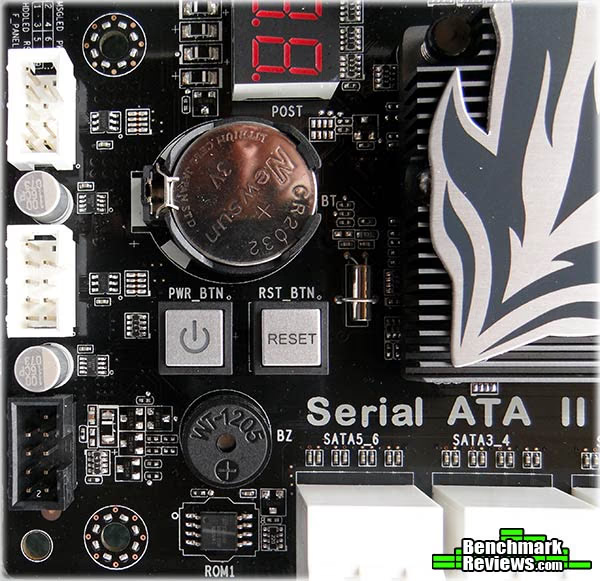
Moving down the board, ECS have included onboard power and reset buttons which shows they intend for this to be a benching board, these two buttons also sport blue LED backlights that can be turned on or off in the BIOS settings and for diagnostics there is an LED post indicator and a built in speaker.

All of the connection headers on the ECS P55H-AK, including fan connection headers are placed around the outside edge of the board, this makes for a very tidy install indeed and is also well suited to a test bench environment, where wires are best kept out of the way for obvious reasons. The grey header in the center is a specially designed USB 3.0 header used only by ECS and ASRock seeing as there is no industry standard as of yet to support front panel USB 3.0, this is where the USB 3.0 header seen in the accessory package will connect.
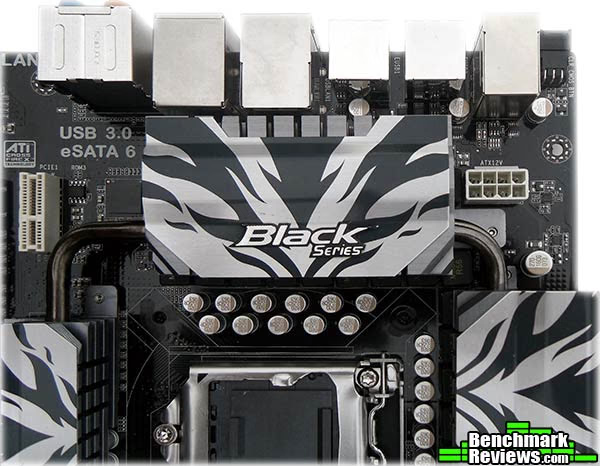
At the top of the P55H-AK motherboard is the 8-pin ATX12V connector, also very well located (I have seen them in much worse places on many different manufacturers boards) right at the top of the board and also helps a lot when it comes to routing cables. The P55H-AK comes with a 14-phase high-end voltage regulator circuit. Twelve of them are used for CPU main voltage (Vcore) and two of them are used for the VTT rail, which feeds the CPU integrated memory controller and L3 memory cache.
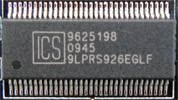
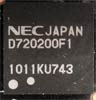
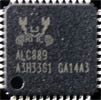
Moving on now to the various support chips that make the ECS P55H-AK what it is, two of these chips are hidden under heatsinks on the board and were not photographed, these are the NVIDIA nForce 200 PCI Express switch chip (under the north bridge) and the PLX PEX 8608 PCIe Gen 2 switch (located between the first and second PCI-E slots). These two chips allow the P55H-AK to support Triple SLI / CrossFire in a 16/8/8 configuration while maintaining enough PCI-E lanes for SATA 6Gb/s and USB 3. In the table below we look at the other support chips present on the P55H-AK Motherboard.
|
Support Chip |
Name / Function | |
|---|---|---|
|
ICS Base Clock Generator | |

|
Marvel eSATA 3.0 6Gb/s controller chip. Supports two ports on rear I/O panel. | |
|
|
Marvel SATA 3.0 6Gb/s controller chip. Supports two onboard SATA 6Gb/s ports | |
|
|
NEC USB 3.0 controller chip. Supports two 5Gb/s ports on rear I/O panel. | |
|
|
NEC USB 3.0 controller chip. Supports two 5Gb/s ports via front expansion panel bracket. | |
|
|
Realtek HD Audio controller chip. 8 channel HD audio CODEC. Capability for "full rate" BluRay DVD/HD DVD support | |
|
|
Realtek RTL811E Gigabit fast Ethernet controller chip. Supports teaming | |
|
|
Realtek RTL811E Gigabit fast Ethernet controller chip. Supports teaming |



ECS P55H-AK BIOS
ECS use the AMI BIOS which is quite familiar, well laid out and easy to use with slight exception to the M.I.B X section which I will get onto in just a minute.
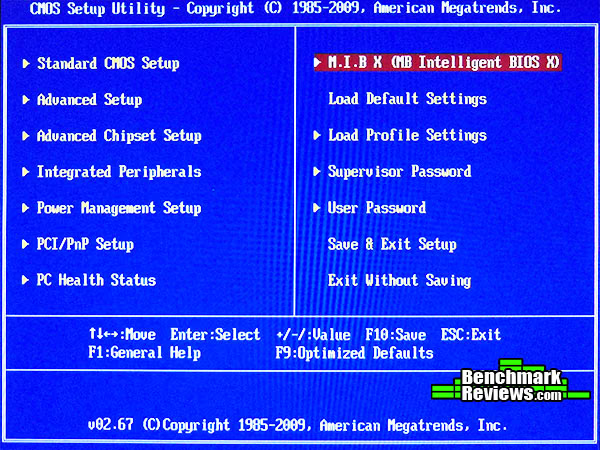
You are greeted with this screen and everything is where you would expect, most settings (with exception to M.I.B X) will be one time settings, there are a few options that will need disabling to ensure a stable overclock and these are found in the advanced setup screen and they are Enhanced halt (C1E), Intel TurboMode and Intel EIST (SpeedStep), there is a note attached to Intel EIST that states "P.S. If you want to set a higher CPU ratio for unlock CPU. This option must be set to enable". This BIOS also allows you to save two different profiles so you can easily switch between two overclock levels.
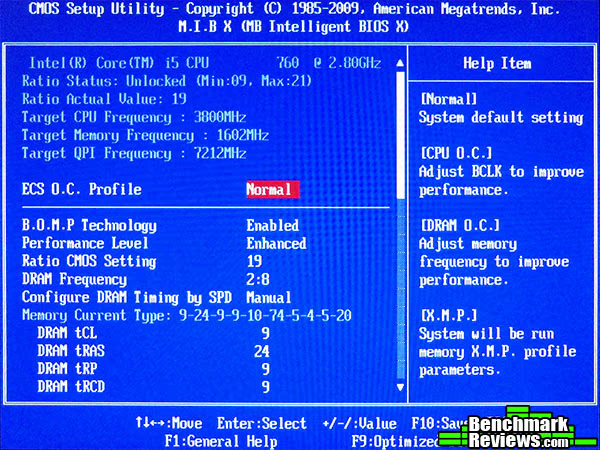
Ok so now we are in the M.I.B X (Motherboard Intelligent BIOS X) section, possibly named after the film Men In Black, considering this is a black series board. It defeats me why most compainies try to use clever acronyms and don't just cut to the chase, still I guess its a good job ECS didn't call it the Clock Regulation Alteration Platform. Either way it's fairly obvious that we are adjusting clock speeds and tampering with voltages in this section. All settings for overclocking are on the one page, and at first I thought this was a good concept as the top section auto updates as you make your changes. But as you can see in this image, it is quite a way from top to bottom, so adjusting voltages becomes a chore (it's a chore anyway as I will explain in a minute). I guess I'm being kinda picky but I think tabs work better.
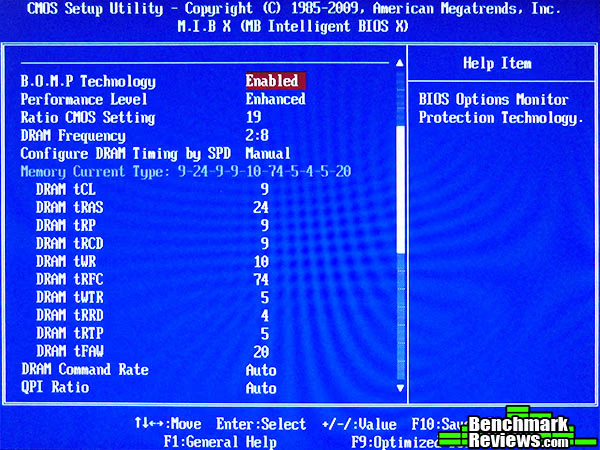
Moving down the screen slightly and we get to actual options, as is usually the case the descriptions for each of the options are very vague and require a little know how when changing the values. I guess that is the reason why ECS provide overclocking tools with the P55H-AK, for those that don't like to get dirty in the BIOS. To get things started you will need to change performance level from standard to enhanced, I suggest keeping RAM timing configuration on manual otherwise auto mode will change RAM timings which could compromise your overclock.
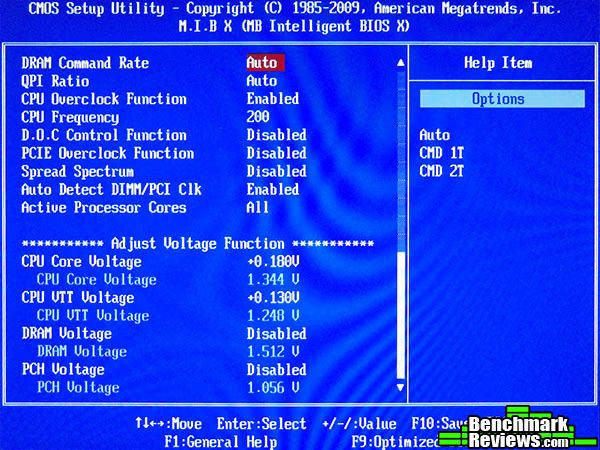
Moving down now to the bottom of the M.I.B X page there are a few more options that need attention. Firstly we need to set CPU Overclock Function to Enable as this will allow us to change the BCLK, next we must change D.O.C Control Function to disabled - D.O.C is an acronym for Dynamic Overclock Control - and allows you to set another BCLK value (works much the same as TurboBoost). last but not least is Spread Spectrum - Enabled reduces the amount of EMI produced by the motherboard, Disabled will enhance BCLK stability - this is a no brainer. In the bottom section of this screen we have the voltage options (some voltage options) and this is what really annoyed me about this BIOS. Firstly there is no option for vDroop / load line calibration (although voltages reported in BIOS are the same in CPU-Z). Secondly, the way voltages are adjusted is very annoying, instead of selecting a voltage you must select an addition amount, which is then reported as said value, but you need to save settings and reload BIOS to get an accurate value as voltage calibration is handled automatically.

Now we are on to O.C profiles, these are useful for a quick overclock but experienced users may prefer to meddle with real values. You are still able to change values after setting an O.C Profile but you will want to watch the voltage settings also as ECS are quite liberal with the voltages. Careful here also, as selecting one of these settings for curiosity will change any pre set options, and you will need to redo any settings you had previously selected - I found out the hard way, good job there is an option to save/load profiles in the BIOS.

You can easily overclock you CPU by choosing either Light, Middle or Heavy. In normal setting my BCLK was 133 and VCore was 1.176 for 2.8GHz. Light will increase BCLK by 5% to 140 and VCore to 1.299 for 2.94GHz, Middle will increase BCLK by 9% to 146 and VCore to 1.374 for 3.06GHz and Heavy will increase BCLK by 20% to 160 and VCore to a crazy high 1.449 for 3.36GHz. I really wasn't joking when I said ECS are quite liberal with voltages.
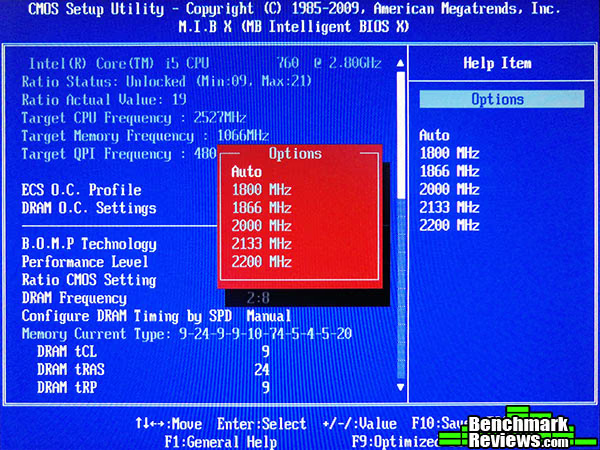
RAM speeds are also easily selected, choosing any of these settings will also change your base clock to get the required speed so you will also want to check VCORE voltage as well as DRAM voltage after selecting one of these settings, just to make sure you are not going to fry your CPU.
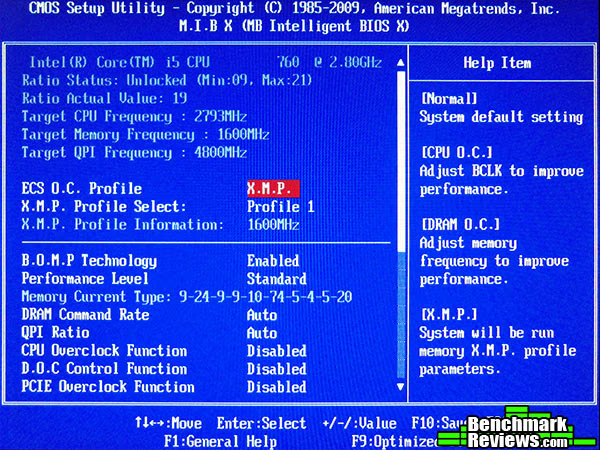
Last but not least is the option to select an Extreme Memory Profile (if your RAM supports X.M.P). In my case my X.M.P is pretty much useless as it sets Command Rate to 2T when I know my RAM runs fine in 1T at the same (and higher) speed.
This concludes the BIOS settings chapter, I hope we have enlightened you, anyhow we are now going to move on to overclocking performance, right this way...
ECS P55H-AK Overclocking
ECS have developed and marketed the P55H-AK as an overclocking board, on their website they have a video review of the board in which they overclock to 5GHz on air. Let's not forget though that there are no benchmarks to support this overclock and also let's not forget that an unlocked CPU was used to attain this overclock. Enough about that, and on to my experiences with the ECS P55H-AK. The BIOS isn't the best, but if you know what you are doing you will find it is sufficient. I first went to work at finding the highest Base Clock and CPU ratio without adjusting voltages, I wasn't able to get past 189 BCLK and the highest multiplier I was able to reach with this BCLK was x19 which gave me a clock speed of 3.59GHz with a 1.176 VCore - not bad considering the 'Heavy' automatic O.C setting would have you heating your CPU with a 1.449 VCore to run at the same speed. Next I set about to find the maximum overclock possible without crossing the maximum 1.4v VCore threshold, I was able to boot to windows and find a semi stable environment with the following settings.

That's 4.2GHz with a BCLK of 210 and an x20 multiplier and a VCore of 1.392v, validated here. Increasing either the BCLK or multiplier resulted in a blue screen. I was able to boot to windows and use my email client and web browser etc but certain benchmarks resulted in either a program crash or Blue Screen. This base clock and multiplier wouldn't become fully stable until I gave the CPU just under 1.5v and also playing with QPI/VTT voltage (this warmed things up a lot inside the CPU).

ECS P55H-AK with max stable Overclock
So now here we are at 4.1 GHz with a BCLK of 205 and an x20 multiplier and a VCore of 1.404v, validated here. An overclock of 46% from stock speed, this was 100% stable and will be used as "Max Overclock" settings when we get on to the benchmarks. Again, adjusting VCore to near 1.5v and playing more with the QPI/VTT voltage again allowed me to use an x21 multiplier with this BCLK, giving me 4.3GHz, but the load temps were peaking over 80c (25c ambient) and I didn't want to take any chances.
So what should we take from all of this, Is the CPU holding the board back or is it the other way round? The way I see it, the board is a good platform, but if you want really high clocks you will be overvolting a little. I was a little disappointed at myself not getting a better result but at the end of the day a Base Clock of 210 and/or a CPU speed of 4.1GHz is nothing to shrug your shoulders at, just make sure you have a proven capable cooling solution before you start out as you are going to need it when you start ramping speeds. The 32nm K series "Unlocked" CPU's from Intel will run better as they require less voltage and therefore produce less heat.
Motherboard Testing Methodology
Now we move on to what most will consider to be the 'important' part of the review, if you have jumped straight to this page I urge you to also read the other parts of the review. It doesn't always just come down to benchmarks in a motherboard review, especially when comparing to another motherboard with the same chipset as the results will always be similar if not the same. What we are really interested in is how well this board can overclock, not just how much improvement that overclock will make. Testing will be done with the following configurations.
ECS P55H-AK System
- Motherboard: ECS P55H-AK v1.0 (Intel P55 Chipset) with version V1.0 (08/04/2010) BIOS
- Processor: Intel Core i5 760 @ 2.8GHz and Overclocked @ 4.1GHz
- System Memory: 4GB G.Skill RipJaws PC3-12800 DDR3 1600MHz
- VGA: PNY GeForce 9800GT 512MB
- Audio: Onboard Realtek RTL889 8 Channel High Definition Audio
- Disk Drive: 2.5" 160GB Seagate Constellation 7200rpm 32MB cache
- Optical Drive: Pioneer DVD ± R/RW Combi
- Enclosure: Thermaltake Armor A90
- PSU: Corsair HX750W modular
Gigabyte GA-P55-US3L System
- Motherboard: Gigabyte GA-P55-US3L (Intel P55 Chipset) with version FE BIOS
- Processor: Intel Core i5 760 @ 2.8GHz and Overclocked @ 4.0GHz
- System Memory: 4GB G.Skill RipJaws PC3-12800 DDR3 1600MHz
- VGA: PNY GeForce 9800GT 512MB
- Audio: Onboard Realtek ALC892 HD Audio
- Disk Drive: 2.5" 160GB Seagate Constellation 7200rpm 32MB cache
- Optical Drive: Pioneer DVD ± R/RW Combi
- Enclosure: Thermaltake Armor A90
- PSU: Corsair HX750W modular
Intel Socket 775 Core 2 Quad DDR2 System
- Motherboard: ASUS P5B Deluxe WiFi-AP (Intel P965 Chipset) with version 1221 BIOS
- Processor: Intel Q6600 Core 2 Quad 2.6GHz overclocked @ 3.4GHz
- System Memory: 2GB OCZ Platinum Rev2.0 PC2-6400 DDR2 800MHz @ 942MHz
- VGA: PNY GeForce 9800GT 512MB
- Audio: Onboard 8-channel HD audio
- Disk Drive: 2.5" 160GB Seagate Constellation 7200rpm 32MB cache
- Optical Drive: Pioneer DVD ± R/RW Combi
- Enclosure: Thermaltake Armor A90
- PSU: Corsair HX750W modular
Test Software
- Lavalys EVEREST Ultimate Edition v5.50.2160
- Futuremark PCMark Vantage 1.0.2.0
- Maxon CINEBENCH R11.5
- Passmark Performance Test v7.0
- Capcom Street Fighter IV Benchmark
- Windows 7 Ultimate Edition
During testing, with both the ECS P55H-AK motherboard and the Gigabyte motherboard, RAM speeds were as follows; While CPU was at stock clock speed RAM was running at 1333MHz 9-9-9-24 and under overclocked settings RAM was running at its rated speed of 1600MHz. This review is not about the RAM, it's about the motherboard and the maximum stable base clock, and I made this decision so as to not compromise results.
Everest Benchmark Results
EVEREST Ultimate Edition is an industry leading system diagnostics and benchmarking solution for enthusiasts PC users, based on the award-winning EVEREST Technology by Lavalys. During system optimizations and tweaking it provides essential system and overclock information, advanced hardware monitoring and diagnostics capabilities to check the effects of the applied settings. CPU, FPU and memory benchmarks are available to measure the actual system performance and compare it to previous states or other systems. Furthermore, complete software, operating system and security information makes EVEREST Ultimate Edition a comprehensive system diagnostics tool that offers a total of 100 pages of information about your PC. All of the benchmarks used in our test bed: Queen, Photoworxx, and AES, rely on basic x86 instructions, and consume very low system memory while also being aware of Hyper Threading, multi-processors, and multi-core processors.
CPU Benchmarks
Everest CPU Queen benchmark shows a very nice performance scaling within CPU frequency. The older generation Core 2 platform is still able to hold its ground and shows that it isn't necessarily a dead platform, but it just can't compete with the overclocking potential of the Core i5 CPU and the P55 chipset. 3.4GHZ was the maximum overclock I could achieve with the Q6600 whilst staying within safe limits. In this benchmark, the ECS P55H-AK outperformed the Gigabyte GA-P55-US3L by a little percentage thanks mainly to the higher clock speed achieved with the P55H-AK motherboard. The Queen benchmark focuses on the branch prediction capabilities and misprediction penalties of the CPU. It does this by finding possible solutions to the classic queen problem on a chessboard. At the same clock speed theoretically the processor with the shorter pipeline and smaller misprediction penalties will attain higher benchmark scores.
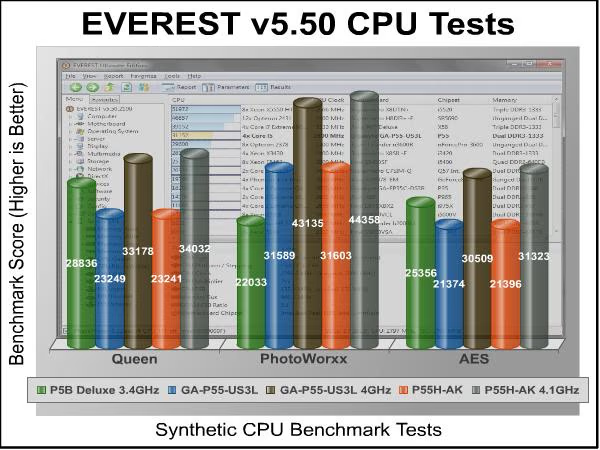
The Photoworxx benchmark tests for penalties against pipeline architecture. This synthetic benchmark stresses the integer arithmetic and multiplication execution units of the CPU and also the memory subsystem. Due to the fact that this test performs high memory read/write traffic, it cannot effectively scale in situations where more than two processing threads are used. The EVEREST Photoworxx benchmark performs the following tasks on a very large RGB image:
- Fill
- Flip
- Rotate90R (rotate 90 degrees CW)
- Rotate90L (rotate 90 degrees CCW)
- Random (fill the image with random colored pixels)
- RGB2BW (color to black & white conversion)
- Difference
- Crop
The Everest documentation hints that this benchmark is highly dependent on memory write speed, and so, it seems to be the practical case of the results obtained. Additional CPU frequency and memory bandwidth allow the Core i5 760 CPU and G.Skill DDR3 RAM to really shine out against the older Q6600 and DDR2 RAM giving a very nice and distinct 43% better performance in these tests while running a lower clock speed, very impressive indeed. The P55H-AK has a 2.9% lead over the GA-P55-US3L thanks to its extra clock speed, but this advantage probably wouldn't be noticed in real world applications
The AES integer benchmark measures CPU performance using AES data encryption. It utilizes Vincent Rijmen, Antoon Bosselaers and Paulo Barreto's public domain C code in ECB mode and consumes only 48 MB of memory. The AES test produced results very similar to the Queen tests. Once the i5 gets overclocked the advantage is obvious, the P55H-AK beats the P5B Deluxe by 23.5% and narrowly beats the GA-P55-US3L by 2.66%.
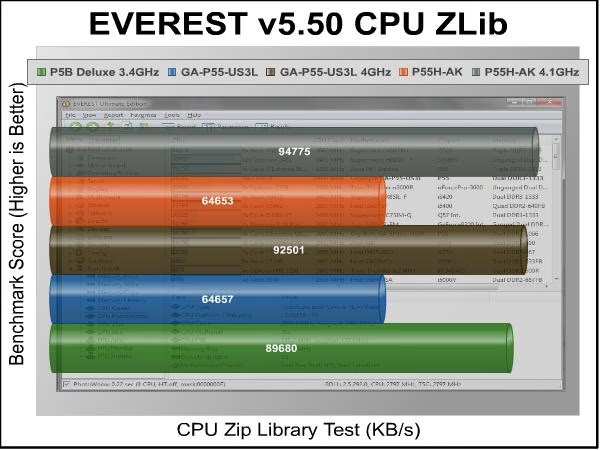
Zip Library Benchmark reports similar results as we've seen in the AES and CPU Queen Benchmarks. The i5 when overclocked only offers a slight advantage over the older Core 2 platform, the P55H-AK beats the P5B Deluxe by 5% which isn't a lot, and shows once again that the Core 2 series can still hold its ground (either that or we have an anomoly). Overclocking the i5 gives a nice 46.5% boost against the non-oveclocked results on the ECS P55H-AK platform.
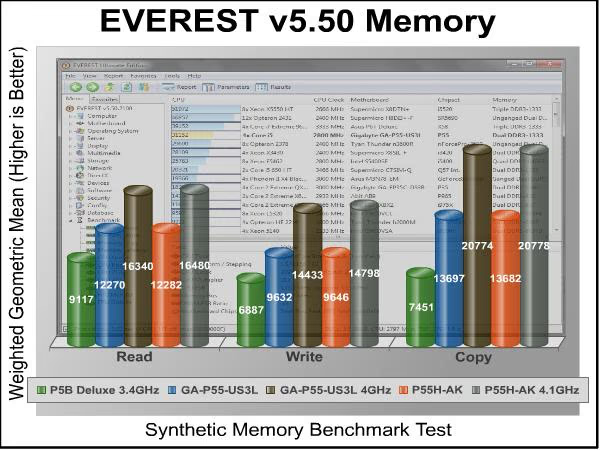
Now we have seen what benefit oveclocking the CPU can bring, it's also important to remember that memory also plays a large role in real world applications too. The results show exactly what one might expect to see, DDR2 really can't hold a torch to DDR3 in terms of speed and overclocking potential. Most good quality DDR3 1333MHz CL7 kits should be able to reach 1600MHz at CL9 or CL10 even (with a little voltage increase) and these graphs show the benefit. The overclocked results on the P55H-AK motherboard give a speed advantage over stock results of 34% Read, 53% Write and 52% Copy.
Now, let's look at some additional benchmarks with PCMark Vantage.
PCMark Vantage Benchmark Results
PCMark Vantage is an objective hardware performance benchmark tool for PCs running 32- and 64-bit versions of Microsoft Windows Vista or Windows 7. PCMark Vantage is well suited for benchmarking any type of Microsoft Windows Vista/7 PC: from multimedia home entertainment systems and laptops, to dedicated workstations and high-end gaming rigs. Benchmark Reviews has decided to use a few select tests from the suite to demonstrate/simulate real-world processor usage in this article. Our tests were conducted on Windows 7, with results displayed in the chart below.
TV and Movies Suite
- TV and Movies 1 (CPU=50%, RAM=2%, GPU=45%, SSD=3%)
- Two simultaneous threads
- Video transcoding: HD DVD to media server archive
- Video playback: HD DVD w/ additional lower bitrate HD content from HDD, as downloaded from net
- TV and Movies 2 (CPU=50%, RAM=2%, GPU=45%, SSD=3%)
- Two simultaneous threads
- Video transcoding: HD DVD to media server archive
- Video playback, HD MPEG-2: 19.39 Mbps terrestrial HDTV playback
- TV and Movies 3 (SSD=100%)
- HDD Media Center
- TV and Movies 4 (CPU=50%, RAM=2%, GPU=45%, SSD=3%)
- Video transcoding: media server archive to portable device
- Video playback, HD MPEG-2: 48 Mbps Blu-ray playback
Gaming Suite*
- Gaming 1 (CPU=30%, GPU=70%)
- GPU game test
- Gaming 2 (SSD=100%)
- HDD: game HDD
- Gaming 3 (CPU=75%, RAM=5%, SSD=20%)
- Two simultaneous threads
- CPU game test
- Data decompression: level loading
- Gaming 4 (CPU=42%, RAM=1%, GPU=24%, SSD=33%)
- Three simultaneous threads
- GPU game test
- CPU game test
- HDD: game HDD
Music Suite
- Music 1 (CPU=50%, RAM=3%, GPU=13%, SSD=34%)
- Three simultaneous threads
- Web page rendering - w/ music shop content
- Audio transcoding: WAV -> WMA lossless
- HDD: Adding music to Windows Media Player
- Music 2 (CPU=100%)
- Audio transcoding: WAV -> WMA lossless
- Music 3 (CPU=100%)
- Audio transcoding: MP3 -> WMA
- Music 4 (CPU=50%, SSD=50%)
- Two simultaneous threads
- Audio transcoding: WMA -> WMA
- HDD: Adding music to Windows Media Player
* EDITOR'S NOTE: Hopefully our readers will carefully consider how relevant PCMark Vantage is as a "real-world" benchmark, since many of the tests rely on unrelated hardware components. For example, per the FutureMark PCMark Vantage White Paper document, Gaming test #2 weighs the storage device for 100% of the test score. In fact, according to PCMark Vantage the video card only impacts 23% of the total gaming score, but the CPU represents 37% of the final score. As our tests in this article (and many others) has already proven, gaming performance has a lot more to do with the GPU than the CPU, and especially more than the hard drive or SSD (which is worth 38% of the final gaming performance score).

The TV and Movies and the Gaming results show that the P55 systems easily out perform the P5B Deluxe system even at stock speeds, and the overclocked results improve this lead even further. The gaming suite shows very different results from what I'd expect, we here at Benchmark reviews know that the GPU is the single most important factor when it comes to gaming, these benchmarks factor in other variables such as CPU and HDD/SSD also. The Music benchmarks best reflect the differences in CPU / RAM speeds and give a more accurate idea of performance increases. The benefit of overclocking is once more proven as the P55H-AK overclocked has a 23% advantage overall in the tests when compared to running at stock speeds.
CINEBENCH R11.5 Benchmark
Maxon CINEBENCH is a real-world test suite that assesses the computer's performance capabilities. CINEBENCH is based on Maxon's award-winning animation software, Cinema 4D, which is used extensively by studios and production houses worldwide for 3D content creation. Maxon software has been used in blockbuster movies such as Spider-Man, Star Wars, The Chronicles of Narnia and many more. CINEBENCH Release 11.5 includes the ability to more accurately test the industry's latest hardware, including systems with up to 64 processor threads, and the testing environment better reflects the expectations of today's production demands. A more streamlined interface makes testing systems and reading results incredibly straightforward.
The CINEBENCH R11.5 test scenario uses all of a system's processing power to render a photorealistic 3D scene, "No Keyframes" the viral animation by AixSponza. This scene makes use of various algorithms to stress all available processor cores. The OpenGL graphics card testing procedure uses a complex 3D scene depicting a car chase with which the performance of your graphics card in OpenGL mode is measured. Since this one test is dominated by the performance of the video card, I'm not showing it here.

The Single and Multi-Core CineBench tests follow the same pattern seen in previous tests, 1) The P55 chipset paired with an i5 CPU is far superior to the older Core 2 / Q6600, and 2) Overclocking on the P55 platform yields far better results than on the older platform. The P55H-AK motherboard gets an advantage of 46% in Single core tests and 46% in Multi-core tests when we compare overclocked results to stock results.
Passmark Performance Test Benchmark
PassMark Performance Test is a PC hardware benchmark utility that allows a user to quickly assess the performance of their computer and compare it to a number of standard 'baseline' computer systems. The Passmark Performance CPU tests all benchmark the mathematical operations, compression, encryption, SSE, and 3DNow! instructions of modern processors. In our tests there were several areas of concentration for each benchmark, which are combined into one compound score. This score is referred to as the CPU Mark, and is a composite of the following tests:
* Integer Math
* Floating Point Math
* Find Prime Numbers
* SSE/3DNow!
* Compression
* Encryption
* Image Rotation
* String Sorting
Taken together as a whole, the eight separate CPU tests offer a very realistic segment of what taxes the processor most for users. These tests are grossly exaggerated synthetic benchmarks, but they can still help illustrate the difference between similar hardware.
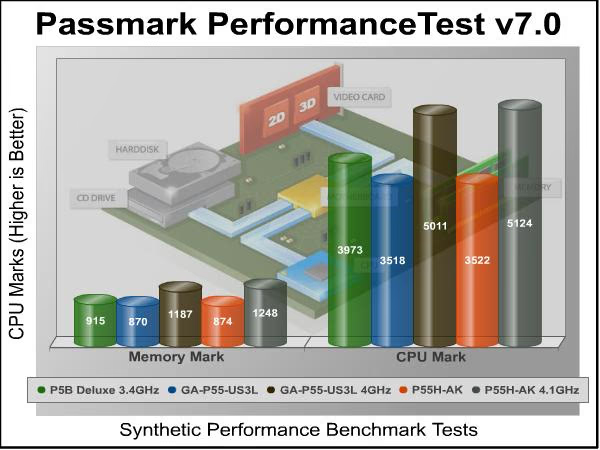
Passmark Performance CPU tests reinforce what we've got in Everest benchmarks. Again, the ECS P55H-AK system is about the same as the P5B Deluxe system clock for clock but the sheer overclocking power boosts the score by almost 29% and this is a similar result to what we have seen in the other benchmarks. Controversially, the memory results don't quite follow the same pattern seen in the Everest Memory test. Passmark Memory test should show a boost when the memory frequency is higher, the results vaguely conform to this rule by showing a better score given only to the overclocked results. Let's take a look at a gaming benchmark to see how well this Overclocked CPU/RAM performance is translated in the graphical world.
Street Fighter IV Benchmark Results
Capcom's Street Fighter IV is part of the now-famous Street Fighter series that began in 1987. The 2D Street Fighter II was one of the most popular fighting games of the 1990s, and now gets a 3D face-lift to become Street Fighter 4. The Street Fighter 4 benchmark utility was released as a novel way to test your system's ability to run the game. It uses a few dressed-up fight scenes where combatants fight against each other using various martial arts disciplines. Feet, fists and magic fill the screen with a flurry of activity. Due to the rapid pace, varied lighting and the use of music this is one of the more enjoyable benchmarks.
Street Fighter IV uses a proprietary Capcom SF4 game engine, which is enhanced over previous versions of the game. The inclusion of this test is to see if there is any variation in results with the older LGA775 system and the newer LGA 1156 system, and to see what improvements overclocking your CPU and RAM will make to games.

Ok, now we're really talking about 3D performance. As expected, when it comes down to real games GPU is the key of more than 90% final performance. This benchmark confirms it by scoring a very similar result for each platform regardless of overclocked settings, and this applies for 90% of the games nowadays. When Benchmark Reviews tests Mid-High end graphics, memory kits or CPUs, we normally use Far Cry 2 or Crysis as a Benchmark, and it only ensures that this kind of games really don't care about memory frequency, and lately, also that CPU frequency is not as relevant as it was in the past years.
ECS Motherboard Final Thoughts
The ECS P55H-AK brings TRI SLI / CrossFire, 4x USB 3.0 ports and 4x SATA 6Gb/s ports to the P55 platform all at the same time, a feature set usually reserved for X58 motherbards, and does so while looking very elegant indeed. This is a valiant effort from a company that is best known for their products in OEM machines and the low to mid end market.
ECS EliteGroup have undercut their direct competition with regards to latest technology features and also pricing with the P55H-AK V1.0 Motherboard, I say this based on my own research (by searching Google for P55 boards that support 3x SLI / CrossFire). I chose three motherboards from the first page of results as my comparison 1) MSI Big Bang Trinergy, 2) EVGA P55 Classified 200 and 3)Gigabyte P55A-UD7. All three of these high end motherboards cost more than the ECS P55H-AK by a small margin, and only one (Gigabyte) has USB 3.0 and SATA 6Gb/s support (has half the amount of ports offered by the ECS P55H-AK). I know this isn't the fairest of comparisons and this is by no means a performance comparison, that would be best left to your own research, but it does show that ECS are really stepping up their game and trying bold moves to gain respect in the enthusiast community.
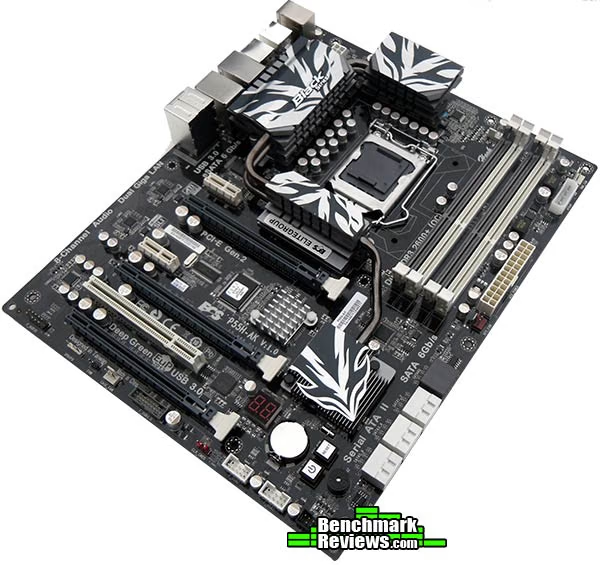
It is hard to find something bad to say about the ECS P55H-AK Motherboard as the layout and design of the board is spot on for me. The spacing of the PCI-E slots means that end users wanting to take advantage of a triple VGA setup (with dual slot coolers) are limited to cases that have eight or more PCI expansion slots, although users who opt for dual VGA setups will have a field day as the spacing allows lots of room for Graphics cards to breathe, either way you will lose that PCIX1 slot. The BIOS could possibly use a revision to break down the overclocking options to two pages (or tabs), but it isn't a necessity as everyone is different and many will possibly prefer to have all of the settings on one page.
ECS P55H-AK Conclusion
In this section I am going to write a brief five point summary on the following categories; Performance, Appearance, Construction, Functionality and Value. These views are my own and help me to give the ECS P55H-AK Motherboard a rating out of 10, a high score does not necessarily mean that it is better or worse than a similar motherboard which has been reviewed by another writer here at Benchmark Reviews, that may have got a lower score. It is however a good indicator of whether the motherboard is good or not. I would strongly urge you to read the entire review, if you have not already, so that you can make an educated decision for yourself.
The performance of the ECS was very good indeed, a BCLK of 210 is a luxury offered by a motherboard in this category. Even though my overclock with this BCLK didn't allow me to complete all the benchmarks while keeping the VCore under 1.4v I was able to perform all of the usual basic (non demanding) tasks that I use my PC for on a daily basis. Infinite tweaking time and a choice of any CPU would undoubtedly yeild better results, but tlet's not forget that his review has a deadline as I am sure you can understand.
Appearance is where the ECS P55H-AK is definitely going to get top marks. There isn't one person I know that has seen this board and shown any dislike for its looks, and while I don't know every body the whole world over, I'm pretty darn sure that you will agree that the P55H-AK is really good looking. The Cooling looks A grade, the color co-ordination is smashing for ECS (read: stop using 6 colors on one board), even though the shades of grey are slightly different (from the SATA 6Gb/s ports to the PCI-E slots to the RAM slots) it really doesn't deduct from the overall image of beauty that is the P55H-AK.
Construction quality was excellent. At this price level this is expected, smudge that - Demanded. You should expect perfect solder-masking, with no drips or smudged silk-screen printing; perfectly aligned components , and, perhaps most importantly, good component layout. You want plenty of room around the CPU socket for your giant cooler, connectors placed near the edges of the board, and so forth. Cables or components should never block connectors, nor should connectors be placed so close to other components that you need a tool to release the connector latch. ECS' design ticks the above boxes and the decision to do away with the legacy IDE and floppy ports opened up room on the motherboard that has been used to good advantage.
Functionality is also top notch, there are not many P55 motherboards that can offer triple VGA setup's at the same time as giving you four USB 3.0 ports and also four SATA 6Gb/s interfaces. High end sound is included as are Dual Gigabit Ethernet ports each with their own controller. Onboard buttons for power, reset, and CMOS clearing and an LED post display are welcome additions. Overclocking in the BIOS took a little getting used to and was annoying at times, but thanks to the ability to save profiles, most of these woes are outweighed.
It's hard to say that a P55 motherboard that costing $299.99 can offer good value for money, the same as it's hard to say for any other 'enthusiast' rated hardware as there is always going to be a premium to pay to have the latest and greatest. What I can say though, is that the ECS P55H-AK motherboard is very competitively priced when all features and specifications are considered. It's probably not the ideal motherboard to casual computer users, as it's very much orientated towards the high-end enthusiast market, where features such as triple VGA setups, SATA 6Gb/s, USB 3.0, dual Ethernet, and 8-Channel HD Audio will be used to good advantage.
Pros:
+ PLX PEX8608 Switch adds 32 PCIe lanes
+ Four SuperSpeed USB 3.0 ports
+ Four SATA 6Gb/s ports
+ Triple SLI / CrossFire support
+ 210MHz BCLK
+ Very attractive appearance
+ Superb motherboard component layout
+ On-board diagnostics and power/reset buttons
Cons:
- Overclocking in BIOS could be better
- High price for a P55 Motherboard
- Triple VGA setup may possibly limit case options
Ratings:
- Performance: 9.00
- Appearance: 9.50
- Construction: 9.00
- Functionality: 9.50
- Value: 7.50
Final Score: 8.90 out of 10.
Quality Recognition: Benchmark Reviews Silver Tachometer Award.
Questions? Comments? Benchmark Reviews really wants your feedback. We invite you to leave your remarks in our Discussion Forum.
Reader comments from the original article
10 comments were posted before commenting closed. They are preserved as written. Original avatars no longer resolve and are shown as a placeholder.
RAM frequency multiplier Servando Silva Permalink:
Hi Steven. I saw you talked about a 2:12 multiplier and you even listed it in the pros. Isn't it the case for every P55 motherboard? As long as your CPU uses that multiplier it will appear (with the proper BIOS update). You can find higher dividers with an Unlocked processor, but 1600MHz seems pretty general for me. Even ITX motherboards handle this multiplier as far as I know. Let me know if you've tested a P55 motherboard without a 2:!2 divider. Thanks for the article.
RE: ECS P55H-AK Intel P55-Express Motherboard Mefist0 Permalink:
Memory controller is in processor, why you are asking about MB? Only Core i7 8xx support ratio 2:12, other desktop soc1156 processors doesn't support this ratio.
Memory Multiplier Steven Iglesias-Hearst Permalink:
With my Gigabyte GA-P55-US3L Mobo I could only choose from a 6,8 or 10 multi, so I was surprised to see the P55H-AK offer 2:12 also.
Spend Less,.......... RealNeil Permalink:
The 1156 platform seems to be coming into it's own recently. At first, I was disappointed in the PCI-E bandwidth limitations they possess, making an SLI or Crossfire setup work in a limited way. I bought an ASRock P55-Pro Mainboard for $99.00 and put an i5-750 in it with some Ripjaws RAM in it. While it always worked well, it wasn't that easy to OC until the latest BIOS came out. The new BIOS has an auto-magic setting that does all of the tweaking for you. (sort of a lazy-man's OC) It gives you a choice of a 40% or a 50% overclock and as I said, it does everything for you. So now my 2.67GHz. CPU is running at 3.8GHz. (40%) and is completely stable. I think ASRock has it going on, because there is absolutely nothing to it and a $99.00 board that performs so well is a steal. #valid.canardpc.com/cache/banner/1431409.png: #valid.canardpc.com/show_oc.php?id=1431409
No word on temps! PSM Permalink:
Hi Steven, thanks for this fine review. But to be honest I'm a bit disappointed that there is not any thermal/power report on this promising motherboard. It's becoming a bit of a trend for reviewers not to include temps and wattage of mobos recently. Yes this p55 and it doesn't get hot like x58 boards but it still needs cooling. And this ECS one has lots of extra chips that dumps even more heat than a regular p55 mobo. Just having pretty looking heatpipes is not enough for a highend board because there are boards like EVGA classified 4-way sli and MSI eclipse x58 which have sinister looking cooling solution, but heats up beyond comfort level. Some highend Asus boards have the same problame. So it would've been nice if you provided some temps along the way. Also power consumptions should've been mentioned for such a heavily loaded board. Regards.
RE: ECS P55H-AK Intel P55-Express Motherboard Steven Iglesias-Hearst Permalink:
Temps here; #i945.photobucket.com/albums/ad297/hatchet_2009/Untitled-1-1.jpg As for power consumtion, I don't have the proper test equipment.
RE: ECS P55H-AK Intel P55-Express Motherboard PSM Permalink:
Thanks for the temps. Though 70c+ is still out of my comfort Zone. But that can be understood. Anyway this is a good sign that companies like ECS are coming up with highend parts. But they've to consider this as a longtime practice. ECS should follow the path of ASUS and reserve their black series for enthusiasts. And if they can keep the price down reasonably, that's the way to do it. Else one odd highend mobo in a while won't fetch much attention. Regards.
USB 2? Testy01 Permalink:
Thought it strange that under the features on page 2, USB2 still has an old definition calling it the "Latest connectivity standard" Meh.
RE: USB 2? Steven Iglesias-Hearst Permalink:
Well since USB 3.0 has not become the "Standard" yet I guess this dialog is still valid....
RE: ECS P55H-AK Intel P55-Express Motherboard Stan Permalink:
One more idiotic design. Overcrouded southbridge with rebranded PCIe v.1.1 NVIDIA NF100 Once again: NONE of the moderd GPU needs even 1GB/s bandwidth