
Rosewill THOR V2 Full-Tower Computer Case
Manufacturer: Rosewill
Product Name: THOR V2
Price As Tested: $149.99 at Amazon and Newegg.
Full Disclosure: The product sample used in this article has been provided by Rosewill
I can’t give you Rosewill’s marketing hype because, well, there isn’t any. I mean, I can’t tell you what they think of their case because they don’t brag on it, if their web site is any indication. The marketing is like this: Here is a case. Here are some pictures. Here are the specs. Have a nice day and eat your greens, without salt. A very austere marketing approach. It’s a big difference from other case companies that give you a “Welcome to Las Vegas” marketing experience. Well, in all fairness, they do state that it has an “Advanced bottom mounted power supply.” Wooo. I'm shakin'!

Oh, and one more thing about the austere nature of information surrounding the Rosewill THOR V2, or lack of information, is that the case is simply called "THOR V2" no digits or alphabets for further identification. "It's the THOR V2. We don't need no stinking numbers!" Can the THOR V2 stand up to the mythology behind the name? Is it a true "hammer" of cases? Read on case warriors, read on!
Rosewill THOR V2 Features
Support up to XL-ATX Motherboard (13.5” x 10.3”)
10 expansion slots
Gaming type - Allow to swing top fins to increase air flow
Front 230mm fan is equipped with LED on/off switch (default is LED off)
Full black interior Support up to 330mm(12.99") video card
Advanced cable management design
Advanced Cooling System:
-Front 1x 230mm Red LED Fan (pre-installed)
-Rear 1x 140mm Fan (pre-installed)
-Top 1x 230mm Fan (pre-installed) or 2x 120/140mm Fan (option)
-Side 1x 230mm Fan (pre-installed) or 4x 120mm Fan (option)
-Bottom 1x 120/140mm Fan (option)
Top mounted dual fan speed control knobs support up to 6 fans.
Screw-less design for 5.25” Devices & 3.5” HDDs
Easy to remove/install front 5.25” bay covers
HDD trays support 3.5” or 2.5” HDD/SSD
Easy-clean PSU filter.
Top mounted IO ports - 1x USB 3.0, 1x e-SATA, 3x USB 2.0, Audio out, MIC in.
Advanced Bottom-Mounted PSU Design
THOR V2 Specifications
| Model | THOR V2 |
|---|---|
| Type |
ATX Full Tower |
| Color | Black |
| Case Material | SECC Steel |
| With Power Supply |
No |
| Power Supply Mount |
Bottom |
| Motherboard Capatability |
Micro ATX, ATX, E-ATX, XL-ATX |
| Side Panel Window |
No |
| External 5.25" Bays |
6 |
| External 3.5" Bays |
2 |
| Internal 3.5" Bays |
6 |
| Expansion Slots |
10 |
| Front Ports |
2x USB 3.0 2x USB 2.0 1x eSATA Audio In/Out (AC97, HD) 2x Fan Speed Control Knobs |
| 140mm Fans | 1x Rear |
| 200mm Fans | 1x Front Red LED with on/off switch 1x Top 1x Side |
| Side Air Duct |
No |
| Dimensions (LxWxH) |
21.89" x 9.14" x 22.84" (Bezel) |
| Dimensions (LxWxH) |
20.08" x 9.14" x 22.84" (No bezel) |
| Weight |
30.42lbs |
| Warranty | 1 year limited |
Closer Look: Exterior
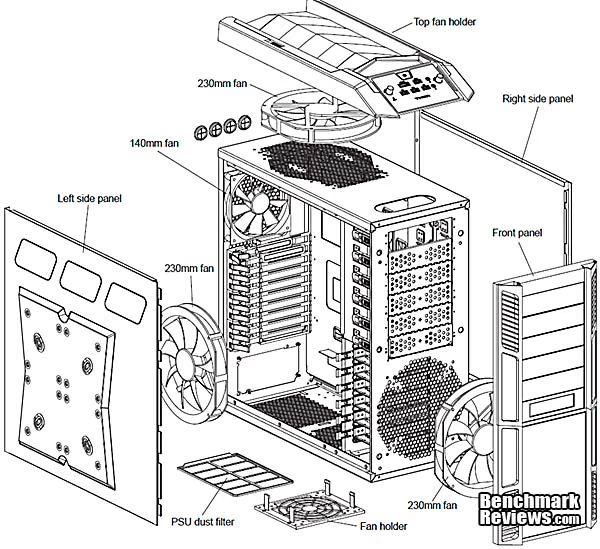
Well, here we are at the starting gate with the Rosewill THOR V2 Full Tower Case. From the previous image, we can see that he's a handsome fellow, for a case, no? He looks somewhat like a transformer, perhaps not so much from the above image, but you'll see why later. Externally, the THOR V2 is pretty straight forward. We see the 5 1/4 perforated external bays. We see the perforated and raised side cooling intake, and the black matte finish. What we have here, esthetically speaking, is a sleek case with a bit of muscle under it's shirt, er, shell, panel? Here's a an expanded view from the owner's manual.
From the front we can really see the design paradigm: strong, thick angular lines both on the angled panel and the bezel's three sided face. That’s as nice touch from simply having a square front that looks like a box. I mean, well, it is a box in any event, but the bezel corner cantilevers are a nice touch.
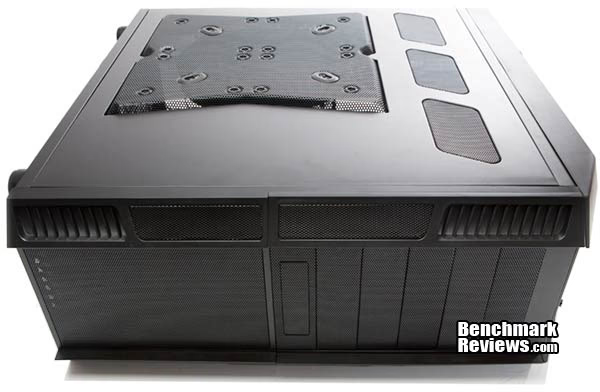
From the business side, we see again the large perforated riser air intake, with three smaller perforated windows on the top. Again, a very aesthetically pleasing design. The fan mount riser gives the case a strong, masculine appearance. You can see the fan mounts here. In the center are the 230mm mounts and the red lines indicate the 140mm fan mounts, if you prefer to go that route.
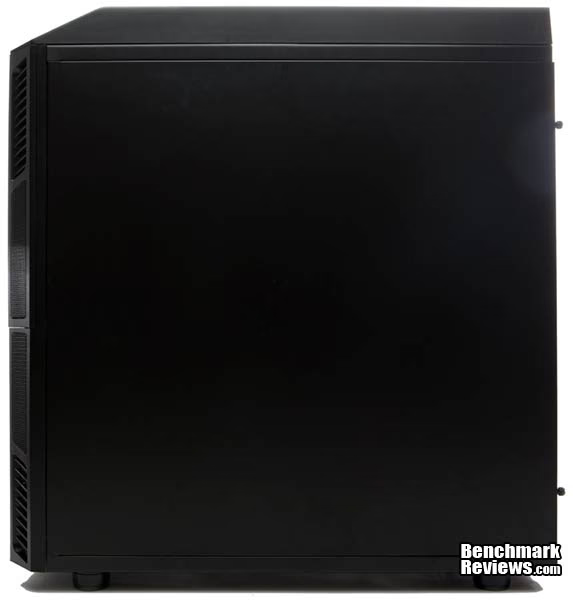
Here we have the alternate side, and it’s simply sleek, flat, and black. Again you can see the cantilevered front bezel effectively giving it three sides. Nothing else happening here. Move along please.
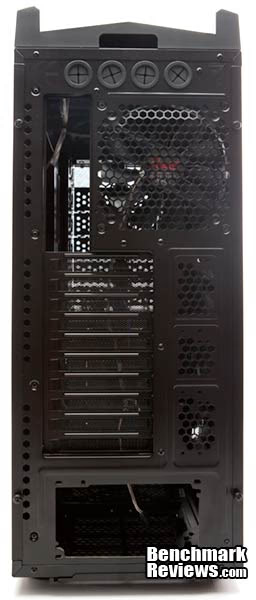
The back. This is your standard full tower case backside. Yep, those are four holes for water cooling for your external water cooling needs, or, you can run USB cables out of them instead. Alternately, I guess you could put party favors in them and call it a party. Well, well, here we go. Let’s not forget the “Advanced bottom mounted power supply” hole. Makes me shake with awe.
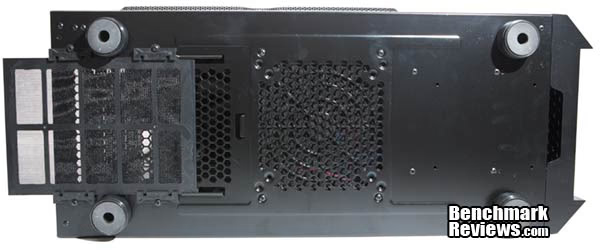
Let’s turn this baby over and have a look at its belly. Four feet, a fan intake and a power supply intake, complete with slide out filter. I like slide out everything, actually. Too bad Rosewill didn’t think twice about that option for it’s front intake filter. Note also the bottom hole for pulling the front bezel off (on the right). Most importantly, check out my greasy finger prints. Now those are tight!
Here’s what the case looks like when the bays are loaded.
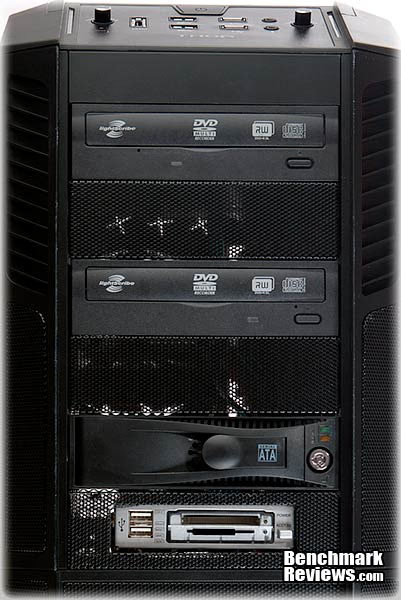
Here’s a look at the front bezel and it’s parts. The side of the bezel slides off giving access to the bay covers. The bay covers are made of steel mesh and are very sturdy.

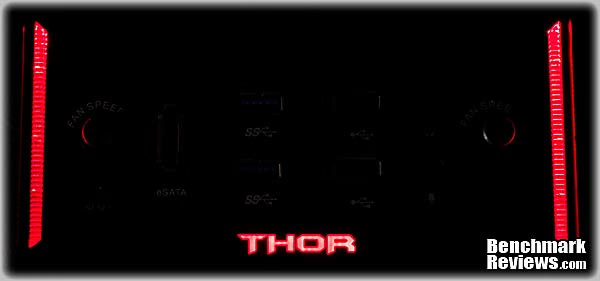
Last we have the front panel in the dark. It looks bright but I hardly notice it, so Rosewill got the luminance right for the front LEDs. The side LEDs are perma-on, but blink when your hard drives are active. It’s a nice look that doesn’t overpower.
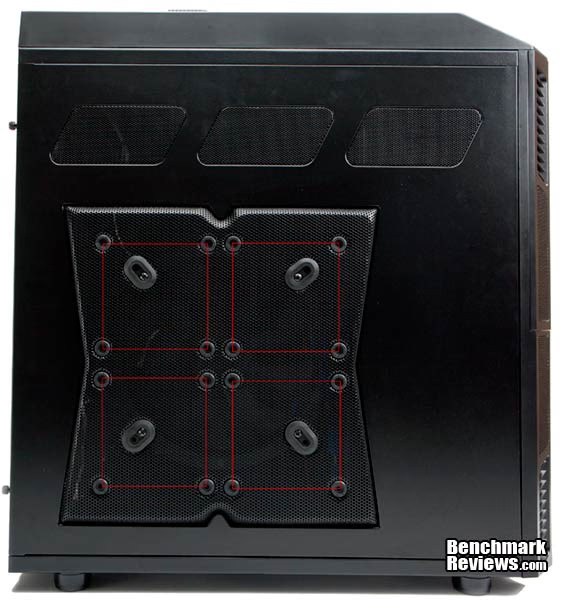
Well, we’re moving along nicely here and there isn’t much else to say about the outside of the case. One side is a huge intake, the bottom is an intake, the top is an exhaust, the back is an exhaust, the front is an intake. So you have the front and side 230mm cannons firing air into the case, and a top 230mm and back 140mm exhausting the case. There is no bottom fan included.
Detailed Exterior Features
So here we have the front of the THOR V2 case. As you can see, you get to the bay covers by sliding off a corner of the THOR'S upper bezel. That's a pretty slick design. Kinda like a Transformer, but not.
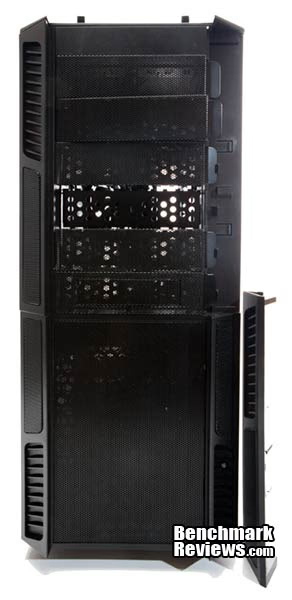
Here’s how it works. Just slide the corner off like the arrows show, and after you line up the slide grooves, pop it back on. You can also see the bezel tabs that lock the covers in place.
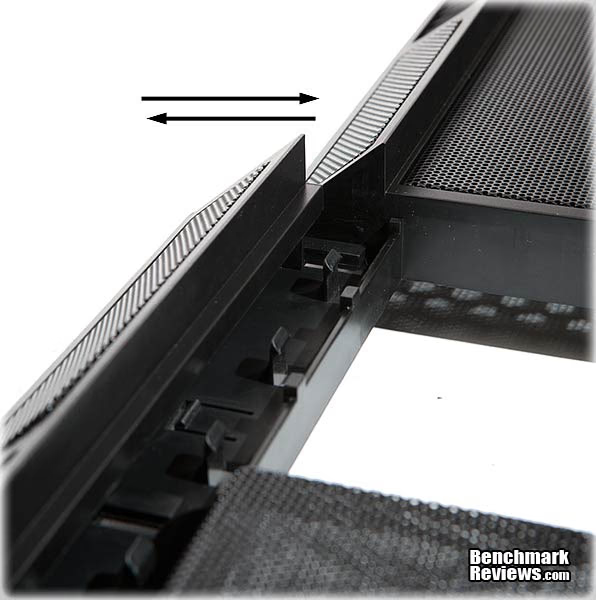
The bay covers use a slide in notch and tab design. One side has plastic tabs that the bay cover’s metal tab clicks into, as noted in the above image. The other side has notches that the metal bay cover tabs slide into, shown with the arrows (below image). You can see the bay cover metal tab partially inserted into the receiver notch. I didn’t like this design at first, but after playing with it, it’s fine and should last as long as any design would. The only downside to this design is that the bay covers aren't as easy to get off and on as the slide and snap design.

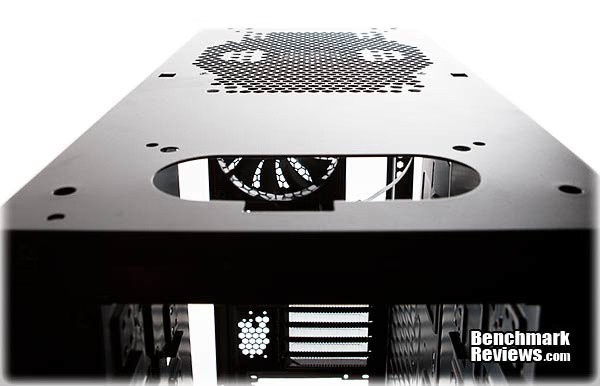
If you paid attention to the exploded diagram above, you’d have seen that the top also comes off. Yep. In fact, that’s how you change out the top fan. This also means you have access to the front panel's pcb board. Here’s an image of the top after I scalped it. The front is where the top I/O panel wiring goes. The back is the top fan vent. (Nice haircut, THOR.)
It's time, so please sit down. You may get weak in the knees. Here's why I called the THOR V2 a sort of "transformer" like case at the beginning of the review. See the arrow? That's where it all starts, baby. But before I show you what happens, please note a nice little top recessed tray for pen drives and other small goodies, lined with a rubber mat. That's nice. Okay, okay, on with the show.
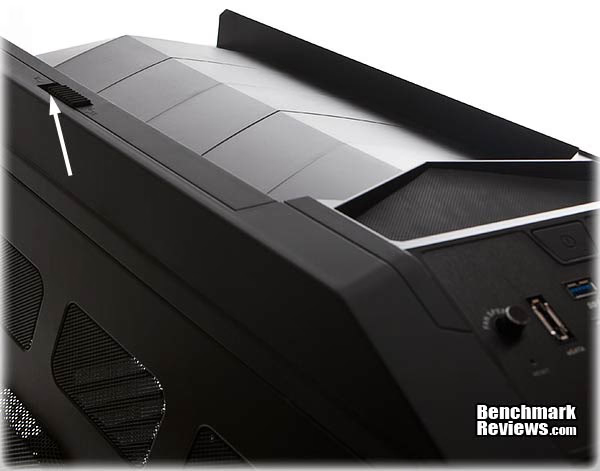
Slide the little button backwards, and you get ROCKET POWER! I like how it looks. It gives the case a very unique, aggressive look. The hair on the back of its neck is standing up as it transforms from a smooth, slightly muscular design into a mean looking attack case. As Duke would say, “Come get sum!"

Since this is obviously a design high point for the Rosewill THOR V2, I thought I’d give you a view from the back, also. I really like the design. It’s eye catching.
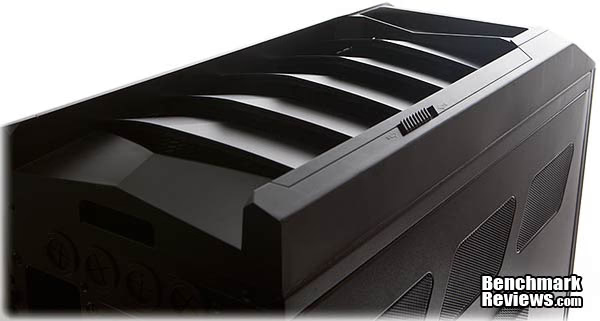
This struck me as a gimmick at first. That is, the aesthetic appeal of the design isn’t a gimmick, but, rather, the slider to open and close the exhaust vents. Other than the dinosaur louvers, there aren’t any other exhaust holes for the top fan. So the question is, “Why would you ever close it?” That would defeat the purpose of the top fan, or at least greatly diminish it’s purpose. Well, a good reason to close the vents is to move or work on the case so the fins don’t get broken. They aren’t thin plastic, though, but they do protrude, as you can see, so being able to close them is a bonus. Other than that, though, you’d be leaving them open all of the time.
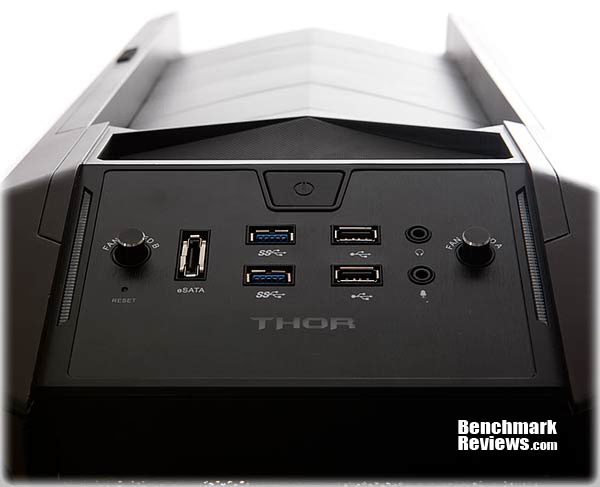
Next, we have the top panel, and a nice assortment of connectors: two USB 2.0 and two USB 3.0, plus an eSATA port and your normal audio ports. The eSATA port connects to a hard drive port on the motherboard. Rosewill has also included a built in fan controller. The two knobs operate either A or B fans. Each fan control knob can attach three fans, and the fan power plugs into a power supply lead. One negative here: The fan knobs are pretty darn sloppy. I don’t know if that’s going to spell doom or not, but it’s worth mentioning. Other than that, they work well and turn smoothly. The excess play just makes them feel cheapo, though.
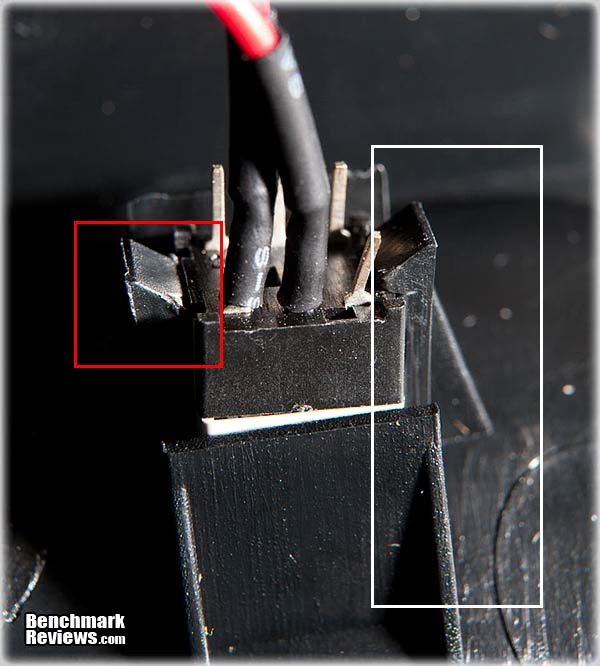
The THOR V2 comes with a switchable LED front fan. That’s great, but the design, in my opinion, is flawed. The button is on the bottom of the case. I think it should have been near the top, for easier access. Second, the mounting system is backwards. The pins that hold the switch into the front bezel are attached as female connectors to the front bezel itself. That means you’ll need a tool to unplug the fan LED switch when you take the front bezel off. Adding to that frustration is that the front bezel fan filter is built into the bezel itself. So you’re stuck cleaning the filter with the wires attached to the front bezel, unless you disconnect the switch, and then that requires tools to do so.The red box shows the clip and the white box shows how the clip holding the switch is built onto the front bezel. Break one of those tabs, and you’re out of luck. A better design would have disconnecting the switch using your thumb and forefinger with pressure clips on the switch side. You could fix this yourself by simply cutting the wires and tossing the entire fan. Just joking. Really, though, you could cut the wires and splice in a couple quick disconnectors, problem solved.
The side panels on the THOR V2 are of the traditional slide in the front close the back, and thumb screw to secure flavor. I had a little trouble getting the screws to match up and that was annoying, but it could have just been me too. That’s about it for the exterior. Next, we’ll look at the internals and how well they do their job. So far the THOR V2 is mostly positive in that the design is neat, simple and useable. Let’s see how the internals measure up.
Closer Look: Interior
Let’s start with a simple three-quarter view. You can see that the front bezel is off here. It attaches with push through pins like the top does. Looking into the back of the case, you can see the 140mm back fan and the top 230mm fan. You can also see the expansion slots, CPU cooler backplate hole, that killer advanced bottom power supply mount, and the case's nicely painted interior.
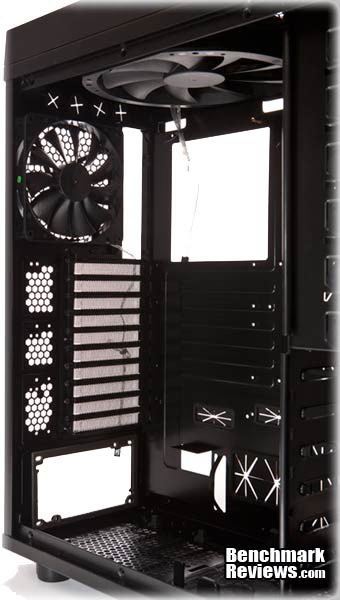
Next, let's take a three-quarter view looking from the back to the front. Here we see the front bays and the hard drive cage, and please note: The hard drive cage is not removable. Not being able to remove the hard drive cage has its cons, but one of those cons isn't any pratical decrease in space. The THOR V2 has space, man. Lots of it, and I'll demonstrate that later on. Again, we see the top 230mm fan. We can now see the clear front 230mm fan, which is lit with red LEDs. Next to the fan we have the drive tray, which shows the relative size of this behemoth. It's almost 23" tall.

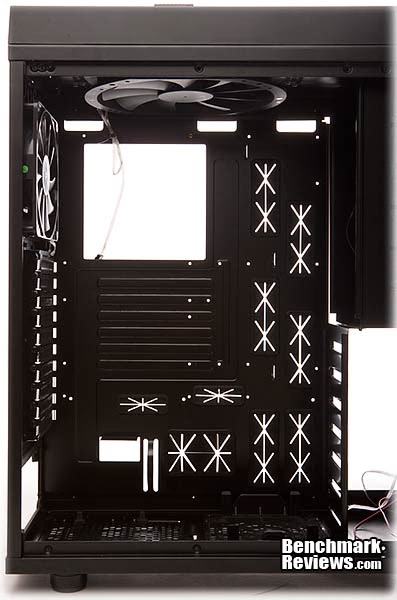
Now we're looking at the motherboard tray straight on against a white background. You can see clearly that this case's internals are money. There are twelve, that's TWELVE, cable routing ports here. The routing holes are large, well placed, and they make good Frisbees too. You'll be able to test that out yourself, because Rosewill saved .000001 cents by not gluing them on. They popped off on me until I got pissed and flug them through the door of my studio to the front room. That's when I discovered their Frisbee like properties. It's not everyday you get a computer case with built-in removable Frisbees. The good news is that even without the rubber gaskets, the holes are smooth, and that goes for the power supply guide hole and retainer hole too, which can be used to run small wires through. That brings the total wire/cable port possibility to fourteen. Nice! Last, the motherboard tray is not removable.
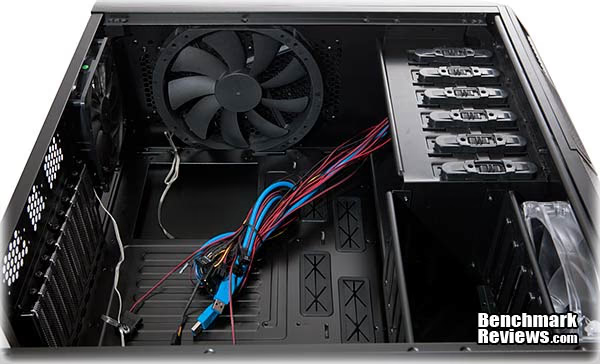
Looking into the case from the bottom, we see, again, the 230mm fan. We also see the THOR V2's guts hanging out. Have you ever wondered why they color coded USB 3 blue? If you know, please tell me. We also have a look at the hard drive cage, sans it's drive carriages. The front fan looks like a tight fit, but I removed it and replaced it easily. Have a look at the front bay "tool-less" sliders. I say "tool-less" in quotes because these here are "tool-less" looking sliders.
That’s right. My Rosewill supplied case came with front bay tool-less drive mounts that don’t work. Oh yes, they slide and snap, but the design tolerance is so lacking, the rear pegs didn’t go into the drive’s rear screw holes. If you have this case, try messing with the drive once you have it in. I’ll bet you can lift the rear of it up with just a little pressure, or none at all. I’m sorry to have to say this, but these front bay mounts are what comes out of horses’ butts. The good news is that you can screw your drives down. I’ve always done that anyway, since DVD writers tend to vibrate, and some pretty badly. Not a big deal, really, but why even include something that doesn’t work? Maybe just to say, “We got ‘em too?” I was not happy. Rosewill almost got to say hello to my little friend.
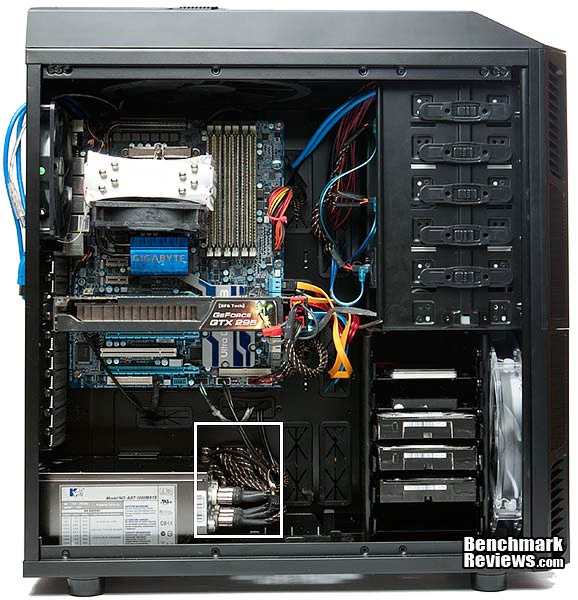
Here’s what the inside looks like completely filled out. I swapped my system out of my Cooler Master Stacker 830 evo into the THOR V2 case. Why, you might ask? Because although it isn’t as polished a case as the Stacker series, it’s much more simplistic and utilitarian. The fan system in the THOR V2 is second to none and incredibly simple. Although my CPU doesn't run any cooler compared to the 830's already excellent cooling features, I'm only using four fans to the Stacker's seven, and that cleans things up in itself. So here you go. Check out how much space this case has. The white box shows that all of the power supply's cables went through the hole, plus room to spare. Don’t be hatin’ on my BFG GTX 295 vid card either.
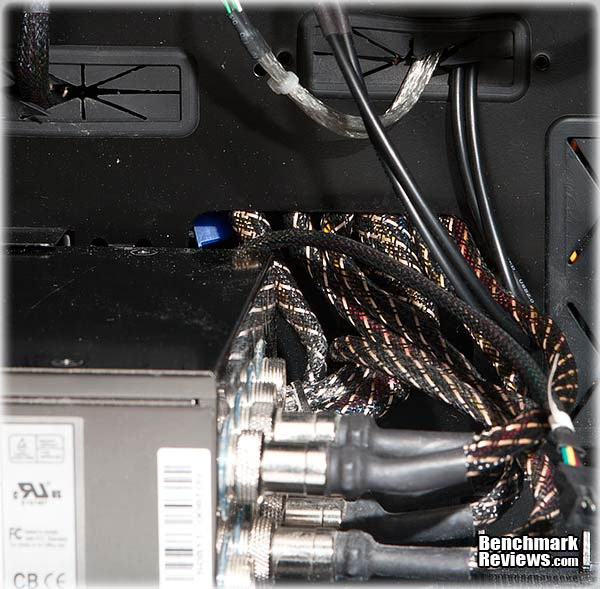
Here’s another look at the power supply's cables going out of the cable port. If you look closely at the left of the port, you can see another half inch or so of space. If I had all of my output cables from my power supply connected, I’d still have room enough to run them all out of this hole, easily. As you can see, only two are left unused.
Here’s what the side mount 230mm fan looks like. It mounts to rubber dampeners and, as all the fans in this case, uses a screw down mounting method. The fan is rated at .24A and 2.88W, and 800RPMs.

I don’t know if this is the deal with all 230mm fans, but it is with this one. You can see that the only insulation between bare solder mounts and a short circuit is a sticker. This probably is of no concern, but like all little cost cutting manufacturing secrets, it’s worth mentioning. I'd also like to metion that you can hear an almost imperceptable scraping noise coming from these 230mm fans that is worse horizontally (but the top fan is hardly perceptible, and it's horozontal all of the time). It comes and goes according to speed and position, but it is there. It's also about the same level and type of noise no matter what the speed. I took one of them out and put my ear against the center axis and very slowly turned the fan. I could hear the bearing click, click, cliking. I should add too that these fan's acoustic signature is almost dead silent, even at full speed. You can hear the air against the blades, but it's a nice, low pitched hum, and again, very quite. So there you go. I don't like the scraping or bearing sound, even if they are almost imperceptible. Mayby all 230mm fans do this, I don't kinow because these are the first I've ever owned. If you have any information, please comment in the comment section.

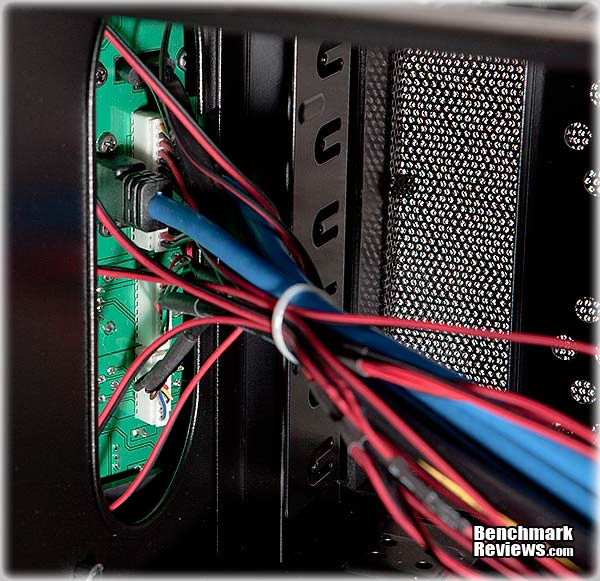
This is the front panel cable port we looked at on the top of the case, when Thor had his haircut. This is a nice, simple, easy to get at design.
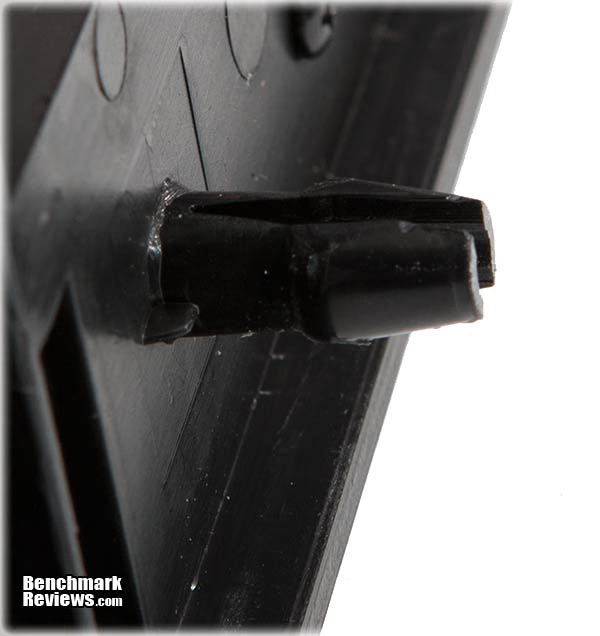
For our last image before we get into the detailed interior section, I wanted to show you what holds the screens on. They’re little metal tabs simply bent over the edge. I thought, “Uh oh, this is gonna allow the side vent holes to rattle (the three vents above the side 230mm fan). I picked up the panel and tapped it. Sure enough, rattle, rattle, rattle. Wow. That’s kind of a let down after doing so well. A rattle trap side panel. You could fix that easy enough by applying a little hot glue, but the good news is - you don’t need to. The case doesn’t rattle at all. It’s nice and quite. Anyway, here’s what they look like, and this is on the front panel mounting the filter, but this is how all the panels are mounted.

That’s it for the Internal Closer Look. Let’s get into the details now. So far I think Rosewill has done a decent job of balancing cost and quality. What was surprising is how well designed the internal aspects of the THOR V2 were, including how much space it has.
Detailed Interior Features
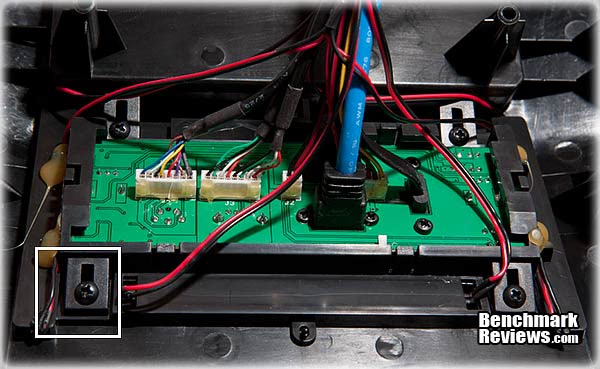
Let’s start with the PCB mount for the front panel. I’ve taken the top off and this is what the PCB mount looks like. It seems to me that you can unscrew four screws and remove the entire pcb. That’s really nice. It’s nice because my last case had one of the USB banks fail and there was no way to get into that case to fix it (or in my case, 'tard it up worse than it already was), unless you wanted to drill out rivets. Having better things to do than drill rivets on a computer case, this easy access design is refreshing.
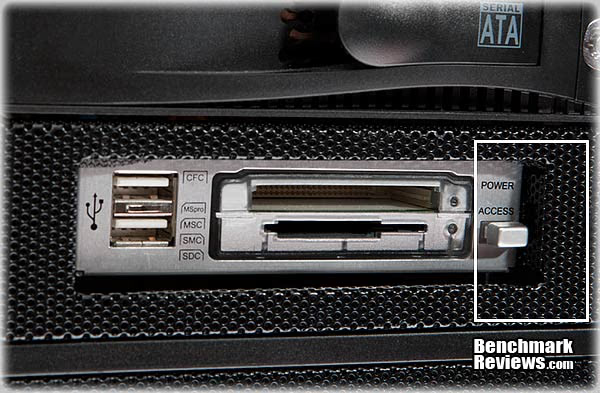
Another aspect I didn’t much care for was the card reader or accessory port mount. It’s where in the olden days a floppy drive would mount. First, you only get one cover. Second, the mount provided didn’t match the holes on my card reader. I ended up ditching the THOR’s mount and using regular 3.5” rail mounts. The problem then was that the card reader was too far recessed to look nice (but not so far that it was unusable). This bothered me so I called up a friend who uses the Cooler Master HAF X and asked him, for comparison, if he had any trouble.
You see, I had no trouble mounting the same card reader in my previous case, the Cooler Master 830. In a way, his explanation was comforting in that this isn’t a Rosewill design flaw. He reported he had the exact same problem with the HAF X and that his reader was recessed to a point he could not use the cover. He said he ended up using one of the full covers and just removing it when he needs to use his card reader. So here’s an image of the card reader mounted in the THOR V2 case. You can see it’s about 3/8" recessed. It’s not a deal breaker.
More inspiring were the steel hard drive carriages that slide in with a click and are easy to use. The drives mount sideways with the cable ends pointing to the cable storage side panel area behind the motherboard.
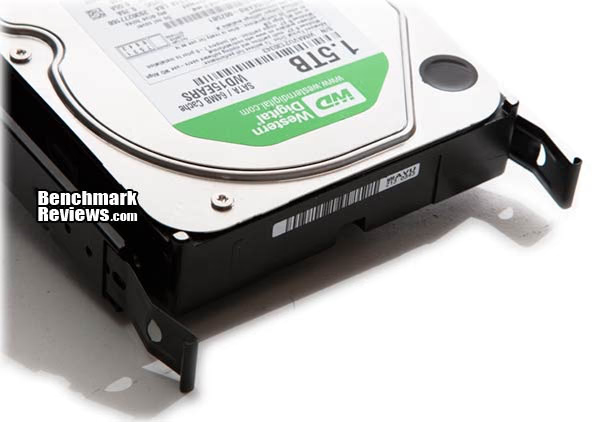
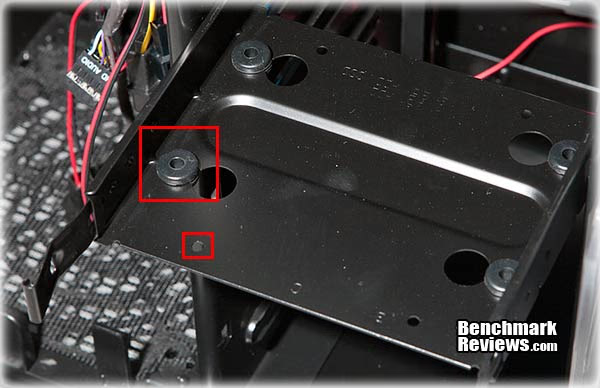
The drive carriages come with beefy, soft rubber dampers and mounting pins. As you can see, they mount from the bottom, which is standard. You can also see outlined the 2.5 inch mount.
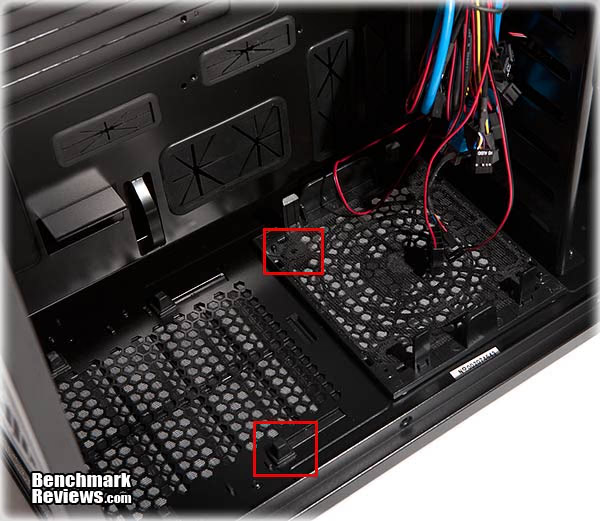
Looking at the bottom of the case, outlined are the rubber power supply rests and the bottom 140/120mm fan mount.
Let’s get to some measurements. As previously mentioned, this case is roomy. How roomy? Really roomy! Let’s check it out. First of all, Rosewill’s specifications tell us that you get a full 12.99” of video card space. Remember, since the drive bays are not removable, this means you get a true 12.99” of video card space. Could Rosewill be pulling or legs here? From my measurements, they’re right on. For comparison, the GTX 295 behemoth card you see is fully 10.5” long. So yeah, you get some space.
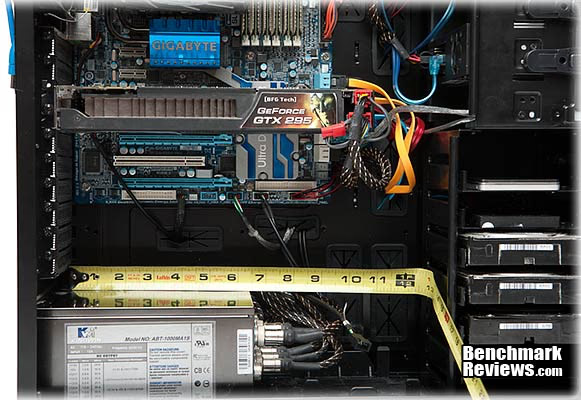
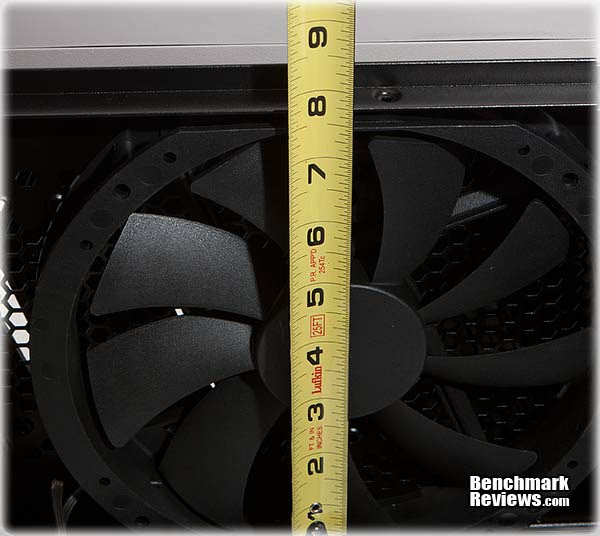
Next, I measured the CPU cooler space. The Rosewill specifications were mute on this measurement. Booyah! From the motherboard I measured almost 7.75” to the inside of the side panel.
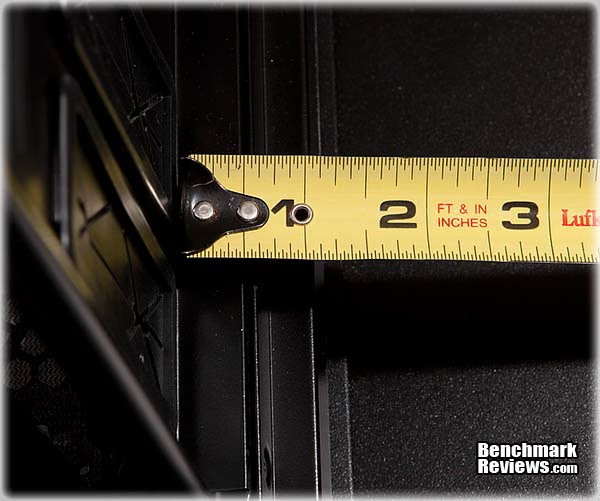
How about that side panel cable management? THOR V2 for the win! You get almost a full 1.125” between the motherboard tray and the side panel. I had no problems attaching the side panel with all of the cases’ cables, power supply cables, and accessory wires back there.
Whew! We did it. There you have the Rosewill THOR V2 full tower gaming case, piece by stinking piece, right? Let’s get over to the discussion chapters now and hash out what we just saw.
Rosewill THOR V2 Final Thoughts
For me, the THOR V2 is a good case. There are other more flamboyant or technically superior cases, but the THOR V2 is functionally well designed--no, excellently designed. I have no truck with its interior. It’s simply huge and was easy to work in. The fan set up and air flow are excellent, reducing multiple fan needs. The impressive aspect of this case is exactly what is unimpressive. It’s simple, and has almost no frills, but it's supremely functional, all the way to the front panel connectors. The interior is painted nicely and there are no sharp edges. The exterior dinosaur fins are a nice aesthetic touch too. That’s why I don’t have a lot to discuss here. It’s priced as a mid ranged case that delivers the goods for its intended audience.
Except for a few minor issues, such as the card reader's 3.5” adapter and its fit, which I’m told is similar in even the excellent Cooler Master HAF X, the LED switch being hard to disconnect and being on the bottom of the bezel instead of near the top, the wobbly fan control knobs, and the unusable front bay quick mounts, the case is simply excellent. It’s a simple design that's fully capable. I don’t think there is even a need for the 140mm back exhaust fan, since the case is so open and there are no obstruction between the CPU cooler and the top 230mm exhaust fan.
I’m sitting here right now thinking of anything I didn’t like, other than what I’ve mentioned, or anything else that needs to be said, and I can’t think of one thing. A round of applause for Rosewill maybe? Ah, one thing. I’m told that case design is moving away from the removable filter option to the small perforations we see on the front and side of cases, like the THOR V2. The exception would be the power supply filter. At first, I didn’t like that about the THOR V2. I wanted real filters, but even my old case used the small perforations to trap dust, which means you only need to vacuum off the front of the intakes, which avoids removable filter cleaning. So as long as the side perforations do their dust collecting job, I’m happy with that too.
So let me drop a bomb on you. This isn't Rosewill's design. Most companies selling cases don't make cases. They contract the work, and they cannibalize each other's designs. Ahhhhh yes, this is the case (get it) with the THOR V2, as the design has been out much loinger under the Aerocool brand name X Predator. What companies do is to change things like fan mounts, fan types, and case color combinations. Well, I guess we can't hit Rosewill too much on making a knock off. It's a jungle out there.
There is one other small oversight. When installing the back panel screws and the motherboard stand offs, I had trouble getting them to screw in. The back panel was a case of the holes not aligning as easily as they could, but then I’ve always had trouble with those stupid side panels.The stand offs were a completely different problem. At first I thought it was damaged motherboard tray stand off threads, but closer inspection revealed paint in about half of them. It’s really not a big deal, but it’s nice to know going in. Just finger them until they stop, and use a wrench to twist them down the rest of the way. Still, that’s a little sloppy. The positives greatly outweigh the negatives, which means I'm really liking this case. It also means that were done, except for the conclusion.
Rosewill THOR V2 Conclusion
This is Rosewill’s second version of the THOR series full tower gaming case. Improvements include a sturdier chassis and thumb screws for expansion cards. It also updates the front panel with four USB ports, instead of two: two USB 2 and two USB 3. The front panel also sports an eSATA port connected to the motherboard’s hard drive port. Moreover, the front panel also contains a built in fan controller with two control knobs controlling a total of six fans. It’s manual only, though. The obligatory audio ports are also there. The panel includes the THOR name in red LEDs and side panel LEDs that blink with hard drive activity. The LEDs are not at all over powering. This adds up to a front panel that is very nicely designed.
The top fins retract and expand with a manual switch allowing the top exhaust fan to move air out of the top of the case. The open close type top exhaust ports are a nice touch to a gaming case, and though some will say gimmicky, the design may be better off with the ability to close the vents when moving or working on the case. In other words, if you’re going to have top vents like these, a way to close them is nice.
The side panels are your basic push in the front, thumb screw the back design. I did have some trouble aligning the back panel screw holes, but that could just be my spastic approach to side panel installation. The front fan comes with a switchable red LED, with the switch mounted at the near bottom of the case. I’d have like to see this moved toward the top in future releases. This is neither a negative nor positive, but, rather, an observation.
You get a total of six front bays and six internal hard drive bays. The internal bays are not removable, nor is the motherboard tray, but there is so much space in this case, loading it was easy, even without the removable bay and tray. The hard drives get carriages that they screw to, and then the carriages slide into the side mounted drive bays. Expansion slots total ten.
Cable management is impressive with the THOR V2. You get almost a full 1.125” of cable space and a total of fourteen holes to push cables through. Cable management and space are two of the cases' high points. I ran every single power supply cable out of the back, shown above, and closed the panel with no binding. Impressive.
The case can take a total of five fans when utilizing the side 230mm fan, or eight fans using 140mm fans on the side instead of the 230mm fan; the THOR V2 comes with three 230mm fans and one 140mm fan installed. The fans are quite and move tons of air, and the 230mm fans are 800RPMs each. This case is a virtual wind tunnel, with no obstructions between the intake and exhaust fans, thanks to it’s cabling design, which is roomy and has plenty of large holes to run cables through.
Yep, I'm going to mention the very low noise, almost imperceptible scraping and bearing sound with the top and side 230mm fans (I didn't test the front one because I didn't hear any mechanical noise from that fan). As mentioned, it's more noticeable when the fans are horizontal, although the top 230mm is almost silent in the scraping and bearing noise department. When turning the fan by hand very slowly, and with my ear pressed against it, I can hear the ball bearings clicking. I don't like either of those things.
However, If you are a couple feet from the case in a room that is all but dead silent, you won't hear anything, and that includes the fans acoustic signature, which is all but imperceptible. You can hear air moving over the blades at full speed, but it's more of a rush sound than it is a blade sound, and the blade sound has a nice, low frequency hum to it ( similar to a Scythe Gentle Typhoon). Even at full speed, the noise is not distracting in the least, unlike some of those screamers with which we're familiar. One last blurb on the fans in this case. The 140mm fan in the rear gets it on. It's air moving ability is impressive and it's very quite.
In any event, I'm not really too happy about the mechanical noise Rosewill. You're not giving us any big design flare here, other than an admittedly well layed out interior and built in fan controller, so why not give us top shelf 230mm fans? On the other hand, if this is how all 230mm fans work on the acoustic side, then just disregard this analysis. I'd really appreciate any technical information on 230mm fans in this area, so if you are in the know, please post in the comments section. Most people are not going to notice these noise analysis points. Fan noise, both acoustical signature and mechanical noise, is one of my little excessive, compulsive deals, so I'm hyper sensitive to any noise from any fan. That's why I bought all Gentle Typhoon fans (their mechanical signature is nill, and even at 1800RPPMs, they have a nice, healthy low pitched hum to them). So take that into consideration too.
I’m not sure about the price on this one. It’s got some pretty stiff competition in its price range from cases that are a bit more refined, but then those cases don’t offer the space, cable routing, and excellent cooling this case does, nor a built in fan controller. If I hadn’t actually received this case and installed my system into it, I probably would have gone with something else, and that would have been a great loss. The THOR V2's utility factor is sky high, and, for me, that makes up for its lack of polish and flash bang elsewhere.
The THOR V2 is a big case, a wide and tall case, at almost 23”, and is a little over 9” wide. It’s made of some heavy steel too. The entire case weighs in at over 30lbs. It’s a muscular and aggressive looking design, but without being flamboyant. If you need a case that's huge inside, has a cool but not over-the-top design, and cools like a wind tunnel, the THOR V2 might just be on your list.
The Rosewill THOR V2 sells for $149.99 at Amazon and Newegg.
Pros:
+ Huge internal space/easy to work on
+ Great cable management
+ Sturdy
+ Simple in design
+ Excellent air flow
+ Three 230mm fans and one 140mm fan installed
+ Innovative top vents
+ Two USB 2.0 and two USB 3.0 front ports
+ eSATA front panel
+ Fan controllers front panel
+ Removable top and front bezels
+ Tons of expansion space for both hard drives and cards
Cons:
- Paint in some motherbaord tray stand off threads
- Card reader mount may not match your hardware
- Front bay tool-less clips don't work
- No way to pick up case, except from the bottom
- Heavy metal construction
- Clumsy front fan LED mount on bezel
- Wobbly fan speed knobs
Ratings:
- Performance: 9.00
- Appearance: 9.00
- Construction: 9.00
- Functionality: 10.00
- Value: 8.50
Final Score: 9.1 out of 10.
Excellence Achievement: Benchmark Reviews Golden Tachometer Award.
Benchmark Reviews invites you to leave constructive feedback below, or ask questions in our Discussion Forum.
Reader comments from the original article
34 comments were posted before commenting closed. They are preserved as written. Original avatars no longer resolve and are shown as a placeholder.
RE: Rosewill Thor 2 Full-Tower Computer Case Adam Permalink:
"So let me drop a bomb on you. This isn't Rosewill's design. Most companies selling cases don't make cases. They contract the work, and they cannibalize each other's designs." I presume Xigmatek does this as well then as the first thing that hit me was how it similar it looked (internally and externally) to the Utgard. Hell, even the name follows the same theme. Clearly improved in some ways yet possibly worse in others, not really sure if it justifies the considerably higher price though.
RE: RE: Rosewill Thor 2 Full-Tower Computer Case Steven Iglesias-Hearst Permalink:
Since the Utgard is a Midi-Tower case that only has 7 PCI expansion slots, the Thor 2 with it's 10 expansion slots and XL-ATX motherboard support I think that the higher price is easily justified. Good detailed review Doug, thanks for the interesting read.
RE: RE: RE: Rosewill Thor 2 Full-Tower Computer Case Adam Permalink:
Durp, well I just failed horribly, didn't even notice it was a full tower. That's what I get for skimming.
RE: RE: RE: Rosewill Thor 2 Full-Tower Computer Case Mike Permalink:
This case sucks in every way theres a lot cheaper cases out there that can out perform this case for cooling
RE: Rosewill Thor 2 Full-Tower Computer Case Doug Dallam Permalink:
I's still looking for 200/230mm fans. There isn't a lot of analytical information out there. I found an NZXT that has really good rating from buyers, and it has rifle bearings, but other than that, they all seem to be sleeved, which is horrible for horizontal mounts. Not only that, but I can't find any rifle bearing 230/20s with Red LEDs. Thank you Steven Iglesias-Hearst
Knock-off Jeremy Permalink:
This looks a lot like the cooler master HAF series cases. Mainly the HAF series full towers. Come on rosewill... you can do better than that. It may have got a high review just because it is practically the same as HAF, but much cheaper. I agree with Adam though. That is why I stick with the big dogs when it comes to cases. #1 cooler master, silverstone, corsair, and lian li. Other bigger companies such as antec and thermaltake I am not impressed by. Cheaply made and their designs are not well thought out. Just take a look at the lan boy air... what the hell were they thinking? lol it looks cool, but....
RE: Rosewill Thor 2 Full-Tower Computer Case Doug Dallam Permalink:
Jeremy, Thanks for your comments. It got the high review becasue I thought it was a well built and well thought out case. No doubt, the leaders are as you listed, and I tend to gravitate to them also--my last case was the CM Stacker 830 series. It looks to me like the THOR 2 design might have the advantage in the cable routing department, though, with more holes to run cables through. Overall, I was just impressed with its simple and very effective design.
RE: Rosewill Thor 2 Full-Tower Computer Case Mefist0 Permalink:
Damn, in Amerika its Rosewill. I have the same case, and its named Aerocool X-Predator.
RE: Rosewill Thor 2 Full-Tower Computer Case KSSyu Permalink:
This case looks quite impressive for the price. FYI Rosewill is part of Newegg along with ABS. Both of them rebrand items and sell them for at competitive price.
RE: Rosewill Thor 2 Full-Tower Computer Case Doug Dallam Permalink:
@ Mefist0 No, they are both different companies who use the same top and front snap on bezels. There are slight differences to each built. You can get either one in Amerika. @ KSSyu It's not a complete re-brand, although most companies re-brand at least some of the time. I think my Lite-on DVD writer is a Sony model. Rosewill is a subsidiary or New Egg, but I have no idea how much "control" Newegg has over Rosewill, if any. "Subsidiary" in business simply means some sort of interaction, ranging from full control, which requires, legally, 50% of shares in the company plus one to some sort of business agreement that does not control the sub. It is interesting though, since Newegg is a large and very successful company, it leads me to think that they would not want their name tarnished by offering products from "their" subsidiary that are inferior. Which leads me to believe, maybe, that Rosewill will continue to increase it's offerings, quality, and innovation in order to stay on the coat tails of Newegg. Maybe not?
Nice but.... GanjaSMK Permalink:
Nice review, well detailed and spec'd, but something about the 230mm fans remind me heavily of the type that Thermaltake uses. Having said that, might I mention that the Thermaltake 230mm fans are a complete joke. Very shoddy design, really low quality plastic, and easily burn out or shift speeds even though they're getting plenty of power and aren't on a fan control or controlled by a board. Are those 230mm fans 230x20 or 25? If they're 230x20 I'm willing to bet they just as bad as the Tt fans.........
RE: Rosewill Thor 2 Full-Tower Computer Case Farnsworth Worthington Permalink:
With that big X-shaped mesh on the side (and the Aerocool X-Predator heritage), I'm surprised they didn't just name it the "THOR X".
RE: Rosewill Thor 2 Full-Tower Computer Case Doug Dallam Permalink:
I'm almost sure they are 230x30. I'll have to take one out and measure it. Good question.
RE: Rosewill Thor 2 Full-Tower Computer Case Doug Dallam Permalink:
@ Farnsworth lol Or the Predwill XX, Rose edition. We might see more of this in the future. The top and front just simply pull off. It also means that the top and front can be modified easily and placed on another box.
doggrell3000 f doggrell Permalink:
i like the thor . i am usually attracted to clean simple exteriors like the corsair obsidian 650d . but the thor has a little more design flair and some originality without going overboard . plus its huge and has lots of big fans for the price . so i will definitely buy a thor for my next build later this year when 2011 socket mobos come out and the next generation of atom thin intels hit the market . i figure the thor will be selling for about $99.99 at some online discount store by december or january . all the other full twer cases by the top four brands start at 300 bucks for the same amount of space and no better fans included . rosewill will sell a ton of thors when the price drops in my humble opinion .
RE: doggrell3000 Louis E. Permalink:
Newegg has just cut the price from $150 to $130.(Amazon's still charging $150).
Definitely a good deal for the price GanjaSMK Permalink:
@ Doug I'd be interested to see when you do measure. But all aside the features, price, and design are fantastic - mostly all due to the selling price. I like this at it's price point just as much as I like the HAF 912 at it's price point. Hard to beat.
RE: Rosewill Thor 2 Full-Tower Computer Case Doug Dallam Permalink:
Rosewill emailed me today and said the fans were 230x30mm.
RE: Rosewill Thor 2 Full-Tower Computer Case Doug Dallam Permalink:
@ f doggrell Yeah I was thinking the same thing. It's such a utility minded case.
just bought this case Thor Permalink:
I just bought the case before reading this review and am very happy i bought it mainly because the case comes preinstalled with my legal name on it. thank you for this review, you sir have made my day!
RE: Rosewill THOR V2 Full-Tower Computer Case dlb Permalink:
Good review of a good case.... yeah, Rosewill is kind of like the Newegg "house brand" similar to how Rocketfish and Dynex are each kind of a BestBuy "house brand". It doesn't necessarily mean anything, but I wouldn't personally spend any money on any Rosewill, Dynex, or Rocketfish electronic products like power supplies, LCD/HDTV, etc. But something "inert" like a PC case is fine IMO, and I have used many Dynex blank CDs and DVDs (but I wouldn't drop $300 on a Dynex HDTV), but this is way off topic..... It was surprising to see how alike the THOR is to the Aerocool case mentioned above. The left side panel is different, but otherwise the cases are more-or-less the same. ...and... Doug- why would we be hatin' on the GTX295? That's a bad-ass card!! I ran a pair of 260s in SLI for a loooong time 'cuz they were so awesome! I'd still be running that SLI setup if the GTX2xx series had DX11 support.... so, no worries here... keep rockin' that 295- it's a beast!
RE: RE: Rosewill THOR V2 Full-Tower Computer Case Doug Dallam Permalink:
That's pretty much how I see Rosewill too. On the other hand, if they did a power supply and Johnny Guru reviewed it and gave it good marks, and had things other PS's didn't have, I wouldn't hesitate to buy one--since there are only several good PS manufactures anyway. Hatin' on my 295 because it isn't DX11 is exactly what I meant.--lol This card is one of the best ever made and it'll go down in Video Card History with the likes of the venerable 8800 Ultra and the 9800GTX2. The last time I checked comparisons, of which there weren't many, the 295 was still not beaten by any of the new cards when tested under DX10. It surely is a "beast."
RE: Rosewill THOR V2 Full-Tower Computer Case Doug Dallam Permalink:
I figured it would end up around 130.00. For that price, it's not just a good but excellent case. I'm really enjoying mine. I don't think I could ever go back to the 120/140mm designs, unless temps come down with smaller dyes so that you only need 2-3 of them. I'm never going to have 6-7 120mm fans in a case again, ever.
On sale at egg Gary Beebe Permalink:
129.99 with a $20.00 code make it $109.99 I bought one today, seems like a great deal!
RE: Rosewill THOR V2 Full-Tower Computer Case Doug Dallam Permalink:
Wow at that price this case is a great deal. I love mine still. Fans are still quite too--no odd sounds coming from the bearings. maybe the best case I've owned for utility and ease of use.
Black Friday Horrabin Permalink:
sale at the Egg, 99.00!! Doesn't say how long this lasts. I just ordered one based on this site review (among others). This is the best review on the web. Kudos to Doug on this one!
RE: Rosewill THOR V2 Full-Tower Computer Case Doug Dallam Permalink:
That is an incredible price for this case. If you're looking for a full tower, I don't think you can beat it at that price/quality.
Black Friday Deal Benjamin Permalink:
As of 5:30am this is still running at 99.00. Thank you for the thorough review as this and one other review factored into me buying in. The only thing I couldn't find was whether my H70 would have problems fitting but after seeing how enormous the space was inside I feel confident all will go well. I am coming from an Antec 900 which has served me excellently for many years but finally will see retirement due to new cable management needs (SSDs probably shouldn't be stacked haphazardly inside a case either, haha). Thanks again for the review, it was very helpful :)
RE: Rosewill THOR V2 Full-Tower Computer Case Sam Permalink:
Just ordered this case for 99.99...first computer I am building in quite awhile, and am definitely stoked! This seemed like the case with the best bang for the buck.
RE: Rosewill THOR V2 Full-Tower Computer Case Doug Dallam Permalink:
I swapped my Cooler Master Stacker 830 evo for this case, and haven't regretted it at all.
COpy Teixeira Permalink:
This case is a copy of the NOX HUMMER ....
RE: Rosewill THOR V2 Full-Tower Computer Case Doug Dallam Permalink:
This case has been knocked off at least three times that I know of. Each vendor has it's on flavor. the Thor v2 got excellent reviews across the board. One site did a cooling test with it comparing it to around 10 diff towers, including the HAF 922, and it out performed them all in 99% of the tests. It's a really simple case that has great utility. I'm glad I replaced my Stacker with it. I can run it with only the side and top 230mm fans, turn off the back 140mm and turn off the front, and the temp stays relatively the same. This is why I'm a believer in the 230/230 side to top configuration now. "The God of Cooling and Silence" AanadTech ##anandtech.com/show/4648/rosewill-thor-v2-the-god-of-cooling-and-silence/5
230x30 mm fans Luay Permalink:
Hey Doug I know this review has been published 6 months ago but to the Thor's credit, no case have yet to match it's layout, airflow and cable management. How goes the search for those fans? I only found Rosewill's $12 220x30mm and Rexus' $25 250x30 mm fans on Newegg. Why no 230x30mm? Will the 220x30mm fit and do the same job? And will the 250x30mm even fit? I know there are tons of forums and sites out there but no one really goes into cases as well as BMR. Thanks again :)
RE: Rosewill THOR V2 Full-Tower Computer Case Doug Dallam Permalink:
I'd get the Bifenix Pro series 230mm fan: ##frozencpu.com/products/14445/fan-935/BitFenix_Spectre_Pro _230mm_Fan_-_Blue_LED_BFF-LPRO-23030B-RP.html It will only take a bolt pattern the same as the 230/220mm sizes. I agree. This case is just really simplistic and is a cooling dream machine.