
CM Storm Sentinel Advance Laser Gaming Mouse
CM Storm Sentinel Advance Mouse Review
If you have ever looked into buying a powerful gaming or performance computer case, you have heard of Cooler Master. They are a household name in the power computing world. Now they are making a name for themselves with a new division focused on gaming. CM Storm has built up a lot of hype over their new mouse, the CM Storm Sentinel Advance Laser Gaming Mouse. It rocks the gaming mouse arena with a twin Doppler laser and up to 5600 dpi. Benchmark Reviews is bringing you the latest information about the CM Storm Sentinel Advance SGM-6000-KLLW1-GP. A lot of gaming mice have been hitting the market recently, and CM Storm is looking to pull into the forefront with a completely customizable eight button laser mouse.
Cooler Master has ventured into new territory with their release of the Sentinel Advance Laser Gaming Mouse. This is their first attempt at a gaming mouse, and it looks very promising. Benchmark Reviews is here to bring you up to speed on the latest addition to the computer gaming accessories market. The Sentinel Advance Gaming Mouse sports a twin Doppler laser sensor for the most precise accuracy available. The mouse sensitivity can be set up to 5600 DPI, the highest available. It has been argued that 5600 DPI is overkill, but we will discuss that issue later on in the review.
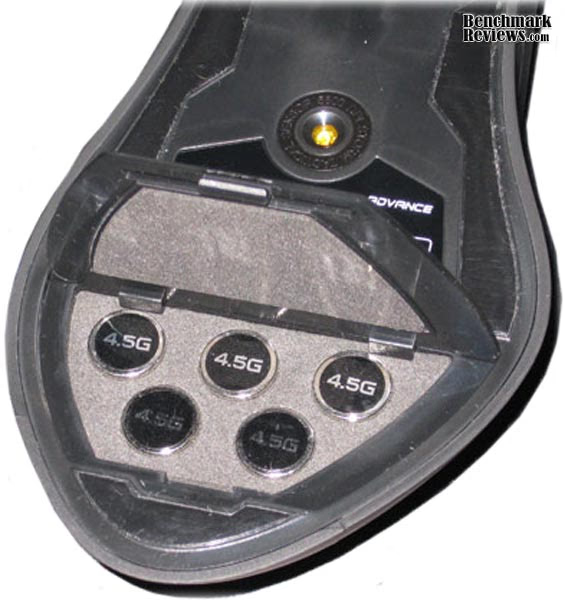
CM Storm has packaged the Sentinel Advance Laser Gaming Mouse with a highly customizable interface. This allows the user to build multiple profiles into the mouses 64kb memory bank so switching between users, or between games is effortless. You no longer have to reach into your mouse options in the windows control panel to reduce sensitivity after a gaming session. The Sentinel Advance Gaming Mouse also offers loads of customizability through the use of LEDs. With 8 colors to choose from and two different LED locations, the color scheme can appropriately reflect any variety of users or moods. You can even adjust the weight of the Sentinel Advance from 139 grams to 161.5 grams through the use of 4.5 gram weights included with the mouse.

Overall, it looks as though Cooler Master, through their entity focused on gaming, CM Storm, has provided the market with a whole new way of viewing the typical gaming mouse. The CM Storm Sentinel Advance Laser Gaming Mouse is pushing the envelope in most of the common aspects of a mouse. For those of you who currently thinking that a mouse is a mouse, continue reading. You are about to encounter the conversion of a previous skeptic in the realm of gaming accessories.
About CM Storm
Owning the PC trenches for almost two decades, Cooler Master's veterans have united with a new generation of eSport athletes and engineers to develop truly ground- breaking, gaming grade hardware for the global gaming revolution.
Through long-standing research programs, CM Storm is co-developed with the world's most prolific enthusiasts and eSport prodigies. Thanks to intensive testing and continuous feedback, the CM Storm division has been able to encompass and improve upon gamers' needs and their tough to handle scenarios.
By working directly with the gaming community we have injected our Storm Tactics into each and every product we make. Storm Tactics, with a heavily dedicated focus on Strength, Security and Control, will keep your most vital gear fortified and well tuned at all times.
CM Storm Mouse Features

Sentinel Advance Specifications
Closer Look: CM Storm Mouse
The CM Storm Sentinel Advance Laser Gaming Mouse is raising the bar for future gaming mice. The ergonomic design is pretty standard, but it is also very comfortable. The left side of the mouse has a slight ledge where your thumb rests. It makes for very comfortable navigation.
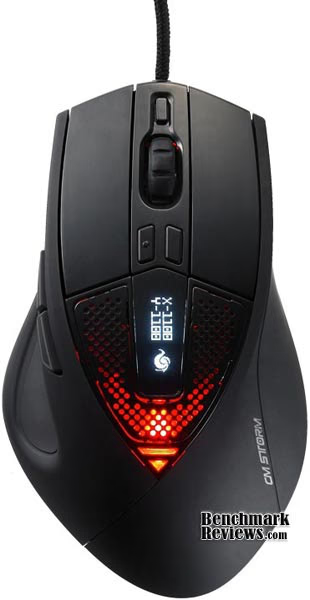
There are a total of 8 buttons that are, essentially, fully customizable. We will get into the how of the customization a little later. Let's look now at the location of the buttons. The left and right click buttons are pretty standard and make up the bulk of the forward end of the Sentinel Advance. The third button is located on the wheel of the mouse. Also a standard the location.

The next two buttons, 4 and 5, are located on the left side of the Sentinel Advance, just above where your thumb would rest. One nice thing about these two buttons is that they aren't place right under where your thumb rests. This makes accidentally clicking the button a lot more difficult. The bad part about these two buttons is that they are small and placed right next to each other. When trying to throw a grenade with button 4, I often hit button 5 by accident, which I have set to sprint. The two don't mix very well, as you can imagine.
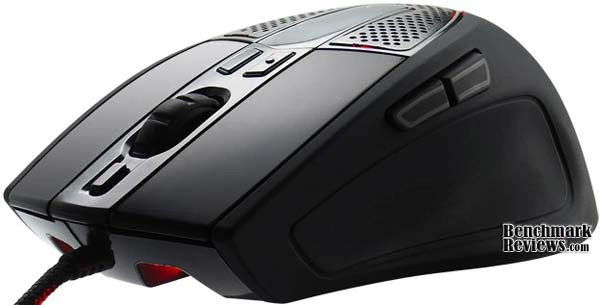
My favorite gaming mouse of all time, until now, has been the Microsoft 5 button IR mouse, now discontinued. I loved the fact that buttons 4 and 5 were placed on opposite sides of the mouse. I haven't found a comfortable mouse yet that recreates that environment. Of course, one drawback to the Microsoft mouse was that button 4 was directly under your thumb and I had often mis-clicks. The CM Storm Sentinel Advance Gaming Mouse doesn't give me a button on the right side of the mouse, but it more than makes up for that small deficiency in other areas.
The 6th and 7th buttons of the Sentinel Advance are located just above the scroll wheel, and below the OLED display. These two buttons come preset for the DPI settings. The left-most button increases the DPI to preset levels that can be adjusted in the GUI, and the right-most button decreases the levels. The preset DPI levels start at 1100, the next level is at 2600, then 3300, 4800, and 5600. We will discuss the DPI levels of the Sentinel Advance further a little later on.

The 8th button is located just below the scroll wheel and is preset to run through the profiles on the mouse. The Sentinel Advance Gaming Mouse can have up to 5 profiles loaded at a time. The profiles are controlled from the GUI and are saved on the mouse through a 64kb memory bank. This means the mouse, and the profiles, can be used on any computer, without having to install the drivers or the GUI first. The profiles are completely customizable. Each button can be programmed to a specific function. There are a lot of pre-made functions for the buttons that you can choose from in the GUI or you can design a macro for your own functions.
Sentinel Advance Detailed Features
Now let's get into the nitty gritty of this amazing new accessory. The CM Storm Sentinel Advance Laser Gaming Mouse, as was said, can be adjusted for up to 5600 DPI. DPI (dots per inch) is a representation of the actual pixel count per inch. So the DPI settings for the Sentinel Advance and any other mouse are really telling you how many pixels the mouse cursor will move per each inch that you move the mouse across the pad. Therefore, when the Sentinel Advance Gaming Mouse is set to 5600 DPI, the mouse cursor will move 5600 pixels across the screen for every inch you move the mouse across the pad.
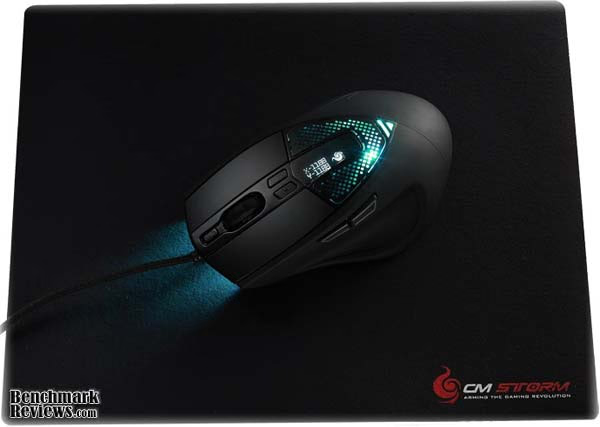
You can estimate what DPI settings you will need based off your resolution. If you are playing a first person based game at a resolution of 1024 X 768, then a complete 360 degree turn for your character will encompass about 1024 * 4 pixels, or 4096. Therefore, if you have set the Sentinel Advance to 5600 DPI, it will take less than an inch of movement on the mouse pad to turn your character 360 degrees. For gaming purposes, CM Storm suggests using a multiplier of 2.5 to determine your DPI settings. A resolution of 1024 X 768 would then need a DPI setting for the Sentinel Advance of about 2600. With a resolution of 2560 X 1600, the 5600 DPI setting would make sense. To make it even more accurate, you can adjust the DPI settings for the Sentinel Advance individually for the X and Y axis, allowing your mouse precision to be that much more accurate.
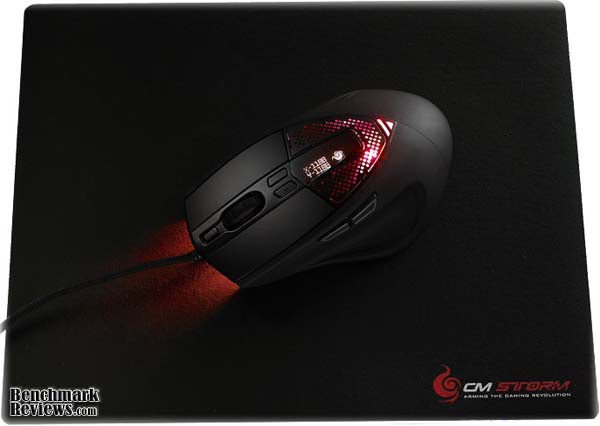
When using high DPI settings (above about 4000), you really need to be aware of your surface as well. A soft surface provided by the most common mouse pads, and even 100% rubber pads such as the CM Storm Battle Pad can react unpredictably to vibrations. With your DPI settings high, this can cause undesired results. Metal and alloy surfaces are recommended when using high DPI settings for the Sentinel Advance Laser Gaming Mouse.
To compliment our CM Storm Sentinel Advance Laser Gaming Mouse, Benchmark Reviews also received a CM Storm Battle Pad. This 100% rubber based large gaming pad was engineered with intense gaming in mind. The pad is 15.9 x 11.2 x 0.20 inches. That gives you plenty of room to maneuver. No more picking up the mouse because you have run off the edge of the mouse pad.
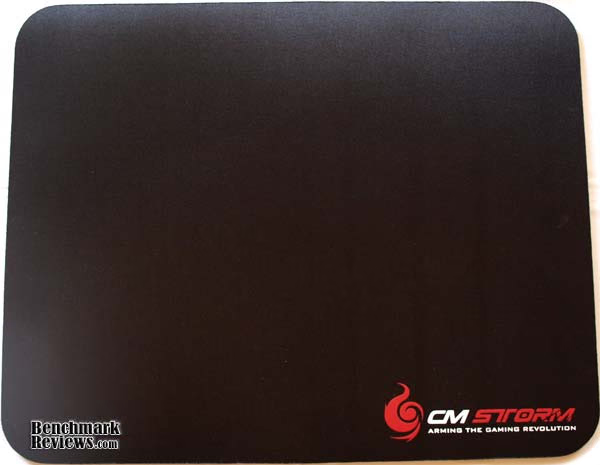
While the base is completely rubber, for better grip and stability from vibration, the top is made of solid black dura-cloth that was allegedly engineered for pin-point precision and highly responsive tracking. The Battle Pad is supposed to work equally as well with optical and laser sensor based mouses. In all reality, after using the CM Storm Battle Pad for a while now, I actual have noticed a difference in mouse performance. The surface is much smoother than my previous pad and works well with the Sentinel Advance Gaming Mouse for providing that delicate balance between slipping smoothly across the pad and stopping at the exact desired location.
CM Storm Sentinel Software
The GUI that comes with the software for the CM Storm Sentinel Advance Gaming Mouse is very helpful for managing the mouse settings. CM Storm recommends turning off the mouse controls in the windows control panel, such as "enhanced pointer precision", "snap to", and "mouse acceleration", and using the GUI only. I agree with this whole-heartedly. The sensitivity settings are much easier to fine tune in the GUI and although the pointer precision and snap to may be somewhat useful in Office or Windows based applications (it's arbitrary), they are useless in games.

The GUI also allows you to change profile settings, button functions, color schemes, and DPI settings. You can have up to 5 different profiles set up in the Sentinel Advance at any time. This becomes very useful when switching between programs. Though you may enjoy that high DPI setting for games, when using Office programs or even Photoshop, the high DPI settings can cause difficulties when trying to pinpoint a location on the screen. Switching to a different profile quickly alleviates that issue. You can also adjust the DPI without changing the profile by using the 6th and 7th buttons located above the scroll wheel as was mentioned earlier. Any changes you make outside the GUI will not be saved to your profile.
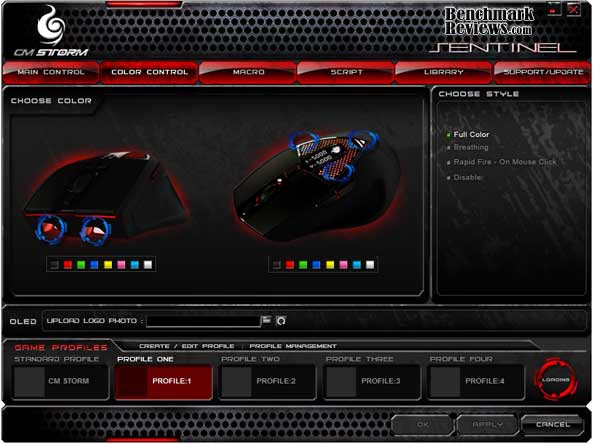
The profiles also house the color schemes and the OLED settings. Seven different color schemes are avialable, or the OLED color can be disabled completely for a black-out operation.
Just above the DPI read-out on the OLED display for the Sentinel Advance is a location where you can actually put your very own bitmap image. The image has to be in .bmp format and can't be larger than 32 x 32 pixels. Also, the image must be black and white only. Grayscale is not accepted. Still, it is a cool little feature added to the mouse.
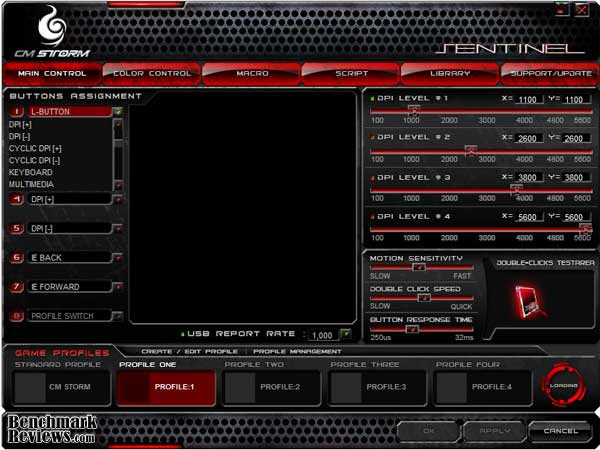
One final note on the GUI is that it provides you the opportunity to change the button presets any way you see fit. Don't like firing with your left mouse button? You don't have to. You can also set a button to rapid fire and have the color scheme blink like a disco light while you destroy your enemies. You can even build macros or complex key strings and assign them to the click of a button. I like to use alt+tab a lot while gaming or even just while multi-tasking. Using the CM Storm Sentinel Advance Laser Gaming Mouse, I can program one of the 8 buttons to alt+tab for me.

I can program the buttons to work with iTunes or RealPlayer as play, stop, next, previous, anything I want. The customizability offered by the CM Storm Sentinel Advance is nearly limitless. You can even customize the report rate on the USB input, from 100hz all the way up to 1000hz. You certainly won't have to worry about mouse lag again. I had my younger brother down for a visit not too long ago and he was fascinated that the macro program in the Sentinel Advance GUI would allow him to perform complex strings of keyboard and mouse commands with the click of a single button. His WoW dual-boxing days just got a lot easier.
CM Storm Mouse Final Thoughts
For years, I have searched for a gaming mouse I could really sink my teeth into. It's not that I do a lot of gaming, I just haven't been able to find a mouse that really fits my mold and meets my needs as a gamer. In fact, I have been using a standard Microsoft 5 button IR mouse for many years, having failed to find a comparable upgrade. Those days are over. I have met my match. The CM Storm Sentinel Advance Laser Gaming Mouse has everything I yearn for in a proper gaming accessory. It also has many things I would have never thought of. The Sentinel Advance has 8 programmable buttons, which is plenty for my needs. It also boasts an complex GUI that takes my control of the mouse to the next level. The color schemes on the Sentinel Advance are just down right cool, and with the weights in the bottom, I can customize it pretty much any way I like. The battle pad adds to the fun, giving enhanced precision and a broad playing surface.
I did have a few complaints about the mouse, and I will air those grievances here. I would have liked the 5th mouse button to be on the right side of the mouse, instead of right next to the 4th button. Also, the scroll wheel button on the Sentinel Advance requires quite a lot to actually depress it. It needs to be a little easier to click.
Sentinel Advance Conclusion
The CM Storm Sentinel Advance Gaming Mouse arrived in pretty impressive packaging. The box shows off the ergonomic design of the mouse and details some of the more prominent features. While the Sentinel Advance is presented very well, there is nothing over-the-top about the packaging that really makes it stand out from other gaming mice.
The Sentinel Advance Laser Gaming Mouse just looks cool. There really isn't another word for it. The design looks like a standard gaming mouse and the even the lighting is vaguely familiar, but the customizable color scheme allowing you to choose two different colors for the top and front of the mouse, the rapid fire LED effects, and the OLED display for the DPI settings and your personalized logo just puts the Sentinel Advance far above the standard gaming mouse as far as appearance is concerned.
CM Storm really thought about durability when making the Sentinel Advance Gaming Mouse. One of their key selling points is the fact that it is a driverless mouse and can be taken anywhere. Since mobility is such a feature, durability has to match. The cord for the Sentinel Advance is protected by nylon on top of plastic, making it much less likely to kink, bend, tear, or otherwise. The shell is tough as well. The occasional fall won't hurt the Sentinel Advance Gaming Mouse much.
If the appearance of the Sentinel Advance is outstanding, the functionality of this gaming mouse really takes the cake. The 8 programmable buttons would make it a formidable mouse alone, but the GUI that comes with the Sentinel Advance really sets the bar for gaming mouse functionality. With 5 profiles, DPI settings up to 5600 (able to be set individually by X and Y axis), keyboard functions, multi-media functions, and macros to let you program the mouse any way you want, there really is nothing on the market that touches the functionality of the CM Storm Sentinel Advance Laser Gaming Mouse right now.
As of December 2009 the Sentinel Advance Laser Gaming Mouse (model SGM-6000-KLLW1-GP) sells for $69.99 at NewEgg. With all that this mouse brings to the table, it will undoubtedly fall on the more expensive side of gaming mice. This is to be expected, and even so, the Sentinel Advance will be well worth the cost. We will have to see how CM Storm prices the mouse to get a good estimate of its value.
Pros:
+ 8 Programmable Buttons
+ Multi-Color LED Customizations
+ OLED Display for DPI and Personal Logo
+ Customizable Weight from 139 to 161.5 grams
+ Up to 5 Different Profiles
+ Macro Editor for Complete Control of Functions
+ Keyboard and Multi-Media Built-In Functions
+ 64kb Memory Bank for Driverless Use
Cons:
- Scroll Wheel button is too hard to push
- 4th and 5th buttons are too close together
Ratings:
-
Presentation: 8.00
-
Appearance: 9.50
-
Construction: 8.50
-
Functionality: 10.00
-
Value: ???
Final Score: 9.0 out of 10.
Excellence Achievement: Benchmark Reviews Golden Tachometer Award.
Questions? Comments? Benchmark Reviews really wants your feedback. We invite you to leave your remarks in our Discussion Forum.
Reader comments from the original article
1 comment were posted before commenting closed. They are preserved as written. Original avatars no longer resolve and are shown as a placeholder.
No Love for Lefties Mike Permalink:
Wish they'd produce a high-end blue tooth gaming mouse for Left handers