
Logitech G600 MMO Gaming Mouse
Logitech G600 MMO Gaming Mouse Review
Manufacturer: Logitech International
Product Name: G600 MMO Gaming Mouse
Model Number: 910-002864
UPC: 097855088055
Price As Tested: $61.99 (Amazon) /$67.99 (Newegg)
Full Disclosure: The product sample used in this article has been provided by Logitech.
Gamers are demanding people to create equipment for, and who can blame them. When you spend hours a day with your hardware, and other people are depending on your hardware to hold up, you have certain expectations from it. When looking for a mouse, one considers many factors, including size, weight, customization, durability, and the list goes on. Logitech has aimed its G600 MMO Gaming Mouse towards gamers looking for a high-quality mouse with lots of features, and it definitely shows. With 20 programmable buttons, a maximum DPI of 8200, the G-Shift feature, a lightweight body, and many other features, this mouse provides a balance between functionality and fun. If you've ever found yourself looking for a mouse with a good balance between functionality, durability and cool features, then take a look at this.
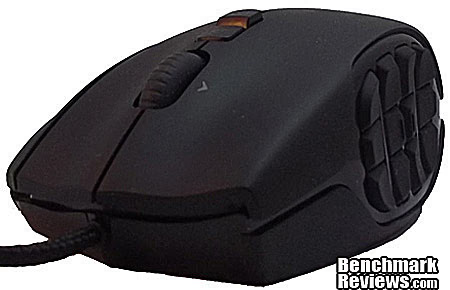
Logitech has an established name in the computer peripheral industry, and continue to release quality hardware for many different uses and price points. From the entry-level computer user, to more gaming-centric users, Logitech's hardware has a history of being durable, easy to use, and having some semblance of a "cool" factor. All of the above means little though, when it comes to performance, and here at Benchmark Reviews, we will put this mouse through its paces. Or scrolls. Whichever applies.
Features & Specifications
-
20 MMO-Tuned Buttons
-
Intuitive Thumb Panel Design
-
G-Shift and DPI Shift
-
Gaming Grade Construction
-
200-8200 DPI Sensor
-
11.25 Megapixels/second image processing
-
Max acceleration: 30G
-
USB Report Rate: 1000 reports/second
-
Buttons (L/R/T): 20 million clicks
-
Feet: 250 km
-
Weight: 133 grams (without cable)
-
6.5 foot braided USB cable
Closer Look: Logitech G600
In this section, we will take a closer look at the Logitech G600 MMO Gaming Mouse, and discuss its main features.
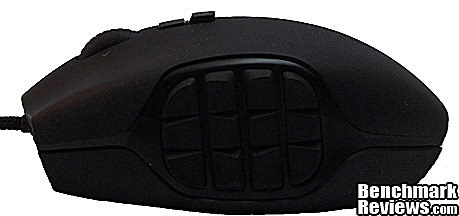
The G600 is definitely built with right-handed gamers in mind. The surface of the mouse is covered with a soft-feel rubber-like coating, which is actually quite pleasant. The buttons have a pleasant feel to them, they're not too stiff, but still stiff enough that accidental button presses are not something I was worried about. The twelve buttons on the left hand side in the above picture light up, with custom RGB color choices.

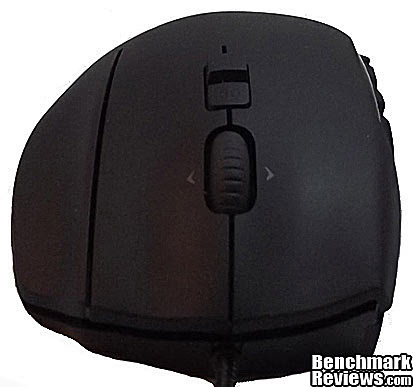
From the right side, the mouse looks a little odd. It has an extra button on the top, to the right of the right-click button. This is the G-Shift button, one of the main features of this mouse. G-Shift allows you to effectively have two sets of keybindings at once. I will explain this in further detail later in the article.
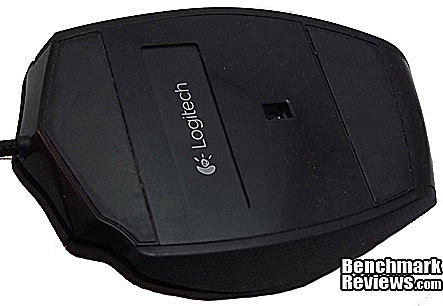
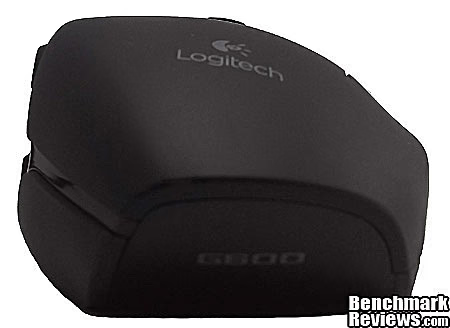
The low-friction feet on the bottom of this mouse are a nice addition, and the bottom is a high-gloss black finish. It works well across multitudes of surfaces, and has yet to lose tracking consistency.
Logitech G600 Detailed Features
In this section we will take a more detailed look at the features offered by the Logitech G600 MMO Gaming Mouse.
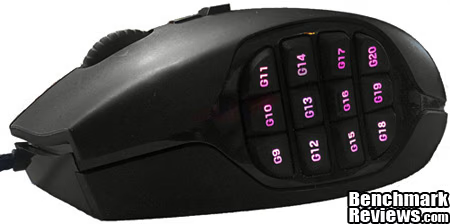
Unlike most gaming mice, the Logitech G600 does not come with umpteen LED lights. The thumb panel is the only thing that lights up, and it does offer custom RGB lighting. The lighting system also offers profile saved colors, as well as game-specified color profiles.
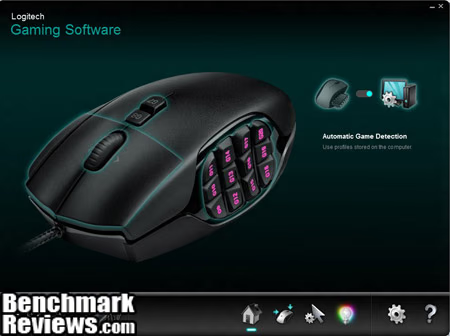
The Logitech mouse configuration software offers a automatic game detection mode. So far, I haven't found much use for it since I only really need the buttons for World of Warcraft, but if you would be switching games frequently, that would be a nice feature to have.
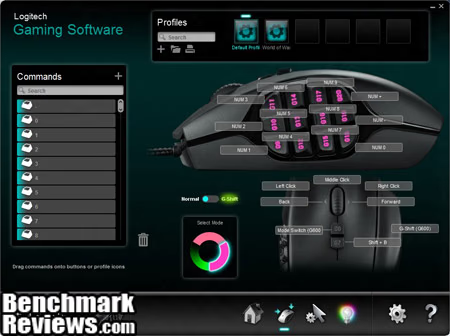
The software is very easy to use for binding keys, and provides suggestions for the keys. This is one of the easier pieces of software I've used to specify keys, and it's pretty self-explanatory. The mouse offers three on-board profiles, each with their own color. As you can see, I like pink. A really neat feature here is the G-Shift feature. If you look in the picture above and see where I have bound the twelve side buttons to num1 through num0, if I then selected G-Shift, while in game, it would modify the bindings of those buttons to be control+num1 through control+num0 (or however you would configure it). This only applies while holding the G-Shift button, and gives one an option to have a multitude of keybinds that you could not otherwise easily have.
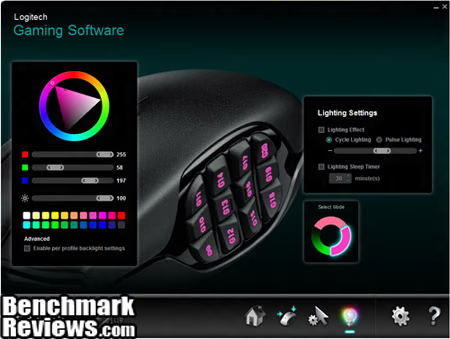
The lighting settings pane offers some pre-defined colors, as well as RGB sliders, a brightness slider, and a color bar. You can cycle lighting patterns, pulse them, have them go to sleep, or just be on. Definitely fun to play with, I think I spent more time here fine-tuning the colors. The DPI sensitivity is very easy to use as well, and offers you five different on-board DPI memory settings. I will say, however, that 8200 DPI was far too fast for me off the bat, and I'm still working my way up to it.
Testing & Results
Testing Methodology
Realistically, mice come down to personal observation, since there is no real benchmark test to report performance. I have used the Logitech G600 as my only mouse for a few weeks now, in various applications such as web surfing, photo editing, and different types of games. I pulled out a few different surfaces to test the Logitech G600 MMO Gaming Mouse on to test the sensor tracking, and played with different profiles to test ease of use.
Test Software
-
Adobe Photoshop
-
Firefox, Google Chrome, and Internet Explorer
-
OpenOffice
-
EVE Online
-
World of Warcraft (More info on that coming)
-
Assorted flash and browser based games
-
Portal
Results
The Logitech G600 MMO Gaming Mouse is definitely an easy mouse to get used to. As with all gaming mouse, the sensitivity can take a bit of getting used to, just keep ramping up your DPI settings as you get mor comfortable with it, and you'll get used to it quickly. Seasoned gamers should not notice much of an issue, but that 8200 DPI is fast until you get used to it.
The main focus of this mouse for me is World of Warcraft, if you don't play the game, or aren't interested, skip over this paragraph. I play a discipline priest, as a core healer in a 10 man raid group, and noticed a very large difference in my healing after getting used to this mouse. Having the G-Shift functionality, mixed with the 12 buttons on the left side are an absolute blessing for me with healing, especially since I use mouseover macros. I went from scrounging for enough keys on a mouse to bind to running out of abilities to bind to buttons. Definitely worth the buy for a healer in that game, and I enjoyed it as well on my tanking characters, but it really shines for healers.
For other gamers, the speed and control of the mouse across multitudes of surfaces is definitely a plus. This is definitely a gaming centric mouse though, and lacking a mouse button four and five threw me off in Internet navigation for awhile, I just needed to get used to where I had bound that functionality.
The buttons on the side are rather close together, so if you have large, flat fingers, this may pose a bit of a problem. Really it's just a bit more of getting used to it, the buttons themselves are hard to press accidentally and have plenty of tactile feedback. On the flip side, the buttons being close together means that there's much less travel time for your fingers, and can cause a noticeable increase in performance (I know it did for me).
MMO Gaming Mouse Final Thoughts
The G600 is an excellent entry from Logitech into the gaming mouse line, and lives up to its claims. Gaming performance for it is excellent, and it does what is needed in other software applications. The high sensitivity takes some getting used to, but it definitely helps navigate a dual 22" monitor setup. My favorite feature on this mouse has got to be G-Shift. Or all the buttons. I'm not sure which one wins there.
Logitech G600 Conclusion
In this section, I will write a brief summary on the Performance, Appearance, Construction, Functionality and Value. These are my personal views, which allow me to give the Logitech G600 MMO Gaming Mouse a rating out of 10. A high score does not necessarily mean that it is better than a similar product, nor does a low score mean that it is worse. I would urge you to do your research, read this review, if you haven't already, and make a decision based on that.
For performance, the G600 excels. With good tactile feedback across a 20-button platform, as well as an 8200 DPI sensor and the G-Shift function, performance is one thing this mouse excels at.
The G600 has a unique appearance, it's definitely not often that you see a mouse with 12 buttons on one side, not to mention a left click, right click, and then another button on the top. A flat black finish on top means no fingerprints (the bane of every shiny-mouse enthusiast), and the finish is very durable. It held up well through multiple rounds of disinfecting, as well as the "drop" test.
The Logitech G600 MMO mouse is very durable, as proven by Logitech's own claim of 20 million clicks. The mouse is light, although it doesn't have a cheap feel, and feels like it may last a while through the rigors of MMO gaming. The sheathing on the mouse cord is well attached, and also seems very durable.
The functionality of this mouse for an MMO gamer simply cannot be beat. An FPS gamer may not see the same appeal to it, but the laser sensor is definitely appealing from an FPS perspective. It is definitely a unique mouse, and had all the features that I, as a demanding MMO player, was looking for.
Value for me is trumped by functionality, but for the budget-conscious, this mouse also holds an appeal. For $61.99 At Amazon and $67.99 at Newegg, the Logitech G600 MMO mouse is moderately priced, but the features offered by this mouse make it worth every penny in my opinion.
Pros:
+ A grand total of 72 possible keybinds saved in mouse memory
+ Comfortable and easy to use
+ G-Shift Function
+ 8200 DPI Sensor
+ Easy to use software
+ On-The-Fly Profile Switching
Cons:
- Buttons are placed a little close together
- Small body, plus for some, con for others
- Less appeal to FPS gamers
Ratings:
-
Performance: 9.75
-
Appearance: 9.50
-
Construction: 9.50
-
Functionality: 10.0
-
Value: 8.00
Final Score: 9.35 out of 10.
Excellence Achievement: Benchmark Reviews Golden Tachometer Award.
Benchmark Reviews invites you to leave constructive feedback below, or ask questions in our Discussion Forum.
Reader comments from the original article
1 comment were posted before commenting closed. They are preserved as written. Original avatars no longer resolve and are shown as a placeholder.
RE: Logitech G600 MMO Gaming Mouse Doug Permalink:
Ami, I'm looking to replace my Microsoft X8 gaming mouse and I've been looking at Logitech. One thing that other mice have that I can't stand is that the side buttons are too far behind where your thumb naturally sits. Some mice set the side buttons too far to the back end of the mouse, making the very back buttons almost impossible to use on the fly. How are the side buttons set up in that respect?