
Lian-Li LanCool PC-K58W Computer Case
LianLi LanCool PC-K58W Case Review
LanCool's line of Dragon Lord computer cases offer two great advantages over many competitors. The first is the amount of customization they provide in choosing a stock model. Rather than simply providing one high end case and one low end case they provide options for several intermediate levels. The second advantage offered by LanCool is their tool-less designs. Many tool-less designs of the past have suffered from compatibility or usability problems. LanCool uses a fresh approach to alleviate the problems of the past while still providing the option to fall back on conventional installation. Benchmark Reviews recently reviewed the PC-K56W which offers snap-in hard drive assemblies. We now bring you the PC-K58W which extends the tool-less design, offers more space, more features, and more room to upgrade.
Perhaps you have used a case with tool-less hardware installation. My first experience was a PCI bar that held all PCI cards in place at once. The idea was simple, easy, and terribly flawed. All PCI cards are not created equal. The inserts often had subtle size variations that made it difficult to get the card into place, or sometimes to keep the card in place long enough to screw it down. The single PCI bar required wrangling all cards simultaneously which often proved impossible. I have similar experiences with other tool-less designs. One particularly frustrating mechanism was a spring-loaded hard drive clamp. Simply push a button and slide in the hard drive. I quickly found that some of my drives would either not lock firmly or could not be released.
Incompatibilty is a result of an inability to predict every possible design. As will be shown, the PC-K58W uses new designs to avoid these pitfalls and allows for conventional installation using screws in all their tool-less hardware.
LanCool PC-K58W Features
-
Tool-Free Design
-
Large Frontal Fan
-
Rear Exhaust Fan
-
Passive Air Filtration
-
Transparent Side Window
-
Removable Top and Sides
-
Internal Cable Management
-
Bottom Mounted PSU
-
Water Cooling Ports
PC-K58W Specifications
| Model | PC-K58W |
|---|---|
| Case Type | Advance Mid Tower |
| Dimensions | 214mm x 496mm x 498 mm (W, H, D) |
| Front bezel Material | Plastic |
| Color | Black |
| Side Panel | CECC Steel Side panel with Transparent Window |
| Body Material | CECC Steel |
| Net Weight | 9.22kg |
| 5.25" drive bay (External) | 5 |
| 3.5" drive bay (External) | 0 |
| 3.5" drive bay (Internal) | 4 |
| Expansion Slot | 8 |
| Motherboard | ATX / M-ATX |
| System Fan (Front) | 140mm Fan x 1 (1000RPM) |
| System Fan (Top) | |
| System Fan (Rear) | 120mm Fan x 1 (1500RPM) |
| I/O Ports | USB2.0 x 2 / HD+AC97 Audio |
About Lian Li: LanCool
"Better idea, innovation for better life experience"
LanCool was founded with the target of providing products with better thermal solutions, more style, and more user friendliness. To provide the best IT products, LanCool headquarters are located in Taiwan, to provide high quality products and service. Our products were designed and manufactured in Taiwan.
Our Business Philosophy:
QUALITY, INNOVATION, SPEED & SERVICE
Quality: Quality is the most key element of our product, we have put a lot of effect into detail, to make sure our product is finished in high quality standard.
Innovation: LanCool's ID and R&D teams spent a lot of time to design and create new products with the latest technology, and use it in our product to ensure our product is up to date.
Speed:Speed is LanCool's advantage. Our in-house ID and R&D team, and professional factories, can turn concept into reality in very short time.
Service: Customer satisfaction is very important to us. To achieve that, LanCool will respond customer's request within one working day, and provide solution no more than three working days.
Future Prospects
Our goal is to provide complete product lines as total service, from cases to power supplies, keyboards to mice. To satisfy our clients, we will continue to devote resources to developing more advanced technologies, retaining a spirit of innovation. It will also continue to refine its operations, enhancing efficiency and making the company even more responsive to customer needs and market changes as they arise, efficient, and providing even better service to customers.
LanCool will put all it's efforts to retain its promise to customers to be their best partner.
Closer Look: PC-K58W Exterior
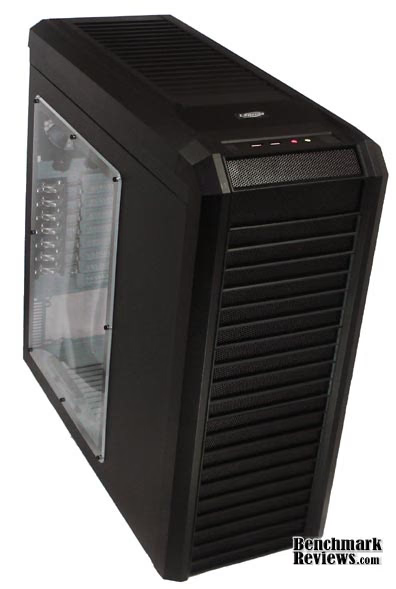
My first impression of the case is that it would fit well in a high-tech martial arts movie. My next impression is how large the case is for a mid-tower. There are more bays than I have ever used, but I think I might try to fill them.
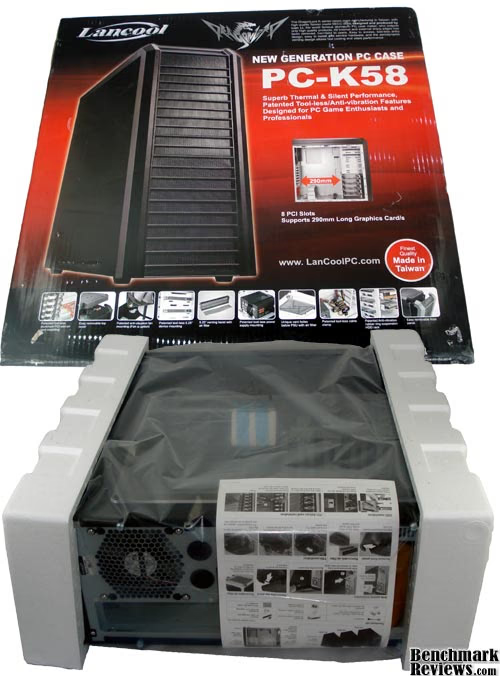
The packaging was standard fare with a box of components taped inside for transport. Also included was one sheet of close-up images and cryptic text supposedly describing how to use the various features all the cases in the Dragon Lord series. The English was difficult to understand and the images were not much help. Luckily most of the features can be learned with a little tinkering. Or just keep reading and I'll tell you how to use them.
The outside of the case is nice. All of the Dragon Lord cases come in jet black with the horizontal bars in front reminiscent of the lamellar designs used in ancient armors. The structural pieces are all metal and the detailing is plastic. I really like the look, but I had the hardest time keeping the case clean of fingerprints.
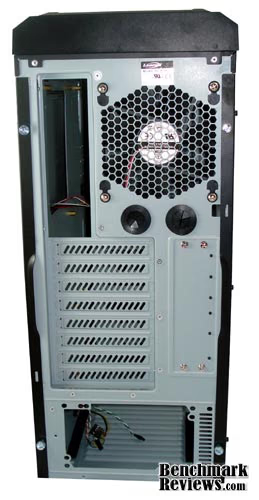
The case is quite wide allowing room for a fan above the motherboard ports and a strange blank area over the PCI slots. Two thumbscrews on each side allow give access to the interior.
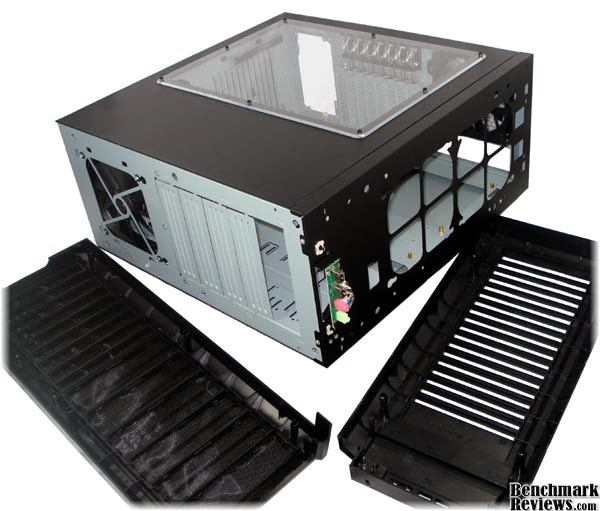
Both the front and top can be removed to give access to the fans, bays and USB and audio controls. With the top removed we can see allowance for two additional fans. This is one upgrade provided by the PC-K58 and higher platforms.
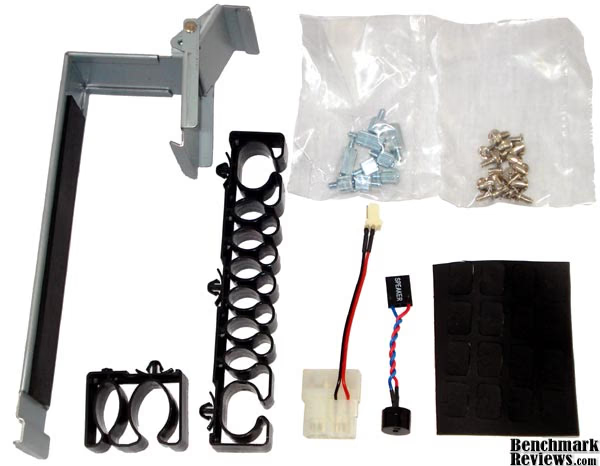
A little box taped inside includes various mounting fixtures. The power supply clamp, two cable wranglers, a power cable adapter, a PC "speaker', rubber mounting pads, thumbscrews and normal computer screws. The rubber pads provide a buffer between your drives and the metal mounting surfaces.
Detailed Exterior Features
The PC-K58W uses the same front inserts as the PC-K56W. There are enough inserts to allow up to five 5.25" drives to be mounted for external access.
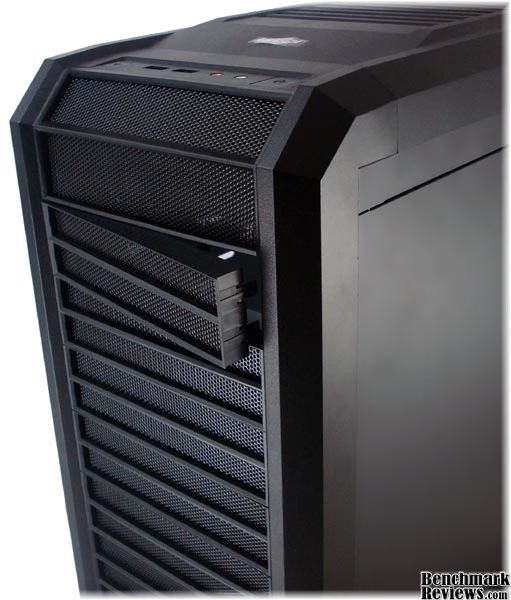
These inserts are hearty. I've had too many cases with flimsy inserts that would break the first time I removed them. Each insert has 4 tabs keeping it in place. I actually had to pry them out the first time. The inserts are also perforated allowing ample air-flow should a negative case pressure arise. Finally, as with the PC-K56W the inside is lined with small filters to keep dust out of the case.
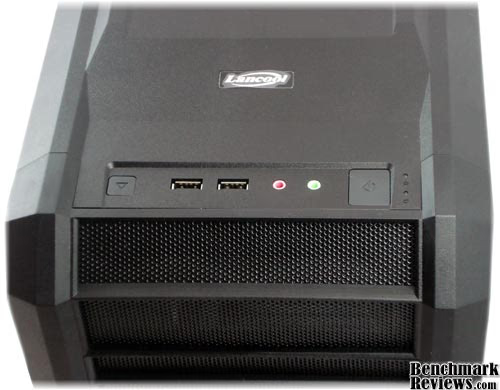
In this model the USB and audio controls are oriented upwards. Located on the same panel are the power and reset buttons. At first I was annoyed by the unusual upward orientation, but as I used the ports i realized that I typically run my cables straight up rather than to the side. This is because I always position my case on the floor or inside a desk. In my case this will help keep my cables from bending and should prolong their life. I have one speaker jack permanently bent to a right angle. However I hate having the reset and power buttons right next to frequently used jacks. It is only a matter of time before I bump the power switch and send my PC into hibernate while frantically trying to plug in my headphones in the middle of a game.
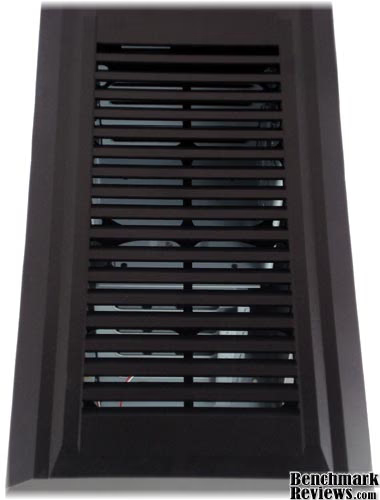
The picture above is a slanted picture of the top panel showing the ample air flow provided by the louvers.
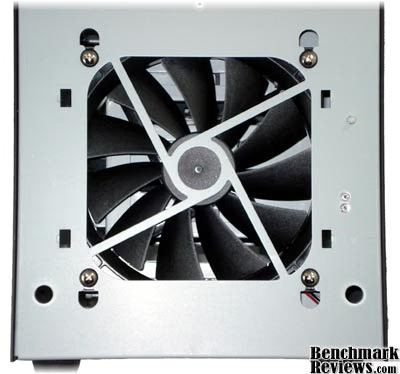
Here's a shot of the front fan. The PC-K58W fan is upgraded from 120mm to 140mm. The round holes are where the front cover mounts. The square holes were empty but presumably provide mounting points for a passive filter. This is probably included in higher models of the Dragon Lord series.
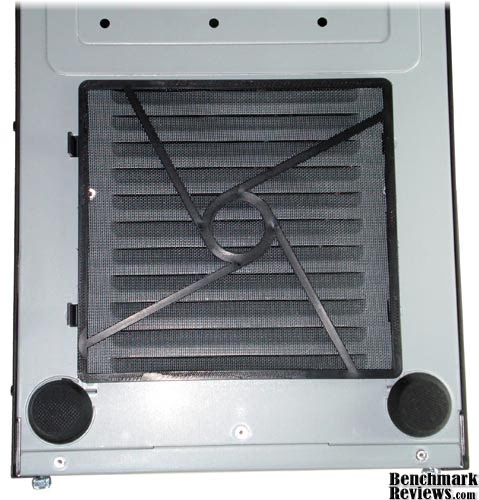
Above is an example of the filter that could optionally be mounted on the front fan. In this case the filter is mounted on the bottom of the case outside the PSU intake. This resolves one complaint we had with the PC-K56W. Also shown are the large rubber feet. Though they appear to be glued on they are quite solid and sturdy.
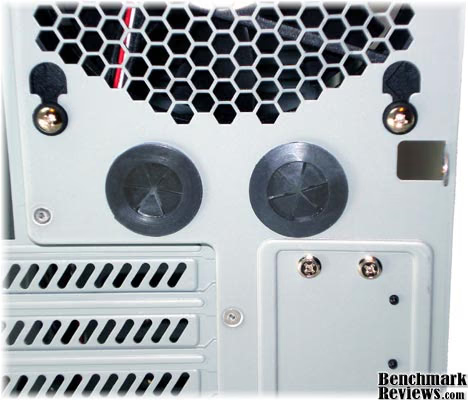
For the water-cooling enthusiast, two ports are provided on the back of the case right below the exhaust fan. The ports are lined with rubber grommets to keep the water lines from rubbing against the metal case.
Closer Look: PC-K58W Interior
Working inside of the PC-K58W is like stepping into a truck after driving a compact car. Too many cases try to cram an average number of bays into a tiny footprint. Having room for cables is not much of an issue anymore now that flat IDE cables are bygone. I frequently get into my case and tend to mix, match, swap and upgrade my components. I almost always have cuts on my fingers or knuckles from stuffing my hands into crammed spaces.
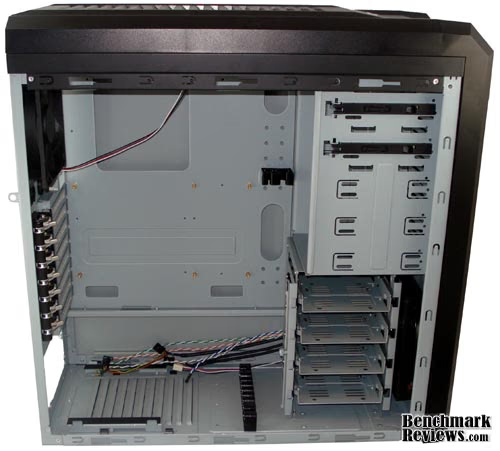
In this case I have extra room for running cables, fitting large connectors, cards and I'm able to do it without contorting my hands. While I enjoy the extra space I'm a little confused by the choice to have five 5.25" bays and only 4 3.5" bays. Most drives now are of the smaller variety, so why do I need so many large bays? Perhaps LanCool is trying to offer compatibility. I dub this choice a true waste of space. They probably could have traded one 5.25" bay for two 3.5" bays!
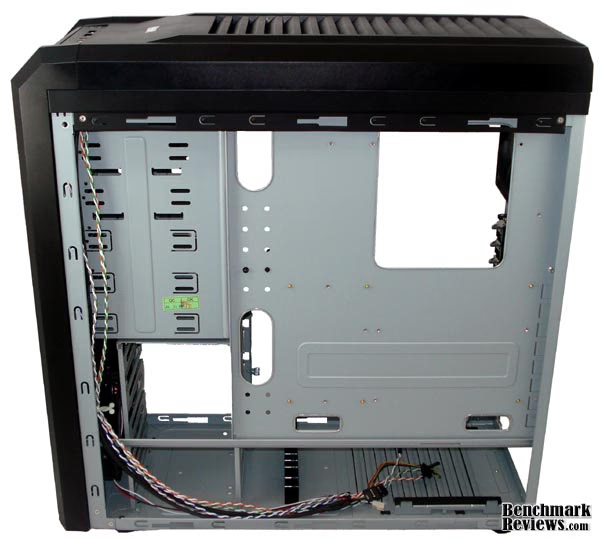
As a modder and a tinkerer I love having access to the underside of the motherboard. Sometimes I just need to recover a dropped screw, but there are rare instances that I actually need to access something from the bottom side of a motherboard. If you plan to mount optical drives using conventional screws you'll probably need to use this panel. Also, if you are the type to use every bay in your case then you will want extra access to your multitude of cables. Finally, back access makes advanced CPU cooler installation easier.
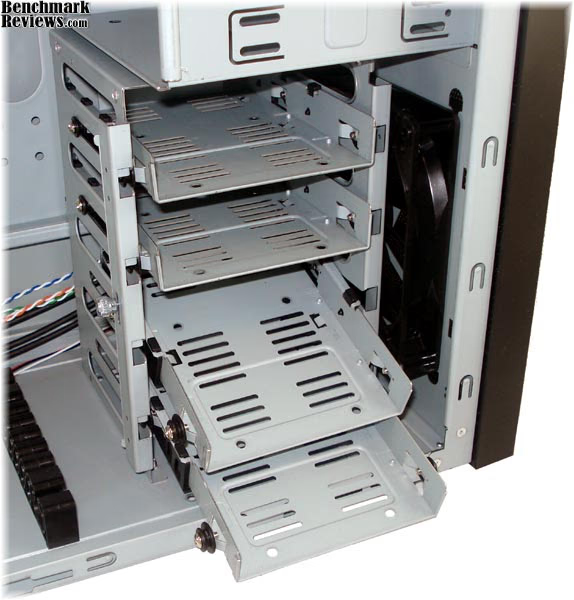
The tool-less 3.5" hard drive system involves 4 removable trays that are kept in place by a sliding bar. The bar can be locked open or closed using a thumb-screw at left. Each tray slides into the cage on rubber grommets that make alignment easy.
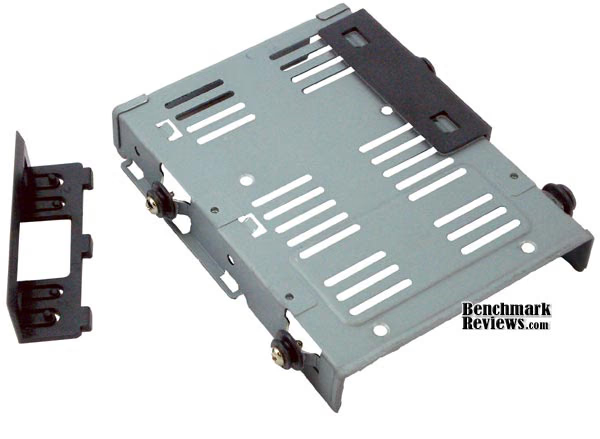
To install a drive, plastic clips must first be removed from the sides of the tray. The clips have plastic nubs that slide into the screw holes on the sides of the drive. Metal tabs on the bottom of the tray use pressure to keep the plastic clips locked into place.
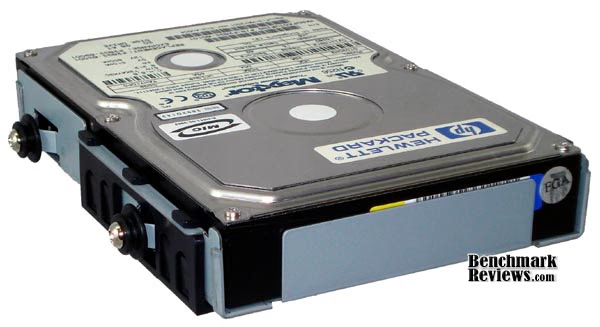
I mounted a couple drives and found the hold to be very secure. When I removed the drives I noticed flecks of plastic that sheared off at the interface between the metal tabs and plastic clips. How many drive swaps can I perform before the metal tabs shear off so much plastic that the clips won't stay in place? Should that happen screws can be used to mount the drive and replacement clips can probably be purchased. If you're a nerd like me you may want to use odd-sized drives in your case. I have sometimes mounted laptop drives in my case for file swapping. These trays include holes on the bottom that can be used for just such purposes.
Detailed Interior Features
While the PC-K58W offers five external bays only two of them are tool-less, and only the tool-less design only works for typical 5.25" drives or adapters. The mechanism used to hold the drives is similar in principle to the 3.5" bays.
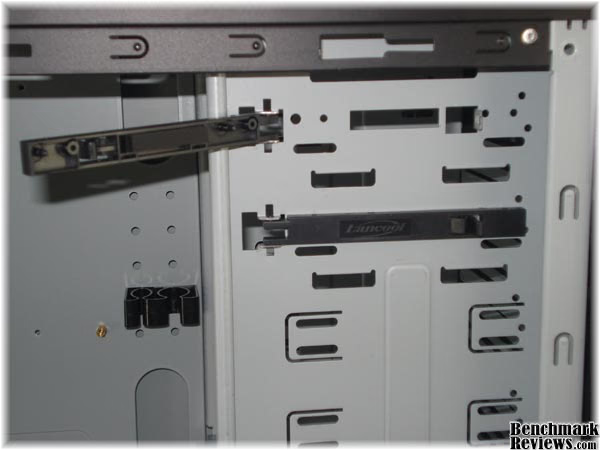
There is a plastic bar with nubs that insert into the screw holes on the drive and a metal tab that keeps the plastic bar locked. Since the plastic bar only holds one side of the drive, there is a rubber pad on the bar designed to squeeze the drive against the opposite side of the bay. The pad also provides resistance to the drive sliding in or out unintentionally. This mechanism suffers from the same plastic-metal contact that will eventually wear out the locking mechanism. Again, should that happen you can always use the normal screw holes to mount the drives. In the image above you can also see one of the two clips used for cable management.
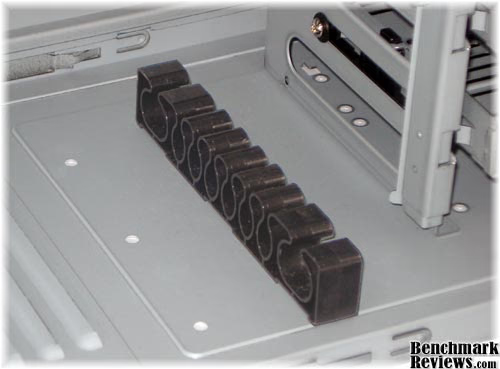
The small clip can be placed in various holes in the side of the case to best fit your needs. The second, larger clip can be placed in one of two positions on the bottom of the case. There are many small slots and two large slots providing high customization. I'm not a case neat-freak, but if you are then you'll love this feature.

Along with a bottom mounted power supply, this tool-less design is a totally new idea to me. A metal and rubber clamp hooks to the side and bottom of the case to clamp the power supply down. A pair of rubber rails on the bottom provide the opposing force and also suspends the PSU above the bottom of the case allowing more comprehensive cooling.
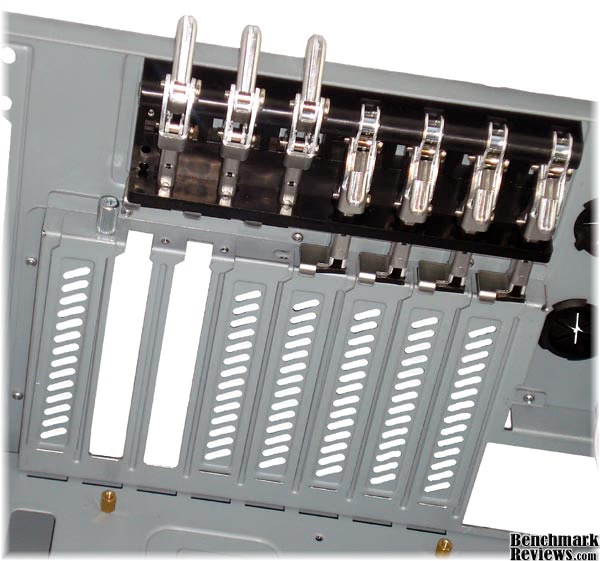
The final feature, and my favorite feature, is the tool-less PCI card holder. LanCool's new design uses individual clamps for each card. Each clamp uses a piston attached to a lever and hinge. The card gets released by lifting the lever and pulling the piston up. Unfortunately the levers would not stay up on their own. Once a card is slid in place the lever can be pushed down and locked into place. The left-most slot uses a thumb-screw instead of the piston system. This helps compensate for obese double-slot PCI cards that are too bulky for the piston to work correctly. If you have more than one such cards you can always leave the piston in the up position and use either a thumb-screw (provided) or a normal case screw (provided).
LanCool Final Thoughts
With the PC-K56W we had several complaints and wishes that were realized with the PC-K58W. This newer model shipped more fully assembled, with all the necessary parts, and with additional features. This case is wider, has room for two more fans, includes all the screws, and comes with a movable air filter. As mentioned for the other case you may need longer cables or cable extensions since the PSU is at the bottom of a large case. The control panel was also minimal. Only two USB ports and minimum audio jacks. It would be nice to have a front panel with full surround support. I also noticed the lack of any internal or fan lighting. It seems everything I see lately has at least one LED. I find the lack of fluff refreshing. LEDs can be pretty, and pretty useless. I'm not a fan of the grey interior and back panel, but that's a cosmetic issue that can be remedied by upgrading to the PC-K62. That's one of the things I like about this series. You buy what you want and have room to upgrade.
PC-K58W Conclusion
Out of the box this will be a decent performer. Two fans will provide good cooling for casual users, and there are two fan slots in the top to meet the needs of high-end users. When it comes to installation, the tool-less design is excellent. LanCool uses unique and functional designs which allow the motherboard, hard drives, and PCI cards to all be installed without tools. Unlike attempts of the past, if a part is incompatible with the tool-less mounts you can default to the typical screws.
The Dragon Lord series cases remind me of a Samurai Warrior in full battle armor. The Lian Li cases often have such radical designs that deter mainstream consumers. The PC-K58W keeps the Asian influence while maintaining a more moderate composure. The window on the side will show off your fancy internals. Finally, there are no flashy LED's which means the case is stylish enough that it doesn't need the fluff.
The case and components used inside were very sturdy. All structural pieces were made of sturdy aluminum not ultra-flimsy sheets. I appreciate the ubiquity of perforations around the entire case. Most cases only have air inlets right next to the fans. This case has room for air flow on nearly every surface. This should allow better cooling for all the drives as well as the motherboard and components. The case was made wide, tall and deep to allow for even the largest cards and drives while leaving room for the cables. I am a little concerned on the tool-less hard drive mounts that use a plastic-metal interface to hold the drive in place. Too many drive swaps might wear down the plastic till it does not work.
I had no problems working any of the features, and installing the hard drives was a snap (of plastic). There are plenty of bays, but one or two of the five 5.25" bays should have been swapped for the smaller variety. LanCool allowed for room for upgrades and modifications with things like water-cooling ports on back, a slotted motherboard tray, and removable back panel.
LanCool made a smart choice by offering useful, inventive features while cutting out the fluff. By doing this they provide an excellent case at an even better price. The PC-K58W can be found on NewEgg.com for $79.99, but prices fluctuate. The true value can be found by comparing other cases in the same price range. While it falls short in the number of expansion bays offered, it beats the competition in the tool-less build. If the front controls had more features or a better design this case would fare toward the top of its class. With bare minimum controls I'd say it rates above average.
This is an excellent all around case. It can really be used in any application. It is a safe purchase for the gamer or home-office user and allows upgrades as desire, time and money permit. The tool-less design and extra space inside make for easy access every time I swap a component. I would definitely recommend purchasing this case over the PC-K56W. Based on community reviews I would recommend this case over most of the alternatives as a safe, satisfying purchase.
Pros:
+ Tool-Less PCI Card Holder
+ Tool-Less HDD Installation
+ Tool-Less Motherboard Installation
+ Extra Fan Slots
+ Passive Air Filters
+ Spacious Inside
Cons:
- Power and Reset switches too close to USB and audio ports
- Too few 3.5" bays
- Plastic-metal contacts could wear down mounts
Ratings:
-
Performance: 8.00
-
Appearance: 8.00
-
Construction: 8.75
-
Functionality: 8.75
-
Value: 9.25
Final Score: 8.55 out of 10.
Recommended: Benchmark Reviews Seal of Approval.
Questions? Comments? Benchmark Reviews really wants your feedback. We invite you to leave your remarks in our Discussion Forum.
Reader comments from the original article
4 comments were posted before commenting closed. They are preserved as written. Original avatars no longer resolve and are shown as a placeholder.
Bad review Meh Permalink:
Bad review. 1.) Doesn't mention anything about the case ability to install internally (this is what in right now. Its not the 90s) 2.) Doesn't mention any in depth on cable management. (yeah. Its been 4 years now since this is the hottest thing. Going ninja on cables) 3.) You didn't do any final installation looks. You know.. having real world components inside.
RE: Bad review Olin Coles Permalink:
Bad comment. It's nice of you to at least follow your criticism with some degree of detail, but sadly, I couldn't make out what you meant with #1. You didn't describe what kind of 'depth' you expected with regards to cable management in #2. As for #3, you need to keep in mind that one size does not fit all and everyone uses different hardware.
Bad review Meh Permalink:
#1 Doesn't mention anything about the case ability to install a radiator internally Do understand, I bear no grudge to the reviewer or whatsoever. Just in the perspective of a consumer, I find it infuriating why they do not include that detail in there. External rads are so 90s and early 2000. Fitting a rad internally with tidy plumbing is what is 'in' right now. #2 in depth detail. am I able to fit cables behind mobo tray? If so, a demo of it would be nice. In anycase, I wouldn't take my hopes up that much since this is far from a real enthusiast site.
phenomenal product renosablast Permalink:
Just finished a build of a upper-tier-performace PC using this case; and let me tell you this case was a dream to work with. EVERYTHING lined up exactly as it was supposed to; components mounted easily and efficiently. Internal harddrive cage was easily removable to facilitate upgrading the lower front fan. Easy to mount fans in top. Cable management was a breeze with ample space behind MOBO mounting panel for routing/hiding/dressing cables. Great to be able to remove both sides, front, and top to give plenty of access for component mounting and wiring. Power supply mounting gives room for airflow underneath, and rubber pads to absorb noise and vibration. With five fans running at 100% speed, and two WD 1TB HDD's, this thing is amazingly quiet. Guess which case I will be buying for the next build!!