
Cooler Master GeminII S524 CPU Heatsink
Cooler Master GeminII S524 CPU Cooler
Manufacturer: Cooler Master
Product Name: GeminII S524
Model: RR-G524-18PK-R1
Price As Tested: $39.99 (Newegg)
Full Disclosure: The product sample used in this article has been provided by Cooler Master
I've said before that since the coolers included with retail CPUs are both quiet and effective at stock clock speeds, overclocking is the only reason anyone should buy a third party CPU cooler. Well, this isn't strictly true: not all third party CPU coolers are designed to handle ultra-high overclocks in massive tower systems; sometimes, what you need is a cooler that is more effective than the retail cooler in specific situations, such as the tight confines of a micro-ATX or HTPC case. When airflow's at a premium, a properly designed cooler that can fit into a tight space can be a big help. Benchmark Reviews looks at Cooler Master's new GeminII S524 cooler, which is designed for just such applications.
The GeminII is a "blow down" style cooler, as are the stock Intel and AMD coolers. A fan blows air down over an array of fins, rather than out the back or top of the computer as most third party coolers do.
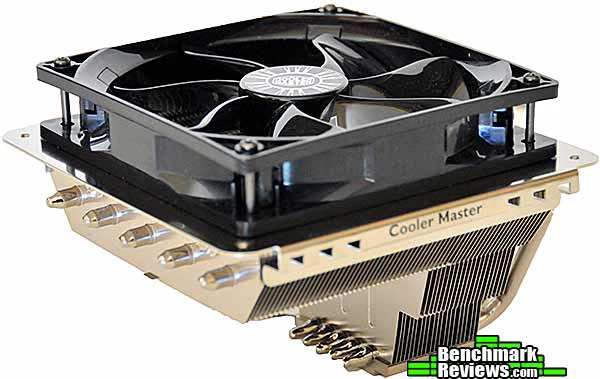
The design used to be more popular, but has largely been replaced by "tower" style coolers which offer more effective cooling since they can be physically larger.
Cooler Master GeminII S524 CPU Cooler Specifications
- Cooler Dimensions: 144 x 144 x 105 mm (5.7 x 5.7 x 4.1 inch)
- Cooler weight: 490g (1.08 lb) (heatsink only)
- Heatsink material: Copper Base / 5 Heat Pipes / Aluminum Fins
- Fan: 120 x 120 x 25 mm, 800-1800RPM
- Fan airflow: 34.2 - 77.7 CFM ± 10%
- Fan noise level: 15.1 - 31.6 dBA
- Fan life: 40,000 hours
Closer Look: Cooler Master GeminII
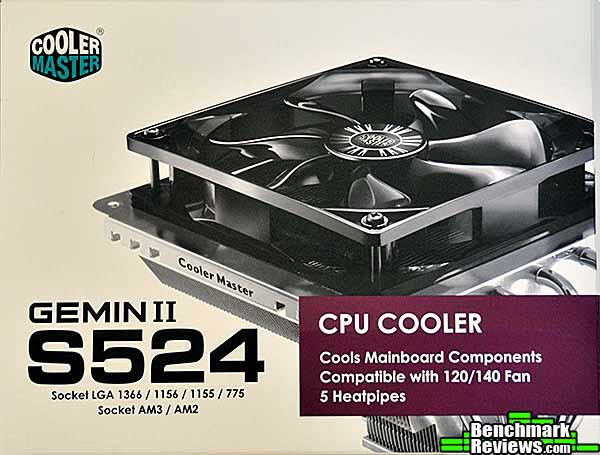
The Cooler Master GeminII S524's box calls out the primary advantage of the "blow down" cooler design: you get cooling airflow over motherboard components as well as CPU cooling. One thing the box doesn't answer is how to pronounce the cooler's name: is it "Gemini", like the space capsule, or "Gemin Two"? I lean towards the latter.
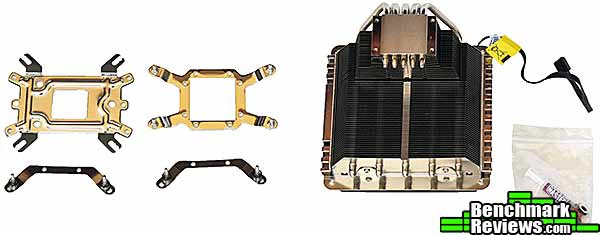
Inside the box are the cooler, with the 120mm PWM fan already mounted, Intel and AMD backplates, mounting hardware for the cooler, and a resealable baggie of screws and washers, along with a tube of Cooler Master thermal interface material.
The cooler is large, but you won't have any trouble with it clearing anything on your motherboard except perhaps very tall memory. The cooler extends way out over your memory slots.
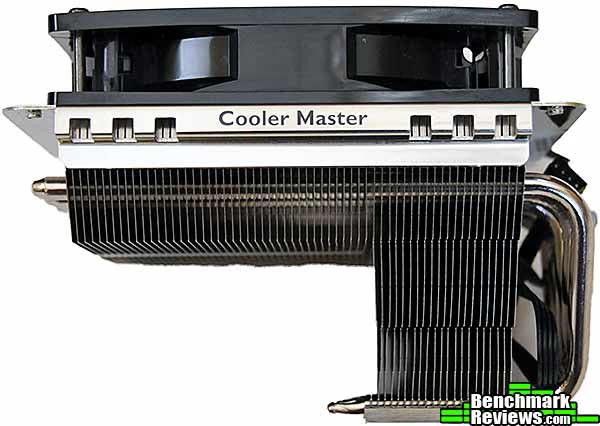
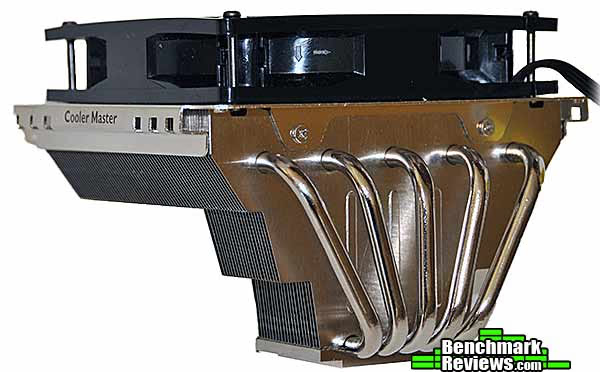
Five 6mm heat pipes expand out from the cooler's base into the large fin array at the top. Although the heat sink looks large, there's less metal here than there is in most high-end tower coolers. This is confirmed by the heat sink's weight: at 490 grams, it's about one-half to two-thirds the weight of coolers like the NZXT HAVIK 140 (760 grams) and the Cooler Master Hyper 612 PWM (806 grams).
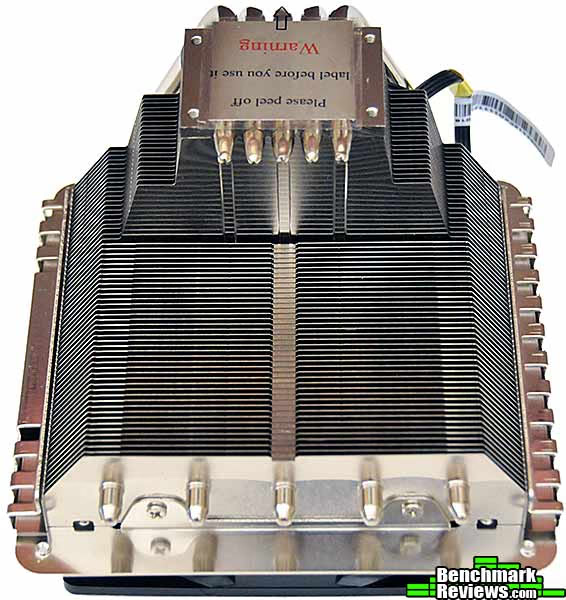
The top of the cooler has mounting holes for a 140mm fan, should you wish to replace the built-in fan. However, since the cowling masks the extra area covered by the larger fan, I don't see what good it would do.

The base of the GeminII S524 is flat and polished, albeit not to a mirror finish. There must be something to this "fine grain" finish because I'm seeing it on more and more coolers these days.
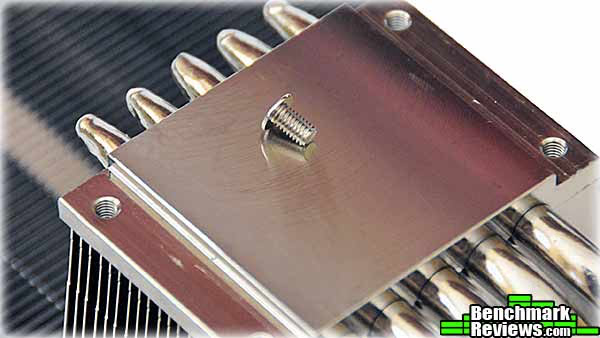
Let's take a closer look and then mount this cooler.
GeminII S524 Detailed Features
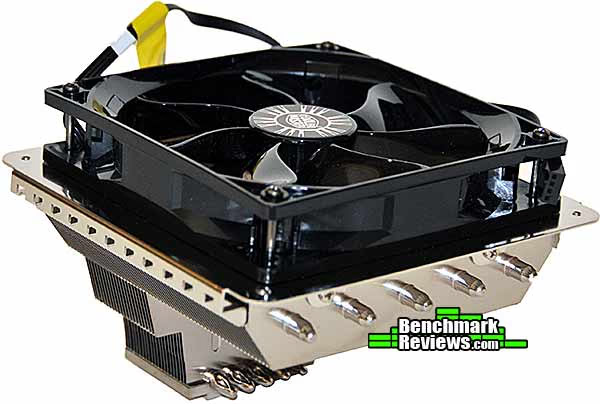
This image gives a better idea of the shape of the cooler. The idea here is that air blown down through the fins will also cool motherboard components such as the memory and VRMs.
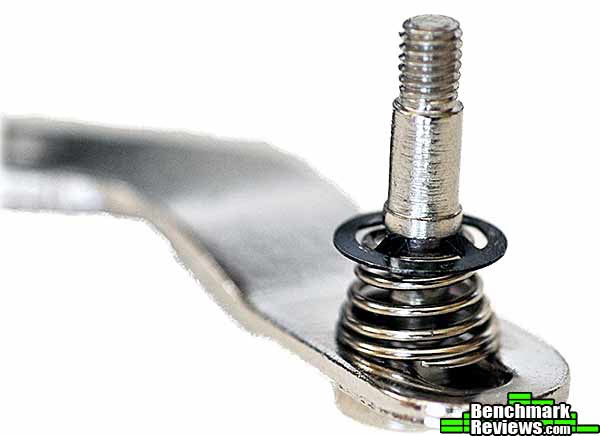
For the Intel installation, you'll attach these two mounting brackets to the cooler's base. The captive screws at the ends of the "arms" are in slots that allow them to move a few millimeters back and forth; this is how they accommodate the various geometries of Intel cooler mounting points.
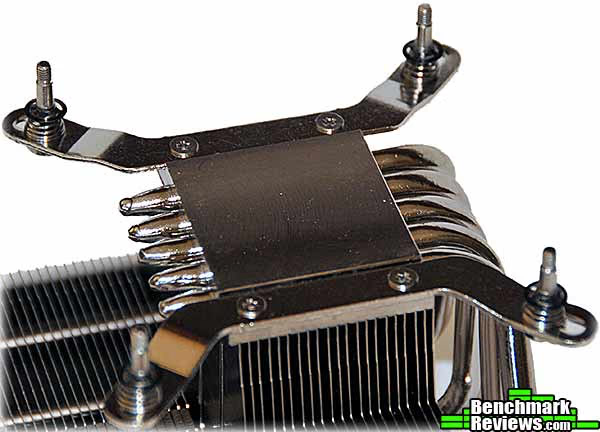
Springs on the captive screws provide the clamping pressure that presses the heat sink down on your CPU.
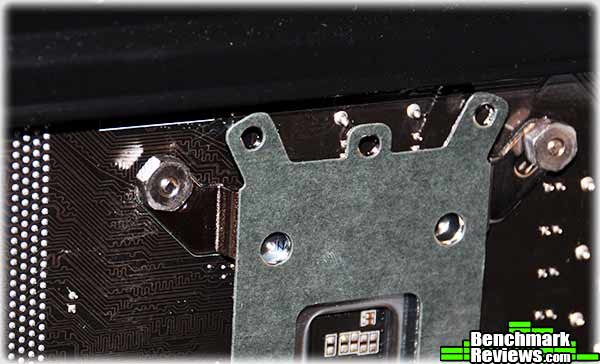
To install the cooler, you hold it inside your system with one hand and hang the back plate on the screws protruding through the motherboard with the other. Four nuts secure the screws; Cooler Master provides a little nut driver head that lets you tighten the nuts with a screwdriver. Having another person handy helps during mounting, but you can do it yourself if you have to.
Compared to many other third-party coolers, the Cooler Master GeminII S524 looks almost dainty in your case. On my ASUS Sabertooth X58 motherboard, the cooler overhangs the first four of the six DIMM slots. The cooler's fins have 47mm of clearance over the motherboard, so most memory will fit with no problem. However, memory with tall fins won't.

Now that it's mounted, let's see how the GeminII S524 performs.
Heat Sink Test Methodology
Benchmark Reviews is obsessed with testing CPU coolers, as our Cooling Section has demonstrated over the past few years. We've solicited suggestions from the enthusiast community, and received guidance from some of the most technical overclockers on the planet. As a result, our testing methodology has changed with every new edition of our Best CPU Cooler Performance series. Because of this, each article is really its own stand-alone product, and cannot be fairly compared to the others. Benchmark Reviews continues to test CPU coolers using the stock included fan (whenever applicable), and then replace it with a high-output fan for re-testing.
Manufacturers are not expected to enjoy this sort of comparison, since we level the playing field for all heat sinks by replacing their included fan (if possible) with a common unit which is then used for every CPU cooler tested. Many manufacturers include fans with their heat sink products, but many 'stock' fans are high-RPM units that offer great airflow at the expense of obnoxiously loud noise levels, or, conversely, quiet fans that sacrifice performance for low noise. By using the same model of cooling fan throughout our heat sink tests, we can assure our results are comparable across the board. This is one of the more significant changes we have made to our test methodology, since many of the benchmark tests we have conducted in the past have compared the total package. Ultimately we're more interested in the discovering the best possible heat sink, and we believe that you'll feel the same way.
For each test, ambient room temperature levels were maintained within one degree of fluctuation, and measured at static points beside the test equipment with a digital thermometer. The Cooler Master GeminII S524 and the comparison coolers used a common Thermal Interface Material of our choosing (listed in the support equipment section below) for consistency. The processor received the same amount of thermal paste in every test, which covered the heat spreader with a thin nearly-transparent layer. The heat sink being tested was then laid down flat onto the CPU, and compressed to the motherboard using the supplied retaining mechanism. If the mounting mechanism used only two points of force, they were tightened in alternation; standard clip-style mounting with four securing points were compressed using the cross-over method. Once installed, the system was tested for a baseline reading prior to testing.
At the start of each test, the ambient room temperature was measured to track any fluctuation throughout the testing period. AIDA64 Extreme Edition is utilized to create 100% CPU-core loads and measure each individual processor core temperature. It's important to note that software-based temperature reading reflects the thermal output as reported from the CPU to the BIOS. For this reason, it is critically important (for us) to use the exact same software and BIOS versions throughout the entire test cycle, or the results will be incomparable. All of the units compared in our results were tested on the same motherboard using the same BIOS and software, with only the CPU-cooler product changing in each test. These readings are neither absolute nor calibrated, since every BIOS is programmed differently. Nevertheless, all results are still comparable and relative to each product in our test bed (see The Accuracy Myth section below).
Since our test processor reports core temperatures as a whole number and not in fractions, all test results utilize ADIA64 to report averages (within the statistics panel), which gives us more precise readings. The ambient room temperature levels were all recorded and accurate to one-tenth of a degree Celsius at the time of data collection.
When each cooler is tested, Benchmark Reviews makes certain to keep the hardware settings identical across the test platform. This enables us to clearly compare the performance of each product under identical conditions. Benchmark Reviews reports the thermal difference; for the purposes of this article, thermal difference (not the same as thermal delta) is calculated by subtracting the ambient room temperature from the recorded CPU temperature.
Please keep in mind that that these test results are only valid within the context of this particular test: and, as the saying goes, your mileage may vary.
Intel Test System
- Processor: Intel Core i7-950 Bloomfield 3.06GHz LGA1366 130W Quad-Core Processor Model BX80601950
- Motherboard: ASUS Sabertooth X58 Intel X58-Express chipset) with BIOS 0603, mildly overclocked with BCLK set to 153MHz for a processor speed of 3519MHz
Support Equipment
- AIDA64 Extreme Edition version 1.50.1200
- MG Chemicals Heat Transfer Compound 8610-60G
- High-speed fan: Delta AFC1212D (113CFM advertised)
All of the tests in this article have been conducted using vertical motherboard orientation, positioned upright in a traditional tower computer case. Air-cooled heat sinks are positioned so that heat pipe rods span horizontally, which in most cases means the fan is blowing air out the top of the chassis. The radiators of water coolers are mounted as per manufacturer instructions. In both cases, fans are connected directly to the power supply (rather than motherboard headers) and run at full speed during the test. At the start of our test period, the test system is powered on and AIDA64 system stability tests are started with Stress CPU and Stress FPU options selected. AIDA64 loads each CPU core to 100% usage, which drives the temperature to its highest point. Finally, once temperatures have sustained a plateau (no observed change in average temperatures for 5 minutes), the ending ambient room temperature and individual CPU core levels are recorded thus completing the first benchmark segment. The time to reach stable temperatures varied between 10 and 20 minutes for the heat sinks in this test; larger heat sinks typically take longer to stabilize.
The second test segment involves removing the stock cooling fan and replacing it with a high-output 120 mm Delta AFC1212D cooling fan, then running the same tests again.
The Accuracy Myth
All modern processors incorporate an internal thermal diode that can be read by the motherboards' BIOS. While this diode and the motherboard are not calibrated and therefore may not display the actual true temperature, the degree of accuracy is constant. This means that if the diode reports 40°C when it's actually 43°C, then it will also report 60°C when it's truly 63°C. Since the design goal of any thermal solution is to keep the CPU core within allowable temperatures, a processor's internal diode is the most valid means of comparison between different heat sinks, or thermal compounds. The diode and motherboard may be incorrect by a small margin in relation to an actual calibrated temperature sensor, but they will be consistent in their margin of error every time.
Testing and Results
Most of the other heat sinks I've tested for Benchmark Reviews have been large, high performance coolers that could handle the extreme overclock of my test system: a Core i7 950 running at just over 4GHz at 1.35 volts. But the GeminII isn't designed for this type of load, and indeed cannot keep the processor from throttling (cutting back clock speed as core temperatures exceed 100 degrees Celsius). The GeminII is designed for quiet running, milder overclocks, and space efficiency in a small desktop or HTPC chassis.
Instead of testing it against coolers it wasn't designed to compete with, I tested it against the Core i7 950's retail box cooler as well as Intel's optional DBX-B "high performance thermal solution." Although not widely available, the DBX-B offers substantially better performance than the retail cooler. A small switch on top of the cooler sets the fan to either "Quiet" or "Performance" modes.
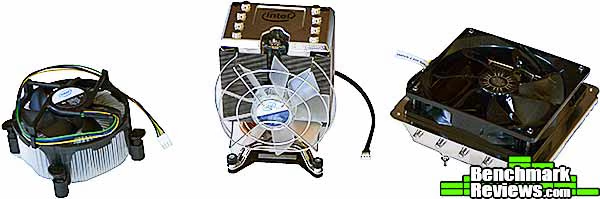
I tested each cooler with the processor running at its stock speed of 3.06GHz as well as a mild overclock to 3.52GHz, still at its stock voltage. The integrated fans of the Intel heat sinks cannot be replaced, but I tested the GeminII with my standard high-performance fan, the Delta AFC1212D, which is rated at 113CFM at 46.5dBa, in addition to its stock fan. The Delta moves a lot of air, but it's very loud.
First let's look at these heat sinks' performance at the i7 950's stock clock speed:
Stock Load Tests
|
Heat Sink |
Thermal Difference (degrees Celsius) |
Difference from GeminII S524 |
|---|---|---|
| Intel Retail Cooler | 60.1 | +11.2 |
| Intel DBX-B low fan | 51.6 | +2.7 |
| Cooler Master GeminII S524 | 48.9 | +0.0 |
| Intel DBX-B high fan | 46.0 | -2.9 |
The Intel DBX-B with its fan set to "Performance" wins here, albeit not by much. However, the win comes at a substantial acoustic cost: the DBX-B's fan on "high", running at full speed, is much louder than the GeminII S524's fan. The stock Intel retail cooler is just barely able to handle this load.
Now, let's crank thinks up a bit with a mild overclock to 3.52GHz at stock voltage:
Overclock Load Tests
|
Heat Sink |
Thermal Difference (degrees Celsius) |
Difference from GeminII S524 |
|---|---|---|
| Intel Retail Cooler | FAIL | FAIL |
| Cooler Master GeminII S524 stock fan | 67.6 | +0.0 |
| Intel DBX-B low fan | 65.8 | -1.8 |
| Cooler Master GeminII S524 Delta fan | 59.7 | -7.9 |
| Intel DBX-B high fan | 58.1 | -9.5 |
The stock cooler can't handle even this mild, no-extra-voltage overclock, with CPU temperatures quickly shooting to over 100 degrees, resulting in substantial throttling. The DBX-B turns in a much better performance, narrowly edging out the GeminII with its stock fan. Replacing the GeminII's fan with the Delta high speed fan drops CPU temperatures almost 8 degrees, but nobody building a system and choosing this cooler would want to listen to the Delta's shriek. The Intel DBX-B cooler with its fan set on high squeaks past the Delta-equipped Cooler Master heat sink with a temperature 1.6 degrees lower...and this time it's quieter as well.
I'll summarize my opinions on this cooler in the next section.
CPU Cooler Final Thoughts
In previous reviews, I've said the only reason to choose a third party cooler is for overclocking performance. But this is really too simplistic a view: while the boxed retail cooler will suffice for most non-overclocked applications, the tight confines of a micro-ATX or HTPC case can benefit from a larger cooler with a blow-down cooler design, where the extra airflow can help cool other motherboard components. In this scenario the fact that it's a lot better at CPU cooling is just a bonus.
Obviously, you should pay attention to your case airflow with a cooler like this, since warm air from the cooler isn't directed out the back or top of the case. A good rear exhaust fan and even a front intake fan can help keep things moving in the right direction, and these need only be very quiet, low airflow fans. The performance of this cooler will vary more with air flow than will a cooler whose air is more directly exhausted from the case.
The Cooler Master GeminII S524 substantially outperforms the boxed retail Intel cooler, and is very close to the performance of the Intel DBX-B cooler. However, the latter is significantly louder under load than the GeminII S524, and doesn't have the advantage of cooling motherboard components as well as the CPU. Add in the fact that the Cooler Master heat sink retails for about $10 less (the DBX-B isn't widely available at retail, but when it is, generally sells for about $50), and it's the cooler I would choose in most cases.
While this cooler will have a limited market, its design and performance make it a very good choice if your situation warrants it.
Cooler Master GeminII Conclusion
Please remember that these test results reflect our experience with each cooler on a specific motherboard, with a specific processor, BIOS revision, BCLK and voltage settings, and test programs. The results of this test cannot be directly compared to other tests since many factors will have changed.
The GeminII S524's design isn't often seen any more, but performs well in cases where space is at a premium. Appearance-wise, it's a pretty plain cooler, but most of the time it won't be in a windowed case anyway.
The construction quality is excellent. The fins are straight and the heat pipe curves are so smooth they seem mandrel-bent. I've seen some pretty lumpy heat pipes recently and it's nice to see the smooth, perfect curves of the Cooler Master product. The base has a good finish, too.
The accessories are standard fare: mounting kits that will accommodate all current AMD and Intel platforms, a tube of thermal interface material, and a nice little nut driver for securing the heat sink to its mounting plate.
The performance of this cooler is excellent, considering its design and intended use. The stock Intel cooler isn't even in the same class, and while the Intel DBX-B cooler beats it, it's only by a narrow margin and at a sonic cost. Also, the DBX-B isn't designed for the use that the S524 is. The GeminII's included PWM fan is almost silent except under high load conditions.
If you're looking for a cooler for a small form factor machine, the Cooler Master GeminII S524 deserves your consideration. As of February 2012 the GeminII S524 sold for $39.99 (Newegg), so it offers good value.
Pros:

+ Small, low profile design
+ Quiet fan
+ Cools motherboard components as well as CPU
Cons:
- Fan shroud blocks extra air from 140mm fans
- Does not exhaust hot air out of the case
- Requires extra attention to case airflow for maximum effectiveness
Ratings:
-
Performance: 9.0
-
Appearance: 7.5
-
Construction: 9.0
-
Functionality: 9.25
-
Value: 9.5
Final Score: 8.85 out of 10.
Quality Recognition: Benchmark Reviews Silver Tachometer Award.
Questions? Comments? Benchmark Reviews really wants your feedback. We invite you to leave your remarks in our Discussion Forum.
Reader comments from the original article
10 comments were posted before commenting closed. They are preserved as written. Original avatars no longer resolve and are shown as a placeholder.
uATX PCIE overlap? Considering purchase Permalink:
I've seen a report of this cooler overlapping the first PCIE slot on uATX mobos... Anyone able to confirm?
RE: uATX PCIE overlap? David Ramsey Permalink:
I don't think this would be a problem. The spacing between the CPU socket and the first slot is pretty much the same on an mATX mono as on a standard mono.
RE: RE: uATX PCIE overlap? David Ramsey Permalink:
That should be "mobo" above. Sorry. Typing with one hand here...
RE: uATX PCIE overlap? Considering purchase Permalink:
If it were an issue do you think the bottom edge that allows for the 140mm fan could be ground off with a dremel or something? I guess the key question is whether the extended fan mount bezel is flush with the RAM mounting tabs, as on every Z77 uATX board I've seen the RAM tabs' bottom is the exact point where the first PCIE slot starts. Since RAM slot + tabs is probably ~exactly 140MM (RAM I think is about 132MM, but not 100% sure), it seems like a perfectly center-mounted 140MM wide sink (which the GeminII looks like it is because of the extended lip for a 140MM fan) would be exactly flush with the top of PCIE slot 1, and since PCIE graphics cards usually have width to both sides, I'm kind of inclined to think the report I saw was accurate, but I'm also kind of inclined to think that removing the 140MM fan mount bezel/lip would fix it without altering thermals much. Anyway, if you have any other recs for CPU sinks that would work well uATX and are under 130MM height and closer to 120MM in the top-to-bottom direction, I'm all ears. I guess there's the Noctua NH-L12 (128MM, rather than 144), but I haven't been thrilled about it. Maybe I should reconsider. Ironically enough my initial concern was sinks bumping interfering with the first RAM slot.
RE: RE: uATX PCIE overlap? David Ramsey Permalink:
I'm not sure why you think that "PCIE graphics cards usually have width to both sides". Aside from the perhaps 1mm-2mm height of components or cooler mounting brackets on the back side of the board, the only PCIE cards I've ever seen with width on the back are passively cooled cards with fins that wrap around the card. Still, I concede the possibility of interference. You probably could Dremel away some of the unused 140mm fan flange, but I think a simpler solution would be one of the single-120mm radiator water cooling setups like the Corsair H80. That should remove all your fitment concerns and provide better cooling to boot.
RE: RE: RE: uATX PCIE overlap? Considering purchase Permalink:
My current GPU has an x-shaped heatsink mounting bracket on the backside about 5 - 10 MM deep and the frontside heatsink extends beyond the bcb and wraps about 3mm to the backside on the top edge. Anyway, thanks for replying, it's probably kind of onerous for you to have an extended comment discussion like this. I've been looking at the H60 very seriously, actually. My major concern is that I feel that despite the 5 year warranty, the longevity and performance degradation over time aren't clear. I know that every sink/fan based cooler I've used is still working and could probably keep on going for far longer than the useful life of my PCs and worse case probably need a fan replaced or reapplication of thermal grease, but with water cooling there are horror stories of pump seizures and coolant leaks that make me a little a ambivalent. Likewise, I've heard there's a constant, but minuscule, rate of coolant evaporation -- not sure how much it matters. Maybe I should just take the plunge. I've heard Corsair will replace your whole PC if things really go south, but it'd still be a hassle.
RE: RE: RE: RE: uATX PCIE overlap? Considering purchase Permalink:
*meant pcb, not bcb.
RE: RE: RE: RE: uATX PCIE overlap? David Ramsey Permalink:
It's true: a good air cooler will last forever (with possible fan replacement), while a water cooler will not. That said, I have not even heard of an all-in-one water cooler failure yet. The Asetek OEM cooler in my HP Blackbird case is going on 5 years old and is running fine. Originally designed for a Socket 775 system, it's been through a succession of LGA 1366/1155 motherboards with no problems so far.
RE: RE: RE: RE: RE: uATX PCIE overlap? Considering purchase Permalink:
Thanks for all the replies. It's been helpful. :)
RE: RE: uATX PCIE overlap? Considering purchase Permalink:
Actually, I think I've got 150 MM height available, not 130MM. Just double checked.