
Corsair Vengeance K60 Mechanical Gaming Keyboard
Corsair Vengeance K60 FPS Mechanical Gaming Keyboard
Manufacturer: Corsair
Product Name: Vengeance K60
Model: CH-9000004-NA
Price As Tested: $87.99 Amazon / $109.99 Newegg
Full Disclosure: The product sample used in this article has been provided by Corsair.
The Vengeance K60 FPS Mechanical Gaming Keyboard is one of Corsair's latest introductions. This keyboard is a rare cherry MX red keyboard (similar to cherry MX blacks), offering very light resistance to key presses, and no tactile "click" during presses, perfect for quick successive key presses like double taps. Benchmark Reviews will review this keyboard for its FPS gaming capabilities as well as general usage.
The Corsair Vengeance family has two pairs of mice/keyboard combinations. The K90/M90 are designed for MMORPG games with macro capabilities. The K60 is designed for FPS games with heavy emphasis on maximizing comfort for WASD and 1-6 keys. The M60 is the mouse counterpart to this keyboard with dedicated snipe mode. Making this split was a great choice for Corsair to capture both enthusiast groups while being able to differentiate the Vengeance series from numerous competitors.

The Vengeance K60 is priced at $109.99, about average among mechanical gaming keyboards. However the feature set present in this keyboard is very different from the rest of the group. In the next section we'll start our dive into the main features of the Corsair Vengeance K60.
Corsair K60 Features
-
Cherry MX Red mechanical key switches
-
Contoured, textured WASD and 1-6 Keycaps
-
Full key matrix anti-ghosting
-
20-key rollover on USB
-
Professional-grade brushed aluminum chassis with laser etched keys
-
Ergonomic wrist rest
-
Easy access multimedia controls
-
USB Pass-through
Corsair K60 Specifications
-
Light, responsive Cherry MX Red mechanical switches for fast, efficient gaming action (45g actuation force, 2mm to actuation and 4mm to bottom, rated for 50 million operations, gold contacts)
-
Tuned silicon dome keyswitches: F1 through F12, Esc, PrtScn, Scroll Lock, Pause/Break, Insert, Home, Page Up, Page Down, Delete, and End
-
Ten (10) additional sculpted FPS keys (W, A, S, D and 1 to 6) for superior reaction and control - interchangeable with the standard keyboard keys gaming palm rest with soft-touch surface for superior gaming comfort. Storage for sculpted keys and key extraction tool included
-
Six multimedia keys - stop, previous, play/pause, next, mute, volume up/down - with solid metal, weighted volume "drum roller"
-
Windows Lock key for uninterrupted game play
-
Metal top plate for increased strength, durability, and rigidity
-
USB pass-through connector giving easy access to a USB port on the back of the keyboard (USB 2.0/1.1/1.0)
-
USB Connector with gold plated contacts
-
2m non-tangle cable
-
438(L) x 163(W) x 24(H) mm / 17.2" (L) x 6.4" (W) x 0.94" (H)
Closer Look: Corsair Vengeance K60
The Corsair Vengeance K60 package comes with the K60 mechanical keyboard, a detachable wrist rest, textured keys for FPS games, key extraction tool, and a brief quick start guide. There is no software for the K60 as macros is not a feature for the FPS-focused keyboard.

Corsair has a clear vision for the K60, and that's very apparent in their selection of features. All the core keys and number pad uses cherry MX red switches. The remaining F1-F12 and PrtScn etc. keys, which are rarely used in FPS games, fall back to the old rubber dome design. This is barely noticeable during the course of regular use, and when used they're rarely spammed, and so the tactile feel of the traditional rubber dome design works great.

The out-of-box keys can be switched to the include FPS keys. These are contoured and textured to stand out while giving you the ability to keep your fingers within the controls and also reposition your hand without needing to ever look at the keyboard. Now gamers can switch between typing and gaming easily.
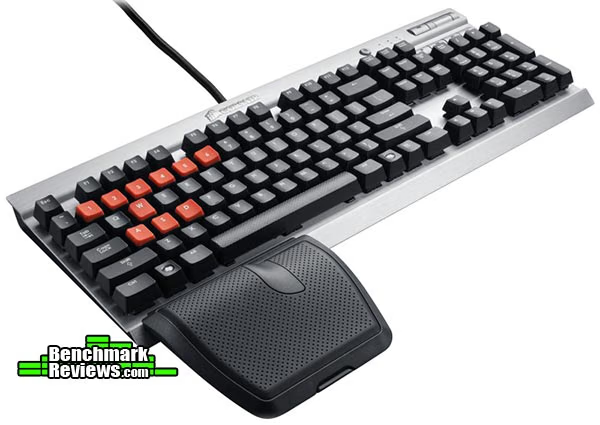
The Vengeance K60 is a solid plastic exterior with an aluminum top for durability. On the bottom there are 4 retractable stands that can lift the keyboard off the surface for another centimeter.
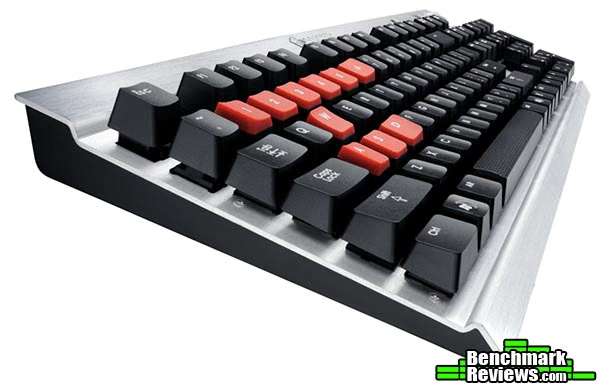
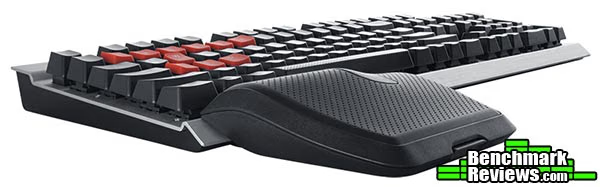
Perhaps one of the most controversial features is the 1-hand wrist rest. It can be attached at only 1 location, and is actually higher than the keys itself. It's not particularly the easiest to remove either, and actually needs to be pried from the bottom of the keyboard. This makes the typing experience somewhat imbalanced and odd. It also makes striking the bottom-left buttons unnatural (Ctrl, windows, alt, z, x, c). That being said, you could get used to it as I did. As long as the game doesn't require frequent use of those buttons, its not a huge deal since it can be removed. The benefits are also questionable, as I felt a normal full wrist rest that extends the entire body achieves the same effect.

The Corsair Vengeance K60 also comes with multimedia keys and a unique windows-lock button. The volume control feels comfortable to use. It uses a weighted roller which you roll up or down to adjust volume. The windows lock if a fun functionality that disables the "windows" key when turned on. This can eliminate accidental minimizing of the screen. However I feel that's more of a Vengeance K90 (MMO keyboard) feature since it's almost impossible to "accidentally" hit the windows key with the wrist rest there.
The K60 also comes with a European edition that has a slightly different layout for its keys.

The Corsair Vengeance K60 has a very slick design, clean and elegant. The construction is extremely solid thanks to the aluminum top. Its core selling points are the cherry MX red switches, and FPS optimized design, which also differentiates itself from the masses of other mechanical keyboards. In the next section we'll look at more detailed features of the Vengeance K60.
Corsair Vengeance K60 Detailed Features
The Vengeance K60's main feature is the cherry MX red switches. The greatest benefit to this switch is its light resistance (lightest of all switches) and spam-ability. It doesn't generate as much tactile feedback as other switches but for FPS games that quick multi-tap to adjust positions with WASD or quick toggling between weapons is more easily achieved with the cherry red switches. To make things better, the K60 allows 20-key rollover on USB. For DDR-like games on PC this keyboard is perfect.
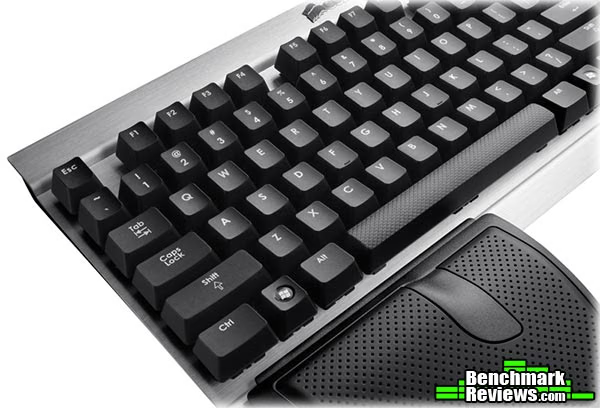
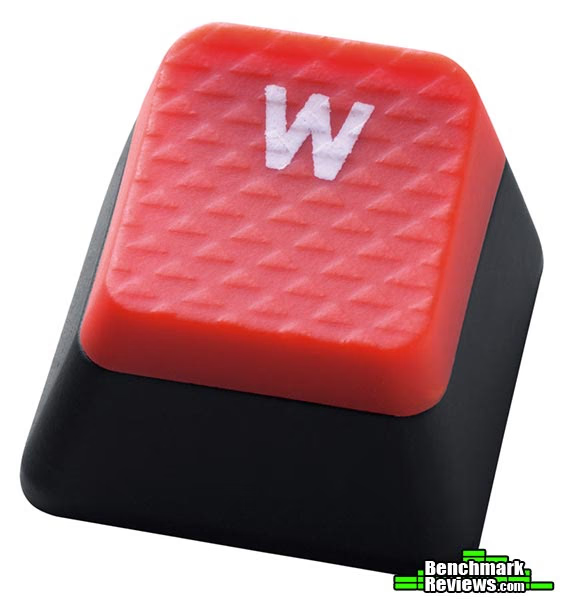
The most unique part of the Vengeance K60 is the extra textured and contoured keys that can be swapped out. The included key extraction tool can easily allow you to remove all keys, whether to switch keys or for cleaning. All you need to do is snap the tool onto a key and pull. The keys fit tightly enough that it's very difficult to pull out a key without the tool, so you won't need to worry about loose keys.

By design only WASD and 1-6 have a textured version to swap. For most FPS games this is sufficient. The key benefit is being able to feel the keys without having to look. Because of this, the K60 also omits any backlighting capability, which is present in the K90.

The wrist rest is also a storage unit for extra keys and the extraction tool. The lid comes entirely off and is not physically attached to the rest of the wrist rest.

The textured keys have a different surface feeling. However it would've been nicer if they used a different material all together, perhaps with a rubber coating to give it a completely different feel while also giving it more grip. One slight annoyance is that the numbered keys do not have its alternate "shift" state etched on. While I remember "%", and "!" from muscle memory, the rest are less used and takes a moment to think before I can proceed.
One additional feature is the built in USB port. The keyboard itself takes 2 USB ports to function but it's nice to have an extra USB port be immediately available without needing to get on the ground and fiddle under the desk.

Looking closer at the details, it's clear that the K60 gets its value from its FPS centered experience. But it might be rare today for someone to play only FPS games. Benchmark Reviews will test out whether the Vengeance K60 is only good for FPS games or if it delivers more than promised.
Testing & Results
Testing Methodology
This keyboard was used as the primary keyboard over a period of 3 weeks. In addition to producitivty software and everyday browsing, the K60 was tested in several games: Crysis, StarCraft 2, League of Legends, and Might & Magic VI.
Test System
- Processor Intel i7-920
- Video Card: Nvidia GTX 285
- RAM: 16GB DDR3
- Monitor resolution: 1920x1080 pixels
Test Software
- StarCraft II
- League of Legends
- Crysis
- Might & Magic VI
- Lunia
- MouseRate
Results
Let's start the results section with the Cherry Red switches. These keys are fabulous for gaming. It's quick to get used to for typing or gaming and offers a great experience. It doesn't take a lot of effort to press a key and is great for rapid successive strikes on the same key. Rapid and precise control of movement in FPS games is possible and achieved with ease on K60. While only the core keys use Cherry Red switches, I have not found that to be a problem at all since you rarely use the remaining keys.
The media keys and windows-lock key also work great. They allow quick adjustments to media settings without needing to alt-tab between applications and desktop.
The contoured keys are a fun part of the Vengeance K60. While logically it may seem odd to type with these keys, in reality it's a non-issue. The angle isn't large enough to make a drastic difference in feel during typing but is enough to guide your hands during the course of a game. I particularly like the numbered keys which I keep by default even for other games such as League of Legends. Since 1-6 are the item controls, and requires repositioning of the hand/fingers, being able to quickly feel the range of item controls is a nice plus.
Some may expect the K60 to have a horrible typing experience. However that's not particularly true. I type at fairly reasonable speeds (80+ WPM on average) and I've found largely no problem typing with the Corsair K60 even with the textured keys. However every once in awhile some keys may register double-taps even though I only intended to hit once. This doesn't happen very often and can be avoided. One way to avoid it is taking off the wrist rest. This eliminates the unnatural reach for keys located in the lower-left corner. The most common letter this happens with for me so far is "c".
The only feature I have mixed feelings about is the wrist rest. After 3 weeks of use I've grown accustomed to it and doesn't cause much of a nuisance anymore. The angle which it allows you to type and play at is much more comfortable than normal, as it allows your wrist to be in level with your arm, avoiding any strain on the wrist. For long gaming sessions that use a combination of keyboard and mouse, this configuration is perfect. But because detaching it actually takes work, it's usually left on in all cases, which makes typing feel odd. While I personally don't mind it, I could see it being an issue for some. A full keyboard wrist rest (like most other keyboards) may have been a better design, but if that's the case there's always the Vengeance K90 to look towards. The good thing is, since it's detachable, if you tried the wrist rest and didn't like it, you can just ditch it.
Overall the Vengeance K60 offers a great experience. It functions great for games and can be optimized for FPS games. However even as a general gaming keyboard the Vengeance K60 can be a great choice, and a cheaper option than the MMO alternative, the K90.
Corsair K60 Final Thoughts
Mechanical keyboards tend to have better durability than traditional keyboards, but the type of switch used produces extremely different feelings. Whether or not you will like the Vengeance K60 largely depends on whether or not you like the cherry MX red switches. All the additional features are customizable and can be removed if preferred.
The most common switches are black, brown, and blue. Red is a spin off of black.
Cherry black switches offer a linear (non-tactile) feel, the force needed to press the key is the same throughout the keypress. Blues have a solid tactile "bump" feel which can be great for typing. However rapid keypresses on the same key can be much slower due to the extra resistance and force required to overcome the "bump". Browns are half way between black and blue. Cherry red's are a special type of black switch that offers even less resistance than cherry blacks. I have found it to be great for "spamming", so it works well for almost all keyboard-based games.
Of course the K60 is an FPS oriented design, and an alternative can be the Corsair Vengeance K90 keyboard for MMO keyboard-based games. If you don't need macro capability, then you can choose to save $20 by purchasing the K60 and use the default configuration.

Corsair Vengeance K60 Conclusion
The Vengeance K60's Cherry Red switches offer a unique experience for gaming. It does not have a tactile "bump/click" feeling, which has extra resistance. The light resistance coupled with no "bump" allows quick successive key presses on the same key far easier than competing switches. The K60 is optimized for any keyboard mashing game or game with keyboard + mouse control configuration. Typing has slightly mixed results due to the nature of cherry reds, such as registering multiple keystrokes for 1 click, but this happens infrequently. Taking off the wrist rest usually eliminates the problem since it happens mostly when trying for a key that's not most comfortable to reach, such as the lower-left keys (if you have the wrist rest attached).
Visually the Vengeance K60 looks fantastic, definitely one of the better looking keyboards. While not as extreme as Razer's design, the K60 is slick and good for home or office settings. If you wanted something a little more extravagant, there's always the Vengeance K90 which has backlighting.
Corsair has always been known for quality products, and the Vengeance series is no different. The K60 has solid construction, and the metal top not only gives it a great look and feel, but also protection from damage and easy cleaning. Because the keys are removable, there's a fine line between too loose and too hard to take off. The Corsair K60 finds that fine line.
The feature set of the Vengeance K60 is a little limiting. Popular features like backlighting and macro buttons are not present in the K60 but available in the K90, so in a sense we can consider this as the "base model". One thing to keep in mind is the features of this keyboard really focus around FPS gaming, but that's not all that this keyboard is good for. If the base model is all you want, this FPS version can save you $20.
Value-wise, for $87.99 Amazon / $109.99 Newegg, the K60 isn't particularly expensive for a mechanical gaming keyboard. Cherry Red keyboards tend to be expensive to construct. Between the K60 and K90, you can choose which configuration you would prefer. You will end up deriving the most value from the Vengeance series because of the Cherry Red switches.
The Corsair Vengeance K60 is an innovative keyboard that definitely distinguishes itself from its competitors. It's also a cheaper alternative than the Vengeance K90. For FPS gaming the K60 stands out as a clear winner since no other keyboards brand themselves this way, but it also functions great as a general gaming and everyday keyboard. There definitely are some better choices if typing is your main usage, as the K60 suffers from occasional hiccups. If you like the style and simplicity of the K60 and want a cherry red mechanical keyboard, the K60 is a great choice.
Pros:
+ Cherry MX Red switches for light resistance and high spam-ability
+ 20 key rollover
+ Contoured and textured FPS keys which can be swapped with traditional keys
+ Key extraction tool included
+ USB port available
+ Slick design
Cons:
- Wrist rest may feel slightly odd
- Cherry MX Red switches not for everyone, typing experience mixed.
- Very narrow feature set
Ratings:
- Performance: 9.00
- Appearance: 9.00
- Construction:9.00
- Functionality: 8.75
- Value: 9.00
Final Score: 8.95 out of 10.
Benchmark Reviews invites you to leave constructive feedback below, or ask questions in our Discussion Forum.
Reader comments from the original article
16 comments were posted before commenting closed. They are preserved as written. Original avatars no longer resolve and are shown as a placeholder.
RE: Corsair Vengeance K60 Mechanical Gaming Keyboard David Ramsey Permalink:
One drawback of this keyboard (and it's shared by many newer keyboards) is that it absolutely will not work through a KVM switch...
RE: RE: Corsair Vengeance K60 Mechanical Gaming Keyboard Austin Downing Permalink:
What causes this effect? Shouldn't all electrical signals be the same?
RE: RE: RE: Corsair Vengeance K60 Mechanical Gaming Keyboard David Ramsey Permalink:
Good question. The effect it very real, and the best explanation I got from Corsair tech support was that newer keyboards are "16 bit" while older ones were "8 bit". Doesn't make any sense to me, but obviously something's changed.
RE: RE: RE: RE: Corsair Vengeance K60 Mechanical Gaming Keyboard Austin Downing Permalink:
Interesting, I will start doing research on which KVM's will work with some of the more modern equipment that will be plugged into it. I definitely do not want to give up my mechanical keyboards to make sure I can use a KVM.
RE: RE: RE: RE: RE: Corsair Vengeance K60 Mechanical Gaming Keyboard David Ramsey Permalink:
I worked around it by having WASD Keyboards build me a keyboard with Cherry Red switches. That one works. However, there's no way to tell in advance...
RE: RE: Corsair Vengeance K60 Mechanical Gaming Keyboard Adam Permalink:
How strange! I feel compelled to hook my BlackWidow up to my KVM now just to test this out, like you said that explanation by Corsair makes very little sense.
RE: Corsair Vengeance K60 Mechanical Gaming Keyboard Olin Coles Permalink:
My complaint with this keyboard is stuck keys. I will occasionally get random stuck keys, and when that key is delete/backspace the effects are devastating. So far I?m not thrilled with it, and will probably go back to generic Dell keyboards.
RE: RE: Corsair Vengeance K60 Mechanical Gaming Keyboard Adam Permalink:
I hope you're not planning on using one of those crappy Dell minimalist ones with no surface around the keys. Horrible keyboards.
Stuck keys? RealNeil Permalink:
How often do you get the stuck key problem? would be a deal breaker for me. Had to use an Apple Aluminum keyboard the other day when a Gigabyte keyboard failed. funny, but I like it better than the old one that died. still have it connected to my Win-7box. I do want to try out a Mech-Keyboard, people rave about them all of the time. I'm typing now on an iPad so sorry if there's any mistakes,..... Good review too.
RE: Stuck keys? Olin Coles Permalink:
I would say at least once per week or more. It's a random key every time, so I know it's not just one problem switch.
RE: RE: Stuck keys? Joey Peng Permalink:
I've had stuck keys only once in the past month using this keyboard. However the double registering keystroke is constantly when typing fast. Didn't notice it as much earlier, and it's a problem only with 1-key, "c". Happens on a daily basis.
RE: RE: RE: Stuck keys? Austin Dowing Permalink:
Perhaps we should send a email into Corsair inquiring if they know of the problem. I have not seen that problem on the K90 yet but I will definitely be on the look out.
RE: Corsair Vengeance K60 Mechanical Gaming Keyboard some guy Permalink:
The reason that the keys are above the chassis (where on others, you can't even see the switches or domes) is for reduced noise. With the red switches and the acoustics of the open keyboard, it really is quiet, unlike all other mechanical keyboards, which tend to be quite loud.
RE: Corsair Vengeance K60 Mechanical Gaming Keyboard some guy Permalink:
also, you can notice that the bottom row is not standard, so you can't put that awesome space bar on a regular mechanical keyboard, it's the regular length+.25 regular key size. Also, the control is bigger, and the windows keys are smaller, to prevent accidental minimizing if you're too lazy to press that button every time you start up a game. Also, I'm pretty sure the base is aluminium, not steel.
RE: Corsair Vengeance K60 Mechanical Gaming Keyboard Joey Peng Permalink:
No you're right, it's aluminium. Both words were used in the article accidently.
RE: RE: Corsair Vengeance K60 Mechanical Gaming Keyboard Olin Coles Permalink:
I've fixed this in the article.