
Microsoft Sidewinder X5 Gaming Mouse ARB-00001
Microsoft Sidewinder X5
Figuring out what makes a good gaming mouse is always difficult. The mouse is definitely one of the most varied input devices around for computers. You find all sorts of different types of mice on the market for both gaming and regular usage. Some are large and fat meant for big hands, whereas others are light and thin meant for easy movement. Some have a whole assortment of buttons bordering on a one handed keyboard and others are Spartan meant for high quality basics. Gaming mice will almost always be laser mice anymore given high precision with good surface area detection. Some even go as far as having a full set of weights to insert in order to customize your mouse as far as possible.
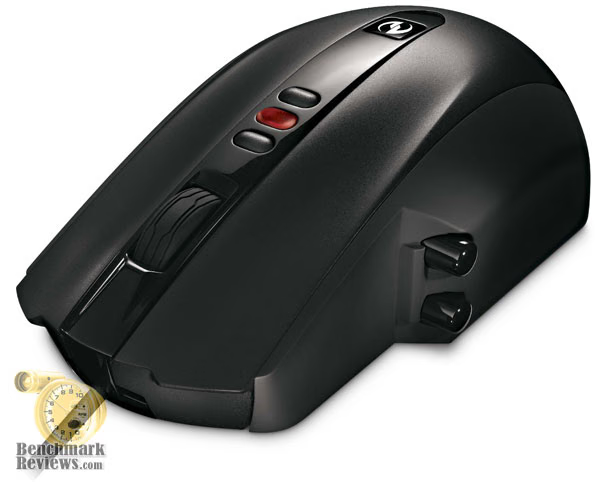
However, the lingering question remains on what makes a mouse good. The biggest tenets appear to be reliability and comfort. While the former is fairly objective, the latter is highly subjective. What's comfortable to Frank may be uncomfortable to Sally. Enter the Microsoft Sidewinder X5 gaming mouse (ARB-00001). This mouse goes for comfort by designing the mouse with the contours of a human hand in mind. It includes 2 customizable thumb buttons and a Vista shortcut button. It also features a laser tracking sensor that is capable of precision up to 2000 dpi with 3 custom dpi settings that you can change within the Intellitype software. Benchmark Reviews will give you the low down on this mouse.
Specifications
-
Sensitivity: 400 - 2000 dpi
-
Technology: Laser tracking
-
Operating system compatibility: Windows XP, Windows Vista
-
Dimentions: 3.06" x 5.07" (77.7 x 128 mm)
About the company: Microsoft
Microsoft Hardware was formed in 1982 to develop a device that would help people use the company's new word processing program. The device was a mouse and the application was called Word, laying the foundation for a future of delivering hardware that helps people better and more easily use software.
In the quarter century since, Microsoft Hardware has continually raised the bar, designing revolutionary peripherals that deliver groundbreaking performance, comfort and design.
From the original "green-eyed mouse" to groundbreaking products like the LifeCam NX-6000 and Wireless Entertainment Desktop 8000, Microsoft Hardware has delivered exceptional mice, keyboards, communication products, and gaming gear that has changed the way the world works, plays, and connects.
Closer Look: Sidewinder X5
The Microsoft Sidewinder X5 came in fairly attractive packaging featuring a red box frame around the plastic encased mouse, featured prominently for all to see. The box contained a fair amount of information on the mouse itself giving the consumer all the needed information to decide if the mouse is for them or not. The box contained the usual assortment of materials, including the mouse itself, an instruction booklet that was quite informative for the basics of getting the mouse up and running and a CD with the Intellitype software included. It should be noted that the mouse does not come with a USB to PS/2 adapter and is incompatible with any adapter you may use. The mouse utilizes a fairly hefty USB 2.0 throughput.
The Sidewinder X5 is a fairly tame looking mouse compared to some of the rather wild looking mice of today. It has a large rear end and fairly wide body compared to other mice. Its design is a combination of sharp edges and round bodies.
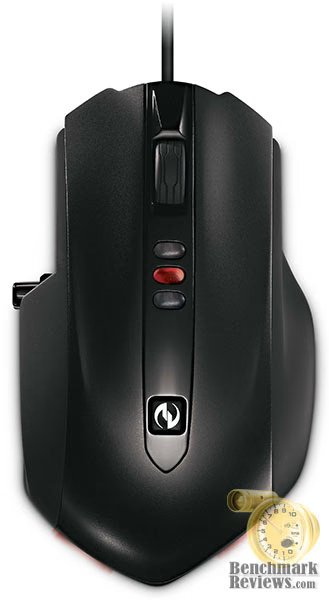
The Sidewinder X5 features the obligatory left and right mouse click which both have fairly short action for quick and easy clicking. The scroll wheel is fairly wide and rubberized with detents providing discrete sections for scrolling movements. The left side of the mouse features two buttons whose functions can be customized through Microsoft's Intellitype software. There's also a recessed button that sits in the middle of the mouse that, when pressed, will open up Vista's game menu or the Intellitype software in XP. The left and right click, scroll wheel (middle click) and two side buttons can all be programmed in Intellitype.

The Sidewinder X5 all features a laser sensor capable of up to 2000dpi. There are also three dpi settings that can be accessed by pressing one of the three lit buttons on the top of the mouse, next to the scroll wheel. The dpi settings for those 3 buttons can be accessed and changed through the Intellitype software.The bottom of the mouse features 5 pads for slippery and frictionless movement of the mouse.

The mouse, itself, is well designed for the hand with the side vertical buttons sitting where the thumb would rest on the mouse. It's a fairly large mouse compared to many others with a slightly bulbous back end meant to fir the contour of the hand. The mouse is also very light. According to Microsoft, it's 20 grams less than the original Sidewinder mouse without any weights in it. The light size feels very nice for moving the mouse, but I cannot comment on whether build quality is compromised by the light weight.
Performance: Microsoft Sidewinder X5
The following platform was used for testing purposes:
-
Intel E8400 @ 3ghz
-
Gigabyte GA-P35-DS3L
-
4GB OCZ DDR2-800, 6-5-5-16
-
EVGA Geforce 9600GT, 512mb
-
Seagate 250GB 7200rpm (OS Partition)
-
Seagate 500GB 7200rpm (game installation partition)
-
Corsair 550w PSU
-
Windows Vista Ultimate 64-bit, with Service Pack 1
-
Latest 64-bit Intellitype software downloaded from Microsoft.com (v. 6.3, English)
-
Portal and CounterStrike Source
After a few weeks of use in gaming and regular day-to-day tasks, I've come to a few conclusions about the Sidewinder X5. First of all, the mouse feels very nice. It's light and able to be pushed quite easily. The 5 pads on the bottom allow for very smooth movement, even on a rough fabric mouse pad. The large size of the mouse was a bit awkward to use at first, but it becomes a lot more easy to use with time. It's fairly ergonomic with curves in the right places.

The right and left mouse clicks have very short action allowing for a lot of successive clicks. The buttons themselves are seamless with the rest of the mouse and you can click the main two buttons about all the way back to the Microsoft shortcut button. The thumb buttons are close to where my thumb resides when using the mouse on a regular basis, but still requires a bit of reach. I never really found myself resting my thumb right next to the buttons when moving the mouse around. The scroll wheel gives a nice precise feel with soft detents that allow the mouse to scroll very fast if need be while maintaining the precise stops.

The high dpi laser sensor and precise customization are very nice for getting the perfect mouse speed for me. However, I tend to find that I get better results when I change mouse sensitivity in-game. The three buttons that change dpi sensitivity reside directly behind the scroll wheel, which aren't in a comfortable position to allow for constant changing. As such, a change in dpi is going to be more of a deliberate action than something you will change frequently for fast action (such as using higher dpi when in scope mode of a sniper rifle).
I was very perturbed about the two LED lights on the back. While LEDs were a necessary evil on optical mice, these are just for show. The constant glow of the two LEDs can be a nuisance for those who sleep in the same room as their computer. Moreover, the shortcut button resides right where the palm would sit and cannot be customized. I did not find it to be particularly useful at all.

The Intellitype software was quite useful. Considering there's not a lot of real estate on the mouse and a gamer would want the two shortcut buttons on their mouse to do different things for different games, the Intellitype software allows for the user to customize the mouse controls to function differently for different games. You achieve this by finding the game exe in question and adding it to a list in Intellitype and customizing the function through there.
Sidewinder Final Thoughts
I've always been a fan of Microsoft hardware since I bought my first Intellimouse Optical back in 1999 or 2000 (which was retired only a few months ago). I've found Microsoft's mice perform well and hold up for long periods of time. I feel that the Sidewinder X5 will, more than likely, hold up the same way.
The Microsoft Sidewinder X5 gaming mouse (ARB-00001) does not really appear to be the type of mouse that's meant to have some sort of x-treme (yes, with a dash) flavor or some must-have, funky-fresh (read: gimmicky) feature. Rather, it comes off as a mouse that takes the basic gaming mouse features and refines them as much as possible. I feel that it does it quite well.

Granted, I still find the on-the-fly dpi switching to be quite cumbersome and gimmicky (on any mouse, no less) and the rear LEDs along with the non-customizable shortcut button to be largely superfluous and unnecessary. Despite these tragic flaws, the mouse works very well. The laser precision means that there's no mouse jumping and that you can use the mouse on far more surfaces than optical mice.
The large size is certainly a welcome feature. As a guy with large hands, I appreciate not having to be very ginger with the mouse or having to contort my hands to fit smaller sized mice. I do think that the side buttons could have been placed a little closer to the thumb, but I find the reach to be minimal. With a purchase price of $39.95 at Newegg, the Microsoft Sidewinder X5 puts itself into the realm of affordability. I find the ergonomically large size and side buttons to be the main draw to this mouse and I find that those features definitely add to the value of the mouse.
Microsoft X5 Gaming Mouse Conclusion
The packing of the Microsoft Sidewinder X5 goes beyond the traditional or regular packaging, certainly making it stand. It's less of an eye-popping display and more of a novel design for cardboard. Like most Microsoft products, the packaging is very professional looking and contains all the necessary information that is needed to make an informed decision.
The Microsoft Sidewinder X5, itself is much larger looking than most "normal" sized mice with a larger rear end and wider body. The LEDs are superfluous and annoying as they serve no purpose on a laser device. Beyond that, the mouse is very sharp.
The Microsoft Sidewinder X5 is a very light weight mouse weighing 20 grams less than the previous Sidewinder mouse without any weights. While the mouse is constructed of fairly hard plastic, I cannot determine how the light weight would affect build quality. Otherwise, it feels sturdy.
The Sidewinder X5 performed very well. The laser sensor certainly helped make keep the mouse in check so that there's no bouncing or jumping around of the cursor. The custom mouse keys were generally well placed and useful.
At $39.95 at Newegg, The Sidewinder X5 is a very affordable mouse. Considering the positive experiences I've had with Microsoft mice, the nice ergonomic feel and the bonuses and features of the mouse, I feel that the Sidewinder X5 is a great bang for your buck.
In conclusion, I find the Microsoft Sidewinder X5 to be a product of refinement. The mouse, essentially, contains the core features of any of the other serious gaming mice and attempts to create the best mouse possible. I'll reserve my judgment on which mouse I consider the best, I feel that the Sidewinder X5 is definitely one of the most comfortable I've used and I whole-heartedly recommend it, especially to those with large hands.
Pros:
+ On the fly dpi switching with settings up to 2000dpi.
+ Laser tracking sensor
+ Large ergonomic design
+ 5 customizable buttons including two side buttons
+ Crisp feeling mouse buttons.
Cons:
- Annoying LEDs on the back of the mouse
- Shortcut key that cannot be customized.
- Dpi setting buttons uncomfortable to reach
Ratings:
-
Presentation: 9.25
-
Appearance: 9.00
-
Construction: 9.25
-
Functionality: 9.50
-
Value: 8.50
Final Score: 9.1 out of 10.
Excellence Achievement: Benchmark Reviews Golden Tachometer Award.
Questions? Comments? Benchmark Reviews really wants your feedback. We invite you to leave your remarks in our Discussion Forum.