
NZXT LEXA-S Gaming Case LEXS-001BK
NZXT LEXA-S LEXS-001BK Review
NZXT is on a roll. Their line of sub-$100 computer cases brings features to this market segment we haven't seen before, including fully finished interiors, rolled metal edges, and cable management, just to name a few things. The NZXT Lexa S Mid-Tower computer case is one of the more recent offerings in their "Crafted Series" line of cases. Festooned with a sleek black front door with integral LED lighting and fan controllers, this case would look great on your desk. But as a starting point for a new system build, how does LEXS-001BK model stack up?
I have to admit that NZXT has never been on my short list of computer cases to consider for my next build. Sub-$100 cases frequently had more compromises than I was willing to accept, with poor design and indifferent construction would conspire to make the build a pain - and in many cases that pain was literal, with scraped knuckles and sliced fingers providing a memorable lesson in "you get what you pay for." The NZXT Lexa S Mid-Tower Computer Case aims to break this tradition.

The purpose of a computer case is to hold all the computer's parts together while protecting them from disturbances and providing sufficient air flow to keep all the parts cool. But if you build your own systems (and would you be reading this review if you didn't ?), you probably have additional requirements: the case should look good, be easy to build a system into, provide enough room for all your components with some space left over for expansion, and make adding or removing components easy. And, of course, a good price/performance ratio always helps. NZXT's tag line for this line of cases is "Crafted Gaming Armor", and we'll see if the Lexa S lives up to the billing.
NZXT Lexa S Features
-
Immense Performance: 4 of 5 fans included ( Front 120mm fan, Top 140mm fan, Side 120MM LED fan, rear 120mm exhaust included ), fans rated at 43CFM, 23dB(A)
-
Fan control: Determine noise and airflow based on your needs, dual intakes and dual exhausts are controlled independently
-
Black on Black: Smoked clear window and a black interior gives the best combination of black on black.
-
Meshed front panel allows for more airflow
-
NZXT Solid State bracket allows for two SSD drives to be installed
-
Wire Routing: Motherboard punched holes allows for quick CPU bracket removable and optimal wire routing.
-
Turned HDD also helps with providing a cleaner look.
-
Pre-drilled water cooling holes on the back plate
-
High end graphics card support, extra space is especially designed to fit longer 10.5" cards
-
Side mounted USB, Audio, and E-SATA ports
-
Mounting holes for dual radiator at the top
-
Removable filter at the bottom PSU
-
Rubber Grommet for wire routing gives a even sleeker look to the system
LEXS-001BK Specifications
| MODEL | NEMESIS SERIES |
|---|---|
| CASE TYPE | MID TOWER FULL SIZE ALUMINUM CHASSIS CASE |
| DIMENSIONS (W x H x D) | 223.5 X 515.4 X 562.2 mm |
| COOLING SYSTEM | FRONT, 1 X 120 mm BLUE LED FANREAR, 1 X 120 mm BLUE LED FANSIDE PANEL, 1 X 120 mm BLUE LED FAN |
| DRIVE BAYS | 9 DRIVE BAYS4 EXTERNAL 5.25" DRIVE BAYS2 EXTERNAL 3.5 " DRIVE BAYS5 INTERNAL 3.5" DRIVE BAYS ( Removing Accesory Box )SCREWLESS RAIL DESIGN |
| MATERIAL(S) | 1.0 mm ALUMINUM CHASSIS |
| EXPANSION SLOTS | 7 |
| POWER SUPPLY | 400 WATT PS2 ATX 12V ( OPTIONAL ) |
| WEIGHT | 6.5 KGS (W/O Power) |
| MOTHERBOARD SUPPORT | MOTHERBOARDS: ATX, MICRO-ATX, BABY AT |
About the company: NZXT
NZXT, a company built upon gamer's dreams, hopes to create products that put consumers first. With the objective of designing unique products catered for hardware enthusiasts and gamers, NZXT has grown into a globally renowned brand recognized for dedication towards creating the next great gaming product. NZXT has won numerous awards from media and publications from across the globe with a product line spanning from gaming chassis, power, and gaming input devices. As a corporation formed by gamers, NZXT continues to expand into new horizons and push the limits further with each product unveiling.
Our dedicated sales and customer service team will work diligently to earn your trust and loyalty. All our products are built with high quality material and engineered in the best conditions.
NZXT products are designed and engineered in the United States and manufactured overseas in China and Taiwan. NZXT was established in 2004 in Los Angeles, California.
Closer Look: Lexa S Exterior
Like most of Lexa's cases, the Lexa S Mid-Tower computer case has a striking front panel. The case's front door appears to have a matte finish in this image, but it's actually very glossy. Very. Like a black mirror. A matte finish would have been better; the glossy finish is a magnet for dust, fingerprints, and fine scratches.
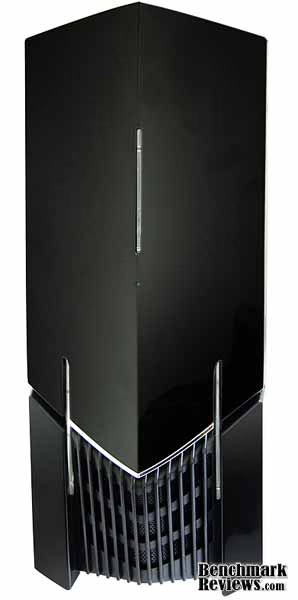
The glossy black front door is held shut with two rubber-padded magnets. It opens towards the right, revealing four 5.25" drive bays, a single 3.5" drive bay, the power and reset buttons, and, just above the "NZXT" badge, two knobs for the built-in fan controllers.

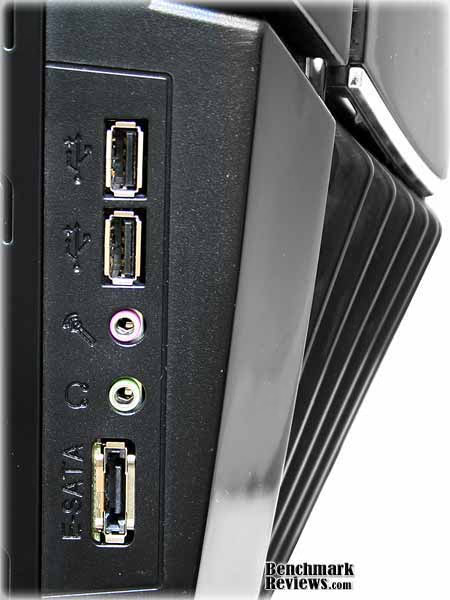
The I/O ports are on the lower left side of the computer, below the drive door. There are two USB ports (still placed too close together, an all-to-common error on many cases), microphone and speaker ports, and an E-SATA port.
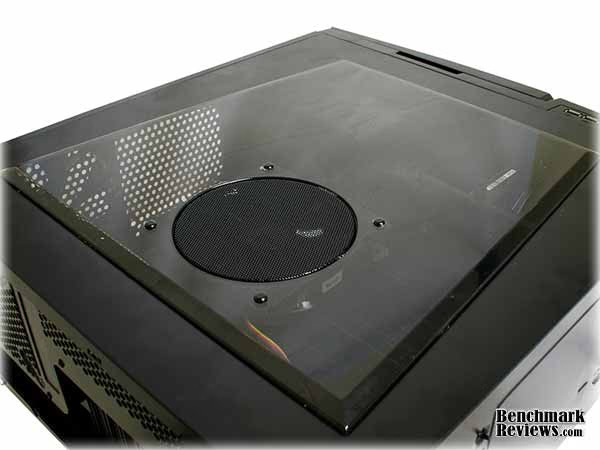
The Lexa S Mid-Tower computer case includes a smoked plastic side window with an integrated 80mm fan. The side window is secured from the inside of the panel, and no fastenings are visible from the outside. The fan is attached with smooth plastic self-locking push-pins. The lack of visible screws, tabs, or other fasteners gives the side door a very clean look.
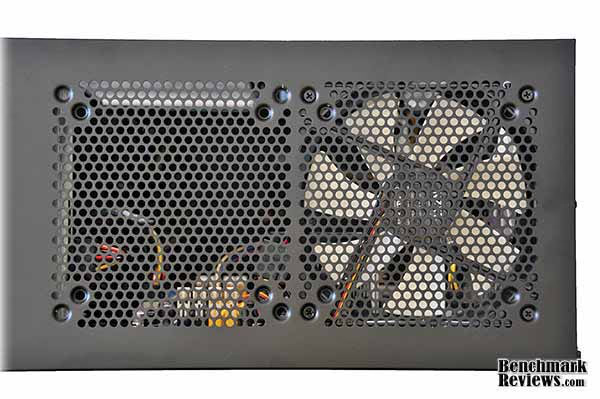
At the rear of the case we see the space for the bottom-mounted power supply, 7 meshed card slot covers, the area for the motherboard I/O panel, and a 120mm exhaust fan. There are mounting holes for 80mm and 92mm fans if for some reason you'd like to replace the 120mm fan. Just above the fan are two grommeted holes for water cooling hoses.

The top of the case has mounts for two 120mm or 140mm fans. The Lexa S Mid-Tower computer case comes with a white-bladed 140mm fan mounted in the rearmost position. You might think you could mount a dual-120mm radiator here, but as we'll see later, interior clearance issues will render that impossible.
Now let's take a detailed look at the exterior of this case.
Detailed Exterior Features
The NZXT Lexa S Mid-Tower computer case has a single 120mm intake fan mounted low in the front of the chassis. The filtered intake for this fan is at the bottom of the case, below the magnetically-secured door.

The front panel is secured with snap-type fasteners. You can pop it off by carefully pulling on it, which reveals the front fan with its attached filter, and the wires from the I/O panel and fan controller, oddly routed through the 3.5" drive bays. This is fine if you're not using these bays or only using one position, but if you need both bays it's easy to pull the wires out and run them through the hole immediately to the right. Similar NZXT cases such as the M59 use this hole for all front panel cables, so it's a mystery why this case didn't.

NZXT adds a little bling to the Lexa S Mid-Tower computer case with 3 blue LED bars in the front panel, and a blue LED fan in the side window. A small green LED mounted just below the blue LED bar on the door serves as the hard drive activity indicator. Thankfully all LEDs are of moderate intensity rather than the eye-searing brightness I've seen in some other cases.

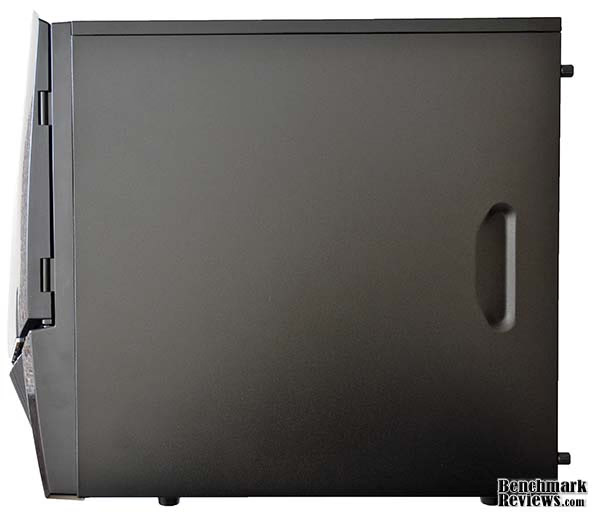
The right side of the case is a plain black panel.
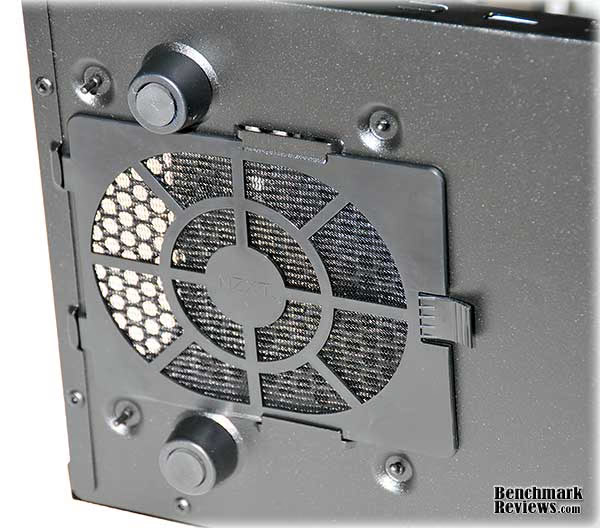
If you have a power supply with a bottom-facing intake fan, you'll appreciate the removable filter on the bottom of the case. It would be more convenient if it slid off to the rear of the case, though.
OK, we're done with the exterior of the case. Let's open her up and see what she's like on the inside.
Closer Look: Lexa S Interior
When you remove the side panel and look at the interior of the case, you're in for a shock: the interior's fully finished! There's no bare metal here. NZXT has painted every inch of the interior. All metal edges are rolled over, and there are no "punch-out" panels - this is one case you won't be bleeding in. You also won't have to remove the motherboard to fit a third-party cooler that uses a backing plate, since the NZXT Lexa S Mid-Tower computer case is thoughtfully provided with a large cutout under the processor socket. The power supply mounts at the bottom of the case, which I prefer, and sits on four small vibration-absorbing rubber pads on the bottom of the case.

NZXT provides both a 120mm rear fan and a single 140mm top fan. As you can see the clearances in this area of the case are going to be pretty tight.

There are five hard drive bays at the bottom of the case, two 3.5" device bays just above them (only the top bay is front-accessible), and four 5.25" bays at the top. The hard drive bays use a rail system: clip the rails to the side of your drive and slide it into place until it snaps.
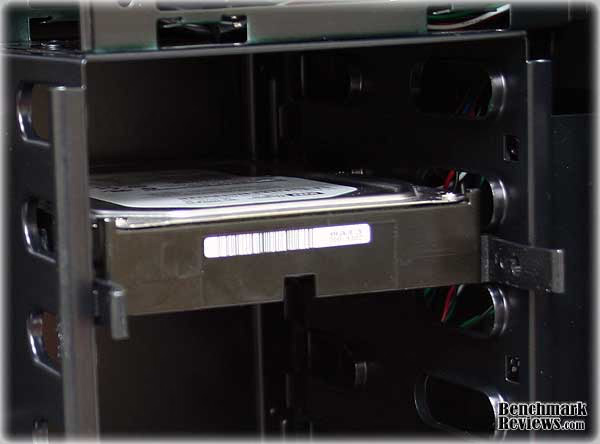
NZXT includes rails for all 5 hard drive positions as well as a plastic caddy that can hold two 2.5" devices such as laptop hard drives or SSDs. It's nice to see more cases supporting 2.5" devices.

The motherboard tray is not removable. However, it has numerous rubber-grommeted cable routing holes and tie-down points.

NZXT includes an accessories kit with motherboard standoffs, mounting screws, thumbscrews, the aforementioned 2.5" device caddy, and enough rails for every hard drive position. The thumbscrews can be used to secure devices in the 5.25" bays.

So, what's it like to actually build a system in this case? Let's find out...
Detailed Interior Features
There are two knobs on the front of the case; each has leads to control up to two fans. Two four-pin Molex pass through connectors provide power for the front panel LEDs and the fan controller. The included 140mm top and 120mm rear fans, as well as the side panel fan, each have standard 3 pin power connectors as well as pass-through 4 pin Molex connectors, so you can connect them directly to your power supply, or to fan headers on your motherboard, or to the leads from the fan controller. I connected the front and side panel intake fans to controller #1 and the rear and top exhaust fans to controller #2. The fans were inaudible with the controllers turned down all the way, and emitted only a low hum when the controllers were turned up all the way. NZXT specs the fans at 43cfm and 23dB on their web site, but don't say which fans (the 120mm or 140mm) these measurements apply to.

One problem with the NZXT Lexa S Mid-Tower computer case interior is that fans mounted on the upper fan mounts intrude on the rest of the interior. Even the shortest optical drive will interfere with a 140mm fan in the front position, so if you're planning to add a fan here, your top 5.25" drive bay will have to be left open or used for something shorter. The rear 140mm fan is so close to the top of the motherboard that many aftermarket CPU coolers will not fit. Even the tiny stock AMD CPU cooler is a tight fit, with less than 1/2" clearance between the cooler and the fan. If you're using a CPU cooler that allows you to install it with the fan blowing up, you might be able to fit it in and take extra advantage of the top fans.
Dismiss any thoughts you may have had about mounting a dual 120mm radiator here; it would protrude so far down into the case that there'd be no room for the motherboard. If you want to use an external water cooling system, you'll have to remove the top fan since it blocks the cooling hose holes NZXT provides just above the rear fan.

The rest of the case is reasonably spacious for a mid-tower design. Long video cards like the nVidia 280GTX fit fine, and the power supply area has ample room even for larger power supplies. The actual clearances are motherboard to case side, 6 15/16" (176mm); back of slots area to 3.5" drive cage (which defines the length of the video card you can use) 11 3/16" (284mm); back of case to 3.5" drive cage in the power supply area, 11 3/4" (298mm); and interior height (bottom of case to top of case, not including any top fans) 17" (432mm).
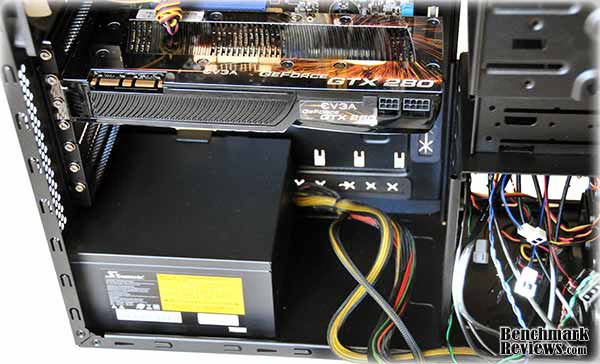
The cable routing holes themselves are rather narrow, and the added thickness of the grommets makes passing thicker cables like the main ATX power cable a little tricky. The first time I tried, the grommet peeled right out of the hole. However, I was able to get it back in and the cable passed through successfully, but as you can see it was a very tight fit.

The right side case panel mounts very closely: the clearance between the back of the motherboard tray and the case panel is only 5/16" (8mm). You'll want to make sure any cables are snugged down as tightly as you can make them. Also, hard drives mount in their bays with the connector side in, and the length of a standard SATA data connector means it's going to be pressed right up against the side panel. Right-angled SATA connectors would be a good idea here.
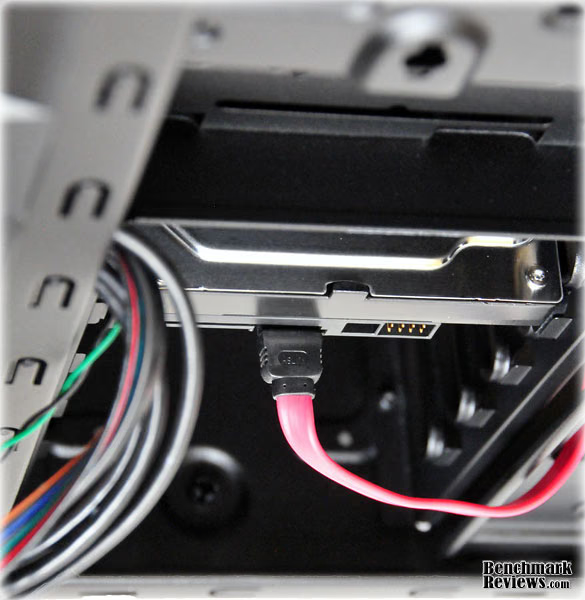
Aside from these clearance issues, this is an easy case to do a build in. In the next section I'll sum up my thoughts on this case.
NZXT Lexa S Final Thoughts
NZXT doesn't say much about the Lexa S on their web site, other than saying it's designed for "enhanced airflow" and mentioning that it offers gamers "sleek aesthetics". The all-black metal chassis is used is several other cases in NZXT's "Crafted" and "Classic" series such as the NZXT M59 case reviewed here or the NZXT Gamma case reviewed here; the various cases are differentiated by included accessories such as fans, fan controllers, and tool-free fasteners for 5.25" devices, as well as the plastic molding used for the faceplate of the case. This strategy allows NZXT to offer cases at a variety of price points and still keep the overall prices low. Compared to the M59 case, this case offers two additional fans, the fan controllers, and a more elaborate faceplate with an external 3.5" drive opening, and is available at Newegg for $79.99, or $20 more than the M59.
NZXT aims the Lexa S Mid-Tower computer case at gamers; indeed, the small print on the case badge reads "Crafted Gaming Armor". Gamers tend to use higher-end components and to tweak their systems frequently, so a case that can handle the heat and provide easy access for swapping out components is a plus. The Lexa S doesn't offer higher-end features like tool-less parts installation or a removable motherboard tray, but what it does offer - a fully finished chassis with roiled edges, cable management and tie-down points, ample device bays, 4 fans, fan controllers, and so forth - are almost unprecedented at this price range. If you'd rather spend your money on processors, motherboards, and graphics cards rather than fancy aluminum cases, NZXT shows that you don't have to lower your standards too much. The included fans should move enough air for even SLI and Crossfire rigs.
The only complaints I have about the case concern clearances: the top fans can interfere with aftermarket CPU coolers and optical drives in the top 5.25" bay, and the clearance between the chassis and the right side panel makes fitting power supply and hard drive cables more trouble than it should be. The rubber grommets in the cable routing holes are a nice touch at this price point, but the holes themselves could be opened up a few millimeters to make passing thicker cables easier.
LEXS-001BK Conclusion
This case performs well, with only a few clearance issues. It has ample room and cooling even for an SLI or Crossfire system.
NZXT has gone to extra trouble on the aesthetics of this case, with a fully finished interior, sleek faceplate, and hidden fasteners. The appearance is bold without being too aggressive.
The construction quality of the case was excellent. The side panels slipped smoothly on and off; the faceplate fit perfectly, and the finish was almost flawless.
Functionally, the only issues I have with this case are the aforementioned clearance issues. These will be common to all NZXT cases using this otherwise excellent chassis. A few added millimeters in the right places would make this case almost perfect.
As of December 2009, the LEXS-001BK model is available for $79.99 from Newegg. The Lexa S computer case represents an excellent value for budget-builders. I've seen cases in the $120 range that don't offer the features and construction quality this case does. The NZXT Lexa S Mid-Tower computer case is a standout product in this price range.
Pros:

+ Finished interior with rounded edges
+ Grommeted cable routing holes and tie-down points
+ Ample room for devices with 7 3.5" bays and 4 5.25" bays
+ Bottom mounted power supply with filtered intake
+ Included fan controller and four quiet fans
+ Overall excellent fit and finish
Cons:
- Clearance issues with upper fan mounts and cable routing
- Side USB ports too close together
- Glossy front bay door attracts dust, fingerprints, and scratches
Ratings:
-
Performance: 9.0
-
Appearance: 8.5
-
Construction: 9.0
-
Functionality: 8.5
-
Value: 9.0
Reader comments from the original article
1 comment were posted before commenting closed. They are preserved as written. Original avatars no longer resolve and are shown as a placeholder.
Gtx 570 Windforce Gigabyte fit ? jonathan ibarra Permalink:
Hello, I want to buy this case but wonder if Gtx 570 Windforce Gigabyte fits correctly. What do you know . Thanks