
NZXT M59 Mid-Tower Computer Case M59-001BK
NZXT M59 M59-001BK Review
I am a case snob. The cases I like are brushed aluminum, have removable motherboard trays, neatly rolled edges, finished interiors, cable management, and so forth. They have SATA backplanes and mounts for triple-120 radiators. A certain degree of style doesn't hurt, either. Of course cases like this are expensive, but since I have to look at them all day, I figure they're worth it. In this article, Benchmark Reviews inspects the NZXT M59 Mid-Tower computer case, which at a suggested retail price of $59.99 for the M59-001BK model it is hardly in the milieu I'm become accustomed to. Will the design flair that was evident in NZXT's $400 Khaos gaming case be in evidence here? Let's see.
As other reviews here on Benchmark Reviews have noted, the prices for most computer components - the processor, memory, hard drives, and so forth - have been going steadily downwards for years. Science fiction author and former Byte magazine columnist Jerry Pournelle noted this more than 20 years ago, repeating "Iron is expensive; silicon is cheap." at every opportunity. We're seeing a lot more activity in the low-end (arbitrarily defined as "less than $75") case market of late, but many, if not most, sub-$75 cases suffer from indifferent design and cheap construction, making them poor choices for enthusiasts who frequently upgrade and modify their systems.
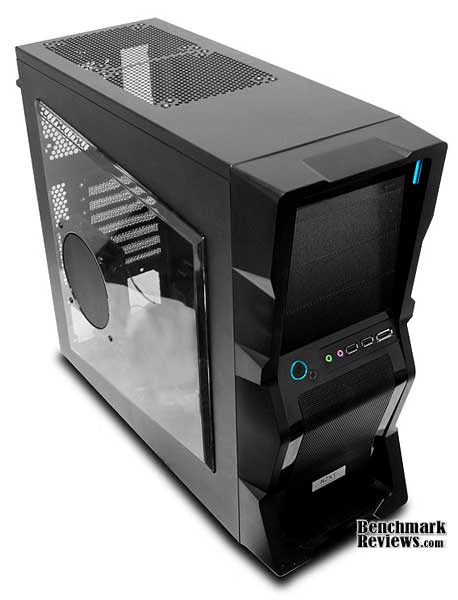
Case companies have only recently begun to produce inexpensive cases using some of the design and construction techniques formerly reserved for higher-end enclosures. The M59 Mid-Tower computer case is NZXT's foray into this new market. Let's see how it stacks up.
NZXT M59 Features
-
Immense Performance: 5 fan capability (side 120mm LED and rear 120mm exhaust included) Included 9-fin rifle bearing NZXT fans rated at 42CFM and 23db
-
Night light: A ambient light sits over the 5.25" drives to give visibility in dark rooms or at LAN parties
-
Black on Black: Smoked clear window and a black interior gives the best combination of black on black
-
Meshed front panel allows for more airflow
-
5.25" stealth bay to keep a clean look
-
NZXT solid state bracket allows for two SSD drives to be installed
-
Wire routing: motherboard punched holes allows for quick CPU bracket removable and optimal wire routing, turned HDD also helps with managing cables
-
Pre-drilled water cooling holes on the back plate
-
Front mounted USB, audio, and ESATA ports
-
Support for external dual radiator at the top of the chassis
-
High end graphics card support, the M59 features space that is especially designed to fit longer 10.5" cards
M59-001BK Specifications
| MODEL | M59 SERIES |
|---|---|
| CASE TYPE | MID TOWER Black interior chassis |
| FRONT PANEL MATERIAL | Steel |
| DIMENSIONS (W x H x D) | 190 X 449 X 508 mm |
| COOLING SYSTEM |
FRONT, 1 x 120mm SIDE, 1 x 120mm LED fan@1200RPM, 23db/42CFM (included)
TOP, 2 x 140/120mm |
| DRIVE BAYS | 11 DRIVE BAYS 4 EXTERNAL 5.25" DRIVE BAYS 7 INTERNAL 3.5" DRIVE BAYS |
| MATERIAL(S) | Steel Construction |
| EXPANSION SLOTS | 7 |
| POWER SUPPLY | 500 WATT PS2 ATX 12V 2.0 ( OPTIONAL ) |
| WEIGHT | 6.5 KGS (W/O Power) |
| MOTHERBOARD SUPPORT | MOTHERBOARDS: ATX, MICRO-ATX, BABY AT |
About NZXT
NZXT, a company built upon gamer's dreams, hopes to create products that put consumers first. With the objective of designing unique products catered for hardware enthusiasts and gamers, NZXT has grown into a globally renowned brand recognized for dedication towards creating the next great gaming product. NZXT has won numerous awards from media and publications from across the globe with a product line spanning from gaming chassis, power, and gaming input devices. As a corporation formed by gamers, NZXT continues to expand into new horizons and push the limits further with each product unveiling.
Our dedicated sales and customer service team will work diligently to earn your trust and loyalty. All our products are built with high quality material and engineered in the best conditions.
NZXT products are designed and engineered in the United States and manufactured overseas in China and Taiwan. NZXT was established in 2004 in Los Angeles, California.
Closer Look: Exterior
The NZXT M59 case presents a striking facade: it has a dramatically-angled front bezel, along with a smoked-plastic side panel window with an integrated blue-LED fan.

On the front of the case are four 5.25" device bays. The top bay has a stealth cover for an optical drive. Note that there are no external 3.5" device bays.

Just below the 5.25" bays is the I/O panel. It contains the power and reset switches, as well as two USB ports (placed too close together for anything wider than a standard USB cable), an E-SATA port, and microphone and speaker jacks. The rim of the power switch glows blue when the computer is on, and the rim of the reset switch flickers green to indicate hard drive activity. This panel is slanted upwards slightly which positions these buttons and connectors conveniently if you place the case on the floor.

Moving to the rear of the case, we can see the power supply fits in at the bottom, just below the 7 meshed card shields. A 120mm fan is pre-installed in its usual place above the I/O shield area; just above are rubber-grommeted holes for water-cooling hoses. The rear fan opening also has mounting holes for 92mm and 80mm fans should you for some reason want to switch to a smaller fan. Both side panels are secured with thumbscrews.

The right side of the case is a plain black panel, which removes from the chassis after two thumb screws are removed.

Detailed Exterior Features
The angled lower front panel of the NZXT M59 is covered with a perforated metal mesh with a filter behind it. Behind this filter is a mount for a 120mm fan to cool the hard drives, but no fan is included with the case.

A blue LED light strip under the top front of the computer illuminates when the computer is turned on. NZXT calls it an "ambient night light sitting over the 5.25" drives for constant visibility in dark rooms or at LAN parties." Whatever it is, it looks cool.
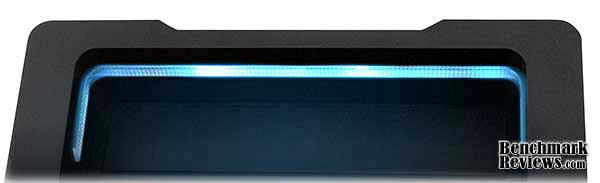
A stealth optical drive cover occupies the uppermost 5.25" bay position. The inside upper part of the front bezel is curved, so the regular meshed blocking panels will not fit...nor will the front of an optical drive, fan controller, or any other 5.25" device. You could put an optical drive here without the stealth cover, but it would have to be pushed back far into the case.

The front panel snaps off easily. Here we can see the four 5.25" drive bays and a mounting area for a 120mm fan at the bottom.
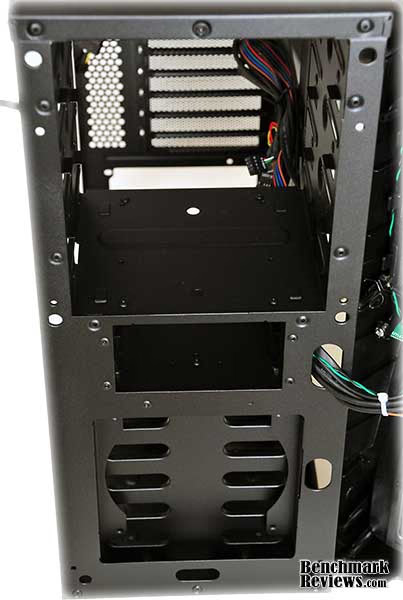
Mounting a fan here will be difficult since the hard drive cage blocks access to the mounting holes from inside the case, so you'll need long screws that reach all the way through the fan.

The side panel's smoked plastic window is thick, has bevelled edges, and is attached by...what? There are no visible screws or other fasteners. (It's actually held down by metal tabs passing through slots in the edge of the plastic, but this is only visible from the inside.) The 120mm fan mounted in the window is secured with smooth plastic push pins. The lack of visible external screws gives the side panel a sleek, high quality appearance.

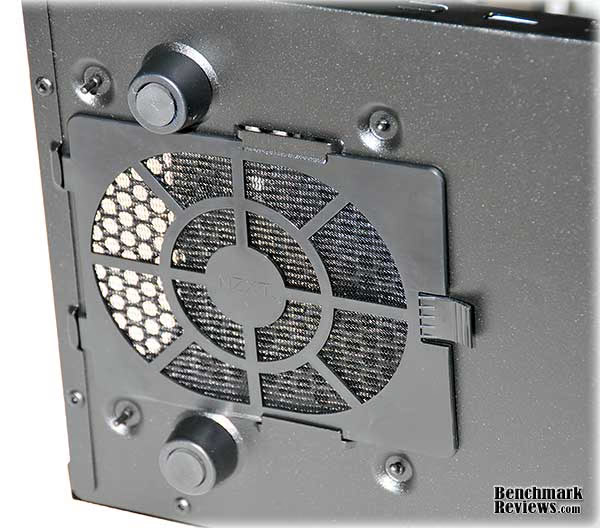
Looking at the bottom of the case, we see four plastic feet (with rubber inserts) and the intake area for the power supply fan. The power supply intake has a removable filter, another surprise on this level of case. Oddly, it pulls out towards the front of the case, rather than the rear.
Moving to the top of the case, we see vents for two internal fans. Mounting holes are provided for 120mm and 140mm fans-- you could even (theoretically) mount a dual-120mm radiator here. But as we'll see later, these vents are almost useless.

The thumbscrews used to secure the side panels are standard metal Philips-head screws with a plastic collar. This is doubtless cheaper than solid metal thumbscrews, but works well. Few cases in this price range use thumbscrews at all!
Closer Look: Interior
The interior of the NZXT M59 is where you really begin to realize how well NZXT has done with this low-cost design. The first thing you notice is that the entire interior of the case is painted black! Yep, no bare metal here. I've seen cases costing over $250 that don't finish the interior; this is a real surprise in this level of case. All sharp metal edges are neatly rolled, and there are no "punch-out" panels for the 5.25" bays or the rear card slot covers (I hate punch-out panels). At the bottom right are bays for 5 hard drives; just above those are two other 3.5" bays (but they are not front-accessible), and at the top are the four 5.25" bays.

The hard drive bays use a rail system: clip the rails to the side of your drive and slide it into place until it snaps. NZXT includes rails for all drive positions as well as a plastic caddy that can hold two 2.5" devices such as laptop hard drives or SSDs. It's nice to see more cases supporting 2.5" devices.

As I noted before, there are no front-accessible 3.5" bays, which makes installing card readers, floppy drives, or other 3.5" devices a problem, but this is easy to work around with inexpensive 3.5" drive bay adapters like this or this.

NZXT includes an accessories kit with motherboard standoffs, mounting screws, thumbscrews, the aforementioned 2.5" device caddy, and enough rails for every hard drive position.
Detailed Interior Features
The NZXT M59 motherboard tray is not removeable, but does provide a large cutout for access to a CPU cooler back plate as well as several well-placed holes for cable management. There are also many small loops for cable tie anchors.

The design of the hard drive mounts requires that the drives be inserted connectors-first. The clearance between the rear of the drives and the side panel is tight: normal SATA connectors will work but the case panel will exert some pressure on them. It would be a good idea to use right-angled SATA connectors here.

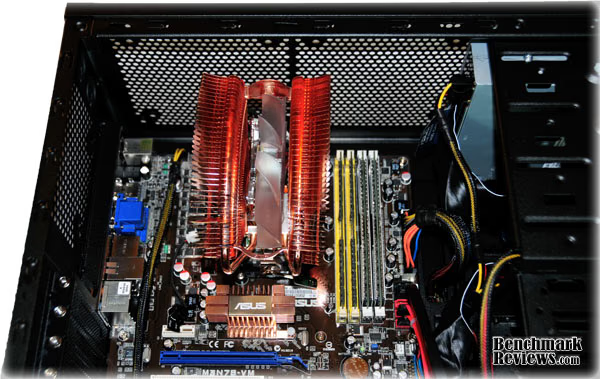
Two 120mm or 140mm fans can (theoretically) be installed at the top of the case. However, even the shortest optical drive in the top 5.25" bay will block the forward fan mount, and many aftermarket CPU coolers will block the rear fan mount. An extra 10mm added to the length and height of the case would make these mounts much more useful.
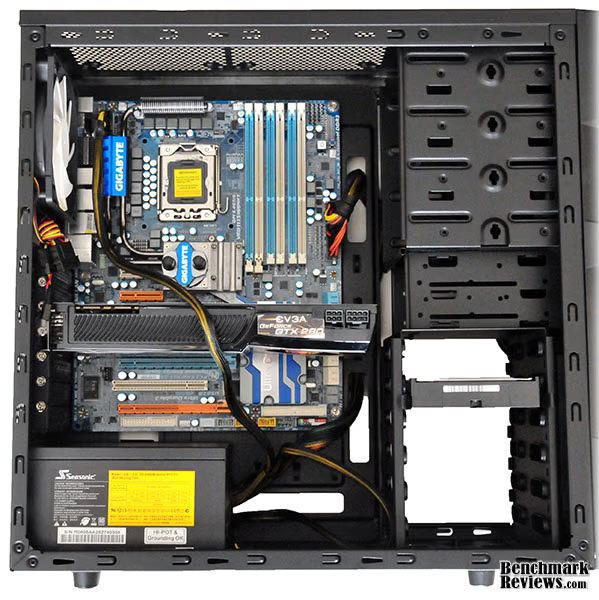
The motherboard mounts very close to the top of the case, and there are no cable routing holes there. Unless your power supply has a very long EPS 12V cable, you'll have to run it across the back of the motherboard. There's just enough room for a 10.5" long graphics card like this nVidia GTX280, and the 120mm side fan in the window will aid in cooling it. Since the case is a "7 slotter", there's not enough room for a double-width video card in the third PCIE-x16 slot, so tri-SLI or tri-Crossfire setups are out of the picture unless you're using single-wide cards. (Note: on this particular motherboard, there's not enough clearance under the back of the video card to feed the cable underneath it, thus the sloppy-looking routing.)
In the next section, I offer my final thoughts and conclusion on the NZXT M59 gaming case.
NZXT M59 Final Thoughts
NZXT calls the M59 a "gaming chassis" on their web site and the fine print on the case badge reads "Crafted Gaming Armor." To me a "gaming chassis" is one designed to host high-end hardware (meaning that it has both the room and the airflow to support gaming-level CPUs and GPUs) as well facilitating the building and maintenance of such a system. Gamers are always tweaking their systems, and cases that make this easy count for a lot. And a striking appearance doesn't hurt either!
Given my penchant for high-end cases, I was impressed by the features and quality NZXT was able to pack into this case for the price. The finished interior, rolled edges, cable management, side window, hard drive rails, and extra lighting were all things I didn't expect to see. Building a system in this case is, for the most part, easy and fun. NZXT uses this same interior (or close variations thereof) on several of their other cases such as the Beta Evo and Lexa S, so if the dramatic styling of the M59 isn't to your taste, you can probably find something you like elsewhere in their lineup.
The NZXT M59 case has mounting points for 5 fans (rear fan, two top fans, side window fan, and front fan), but NZXT only supplies the rear and side window fans. Enthusiasts who prefer to pick their own case fans might prefer this, but I'd like to have seen at least a front fan in addition. But even with the mounting problems for the top fans, it's easy to configure this case to provide enough airflow for most rigs. I'd really like to see NZXT add a few millimeters of height to make the top fan mounts more useful, and doing this would also allow room for a couple more cable management cutouts above the motherboard. And it would only cost a few cents more to add the long screws required to mount the front fan.
NZXT shows that "inexpensive" doesn't have to mean "cheap." the M59 would be a good choice for any gamer more interested in putting their money into CPUs and graphics cards rather than a fancy aluminum case.
M59-001BK Conclusion
This case performs well; it's not a tool-less case (but no case at this price point is). It offers ample interior room for most builds and is easy to work with.
The NZXT M59's appearance is bold and rather aggressive. This may not be to everyone's taste, but it a good fit for the intended market. Touches like the finished interior and the hidden fasteners for the side window are nice extras.
The construction quality of the case was top-notch. The side panels slipped on and off smoothly; drives snapped firmly into place, and all the parts fit well.
Functionally, I have a few nits: the upper fan mounts are almost useless; the upper 5.25" bay can really only be used for an optical drive (barring a little Dremel work); the two front USB ports are too close together, and...well, that's about it.
As I mentioned at the start of this review, I'm a case snob. I've owned Lian Li, Cooler Master, and other multi-hundred-dollar high end cases. Before I was introduced to this case it would never have occurred to me to look at anything this inexpensive. But actually building a system in a case is the real test, and for a mere $59.99 at NewEgg.com, the M59-001BK case easily offers the most bang for the buck I've seen.
Pros:
+ Finsihed interior with rounded edges
+ Cable routing holes, tie-down areas, and processor back plate cutout
+ Room for 7 3.5" devices and 4 5.25" devices
+ Bottom-mount power supply with filtered intake
+ Extraordinary features and construction quality for the price
+ Radical styling appealing to some
Cons:
- No external 3.5" bays
- Upper fan mounts of limited usefulness
- Difficult to mount front 120mm fan
- Front panel USB ports too close together
- Radical styling not appealing to some
Ratings:
-
Performance: 8.5
-
Appearance: 8.5
-
Construction: 9.0
-
Functionality: 8.0
-
Value: 9.5
Final Score: 8.7 out of 10.
Recommended: Benchmark Reviews Seal of Approval.
Questions? Comments? Benchmark Reviews really wants your feedback. We invite you to leave your remarks in our Discussion Forum.
Reader comments from the original article
1 comment were posted before commenting closed. They are preserved as written. Original avatars no longer resolve and are shown as a placeholder.
корпус Kirill Permalink:
I write in Russian to you, too, did not understand :) Ну нефиговенький корпус, только вот фоток достаточно мало :( и про пыльевые фильтры ничего не сказано...