
Silverstone SUGO SG08 Mini-ITX Case
SilverStone SUGO SST-SG08 Computer Case Review
Manufacturer: SilverStone Technology
Product Name: SFF Chassis
Model Number: SST-SG08B
UPC: 844761008130
Price As Tested: $199.99 at Newegg
Full Disclosure: SilverStone Technology provided the product sample used in this article.
SilverStone Technology is best known for their computer cases. Some of their older models, such as the Temjin SST-TJ07, are actual classics in the field. SilverStone isn't afraid to innovate, as their "rotated motherboard" cases like the Raven and Fortress FT-02 show.
As more and more functions that used to require separate cards are subsumed into the motherboard and chipset, the need for multi-slot motherboards is diminishing. Of course, serious gamers running SLI or CrossFireX systems with Killer NIC network cards and fancy audio cards do need a lot of slots, but I'd guess the majority of even gamer systems run exactly one card: a video card. For these users, a computer based on a micro-ATX or mini-ITX motherboard means a smaller, possibly less expensive system with all the functionality they need.
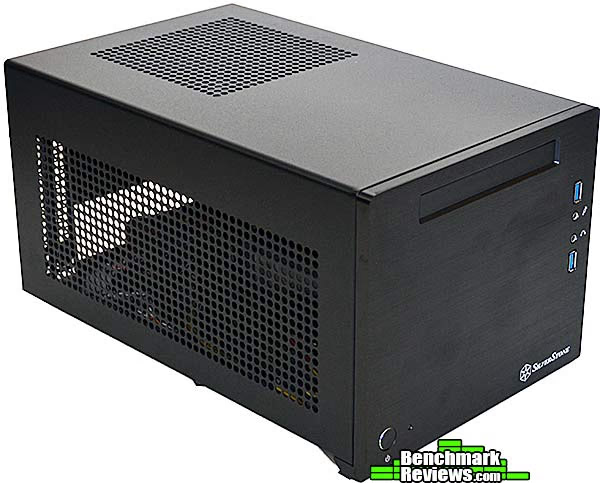
SilverStone's SST-SG08B is their latest and fanciest mini-ITX computer case. Since it's designed for a mini-ITX motherboard, it's much smaller that a traditional computer case designed to accommodate standard ATX motherboards. Of course, there are other factors to consider, such as what kind of power supply you need and how many drives it will hold. I'll dissect the case to the component level and build a performance-oriented system in it to check it out.
SUGO SG08 Features
-
180MM Air Penetrator fan with removable filter for cooling
-
Thick 10mm aluminum front panel with premium styling
-
Dual speed fan switch and reset button on rear panel
-
Two full size expansion slots accommodates top-end graphics card up to 12.2" long
-
Supports Mini-DTX and Mini-ITX motherboards
-
One slim optical drive bay included
-
Accommodates one 3.5" hard drive and two 2.5" hard drives or SSDs
-
Custom 600W PSU (80 PLUS Bronze certified) with short cables included
-
GPU vent divider prevents air exhaust recycling back into PSU
SST-SG08 Specifications
|
Model No.
|
SST-SG08B(black) | |
|---|---|---|
|
Material
|
10mm aluminum front panel, SECC body | |
|
Motherboard
|
DTX, Mini-ITX | |
|
Drive Bay
|
External | Slim optical x 1 |
| Internal | 3.5” x 1 , 2.5”x 2 | |
|
Cooling System
|
Front | -- |
| Rear | -- | |
| Side | VGA fan duct with oversized vents | |
| Top | 180mm Air Penetrator 700/1200rpm, 18/34dBA | |
| Bottom | PSU intake vents and VGA exhaust divider | |
| Internal | -- | |
|
Expansion Slots
|
2 | |
|
Front I/O Port
|
USB 3.0 x 2 Audio x 1 MIC x 1 |
|
|
Power Supply
|
Custom 600W with 80 PLUS Bronze certification and single +12V rail | |
| Power Supply Dimensions | 150 mm (W) x 86 mm (H) x 140 mm (D) | |
| Power Supply Cables | 1 x 24 / 20-Pin Motherboard connector (670mm) 1 x 8 / 4-Pin EPS / ATX 12V connector (670mm) 1 x 8/6-Pin PCIE connector (360mm) 1 x 8/6-Pin PCIE connector (380mm) 3 x SATA connector (350mm + 130mm + 150mm) 2 x 4-Pin Peripheral connector (350mm + 100mm) |
|
|
Expansion Card
|
Support expansion cards up to 12.2 inches | |
|
Limitation of CPU cooler
|
117mm | |
|
Limitation of PSU
|
12.2" | |
|
Net Weight
|
6 kg | |
|
Dimensions
|
222 mm (w) x 190 mm (h) x 351 mm (d), 14.8 liters | |
Let's take a closer look at this case in the next section.
Closer Look: Exterior
The accessories pack includes a multi-lingual manual, an adapter to allow motherboards with only USB 2.0 headers to be connected to the case's front panel, a small bag of screws for mounting drives (it even includes four of the ultra-tiny screws for mounting slim optical drives), two reusable cable ties, and a power cord. You can attach the rectangular vent to the left side panel, sealing its edges with the supplied foam block, to precisely direct cool outside air into your video card's axial fan input.

The front of the SST-SG08 case is a single slab of black anodized aluminum. It's a pretty minimalist facade, with a power button and light, two USB 3.0 ports, microphone and headphone connections, and a slot for a slim optical drive. The "SilverStone" logo is the only decoration. A card reader-- at least for SD cards-- would have been nice. The power indicator to the right of the power button is also the drive activity light: it's on steadily when the computer is turned on, but flickers with drive activity.
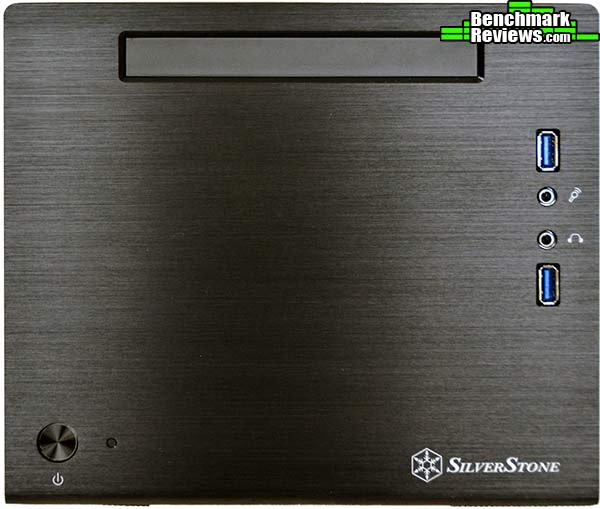
When I first examined this case, I was struck by its weight-- it seemed noticeably heavier than you think a case this size would be. And here's why: that brushed aluminum front panel is a full centimeter thick. I'm not sure why SilverStone made this design decision, but it gives the case some...presence.

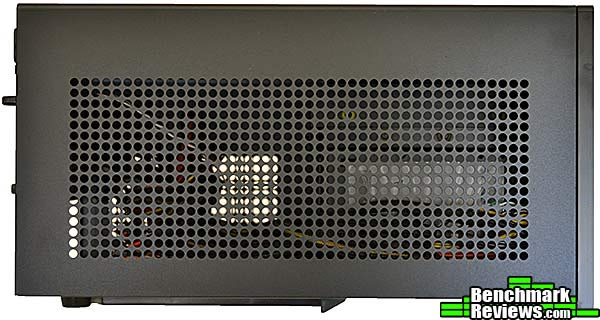
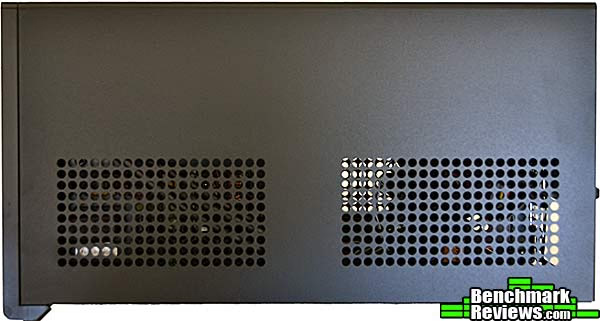
The left side of the case is a single vented panel, the better for your video card to breathe. SilverStone had full-sized, high performance video cards in mind for this case when they designed it, as we'll see in the following sections.
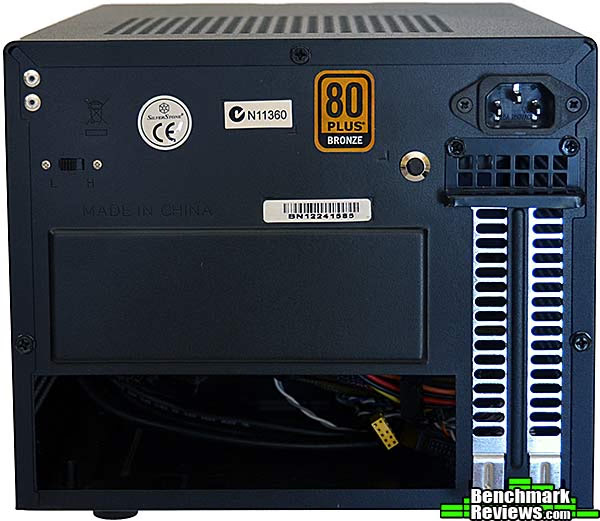
At the rear of the case are a low/high speed switch (barely visible at the left in this image) for the Air Penetrator fan; the I/O panel cutout; two card slot covers (mini-ITX motherboards only have one slot at most, but again, SilverStone's thinking of double-width video cards), the reset switch, and the power receptacle. Power receptacle? Yes, this case comes with its own power supply...more on that later.
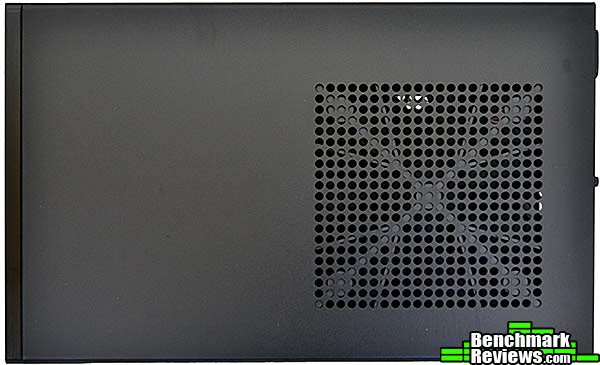
The right side of the case is plain, with more ventilation slots. However, while the ventilation slots on the left side of the case were for intake air for a video card cooler, these slots are for exhaust. This case has two airflow paths: for the video card, it's intake air through the left side of the case and out the rear and bottom; for the rest of the system it's air in through the top of the case via the filtered Air Penetrator fan, and out through the right side of the case.
And here's the intake at the top of the case for the 180mm SilverStone Air Penetrator fan. We'll look at this in more detail in the Interior section.
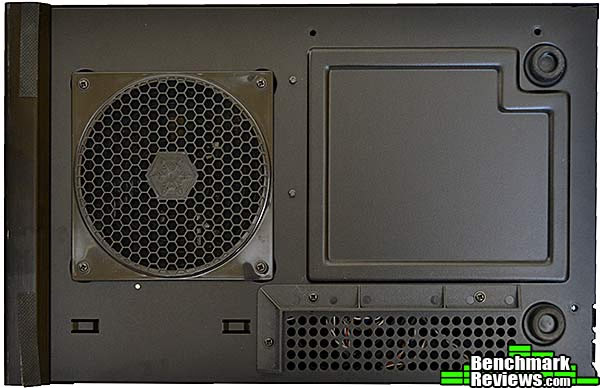
Things get interesting on the bottom of the case. It almost looks as though SilverStone was thinking about a motherboard backplate cutout here, although that wouldn't make any sense because it would (1) Leave the bottom of the motherboard exposed, and (2) space restrictions inside the case preclude the use of the large coolers that require backplates. The fan intake you see on the left of this image is for the built-in power supply, and the vented area at the lower right is an exhaust area for graphics cards that don't route all their hot air out the back of the case. Note the screw-in plastic blocking ridge that keeps this warm air from being sucked into the power supply intake. Nice touch!
Let's take a look inside this intruiging case in the next section.
Closer Look: Interior
SilverStone is known for their innovative case designs, and the SG08 is certainly unusual in its cooling setup. A single massive 180mm Air Penetrator fan sucks in air through a removable filter and blows it down into the case, where it exits from the right side. The fan is almost inaudible at its "low" setting and unobtrusive although audible on "high". In this image the fan filter is sitting on top of the optical drive bay. You must remove the top of the case to get at the fan filter.

Four screws (removed in this image) secure the optical drive bay. You'll need to take it out to install the optical drive. I installed a SilverStone slot-loading drive into this bay. The accessories package included with the SG08 includes the four tiny screws needed to secure the drive to the tray.

The drive caddy is under the optical drive bay and can accommodate two 2.5" drives on the bottom and one 3.5" drive on the top. The mounting points for the 3.5" drive use yellow rubber isolators to quell noise; oddly, this case was missing one as delivered.

The drive caddy mounts just above the power supply. The part of the case receives virtually no airflow, so I wouldn't recommend a VelociRaptor or other high-RPM 3.5" hard drive here. By the way, you're going to want to get some right-angled SATA connectors for the 2.5" drives, as they're very close to the side panel and standard SATA cables will poke out too far.

With the fan and drive bays removed, you've got a straight shot into the interior of the case. Four mounting posts for a mini-ITX motherboard are pre-installed. At the right of this image you can see the power supply included with the case. The included (short) ATX form factor power supply is one of the things that makes this case interesting. Most mini-ITX cases require "sfx" form factor power supplies, which can be difficult to find, especially in high wattage ratings (SilverStone does have a nice 450 watt model). This 600W unit is an 80 Plus Bronze certified single-rail design that includes two 8/6-pin PCI-E connectors for your video card.
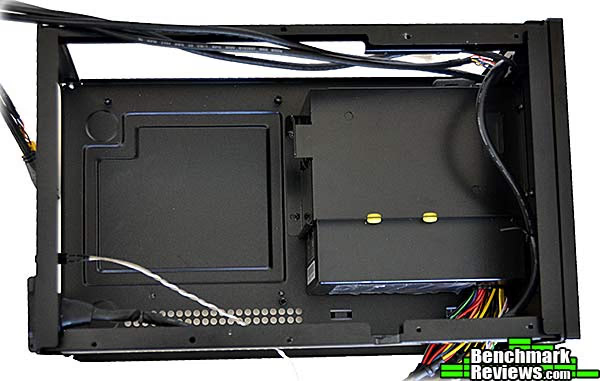
Looking at this photo, you might be thinking that the upper rails would make useful handles to pick up the chassis while you're working on it. Don't. The sheet metal forming these rails is thin and it's very easy to bend them. I also noticed the sheet metal of the rear panel was equally thin and easy to deform when snapping in the I/O shield.

Let's give this case a real test: building a system in it.
Building a System
While historically mini-ITX motherboards have been low-power designs relegated to home theater or server use, we're starting to see a number mini-ITX designs aimed at the enthusiast. Several vendors have or are releasing LGA1155 boards based on Intel's latest Z77 chipset. Paired with the right video card and CPU, such a motherboard can be a good basis for a high performance gaming rig.
But when dealing with the space constraints of this case and mini-ITX builds in general, you must choose your components carefully. You'll need a "slim" optical drive, for one thing; as well as a CPU cooler that will fit within the limited confines of the case (of course you can use the stock Intel cooler); in particular, the CPU cooler cannot extend beyond the edges of the motherboard. Mini ITX motherboards only have two memory slots, so consider how much RAM you'll need now and in the future. Here are the main components I used for this build:
| Motherboard | ASUS P8Z77-I Deluxe | Newegg |
|---|---|---|
| Memory | Corsair CMX16GX3M2A1600C11 (2x8GB) | Newegg |
| CPU cooler | Cooler Master GeminII M4 RR-GMM4-16PK-R2 | Newegg |
You'll also want to consider the video card and hard drive you select due to ventilation limitations. "Reference design" cards with a single axial fan that expels all hot air from the rear of the case are better than dual-fan video cards that exhaust part of their heat back into the case; these will create a hot spot in the dead air zone in front of the card. There's no air flow at all over the hard drives, so high-speed drives like Western Digital Velociraptors are probably a bad idea. The drives mount just inches from the motherboard, so some short SATA cables with right-angled connectors will help keep things neat.
As you might expect from a case this size, interior space is at a premium. SilverStone says the included power supply has "short cables". I suppose this is true for certain values of "short". While the cables might be considered short in the context of a standard full tower case, they are much longer than they need to be for this case, as shown below. The cables on the left are the front panel audio and USB 3.0 headers; on the right are the power supply cables.

If you've only built in standard sized cases before, you'll be frustrated at the lack of cable routing options. There is no motherboard tray to route cables behind, or empty drive bays to stuff them in. The extra length of power supply and PCI-E cables can be accommodated in exactly one place: a "ledge" beside the drive caddy. Even so, it's a tight fit. Zip ties and adhesive tie-downs are your friend. Of course if you're not going to use a separate video card, there's plenty of room for extra cable length.
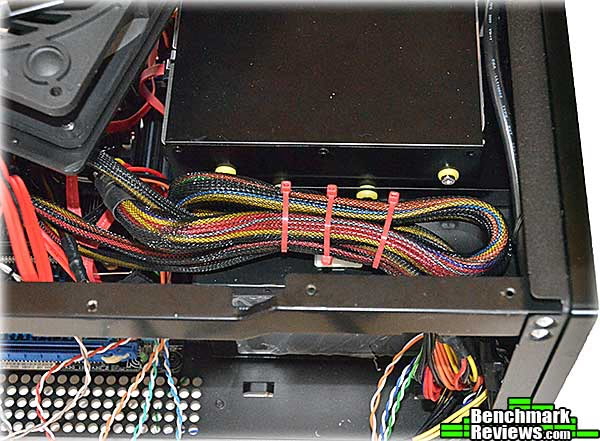
Here's my first shot at wire routing. The idea is to clear as much space as possible for the video card, which will install right alongside the power supply. The power supply has a protective plastic pad that will prevent the back side of the video card from shorting out against it. You'll need a low-profile CPU cooler that doesn't extend beyond the edges of the motherboard, such as the Cooler Master Gemini M4 I used in this build.

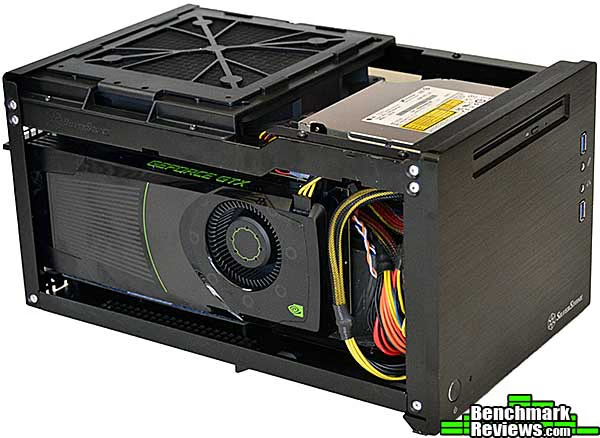
SilverStone says the case will accommodate cards up to 12.2" long. Technically, that's true, but there are a few caveats. A card that long will be pressed right up against the bundle of cables exiting the non-modular power supply. And there are other potential fitment problems as well. Note the heat pipes visible on the top of this PowerColor PCS+ 6950 Vortex II card: they interfere with the fit of the Air Penetrator fan, which you really need since it's the only fan in the case. The MSI NGTX680 Lightning video card won't fit, either, since its large fan shroud hits the top rail of the case. If you plan to use a video card, stick with small or "reference design" cards without protruding components.

Fortunately, a reference design NVIDIA GTX680 fits perfectly. As you can see from the image below, there's about 1.5" of free space between the card and the bundle of cables coming out of the power supply. Since the GTX680 reference design is just a hair over 10" long, you can get an idea about how much clearance is left over for longer cards.
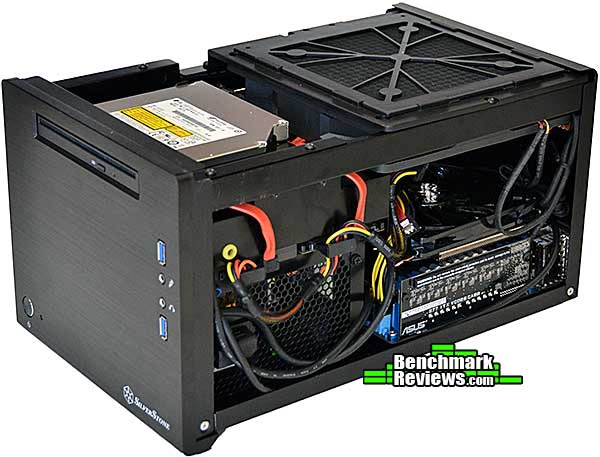
Here's what the assembled system looks like from the other side. Another place to stuff extra cables is the 1" gap between the front of the top fan and the back of the optical drive. Note the right-angled SATA cables coming up from the two 2.5" drives-- there's about 1/4" of space under the optical drive tray you can use for routing these flat cables. You'll want to take extra care to keep the space under the top fan clear, as this is where all the case ventilation is. It took a lot of work to get the case even this neat; plan to spend some quality time on cable routing, and also plan to take everything out and start over a few times.
When you press the power button on your new build and nothing happens, take a look under the power cord. The power supply switch is almost invisible under the cord exiting from the 90-degree power plug, and in my case the switch was turned off as delivered.

Join me in the next section as I give my final thoughts and conclusion about this case.
Mini ITX Case Final Thoughts
SilverStone is known for their innovative case designs, and the SST-SG08B, although ordinary looking from the outside, carries on this tradition. The main points of interest are its use and inclusion of a 600 watt ATX power supply, enabling enthusiasts to build a high-end gaming system with headroom for overclocking the video card, and the unique ventilation arrangement, with a single large Air Penetrator fan blowing down onto the motherboard area and out the side of the case. Baffles on the bottom of the case isolate any hot air exhausted from the video card or rest of the case from the cool air intake for the power supply.
Compared to a standard full tower case for ATX motherboards, the SG08 is minuscule:
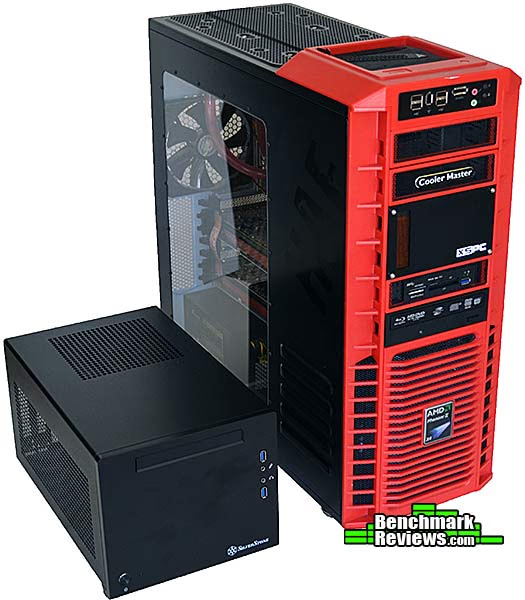
The whole point of a mini ITX system is small size, and while there are certainly smaller mini ITX cases, SilverStone's made this one as small as possible given its beefy power supply and ability to hold three hard drives/SSDs. Building a system in a case this small might come as a shock if your only experience has been with larger cases; frankly I'd argue for a few extra millimeters to be spliced in here and there, and it would make building a system in this case much easier! SilverStone uses this same power supply in at least one other mini ITX case, the SG07, and I imagine it has the same problems with excess cable length in that case as well. Lopping a few inches off each of the power supply's cables would make things much neater inside.
I was surprised at the flimsiness of the steel case body. It's very easy to bend or deform both the rear panel of the case (when snapping in the I/O shield) as well as the top rails of the case, which seem to be natural "handles" for moving the case while you're working on it. The 10mm thick aluminum front panel, on the other hand, would probably stop small arms fire and adds a lot of weight to the front of the case.
SilverStone's decision to design the case to accept only slim optical drives limits your choices there, too. In this post-physical-media world, optical drives may be going out of style, but there are a number of other interesting things you can do with a full-sized 5.25" drive bay.
SilverStone's top-down airflow scheme is unique in the mini ITX case market, but having a 180mm Air Penetrator fan just inches above the motherboard works really well. Even though the Cooler Master GeminII M4 is hardly an enthusiast heat sink, I was able to run the Intel Core i7-2600K CPU through AIDA64 stress testing (at stock speeds) with no cooler fan at all. With the cooler fan I was able to run stress tests with a mild overclock.
What's really nice about this system is that with a late model video card, you can have a very high performance gaming system with very little noise.
SilverStone SST-SG08B Conclusion
SilverStone set out to make the smallest possible mini-ITX computer case they could that could still serve as the basis of a high-performance system. They succeeded, albeit with some design decisions and compromises that make the result possibly less than optimum.
Nobody expects a mini ITX case to have the sort of expandability a standard case would, and yet SilverStone manages to fit room for two 2.5" drives, a 3.5" drive, a slim optical drive, and a 600 watt power supply all inside one of the smaller mini ITX enclosures made. Granted, you do have to plan on putting some quality time in for cable management. With a standard case, poor cable management just means things are messy inside the case; with this case, it means you can't get it put together!
If you're familiar with SilverStone's other cases, like the TJ-11, the Raven series, or the FT02 and FT03 series, you'll find the SST-SG08's styling to be very bland-- even its predecessor SG07 was more visually interesting. It's a plain black box, and if you wanted to say nice things about it you'd use adjectives like "elegant" and "understated", which it of course is. The brushed and anodized aluminum slab that forms the front panel does give it some presence, though. While it may not be striking, it's also not garish or offensive and will fit in well with any decor.
The case body and frame are mild steel, with a 10mm thick aluminum front. While the construction is of high quality from a "how do the parts fit" point of view, the steel used for the case frame and rear panel is so thin that it's easy to bend or deform the case if you're not careful. I was quite surprised by this since it's completely unlike any other SilverStone case I've ever seen. The case is hardly a lightweight at over 12 pounds (admittedly with power supply), so I think some extra ounces devoted to a more robust construction would be well worth it.
The case performs its main function-- housing and cooling high performance components-- well. As a modern case it offers SuperSpeed USB 3.0 ports on the front of the case if your motherboard has the appropriate header. I still would have liked to have seen an integrated card reader, even if it's just for SD cards. Online gamers will appreciate the microphone and headset jacks. SilverStone has gone to a great deal of trouble to design the airflow for this case, with touches like the baffles on the bottom of the case that ensure the power supply intake air is cool, and the adjustable filter and foam collar that directs cool outside air directly into your video card's axial fan.
At $199.99 at Newegg, this is certainly one of the most expensive mini-ITX cases you can buy, but that price does include a very nice 80 Plus Bronze-certified power supply with exactly the number and type of connectors you'll need for a full build, with no wasted cables. That power supply also means that you can run cards like an NVIDIA GTX690 without a problem.
There are cheaper mini ITX cases you can buy, as well as larger ones that arguably provide a better home for high performance systems by permitting larger CPU coolers and more hard drives. SilverStone is aiming for a pretty small demographic with this case: people who want to build the smallest possible high performance computer and run a high-end graphics card. If this describes you, this is about the best case out there.
Pros:
+ Included 600W 80 Plus Bronze power supply
+ Excellent ventilation and airflow management
+ Power, space, and cooling are more than adequate for any video card (that will physically fit)
+ All air intakes are filtered
Cons:
- Distressingly thin sheet metal is easy to damage
- Power supply cables are far too long for this case, making cable management difficult
- No integrated memory card reader
- Design for slim optical drive limits your options
Ratings:
- Presentation: 9.50
- Appearance: 8.50
- Construction: 8.25
- Functionality: 9.00
- Value: 9.00
Final Score: 8.85 out of 10.
Quality Recognition: Benchmark Reviews Silver Tachometer Award.
Benchmark Reviews invites you to leave constructive feedback below, or ask questions in our Discussion Forum.
Reader comments from the original article
3 comments were posted before commenting closed. They are preserved as written. Original avatars no longer resolve and are shown as a placeholder.
I'm impressed Bruce Permalink:
"Note the screw-in plastic blocking ridge that keeps this warm air from being sucked into the power supply intake. Nice touch!" This is what I call attention to detail...!! Impressive.
Not impressed Yanni Permalink:
Slim optical drive only, included power supply is non-modular, cable management very difficult, only takes one 3.5" HDD, price is very high, too heavy, non rigid construction. These issues are simply unacceptable. In my opinion, the Lian Li PC-Q08B has all the advantages but none of the above issues that the Silverstone case has. It is approx 80mm taller, but that is just about the only minor issue and I am happy with it!
RE: Not impressed Sean Permalink:
While I haven't used this case, the comments from Yanni are a bit disingenuous. It's very hard to find a decent Mini-ITX case with a 600w power supply that will actually FIT. Finding regular ATX PSUs that are small enough and can power a full size dual slot graphics card is difficult at best. Cable management CAN be hard with the amount of space in this case, but considering the size of the ase management is not quite the issue that it's made out to be. I'll admit that the non-rigid construction could be an issue but I'm not entirely certain as to why. In regards to the point about the lack of 3.5" HDD slots...this case is designed, as are many SFF cases, for 2.5" drives as primary. You can get 2.5" drives with pretty decent capacity for about the same price as 3.5"'s. You can run a 2.5" for main OS duties (500GB, like the Hybrid Momentus XT or and SSD of your choice and a 1TB 3.5" for storage and apps). You just need to think about the flexibility as opposed to what are perceived limitations. The Lian Li PC-Q08B is a very good case and does afford plenty of flexibility but for those that dislike the perforated front and glowing fan this case does a very good job, if only on paper. I have mine on order and am eager to give it a whirl.