
MSI GeForce GTX 680 Lightning Video Card
Manufacturer: Micro-Star International (MSI)
Product Name: N680GTX Lightning
Model Number: V823
UPC: 816909099126
Suggested Retail Price: $599.99 (Newegg)
Full Disclosure: MSI provided the product sample used in this article.
Now that the Kepler drought has finally eased, NVIDIA's retail partners can start providing the overclocked and top-spec'd versions of their GTX 680 video cards. GPUs typically have some exploitable "headroom" in their clock frequency and power specifications, and often all a vendor needs to do to make use of this headroom is outfit the card with an improved cooler.
Kepler-based cards make this proposition more difficult than it has historically been since NVIDIA's reference cooler is very good: effectively and quiet. It's not that absolute best that can be done within a two-slot form factor, but it's much closer to that ideal than it has been in the past, and it's helped by the fact that Kepler GPUs are much less power-hungry than previous generations. Less power means less heat, which makes the card easier to cool.
Not that MSI would be content with anything so mundane as just a new cooler for their Lightning product lineup. While they do offer variants of the GTX 680 with their signature Twin Frozr cooling system as the sole distinguishing feature, the N680GTX Lightning is built upon a completely new custom PCB that owes nothing to NVIDIA's reference design.
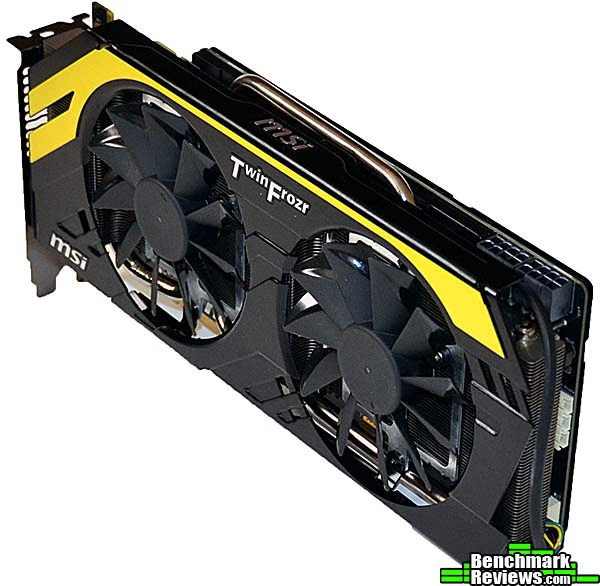
With greatly enhanced power circuitry as well as mil-spec components and an unlocked BIOS, impressive overclocks should be possible...and you should expect them given the card's substantial price premium over a reference design GTX 680.
Closer Look: MSI N680GTX Lightning
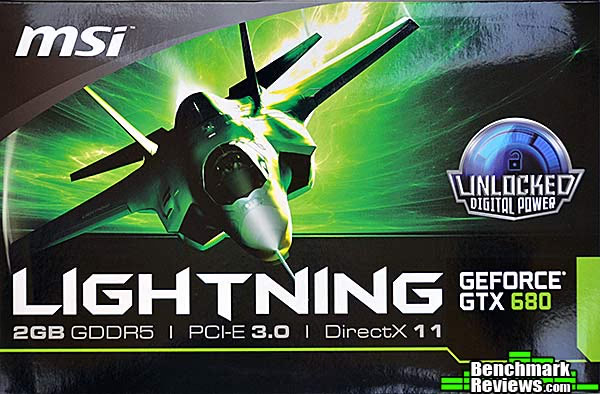
Surprisingly, the box doesn't call out the special features of the card. The back of the box shows a lot of technical specs, but they're generic and would apply to any 680-based video card. When you see this sitting on the shelf next to another 2GB 680 card that costs $75 less, you might wonder why this one costs more, but the box won't tell you. Unless, of course, you happen to notice the Velcro-secured top flap (which I didn't, for a while) which opens to reveal a panoply of all the card's special features.
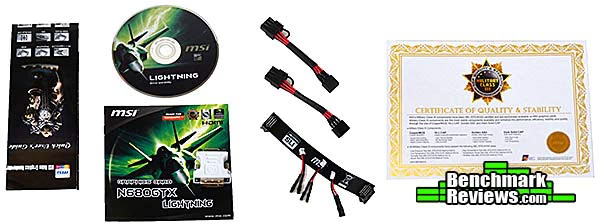
The accessories package comprises an installation manual, a catalog, the driver/utilities disk, two 6-pin to 8-pin power cables, an extra-long SLI bridge, three plug-in voltage check cables, and a "Certificate of Quality and Stability". A single DVI to VGA adapter is provided for those who are inexplicably still using analog displays.
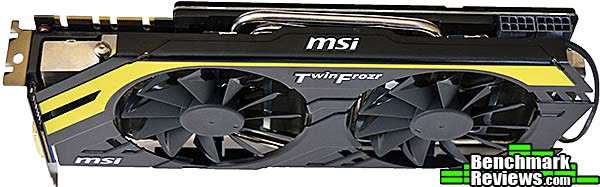
Like many of MSI's cards, the N680GTX Lightning sports the company's Twin Frozr cooler. A clever feature here is that MSI runs the fans backwards at full speed for 15 seconds or so at startup to help clear dust from the fan blades and cooling fins. Note that the second SLI connector is blocked by the fan shield-- this is why MSI includes an extra-long SLI cable that can be looped over the top of this shield to reach that connector.

A look at the top of the card shows the two of the four 8mm "super pipe" heat pipes for MSI's custom cooler. We can also see that in place of a reference design 680's two 6-pin PCI-E power connectors, the N680GTX Lightning has two 8-pin connectors.
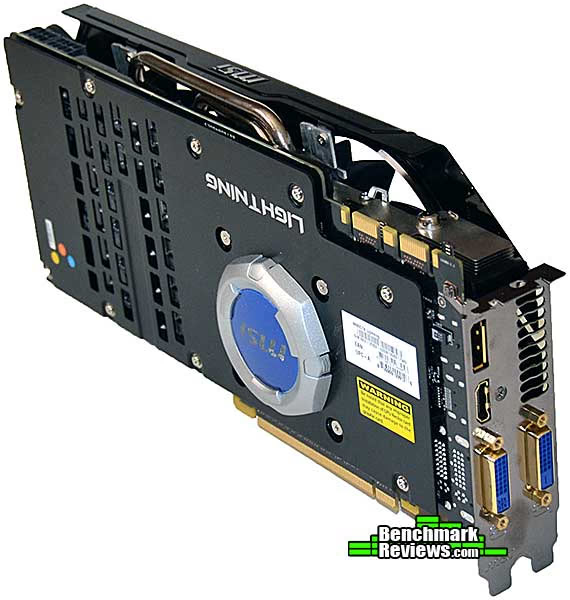
The back side has a full coverage metal plate, which I always like to see on high-end video cards. The odd-looking silver and blue plastic cover hides the separate "GPU Reactor" module and glows blue when the card is powered up. Don't worry, the upside-down "Lightning" and "MSI" logos will look right when the card's installed in your tower case.

Let's take a closer look at this card in the next section.
N680GTX Lightning Detailed Features
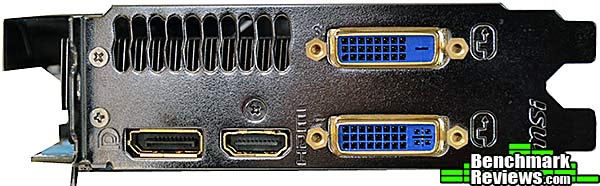
The connections provided are the same as those on the reference card: two dual-link DVI connectors, a DisplayPort connector, and an HDMI connector. You can use all four of these connectors to run four monitors simultaneously, although only three can be grouped together as an extended desktop with "NVIDIA Surround"; the fourth monitor is an "accessory display" that isn't part of the gaming screens. One detail: only the bottom DVI connector is a "DVI-I" connector that also carries analog video signals. This is the connector you plug the supplied VGA adapter into if you're still using a VGA monitor.
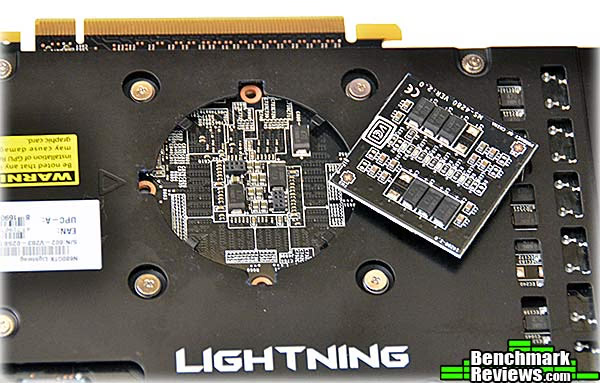
Popping off the plastic "GPU Reactor" cover reveals the Reactor in the form of a small plug-in circuit board. Components on the board included some tantalum capacitors and blue LEDs; presumably the capacitors act as power filters (MSI is rather vague on this point) and should help overclocking. One potential problem is that the board and its plastic cover protrude about 10mm from the back of the card, and could interfere with a card in the adjacent slot.
This tiny switch selects which of the card's two BIOSes will be active the new time you boot. The primary BIOS applies about a 10% overclock to the GPU/boost speeds (1111MHz/1176MHz as compared to a reference 1006MHz/1058MHz) but does not increase the memory clock. The secondary BIOS drops back to the stock GPU/boost speeds, but removes the limits on voltage and maximum power draw that you can set in the MSI Afterburner utility.

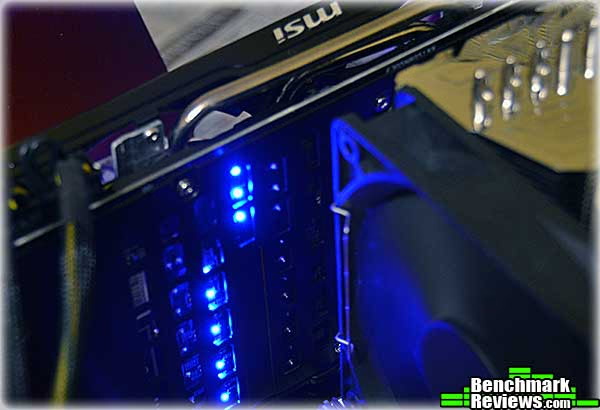
The back of the card sports power phase LEDs that light up in sequence as the card load increases. At idle, only two LEDs are on; under load, they're all on.
Like most third party coolers, the MSI's Twin Frozr setup exhausts hot air into your case, so this is something you should consider when planning your rig's airflow. This image also shows the three hardware voltage test points, with one of the three included test leads plugged in. Starting at the left, the test points provide voltage for the GPU, RAM, and PLL circuits.

We'll cover the features and specifications of this card in the next section.
MSI N680GTX Lightning Features
- Unlocked digital power
- Digital PWM controller and enhanced power design. 2X power output for maximum overclocking
- 8-phase GPU power and 3-phase memory power
- GPU Reactor
- Provides 200% higher power capacity and eliminate power noise (ripple)
- Extreme Thermal
- Dust Removal Technology on Twin Frozr IV keeps dust out for the best thermal condition
- Dual Form-in-one Heatsinks provide better heat dissipation and strengthen the structure
- Military Class III Components
- Meet MIL-STD-810G standard to ensure the best stability and quality
- Adopt CopperMOS, Hi-c CAP, Golden SSC, and Dark Solid CAP
- Video Output: Dual-link DVI-D x 1, dual-link DVI-D x 1, DisplayPort x 1, HDMI x 1
- Dual Form-in-one Heatsinks provide better heat dissipation and strengthen the structure
- Adopt CopperMOS, Hi-c CAP, Golden SSC, and Dark Solid CAP

MSI N680GTX Lightning Specifications
- Model Number: V823
- GPU: GeForce GTX 680
- Bus Standard: PCI-E 3.0 x16
- Core Clock: 1110MHz (boost 1176MHz)
- Memory Size: 2GB
- Memory Type: GDDR5
- Memory Bus: 256 bits
- Memory clock: 6008Mhz (1502 x 4 )
- Maximum resolution: 2560x1600
- Dimensions: 280x129x49.15 mm(w/ GPU Reactor)
- Video output: DVI-I x 1, DVI-D x 1, HDMI x 1, DisplayPort x 1
With its completely custom PCB and enhanced power circuitry and cooling, I'm hoping for some pretty epic overclocks...'cause that's what all this is for.
Let's get on with the testing regimen...
VGA Testing Methodology
The Microsoft DirectX-11 graphics API is native to the Microsoft Windows 7 Operating System, and will be the primary OS for our test platform. DX11 is also available as a Microsoft Update for the Windows Vista OS, so our test results apply to both versions of the operating system. All of the tests in this review were run with DX11 graphics.
According to the Steam hardware survey, as of December 2011 the most popular desktop resolution (for Steam users) is 1680x1050 pixels, with a 17.59% share, with 1920x1080 pixels coming in second with only 7.7%. I ran most tests at both 1680x1050 and 1920x1080 or 1920x1200 (I continue to prefer the 16:10 ratio of 1920x1200 to the mysteriously more popular 1920x1080 resolution).
I used a combination of synthetic and video game benchmark tests in this article to illustrate relative performance among graphics solutions. Our benchmark frame rate results are not intended to represent real-world graphics performance, as this experience would change based on supporting hardware and the perception of individuals playing the video game.
Overclocking: Normally, I'd include overclocked results in the benchmarks, but the specialized software needed to fully exploit overclocking on this card was not available at the time of this review, and I'll revisit overclocking of this card in a future article. Note that the MSI N680GTX Lightning does come with a mild standard overclock.
DX11 Cost to Performance Ratio
For this article Benchmark Reviews has included cost per FPS for graphics performance results. Only the least expensive product price is calculated, and does not consider tax, freight, promotional offers, or rebates into the cost. All prices reflect product series components, and do not represent any specific manufacturer, model, or brand (except for the XFX cards). These retail prices for each product were obtained from NewEgg.com on 2-July-2012:
- $389.99 XFX Radeon 7950 Black Edition Double Dissipation
- $469.99 XFX Radeon 7970 Black Edition Double Dissipation
- $399.99 GeForce GTX 670
- $499.99 GeForce GTX 680
- $599.99 MSI N680GTX Lightning
Intel Z77-Express Test System
- Motherboard: Intel DZ77GA-70K
- Processor: Intel Core i7-3770K
- System Memory: 8GB (2x4GB) Kingston HyperX Genesis DDR3-1600, 9-9-9-27
- Primary Drive: Western Digital Velociraptor 300G
- Monitor: 27-Inch Widescreen LCD (up to 1920x1200@60Hz)
DirectX-11 Benchmark Applications
- Aliens vs Predator
- Very high textures, high shadows, tesselation, SSAO, advanced shadow sampling, 4x AA, 16x AF
- 3DMark11
- "Performance" settings (1280x720)
- Lost Planet 2
- Test "B", 4xAA, blur off, all other settings "High"
- Batman: Arkham City
- 8xAA, MVSS+HBAO, high tesselation, extreme detail, all other settings "Yes", PhysX off
- Metro 2033
- Very High Settings, 4xAA, 16xAF, PhysX off
- Unigine Heaven Benchmark 3.0
- Extreme tesselation, high shaders, 16xAF, 8xAA
- F1 2010
- 8xMSAA, "Ultra" quality
- Battlefield 3
- FOV 90, "Ultra" graphics quality
Video Card Test Products
| Graphics Card | Radeon HD 7950 | Radeon HD 7970 | GeForce GTX670 | GeForce GTX680 | MSI N680GTX Lightning |
|---|---|---|---|---|---|
| GPU Cores | 1792 | 2048 | 1344 | 1536 | 1536 |
| Core Clock (MHz) | 900 | 925 | 915 (boost 980) | 1006 (boost 1058) | 1111 (boost 1176) |
| Memory Clock (MHz) | 1375 | 1425 | 1502 | 1502 | 1502 |
| Memory Amount | 3GB GDDR5 | 3GB GDDR5 | 2GB GDDR5 | 2GB GDDR5 | 2GB GDDR5 |
| Memory Interface | 384-bit | 384-bit | 256-bit | 256-bit | 256-bit |
- NVIDIA GeForce GTX 670 Reference Design (915/980 MHz GPU/1502 MHz vRAM - Forceware 301.42)
- NVIDIA GeForce GTX 680 Reference Design (1006/1058 MHz GPU/1502 MHz vRAM - Forceware 301.42)
- MSI N680GTX Lightning (1111/1176MHz GPU/1502 MHz vRAM - Forceware 301.42)
- XFX 7950 Black Edition Double Dissipation (900 MHz GPU/1375 MHz vRAM - ATI Catalyst Driver 12.4)
- XFX 7970 Black Edition Double Dissipation (925 MHz GPU/1425MHz vRAM - ATI Catalyst Driver 12.4)
DX11: 3DMark11
3DMark11 is Futuremark's latest iteration of the video card software benchmark suite, building on the features of 3DMark Vantage and 3DMark 06 as well as earlier version. It's optimized and intended for testing DirectX-11 capable hardware running under Windows Vista or Windows 7.
- 3DMark11
- "Performance" settings, 1280x720 resolution
3DMark Vantage offers benchmark tests focusing on GPU, CPU, and Physics performance. For this review I concentrated on the four GPU-specific tests. The first two tests take you through an undersea scene with small submarines exploring the sea floor and sunken ships. In the GT1 test, there's no tessellation, but there are extensive lighting and shadow effects. In the GT2 test, the same scene is repeated but with moderate tessellation and fewer lighting effects.

This benchmark reveals some nice scaling, albeit with a bump as the Radeon 7970 jumps ahead of the GTX670 in the GT2 test. The MSI Lightning acquits itself well with its factory overclock, turning in scores 14% better in GT1 and 11.3% better in the GT2 test.
Cost Analysis: GT1+GT2
- $389.99 XFX Radeon 7950 Black Edition Double Dissipation costs $6.02 per FPS
- $469.99 XFX Radeon 7970 Black Edition Double Dissipation $6.30 per FPS
- $399.99 GeForce GTX 670 costs $5.44 per FPS
- $499.99 GeForce GTX 680 costs $5.85 per FPS
- $599.99 MSI N680GTX Lightning costs $6.23 per FPS.
The second pair of graphics tests explore an abandoned temple deep in a tropical jungle. The GT3 test has medium tessellation and one shadow-casting light, while the GT4 test ups the ante with heavy tessellation and many shadow-casting lights. The GT4 test is by far the most demanding of this test suite.

Cost Analysis: GT3+GT4
- $389.99 XFX Radeon 7950 Black Edition Double Dissipation costs $6.10 per FPS
- $469.99 XFX Radeon 7970 Black Edition Double Dissipation costs $6.66 per FPS
- $399.99 GeForce GTX 670 costs $5.49 per FPS
- $499.99 GeForce GTX 680 $6.06 per FPS
- $599.99 MSI N680GTX Lightning costs $6.78 per FPS
Test Summary: The MSI N680GTX Lightning handily wins each test, although at a high cost per FPS.
| Graphics Card | Radeon HD 7950 | Radeon HD 7970 | GeForce GTX670 | GeForce GTX680 | MSI N680GTX Lightning |
|---|---|---|---|---|---|
| GPU Cores | 1792 | 2048 | 1344 | 1536 | 1536 |
| Core Clock (MHz) | 900 | 925 | 915 (boost 980) | 1006 (boost 1058) | 1111 (boost 1176) |
| Memory Clock (MHz) | 1375 | 1425 | 1502 | 1502 | 1502 |
| Memory Amount | 3GB GDDR5 | 3GB GDDR5 | 2GB GDDR5 | 2GB GDDR5 | 2GB GDDR5 |
| Memory Interface | 384-bit | 384-bit | 256-bit | 256-bit | 256-bit |
DX11: F1 2010
Codemasters' F1 2010 is officially licensed by Formula One World Championship Limited, the folks who run the actual Formula One franchise. As a racer, you must sign with a team and work to build your career, which consists of more than simply driving...although, to be honest, driving's most of it!
F1 2010 is really more of a simulator than anything else. You have to contend with everything from engine overheating to aerodynamics to dirt and rubber on the track affecting your traction in real time. Codemasters game designers and programmers spent time with Formula One race engineers, mechanics, and drivers to build the most realistic game possible.
- F1 2010 in-game benchmarkl
- 8x MSAA, all graphics set to "Ultra" quality

Cost Analysis: F1 2010 (1920x1200)
- $389.99 XFX Radeon 7950 Black Edition Double Dissipation costs $4.64 per FPS
- $469.99 XFX Radeon 7970 Black Edition Double Dissipation costs $4.95 per FPS
- $399.99 GeForce GTX 670 costs $4.55 per FPS
- $499.99 GeForce GTX 680 $5.41 per FPS
- $599.99 MSI N680GTX Lightning costs $6.12 per FPS
Test Summary: The XFX Radeon 7970 beats every other card in this test, if only by a smidgen...except the N680GTX Lightning. Even then it's very close.
| Graphics Card | Radeon HD 7950 | Radeon HD 7970 | GeForce GTX670 | GeForce GTX680 | MSI N680GTX Lightning |
|---|---|---|---|---|---|
| GPU Cores | 1792 | 2048 | 1344 | 1536 | 1536 |
| Core Clock (MHz) | 900 | 925 | 915 (boost 980) | 1006 (boost 1058) | 1111 (boost 1176) |
| Memory Clock (MHz) | 1375 | 1425 | 1502 | 1502 | 1502 |
| Memory Amount | 3GB GDDR5 | 3GB GDDR5 | 2GB GDDR5 | 2GB GDDR5 | 2GB GDDR5 |
| Memory Interface | 384-bit | 384-bit | 256-bit | 256-bit | 256-bit |
DX11: Batman: Arkham City
If there was ever a game that showcased the growing gap between game consoles and high-end gaming PCs, Batman: Arkham City is it. In this dystopian near-future, part of Gotham City has been walled off as an enclave for criminals (rather like Escape from New York). It's a 3rd-person action game that adheres to story line previously set forth in Batman: Arkham Asylum, and is based on an updated Unreal Engine 3 game engine. Batman: Arkham City is a DirectX 11 title that uses multi-threaded rendering to produce life-like tessellation effects.
One annoyance with the game is that all game settings must be made through a hidden application called "BMLauncher". Once you've made your settings, though, an in-game benchmark provides the feedback you'll need to tune your system's performance.
-
Batman: Arkham City
-
8xAA, DirectX 11 features, high tessellation, extreme detail, Dynamic Shadows, Motion Blur, Distortion, Lens Flares, Light Shafts, Reflections, Ambient Occlusion, PhysX off
-

The AMD Radeon graphics cards are at a disadvantage here, since, like Arkham Asylum, Arkham City is a showcase of PhysX effects, which can be directly accelerated by NVIDIA cards but not by AMD cards. I left PhysX turned off for this test but if your Radeon-equipped rig is running an Intel 2500K or higher processor, consider turning it on: the PhysX will run on the CPU but modern multi-core CPUs have enough power to do a credible job, and you'll miss out on some really cool effects otherwise.
Cost Analysis: Arkham City (1920x1200)
- $389.99 XFX Radeon 7950 Black Edition Double Dissipation costs $6.12 per FPS
- $469.99 XFX Radeon 7970 Black Edition Double Dissipation costs $5.97 per FPS
- $399.99 GeForce GTX 670 costs $5.48 per FPS
- $499.99 GeForce GTX 680 $6.76 per FPS
- $599.99 MSI N680GTX Lightning costs $7.86 per FPS
Test Summary: The XFX Radeon 7970 waltzes to a win here. The luster on AMD's Southern Islands GPUs dimmed somewhat when NVIDIA's Kepler-based cards were introduced, but enthusiasts should remember that these are very fast cards, and now have a $-per-FPS advantage in many cases.
| Graphics Card | Radeon HD 7950 | Radeon HD 7970 | GeForce GTX670 | GeForce GTX680 | MSI N680GTX Lightning |
|---|---|---|---|---|---|
| GPU Cores | 1792 | 2048 | 1344 | 1536 | 1536 |
| Core Clock (MHz) | 900 | 925 | 915 (boost 980) | 1006 (boost 1058) | 1111 (boost 1176) |
| Memory Clock (MHz) | 1375 | 1425 | 1502 | 1502 | 1502 |
| Memory Amount | 3GB GDDR5 | 3GB GDDR5 | 2GB GDDR5 | 2GB GDDR5 | 2GB GDDR5 |
| Memory Interface | 384-bit | 384-bit | 256-bit | 256-bit | 256-bit |
DX11: Aliens vs Predator
Aliens vs. Predator is a science fiction first-person shooter video game, developed by Rebellion, and published by Sega for Microsoft Windows, Sony PlayStation 3, and Microsoft Xbox 360. Aliens vs. Predator utilizes Rebellion's proprietary Asura game engine, which had previously found its way into Call of Duty: World at War and Rogue Warrior. The self-contained benchmark tool is used for our DirectX-11 tests, which push the Asura game engine to its limit.
I configured Aliens vs. Predator to use the highest quality settings with 4x AA and 16x AF, as well as turning on DirectX-11 features such as Screen Space Ambient Occlusion (SSAO) and tessellation, along with advanced shadows.
- Aliens vs Predator
- Texture quality Very High, Shadow quality High, 4xAA, 16xAF, SSAO on, Hardware tessellation, Advanced Shadow Sampling

Cost Analysis: Aliens vs Predator (1920x1200)
- $389.99 XFX Radeon 7950 Black Edition Double Dissipation costs $6.96 per FPS
- $469.99 XFX Radeon 7970 Black Edition Double Dissipation costs $7.31 per FPS
- $399.99 GeForce GTX 670 costs $7.35 per FPS
- $499.99 GeForce GTX 680 $8.90 per FPS
- $599.99 MSI N680GTX Lightning costs $10.42 per FPS
Test Summary: This game is a sweep for AMD: even the 7950 manages to beat the N680GTX Lightning at 1680x1050 and come within a whisker of its performance at 1920x1080.
| Graphics Card | Radeon HD 7950 | Radeon HD 7970 | GeForce GTX670 | GeForce GTX680 | MSI N680GTX Lightning |
|---|---|---|---|---|---|
| GPU Cores | 1792 | 2048 | 1344 | 1536 | 1536 |
| Core Clock (MHz) | 900 | 925 | 915 (boost 980) | 1006 (boost 1058) | 1111 (boost 1176) |
| Memory Clock (MHz) | 1375 | 1425 | 1502 | 1502 | 1502 |
| Memory Amount | 3GB GDDR5 | 3GB GDDR5 | 2GB GDDR5 | 2GB GDDR5 | 2GB GDDR5 |
| Memory Interface | 384-bit | 384-bit | 256-bit | 256-bit | 256-bit |
DX11: Lost Planet 2
Capcom provides a stand-alone benchmark tool for Lost Planet 2. Reviewers love stand alone benchmarks, and users should, too, since they allow the evaluation of a system without the trouble and expense of purchasing and configuring the actual game. Lost Planet 2 takes place on E.D.N. III, the same planet in the original Lost Planet game, but ten years later. The snow has melted and somehow giant tropical jungles have grown to fill the landscape.
Lost Planet 2 takes advantage of DX11 features including tessellation and displacement mapping on water, level bosses, and player characters. In addition, soft body compute shaders are used on 'Boss' characters, and wave simulation is performed using DirectCompute. These cutting edge features make for an excellent benchmark for top-of-the-line consumer GPUs. There are two parts to the benchmark: Test A, which is a semi-random script that's a good example of normal game play, and Test B, which is a deterministic script that places a significantly heavier load on the card being tested.
- Lost Planet 2
- 4X AA, Motion Blur off, all other settings "High"

Cost Analysis: Lost Planet 2 (1920x1200, Test B)
- $389.99 XFX Radeon 7950 Black Edition Double Dissipation costs $7.22 per FPS
- $469.99 XFX Radeon 7970 Black Edition Double Dissipation costs $7.68 per FPS
- $399.99 GeForce GTX 670 costs $5.95 per FPS
- $499.99 GeForce GTX 680 $6.83 per FPS
- $599.99 MSI N680GTX Lightning costs $7.74 per FPS
Test Summary: Nice scaling here produces the results you'd expect if you were guessing how these cards would do. NVIDIA dominates here.
| Graphics Card | Radeon HD 7950 | Radeon HD 7970 | GeForce GTX670 | GeForce GTX680 | MSI N680GTX Lightning |
|---|---|---|---|---|---|
| GPU Cores | 1792 | 2048 | 1344 | 1536 | 1536 |
| Core Clock (MHz) | 900 | 925 | 915 (boost 980) | 1006 (boost 1058) | 1111 (boost 1176) |
| Memory Clock (MHz) | 1375 | 1425 | 1502 | 1502 | 1502 |
| Memory Amount | 3GB GDDR5 | 3GB GDDR5 | 2GB GDDR5 | 2GB GDDR5 | 2GB GDDR5 |
| Memory Interface | 384-bit | 384-bit | 256-bit | 256-bit | 256-bit |
DX11: Metro 2033
Metro 2033 is an action-oriented video game with a combination of survival horror, and first-person shooter elements. The game is based on the novel Metro 2033 by Russian author Dmitry Glukhovsky. It was developed by 4A Games in Ukraine and released in March 2010 for Microsoft Windows. Metro 2033 uses the 4A game engine, developed by 4A Games. The 4A Engine supports DirectX-9, 10, and 11, along with NVIDIA PhysX and GeForce 3D Vision.
The 4A engine is multi-threaded in such that only PhysX had a dedicated thread (although PhysX is disabled for this test), and uses a task-model without any pre-conditioning or pre/post-synchronizing, allowing tasks to be done in parallel. The 4A game engine can utilize a deferred shading pipeline, and uses tessellation for greater performance, and also has HDR (complete with blue shift), real-time reflections, color correction, film grain and noise, and the engine also supports multi-core rendering.
Metro 2033 features superior volumetric fog, double PhysX precision, object blur, sub-surface scattering for skin shaders, parallax mapping on all surfaces and greater geometric detail with a less aggressive LODs. Using PhysX, the engine uses many features such as destructible environments, and cloth and water simulations, and particles that can be fully affected by environmental factors.
-
Metro 2033
-
DirectX 11, Very High quality, 4xAA, 16xAF, tessellation, DOF, "Frontline" scene, no PhysX
-

NVIDIA has been diligently working to promote Metro 2033, and for good reason: it is the most demanding PC video game we've ever tested. When their flagship GeForce GTX 580 struggles to produce 26 FPS at 1920x1200 with DirectX-11 anti-aliasing turned two to its lowest setting, you know that only the strongest graphics processors will generate playable frame rates. All our tests disable advanced PhysX options.
Cost Analysis: Metro 2033 (1920x1080)
- $389.99 XFX Radeon 7950 Black Edition Double Dissipation costs $11.44 per FPS
- $469.99 XFX Radeon 7970 Black Edition Double Dissipation costs $13.28 per FPS
- $399.99 GeForce GTX 670 costs $13.75 per FPS
- $499.99 GeForce GTX 680 $16.72 per FPS
- $599.99 MSI N680GTX Lightning costs $19.54 per FPS
Test Summary: There's no doubt that this is a very demanding game. What Crysis was to top-end video cards a few years ago, Metro 2033 is now, with even the strongest single-GPU cards struggling to break 30 frames per second at 1920x1200. And note that this is with PhysX features turned off! At these settings, MSI's Lightning was the only NVIDIA card that could break 30FPS, but even it was handily beaten by both AMD Radeon cards.
| Graphics Card | Radeon HD 7950 | Radeon HD 7970 | GeForce GTX670 | GeForce GTX680 | MSI N680GTX Lightning |
|---|---|---|---|---|---|
| GPU Cores | 1792 | 2048 | 1344 | 1536 | 1536 |
| Core Clock (MHz) | 900 | 925 | 915 (boost 980) | 1006 (boost 1058) | 1111 (boost 1176) |
| Memory Clock (MHz) | 1375 | 1425 | 1502 | 1502 | 1502 |
| Memory Amount | 3GB GDDR5 | 3GB GDDR5 | 2GB GDDR5 | 2GB GDDR5 | 2GB GDDR5 |
| Memory Interface | 384-bit | 384-bit | 256-bit | 256-bit | 256-bit |
DX11: Unigine Heaven 3.0
The Unigine Heaven 3.0 benchmark is a free publicly available tool that grants the power to unleash the graphics capabilities in DirectX-11 for Windows 7 or updated Vista Operating Systems. It reveals the enchanting magic of floating islands with a tiny village hidden in the cloudy skies. With the interactive mode, emerging experience of exploring the intricate world is within reach. Through its advanced renderer, Unigine is one of the first to set precedence in showcasing the art assets with tessellation, bringing compelling visual finesse, utilizing the technology to the full extend and exhibiting the possibilities of enriching 3D gaming.
The distinguishing feature in the Unigine Heaven benchmark is a hardware tessellation that is a scalable technology aimed for automatic subdivision of polygons into smaller and finer pieces, so that developers can gain a more detailed look of their games almost free of charge in terms of performance. Thanks to this procedure, the elaboration of the rendered image finally approaches the boundary of veridical visual perception: the virtual reality transcends conjured by your hand. The Heaven benchmark excels at providing the following key features:
- Native support of OpenGL, DirectX 9, DirectX-10 and DirectX-11
- Comprehensive use of tessellation technology
- Advanced SSAO (screen-space ambient occlusion)
- Volumetric cumulonimbus clouds generated by a physically accurate algorithm
- Dynamic simulation of changing environment with high physical fidelity
- Interactive experience with fly/walk-through modes
- ATI Eyefinity support
- Unigine Heaven 3.0
- High Shaders, Extreme tessellation,8xAA, 16xAF

Cost Analysis: Unigine Heaven (1920x1080)
- $389.99 XFX Radeon 7950 Black Edition Double Dissipation costs $10.43 per FPS
- $469.99 XFX Radeon 7970 Black Edition Double Dissipation costs $11.27 per FPS
- $399.99 GeForce GTX 670 costs $9.55 per FPS
- $499.99 GeForce GTX 680 $11.04 per FPS
- $599.99 MSI N680GTX Lightning costs $12.55 per FPS
Test Summary: The N680GTX Lightning wins this one, but its performance advantage over the reference design GTX680 is small.
| Graphics Card | Radeon HD 7950 | Radeon HD 7970 | GeForce GTX670 | GeForce GTX680 | MSI N680GTX Lightning |
|---|---|---|---|---|---|
| GPU Cores | 1792 | 2048 | 1344 | 1536 | 1536 |
| Core Clock (MHz) | 900 | 925 | 915 (boost 980) | 1006 (boost 1058) | 1111 (boost 1176) |
| Memory Clock (MHz) | 1375 | 1425 | 1502 | 1502 | 1502 |
| Memory Amount | 3GB GDDR5 | 3GB GDDR5 | 2GB GDDR5 | 2GB GDDR5 | 2GB GDDR5 |
| Memory Interface | 384-bit | 384-bit | 256-bit | 256-bit | 256-bit |
DX11: Battlefield 3
In Battlefield 3, players step into the role of the Elite U.S. Marines. As the first boots on the ground, players will experience heart-pounding missions across diverse locations including Paris, Tehran and New York. As a U.S. Marine in the field, periods of tension and anticipation are punctuated by moments of complete chaos. As bullets whiz by, walls crumble, and explosions force players to the grounds, the battlefield feels more alive and interactive than ever before.
The graphics engine behind Battlefield 3 is called Frostbite 2, which delivers realistic global illumination lighting along with dynamic destructible environments. The game uses a hardware terrain tessellation method that allows a high number of detailed triangles to be rendered entirely on the GPU when near the terrain. This allows for a very low memory footprint and relies on the GPU alone to expand the low res data to highly realistic detail.
Using Fraps to record frame rates, our Battlefield 3 benchmark test uses a three-minute capture on the 'Secure Parking Lot' stage of Operation Swordbreaker. Relative to the online multiplayer action, these frame rate results are nearly identical to daytime maps with the same video settings.
- Battlefield 3
- 90 degree field of view, all graphics "Ultra", 180-second FRAPS scene

Cost Analysis: Battlefield 3 (1920x1200)
- $389.99 XFX Radeon 7950 Black Edition Double Dissipation costs $7.53 per FPS
- $469.99 XFX Radeon 7970 Black Edition Double Dissipation costs $8.06 per FPS
- $399.99 GeForce GTX 670 costs $5.38 per FPS
- $499.99 GeForce GTX 680 $7.49 per FPS
- $599.99 MSI N680GTX Lightning costs $8.21 per FPS
Test Summary: The surprise here is the high score returned by the reference design GTX670 at 1920x1200. As multiple reviews have shown, the 670 frequently performs almost as well as a 680, but this score even beats the Lightning, so I'm inclined to dismiss it as an error...although the frame rates I recorded over multiple runs were consistent.
| Graphics Card | Radeon HD 7950 | Radeon HD 7970 | GeForce GTX670 | GeForce GTX680 | MSI N680GTX Lightning |
|---|---|---|---|---|---|
| GPU Cores | 1792 | 2048 | 1344 | 1536 | 1536 |
| Core Clock (MHz) | 900 | 925 | 915 (boost 980) | 1006 (boost 1058) | 1111 (boost 1176) |
| Memory Clock (MHz) | 1375 | 1425 | 1502 | 1502 | 1502 |
| Memory Amount | 3GB GDDR5 | 3GB GDDR5 | 2GB GDDR5 | 2GB GDDR5 | 2GB GDDR5 |
| Memory Interface | 384-bit | 384-bit | 256-bit | 256-bit | 256-bit |
MSI N680GTX Temperatures and Power
We're at the start of a transition: for years the PC industry has produced faster and more powerful CPUs and GPUs, which always came with ever-higher power draws. But as the industry moves to smaller and smaller fabrication processes, we're seeing power draws drop, and clever designs save even more power. Users benefit from GPUs that disable large portions of their circuitry when idle, leading to dramatically lower power draws and very cool idle temperatures. At the other end of the scale, reduced power at the higher end means smaller coolers, quieter fans, and less heat to worry about dissipating.
At the start of this test, I measure the idle temperature of the card with the card sitting at the Windows desktop, using the GPU-Z utility. Next, I start FurMark's stress test and let it run until the temperature curve flattens and the temperature has not varied more than 1 degree in the last five minutes.
FurMark does two things extremely well: drive the thermal output of any graphics processor higher than applications of video games realistically could, and it does so with consistency every time. FurMark works great for testing the stability of a GPU as the temperature rises to the highest possible output. The temperatures discussed below are absolute maximum values, and not representative of real-world performance.
MSI's Twin Frozr cooler may have a silly name, but it's very effective on the N680GTX Lightning:

Although the card is factory-overclocked, MSI's cooler keeps the loaded temperature several degrees below the load temp we recorded in our review of the reference design 680GTX. And at only six degrees over ambient temperature, the idle temperature of 29 degrees is equally impressive. In most games you'll probably never see anything within 5 degrees of the load temperature we saw.
Although the fans did ramp up a bit once the GPU temp passed 60 degrees, they were still very quiet.
VGA Power Consumption
The new generation of video cards-- AMD's Southern Islands and NVIDIA's Kepler-- are certainly fast, but their new power saving features are almost as impressive. The move to a smaller process has helped, but both products benefit from a variety of power-saving techniques, including aggressively underclocking and undervolting themselves in low demand scenarios, as well as turning off unused portions of the card. Both companies also use other, proprietary methods to keep power usage low.
To measure isolated video card power consumption, Benchmark Reviews uses the Kill-A-Watt EZ (model P4460) power meter made by P3 International. A baseline test is taken without a video card installed inside our test computer system, which is allowed to boot into Windows 7 and rest idle at the login screen before power consumption is recorded. Once the baseline reading has been taken, the graphics card is installed and the system is again booted into Windows and left idle at the login screen. Our final loaded power consumption reading is taken with the video card running a stress test using FurMark. Below is a chart with the isolated video card power consumption (not system total) displayed in Watts for each specified test product:
| Situation | Power | Card delta |
|---|---|---|
| Windows login, no video card | 52 watts | -- |
| Windows login, video card | 66 watts | 14 watts |
| Windows desktop | 66 watts | 14 watts |
| Windows desktop, display sleep | 64 watts | 12 watt |
| FurMark load | 330 watts | 278 watts |
VGA Product Description(sorted by combined total power) |
Idle Power |
Loaded Power |
|---|---|---|
NVIDIA GeForce GTX 480 SLI Set |
82 W |
655 W |
NVIDIA GeForce GTX 590 Reference Design |
53 W |
396 W |
ATI Radeon HD 4870 X2 Reference Design |
100 W |
320 W |
AMD Radeon HD 6990 Reference Design |
46 W |
350 W |
NVIDIA GeForce GTX 295 Reference Design |
74 W |
302 W |
ASUS GeForce GTX 480 Reference Design |
39 W |
315 W |
ATI Radeon HD 5970 Reference Design |
48 W |
299 W |
NVIDIA GeForce GTX 690 Reference Design |
25 W |
321 W |
ATI Radeon HD 4850 CrossFireX Set |
123 W |
210 W |
ATI Radeon HD 4890 Reference Design |
65 W |
268 W |
AMD Radeon HD 7970 Reference Design |
21 W |
311 W |
NVIDIA GeForce GTX 470 Reference Design |
42 W |
278 W |
NVIDIA GeForce GTX 580 Reference Design |
31 W |
246 W |
NVIDIA GeForce GTX 570 Reference Design |
31 W |
241 W |
ATI Radeon HD 5870 Reference Design |
25 W |
240 W |
ATI Radeon HD 6970 Reference Design |
24 W |
233 W |
NVIDIA GeForce GTX 465 Reference Design |
36 W |
219 W |
NVIDIA GeForce GTX 680 Reference Design |
14 W |
243 W |
Sapphire Radeon HD 4850 X2 11139-00-40R |
73 W |
180 W |
NVIDIA GeForce 9800 GX2 Reference Design |
85 W |
186 W |
NVIDIA GeForce GTX 780 Reference Design |
10 W |
275 W |
NVIDIA GeForce GTX 770 Reference Design |
9 W |
256 W |
NVIDIA GeForce GTX 280 Reference Design |
35 W |
225 W |
NVIDIA GeForce GTX 260 (216) Reference Design |
42 W |
203 W |
ATI Radeon HD 4870 Reference Design |
58 W |
166 W |
NVIDIA GeForce GTX 560 Ti Reference Design |
17 W |
199 W |
NVIDIA GeForce GTX 460 Reference Design |
18 W |
167 W |
AMD Radeon HD 6870 Reference Design |
20 W |
162 W |
NVIDIA GeForce GTX 670 Reference Design |
14 W |
167 W |
ATI Radeon HD 5850 Reference Design |
24 W |
157 W |
NVIDIA GeForce GTX 650 Ti BOOST Reference Design |
8 W |
164 W |
AMD Radeon HD 6850 Reference Design |
20 W |
139 W |
NVIDIA GeForce 8800 GT Reference Design |
31 W |
133 W |
ATI Radeon HD 4770 RV740 GDDR5 Reference Design |
37 W |
120 W |
ATI Radeon HD 5770 Reference Design |
16 W |
122 W |
NVIDIA GeForce GTS 450 Reference Design |
22 W |
115 W |
NVIDIA GeForce GTX 650 Ti Reference Design |
12 W |
112 W |
ATI Radeon HD 4670 Reference Design |
9 W |
70 W |
Kepler's not the power miser Southern Islands is; in particular, there's no provision for turning off the additional, non-primary video cards in a multi-card system. The stock-clocked Furmark load is almost 60 watts higher than I measured (admittedly on a different test system) for the XFX 7970 Black Edition Double Dissipation, and it's using more than twice the power of that card when in "display sleep." The loaded power is higher than the 243 watts Benchmark Reviews recorded for the reference design GeForce GTX680, but remember this is a custom card with a factory overclock.
MSI N680GTX Lightning Final Thoughts
MSI's Lightning series products have always been aimed at the true-blue enthusiast: the one that was willing to pay extra-- sometimes much extra-- to own the fastest, bestest version of a motherboard or video card. To this end MSI uses custom PC board designs slathered with high-end mil-spec components, all the better for the user to push to extreme levels of performance.
What the Lightning products have never been is "inexpensive", and at $100 more than a reference design card, this is the second most expensive GTX680 card as of this writing, beaten only by EVGA's GTX 680 FTW+, which has 4GB of graphics RAM as opposed to this card's 2GB.
Switching to the card's secondary BIOS unlocks the power usage limits, and I was able to push the card's factory overclocks a fair bit higher than delivered, but you'll notice that I didn't include benchmark scores with these settings. The reason is that because although I achieved some pretty good overclocks, the card's custom hardware means that I wasn't able to vary the voltage...and being able to tweak the GPU voltage from software is one of this card's big selling points, and MSI specifically said that voltage increases were necessary to get the best performance out of the card. To adjust the GPU voltage, you need MSI Afterburner v2.2.3 or later, and this wasn't available in time for this review.
This puts Benchmark Reviews in the position of having to judge a video card knowing that we weren't able to achieve the full performance the card is capable of. It's frustrating, but we can only review what's actually available. For this reason we will revisit this card's performance in a separate overclocking review once the required software becomes available.
MSI N680GTX Lightning Conclusion
IMPORTANT: Although the rating and final score mentioned in this conclusion are made to be as objective as possible, please be advised that every author perceives these factors differently at various points in time. While we each do our best to ensure that all aspects of the product are considered, there are often times unforeseen market conditions and manufacturer changes which occur after publication that could render our rating obsolete. Please do not base any purchase solely on our conclusion, as it represents our product rating specifically for the product tested, which may differ from future versions. Benchmark Reviews begins our conclusion with a short summary for each of the areas that we rate.
The performance of the card was exceptional: it's the fastest single-GPU graphics card I've ever tested overall. It posted the highest scores in five of the eight benchmarks I ran, but was beaten by the XFX 7970 in Batman: Arkham City, Alien vs. Predator, and Metro 2033. AMD continues to tweak their drivers and game profiles and the performance of the 7970 and GTX680 GPUs is closer than it was when the GTX680 was introduced. Of course, NVIDIA's not standing still, either, and can improve gameplay in non-FPS ways with features like PhysX and Adaptive vSync.
MSI's Lightning series of cards has always struck me as a little garish, with heat pipes seemingly bursting out of the top of the card and an extravagant fan shroud. The black and yellow color scheme clashes somewhat with the blue LED lighting on the fans and the back of the card.
The construction of the card is first-rate. Unlike the reference designs, a full metal back plate provides protection for the tiny surface mount component on the back of the card. The completely custom PCB is assembled with great attention to detail.
Of course, the Lightning benefits from the new capabilities NVIDIA's baked into the Kepler silicon, such as power saving features, adaptive vSync, and such. MSI's custom PCB with its enhanced power circuitry should enable substantial levels of performance...eventually. A secondary BIOS accessible through a switch on the card and voltage measuring points are features you won't see on other GTX680s.
MSI's packaging and accessories bundle includes everything you need, including the extra-long SLI bridge required to clear the giant fan shroud, connectors for the voltage measuring points, and a DVD to VGA adapter. A "Certificate of Quality and Stability" seems frivolous, though.
The value proposition is where this card in its current form falls down: without the software required to push it to its best overclocks, the performance it was able to achieve doesn't justify its significant added cost compared to a reference design card. While it does beat the reference GTX680 in every benchmark, the FPS differences overall are small and certainly not worth $100 extra. While it's a pretty safe bet (based on MSI's history with the Lightning series) that the card has lots of extra performance locked inside, I can only evaluate what I have to work with now.
As I mentioned in the Final Thoughts section above, it's frustrating not being able to push a new card to its limits, which is especially critical when evaluating and expensive, high-end custom card like this one. MSI's Lightning. If you're willing to take a bet that the card will live up to its name, you can buy it now for $599.99 (Newegg).
Pros:
+ Custom PCB with enhanced power circuitry
+ Best performance I've ever seen from a single GPU
+ Auto dust removal feature keeps fans and cooling fins clean
+ Very quiet, even under heavy load
+ Can support 3 monitors in NV Surround, plus one additional monitor
+ Voltage test points and unlocked BIOS for serious overclockers
Cons:
- Somewhat garish appearance
- Very expensive
- Required overclocking utility not yet available
- Poor value in its current form
Ratings:
- Performance: 9.50
- Appearance: 8.00
- Construction: 9.75
- Functionality: 9.50
- Value: 7.00
Final Score: 8.75 out of 10.
Quality Recognition: Benchmark Reviews Silver Tachometer Award.
Benchmark Reviews invites you to leave constructive feedback below, or ask questions in our Discussion Forum.
Reader comments from the original article
15 comments were posted before commenting closed. They are preserved as written. Original avatars no longer resolve and are shown as a placeholder.
RE: MSI GeForce GTX 680 Lightning Video Card Chris Permalink:
It's probably the best 2 gb 680 on the market right now. It might be a good idea to take a second look at it when the next version of Afterburner 2.2.3 comes out. I don't know if this was due to time constraints, but the depth of the closer look seems to have been shortened compared to say, this review: /index.php?option=com_content&task=view&id=752&Itemid=72&limit=1&limitstart=1 In particular, one thing that might be interesting to see is if MSI is still using excessive thermal paste. It's not a card aimed at those maxing price-performance; just absolute single GPU performance, which this card does very well at. Otherwise, it's a solid review and a very impressive enthusiast card.
RE: RE: MSI GeForce GTX 680 Lightning Video Card David Ramsey Permalink:
I normally only remove a card's cooler after I've completed all testing, because there's a small possibility of damaging the card. Since I haven't run the overclocked benchmarks yet, I haven't removed the cooler. When Afterburder 2.2.3 is released and I can write the separate article on overclocking this card, rest assured there will be a "naked" card shot!
RE: RE: RE: MSI GeForce GTX 680 Lightning Video Card Chris Permalink:
Understandable. I suppose that apart from reapplying the thermal paste, it's hard to imagine someone replacing the cooler, unless they intend to try LN2 benchmarking. Waterblocks for custom PCBs like this are pretty hard to find, although I do recall the previous 580 Lightning getting one.
RE: MSI GeForce GTX 680 Lightning Video Card Chris Permalink:
Edit: I can see that on the final thoughts page that you've already mentioned that you'll take a second look. The GPU voltage lock is very frustrating on the 680s - almost to the point where some people have recommended getting a 7970 over a 680.
Um.. Johnny Utah Permalink:
Unwinder who maintains Afterburner (and coded it I believe) has yet to receive his Lightning. He eve stated it may not be possible to overvolt the card with software. You might want to do your OC testing now.
RE: Um.. Olin Coles Permalink:
To quote MSI marketing on 22 June 2012: "Afterburner 2.2.3 is in the works and should be out in a few days. 2.2.3 will have voltage unlock so Kepler voltages can be adjusted past 1.175V... so users can maximize the potential of the GTX680 Lightning. Please be noted in case you're looking to maximize overclocking." It seems that MSI forgot to tell Unwinder what his software can do. :p
RE: Um.. David Ramsey Permalink:
Yeah, I saw that he hadn't received his card yet. I'm pretty sure the MSI engineers are smart enough to design a card that can be overvolted in software, so I remain hopeful. I was able to run Heaven 3.0 (aka "the overclocking killer") with the core at 1340MHz, so if we still don't have a new Afterburner in a few weeks I'll do an overclocking article anyway.
SLI Functionality John Permalink:
I have not seen the functionality of this card in an SLI environment tested in any review. It has been my experience that if you cannot leave at least a slot spacing between cards, they quickly overheat and shutdown. You are therefore limited to 2-way SLI only. If you want to do a 3-Way or 4-Way SLI, you need to liquid cool these, and as of yet there are no full board waterblocks available.
RE: SLI Functionality David Ramsey Permalink:
That's probably because MSI isn't handing out pairs of them to reviewers, and we're disinclined to spend $600 of our own money in order to be able to add a column to the performance charts. Some available motherboards (EVGA X79 Classified, for example) will allow you to use three dual-slot graphics cards with at least one slot's worth of space between each pair of cards. Of course you'd need an 8 or 10 slot case to pull this off. But you're right: system builders must take thermals into account when designing their rigs.
RE: MSI GeForce GTX 680 Lightning Video Card kzinti1 Permalink:
I'd already own a pair of these if they had at least 3GB memory each.
RE: RE: MSI GeForce GTX 680 Lightning Video Card kzinti1 Permalink:
"For this reason we will revisit this card's performance in a separate overclocking review once the required software becomes available." I just remembered the above quote. When are you going to do another review now that MSI Afterburner Version 2.3.0 (2012/11/200 is here? I'd really like to know how these cards run with the voltage that was intended for them.
Marketing Propoganda Olin Coles Permalink:
I can tell you that MSI overextended themselves with this claim. While Afterburner 2.3.0 does allow users to increase voltage, it's not much. Core and Memory voltage can be raised by 100 mV, and Auxiliary voltage by 50 mV.
Afterburner 2.3.0 Joe Permalink:
Wheres the updated review? The new afterburner version has been out. Very interested to see what you guys have to say.
RE: Afterburner 2.3.0 Olin Coles Permalink:
There was no need to re-test anything, since MSI over-exaggerated their claims by stating a newer version of the software would unlock features in the card. While Afterburner versions 2.3.0 to 4.0.0 do allow users to increase voltage, it's not much. Core and Memory voltage can be raised by 100 mV, and Auxiliary voltage by 50 mV.
RE: RE: Afterburner 2.3.0 Chris Permalink:
I know this is several months after, but to their credit, MSI did release the later versions Afterburner allowed for much more aggressive overclocking. Typically 1300 MHz to 1400 MHz was doable on air.