
Mad Catz S.T.R.I.K.E. 7 Gaming Keyboard
Manufacturer: Mad Catz Interactive
Product Name: S.T.R.I.K.E. 7 Gaming Keyboard
Model: MCB43109N002/02/1
UPC: 728658031060 EAN: 0728658031060
Price As Tested: $299.99 (Amazon / Newegg)
Full Disclosure: The product sample used in this article has been provided by Mad Catz.
Mad Catz has always taken wild swings at design and innovation. Their latest introduction, the Mad Catz STRIKE 7 gaming keyboard, is among the most luxurious and expensive keyboards on the market. With 7 detachable and modular pieces, 1 TFT-LCD touch screen, 12 programmable macro keys, 12 touch screen macros, and 3 instant toggle profiles, the raw capability of this keyboard can put any keyboard to shame. Benchmark Reviews will take apart the STRIKE 7 and see if it really is the king of the crop.
Aside from its futuristic look and eye popping touch screen, the first thing you'll probably notice is the $299.99 price tag. That's a steep premium to pay as some of the best mechanical keyboards are only around $150. The Razer DeathStalker, a comparable keyboard with a touchscreen that runs apps, costs $250. We will discuss the comparisons in more detail in later sections.

The STRIKE 7 is not a mechanical keyboard, one of the most popular demands today from gamers. However Mad Catz has developed a membrane that mimics the feeling of a mechanical keyboard without the excessive noise. The feel most closely resembles cherry brown switches for its light tactile feel when the key press is activated. It is comfortable for typing as well as gaming. The main excitement for this keyboard is the modular touchscreen that features 12 out of box apps, which alone comprises about 50% of this keyboard's cost. Benchmark Reviews is eager to try out this piece of hardware.
STRIKE 7 Features
Fully Modular for Unparalleled Customization
Borrowing modifiable technology from the world's most adjustable mouse - - the award-winning R.A.T. - - the S.T.R.I.K.E. 7 Gaming Keyboard's unique design provides unprecedented customization options to enhance overall comfort. Armed with total control of your keyboard's fit, size, color, sound, and programming, you can finally play your favorite games exactly as intended: How you like to play them!
5 Separate Hardware Modules
- Control Module with V.E.N.O.M. TFT-LCD touch screen
Easily navigate the keyboard's many functions with the Control Module's intuitive V.E.N.O.M. touch screen. Program advanced macros, adjust backlighting, and take in-game control of external functions - - balance game and chat volumes, launch apps and websites, even initiate and control TeamSpeak - - all with a few simple finger taps. - Main Keyboard
Thanks to a much smaller footprint than run-of-the-mill keyboards, the main keyboard gives your mouse plenty of extra space for large, sweeping movements. Replacement, interchangeable WASD and cursor keys adapt to your gaming style by giving you the choice of standard, contoured or rubber-edged versions. Full RGB backlighting - - with 16 million color variants - - matches the keyboard to your gaming rig and the keys' laser-etched, lacquered light guides are ideal for gaming in dim environments. - Function Strip
Adding four programmable macro buttons to the mix, the removable Function Strip brings the total to 24. Including the V.E.N.O.M. touch screen, the S.T.R.I.K.E. 7 Gaming Keyboard incorporates 24 programmable macro buttons over three modes to create 72 user-definable commands. - NumPad
Just like the Control Module, the NumPad is capable of loose or fix-mounted positioning. The custom connection scheme makes it all possible, and the included set of longer wires bolsters your arrangement options. - 3-Part Active Palm Rest and Two Wrist Rests
A height-adjustable, active palm-rest houses both a thumb wheel and an action button for even more controls at your fingertips. Both wrist rests utilize a rugged 5-pin connector to attach to the main keyboard module and NumPad, effectively enhancing your comfort during stints of extended gaming.
Uncomplicated Macro Programming
An intuitive graphical interface vastly simplifies the formerly tedious task of macro programming. Assign single or multiple keystrokes, complete with custom timings, to macro keys or interface icons and then easily fine-tune your settings. This ability is essential for fast-paced games which require clear but complex multi-key actions.
Each of the keyboard's three different modes can store your programmed macros; you need only switch to a different mode mid-game to triple your available commands. Once programmed, custom profiles can be published to share with your community and saved for later recall, allowing for a seamless transition to another gaming PC.
Integrated TeamSpeak Functionality with Visual Identifier
The team at Mad Catz collaborated with TeamSpeak's development team to integrate their state-of-the-art chat technology into the S.T.R.I.K.E. 7 Gaming Keyboard. Once you have the TeamSpeak application running on the keyboard's V.E.N.O.M. touch screen, select specific game rooms to check who is online and who is actively talking. You can even control the chat volume from within the game you are playing, removing the need to pause and switch programs.
STRIKE 7 Specifications
| Size | 9.33"x7.52"x15.08" |
|---|---|
| Weight | 7.28 lbs |
| Product includes |
|
| Compatibility | Windows XP/Vista/7/8 |
| Ports | 2x USB 2.0 ports |
Closer Look: Mad Catz STRIKE 7
The Mad Catz STRIKE 7 is a slick Cyborg family keyboard. It was designed to match the style of the existing Mad Catz Cyborg RAT gaming mouse. The keyboard has a metallic body and matte plastic top that has a rubbery texture. The mix makes the keyboard eye popping without excessive doodads to detract from the design. The matte surface is also great for avoiding sweat.
Like the Cyborg Mouse series, the STRIKE 7 has outstanding customization capabilities. The full keyboard is made up of 7 individual pieces that can be constructed as you please. The full package includes a touch screen controller, the main keyboard body, 1 macro attachment, 1 number key block, and 3 palm rests. While the full keyboard takes up quite a bit of space, taking just the body will give you a fully functional keyboard that's less than 6"x12".

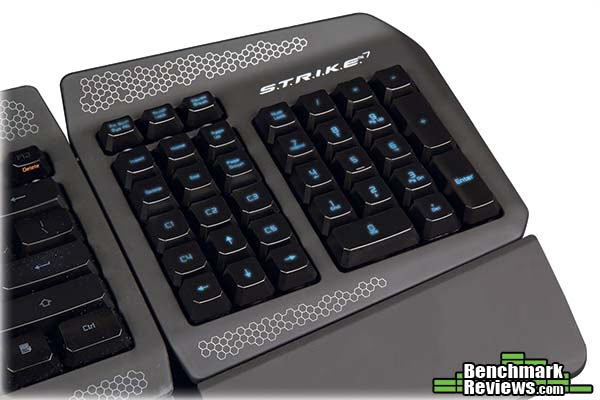
If you pay $299.99 for the STRIKE 7, then you'll probably want to use the keyboard to its maximum potential. Below is the number pad detachment. In addition to the common keys, Mad Catz has located 5 macro keys C1-C5 right above the arrow keys. These are fully programmable macro buttons. In order to increase usability, the C1-C5 keys are slightly lower than the remaining keys so there's a clear distinction between the function keys (delete, end, and pagedown) and the macro keys. For games that use the arrow keys, C1-C5 is in an outstanding position for use.
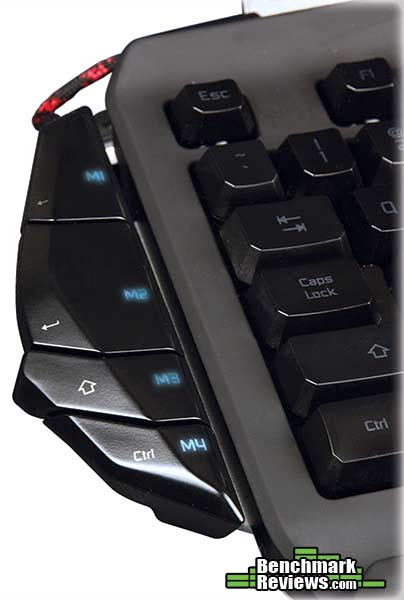
The 2nd set of macro keys, M1-M4, are located on the right-hand side. They are also detachable. These buttons have a tactile click feedback when activated. They have default functions assigned but can be assigned a different macro.
The most interesting piece, and the most "Cyborg" piece of all, is the left side palm rest. This piece has the ability to adjust inwards and outwards by an inch. The height can also be adjusted by about half an inch by pressing on the bottom thumb button. In addition to being a palm rest, it also includes a scroll wheel and button for assigning macros or basic mouse functionality.

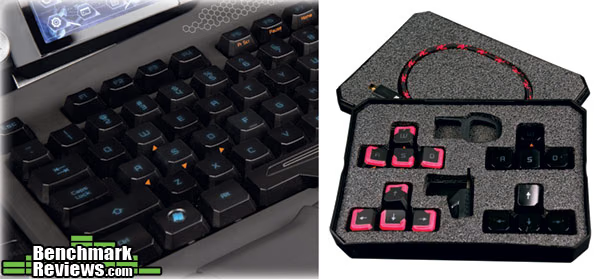
It wouldn't be Mad Catz if they didn't give us some more customization. The STRIKE 7 includes 4 sets of alternative keys for WASD and arrow keys along with extraction tools. The swapping part is identical to what you can do on any mechanical keyboard so periodic cleaning is still easy to do.
The box also contains compartments for screws. The modular pieces can be attached and used without screwing in as the pieces fit and lock tightly together. Mad Catz provides these screws if you need that extra security. The individual pieces also need cables to connect to each other. In total there are 3 keyboard link cables. While that may sound annoying at first, the cables actually provide a very nice look. If there's one thing Mad Catz has done well, it's delivering this complex multi-piece keyboard with a unified design where every part just looks right.
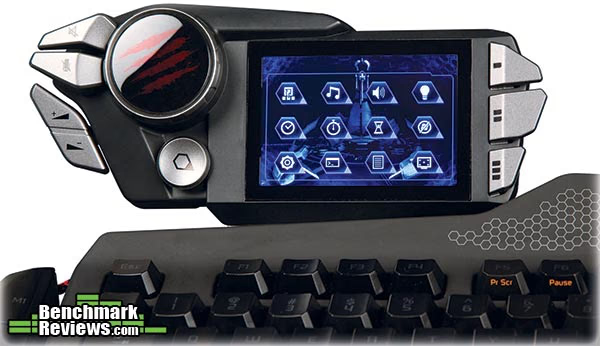
The most exciting feature of all is the TFT-LCD touch screen, code named VENOM, that allows you to run Cyborg apps. The screen is 3.2" along the diagonal. While resolution and color information is not advertised, I can say it's "good enough". From a typical typing position, you cannot see the individual pixels, and the color support seems to be either 8bit (256 colors) or 16bit (32k colors). The STRIKE 7's touch screen is pressure sensitive so it can be triggered using finger nails, pens, or other objects. The response time is pretty good as well.
Along with the touch screen unit, there's also volume controls, mic controls, profile toggle buttons, and a "home" button that brings the touch screen back to it's home page. The media buttons are a bit wobbly due to sitting on the very edge, but they're still very usable. There are a total of 12 apps that come with the Mad Catz STRIKE 7. We'll talk more about them in the next section.
The Mad Catz STRIKE 7 feels great, handles great, and looks great. From a hardware perspective it's pretty close to perfect. In the next section Benchmark Reviews will go into detail about the software aspect of the STRIKE 7.
Mad Catz STRIKE 7 Detailed Features
The Mad Catz STRIKE 7 has a lot going for it in terms of hardware. Let's take a look at the software side now. Before we head into drivers, let's take a look at the apps included with the system.
- Launcher: Changes the screen to a customizable interface that allows up to 12 programs be placed here for instant launch. This is especially good for horizontal programs such as chat (Skype, Raidcall) or music.
- Media Buttons: Provides basic media button capability, including forward, backward, play and pause.
- Volume: Speaker and mic volume adjustment
- Backlight: Adjust the backlight color and brightness for the keyboard using RGB controls.
- Clock: Dedicated clock. Though the need for this is questionable since the homepage has the time present.
- Stopwatch: Stopwatch that allows recording for up to 3 split times.
- Timer: Allows up to 3 timers. Perfect for games like League of Legends where you need a Baron and Dragon timer.
- Windows Lock: Locks the windows button.
- Settings: Calibration, screen brightness, and screen dim settings are here. The time for the screen to dim and save power can be customized here.
- Macros: Allows for 12 completely customizable macros, from functionality to icons. More details about this will come when going over the drivers.
- Journal: A nifty app for entering journal/note entries. Starting a journal entry takes over the keyboard input until you finish. May be helpful in certain situations where you may not want to alt-tab or change screen context.
- TeamSpeak: TeamSpeak integration that displays room and player information while also having volume control.
Overall Mad Catz has provided a series of small apps that can be easily used during gameplay. None of them exceeded expectations however. It would've been nice to introduce some apps that are more complex, interactive, or fun to demo, such as mini-browser (for navigating guides while playing). Hopefully Mad Catz can deliver an app pack for more functionality in the future.

The Mad Catz STRIKE 7 drivers were initially a little overwhelming due to the number of things you can do, but after a while, surprisingly intuitive. Best of all, the driver is fast and snappy. A lot of drivers take 5 seconds just to publish changes, the STRIKE 7 takes no noticeable time at all.
The UI lays out the different programmable sections nicely. Out of the 12 apps, Macros and Launcher are the two that can be customized. To get things running on first use, Mad Catz provides some downloadable profiles for popular games and applications that come pre-programmed with functionality and icons. This list includes: Photoshop, Diablo III, Skyrim, League of Legends, Minecraft, Outlook, StarCraft II, SWTOR, and WoW.
For each macro slot there's a long list of included Macros that can be assigned based on the profile you're using. For example League of Legends about 50 key bindings so you don't have to go figure it out what the ingame keyboard shortcuts are yourself.
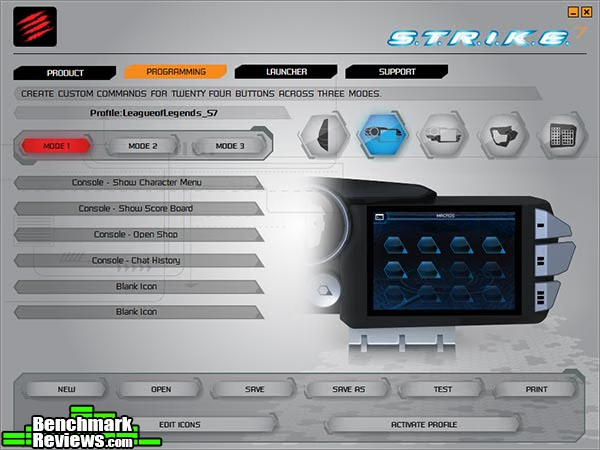
When pre-defined macros aren't enough, you can program your own. One of the greatest things about this keyboard is its accurate macro time delay capture with virtually no upper limit on the number of keypresses allowed. Of course, once you enter enough keys, your computer will start lagging until it finishes processing the input. This is a bug in the software, but that doesn't happen until you reach over a hundred keypresses, which is beyond rare. There are many keyboards with macro capabilities, but most have strict character limits and time delays between each command. The time delay is usually a lot longer than what your fingers can spam. Corsair and Genius's latest keyboards are an example. That time delay means it's impossible to program a rapid sequence and guarantee completion of the input sequence without you interrupting it with another command.
An example here is SCII. Instead of always worrying about macro and building as zerg, how about binding your bases to 9, then record a macro which presses 9 and then spams the drone keyboard shortcut? That way 1 button press every once in awhile will guarantee maximizing drone production. On other keyboards this can't be done because the built in time delay between each key press makes the macro command potentially several seconds long.

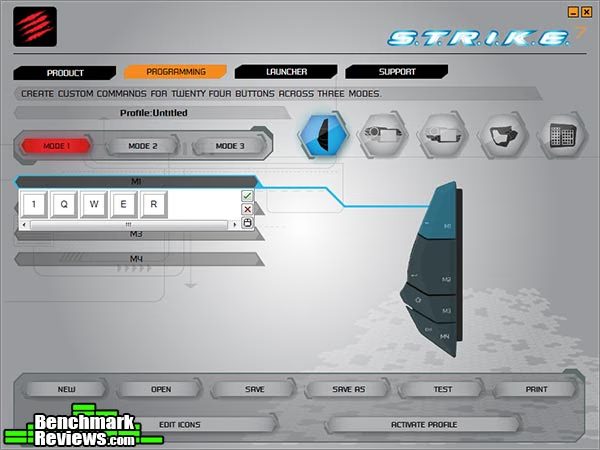
For most use cases however, a full macro recorder isn't needed. Mad Catz has included a speedy quick macro editor for each slot that works great for quickly setting up a simple macro.
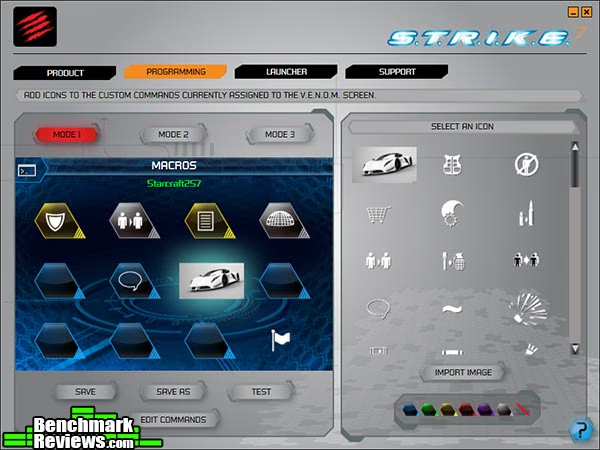
The fun part of the STRIKE 7 profiler is to customize the macros you create with whatever icon you choose. Mad Catz provides a long list of icons that can cover most scenarios, but I prefer colorful and exciting icons. As shown below, you can use any image for the icons.
In addition to macros, there's another section that allows customization. This is the launcher app. This page can be customized to launch any of your system's applications. You can use this for many purposes, but my desktop in general is pretty messy, and I have a ton of windows open at all times. Having this secondary menu to launch my favorite and most common apps is useful. Another usage scenario is for launching side apps like raidcall or FRAPS in game.

The STRIKE 7 provides one of the best macro capabilities that I've seen. The customizations available are also excellent. The software is intuitive and performs well. The included apps are not as exciting as they could be, which I'm hoping Mad Catz can address in future updates.
Overall keyboard functionality is excellent. I would be perfectly happy using the STRIKE 7 without the touch screen (assuming price is also cheaper). The touch screen itself is fun to use and customize, and fits into gaming scenarios pretty well.
Testing & Results
Testing Methodology
This keyboard was used as the primary keyboard over a period of 3 weeks. In addition to producitivty software and everyday browsing, the Mad Catz STRIKE 7 was tested in several games: Crysis, StarCraft 2, League of Legends, and Might & Magic VI.
Test System
- Processor Intel i7-920
- Video Card: Nvidia GTX 285
- RAM: 16GB DDR3
- Monitor resolution: 1920x1080 pixels
Test Software
- StarCraft II
- League of Legends
- Diablo III
- Crysis
- Might & Magic VI
- Lunia
Results
The Mad Catz STRIKE 7 came in a shoe-box style packaging. Assembly was a breeze as individual parts had very obvious way of attaching to each other. The STRIKE 7 does need a power supply for proper use, so it's definitely not suitable for frequent travelers. The minimal functional combination of the keyboard is the touch screen (where the power/USB line comes out of) and the number pad. If you wanted to, you could play games using just those two, assigning macros on the touch screen and using arrow keys on the numpad. Drivers are available for download online, though Mad Catz' current web portal for the STRIKE 7 does need some additional work. There are also some premade profiles that can be downloaded from Mad Catz to give you a quick start. Overall setup was relatively straightforward.
Figuring out the apps and customizations was the next step. The software used is called Smart Technology. It's very user friendly and has a wide array of customizations possible. On initial run, the launcher is probably the first app you will want to set up. This gives you a quick way to launch applications on your PC. I quickly slapped in the apps I use most often, including Steam, Raidcall, FRAPs, and RivaTuner. The Macro recording process was smooth as well. If you have dual screen, it'll be incredibly easy to record macros for keyboard mashing games like Lunia and Street Fighters. Because of its accurate millisecond accurate key captures, combos can be easily recorded.
The keyboard is comfortable to use as there's adjustable palm rests that can be attached. The keys do feel very close to a mechanical keyboard even though it's not. While quieter, it still produces noise common in other mechanical keyboards. The tactile feel is great for typing and everyday use. It may not be as nice as Cherry Red switches for spam-ability, but that's a tradeoff that most gamers should feel comfortable making.
Simultaneous keypresses on this keyboard seem a little odd at times. Certain key combinations (center row) will yield up to 8 or so simultaneous key presses consistently, while others (numbers) will gives you 2-3. The takeaway here is that anti-ghosting is not a feature of this keyboard so certain games like O2Jam or other DDR style games may not go well with the STRIKE 7.
The VENOM touch screen is a fun addition to this keyboard. Overtime I find myself using it more for information and timers (for games with respawn times that are critical). Out of the 12 apps, there's quite a few that don't offer quite enough value. This includes the brightness/color settings (no reason why this needs to be on the touch interface), a dedicated digital clock, and VENOM screen settings. Some of these are 1-time setups that will rarely be used again, and should be moved to the profile editor. These apps might be fun to use initially, but for $300 I'm hoping Mad Catz can include a little more.
Overall there's not many quirks with this keyboard. Whether it be from the perspective of comfort, usability, or software. It's a very solid keyboard that's suitable for many gamers. I'm a huge fan of RTS and RPG style games, and I've had no issues using the STRIKE 7. And we can't forget that the Mad Catz's Cyborg series is just plain fun. You can do things with different parts of the keyboard that people usually just won't expect, whether it'd be the adjustable palm rests, or detachable keyboard parts, or macro buttons on the palm rest.
Gaming Keyboard Final Thoughts
The only realistic comparison I can make here with the Mad Catz STRIKE 7 is the Razer DeathStalker as they are the two industry leaders that have created a keyboard with built-in touchscreen. There's some differences in the types of apps available to both systems. In terms of raw touch screen specs, the DeathStalker has a bit more going for it with it's larger screen and vivid colors. Razer's keyboard also has physical macro buttons that can be customized to take on any icon. The DeathStalker's touch screen has some very popular apps built in such as facebook and youtube. It also has dedicated gaming profiles that instantly switches modes for both the touch screen and physical macros. When the touch screen isn't doing anything particularly useful, it can be used as a trackpad.
Mad Catz's approach is different. They built generic apps that can be used across all games such as timers, note takers, and TeamSpeak integration. Mad Catz also likes to use the screen as an auxiliary monitor for displaying system information. The apps are simpler and doesn't offer as much functionality as Razer's. Below are some comparisons:
-
Clock/Timers - both systems have a dedicated clock and timer app.
-
Program launcher - only the Mad Catz STRIKE 7 allows you to launch apps using the touch screen.
-
Game mode - both systems have a game mode. However STRIKE 7 only disables windows button while DeathStalker can disable alt-F4 and alt-tab as well.
-
Browser - the Razer DeathStalker has a fully functional built-in browser, this opens up the gateway for an infinite number of possibilities given 3rd parties can develop web apps just for the keyboard. Community power users can develop things themselves and share.
-
Popular tools - The DeathStalker has Youtube, Twitter, and Facebook built-in. The STRIKE 7 has TeamSpeak.
-
Track pad - The DeathStalker enables users to use the touch surface as a trackpad if they choose to.
The drawback for Razer's keyboard is the lack of a mechanical keyboard's feel. It may earn them style points but if you're a serious advocate of mechanical keyboards, the Mad Catz STRIKE 7 is a better fit. However from a pure app capability perspective, the Razer DeathStalker takes a lead. Of course this doesn't take any of the other factors into account like macro capabilities or comfort.
Mad Catz STRIKE 7 Conclusion
The Mad Catz STRIKE 7 is a stellar keyboard. It is comfortable to use, has well positioned macros buttons, and includes some top notch functionality that's best in class. The custom membrane that Mad Catz uses closely resembles that of a cherry brown switch. This delivers light tactile feedback when the keypress is fired. Because it's not actually a mechanical keyboard, it's a lot quieter to use. The included profile software is intuitive and fast. Unlike many other keyboard drivers, the Smart Technology profiler is anything but sluggish. For such a complex keyboard, every part of it just works, and works well.
Visually, the STRIKE 7 is stunning. It might be hard to believe that a keyboard that comes in 7 separate pieces that need to be connected via 4 cables would turn out to look good, but Mad Catz pulled it off. The matte surface and metal frame fit the Cyborg look perfectly. Much of the VENOM screen can be customized as well, including the app launcher and macro pages. One of my favorite features is assigning images as the macro icon. If you took some time, it's easy to copy and use game actual in-game icons. This would allow you to play games with the minimalist keyboard setup of just the touch screen and the number pad.
Just like the rest of the Cyborg product line, the STRIKE 7 packs a bunch of functionality that's simply fun to use. Users can customize the keyboard parts as needed, as there are many possible configurations. If you needed to save space, the VENOM touch screen and keyboard body together take up about as much space as 2 hands. The macro capability is simply superb on this keyboard. Competitors like Corsair have decent profilers but between each key press there's a minimum time delay. This makes it hard to capture accurate combos, and also makes spamming macros impossible to use. The STRIKE 7's macro recorder can capture millisecond-accurate key combinations. The VENOM touch screen also allows a bunch of cool functionalities that are non-existent in keyboards today. This will probably open up a huge array of possibilities in the future.
The STRIKE 7 has a solid construction. For a keyboard with such a large number of moving and detachable parts, the STRIKE 7 doesn't have any loose joints. To ensure a stable connection, Mad Catz also provides screws. However even without the screws, the keyboard locks together strong enough that I can lift one end of the keyboard and everything would stay intact.
If we can ignore the price for a second, the STRIKE 7 would be an instant recommend. However there are competitors in the market now, including Razer, with touch screen keyboards. The Mad Catz STRIKE 7 is available for $299.99 (Amazon / Newegg) while the Razer DeathStalker is priced at $250.00. This puts the STRIKE 7 in a tough position. One of the key reasons in buying these keyboards it the touch screen capabilities. While both have a bunch of apps, there is one key feature that the DeathStalker has that makes the STRIKE 7 a tough call, and that's the built-in browser. That effectively acts as a third monitor and opens up possibilities for things you can do with the keyboard. As of now Benchmark Reviews has not reviewed the Razer DeathStalker yet so we cannot make a call yet since we don't know the comfort, usability, macro capability, and other details about the DeathStalker other than paper features. When comparing with the rest of the market, a high end mechanical keyboard comes to about $150. Grabbing a keyboard with basic macro capabilities will be about $80-100. Of course, the STRIKE 7 performs much better than those keyboards, but at a price.
Given the amount of features Mad Catz has delivered, the $299.99 price tag justifies itself. This is especially true from a hardware perspective comparing to the Razer alternative For most people this is an overkill. If Mad Catz releases some new apps, or at least open up browser capabilities, I would be able to recommend this keyboard much more strongly. Never forget this is one of the only keyboards on the market with a touch screen, delivers a mechanical keyboard experience, and can be reassembled to a different form factor as needed. What's for sure is if gamers can ignore the price on STRIKE 7, everyone should take one home.
Pros:
+ Macros that have accurate time delays and virtually no input limits
+ Customizable in terms of hardware and software
+ VENOM touch screen that runs apps
+ A keyboard that closely resembles the feel of a Mechanical keyboard feel without the excessive sound
+ Ridiculously large number of macro buttons
+ One of the only macro recorders with accurate capture times, no artificial delay, and virtually no upper limit on key captures
+ Looks fabulous
+ Comfortable matte surface that avoids sweat accumulation
Cons:
- Limited VENOM touch screen apps
- Very expensive
Ratings:
- Performance: 9.75
- Appearance: 9.75
- Construction: 9.75
- Functionality: 9.50
- Value: 6.00
Final Score: 8.95 out of 10.
Benchmark Reviews invites you to leave constructive feedback below, or ask questions in our Discussion Forum.
Reader comments from the original article
8 comments were posted before commenting closed. They are preserved as written. Original avatars no longer resolve and are shown as a placeholder.
RE: Mad Catz S.T.R.I.K.E. 7 Gaming Keyboard iFLAME Permalink:
A touch-screen on a keyboard! I believe MadCatz is about to get a letter or two from Cupertino over that one ;)
RE: Mad Catz S.T.R.I.K.E. 7 Gaming Keyboard Argos Permalink:
As far as design goes this must be one of the fugliest keyboards I have ever seen. What a mess. But... that is of course personal taste. And as far as functionality is concerned this board still does little to nothing for FPS gaming. For a board with so many module why on earth is there no FPS module with a layout like for example the Ideazon Fang or Steelseries Merc Stealth has. If there was a module like that I would have bought this board no matter the messy look.
mr Skidmarks Permalink:
I've got to hand it to Mad Catz, they're not afraid to stick their necks out but I think I'll pass on this thanks.
RE: Mad Catz S.T.R.I.K.E. 7 Gaming Keyboard kzinti1 Permalink:
Too bad. If this keyboard used mechanical switches I'd be using one right now. Every single keyboard I've owned that used membrane type switches simply didn't last long enough to justify their expense. Membrane type switches are irreparable, mechanical switched are. The Deck keyboard I've been using for a couple of years had 2 instances of key lights that failed. Both were fixed during the warranty period. I can also modify this keyboard any way I wish with a soldering iron, resistors and/or led's. I really don't think that a keyboard with membrane switches may be modified in any fashion without destroying it. If Mad Catz produces another keyboard like this, with mechanical switches, I'll be buying the 1st one I find. Mad Catz is a very good company. I just wish they didn't buck the trend by using membrane switching with this keyboard. It has everything I want and a few things I'd have never thought of asking for.
Membrane keys Richard Roon Permalink:
I have actually had this keyboard since release now and i can seriously say that it feels better then any mechanical keyboard i have had so far. As for the FPS setup, you can just attach the touchscreen to your numpad, attach the extra long cable that comes with it and you can use your numpad + arrows and extra macro keys around the arrows for FPS gaming. If you don't want the numpad on the right side of the rest of the keyboard you can just put it on the left side and attach the 4 extra macro keys to your numpad section as well.
Battery Gustavo Permalink:
Hi! I want to know if we can use this keyboard without a computer...I mean...if we can use touchscreen funcionalities with some autonomy, like a battery, or we really have to use the keyboard alonside a computer? Thanks!
Keybinds! Inzane Permalink:
Just got this keyboard, but have some problems with binding the extra keys to keybindings in-game. It's like windows isn't recognizing the keys when i try assign them :S
RE: Keybinds! Steve Permalink:
Check your mode switches, if you bind in mode 2 for instance, bindings will only work in mode 2.