
Mionix Naos 5000 USB Gaming Laser Mouse
Mionix Naos 5000 Gaming Mouse Review
Gamers want the best system they can get their hands on. This means a blazing fast CPU, dual video cards, and good ram. However, all this is potentially useless if you pair this system with an unreliable mouse. Mionix aims to prevent this problem by unleashing the latest addition to their lineup of gaming peripherals: the Naos 5000. Boasting up to 5040 dpi, switchable profiles and a unique weight tuning system, the Mionix Naos 5000 stands above all else. As a newcomer to the computer peripheral scene, Mionix, a small company based in Sweden, may not be a name familiar to gamers. However, this doesn't stop them from providing a wide range of solid gaming accessories. In this article, Benchmark Reviews takes a look at the Mionix Naos 5000. Keep reading to find out if this mouse really is light-years ahead of the game.Due to the vast amount of gaming mice available, new mice require certain, unique features to make them stand out from the crowd. Mionix seems to have reinvented the wheel with the Naos 5000; instead of adding new features, they refined the definition of the generic high-end gaming mouse. Increased DPI, onboard memory, quickswitch profiles, a weight tuning system, and a sleek look are the aspects Mionix thought about while designing this mouse. Although nothing here is new, all these features are seamlessly integrated into an ergonomic mouse. Coupled with a powerful software backend, this mouse is uniquely designed, suitable for gamers with a variety of needs.

The Mionix Naos 5000 was not designed to be revolutionary or groundbreaking in any way. However, it was created to be a powerful mouse, aimed at perfecting the most basic necessities required in any mouse: tracking, DPI, programmable buttons, and an ergonomic feel. The Naos 5000 does all this and more, while adding worthwhile touches such as customizable LED lights.
About Mionix
MIONIX - LIGHT-YEARS AHEAD OF THE GAME
Our goal from the very start is to develop quality products with an original design. It is also very important to us that we develop innovative products with unique features that users all over the world can identify themselves with.
We love our work and Mionix will always stay true to gaming. Our products is not only the result of hard work, it is also our shared vision and a deep passion for what we do.
Mionix Naos Features
• Truly ergonomic design
Truly ergonomic design with support for all five fingers
• Maximum grip
The rubber coating ensures a maximum grip
• Balanced weight tuning system
A unique weight tuning system for an optimal weight distribution
• 5040 dpi laser sensor
Remarkable tracking performance built for gaming
• 128kb built-in memory
Bring your settings and recorded macros with you stored into one of the 5 profiles
• Customizable LED light system
Personalize your mouse with extensive color options
• S.Q.A.T - Surface Quality Analyzer Tool
Surface Quality Analyzer tool to measure the tracking quality on a certain surface
• 3 steps customizable dpi in-game adjustment
Set 3 dpi values and switch easily between them in-game
• 7 programmable buttons
The buttons can be assigned to any key, mouse command or macro
• In-game profile switch
Switch easy with a click between stored profiles in-game
• Adjustable polling rate
Tune it all the way up to 1000Hz through the software
• Plug n Play
Completely Plug n Play, software needed only for configuration
Naos 5000 Specifications
• Truly ergonomic design
• Grip friendly rubber coating
• 7 buttons (7 programmable)
• 3 steps in-game dpi adjustment
• In-game profile switch
• Configurable dpi up to 5040 dpi
• 6 integrated LEDs
• Adjustable polling rate
• 128 kb built-in memory
• Large teflon feet
• Balanced weight tuning system (up to 40 gr)
• Gold-plated USB connection
• Full speed USB 2.0 with Plug n Play
• Cable length: 2 m (braided for durability)
• Compatible with all kinds of surfaces
Closer Look: Mionix Naos 5000
The Mionix Naos 5000 looks like any standard well-equpped gaming mouse. From the top, two mouse buttons, a middle mouse button, as well as two DPI adjustment buttons can be seen. This, along with the LED Mionix logo on the rear, gives the mouse a very ominous look.
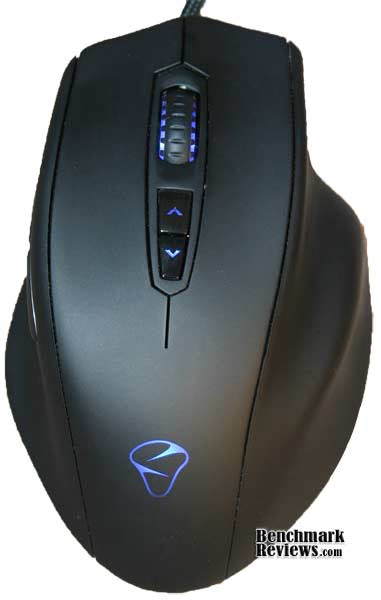
The front of the mouse features the 5 buttons mentioned earlier. The DPI buttons are used to change the DPI on-the-fly. These two buttons, thanks to their position, are impossible to accidentally hit. The mouse wheel is solid and firm, and the rubber coating creates a nice firm grip, suitable for any hand.

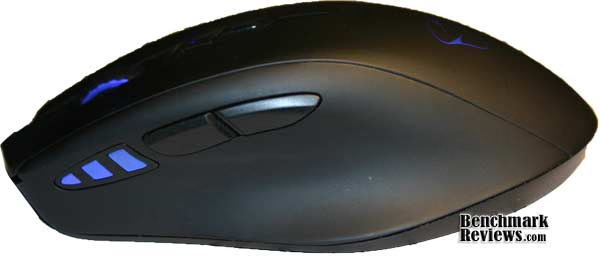
Two programmable buttons are positioned on the left side of the mouse. They're positioned in such a way that allows you to simply rest your thumb below them comfortably, and press them when needed. Closer to the front of the mouse, on the left, we see a DPI display. There are 3 LED lights that show which DPI profile is currently active. I found this very helpful; with a simple glance I was able to easily determine which DPI stepping I was using.
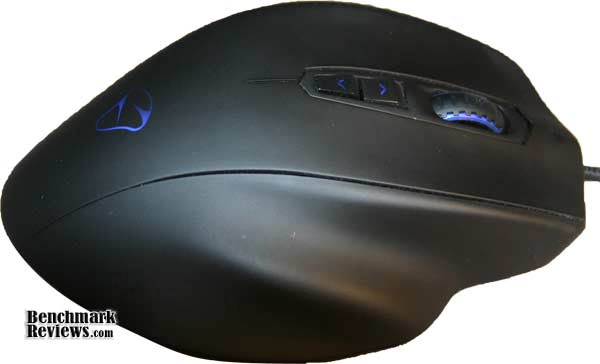
The right side of the mouse features an ergonomic, rubber rest which allows your ring and baby finger to sit comfortably.
On the bottom of the mouse we find the laser sensor, as well as two areas for the weight tuning system.
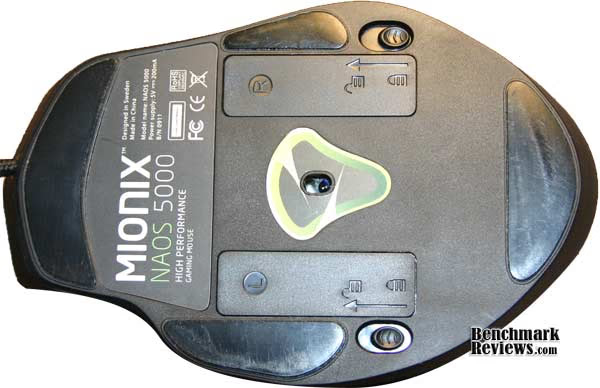
This device comes with eight identical weights. Each of them weighs 5 grams, so a total of 40 grams is able to be added on to the mouse. Within the weight tuning area, we're able to place the weights in any order we prefer.

Naos 5000 Software Features
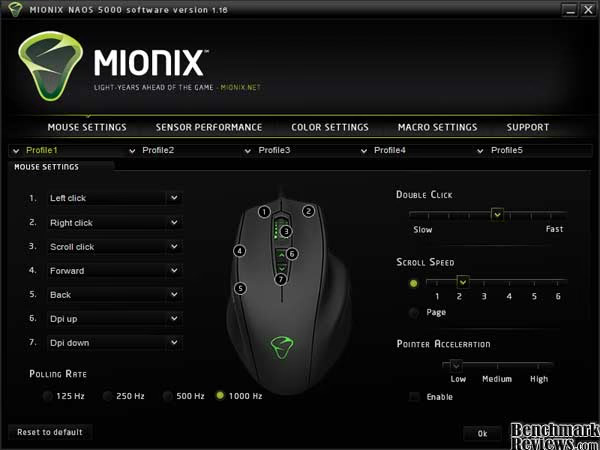
The Mionix Naos is plug and plug, and no software is required to use all the basic functionality of the mouse. However, this is only usuable to some extent. The downloadable software provided by Mionix (downloaded here ) gives you the ability to change the colour of the LED lights, change the functions of the programmable buttons, and even create button-specific macros. Due to the 128kb of onboard memory the Naos 5000 has, up to five different profiles (all with entirely different settings) may be stored and changed on-the-fly.
All the basic mouse settings are found on the very first tab on the software. Programmable buttons, polling rate, double click and scroll speed, and pointer acceleration may be changed.
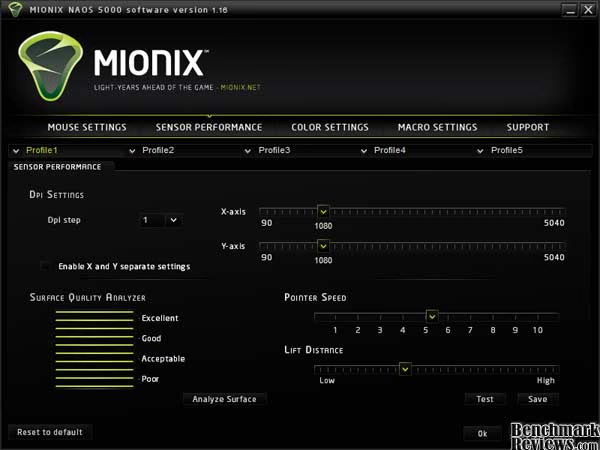
The various sensor settings, including DPI and pointer speed, may be changed on the Sensor Performance page of this software. A very unique tool, dubbed "S.Q.A.T." or Surface Quality Analyzer Tool, allows you to test the tracking of any mouse surface. I'll go into this in more detail on the next page.
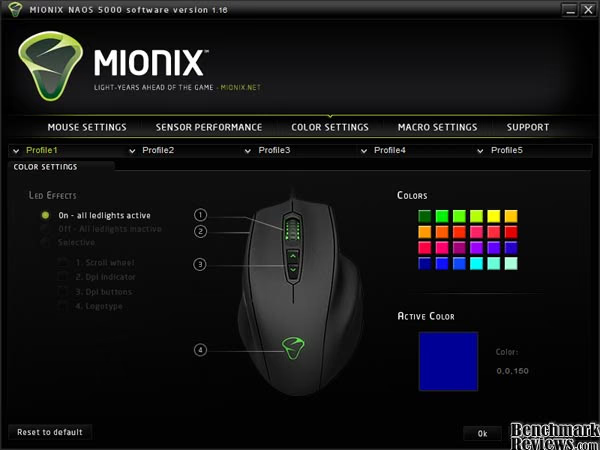
The Naos 5000 is meant for hardcore gamers, but also for gamers who enjoy a bit of style. This is evident on the next page - Color Settings. This mouse has 4 separate LED lights, which are able to be changed individually to one of 24 different colours.
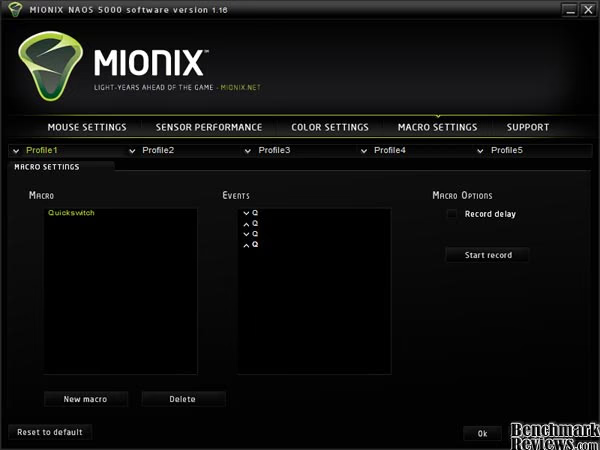
This software gives you the ability to create macros and utilise them by binding them to a button on the mouse. This is very powerful; you're able to record macros, insert specific keys, and even insert delays.
The last tab in the Mionix Naos software simply features a link to their online support, and two buttons to update software and mouse firmware.

S.Q.A.T. Testing & Results
The most important aspect of gaming is tracking. Sure, a mouse can have high-end components paired with an ergonomic design, but this will do no good if it experiences constant tracking loss while you're trying to align that perfect headshot. This is why Mionix developed the Surface Quality Analyzer Tool, or S.Q.A.T. for short. On their website, Mionix states that S.Q.A.T. "uses the laser sensor to measure the tracking quality of your mousepad." On a scale of 1 to 10, ranging from poor to excellent, this tool simply shows you the quality of tracking on your mousepad.
Disclaimer: These tests are from my own set of mousepads, and may not produce the same results if duplicated.
Testing Methodology
The software states, to get the most accurate reading, you're required to cover as much surface area of the mouse as possible. With each test, I positioned the mouse surface on a flat desk, and moved my mouse to each corner repeatedly.
Test Results: Paper
In this first test I used a standard 8.5x11 sheet of blank paper.

As you can see, the paper achieved a score of only 4 /10. This was to be expected, as paper isn't really an ideal mouse surface.
Testing Results: Desk
In this test I didn't use a mouse pad; I used my plain desk. This desk is essentially comprised of finished wood. I've had this desk for a long time, and it isn't in the best shape, so I didn't expect the score to be high.
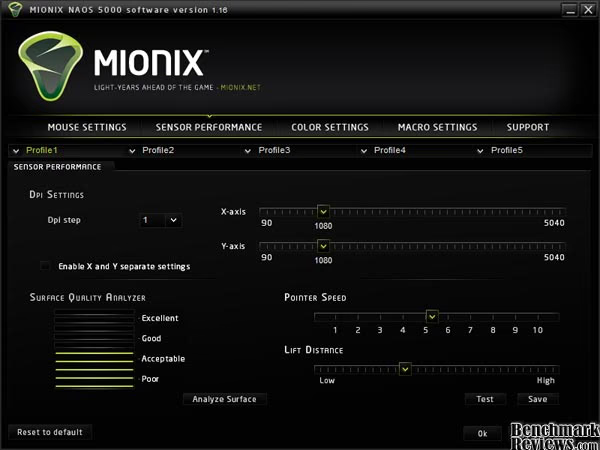
This scored a 5 / 10, only one bar higher than the paper.
Testing Results: Mouse Pad
I used a generic mousepad designed for optical / laser mice for this test. I picked this mousepad up for 5$ at a local computer store. I wasn't sure what to expect with this mousepad, as it was the least expensive one I could find.
This mousepad scored an astonishing 10 / 10. I suppose this shows you don't need an expensive mousepad to get the best quality tracking out of your mouse.
Everyday Usage Performance
Throughout my few months of using the Naos 5000, I attempted to use it in as many situations as possible. This includes tracking-dependant games in the genres of first-person shooters, real-time strategys, and action role-playing games, as well as basic word processing and internet browsing.
Test System
-
Motherboard: Asus P6T
-
System Memory: 6GB Corsair XMS3
-
Processor: Intel Core i7 920
-
Video: ATI Radeon HD 4890
Test Results
The Mionix Naos 5000 performed very well under any circumstances. In first person shooter games, such as Counter-Strike: Source or Call of Duty 4, precision and accuracy play a huge role. The Naos 5000 allowed me to easily aim up the perfect headshot, as it glided swiftly across my mousepad. The smallest twitch could offset your hand in the slightest, so I used the mouse without any weights. I found this worked well; the ergonomic design combined with the mouse's precision allowed me to play hours on end without cramping.
The same goes for any other tasks, such as web browsing, photoediting, and word processing. This mouse, due to it's on-the-fly DPI switching functionality, allowed you to accomplish precision jobs such as photo editing, then switch to a higher DPI for a different task such as web browsing.
Mionix Naos Final Thoughts
The Mionix Naos 5000 does not reinvent the wheel. This mouse is not revolutionary in any way; all functionality in this mouse may be found in a different one for a slightly cheaper price. This being said, the Naos 5000 attempts to refine and perfect the ideal hardcore gaming mouse. All the generic functionality is bundled with a superb rubber packaging, alongside stylish, sleek LED lights. This mouse appeals to anyone, and may be customized to suit your exact needs. This being said, the price point is not very ideal. For $85, I'd expect there to be a few more programmable buttons added in. Compared to similar mice on the market, the Naos may seem a bit more expensive.
Mionix Naos 5000 Conclusion
The DPI on this mouse is able to be changed, with a DPI ranging from 90 to 5040. On-the-fly DPI switching is also included, with two buttons placed on the mouse to accomplish this. The polling rates are also able to be changed. The Naos 5000 contains all the performance expected in any high-end gaming mouse.
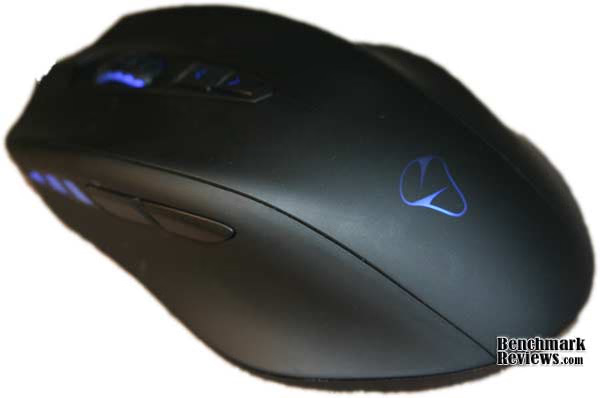
This mouse features an all-black, sleek, ergonomic body paired with 4 customizable LED lights. As you can see, the appearance of this mouse is phenomenal.
This device is extremely well built. A comfortable rubber exterior is used, so the mouse is able to provide many hours of gaming while preventing your hands from getting sweaty or cramped.The functionality of the Naos 5000 is outstanding. It boasts many features, such as 7 total programmable buttons, onboard memory which allows macros to be recorded and saved on the mouse, on-the-fly DPI switching, multiple profiles, and even unnecessary but welcome functionality like the Surface Quality Analyzer Tool. (S.Q.A.T.).
Value is where this mouse could be improved. A high-end gaming mouse is expected to come with a hefty price tag, but for $84.99 at NewEgg the price seems expensive when compared to other mice with similar functionality.
The Mionix Naos 5000 Laser Gaming Mouse features all the functionality and performance expected from any high-end gaming mouse. This, paired with the sleek, ergonomic body and customizable options such as the 4 LEDs, make the mouse a must-have for any dedicated hardcore gamer (with some money to spare) looking only for the best.
Pros:
+ Solid construction
+ Ergonomic design
+ Powerful software backend
+ Sleek and stylish
Cons:
- Expensive
Ratings:
-
Performance: 9.00
-
Appearance: 9.50
-
Construction: 9.00
-
Functionality: 9.50
-
Value: 7.00
Final Score: 8.8 out of 10.
Excellence Achievement: Benchmark Reviews Silver Tachometer Award.
Questions? Comments? Benchmark Reviews really wants your feedback. We invite you to leave your remarks in our Discussion Forum.