
Antec Six Hundred v2 Gaming Case
Manufacturer: Antec, Inc.
Product Name: Antec Six Hundred v2 Mid-Tower Gaming Case
Model Number: Six Hundred (version 2)
Price As Tested:$89.95 at Newegg (before rebate) or $96.69 at Amazon
Full Disclosure: The product sample used in this article has been provided by Antec, Inc.
Antec has been in the PC enclosures business for over 25 years. They have many unique and creative cases such as the LanBoy and Skeleton. However, nothing is more iconic than their "Hundred" series gaming cases, from the low-end Antec One Hundred to the Antec Twelve Hundred full tower. In order to keep up with competition, Antec has been massively updating their line of products. This time it's the Six Hundred's turn. Out of the seven "Hundred" series gaming cases, the Antec Six Hundred v2 is the most balanced. It was designed to be simple but effective. Benchmark Reviews will test the Antec Six Hundred v2 and see where it stands among the fierce competition.
Being a mid-tower case, the Antec Six Hundred v2 supports all of the expected features. It supports ATX/micro-ATX/mini-ATX motherboards, has three 5.25" HDD bays, six 3.5" HDD bays, and two 2.5" SSD/HDD mounts. It can support graphic cards up to 11.5" long. In terms of functionality the Antec Six Hundred has everything you need for a mid-ranged tower.
However simply having the raw functionality isn't enough. The Antec Six Hundred v2 comes sells for $89.95 at Newegg (before rebate) or $96.69 at Amazon, so it is expected that there is work put into the design, performance, and usability of the case. Antec realizes that updates are necessary as there are growing numbers of sub-$60 mid towers that get the job done. Benchmark Reviews will be disassembling the Six Hundred v2 to see where the Antec Six Hundred stands today.
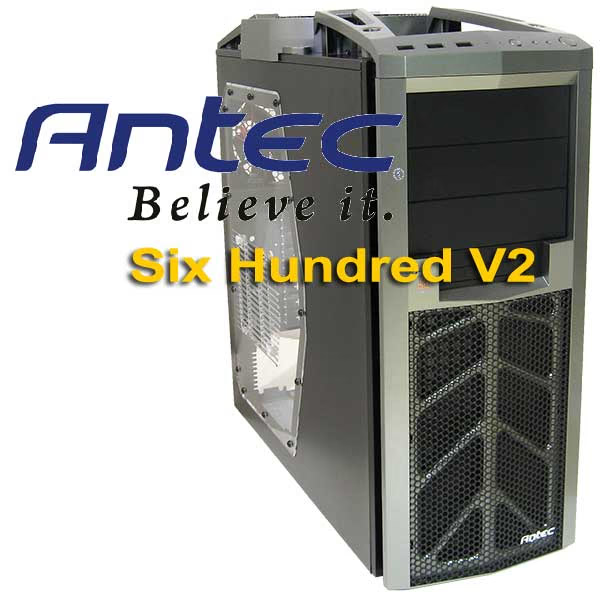
Antec Six Hundred v2 Features
- Bottom-mounted power supply isolates heat and noise
- Front-loaded hot swap 2.5" drive caddy
- Perforated front bezel delivers maximum air intake
- CPU cutout allows for easy installation of CPU coolers
- Windowed top panel for unique "moonroof" visibility
- Windowed side panel with optional fan mount
- Cable management compartment organizes cables discreetly
- Front-loaded HDD cage for up to 6 hard disk drives
- Cable management ties help keep your case tidier
- Washable air filters for quick, easy cleaning
- Power supply not included
Six Hundred v2 Specifications
| Drive Bays |
- 6 x internal 3.5" HDDs |
|---|---|
| Expansion Slots |
7 Total |
| Cooling System | - 1 x top 200mm TriCoolTM blue LED fan - 1 x rear 120mm TwoCoolTM blue LED fan - 2 x front 120mm fans for HDDs (optional) - 1 x side 120mm fan for graphics cards (optional) |
| Front Ports |
- 3 x USB 2.0 |
| Maximum video card size | 11.5"/292mm (Note: some video cards may block access to the adjacent hard drive bay) |
| Motherboard Support | Mini-ITX, microATX, Standard ATX |
| Unit dimensions | - 491mm (H) x 212mm (W) x 492mm (D) - 19.3" (H) x 8.3" (W) x 19.4" (D) |
| Package dimensions | - 565mm (H) x 273mm (W) x 559mm (D) - 22.25" (H) x 10.75" (W) x 22" (D) |
| Net weight | 15.3 lbs / 6.9 kg |
| Gross weight | 18.7 lbs / 8.5 kg |
Six Hundred v2 Exterior
The Antec Six Hundred v2 is considered a minor update to the series. There are no significant visual differences, as most of the updates went to tweaking the engineering. This isn't a tool-less design so it can be expected that all drives are locked in place using old fashion screws.

Antec's "Hundred" Series cases all share a similar look and feel. The design tends emphasize the use of straight lines and thick rims. The Six Hundred v2 has a steel-based frame with plastic rims. The rims are for visual benefit only and cannot be used as a handle for lifting the computer as it doesn't support the weight.

As a typical mid-tower gaming case, the Antec Six Hundred v2 has three external 5.25" HDD bays, with the capacity to still two front intake fans. What's different is the external front-loaded hot swap 2.5" SATA HDD caddy.

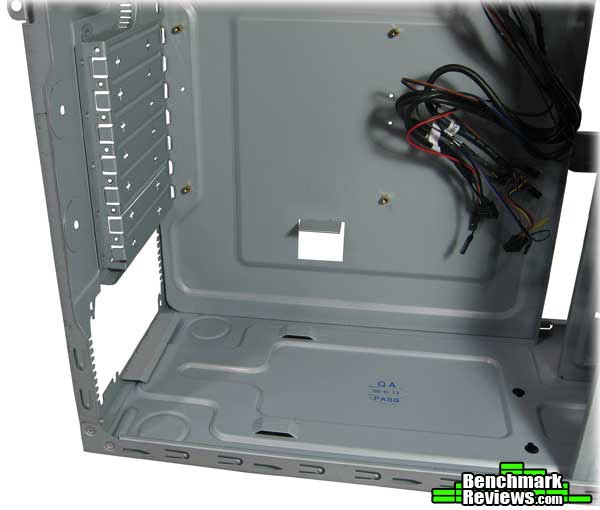
The Antec Six Hundred v2 has some areas where fine touches were omitted, touches that could have easily made the case better. One of these areas is the paint job. Antec decided to skip painting the interior and back of the case. It's slightly odd for an updated case with see-through window to omit such a change.

The Antec Six Hundred v2 has a total of seven expansion slots and has support for water cooling systems. The Six Hundred v2 comes with two fans, and by default they are connected to a custom fan control at the back of the case. At the top there are three switches each controlling one of lighting, top fan, and back fan. Unfortunately being located on the back of the case is a usability issue, especially for cases tucked under a desk.

The Antec Six Hundred v2 has a solid exterior. There hasn't been much update to the main visual components. It's unfortunate that the interior and back still isn't painted, as it could've made the case seem that much more complete.
Detailed Exterior Features
The roof of the Antec Six Hundred is the highlight of the case. The see-through moonroof is a nice touch and works well if there's a good amount of case lighting. The area right above the moonroof also acts as a natural item holder, protected on all sides with plastic rims acting as the fence. Hard drives, USB devices and other small items can be placed there when not in use.

Typically a 200mm top fan would only work in large cases to make up for lost space. However Antec kept the case size in the mid-tower range and built the fan externally. In terms of performance, the default 200mm fan comes at 800RPM. That actually fairs worse than two 120mm top fan that can be going at 2500RPM and only marginally better than a single fan. While visually attractive and near inaudible, the fan's cooling ability is a concern.

The Antec Six Hundred v2 has 3x USB 2.0 ports, audio jacks, power/reset buttons, and 2 white led indicators for HDD activity and power. These wires can be looped to the side internally as to avoid contact with any top drives you may want to install. Up close the moonroof really seems like a nice visual touch.

The bottom of the Six Hundred v2 has four elevated rubber feet to keep ground surfaces safe from scratches. There's no cutout for the PSU, but Antec did include the tools for an internal bottom-mounted 2.5" SSD drive.

The Antec Six Hundred v2 doesn't really come off as visually stunning due to the incomplete paint job. At $96.69, it's not a budget case either. While special attention has been given to the design of the 200mm top fan and the set of unique rims, it's the exact same build as the original Six Hundred. I can't help but feel Antec leaves us feeling slightly dull.
Antec Six Hundred v2 Interior
Being a revised case, there are high expectations for the Antec Six Hundred v2 to have worked out all the engineering quirks. During disassembly we can see some of the work Antec did to make the Six Hundred easy to work with. Unlike many other cases, brute force is not needed for taking off the front frame. Instead, there are plastic "hooks" that you simply push and release from the inside after taking off the side panels.
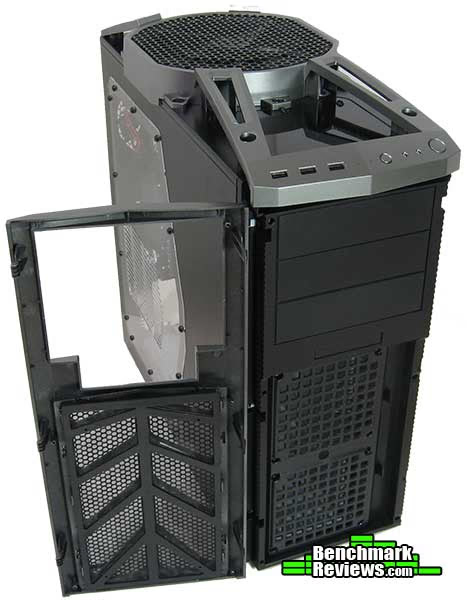
The front has a steel mesh paired together with a much finer dust filter. There can be up to two intake fans installed right at the front so dust prevention is extremely important. These pieces can be cleaned with a quick rinse and reattached immediately.

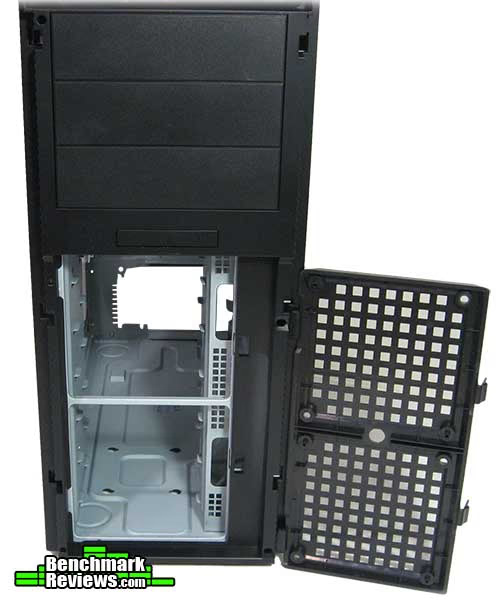
After removing the Six Hundred v2's front covers you will get access to the drive bays. The hook mechanic is used here too for easy access to the fan holder. Antec made an interesting design choice to use only two screws on opposite sides for attaching all the 120mm fans. The other two corners have place holders to fit in the screw hole, locking it in place.
The side panels are held in place using four metal thumbscrews. Upon removing we find the interior completely unpainted. The Antec Six Hundred was designed to have ample room for installing some of the latest graphics cards on the market including the HD5870. It allows graphics cards up to 11.5" long. However, any full sized graphic card will block up to two drive bays on the right. It's a tradeoff of two hard drives per graphics card. Only cards less than 10" can be guaranteed to not interfere with hard drive installation.
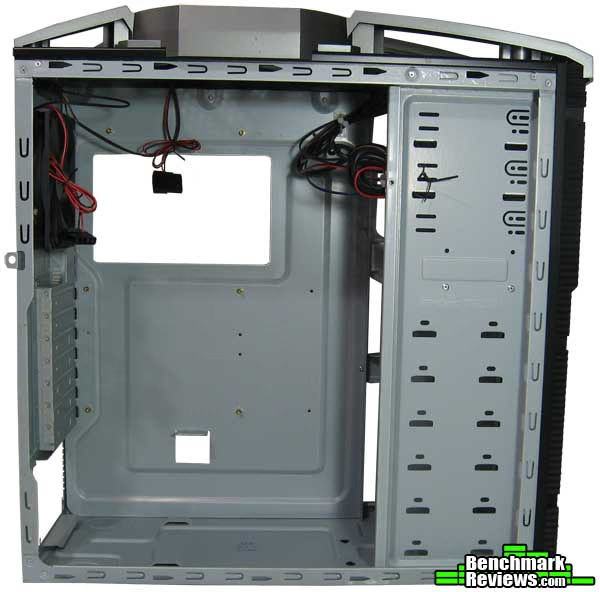
On the other side the Six Hundred has a narrow passage for looping wires at the bottom. A CPU cutout is present for easier installation of CPU coolers. There's no cable management of any sort other than a single pre-pasted plastic cable holder. The case is quite wide so there's room to play around with. Some extra cable holders are recommended to avoid wiring disasters.

Antec seems to have given the exterior frame a lot more consideration than the interior, or perhaps it was a conscious choice to do so. The exterior mechanics and engineering shows thought and overall it gives a great impressio. The interior on the other hand is plain, has no paint, tool-less designs or cable management features. In the next section Benchmark Reviews will take a closer look at interior, test the case, and discuss the Antec Six Hundred v2's performance.
Detailed Interior Features
In this section we take a closer look at the interior of the Antec Six Hundred v2. In all honesty what Antec managed to perfect isn't usability or design, but minimizing material usage. The interior has a plain steel design with no moving parts. All drives need screws to lock them in place. There's about half a dozen different types of screws that came with the case, numerous in numbers.

The only room for stashing cables and wires is at the lower half of the Six Hundred v2, right behind the six 3.5" HDD bays. There's also room to mount an internal 2.5" SSD drive at the bottom of the case should you choose. The screws and rubber anchors are included.

Antec went with the popular bottom-mounted PSU in the Six Hundred v2. However, in a strike of differentiation, there's no PSU vent. The exhaust faces outside so it doesn't affect other components. However the PSU temperature may be slightly higher since it's drawing in warm air in the case.
After disassembling the Antec Six Hundred v2, it is time to migrate components into the case.
My system consisted of a Micro-ATX motherboard, Intel i7-920 CPU, and NVidia GTX 285 (10.5" length). Overall installation was easy. Even though there was very little cable management available, the case has a lot of room to work with. Notably the top of the case has plenty of room for large CPU heatsinks thanks to an external roof fan. For me the GTX 285 blocked off two HDD slots. There's still additional room so graphics card up to 11.5" should fit without problem. However if you want to keep the HDD slots then the graphics card must be less than 10".
The cooling performance was however a little disappointing, even with two 120mm fans installed in the front. Due to a low RPM 200mm top fan, cooling performance is only marginally better than one 120mm fan at 2500RPM, and worse than two. The CPU temperature is in line with competing cases due to its proximity to the two exhaust fans. However GPU temperatures are less impressive. My GTX285 idles at about 42 degrees Celsius. My previous case mid-tower case of this size, the NZXT Tempest Evo ($8 more expensive), kept GPU temperatures at 32 degrees Celsius with 100% fan speed. Naturally the Six Hundred v2 is quieter as you have a larger fan at slower speeds, but that's a pretty big performance difference when you consider the two cases to be in the same price range.
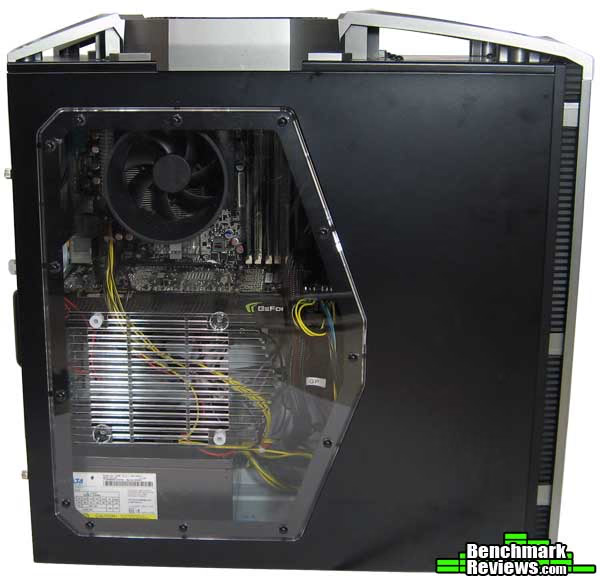
The Antec Six Hundred v2 doesn't have much to show off in the interior. Installation is straightforward but requires some trial and error with different types of screws. Performance is mediocre. After testing the case I really can't help but feel that no matter how good the Antec Six Hundred was when it was first introduced, the v2 update really is too small and doesn't give much of an upgrade at all.
Antec Six Hundred Conclusion
The Antec Six Hundred v2 is a revised case tweaked to be placed back in competition with newer products. Most revisions tend to offer significant improvements in terms of usability, performance, or visual design. In this case however the only notable difference is the change from a front-loaded hot swap 3.5" SATA hard drive caddy to a 2.5" one. In a way it kind of feels like a rebrand more than anything.
The Six Hundred v2's performance is slightly weak for its price. By default only two exhaust fans are included and no intake fans are installed. Even with two extra intake fans installed the Antec Six Hundred v2's performance isn't mind blowing. CPU temperatures are in line with competition. However GPU temperatures are quite a bit higher, as the 200mm exhaust fan is just too slow. One upside is that without additional fans, the Antec Six Hundred v2 becomes almost inaudible, a perfect roommate. One problem the case may run into in the long run is dust. The only area properly protected with dust filters is the front. The top fan does not have a dense mesh and dust will definitely be drifting in whenever the computer is off.
In this update I was hoping for some significant visual improvements. The most popular being a unified paint job. However there were no visual adjustments of any sort made. Overall it's a hit or miss type of design. The top looks great with built-in lighting and the moonroof. In a darker surrounding only key components like the rims and well-lit fan stand out, looking quite good. But any PC owner wishing to put the case out on display will reveal certain aspects that make the Six Hundred v2 seem cheap, like the grey plastic and white unpainted steel.
An area that's outstanding for the Antec Six Hundred v2 is the construction and build. The hook system for front covers and panels allow easy access to dust filters and fan covers without need for brute force and frustration. The interior is simple, but solid nonetheless. As long as the rims aren't used for lifting the case, the Six Hundred v2 should be able to easily last past Antec's impressive three year warrantee.
For a mid-tower case all the basic functionality is there. The Six Hundred has space for installing reasonable amounts of drives and has plenty of room for multiple graphics cards at the tradeoff of hard drive bays. The two 2.5" drive mounts are the only "extras" you get with the case. Unfortunately that's all. There's no tool-less design, no eSata/Firewire/USB 3.0, limited cable management features.
Throughout the review I've been pointing out things the Antec Six Hundred v2 is missing or could've done better. It happens to be important because the case is a revised edition that costs $89.95 at Newegg (before rebate) or $96.69 at Amazon. That's not a particularly competitive price given how many sub-$60 cases there are that look great and offer the "basic functionality" that the Six Hundred v2 does. Of course compared with those cases, the Six Hundred v2 has quite a couple more features going for it, including the external 200mm fan, a nice frame design, external fan controls, and a moonroof. But when comparing with other $100 cases the performance is only mediocre, the appearance is outdated and incomplete because of the paint job, and interior features are next to none.
Overall I don't think Antec changed the original design enough. The Antec Six Hundred v2 is a solid case but at the current price there are better options. Unless you love the appearance or prefer the simple interior design, it's probably better to wait for a price adjustment, a larger update to the series, or look for alternatives.
Pros:
+ Built-in lighting
+ External fan control
+ Included fans are quiet even at max speed
+ Front fan intake dust filters are thorough
Cons:
- Visually incomplete
- 200mm fan performance below expectations
- Poor cable management
- Over-priced for an out-dated model
Ratings:
- Performance: 8.25
- Appearance: 8.50
- Construction: 9.00
- Functionality: 8.50
- Value: 7.50
Final Score: 8.35 out of 10.
What changes would you suggest for the Antec Six Hundred series? Leave comments below, or ask questions in our Forum.
Reader comments from the original article
12 comments were posted before commenting closed. They are preserved as written. Original avatars no longer resolve and are shown as a placeholder.
nothing beats.... Juan pablo cuervo Permalink:
nothing beats the antec super lan boy case. what a great case... for rack mount & hdd reasons i use the thermaltake m9 but i wish i could buy this one: ##plinkusa.net/web5101.htm
Question? Charles Permalink:
Why is the 200mm fan listed as "below expectations"? You listed no expectations nor any measured results with it. I've personally tested this fan and have had the results posted it's more than good. The bearing is either a sleeve (or variation of sleeve like Long Life Sleeve or Rifle.) That's the only con of it. Airflow to noise ratio on it is very good and it has little vibration even though the impeller is a tad undersized.
RE: Question? Charles Permalink:
For those wondering, airflow is around 55CFM with a sound pressure of 21dB(A) (@ a distance of 1 meter.) Overall that's very good.
Re:Question? Joey Peng Permalink:
Thanks Charles for finding out that this is 55CFM (that's airflow measurement, higher = better). Now the surprise is MANY $15-20 120mm fans deliver over 60+ CFM. In the end that one 200mm fan performs worse than a single 120 fan. But of course I mention in the review, and you pointed out to, that the only advantage is it being much quieter. Otherwise in terms of AIRFLOW it's 2-3 times less than a typical 2x120 fan installation.
Re:Question Joey Peng Permalink:
Forgot to stress that the 200mm fan goes at 800RPM while many 120mm fans go at 1600-2500RPM.
200mm as Intake Fan BruceBruce Permalink:
I really like how the 200mm intake fan on the side panel of my case pushes cool air over a wide area of the motherboard. As an exhaust fan, that is not a consideration. Only the noise performance is bettter.
RE: Re:Question? Charles Permalink:
I actually forgot to add that that is at the low setting (which the case comes stock at.) High speed setting is around 75CFM/25dB(A) Either way; for a case fan you don't need more than 50 CFM, More so as an exhaust in this location as you have both the rear and top exhuast fighting for air. Use a case with matching 60 CFM fans all around, and then compare the temp results to a case with 50 CFM fans all around. You won't see much of a difference except that the 50CFM setup will be much quieter.
RE: Re:Question? Joey Peng Permalink:
Maybe we're focused too much on performance. It's actually ok, and extremely quiet. But fans definitely matter. Just think of the temperature difference you get by adjusting 40% to 100%. I posted the stats for typical fans later in comments. 2x 120mm fan will literally double to triple CFM. Note performance score is 8.25, VALUE is 7.50. The key isn't performance is bad, there's just better ones at this price range. My Tempest Evo delivers much better idle temperatures under the same conditions. Whether it's the fan, material, hard drives blocking intake fans, or something else I can only provide the available statistics and the results that I got.
Cooling Not Bad Computer Ed Permalink:
While I was pretty rough as well on my review of the Six Hundred V2 the cooling was one area I could find no complaint in. I am not sure of what your testing revealed but mine showed that it was very close to a Nine Hundred when the two front fans where added. Right now I have a small gaming rig built in this case with an X6 1075 and a GTX 460. With both pushed to load wioth folding the CPU has not broke 30C (Antec H2) for cooling) and the GPU has not give over 60C. These are great temps. Otherwise I agree for the price point they could have done the interior in black and added behind the tray routing. At the very least included the two front fans.
Re:Cooling Not Bad Joey Peng Permalink:
I'm not surprised cooling performance is similar to the Nine Hundred as case designs/fan is similar. However compared to other cases, the performance matches more of the $60 range than the $100 range cases. Note I did install 2x additional front intake fans. Didn't mention in review. The fan's airflow capability is explained in comments above. Quite plainly the 200mm is quieter and looks better but doesn't excel at performance.
Fan Explaned Joey Peng Permalink:
Just a note for everyone (should've included this in review), CFM is measurement for airflow. The low performance review is because it doesn't meet its price expectations. Charles pointed out the 200mm 800RPM fan for this case is about 55CFM. A single 120mm 1600RPM fan is about 65CFM, A single 120mm 2500RPM fan is about 100CFM, One of the fastest 120mm fans can get to about 120CFM. Clearly at this price-point, most cases can install 2x120mm fans, and the performance difference is clear.
Not bad, but expensive. Tai Permalink:
It's a decent case, but one could get an Antec 900/902 for just a tad bit more and the features/specs on the 900 series far outweigh this case.