
Mad Catz Call of Duty: Black Ops Stealth Mouse
Mad Catz Black Ops Stealth Mouse Review
Human input devices (especially the mouse) are very much akin to musical instruments. They are both designed to take the coordinated movements of human hands and transduce them into a predictable yet marvelous output. For instruments the output are sound waves, but on a computer the output can be any imaginable manipulation of a virtual world. In both cases the benchmarks for quality are surprisingly similar. For example, what is it made of, is it well made, does it feel good, is it convenient to use, does it work well and does it look good? With these questions in mind, Benchmark Reviews reviewed the newest release from Mad Catz, the Call of Duty: Black Ops Stealth Mouse. Based on the Cyborg R.A.T. platform the Stealth Mouse adds some style that, for this reviewer, stirs up some new thoughts about the future of gaming mice.
At one time, in the very recent past, computer mice could be simply benchmarked and rated purely by their motion performance. This was a period when 5 buttons was considered many, and wheel-mice were still ubiquitous.It was also a time where simple left-right-up-down motions suffered from major technology inadequacies. It was a major breakthrough and milestone when mouse transduction could be quantified and compared. Essentially, transduction is what happens when ten inches of mouse movement gets converted to pixels on the screen. Early benchmarks proved that the accuracy of mice were limited by their movement speed, resolution and internal electronics. This showed everyone what needed to be improved to make a better mouse. It has been a few years and the current generation of gaming mice are the fruits of that study.

Mice have matured to the point where movement speed, resolution and electronics on almost any gaming product have surpassed all reasonable demands. So what will be the new benchmarks to propel yet another revolution and generation of mice. Like musical instruments, the core factors will always be manufacturing quality, performance, look and feel. Performance has reached an acceptable level, but there is still room for innovation. As such this review will focus more on the look and feel aspects since this is a largely untapped realm, ripe for discovery.
Cyborg Stealth Mouse Features
- Includes Limited Edition 1GB Dog Tag USB Memory Stick
- Includes download code for Bradygames Call of Duty: Black Ops mini guide.
- PrecisionAIM mode
- 5 programmable buttons and 3-position mode switch
- 15 user-definable commands
- Unique LED color for each mode
- Four user-definable DPI settings
- Programmable buttons
- Custom Macros
- Custom length adjustment for perfect comfort
- Aluminium Chassis
- 30 g of removable weights
CD74371200A1 Specifications
- DPI Range: 100-5600 DPI (25DPI steps)
- Acceleration: Up to 50G
- Polling Rate: Dynamic up to 1000Hz
- Tracking Speed: Up to 6 m/s
- Always on: Yes
- Mouse Feet: "Slick" PTFE
- USB: Gold-plated connector
- Cable: Braided
- Works with: Windows 7, Vista, XP and XP64
Manufacturer: Mad Catz Interactive
Product Name: Mad Catz Cyborg Call of Duty: Black Ops Stealth Mouse
Model Number: CD74371200A1/04/1
Price As Tested: $91.63 at Amazon / $99.99 at NewEgg
Full Disclosure: The product sample used in this article has been provided by Mad Catz.
First Look: Black Ops Stealth Mouse
The Call of Duty: Black Ops Stealth Mouse is one product in a larger line released by Mad Catz to accompany the new Call of Duty game. The line includes controllers and audio headsets for PlayStation 3, Xbox 360, Wii and PC as well as other accessories like a pair of gaming glasses and a mouse pad.

As far as product packaging, the Stealth Mouse comes packaged almost the same way as the Cyborg R.A.T. but with a face lift. The Mad Catz packaging does a great job of listing the capabilities and features of the mouse with details adequate for an off-the-shelf decision. The front panel of the box opens so you can actually see the unique styling of the mouse and get a good idea of the size.
Visually the Stealth Mouse looks practically identical to the Cyborg R.A.T. models because it is based on the same platform. This new version has the normal Cyborg emblems and styling replaced by much a much cooler Call of Duty: Black Ops skull and logos. It's nice to see gaming hardware released as collector's items. It is a sign of product maturity when the genre of the product can become a deciding factor in a purchase. With regard to specifications and performance model CD74371200A1is most akin to the R.A.T. 9. There are a few major differences between the model which could mean the difference between choosing one over the other.

The R.A.T. 9 uses wireless technology while the Stealth Mouse is hard wired. The Stealth Mouse does not come with the customizable panels included with the other R.A.T. mice, but since the body is so similar it might be possible to use some if not all of the custom panels if acquired from Mad Catz. Finally, the Stealth Mouse ships with the driver and software on a USB drive instead of a CD. Before getting into greater detail about the software let's take a closer look at the layout and features of this mouse.
Closer Look: Mad Catz Cyborg Mouse
The Call of Duty: Black Ops Stealth Mouse has the same mechanical look as the R.A.T. mice as if it were a piece of some robotic structure. The vertical height lies somewhere inbetween the flatter razer mice and the taller curves of the MX series. The left and right mouse buttons are large a wide squeezing a failry narrow scroll wheel. The two main buttons are slightly concave with steep ridgess at the sides to keep fast fingers from wandering off the edges of the buttons.

The scroll wheel has a plastic core with a knobby rubber circumference. The rubber is soft and grips well for precise control, but the wheel spins so easily that the grip is hardly necessary. The wheel spins almost too easily to the point that it is hard to get just a single notch up or down. This is a major drawback for me since I often script my gaming inputs so that one click and two clicks perform different functions. Just behind the scroll wheel is a rocker switch that adjusts the DPI between four customizable values.

At the back of the mouse several features can be seen. The Stealth Mouse provides a large thumb pad which allows your thumb to rest without having to slide across the mouse pad. This is nice since a textured pad can get uncomfortable when playing with a heavy hand. The buttons on the thumb pad are connected to the main body with a transparent red cable. The mechanism for adding weights is located in the back under the palm rest. On the right side under the palm rest is the adjustment lever for extending the rest.

All of the mouse's extra inputs are located on the left side of the mouse. There is a red precision aim button, forward and back buttons, a thumb wheel, and a mode changing button located on the top-side.
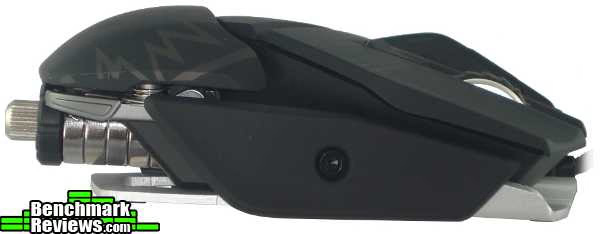
The right side of the mouse is bare with exception only to the pinky rest. Although model CD74371200A1 doesn't come with any extra panels, I'd be surprised if the pinky panels from the R.A.T. series don't fit the CD74371200A1 body. While it would be a nice feature you'll have to get the panels separately as they are not included with the kit.

Underneath can be found the Phillips Twin Eye laser sensor, 6 teflon feet and the weighting system. The bottom of the mouse looks and feels much like metal,but it's really hard to distinguish it from hard-molded plastic. In any case the frame is stiff, strong and light, and the Stealth Mouse is well-constructed. Now we'll take a closer look at the individual features.
Cyborg Detailed Features
There are many features on the Black Ops Stealth Mouse that make the mouse more comfortable to use and easier to fit to your gaming preference. Probably the most lauded feature of the Black Ops Stealth Mouse is the precision aim button.

This little red button is located on the thumb pad positioned low for activation by the thumb tip. When holding the precision aim button the mouse sensitivity is decreased to give you more accuracy when needed...especially for those zoomed-in sniper shots. The amount of sensitivity change can be customized from zero 0-100% using the included software. I really like the precision aim button, but for me it is in a bad location. I use a modified palm grip optimized for activating the forward and back buttons while browsing or gaming. This puts the pad of my thumb under the forward button and the knuckle of my thumb under the back button. This requires a stretch to get my thumb-tip to hold the precision aim. It would be much more convenient if the precision aim button were a few millimeters towards the back of the mouse.
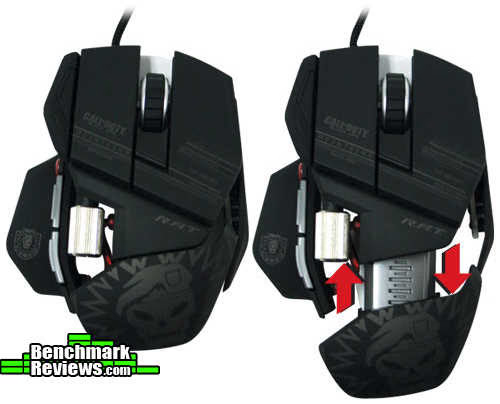

The forward and back buttons on the Stealth Mouse are slightly unconventional. They're long, skinny and located high up on the thumb rest. Right behind these two buttons is the very unique thumb scroll-wheel. It behaves just like a normal scroll wheel, but by default doesn't work for side-scrolling. In fact, side-scrolling is non-standard such that there is no standard method used by all applications. It's just as well because side-scrolling is terribly inconvenient to use with a full-out palm grip since the hand covers the wheel. In my grip there is enough space under my index finger for my thumb to activate the wheel. At best it is a secondary input.
One last thought on the thumb buttons. They have a strong spring which requires slightly more force than most mice I've used. I really like this for two reasons. One, it keeps you from accidentally clicking a button while going for the thumb-wheel. Two, it is much easier to click only the button intended. Too often on my Diamondback or Inferno (where the buttons have light springs) I go for one and accidentally get both. But I'm a button masher, so you might not have this issue.

Model CD74371200A1 uses a weighting mechanism similar to previous R.A.T. models. Five weights at six grams each provide a 30 gram range. Without the weights the Stealth Mouse is very light and speedy. Including all the weights adds some mass for stabilizing accuracy, but the mouse is still quite fast. Some users may desire even more weight. Without the spring there is room on the pole for probably three more weights.
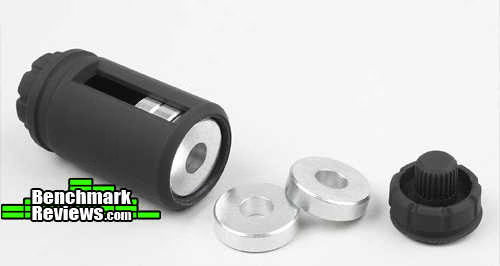
If any weights are not being used the Stealth Mouse comes with a plastic carrying case for the extras. Although I like a light mouse I use all 30 grams.
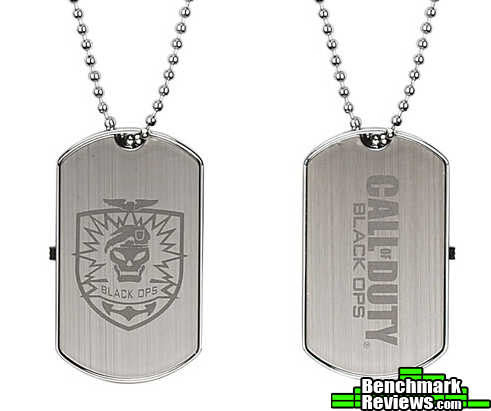
Possibly the most unique addition to the Stealth Mouse is a Call of Duty: Black Ops dog tag USB drive. In most pictures it looks like some chinsy piece of plastic. It's actually made from metal with excellent construction. The drive interface slides out of the bottom with a USB 2.0 interface. The drive is pre-loaded with the driver software and a code for a Call of Duty: Black Ops mini guide by Bradygames. My main complaint is that the drive is only 1 GB.Now that we've seen the hardware let's take a look at the software from that USB drive.
Cyborg Stealth Mouse Software
Software and drivers are one area that can greatly impact the user experience for a mouse. The COD Black Ops Stealth Mouse comes with the driver and configuration software on the dog-tag USB drive. The mouse works fine before installation, but only the standard buttons work. Installation is quick and results in two resident processes. ProfilerU.exe eats 8 K of memory and is the process responsible for the profile editor residing in the system tray. SaiMfd.exe uses 5 K of memory and is the actual mouse driver, but even all the features appear to work fine without this process.

The profile editor is straight forward and takes little instruction to get started with basic changes. The Settings tab provides the sliders for optimizing the DPI resolution and precision aim. Four different DPI settings can be stored per profile and are changed using the rocker switch behind the scroll wheel. Although there are three different modes for the rest of the buttons the DPI modes are independent. As a result the four DPI modes are the same for all three button modes. Similarly, the precision aim slider is independent of both the DPI modes and the button modes. As an example, if my precision aim slider is set to 50%, the precision aim will always reduce the active DPI mode by 50% regardless of the DPI mode or button mode. There is only one universal precision aim setting.

The programming tab handles the button configurations and profile management. There are several options when it comes to configuring mouse buttons.
Latched: Causes the button to "latch" or "lock" like the Caps Lock, Scroll Lock or Num Lock. Press once to latch, press once to release. The assigned function (mouse button, keyboard key or macro) will keep repeating while the latch is on.
Unprogrammed: Clears all settings for the button.
Fall Back: This uses the default button assignment or whatever function you assign in the default mode (mode 1).
Button: Assigns one or more keystrokes or clicks in series.
New Key Presses: This opens a button entry dialogue allowing you to record keys and clicks. The time delays between press and release are not saved during the initial recording but can be updated afterwards. Delays for up and down states cannot be set separately.
New Macro: Macros are essentially the same as New Key Presses with one main difference. A New Key Press series will only continue executing while the mouse button is held down. A macro series will continue to execute to completion even after releasing the mouse button. It can be interrupted by pressing another mouse button, but will continue to execute when real keyboard keys are pressed.
New Advanced Command: This option opens the editor shown in the image below. A button series can be assigned for each of three states of the mouse button, Press, Repeat and Release. The Press and Repeat phases can execute either as macros or as "key presses" while the release phase only executes as a macro. Each phase will execute to completion before the next phase begins. In this mode the button timings are recorded, visible, editable, and can be assigned separately for up and down key states. I use this editor exclusively.

Hot Keys and System Keys: All three button series can include system keys and hot keys. The list of hot keys includes media functions, application launches and application controls. The list of applications includes My Computer, internet, media player, e-mail, and calculator. The application controls include forward, back, search, stop, refresh, and bookmarks.
As you create button series they are stored in the profile and added to the popup menu below the "Do Nothing" command. Other keys can be assigned to any command on the list including the "Do Nothing" command. Once a command is not being used by any of the mouse buttons it can be deleted.
Once a profile has been configured it must be saved for future use. Profiles are saved by default to a specific location on the local hard drive, but they can also be saved to the dog-tag USB drive. Profiles in the default location automatically get listed in the system tray for easy activation. A default profile to load on startup can be set from the system tray. Profiles on the USB drive must be manually opened and activated through the profile editor software. The software suite also has the option to download pre-configured profiles for various games, but despite weeks of checking the Saitek webpage is still "being updated". Luckily I browsed the files on the USB drive and found several profiles there. Some examples are "Call of Duty Generic", "Fallout3", "Bad Company2", "L4D2" and several more. Hopefully they'll update the website with newer games.
Overall the software suite provides access to some very convenient scripting for automating tasks. But these advanced features require the driver and software to be installed on the PC, so the settings are not portable. I would like to see more companies move in the direction of on-board memory for saving the mouse settings like we saw on the CM Storm Sentinal and Inferno.
Testing & Results
Testing Methodology
To test usability and comfort the Black Ops Mouse was used day to day across multiple platforms, operating systems, and applications. To test the features several scripts and macros were written and tested across the same platforms, systems and applications. To verify the hardware operation, dx_mouse_timer_dialog and Mouse Rate Recorder wre used to verify the reporting rate and accuracy.To test the lift-off distance two stacks of paper were used to suspend the mouse above the mouse-pad. The thickness of the stacks were increased until the sensor stopped responding and the result measured with calipers.Test System 1
- Motherboard: Gigabyte GA-MA790X-UD4P
- Processor: AMD Phenom II X4 965 BE CPU HDZ965FBGIBOX
- System Memory: OCZ Gold 4GB 800MHz DDR2
- Disk Drive: SAMSUNG HD251HJ (232 GB)
- PSU: Antec EA500 EarthWatts 500W PSU
- Operating System: Windows 7 Professional
Test System 2
- Motherboard: Foxconn G33M02
- System Memory: 2 x 1GB DDR2-667
- Processor: Intel Core 2 Duo E7200 @ 2.53 GHz
- Video: ATI Radeon X850XT
- Disk Drive: Western Digital WD400BD-75JMAQ
- Operating System: Windows XP Professional
Test Software
- Call of Duty 4: Modern Warfare 2
- Battlefield: Bad Company 2
- Just Cause 2
- Office 2007
- Photoshop/Gimp
- Macromedia Studio 8
- Firefox, Internet Explorer
Cyborg Mouse Test Results
If you take some time and read through user reviews of any product you will always find a small percentage of users who experienced technical difficulties. On rare occasion such problems will occur for Benchmark Reviews. Such was the case for the wireless R.A.T. 7 review. The COD Stealth Mouse didn't have any hardware difficulties in any of the test environments. While testing the macros I got my first blue screen of death in Windows 7. I was recording a macro and went to delete some errant keystrokes from the macro before I had saved the macro. After reboot I was unable reproduce the error.
In general the mouse is comfortable to use. When the palm rest is fully contracted I find that my wrist must twist to put my fingers into palm position. This caused soreness after very little use. When the palm rest is fully extended the problem is mostly eliminated but still exists to some degree. I think it is due to the low height of the mouse in concert with the wide flat top. I personally prefer slightly more curvature from left to right.
One thing I really liked about the Stealth Mouse is the button purity. The button presses are solid and distinct. For example, the DPI rocker is solid enough that I always get exactly the clicks I want. I never had to worry about accidentally rocking forward when I wanted to go backwards and then end up performing three clicks instead of just one. The same was true for the forward and back buttons with my thumb. For gaming this feature is enough for me to prefer the Stealth Mouse over my Diamondback and Inferno despite the minor difference in comfort / fit. The only button that could be improved for me is the mode button. I really have to think hard or stop and look at the mouse to switch modes. For me this renders the modes almost useless.
When it comes to hardware performance, the polling rate and resolution perform flawlessly to spec. In fact the performance has become so high that it is nearly impossible to even evaluate an acceleration of 50 Gs. A resolution of 5600 DPI is more than enough for even the most sensitive gamers.But there is still one aspect of the mouse that does not perform flawlessly. It is a problem that plagues all twin laser mice (to my knowledge).
The R.A.T. series and this CD74371200A1 model all use the Philips Twin Eye Laser sensor. It is becoming common knowledge among gamers that this sensor suffers from the "Z-Axis" problem. But people don't seem to agree on the exact definition and nature of the problem. Some mice with the twin eye suffer from erratic cursor movement when the mouse is lifted and returned to the surface. All twin-eye mice experience a predictable movement down and right when slowly lifted then up and left when slowly returned. Most if not all of them experience hysteresis when lifted and returned quickly. That is, the cursor moves down and right when lifted quickly, but doesn't move at all when returned quickly. So which one of these behaviors is the Z-Axis problem.

I submit to you that all of these behaviors are a problem. These motions are inherent to the current design of the twin-eye sensor. The twin laser system employed by Philips uses Laser Doppler Technology to determine mouse movement. Since the lasers are oriented at an angle to the mouse pad any lifting movement causes both the X and Y lasers to drift across the mouse pad. This drift cannot be avoided and can be perfectly calculated by simple geometry. For more in depth reading on the doppler technology employed see some advanced white papers here.
You can try to make the case that this should be a minor issue, but not everybody shares that opinion. The point is that twin laser mouse sensors have a default behavior that some customers consider a problem. I tried contacting Philips about this behavior to see if they have any future plans for a better sensor, but the answer was stark silence. Personally I never even notice the issue since I'm not a lifter.
Gaming Mouse Final Thoughts
Now that gaming mice have reached a new standard in performance, something new must emerge to distinguish the best from the worst. Like musical instruments the determining factors will be different for each person. By comparing the Call of Duty: Black Ops Stealth Mouse to others in the same class I think that three major features will make that distinction. The first is button purity. I've never seen any statistical studies comparing the error rates or reaction speeds for different button layouts, but I'll bet this makes a huge difference in office and gaming performance. For me, layout is typically what separates one mouse from another. I need buttons that are easy to hit and only click when I want them to. The second factor is ergonomics. The Stealth Mouse makes a step in the right direction with an adjustable palm rest, but there is much more room for innovation. Especially in the office where computer jockeys spend all day using these things it would be nice to have a mouse that not only works well but feels good to use. That third and last factor I think will make a difference in future mice is the software. Until you experience the convenience of not installing drivers and software you don't know what you're missing. Even at that it takes some smart software that will allow users to manage a plethora of advanced features without requiring a degree in computer science.
The laser sensor is an advance over other technologies of the past because it has enabled high resolutions, fast mouse speeds, high acceleration and reliable tracking. But there is still room for improvement. Not all mouse surfaces are compatible with the laser, and the lifting behavior causes enough problems that lots of people are noticing. Addressing these issues will hopefully spur a new, better generation of human input devices.
Mad Catz Black Ops Stealth Mouse Conclusion
Ratings for any given product always depend on the time of the review and the personal experience and preferences of each reviewer. In such a quickly evolving market the prices and value ratings can often change quickly. As such it is always recommended that less emphasis be placed on the actual number ratings as much as the qualitative experience. Additionally, some users have different styles and techniques or notice things that aren't always possible by one person. As such we value your comments about the Mad Catz COD Mouse.
With 5600 DPI and a huge acceleration capacity the Stealth Mouse is a top performer. Model CD74371200A1is a wired mouse and did not suffer from any lag or wireless integrity issues. The Z-Axis issue was present due to the twin laser sensor, but the pros of the laser sensor outweigh the cons so this is a minor ding at most. The buttons performed flawlessly and the thumb wheel is a nice innovation adding two convenient extra buttons. The mode button was extremely difficult to press on the fly and will not work well for live-action scenarios. Finally, the laser doppler technology worked great for every surface I tried from hard and glossy to soft and textured.
The Stealth mouse shares the same form as the Cyborg R.A.T. line and is subject to the same opinions good or bad. The Black Ops face-lifton the mouse and the USB drive make this a collector's item if you're a big fan of the game. I find the blocky shape of the wings and mouse outline to be a little odd, but not bad enough to not use or not like the mouse.
Mad Catz made great choices on the textures and materials for the scroll wheels and shell. The surfaces were very easy to grip, buttons easy to push and the frame is solid, sturdy and light. By default the weights are positioned at the far back of the mouse, but it is a quick fix to put them closer to the center of the mouse. While using the palm rest fully extended this switch was a necessity to keep the front of the mouse from lifting off the mouse pad. In general the springs used in the buttons were nice and sturdy to prevent accidental clicks, but the scroll wheel needed firmer clicks.
A new standard has been set by other gaming mice with internal memory for saving settings and no need for a driver. The Stealth Mouse still requires driver and configuration software which are included on the dog-tag USB drive. The software was at least easy to install and use. The macros allow for a wide range of possibilities and are limited to key presses, mouse clicks, and a small range of application functions. Profiles can be saved to and loaded from hard drive or USB drive, but the default profile must be located on the hard drive. The adjustable palm rest is a step in the right direction for ergonomics and adjustability, hopefully we'll se more in the future.
You can find the COD: Black Ops Stealth Mouse on sale for $91.63 at Amazon or $99.99 at NewEgg, the same as it's wireless cousin the R.A.T. 9. In place of the swappable panels wireless capability you get a wired mouse with a paint job and a 1GB USB drive shaped like a dog tag. At this price point the main competition is specialty and super-high performance products. The performance may merit a higher price, but other mice with slightly less performance can be found for much cheaper. If you're a huge fan of the Cyborg mice and the COD games then the collector's quality of this package may well be worth the money.
Pros:
+ Precision Aim Button
+ Adjustable grip
+ Weighting System
+ Customizable Macros
+ Good Button Layout
+ Thumb Wheel
+ On-the-fly DPI Switching
+ Excellent Performance
Cons:
- Expensive
- Odd shape
- Mode button hard to push
- Not left handed
Ratings:
-
Performance:9.75
-
Appearance: 8.50
-
Construction: 9.75
-
Functionality: 9.00
-
Value: 8.00
Final Score: 9.0 out of 10.
Excellence Achievement: Benchmark Reviews Golden Tachometer Award.
Questions? Comments? Benchmark Reviews really wants your feedback. We invite you to leave your remarks in our Discussion Forum.
Reader comments from the original article
3 comments were posted before commenting closed. They are preserved as written. Original avatars no longer resolve and are shown as a placeholder.
RE: Mad Catz Call of Duty: Black Ops Stealth Mouse Anon Permalink:
"Any mouse will cause the cursor to move when you lift it off the mouse pad. The Mamba does it in a more predictable fashion, always down and to the right. With higher DPI setting you will notice the affect more, but of course the higher the setting the less likely you are to lift the mouse. You should be able to lessen the affect you are seeing by using a lower DPI setting." Razer should patent this "feature". Derp.
Cyborg R.A.T. game profiles Kevin Permalink:
There are two game profile packs. They can be found here: #cyborggaming.com/download.htm
sofwar irakli Permalink:
how can i download this softwar?