
Gigabyte GA-MA790X-UD4P DDR2 790X AMD Motherboard
Gigabyte MA790X-UD4P
Along with AMD's launch of the Phenom II and Athlon II processor families this year, we've also witnessed a steady shift in focus from their AM2+/DDR2 platform to a full AM3/DDR3 platform. The good news is that these newer AM3 processors support both DDR2 and DDR3 memory, allowing consumers to upgrade without replacing their whole system. Still, that leaves many wondering if they're missing out by not making the jump to DDR3 memory. To help answer that question, today Benchmark Reviews puts Gigabyte's DDR2-based MA790X-UD4P motherboard to the test.
The Gigabyte MA790X-UD4P was one of the first motherboards to provide support for all AM2, AM2+, and AM3 processors. To maintain that kind of compatibility, though, they had to stick with DDR2 memory. On the plus side, Gigabyte cites support for up to DDR2-1333 MHz, a speed equal to that of many DDR3 modules. Follow that up with AMD's 790X chipset, ATI Crossfire support, 8+2 phase power design, and Gigabyte's Ultra Durable 3 construction and it would appear we have quite a capable motherboard on our hands.
With this kind of feature set and a price tag of only $110, the Gigabyte MA790X-UD4P is well-positioned among the AMD 790 series motherboards on the market. In today's review, we'll take a closer look at these features as well as run the MA790X-UD4P through our usual benchmarks. The comparison motherboards for today will be the DDR3-based ASUS M4A79T Deluxe, and another DDR2-based motherboard: the ASUS M3A78-EM. This should make for some interesting results.
About Gigabyte United Inc. (G.B.T. Inc. USA)
Gigabyte United Inc., established in December 2006, is assuming the GIGABYTE TECHNOLOGY Co., Ltd. Brand, which for the past 20 years has been a world-renowned leader in the motherboard industry. Continuing to focus on its core businesses of GIGABYTE branded motherboards and graphics cards, Gigabyte United Inc. is committed to providing our valued customers with the highest quality products and services featuring the industry's most innovative design.
In order to meet the challenges of today's intensely competitive channel market, Gigabyte United Inc. fully utilizes its key assets including its cutting-edge research and development team as well as its professional sales and marketing resources to continue to develop technologies to fit a complete range of digital life solutions. Now and for the future, Gigabyte United Inc. will continue to embody the unique spirit and culture, which has made Gigabyte one of the foremost brands in the industry.
More information about Gigabyte is available by visiting their website.
Gigabyte 790X Features
The GA-MA790X-UD4P introduces revolutionary GIGABYTE Ultra Durable 3 technology on latest AMD socket AM2+ platform with featuring 2 oz copper PCB and further helps to reduce the system temperature and dramatically enhance the performance. Based on AMD 790X chipset, the GA-MA790X-UD4P supports new generation of 45nm AMD Phenom II series processors, integrated DDR2 memory controller, HyperTransport 3.0 technology links and dual PCI Express 2.0 graphics interfaces (running at x8 and x8) for ATI CrossFireX support. With the innovative GIGABYTE Easy Energy Saver technology, the MA790X-UD4P is able to provide user friendly computing, reach the maximum system performance easily while still able to save the power and environment in real life at the same time.
Supports next generation of 45nm AMD AM3 CPU
This motherboard designs with Split Power Plane, 8+2 phase VRM to support AMD the latest 45nm AM3 Phenom II series processors, delivering the great performance enchantment to system and ultimate scalability hardware expending.
EC AOD-ACC Support
EC AOD-ACC is described as Embedded Controller for AMD OverDrive- Advanced Clock Calibration, which is the newest feature comes from AMD SB750 southbridge chip, destined for use AMD 790X chipset, is set to allow AMD Black Edition CPUs to be overclocked through AMD OverDrive utility further than was previously possible.
* Please be noticed that GIGABYTE's product warranty does not cover damages caused by overclocking.
AMD OverDrive Support
The AMD OverDrive utility is provided by AMD, offering high-end users the ability to maximize the capability, flexibility, and adjustability of the platforms utilizing AMD processors, sockets, and chipsets.
ATI CrossFireX Support
With support for latest ATI CrossFireX technology, GIGABYTE pushes the envelope once again by delivering highly optimized performance and flexibility demanded for power users and extreme gaming enthusiasts. Designed to provide unmatched multi-GPU support with dual PCI-E connectivity, the GA-MA790FXT-UD5P allows users to take advantage of the ultra smooth 3D rendering, blazing-fast frame rates and enhanced visual quality possible.
Ultra Durable 3
GIGABYTE Ultra Durable 3 design, featuring 2 ounces of copper for both the Power and Ground layers which dramatically lowers system temperature by delivering a more efficient spreading of heat from critical areas of the motherboard such as the CPU power zone throughout the entire PCB. GIGABYTE's Ultra Durable 3 also lowers the PCB impedance by 50%, which helps to reduce electrical waste and further lowers component temperatures. A 2oz Copper layer design also provides improved signal quality and lower EMI (Electromagnetic Interference), providing better system stability and allowing for greater margins for overclocking.
Benefits of 2 oz Copper PCB
-
Cooler than traditional motherboards
-
Enhanced durability
-
Improved energy efficiency
-
Greater margins for overclocking
2X Lower Impedance
Doubling the amount of copper lowers the PCB impedance by 50%. Impedance is a measure of how much the circuit impedes the flow of current. The less the flow of current is impeded, the less amount of energy is wasted. For GIGABYTE Ultra Durable 3 motherboards, this means total PCB electrical waste is reduced by 50%, which also means less heat is generated. 2 ounces of copper also provides improved signal quality, providing better system stability and allowing for greater margins for overclocking.
Dual Channel DDR2 1333+ MHz
Delivering native support for DDR2 memory up to 1333MHz, GIGABYTE Ultra Durable 3 motherboards allow users to easily reach higher memory frequencies at lower voltages; achieving higher memory performance with lower power consumption to run even the most memory intensive applications such as high-definition video and 3D games with ease.
* DDR2 1333+ is supported with combination of AM3 processors and qualified memory modules, please refer "Memory Support List" for detail memory support information.
Low RDS(on) MOSFET Design
Low RDS(on) MOSFETs specially designed to produce lower switching resistance for faster electric current charging and discharging....more.
Low Power Loss - Ferrite Core Choke Design
Ferrite core chokes comprised of a compound of iron oxide and other metal elements whose properties hold energy much longer than common iron core at high frequency....more.
50,000 Hours Japanese Solid Capacitors
GIGABYTE Ultra Durable motherboards are equipped with solid capacitors developed by leading Japanese manufacturers. With an average lifespan of 50,000 hours, these solid capacitors provide the stability, reliability and longevity essential to meet the power needs of high-end processors and other components running today's most demanding applications and games...more.
* 50000 hours of work time is calculated at 85? ambient temperature.
Easy Energy Saver
Featuring an advanced proprietary software design, GIGABYTE Easy Energy Saver is able to dynamically adjust CPU power depending on workload, delivering just the right amount of power needed for the task. Coupled with AMD's highly efficient 45nm AM3 CPU, the Easy Energy Saver is able to provide exceptional levels of power savings and enhanced power efficiency without sacrificing computing performance.
EasyTune6
GIGABYTE has completely redesigned EasyTune6 from the ground up to make it easier than ever to manage and monitor your hardware resources as well as tweak your system settings in order to achieve maximum system performance. Whether you are an overclocking enthusiast, or a computer novice, EasyTune6 provides the tools you need to quickly and effortlessly fine tune your system.
DualBIOSTM - Patented Dual Hardware BIOS Protection
DualBIOS is a GIGABYTE patented technology that automatically recovers BIOS data when main BIOS has crashed or failed. Featuring 2 physical BIOS ROMs integrated onboard, GIGABYTE DualBIOS allows quick and seamless recovery from BIOS damage or failure due to viruses or improper BIOS updating.
Dolby Home Theater - Enjoy a Rich Home Theater Surround Sound Experience
Dolby Home Theater places listeners in the middle of the action, giving their PCs a powerful set of tools to deliver a cinema-style experience in vivid surround sound.
-
Delivers vivid surround sound for music, movies, and games, using two to eight speakers or any set of headphones
-
Designed to automatically deliver the best possible listening experience
Windows Vista Premium Logo Certified
Windows Vista Premium promises to deliver a streamlined computing experience designed to fundamentally change how users view, find and organize their digital information. With Vista Premium support, GIGABYTE AMD motherboards offer a fresh and unique desktop experience that will be more informative, intuitive and completely new....more
MA790X-UD4P Specifications
| CPU |
|
|---|---|
| Hyper Transport Bus |
|
| Chipset |
|
| Memory |
|
| Audio |
|
| LAN |
|
| Expansion Slots |
|
| Storage Interface | South Bridge:
|
| IEEE 1394 | T.I. TSB43AB23 chip
|
| USB | Integrated in the South Bridge
|
| Internal I/O Connectors |
|
| Back Panel Connectors |
|
| I/O Controller |
|
| H/W Monitoring | System voltage detection
|
| BIOS |
|
| Unique Features |
|
| Bundle Software |
|
| Operating System |
|
| Form Factor |
|
| Remark |
|
| Note | (Note 1) Due to Windows Vista/XP 32-bit operating system limitation, when more than 4 GB of physical memory is installed, the actual memory size displayed will be less than 4 GB. (Note 2) For optimum performance, if only one PCI Express graphics card is installed, be sure to install it in the PCIEX16_1 slot. The PCIEX8_1 slot shares bandwidth with the PCIEX16_1 slot. When PCIEX8_1 is populated with a PCI Express graphics card, the PCIEX16_1 slot will operate at up to x8 mode. (Note 3) Whether the CPU/system fan speed control function is supported will depend on the CPU/ system cooler you install. (Note 4) Available functions in EasyTune may differ by motherboard model. (Note 5) Due to the hardware limitation, you must install the AMD AM3 Phenom II/ AM2+ Phenom series CPU to enable support for Easy Energy Saver. |
Closer Look: Gigabyte 790X
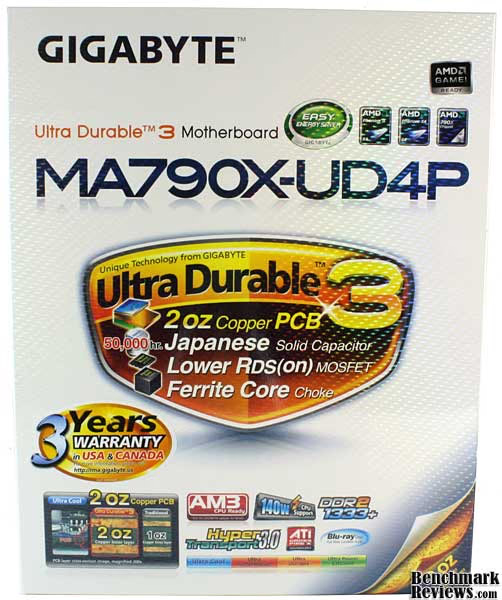
The MA790X-UDP4 arrived in Gigabyte's famous holographic white box. Despite being a pain to photograph, the box is actually very attractive and laden with important features and specifications. One of these features, and a big selling point for Gigabyte, is the Ultra Durable 3 manufacturing process. Other stand-out features include support for AM3 processors, ATI Crossfire, and DDR2-1333 memory. We'll cover these in detail in the next section, but for now let's get the MA790X-UD4P out of the box and take a look at the layout.
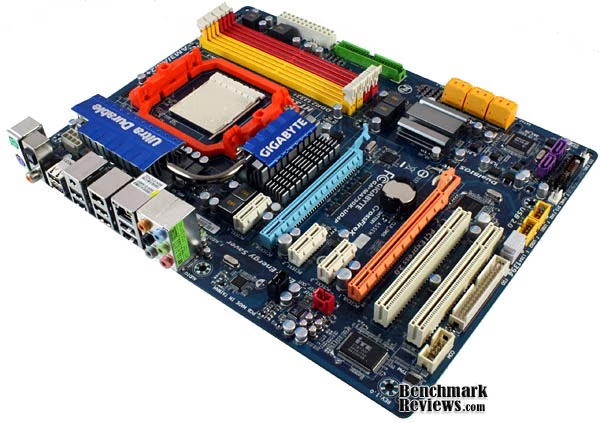
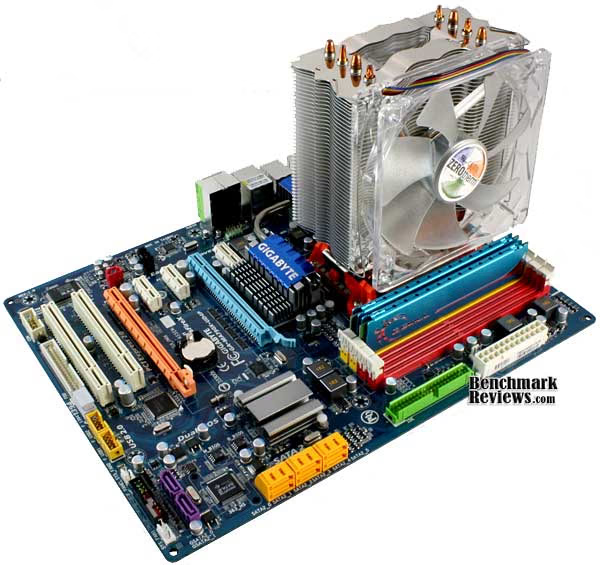
Free of its anti-static prison, we can finally get a good look at our Gigabyte MA790X-UD4P. Although not immediately obvious, one of the interesting things about this motherboard is its size. Gigabyte went with a 12.0 x 9.2" PCB as opposed to the usual 12.0" x 9.6". This should add a little breathing room to tight cases, but I wish they had included a few plastic standoffs. When installed in most computer cases, the right side of the motherboard will end up unsupported and you'll have to take extra care not to press too hard during installation.

The rest of the MA790X-UD4P motherboard adheres to the typical ATX layout. The CPU socket, memory slots, power connections, and rear I/O ports occupy the top half of the board, while the bottom half is reserved for expansion cards and internal I/O. For the most part, the internal connection points fall along the periphery of the board, which makes cable and thermal management much easier; I particularly like the angled SATA ports. My only complaint here is that Gigabyte decided to place the internal audio header toward the back side of the board. Not only is this an awkward location to work with, but it can pose a problem for some cases that have shorter front I/O cables.
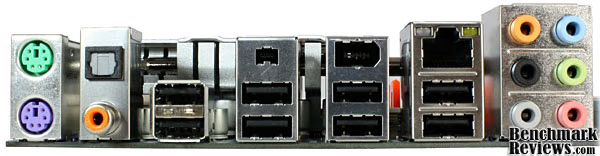
Shifting to the back side of our Gigabyte MA790X-UD4P reveals a plethora of rear I/O ports. Starting on the left, we have two serial ports for older keyboards/mice, digital audio output (coax and optical), six USB ports, two fire wire ports, a Realtek 10/100/1000 Mbps NIC, and the six analog audio ports supported by the onboard Realtek ALC889A chip. The only thing missing is an eSATA port, but Gigabyte takes care of that with an additional bracket.

As you can see in the photo above, the bracket comes with two eSATA ports and a power connection. Also included, but not pictured, are two eSATA cables and a power cable that splits the single 4-pin molex connection on the bracket into two 15-pin SATA power connectors. This makes it possible to hook up a bare hard drive without having to open up the case or find an external power source.
MA790X-UD4P Detailed Features
With the layout and basic specifications out of the way, let's take a detailed look at some of the features Gigabyte offers on their MA790X-UD4P motherboard. As I mentioned in the intro, this board supports the full line of AMD AM2, AM2+, and AM3 processors. This makes it possible to utilize existing processors, but should also ensure compatibility well into the future.
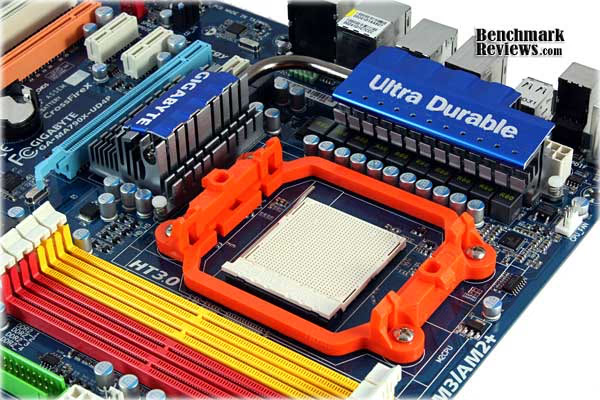
The MA790X-UD4P also incorporates Gigabyte's latest Ultra Durable 3 manufacturing process. What this amounts to is a PCB with 2oz of copper for the power and ground layers, 50,000-hour solid Japanese capacitors, low RDS(on) MOSFETs, and ferrite core chokes. Marketing aside, this process actually does improve durability, as well as stability and overclocking potential. You can see the capacitors and chokes in the photo above. Combined with the mosfets hiding beneath the heatsink, these form the 8+2 phase power plane. Add a good power supply to the mix and you should have plenty of stable power for overclocking and regular use.

Moving on to memory, the Gigabyte MA790X-UD4P comes equipped to handle four DDR2 DIMMs, for a total of 16GB of RAM when fully loaded. Of course, you'll need a 64-bit operating system to make use of anything above 4GB. In our test system today, we went with two low latency DDR2-1066 modules, although this board officially supports memory speeds of up to 1333MHz. Keep in mind, though, that actual speeds will vary depending on the CPU and memory modules used. Fortunately, Gigabyte maintains a list of supported memory on their website to help eliminate some of the guess work.

Turning our attention to the bottom half of the board, we can see a good selection of expansion slots. As this motherboard is based on the AMD 790X chipset, it does support Crossfire builds. However, much like Intel's similarly priced P45 chipset, the MA790X-UD4P is limited to a dual 8x PCI-E or a single 16x PCI-E configuration. Other expansion slots include three 1x PCI-E and two standard PCI slots. Overall, it's a good mix. The 8x crossfire limitation shouldn't prove too much of a problem unless you're running two top-end cards at high resolutions and max settings.

Also on the bottom half of the motherboard is the aptly named southbridge chipset. In the case of our Gigabyte MA790X-UD4P, it takes the form of AMD's SB750 chip. This translates into support for AMD Overdrive, ACC, 12 USB ports, 1 ATA-133 IDE connector, and 6 SATA ports with RAID 0,1,5,10 and JBOD. Now if you've been counting, you may say that there are 8 SATA ports, not 6. That's true! Those purple-colored SATA ports are actually run by a second controller added by Gigabyte to provide more storage/RAID options. One other item of note in the above photo are the two BIOS chips. This is part of Gigabyte's DualBIOS feature, which provides redundancy in the event one BIOS fails.
System Testing Methodology
Before I begin any benchmarking, I thoroughly stress the CPU and memory by running Prime95 on all available cores for 12 hours. If no errors are found, I move on to a gaming stress test. To do this, I use Prime95 again to stress the processor, while running an instance of FurMark's stability test on top of this. If the computer survives this test for 2 hours without lockup or corruption, I consider it to be stable and ready for testing.
Each benchmark test program begins after a system restart, and the very first result for every test will be ignored since it often only caches the test. This process proved extremely important in the Crisis benchmarks, as the first run served to cache maps allowing subsequent tests to perform much better than the first. Each test is completed five times, with the average results displayed in our article.
Our site polls and statistics indicate that the over 90% of our visitors use their PC for playing video games. Since all of the benchmarks we use for testing represent different game engine technology and graphic rendering processes, we feel that this battery of tests will provide a diverse range of results for you to gauge performance on your own computer system. Since most gamers and enthusiasts are still using Windows XP, it was decided that DirectX 9 would be used for all tests until demand and software support improve for Windows Vista.
Test System
-
Processors:AMD Phenom II X4 955 BE
-
System Memory (DDR3): 2x2GB OCZ Platinum DDR3 (1600MHz@7-7-7-24)
-
System Memory (DDR2): 2x2GB G.SKILL DDR2 (800MHz@4-4-4-12 or 1066MHz@5-5-5-15)
-
Video:ASUS EAH4870 DK TOP
-
Disk Drive: Western Digital 6400AAKS 640GB
-
Optical Drive: LITE-ON iHAS122-04 DVD Burner
-
PSU: Corsair TX850W
-
Enclosure:Cooler Master CM Storm
-
Operating System: Windows XP Professional SP3
Benchmark Applications
-
EVEREST Ultimate Edition v5.01 by Lavalys
-
3DMark06 v1.1.0 by Futurmark Corporation
-
PCMark05 v1.2.0 by Futurmark Corporation
-
Crysis Benchmark Tool
-
Devil May Cry 4 Benchmark
-
MAXON CINEBENCH R10
Motherboards Tested
-
Motherboard:ASUS M4A79T Deluxe
-
Motherboard: ASUS M3A78-EM
-
Motherboard: Gigabyte GA-MA790X-UD4P
EVEREST Benchmark Tests
EVEREST Ultimate Edition is an industry leading system diagnostics and benchmarking solution for enthusiasts PC users, based on the award-winning EVEREST Technology. During system optimizations and tweaking it provides essential system and overclock information, advanced hardware monitoring and diagnostics capabilities to check the effects of the applied settings. CPU, FPU and memory benchmarks are available to measure the actual system performance and compare it to previous states or other systems. Furthermore, complete software, operating system and security information makes EVEREST Ultimate Edition a comprehensive system diagnostics tool that offers a total of 100 pages of information about your PC.

Right off the bat, we see some interesting results from the memory tests. The two DDR2-based motherboards, the Gigabyte MA790X-UD4P and the ASUS M3A78-EM, fall short of the DDR3-based ASUS M4A79T in read and copy bandwidth. However, when it comes to write bandwidth, the three motherboards tie up due to a limitation of our Phenom II X4 955's memory controller.

The EVEREST integer tests produce some varied results as well. In the PhotoWorxx benchmark, which tests the CPU and memory subsystem, the use of DDR3 (ASUS M4A79T) appears to have a 10% performance advantage. In the Zlib and AES benchmarks, though, all three motherboards fall within about 1% of each other. These benchmarks better isolate the CPU and the use of different motherboards doesn't have much impact.
3DMark06 Benchmark Results
3DMark is a computer benchmark by Futuremark (formerly named Mad Onion) to determine the DirectX 9 performance of 3D game performance with graphics cards. 3DMark06 uses advanced real-time 3D game workloads to measure PC performance using a suite of DirectX 9 3D graphics tests, CPU tests, and 3D feature tests.
3DMark06 tests include all new HDR/SM3.0 graphics tests, SM2.0 graphics tests, AI and physics driven single and multiple cores or processor CPU tests and a collection of comprehensive feature tests to reliably measure next generation gaming performance today. Some enthusiasts may note that Benchmark Reviews does not include CPU-bound tests in our benchmark battery, and that only graphic-bound tests are included.
Here at Benchmark Reviews, we believe that synthetic benchmark tools are just as valuable as video games, but only so long as you're comparing apples to apples. Since the same test is applied in the same controlled method with each test run, I believe 3DMark is a very reliable tool for comparing graphic cards against one-another.
More visitors to Benchmark Reviews operate at 1280x1024 resolution than any other, as it represents the native resolution of 19" LCD monitors. Using this resolution as a starting point, the maximum settings were applied to 3dMark06 which for these tests include 8x Anti-Aliasing and 16x Anisotropic Filtering. Low-resolution testing allows the graphics processor to plateau maximum output performance, which thereby shifts demand onto the system components to keep up. At the lower resolutions 3DMark will reflect the GPU's top-end speed in the composite score, indicating full-throttle performance with little load. This makes for a less GPU-dependant test environment, and is helpful in measuring the maximum output performance in the test results.
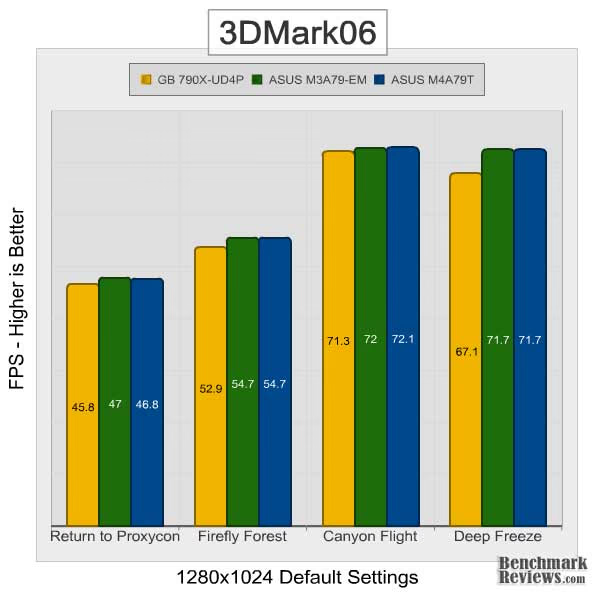
At default settings, the Gigabyte MA790X-UD4P lags slightly behind our other two test motherboards. The difference isn't that great, only about 2-3%, but it makes me wonder if there could be minor variations in how ASUS and Gigabyte configure memory sub-timings. It could also be the northbridge chipset, but I would expect the 790X on the Gigabyte board to outperformance the 780G (ASUS M3A78-EM).
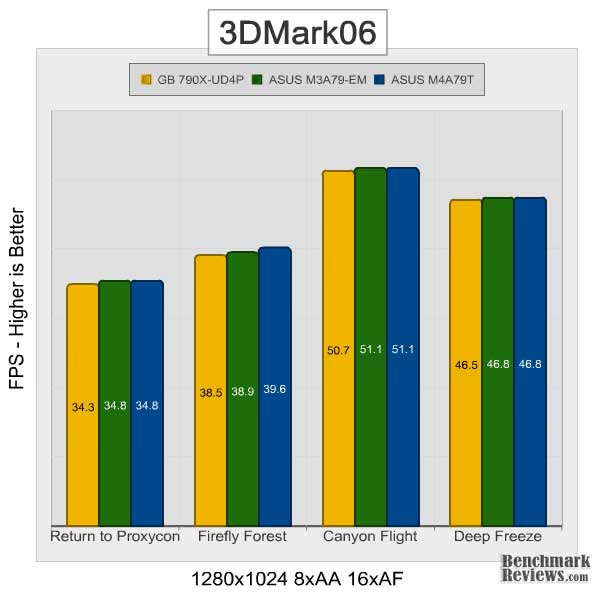
Bumping up the post-processing load on our graphics card appears to even things out a bit. On average, all three motherboards are within about half a frame of each other. Still, the initial results under default settings give cause for question. Let's look at a few more benchmarks to see if we can isolate a consistent variation.
PCMark05 Benchmark Results
Using synthetic benchmarks to compare one product to another has some distinct advantages when testing similar hardware, yet I have never found myself completely satisfied by the process. I have come to understand that they're important for comparing "apples to apples", and that the results are usually very consistent. But as with any synthetic benchmark, the numbers can often mean very little more than just numbers. We don't take a high score on a synthetic benchmark to mean that a product will/should perform well, and neither should you. The difference between projected performance and actual performance is the difference between fire and the fire-fly.
PCMark is a series of computer benchmark tools developed by Futuremark. The tools are designed to test the performance of the user's CPU, read/write speeds of RAM and hard drives. We have used these tests to simulate a battery of applications and tasks, which will produce results we can compare to other systems using similar hardware.

PCMark05 doesn't offer much help in finding a trend among these motherboards. The Gigabyte MA790X-UD4P that lagged slightly behind in our first two benchmarks, now takes the lead in both overall score and the memory subtest. Even more surprising, the ASUS M3A78-EM, with its SB700 southbridge, manages an 8% lead in the hard drive subtest. I should note, however, that all three motherboards were configured to use IDE mode as opposed to AHCI. Enabling AHCI may produce difference results. Still, it looks like the SB700 has some advantage over the SB750 southbridge, at least as far as PCMark05 is concerned.
Crysis Benchmark Results
Crysis uses a new graphics engine: the CryENGINE2, which is the successor to Far Cry's CryENGINE. CryENGINE2 is among the first engines to use the Direct3D 10 (DirectX10) framework of Windows Vista, but can also run using DirectX9, both on Vista and Windows XP.
Roy Taylor, Vice President of Content Relations at NVIDIA, has spoken on the subject of the engine's complexity, stating that Crysis has over a million lines of code, 1GB of texture data, and 85,000 shaders. To get the most out of modern multicore processor architectures, CPU intensive subsystems of CryENGINE 2 such as physics, networking and sound, have been re-written to support multi-threading.
Crysis offers an in-game benchmark tool, which is similar to World in Conflict. This short test does place some high amounts of stress on a graphics card, since there are so many landscape features rendered. For benchmarking purposes, Crysis can mean trouble as it places a high demand on both GPU and CPU resources. Benchmark Reviews uses the Crysis Benchmark Tool by Mad Boris to test frame rates in batches, which allows the results of many tests to be averaged.
Low-resolution testing allows the graphics processor to plateau its maximum output performance, which thereby shifts demand onto the other system components. At the lower resolutions Crysis will reflect the GPU's top-end speed in the composite score, indicating full-throttle performance with little load. This makes for a less GPU-dependant test environment, and is helpful in creating a baseline for measuring maximum output performance in the next few test results. At the 1280x1024 resolution used by some newer 17" and most 19" monitors, all of the video cards tested performed at very respectable levels.

I didn't expect too much variation in this test, and there really isn't much. The Gigabyte MA790X-UD4P and the ASUS M3A78-EM fight for second place in the first two tests and by the third test we reach the limit of the Radeon HD 4870 used in our test system. The only consistent results here seem to be a slight advantage in favor of the DDR3-based ASUS M4A79T. Of course, that could also be due to the 790FX northbridge, which can handle more bandwidth than the 790X and 780G chipsets used in the other two motherboards. With all three systems running the video card at x16 speeds, though, it's really hard to say.
Devil May Cry 4 Gaming
Devil May Cry 4 is one of the newest additions to Benchmark Reviews' testing suite. Fortunately for us, Capcom recognized the community's interest in hardware testing and included a built in benchmarking tool with this game. In fact, it is even included it in the demo. The benchmarking tool runs through four different scene, all of which I highly recommend watching. However, for the purposes of our review, we only report the scores of the most challenging tests: scenes 2 and 4.
Similar to the Crysis gaming benchmarks, we will start testing DMC 4 at lower settings to reduce the impact of GPU limitations. From there, we'll slowly increase resolution and quality settings until we reach the limit of our HD 4870.
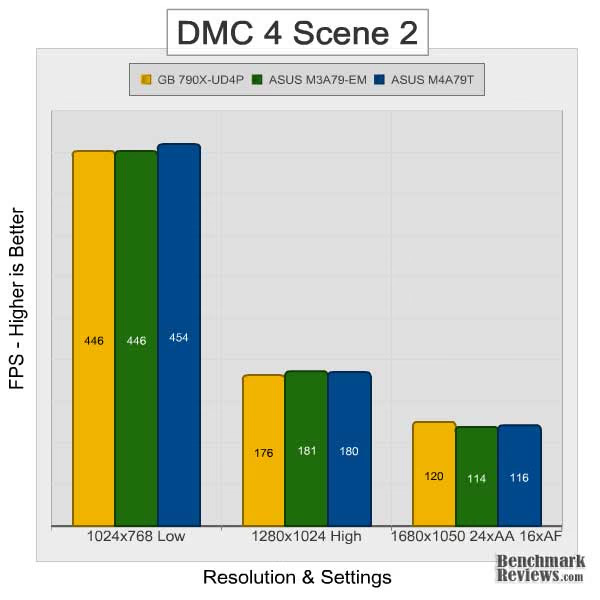
Similar to what we saw in our Crysis benchmark, all three motherboards perform within a few percent of each other. In contrast to Crysis, though, there really isn't an identifiable trend here. In fact, out of the three tests, each of our three motherboards takes a turn at the top. Let's see if scene 4 can tell us more.

The first two tests of Scene 4 place the Gigabyte MA790X-UD4P and the ASUS M4A79T neck-and-neck, with a decent lead over the ASUS M3A78-EM in the first test. This appears to be a result of the different northbridges, however, and not the type of memory used. Bumping up the resolution and post processing removes any advantage and once again we are at the limit of our graphics card.
MAXON CINEBENCH
CINEBENCH comes to us from MAXON, the developers of CINEMA 4D animation software. This benchmark runs several tests to measure performance of the processor and the graphics card under real-world circumstances. It can make use of up to 16 CPUs or CPU cores, but also includes a single-threaded test to provide an accurate comparison of efficiency and performance across a wide range of CPU types.
The resulting values among different operating systems are 100% comparable and therefore very useful with regard to purchasing decision making. It can also be used as a marketing tool for hardware vendors or simply to compare hardware among colleagues or friends.
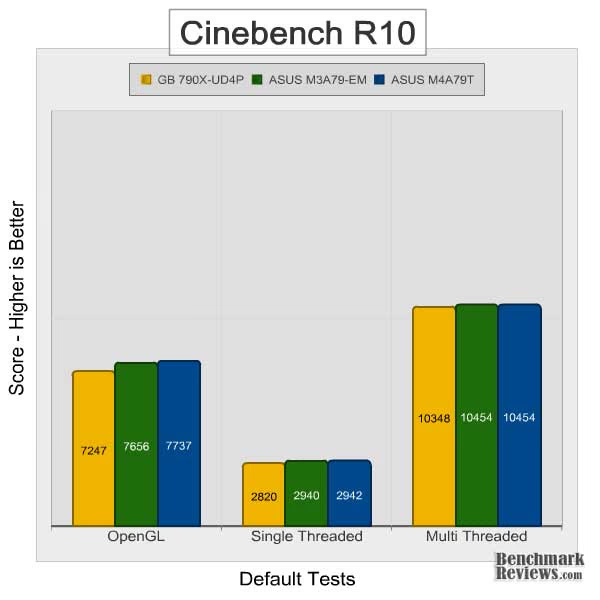
Our Gigabyte MA790X-UD4P comes in third place in all three CINEBENCH tests, with the largest variation showing up in the OpenGL test. In the CPU tests though, the variation is minimal and probably not significant. Given what we've seen so far, I'd say that, overall, there are minimal performance differences between these three motherboards.
790X Power Consumption
Life is not as affordable as it used to be, and items such as fuel and electrical energy top the list of resources that have exploded in price over the past few years. Add to this the limit of non-renewable resources compared to demand and you can see that the prices are only going to get worse. Planet Earth is needs our help, and needs it badly. With forests becoming barren of vegetation and snow capped poles quickly turning brown, the technology industry has a new attitude towards suddenly becoming "green". Motherboard manufacturers, in particular, have been touting their new energy saving features. How effective these power management system are, is exactly what we intend to measure in our power consumption tests.
Before we get to the results, let me quickly explain the procedures. We begin with a completely idle system (Windows XP desktop with 0-2% processor utilization), and measure the power draw from the wall with a Kill-a-Watt power meter. We then max out the available CPU cores/threads using Prime95 to establish a maximum 2D power draw. After this measurement has been taken, we fire up the FurMark stability test, while still running Prime95, to determine the maximum VGA power consumption. I also monitor the power draw during the benchmarks to ensure we did, indeed, establish the maximum power consumption.

This is one test where it pays to have the lowest number, and the Gigabyte MA790X-UD4P is indeed the winner when it comes to power consumption. Just to be clear, we did not use any of the motherboards' included power saving features. These features are great and an important selling point, but for our tests we try to standardize as much as possible. In other words, there are no software tricks here; the MA790X-UD4P simply consumes less power.
Gigabyte 790X Final Thoughts
So after several rounds of testing, what have we learned? Well, for starters we learned that both AM3/DDR2 and AM3/DDR3 platforms perform similarly given our synthetic and real world testing. Throughout our benchmarks, the ASUS M4A79T (DDR3) motherboard did have a slight advantage over the Gigabyte MA790X-UD4P (DDR2), but it's hard to say whether that was due to the memory type, chipset, or some other hidden variable. In memory-intensive applications, though, the increased bandwidth of a DDR3 platform may be beneficial. In the EVEREST PhotoWorxx benchmark, for example, our ASUS M4A79T did score about 10% higher. That said, you'll want to consider what applications you use before selecting a motherboard.
Of course, performance is only one concern when picking a motherboard. Given the limited variation in performance that we've seen among these motherboards, I'd say features play a much larger role. You'll want to pay attention to things like form-factor, layout, expansion slots, rear I/O ports, internal I/O ports, and overall construction. Gigabyte typically does very well in this category and their Ultra Durable 3 manufacturing process one of the best in the industry.
Along with features and performance comes price. You can expect to pay for both of these. The ASUS M3A78-EM performed well and is the cheapest of our motherboards tested, but it also has the least features. The ASUS M4A79T has a very good feature set, including support for DDR3 and Quad CrossfireX, but it comes at a considerable price. That leaves the Gigabyte MA790X-UD4P in the sweet spot. At $110, it's a great balance of price, performance, and features.
MA790X-UD4P Conclusion
The MA790X-UD4P motherboard came to us from Gigabyte in their now standard holographic white box. It has great shelf appeal and is backed by an excellent website. It appears Gigabyte has also beefed up their file servers, as driver downloads are much faster than they used to be.
Once out of the box, the MA790X-UD4P continues to win points in the appearance category. Colored PCBs seem to be standard these days and Gigabyte doesn't disappoint with their blue design. The heatsink solution is also very attractive and helps keep the northbridge, as well as the power delivery components, nice and cool. Overall, the color selection and component layout are great. I only wish they had grouped the audio header with the other front panel connectors to help cut down on cable clutter.

Appearances aside, the MA790X-UD4P is also very well built. I tend to be critical of marketing hype, but the Ultra Durable 3 process that Gigabyte has been using lately is actually very good. The extra copper in the PCB helps with efficiency and the improved power delivery components should provide plenty of stable power. My only concern is that when mounted in most cases, the smaller 9.2" width of this motherboard will leave right edge unsupported. You'll want to take extra care during installation.
Despite the shorter width, the MA790X-UD4P is still as feature-packed as any ATX motherboard out there, probably even more so. That's important, because, as our benchmarks showed today, there isn't much variation performance. What consumers are really going to be looking for are the features that fit them. That said, the Gigabyte MA790X-UD4P supports AMD's full line of AM2, AM2+, and AM3 processors, as well as DDR2-1333, ATI Crossfire, OverDrive/ACC, RAID, and a nice mix of internal and external I/O ports. Keep in mind, though, that if you're planning a Crossfire build, this board is based on the 790X chipset and will only run at x8+8x.
Of course, Gigabyte's decision to go with the 790X chipset on this board does help to keep prices down. The MA790X-UD4P currently sells for only $110 from newegg.com, which is a pretty good value considering the excellent feature-set and build quality. It's not without its flaws, but the MA790X-UD4P is definitely one of the better AMD motherboards out there.
Pros:
+ Build quality & stability
+ DDR2-1333 support
+ Overclocker friendly
+ 8+2 power design
+ Solid performance
+ 9.2" width is good for smaller cases
+ eSATA power connection included
+ Crossfire support
Cons:
- Audio header location is awkward
- 9.2" width introduces risk of flex
- Crossfire limited to 8x+8x (790X chipset)
Ratings:
-
Presentation: 9.5
-
Appearance: 9.5
-
Construction: 9.0
-
Functionality: 9.0
-
Value: 9.5
Final Score: 9.3 out of 10.
Excellence Achievement: Benchmark Reviews Golden Tachometer Award.
Questions? Comments? Benchmark Reviews really wants your feedback. We invite you to leave your remarks in our Discussion Forum.