
ASUS M4A88TD-V EVO/USB3 Motherboard
ASUS M4A88TD-V EVO/USB3 Motherboard Review
The AMD 880G Northbridge and SB850 Southbridge are two of the latest bits of chipset silicon designed to bolster AMD's position in the mainstream PC market. They were released about a month apart this Spring, as part of a full line of 800-series chips, and ASUS has wasted no time putting them into production. Key items that help make the M4A88TD-V EVO/USB3 motherboard stand out are native support for SATA 6Gb/s, USB 3.0, and AMD's latest game changer, the Phenom II X6 CPU with Turbo Core. Benchmark Reviews chose a more likely partner for this mid-range motherboard: the Phenom II X2 555 Black Edition CPU. With both Core Unlocker and Turbo Unlocker functionality built right into the board, this combination could be the magic ticket to dynamically-clocked, quad core processing on the cheap. I'll show later how ASUS one-upped AMD, by making Turbo Unlocker compatible with every AMD Black Edition processor.
The 880G features a Radeon HD 4250 Integrated Graphics Processor (IGP), which is almost identical to the HD 4200 device last seen in the 785G Northbridge. They are both based on the RS880 core and offer 40 shaders in amongst the approximately 205 million, 55nm transistors contained in the package. The HD 4250 runs 12% faster than the HD 4200, at a stock speed of 560 MHz. Chances are, you don't care that much about the IGP, and intend to run this board with discrete graphics. Choose wisely, because only one PCI Express slot is suitable for graphics cards, with an x16 connection. The second PCI Express slot is limited to x4 connectivity, which is great for a RAID controller or other medium bandwidth device, but not for a gaming-class graphics card.

ASUS has only four motherboards currently available in North America with this chipset combo, and three of them are µATX boards. For those who have a few more peripherals to plug in, this full-sized ATX model has several additional PCI and PCI Express expansion slots that are ready to go. The 880G chipset is really intended for a mainstream product, or the price range slightly below that. Its integrated graphics cover a lot of ground, especially when you consider that two thirds of all discrete graphics cards sold are priced below $100. This is one of the lowest priced AMD boards with the new SB850 Southbridge, which supports native SATA 6Gb/s connectivity, and doesn't have to jump through any hoops to do it. Your options for CrossFireX are extremely limited by the 880G, but most people opt for a single video card, anyway.
Let's dig a little deeper into all the things that the ASUS M4A88TD-V EVO/USB3 motherboard offers, and then we'll see how it performs in our challenging test suite.
About ASUSTeK Computer Inc.
ASUS, a technology-oriented company with a global staff of more than ten thousand and blessed with one of the world's top R&D teams, is renowned for high-quality products and cutting-edge innovation. As a leading company in the new digital era, ASUS offers a complete product portfolio to compete in the new millennium.
ASUS has an unyielding commitment to innovation and quality, a fact borne out by its corporate slogan-"Inspiring Innovation - Persistent Perfection"-and the numerous media, industry and governmental accolades it receives every year. In 2008, ASUS won 3,056 awards-receiving over 8 awards on average every day. The company's revenue for the same year was 8.1 billion U.S. dollars, and it topped the IT Hardware Category of the annual league table of Taiwan's Top 10 Global Brands with a brand value of 1.324 billion U.S. dollars. ASUS also ranks among the top 10 IT companies in Business Week's "InfoTech 100", and has been on the listing for 11 consecutive years.
Inspired by the diverse needs of consumers in all areas and phases of life, ASUS' foremost mission is to deliver truly innovative solutions that in turn inspire consumers to reach for greater heights of productivity and fun. By leveraging its intimate understanding of the requirements of today's digital home, digital office and digital person, ASUS has the honor of claiming many world's firsts-such as the introduction of the groundbreaking Eee PCTM, the ingenious use of renewable materials like leather and bamboo in notebooks and the incorporation of its proprietary power-saving Super Hybrid Engine technology into its notebooks and motherboards. By pioneering many new innovations, trends and technologies that have had a genuine impact on its customers' lives and the Earth at large, ASUS hopes to garner mind-share as well as market share.
To succeed in the ultra-competitive IT industry, ASUS focuses on speed-to-market, cost and service. That is why every ASUS employee strives to master the "ASUS Way of Total Quality Management" in order to fulfill the "Persistent Perfection" promise of the brand. Guided by these precepts, ASUS has developed a strong advantage in product design, technology, quality and value/cost. These advantages in turn constitute ASUS' formula for success-allowing marketing to communicate these strengths to win our consumers' hearts.
AMD 880G Chipset Overview
The ASUS M4A88TD series of motherboards are designed with the AMD 880G Northbridge and the AMD SB850 Southbridge. Of the two, the Southbridge is the newer chip, so let's start with that first. Foremost among the features contained in the humblest member of the chipset, is native support for six SATA 6Gb/s ports. No extra controller chips required, no need to split of PCI Express lanes to a bridge chip - just SATA 6, plain and simple. In order to handle the increased data rates, the data link to the Northbridge has been doubled up; by upgrading the four PCI Express 1.0 lanes to the latest 2.0 specification; it's good for 2GB/s now. Fourteen USB 2.0 connections are now available, up from 12 with the SB750. New, are also two PCI Express 2.0 connections, available for interfacing with additional support chips or just feeding PCI Express 2.0 x1 expansion slots; this board has one x1 slot. Beyond that, the full range of Southbridge functions are provided: PATA, Gigabit Ethernet, PCI, and HD Audio.
There is another member of the 800-series chipset that is not yet released, and that is the SB810 Southbridge. Honestly, the SB810 is going to be the most popular choice for pairing with the 880G Northbridge, but it isn't released yet; all the new boards are getting designed and built with the SB850. It's pretty certain that the SB810 will drop RAID 5 operation, but the other limitations are not public knowledge yet.
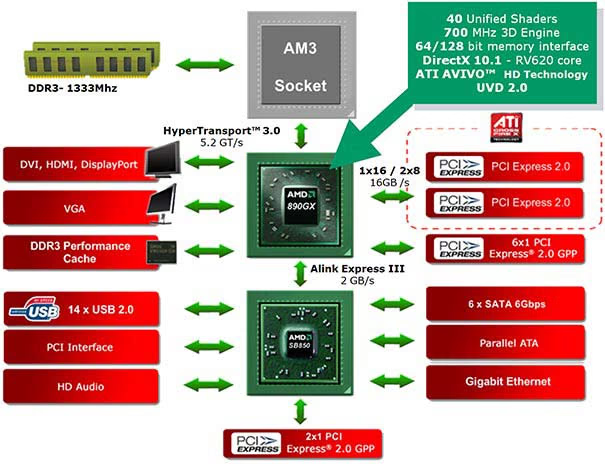
AMD 880G Northbridge Features
The AMD 880G Northbridge looks a lot like the 890GX, which was released a month earlier. I don't have an architecture diagram for the 880G, but the one above, for the 890GX is pretty close, and I'll discuss the differences throughout the article. The main difference is in the PCI Express 2.0 interface, intended for use with graphics cards. The capabilities and relative positioning of the various models hasn't really changed from the market model for the 700 series chipset. The 880G is essentially limited to supporting a single video card, just like the 785G Northbridge that it replaces. This is not necessarily a bad thing, because many people eschew CrossFireX and/or SLI due to the complexity, stability, compatibility, and performance issues that can surface with multi-GPU setups. Things are MUCH better today, but problems do crop up occasionally, and honestly, only a small percentage of users go down the CrossFireX path.
Let's look at a comparison of the four Northbridge chips that make up AMD's 800 series:
|
Feature |
870 |
880G |
890GX |
890FX |
|---|---|---|---|---|
|
PCI Express 2.0 |
1x16 |
1x16 and 1x4 |
1x16 or 2x8 |
2x16 or 4x8 |
|
ATI CrossFireX Technology |
Yes |
Yes |
||
|
Microsoft DirectX 10.1 |
Yes |
Yes |
||
|
Unified Video Decoder 2 |
Yes |
Yes |
||
|
ATI Stream |
Yes |
Yes |
||
|
ATI Powerplay |
Yes |
Yes |
||
|
Gigabit Ethernet |
Yes |
Yes |
Yes |
Yes |
Here's a brief explanation of the features mentioned in the comparison above:
|
Feature |
Function |
Benefit |
|---|---|---|
|
Microsoft DirectX 10.1 |
Hardware support for the latest 3D graphics features such as Shader Model 4.1. |
Enjoy awesome gaming performance, stunning 3D visual effects, and dynamic interactivity. |
|
Unified Video Decoder (UVD) 2 |
Dedicated hardware that decodes and plays back Blu-ray and other HD content with support for MPEG2, VC-1, and H.264 formats. 1,2 |
Supports latest HD features, helps improves image quality and frees up your CPU for other tasks for a seamless and visually stunning HD experience. 1,2 |
|
Hardware Picture-in-Picture |
Support for dual-stream PiP (Picture in Picture), supported on Blu-rayTM 1.1 playback. 1,2 |
Enjoy the latest Blu-ray 1.1 titles with support for special "Bonus" features like Director's commentary presented in PiP format. 1,2 |
|
High Quality Video Scaling |
Uses post processing algorithms to enhance standard and low resolution videos and movies on your HD display. 1 |
Watch standard DVD movies in near high-definition quality. 1 |
|
Dynamic Contrast |
Automatically adjusts the contrast and brightness during video scenes. |
Delivers a consistently crisp and vibrant picture |
|
ATI Stream Technology |
A set of advanced hardware and software technologies that enable AMD graphics processors (GPU), working in concert with the system's central processor (CPU), to accelerate many applications beyond just graphics. 3, 4 |
Enables better balanced platforms capable of running demanding computing tasks faster than ever. 3, 4 |
|
Accelerated Transcoding |
Accelerates the conversion of standard and HD video into multiple formats for use on differing consumer electronics devices. |
Offers incredible transcoding speed superior to the CPU alone. |
|
ATI PowerPlay |
AMD graphics power management technology enables the graphics processor to respond to demand and power down when not needed. 4 |
Reduces system power draw, enabling a more energy efficient PC. 4 |
|
HDMI 1.3 |
A combined audio/video interface, HDMI 1.3 enables improvements in both audio and video capability. 3, 4 |
Connect to your HDTV and watch TV, Blu-ray and other HD video, with surround sound |
|
DisplayPort |
A digital display interface that supports the latest graphics and LCD technologies. 1, 4 |
Connect to ultra-high resolution monitors or full 1080p HDTV to enjoy premium video content. 1, 4 |
|
HyperTransport 3.0 Technology |
HyperTransport 3.0 technology spec supports transfer rates of up to 20.6GB/s for high-performance I/O bandwidth. |
Huge bandwidth can translate into fewer bottlenecks and higher performance |
|
PCI Express Generation 2.0 |
Double the bandwidth over earlier PCI Express for improved performance. |
Massive I/O bandwidth for fast graphics performance |
|
GPU-Plex Technology |
Scalable twin-engine technology, all on a single chip, enables flexible configurations for multiple graphics cards on a single x16 link. |
Designed to make ATI CrossFireX technology run smooth for an amazing graphics experience |
|
ATI CrossFireX Technology |
The ultimate in scalable graphics performance with a widely certified infrastructure and dedicated memories with improved memory performance. |
Ultimate multi-GPU performance for game-dominating power |
|
SATA 6Gb/s |
Support for next generation Hard Drives and SSDs supporting new SATA 6Gb/s technologies |
Fast file transfer and application performance |
|
Gigabit Ethernet |
High-speed network performance |
Download and connect fast |
|
AMD RAIDXpert |
RAID setup utility usable from remote locations |
Customize for extra performance or enhanced reliability. |
The published benefits of the 880G are long on praise the for the HD4250 IGP, and also takes some of the credit for the capabilities in the SB850 Southbridge:
-
Versatility
-
Redefine the Way You Play
Enjoy awesome gaming performance for the mainstream PC with stunning visual effects and dynamic interactivity with Microsoft DirectX 10.1 and support for high-end discrete ATI Radeon HD graphics -
Accelerate Your Digital Life
ATI Stream technology enables AMD graphics processors, working in concert with AMD Processors, to accelerate many applications beyond just graphics. This enables superior balanced platforms capable of running demanding computing tasks fast. -
Designed for Microsoft Windows 7
Get a smooth and amazingly visual PC experience for Microsoft Windows 7, with support for features such as "Aero Shake", "Aero Glass", "Transparent Windows" and more!5
-
-
Visual Experience
-
Get the Ultimate HD Experience1
Let your desktop PC be the center of your entertainment lifestyle with full 1080p HD playback. Get dual-stream PiP (Picture in Picture) on Blu-ray 1.1 playback with multi-monitor capability and support for DVI, HDMI, and DisplayPort outputs.1, 2, 3, 4 -
Enhanced DVD Upscaling
Watch standard DVD movies in near high-definition quality with DVD upscaling. The GPU uses post processing algorithms to enhance standard and low resolution videos and movies on your HD display.1 -
HDMI
Enjoy the latest audio technologies using HDMI v1.3 which includes xvYCC support to enable a wider range of color when connected to a capable HDTV.4
-
-
Connectivity
-
Connect and Transfer
Take advantage of advanced technology to accelerate your connectivity with SATA 6Gb/s, Gigabit Ethernet, HyperTransport 3.0 technology, and PCI Express Generation 2.0.
-
1. HD capable monitor required.
2. Blu-rayTMdrive required for Blu-ray playback.
3. Additional hardware or software may be required.
4. Not all features will be supported on all machines. Check with your PC manufacturer for specific model capabilities and supported technologies.
5. Windows 7-capable system required.
Finally, let's take a close look at the Integrated Graphics Processor in last year's 785G, its replacement the 880G, and the next step up the current chipset foodchain, the 890GX.
|
NB |
785G |
880G |
890GX |
|---|---|---|---|
|
Transistor Count |
~205million |
~205million |
~205million |
|
GPU |
Radeon HD 4200 |
Radeon HD 4250 |
Radeon HD 4290 |
|
Process |
55nm |
55nm |
55nm |
|
Shaders |
40 |
40 |
40 |
|
DirectX |
DirectX 10.1 |
DirectX 10.1 |
DirectX 10.1 |
|
Shader |
SM 4.1 |
SM 4.1 |
SM 4.1 |
|
Core |
500MHz |
560MHz |
700MHz |
|
Memory |
UMA/UMA+SidePort |
UMA/UMA+SidePort |
UMA/UMA+SidePort |
|
Sideport Memory |
GDDR2/GDDR3 |
GDDR2/GDDR3 |
GDDR3 |
|
Memory Bus |
16bit |
16bit |
16bit |
You can see why there's not a whole lot of excitement being generated over the Radeon HD 4250 IGP. It's essentially the same as the HD 4200 from last year. Well, enough about the specifics of the chipset. Let's see what ASUS has made out of it, and take a closer look at the M4A88TD-V EVO/USB3 motherboard itself.
ASUS AMD-880G Series Features
There are a ton of features included with any motherboard that are not directly associated with the CPU Socket and Chipset. It's those features that help differentiate between product offerings, so let's look at the list of specific features that come with the ASUS M4A88TD-V EVO/USB3 motherboard.
CPU, Chipset and Graphics
AMD AM3 Phenom II /Athlon II /Sempron 100 Series Processors
This motherboard supports AMD AM3 multi-core processors with unique L3 cache and delivers better overclocking capabilities with less power consumption. It features dual-channel DDR3 memory support and accelerates data transfer rate up to 5200MT/s via HyperTransport 3.0 based system bus. This motherboard also supports AMD CPUs in the new 45nm manufacturing process.
AMD 880G
AMD 880G Chipset is designed to support up to 5200MT/s HyperTransport 3.0 (HT 3.0) interface speed and PCI Express 2.0 x16 graphics. It is optimized with AMD's latest AM3 and multi-core CPUs to provide excellent system performance and overclocking capabilities.
CrossFireX Support
Flexible Multi-GPU solutions, Your Weapon of Choice - M4A88TD-V EVO Series brings you the multi-GPU choice of CrossFireX. Expect a brand-new gaming style you've never experienced before.
PCIe 2.0 support
Double Speed; Double Bandwidth - This motherboard supports the latest PCIe 2.0 devices for double speed and bandwidth which enhances system performance.
VGA Output Support
HDMI Support
Enjoy Full HD 1080p Multimedia Home-Theater Entertainment - High-Definition Multimedia Interface (HDMI) is a set of digital video standards that delivers multi-channel audio and uncompressed digital video for full HD 1080p visuals through a single cable. Supporting HDCP copy protection such as HD DVD and Blu-ray Discs, HDMI provides you with the highest-quality home theater experience.
DVI Support
DVI (Digital Visual Interface) provides high visual quality of digital display devices such as LCD monitor. The interface of this motherboard supports dual VGA output both DVI-D/HDMI and RGB.
Next-gen Technology
True USB 3.0 Support
Realize the True Future with TRUE USB 3.0 Support - Experience ultra-fast data transfers at 4.8 Gb/s with USB 3.0-the latest connectivity standard. Built to connect easily with next-generation components and peripherals, USB 3.0 transfers data 10X faster and is also backward compatible with USB 2.0 components.
True SATA 6Gb/s Support
The AMD SB850 Southbridge natively supports next-generation Serial ATA (SATA) storage interface, this motherboard delivers up to 6.0 Gb/s data transfer rates. Additionally, get enhanced scalability, faster data retrieval, double the bandwidth of current bus systems.
Memory Features
Dual-Channel DDR3 2000(O.C.)/1333/ 1066 support
The motherboard supports DDR3 memory that features data transfer rates of 2000(O.C.)/1333/1066 MHz to meet the higher bandwidth requirements of the latest 3D graphics, multimedia, and Internet applications. The dual-channel DDR3 architecture enlarges the bandwidth of your system memory to boost system performance.
Hybrid Features
Core Unlocker
Intelligently Unlocks True Core Performance - ASUS Core Unlocker simplifies the activation of a latent AMD CPU-with just a simply switch. Enjoy an instant performance boost by simply unlocking the extra cores, without performing complicated BIOS changes.
Turbo Key II
Switch on the Potential, Turn up the Performance - Enjoy superb performance by auto-tuning your processor to an extreme yet stable state. Simply activate a dedicated switch on the motherboard to unleash extra processing capabilities.
TurboV EVO
The Ultimate O.C. Processor - The ultimate O.C. processor satisfies every level of overclockers-from die-hard enthusiasts to beginners. Auto tuning intelligently pushes the system to the fastest clock speeds while maintaining stability. Turbo Key boosts performance with just one touch; while TurboV offers more options to advanced overclockers to achieve world O.C. record. Moreover, upgrade your CPU at no additional cost with CPU Level UP.
Turbo Unlocker
Turbo Unlocker is the next evolution of an exclusive ASUS performance boost feature. All it takes is one click in the TurboV EVO interface and Turbo Unlocker automatically and dynamically adjusts each core frequency to speed up performance based on actual system load. Turbo Unlocker gets you in touch with more performance exactly when you need it.
Auto Tuning
Auto System Level Up - to Tuning is an intelligent tool that automates overclocking to achieve a total system level up. This tool also provides stability testing. Even O.C. beginners can achieve extreme yet stable overclocking results with Auto Tuning.
GPU Boost
Instant iGPU Level Up - GPU Boost overclocks the integrated GPU in real time for the best graphics performance. User-friendly UI facilitates flexible frequency and voltage adjustments. Its ability to deliver multiple overclocking profiles also provides rapid and stable system-level upgrades.
Express Gate
0 to Internet in Seconds! - Express Gate is an ASUS exclusive OS that provides you with quick access to the Internet and key applications before entering Windows.
ASUS Exclusive Features
MemOK!
Any Memory is A-OK - MemOK! quickly ensures memory boot compatibility. This remarkable memory rescue tool requires a mere push of a button to patch memory issues. MemOK! determines fail-safe settings and dramatically improves your system boot success. Get your system up and running in no time!
ASUS EPU
System Level Energy Saving - The ASUS EPU (Energy Processing Unit) provides total system power management by detecting current PC loadings and intelligently moderating power usage for critical PC components in real-time-helping save power and money.
Anti-Surge Protection
This special design prevents expensive devices and the motherboard from damage caused by power surges from switching power supply (PSU).
ASUS Quiet Thermal Solutions
ASUS Stylish Heatsink
The brand new 2 color design features a 0-dB thermal solution that offers users a noiseless PC environment. The Patent Pending 2-colors design within the beautifully curved fins upgrade the visual enjoyment for the motherboard users, it also effectively cools down hot airflows generated by the north bridge chipset. Combined with usability and aesthetics, the ASUS Patent 2-color Wing heat-sink will give users an extremely silent and cooling experience with the elegant appearance.
Fan Xpert Active Quiet & Cool
ASUS Fan Xpert intelligently allows users to adjust both the CPU and chassis fan speed according to different ambient temperature, which is caused by different climate conditions in different geographic regions and system loading. Built-in variety of useful profiles offers flexible controls of fan speed to achieve a quiet and cool environment.
ASUS Crystal Sound
8-channel Audio
Enjoy High-End 8-channel sound system on your PC: The onboard 8-channel HD audio (High Definition Audio, previously codenamed Azalia) CODEC enables high-quality 192KHz/24-bit audio output, jack-sensing feature, retasking functions and multi-streaming technology that simultaneously sends different audio streams to different destinations. This motherboard now adopts the future standard to deliver the most vivid audio enjoyment!!
Noise Filtering
Eliminate background noise while recording: This feature detects repetitive and stationary noises like computer fans, air conditioners, and other background noises then eliminates it in the incoming audio stream while recording.
S/PDIF-out on Back I/O Port
This motherboard provides convenient connectivity to external home theater audio systems via optical S/PDIF-out (SONY-PHILIPS Digital Interface) jacks. It allows to transfer digital audio without converting to analog format and keeps the best signal quality.
ASUS EZ DIY
Q-Connector
Make connection quick and accurate: ASUS Q-Connector allows you to connect or disconnect chassis front panel cables in one easy step with one complete module. This unique adapter eliminates the trouble of plugging in one cable at a time, making connection quick and accurate.
Q-Shield
Easy and Comfortable Installations: The specially designed ASUS Q-Shield does without the usual "fingers" - making it convenient and easy to install. With better electric conductivity, it ideally protects your motherboard against static electricity and shields it against Electronic Magnetic Interference (EMI).
O.C. Profile
Conveniently store or load multiple BIOS settings: Freely share and distribute favorite overclocking settings The motherboard features the ASUS O.C. Profile that allows users to conveniently store or load multiple BIOS settings. The BIOS settings can be stored in the CMOS or a separate file, giving users freedom to share and distribute their favorite overclocking settings.
EZ-Flash 2
Simply update BIOS from a USB flash disk before entering the OS: EZ Flash 2 is a user-friendly BIOS update utility. Simply launch this tool and update BIOS from a USB flash disk before entering the OS. You can update your BIOS only in a few clicks without preparing an additional floppy diskette or using an OS-based flash utility.
CrashFree BIOS 3
Simply restore corrupted BIOS data from USB flash disk. The ASUS CrashFree BIOS 3 allows users to restore corrupted BIOS data from a USB flash disk containing the BIOS file. This utility saves users the cost and hassle of buying a replacement BIOS chip.
Industry Standard I/O
IEEE 1394a interface
IEEE 1394a interface provides high speed digital interface for audio/video appliances such as digital television, digital video camcorders, storage peripherals & other PC portable devices.
RoHS
GreenASUS
The motherboard and its packaging comply with the European Union´s Restriction on the use of Hazardous Substances (RoHS). This is in line with the ASUS vision of creating environment-friendly and recyclable products and packaging to safeguard consumers´ health while minimizing the impact on the environment.
ASUS M4A88TD-V EVO/USB3 Specifications
|
CPU |
AMD Socket AM3 ;Phenom II /Athlon II /Sempron 100 Series Processors |
|---|---|
|
Chipset |
AMD 880G/SB850 |
|
System Bus |
Up to 5200 MT/s ; HyperTransport 3.0 |
|
Memory |
4 x DIMM, Max. 16 GB, DDR3 2000(O.C.)/1333/1066 ECC,Non-ECC,Un-buffered Memory |
|
Expansion Slots |
2 x PCIe 2.0 x16 , support ATI CrossFireX Technology (blue @ x16 mode,gray @ x4 mode) |
|
VGA |
Integrated ATI Radeon HD 4250 GPU |
|
Storage |
SB850 Chipset |
|
LAN |
Realtek 8111E Gigabit LAN controller featuring AI NET2 |
|
Audio |
ALC892 8-Channel High Definition Audio CODEC |
|
IEEE 1394 |
VIA VT6330 controller supports 2 x 1394a port(s) (1 at mid-board; 1 at back panel) |
|
USB |
12 USB 2.0/1.1 ports (8 ports at mid-board, 4 ports at back panel) |
|
ASUS Unique Features |
ASUS Xtreme Design |
|
Overclocking Features |
Intelligent overclocking tools |
|
Back Panel I/O Ports |
1 x PS/2 Keyboard/Mouse Combo port |
|
Internal I/O Connectors |
4 x USB connectors (8 ports) |
|
BIOS |
16 Mb Flash ROM , AMI BIOS, PnP, DMI2.0, WfM2.0, SM BIOS 2.5, ACPI 2.0a, ASUS EZ Flash 2, ASUS CrashFree BIOS 3 |
|
Manageability |
WOL by PME,WOR by PME, WOR by Ring, PXE |
|
Accessories |
User's manual |
|
Support Disc |
Drivers |
|
Form Factor |
ATX Form Factor |
Closer Look: M4A88TD-V EVO/USB3
The M4A88TD-V EVO/USB3 motherboard doesn't look like a budget board. The only tell-tale clue comes from the abundance of PCI slots. High end boards tend to feature more PCI Express slots, to accommodate the latest add-in boards. Budget boards tend to have more PCI slots, which allow consumers to continue using their old peripherals when they upgrade. There are only a few ASUS motherboards based on this combination of an 880G Northbridge and a SB850 Southbridge. More than half of them are µATX boards, but don't let that put you off. This pairing of modern components provides excellent performance and the latest features at low cost. Plus, its full-sized ATX form factor means that it has more of those PCI slots to accept your existing hardware.
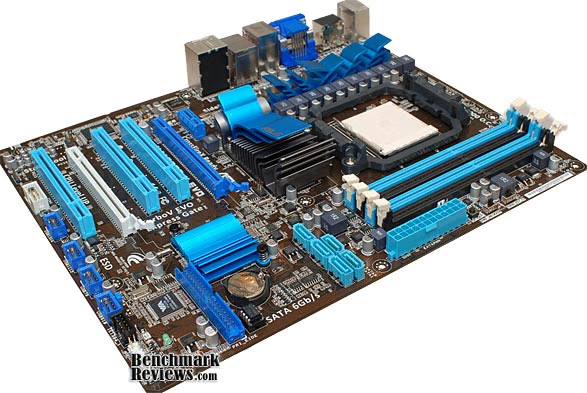
Perhaps the most significant feature of the M4A88TD-V EVO/USB3 is the SB850 Southbridge, which supports six native SATA 6Gb/s ports and USB 3.0 with full PCI Express 2.0 connectivity. The Intel P55/H55 chipset has to jump through hoops to support the latest high-speed peripheral interfaces with anything close to full bandwidth, but the SB850 does it in stride. While a USB3 interface is not integrated into the Southbridge, there are two "extra" PCI Express 2.0 interfaces there, which allows easy connection to the most common USB3 support chips. It is also possible to connect the USB 3.0 support chips up to the 880G Northbridge, as it also has some "spare" PCI-Express 2.0 lanes available. Latency is likely to be lower with this NB connection, so look to see how each motherboard vendor implements the USB 3.0 connection. All this is accomplished at a much lower cost than any Intel-based solution currently available. While Intel is ahead in the inevitable push to integrate NB and SB functions, their current chipset leaves too many interfaces behind; interfaces left to be performed by additional support chips.

The AMD 880G Northbridge incorporates a Radeon HD 4250 integrated graphics processor in addition to the normal functions of handling the PCI Express 2.0 lanes for discrete graphics and providing a bridge between the CPU and the Southbridge. The data link to the CPU is accomplished by HyperTransport 3.0, with a transaction rate of 5.2GT/s (gigatransfers per second). The South-side data link to the SB850 has been upgraded to 2 GB/s with the use of A-Link Express III, which trades the old four lanes of PCI EXPRESS 1.0 for the same number of PCI EXPRESS 2.0, thereby doubling the capacity of the link. This takes care of any potential bandwidth issues with transferring SATA 6Gb/s data. Plus, since USB 3.0 connects directly into the Northbridge, the SATA data doesn't have to compete with it for bandwidth.
The Radeon HD 4250 is still based on the Radeon HD 4200, first found in the 785G chipset launched in August of 2009. The only difference is the base clock rate of the GPU, which has been bumped up from 500MHz to 560 MHZ. The HD 4290 in the 890GX is specified at a base clock of 700 MHZ, but ASUS includes their GPU Boost feature in the BIOS of the M4A88TD-V EVO/USB3, so if you need to crank up your integrated graphics, have at it! They are all built on the same graphics core, the RS880 with 205 million transistors and 40 stream processors. At the mid-market price point, most everyone has implemented the 128MB of sideport memory, which is directly addressed by the graphics core, unlike the remaining system memory. Low end boards generally do without the benefit of the dedicated sideport memory.
In common with most IGPs, which are called on to drive the majority of PC-based home theater setups, the HD 4250 has no shortage of support for video standards. HDMI 1.3, UVD2 / AVIVO support, DirectX 10.1, and hardware MPEG-2/VC-1/H.264 decoding are all catered for, gratis. The Radeon HD 4250 is supposed to support Hybrid CrossfireX with the Radeon HD 5450. This is the first time the HD 4xxx series of IGPs has supported a modern GPU in Hybrid CrossFireX. I didn't have any success with it, using Catalyst Control Center 10.6. My HD 5450 card is an engineering sample, and may need a BIOS update. Or, maybe the base driver needs to be the IGP driver from ATI. The manual was VERY generic in its instructions.
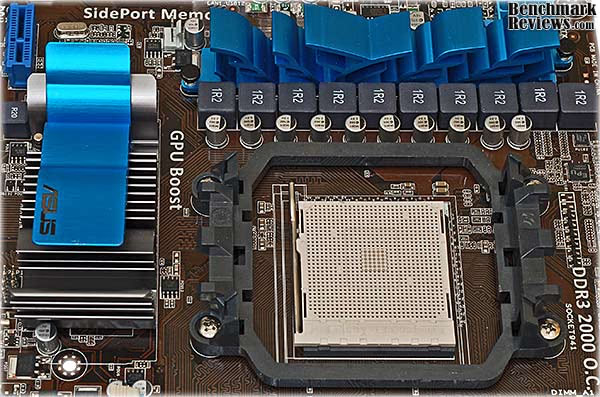
ASUS uses an 8+2 PWM design for the M4A88TD-V EVO/USB3, as it does on almost every modern AM3-socketed motherboard they produce. Even the ASUS Crosshair IV Formula, which costs almost double the price ($ 229.99), uses the same basic topology. Someday, I'll figure out how it is that Intel CPUs benefit from 16+2 phases of PWM power, and AMD chips don't....some people blame it on a limitation with the AM2 architecture. ASUS makes the case that their board offers "True" 8+2 phase power, and it's true, all right. The PWM controller chips, which is where the PWM phases are first generated, output 8 distinct, separate phases that get delivered to eight full sets of drivers and power MOSFETs. Unfortunately, there are some other boards that only have a 4-phase PWM controller, and then double the number of filter chokes and capacitors, to make it appear that twice that number of phases is present. Some use a "phase splitter" to create the additional phases, but the PWM controller can only control the downstream devices in groups of two, limiting the power quality vs. power efficiency balance. All of the power MOSFETS and drivers are covered by a long, thin heatsink, next to the row of ferrite chokes. It's physically held in place with the typical spring-loaded plastic lock pin, and contacts the power transistors via thermal tape.

The rear I/O panel has 6 USB ports (the two blue ports are USB 3.0), one PS/2 connector for Keyboard, an optical S/PDIF port, HDMI, VGA and DVI ports, an IEEE 1394 Firewire port, an E-SATA port, a gigabit Ethernet port, and the regular 8-channel audio ports. Nothing out of the ordinary here, except the blue USB 3.0 ports, shown by balloon number 11 above.

At the rear edge of the board, the five SATA connectors face up, not out to the side. This is not always a negative, as some PC cases don't have enough room around the back edge of the motherboard to allow for SATA cables sticking out. In some instances, the 90 degree ports provide a cleaner install, but the odds of a budget case having the necessary room in this area are about 50/50. ASUS played it safe here, and I can't blame them. The same goes for the PATA connector, although I imagine most people would use the PATA interface for their older optical drive and would like it to be located closer to the top of the board, where most people place their ODD. I could be wrong, as many people have one or two old PATA HDDs lying around, and a new SATA DVD writer is generally less than $30.

The card slot layout is pretty standard, and given the fact that it really doesn't need to support SLI or CrossFireX, the only given is that you will lose access to one of the three standard PCI slots when you install a 2-slot graphics card. Not a great loss, as you still have access to two regular PCI slots, one PCI Express x4 slot, and one PCI Express x1 slot. The upper, dark blue connector is the one wired for x16, and the only place you would want to install a high-end graphics card. I must admit to being confused when I looked at the back of the motherboard, as the x4 slot is actually soldered in with a full 16 lanes worth of connector pins, despite the fact that it only supports four of those 16 lanes. The board is also silk-screened with an x16 designator, even though it is only an x16 in the mechanical sense.
Let's take an even closer look at some of the unique features on this motherboard...
ASUS M4A88TD-V EVO/USB3 Details
One of the coolest features included on this motherboard, and some others based on the AMD 800 series chipset, is the hardware-based solution for unlocking additional cores on Phenom II CPUs. The 700 series chipset included that feature as part of "Advanced Clock Calibration", which involved a peculiar connection between the Southbridge and the CPU that AMD never really disclosed the details for. When AMD pulled the plug on that feature, ASUS and others jumped into the breach and provided their own solution. The switch on the M4A88TD-V EVO/USB3 motherboard could not be more obvious or simple to use. With the system powered down, slide the lever up to unlock the extra cores when you power the system up. The feature stays engaged until you move the switch back. Of course, not all dual or triple or quad core Phenom II chips will unlock successfully, but there is a good chance they will, especially if you goose up the CPU voltage a bit before you try it. In addition to the hardware switch, the feature can also be enabled in BIOS, but you'll end up having to clear the CMOS if the system won't get through POST.
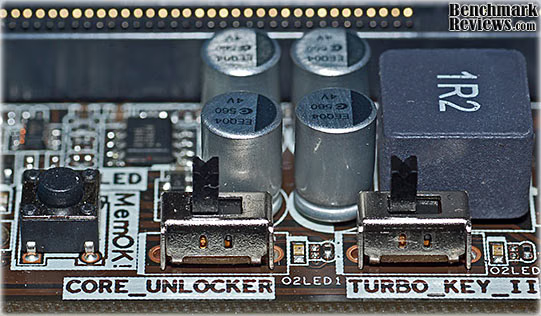
The MemOK! button is helpful in scenarios where the RAM settings in BIOS aren't suited to the DIMMs that are installed, and the system won't boot. There are a couple of possible reasons for this. One, there might be a faulty DIMM that won't meet its specifications. Two, you might be trying out some unmarked DIMMs or ones that you are unfamiliar with. Once you get the system to boot up, you can interrogate their SPD table, but first you need to get it to boot up. Three, you may be overclocking the memory, either intentionally or unintentionally, and the system crashes. You don't want to switch over to all default values in the BIOS and lose all your overclocking settings, so this feature allows you to only change the memory settings on restart. This is a nice "Get out of Jail Free" card; I know I'm supposed to document all my BIOS changes as I go, but sometimes I get lazy or overconfident, or both.
The third switch in the photo above is for a useful new feature that improves on previous implementations. Earlier versions of Turbo Key allowed the user to switch between stored overclock profiles on the fly, using the power switch on the PC case. Good concept, but I think we would all get a little nervous punching in the power button while the system is up and running with a screen full of apps. Turbo Key II takes the same concept, and allows you to designate Hot Key combinations on your keyboard to make the switch. This is a much more convenient and comfortable solution for most users.
The basic functions of the motherboard are taken care of by several support chips. The ITE IT8721 chip provides for the basic I/O functions like Keyboard, Mouse, and front panel controls. The ICS 9LPRS477CKL is the clock generator for most of the auxiliary clocks on the board.

The Realtek RTL8111E onboard NIC supports 10/100/1000 Mb/s Ethernet, and while it may look like an unassuming little chip, it won an award at Computex Taipei in May 2010. "...its RTL8111E Single-Chip Gigabit Ethernet Controller has won a prestigious "Best Choice of COMPUTEX TAIPEI 2010 Award"; an award recognized and given by an evaluation committee comprised of experts from the industry, academia, media, and government. The innovative Realtek RTL8111E is the world's first Single-chip Gigabit Ethernet Controller to implement the power-saving IEEE 802.3az standard (Energy Efficient Ethernet: EEE)."
The Realtek ALC892 is a brand new 10-channel audio codec chip, and there is not much information available for it. Based on the motherboard's published specs, it looks most similar in features to the current ALC899 model. The key features are BD audio layer content protection, and support for 24bit/192kHz BD lossless audio. The VT6330 is a combination controller that integrates an IEEE 1394a interface, and a 1-channel PATA (IDE) host controller for two ATA/ATAPI devices.

The three ICs below are responsible for all the fancy footwork associated with energy management and overclocking. The EPU IC and PEM ASP0910 handle the low-level PWM control of the power MOSFETS and their driver ICs. They are custom ICs built exclusively for ASUS by UPI, and they control the 8 distinct phases of PWM voltage regulation for the CPU and the two phases for the integrated memory controller. This is a true 8+2 design, just like it says on the box! The TurboV chip handles all the high-level application programs like Auto Tuning, TurboV , CPU Level UP and Turbo Key II. Any performance improvements that are not done manually in BIOS are handled by this IC.

The final support chip of note is a NEC D720200F1 IC that provides two ports of USB 3.0 connectivity, and it is hooked up to one of the available PCI Express 2.0 connections on the 880G Northbridge. This avoids some latency issues that may occur if using the PCI Express 2.0 connection on the Southbridge. The last two chips shown below are a simple 2 Amp Ultra Low Dropout Linear Voltage Regulator, and a 3.3V CMOS Quadruple Bus Buffer Gate that allows one of the Logic ICs operating at a 3.3V signal level to communicate with another IC operating at the 5V level. Mundane stuff, I know...

Memory configuration is Dual-Channel, with support for up to 16 GB of DDR3 2000 in overclocking modes. For my testing, I used DDR3 1600 DIMMS, but occasionally overclocked them into the 1700+ MHz range. The DIMM slots are the standard dual-latch units that we're all familiar with. I always thought the new single latch connectors were cheaper, but ASUS is not using them on this board. For most people, who will probably go for a 2 x 2GB stick solution, ASUS recommends in the manual that you use the blue slots for best overclocking performance. If you accidentally put two sticks of memory in the black slots there is no harm, unlike a P55-based motherboard, which won't boot up. The DIMM slots are a little too close to the CPU socket for my taste, but I tend to use monster coolers when I'm trying to wring all the performance I can out of a test system.

Speaking of the trials and tribulations of overclocking, let's look at that next.
ASUS BIOS and Overclocking
It seems like Intel, AMD and NVIDIA can't help themselves. Every new product line they introduce seems to have a built-in capacity for higher clock rates. In this very aggressive semiconductor marketplace, it seems there is a soft spot for conservative speed ratings. It's not like this is a big secret anymore; ever since enthusiasts started getting 100% overclocks on the Intel Core2 Duo chips with decent air cooling, it seems the whole world is in on it.
ASUS makes it easier and easier to achieve those overclocks with each new major release of their BIOS. For several years now, the core functions required to maximize the performance of your PC have been contained on the "Ai Tweaker" tab of the custom AMI BIOS. There are several ways of tweaking the performance. CPU Level Up is the simplest; it just bumps up your BIOS settings to the next higher level processer specs. If there isn't one, you can jump up to the next tier; got an AMD Phenom II X4 945 and you want a 965? Just do it, as they say. The OC tuner takes a more deliberate approach, and goes through a sequence of repeatedly raising clocks and then testing for stability. It's a well established process that most people would do themselves, manually. With OC Tuner, it's automated. Lastly, there is support for utility programs that run in Windows and can speed up the effort by eliminating the repetitive rebooting process.

I'm a manual overclocker at heart; it's how I learned it the first time I did it, and I'm most comfortable when I have full control. Yes, it's just an illusion, but humor me..... I also get annoyed with machines that don't think the way I do. For example, if I'm running benchmarks, I can't have AMD's Cool'n'Quiet slowing the CPU down at the exact moment I press the button to start a test. The lag isn't that much, but it's never consistent. The same goes for ASUS' fantastic new feature called "Turbo Unlocker", which dynamically increases each core frequency by up to 500 MHz, to speed up performance based on CPU load. Nice! Great! Love it! It's wonderful that ASUS has one-upped AMD by bringing this kind of functionality to all the Black Edition CPUs instead of just the new X6 models that currently get "Turbo Core". But once again it doesn't do it exactly the same each and every time, and it screws up the benchmark scores.
In order to reach the full potential of your system, it is usually necessary to adjust some system voltages. Once again, everything is accessible in BIOS, with either the automated processes I discussed above, or with fully manual adjustments. All the basics are here, and I especially like how the current voltage is displayed; it gives you an idea of the default voltage without having to go look it up on some obscure website, if you can find it at all.

Ultimately, I decided to perform the testing for this article with two different overclocks. One was achieved with the default settings for everything. All I did was set the memory to the correct speed and timings, and adjust the base clock and multiplier for the CPU. With these few, simple changes I got a stable overclock of 3.8 GHz on the CPU, which is a decent bump up from the default of 3.2 GHz.
After I completed testing with that configuration, I turned the CPU Offset Voltage up slightly, and then bumped the CPU up to 4.0 GHz. I tried getting 4.1 GHz and 4.2 GHz, but was never able to get the system completely stable. I'm sure with a bit of research and tweaking I can get 4.1, but 4.0 GHz is a nice round number; a milestone, if you will. Core temps on the CPU never got above 40C, so I know there was some headroom left, but I didn't want to risk instability. It's a real heartbreaker to get to the last test of the day and find out that it's the only one that crashes your system with its great new settings....

The 880G Northbridge, and ASUS' M4A88TD-V EVO/USB3, make some compromises on PCI Express 2.0 connectivity for the graphics system that limit the uses of this board to more of a mainstream market segment. It is priced that way too, and if you choose your system components wisely, you can avoid those limitations and build a very competitive gaming rig for a bit less money. Take the money you save on the motherboard and CPU, and go to town with your choice of video card. That's the hot ticket for gaming performance.
Please stick around for the next section, as we proceed with testing. We'll focus mainly on CPU and system-level tests, but at the end there are some gaming benchmarks to show how well this low-cost platform compares against some stiff competition.
Motherboard Testing Methodology
I recently looked at how well an AMD 790FX system holds up to a more modern Core i5 setup. The 880G Northbridge can't hold a candle to the 42 available PCI Express lanes on the 790FX, but we're limiting our tests to a single video card in a single x16 PCI Express slot, so that aspect is a fair match. The Core i5 system is generally going to offer superior performance, with 4 cores, better performance per clock cycle, and what is arguably the best integrated memory controller on the market. Hey, nobody said it was going to be a completely fair fight...
 Test Systems
Intel LGA 1156 System
- Motherboard: ASUS P7P55D-E Pro (1002 BIOS)
- System Memory: 2x 2GB GSKILL Ripjaws DDR3 1600MHz (7-8-7-24)
- Processor: Intel Core i5-750
- CPU Cooler: Prolimatech Megahalems (Delta AFB1212SHE)
- Video: ASUS EAH5870/2DIS/1GD5/V2 Radeon HD 5870 (ATI Catalyst Driver 10.6)
- Drive 1: OCZ Vertex SSD, 32 GB
- Drive 2: Western Digital VelociRaptor, 150 GB
- Optical Drive: Sony NEC Optiarc AD-7190A-OB 20X IDE DVD Burner
- Enclosure: CM STORM Sniper Gaming Case
- PSU: Corsair CMPSU-750TX ATX12V V2.2 750Watt
- Monitor: SOYO 24"; Widescreen LCD Monitor (DYLM24E6) 1920X1200
- Operating System: Windows 7 Ultimate Version 6.1 (Build 7600)
AMD 790FX AM3 System
- Motherboard: ASUS M4A79T Deluxe (2205 BIOS)
- System Memory: 2x 2GB OCZ Reaper HPC DDR3 1600MHz (7-7-7-24)
- Processor: AMD Phenom II 720 Black Edition (Overclock to 3.8 GHz)
- CPU Cooler: CoolerMaster Hyper Z600
- Video: ASUS EAH5870/2DIS/1GD5/V2 Radeon HD 5870 (ATI Catalyst Driver 10.6)
- Drive 1: GSKILL Titan SSD, 128GB
- Optical Drive: Sony NEC Optiarc AD-7190A-OB 20X IDE DVD Burner
- Enclosure: Lian Li PC- P50R Gaming Case
- PSU: PC Power & Cooling Silencer ATX12V V2.2 750Watt
- Monitor: SOYO 24"; Widescreen LCD Monitor (DYLM24E6) 1920X1200
- Operating System: Windows 7 Ultimate Version 6.1 (Build 7600)
AMD 880G AM3 System
- Motherboard: ASUS M4A88TD-V EVO/USB3 (1308 BIOS)
- System Memory: 2x 2GB OCZ Black Edition DDR3 1600MHz (8-8-8-24)
- Processor: AMD Phenom II 555 Black Edition (Overclock to 4.0 GHz)
- CPU Cooler: CoolerMaster Hyper Z600
- Video: ASUS EAH5870/2DIS/1GD5/V2 Radeon HD 5870 (ATI Catalyst Driver 10.6)
- Drive 1: OCZ Summit SSD, 60 GB
- Drive 2: Western Digital VelociRaptor, 150GB
- Optical Drive: Sony NEC Optiarc AD-7190A-OB 20X IDE DVD Burner
- Enclosure: SilverStone Fortress FT01 SST-FT01B-W Gaming Case
- MB PSU: Antec Neo-HE500 Modular ATX12V V2.2 500Watt
- VGA PSU: Thermaltake Toughpower Power Express 650Watt
- Monitor: SOYO 24"; Widescreen LCD Monitor (DYLM24E6) 1920X1200
- Operating System: Windows 7 Ultimate Version 6.1 (Build 7600)
Benchmark Applications
- Lavalys EVEREST Ultimate Edition v5.50
- Futuremark PCMark Vantage 1.0.2.0 64-Bit
- Maxon CINEBENCH 11.5 64-Bit
- Passmark Performance Test v7.0 (1011) 64 Bit
- Crysis v1.21 Benchmark v1.03 (Very High Settings, 0x and 4x Anti-Aliasing)
- Aliens vs. Predator (Texture Q-Very High, Shadow Q-High, HW Tessellation & Advanced Shadow Sampling-ON, MSAA-0 & 4x, AF-16x, SSAO-ON)
I took the ASUS M4A88TD-V EVO/USB3 motherboard to two different levels of stable overclock for these tests. The first, at 3.8 GHz (225 MHz x 17) I got easily without raising the CPU voltage from the default value. I then raised the voltage just a bit, and changed to 230 MHz x 17.5 for a 4.0 GHz overclock. I concentrated on raising the system bus instead of the multiplier for these trials, because this is a motherboard test and I wanted to see how well the Northbridge would handle the higher bus speeds. I didn't go wild, like we used to in the Core2Duo days (400 MHz on P35's, remember...?), but instead used what folks without an unlocked CPU multiplier might use in the real world. Memory timings were kept at their rated timings of 8-8-8-24 for all tests. I also used the standard voltage spec for the OCZ Black Edition DIMMS, 1.65V.
EVEREST Benchmark Results
EVEREST Ultimate Edition is an industry leading system diagnostics and benchmarking solution for enthusiasts PC users, based on the award-winning EVEREST Technology by Lavalys. During system optimizations and tweaking it provides essential system and overclock information, advanced hardware monitoring and diagnostics capabilities to check the effects of the applied settings. CPU, FPU and memory benchmarks are available to measure the actual system performance and compare it to previous states or other systems. Furthermore, complete software, operating system and security information makes EVEREST Ultimate Edition a comprehensive system diagnostics tool that offers a total of 100 pages of information about your PC. All of the benchmarks used in our test bed: Queen, Photoworxx, and AES, rely on basic x86 instructions, and consume very low system memory while also being aware of Hyper Threading, multi-processors, and multi-core processors.
CPU Benchmarks
I recently tested the AMD AM3 platform with Everest Ultimate Edition and the triple-core 720 Black Edition Processor against the Intel I5-750 and the $200 CPU beat up on the $100 processor, with one fewer core to fight with. No surprise there, and things aren't going to get any better with the AMD 555BE dual-core driving the ASUS M4A88TD-V EVO/USB3 CPU socket.
The EVEREST Queen benchmark shows some good scaling with the AMD 555BE overclock, just like a good synthetic benchmark should. The i5 with 4 cores and a substantial overclock almost doubles the score of the triple-core 720BE, and the 555BE comes within 20% of the triple core Phenom II, with its 4.0 GHz overclock. The Queen benchmark focuses on the branch prediction capabilities and misprediction penalties of the CPU. It does this by finding possible solutions to the classic queen problem on a chessboard. At the same clock speed theoretically the processor with the shorter pipeline and smaller misprediction penalties will attain higher benchmark scores.

The Photoworxx benchmark tests for penalties against pipeline architecture. This synthetic benchmark stresses the integer arithmetic and multiplication execution units of the CPU and also the memory subsystem. Due to the fact that this test performs high memory read/write traffic, it cannot effectively scale in situations where more than two processing threads are used. The EVEREST Photoworxx benchmark performs the following tasks on a very large RGB image:
-
Fill
-
Flip
-
Rotate90R (rotate 90 degrees CW)
-
Rotate90L (rotate 90 degrees CCW)
-
Random (fill the image with random colored pixels)
-
RGB2BW (color to black & white conversion)
-
Difference
-
Crop
The Everest documentation hints that this benchmark is highly dependent on memory write speed, and we've see ample evidence of that in prior tests. Here we see another huge gain by the ASUS P55 motherboard, in part due to the strength of the integrated memory controller on the Lynnfield CPU. The Phenom II X3 and M4A79T Deluxe actually lag a little behind the 555BE and the M4A88TD-V EVO/USB3. The results also scaled nicely with the overclocks on the AMD CPU, eventually besting the M4A79T/720BE combo by 22%.
The AES integer benchmark measures CPU performance using AES data encryption. It utilizes Vincent Rijmen, Antoon Bosselaers and Paulo Barreto's public domain C code in ECB mode and consumes only 48 MB of memory. The AES test shows a very strong dependence on the number of cores doing the processing. The AMD 555BE CPU scaled nicely in this test; for a 25% increase in CPU clock, the score increased by 26%. Some of that gain is due to raising the main bus speed; otherwise we never would have topped the increase in clock rate, even by 1%.
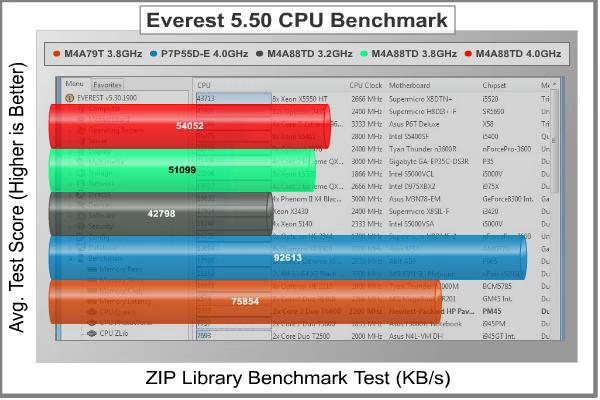
The Zip Library provides another case where the number of cores exerts the most influence. Neither the dual-core or the triple-core is a match for the i5 platform, with four cores, and a brand new memory controller. The ease at which the M4A88TD-V EVO/USB3 motherboard and processor combination overclocked is evident here, as is the improved performance; a 26% improvement again when going from the stock clock of 3.2GHz to 4.0GHz.
So far, memory performance seems to have had an impact on some of the synthetic benchmarks in Everest, so it's a good idea to look at the pure memory benchmarks that are available in the test suite. EVEREST Ultimate Edition offers three simple memory bandwidth tests that focus on the basics; Read, Write, and Copy. In order to avoid concurrent threads competing over system memory bandwidth, the Memory benchmarks utilize only one processor core and one thread. This will also aid in equalizing the comparison here between Quad and Tri-Core processors.

Once again, we see that Intel has a winner with their new Core microarchitecture, and particularly the i5, with its improved memory controller. There's no contest here between the AMD and Intel platforms, even though they both now have integrated memory controllers on the CPU. We see similar results here from overclocking on the ASUS 880G board; 21%, 17%, and 25% increases in memory performance with the 25% increase in CPU clock.
Now, let's look at some additional benchmarks with PCMark Vantage, which emphasize real-world activities.
PCMark Vantage Test Results
PCMark Vantage is an objective hardware performance benchmark tool for PCs running 32- and 64-bit versions of Microsoft Windows Vista or Windows 7. PCMark Vantage is well suited for benchmarking any type of Microsoft Windows Vista/7 PC: from multimedia home entertainment systems and laptops, to dedicated workstations and high-end gaming rigs. Benchmark Reviews has decided to use a few select tests from the suite to demonstrate simulate real-world processor usage in this article. Our tests were conducted on 64-bit Windows 7, with results displayed in the chart below.
TV and Movies Suite
- TV and Movies 1 (CPU=50%, RAM=2%, GPU=45%, SSD=3%)
- Two simultaneous threads
- Video transcoding: HD DVD to media server archive
- Video playback: HD DVD w/ additional lower bitrate HD content from HDD, as downloaded from net
- TV and Movies 2 (CPU=50%, RAM=2%, GPU=45%, SSD=3%)
- Two simultaneous threads
- Video transcoding: HD DVD to media server archive
- Video playback, HD MPEG-2: 19.39 Mbps terrestrial HDTV playback
- TV and Movies 3 (SSD=100%)
- HDD Media Center
- TV and Movies 4 (CPU=50%, RAM=2%, GPU=45%, SSD=3%)
- Video transcoding: media server archive to portable device
- Video playback, HD MPEG-2: 48 Mbps Blu-ray playback
Gaming Suite*
- Gaming 1 (CPU=30%, GPU=70%)
- GPU game test
- Gaming 2 (SSD=100%)
- HDD: game HDD
- Gaming 3 (CPU=75%, RAM=5%, SSD=20%)
- Two simultaneous threads
- CPU game test
- Data decompression: level loading
- Gaming 4 (CPU=42%, RAM=1%, GPU=24%, SSD=33%)
- Three simultaneous threads
- GPU game test
- CPU game test
- HDD: game HDD
Music Suite
- Music 1 (CPU=50%, RAM=3%, GPU=13%, SSD=34%)
- Three simultaneous threads
- Web page rendering - w/ music shop content
- Audio transcoding: WAV -> WMA lossless
- HDD: Adding music to Windows Media Player
- Music 2 (CPU=100%)
- Audio transcoding: WAV -> WMA lossless
- Music 3 (CPU=100%)
- Audio transcoding: MP3 -> WMA
- Music 4 (CPU=50%, SSD=50%)
- Two simultaneous threads
- Audio transcoding: WMA -> WMA
- HDD: Adding music to Windows Media Player
* EDITOR'S NOTE: Hopefully our readers will carefully consider how relevant PCMark Vantage is as a "real-world" benchmark, since many of the tests rely on unrelated hardware components. For example, per the FutureMark PCMark Vantage White Paper document, Gaming test #2 weighs the storage device for 100% of the test score. In fact, according to PCMark Vantage the video card only impacts 23% of the total gaming score, but the CPU represents 37% of the final score. As our tests in this article (and many others) has already proven, gaming performance has a lot more to do with the GPU than the CPU, and especially more than the hard drive or SSD (which is worth 38% of the final gaming performance score).

These results show a fair amount of consistency as you go from left to right, until you get to the Music benchmark, where the AMD 720BE on the M4A79T platform falls down relative to the newer AMD CPU and chipset. The TV and Movies set show a significant win for the ASUS P55 platform and the i5-750, beating the best AMD score by over 50%. The gaming benchmark shows a 92% improvement in gaming performance between the best and worst performers. We'll be validating this later on, but I'll give you a hint: it isn't true.... On the Music benchmark, the P7P55/i5 combination beats the AMD 880G/555BE pairing again, offering 37% more performance. I suspect the poor performance of the 790FX/720BE on the music test is down to data writes to the SSD in that system, it's an older JMicron-based model that doesn't support TRIM.
As a whole, these results reinforce a couple of things for me. One, the P55/i5 combo is in a different league altogether for all these tests. Of course, the processor itself costs twice as much as the two AMD Phenom II choices included here, so it's not unexpected. Secondly, I'm impressed by the performance of the 880G/555BE pair on the ASUS M4A88TD-V EVO/USB3 motherboard. The easy overclocking and performance scaling pushes it past a triple-core CPU from the same family, running on a high-end board with the best performing 700-series chipset available from AMD. That's progress...
CINEBENCH 11.5 Benchmark
Maxon CINEBENCH is a real-world test suite that assesses the computer's performance capabilities. CINEBENCH is based on Maxon's award-winning animation software, Cinema 4D, which is used extensively by studios and production houses worldwide for 3D content creation. Maxon software has been used in blockbuster movies such as Spider-Man, Star Wars, The Chronicles of Narnia and many more. CINEBENCH Release 11.5 includes the ability to more accurately test the industry's latest hardware, including systems with up to 64 processor threads, and the testing environment better reflects the expectations of today's production demands. A more streamlined interface makes testing systems and reading results incredibly straightforward.
The CINEBENCH R11.5 test scenario uses all of a system's processing power to render a photorealistic 3D scene, "No Keyframes" the viral animation by AixSponza. This scene makes use of various algorithms to stress all available processor cores. The OpenGL graphics card testing procedure uses a complex 3D scene depicting a car chase with which the performance of your graphics card in OpenGL mode is measured. Since this one test is dominated by the performance of the video card, I'm not showing it here.
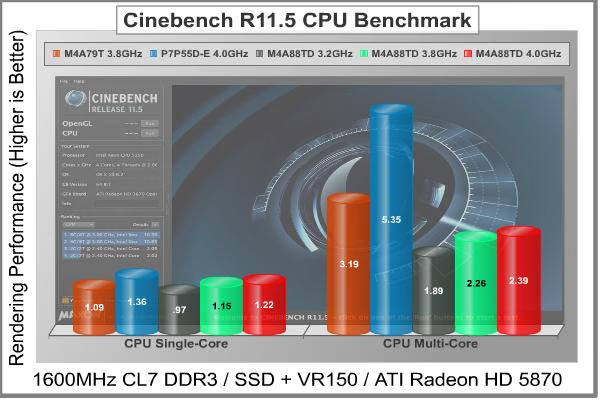
The most interesting part of this benchmark for me is always the single-core test. I understand that the multi-core test is better at showing the real world performance, but I'm always curious how the systems perform on a one-for-one basis. Here, the i5 and P55 pairing have a much smaller advantage. If you compare the 4.0 GHz overclocks, the i5 has an 11% lead over the latest AMD Phenom II and 880G platforms. That's relatively minor, compared to some of the previous synthetic tests. If you pro-rate the results in the multi-core scores for the number of cores in action, the differences are similar.
The results so far should convince you that there are no perfect benchmarks, only a large number of imperfect ones that must be considered collectively. So, let's take one more look at a synthetic test suite before we look at some hard core gaming benchmarks.
Passmark Performance Test Benchmark
PassMark PerformanceTest is a PC hardware benchmark utility that allows a user to quickly assess the performance of their computer and compare it to a number of standard 'baseline' computer systems. The Passmark Performance Memory Test looks at a variety of memory functions:
- Allocate Small Block
- Read Cached Memory
- Read Un-Cached Memory
- Write Memory
- Large RAM
It then calculates an overall performance number for Memory Marks. Unlike the Everest memory benchmarks, this test uses all available CPU cores. At similar clock speeds the Intel i5 beats the AMD 555BE by 39%. Even though I saw all cores being used by this test, using task manager to see the individual CPU loads during unrecorded trials, the results look more like a single-core test.

The CPU tests benchmark all the mathematical operations, compression, encryption, SSE, and 3DNow! instructions of a modern processor. There are several areas of concentration for each benchmark, which are then combined into one compound score. This score is referred to as the CPU Mark, and is a composite of the following tests:
-
Integer Math
-
Floating Point Math
-
Find Prime Numbers
-
SSE/3DNow!
-
Compression
-
Encryption
-
Image Rotation
-
String Sorting
The CPU test shows a 69% performance gain for the Core i5-750 over the Phenom II 720BE at roughly similar CPU clock speeds. If you factor out the difference in the number of cores, the difference between the i5-750 and 555BE gets narrowed down to 17%. There's little doubt about the power of the P55/i5 platform, especially in CPU-bound applications or where memory performance has an impact. But that performance comes at a price, literally.
Wrapping up the synthetic benchmarks, what can we say about the overall results? Obviously, in non-gaming situations, four cores beat two or three cores. Applications are getting better at using multicore processors to their fullest capability and computationally intensive tasks like video and audio encoding really benefit from the additional cores. If you've got a gaming rig though, you are better off running those tasks on your GPU. It'll smoke the CPU every time. If you don't, then every additional CPU core makes a difference.
The other thing that struck me was the way the M4A88TD-V EVO/USB3 motherboard and the AMD 555BE CPU scaled their performance in every benchmark, with a fairly simple overclock to a very respectable 4.0 GHz. The results for the 790FX/720BE and P55/i5-750 each show the best 24/7 overclock I was able to achieve with that MB/CPU combination, so I set the bar pretty high for the 880G/555BE. There is a limit to how much performance you can squeeze out of two cores, but in the end the actual performance is dictated by how well the application uses all available cores. CINEBENCH gives almost perfect CPU scaling results, while PCMark Vantage mixes up a variety of tasks and threads, and provides more of a system-level benchmark. The lower cost solution looks more viable at the system level, which reinforces the accepted wisdom that for general purpose usage, people tend to buy more computing power than they need.
Let's take a look at two gaming benchmarks to see how well this CPU performance translates in the graphical world.
Crysis Test Results
Crysis uses a new graphics engine: the CryENGINE2, which is the successor to Far Cry's CryENGINE. CryENGINE2 is among the first engines to use the Direct3D 10 (DirectX10) framework of Windows Vista, but can also run using DirectX9, both on Vista and Windows XP.
Roy Taylor, Vice President of Content Relations at NVIDIA, has spoken on the subject of the engine's complexity, stating that Crysis has over a million lines of code, 1GB of texture data, and 85,000 shaders. To get the most out of modern multicore processor architectures, CPU intensive subsystems of CryENGINE 2 such as physics, networking and sound, have been re-written to support multi-threading.
Crysis offers an in-game benchmark tool, and this short test does place some high amounts of stress on a graphics card, since there are so many landscape features rendered. For benchmarking purposes, Crysis can mean trouble as it places a high demand on both GPU and CPU resources. Benchmark Reviews uses the Crysis Benchmark Tool by Mad Boris to test frame rates in batches, which allows the results of many tests to be averaged.
Low-resolution testing allows the graphics processor to plateau at its maximum output performance, which shifts demand onto the other system components. At the lower resolutions Crysis will reflect the GPU's top-end speed in the composite score, indicating full-throttle performance with little load. This makes for a less GPU-dependant test environment, and is helpful in creating a baseline for measuring maximum system performance. At the lowest 800x600 resolution available, frame rate performance often becomes entirely CPU dependant.
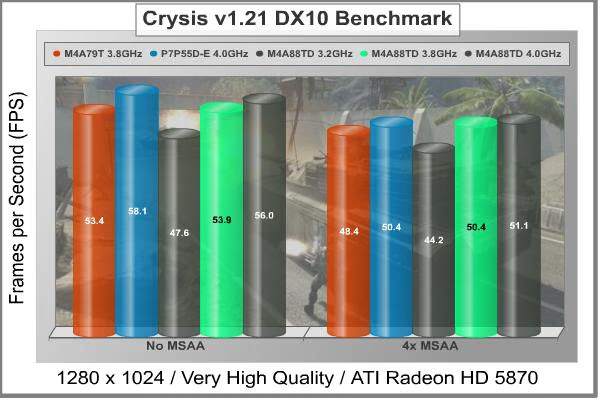
Crysis is well known for putting a substantial load on the CPU as well as the GPU, so it's a good test when you want a more balanced performance measurement. With no Multi-Sample-Anti-Aliasing enabled, the best P55/i5-750 performance is 9% better than the best AMD 790FX/720BE score. At its default clock setting of 3.2 GHz, the AMD 880G/555BE system takes a big hit in performance, over 10 FPS. Crank up the bus speed and the CPU multiplier, though, and it settles in half way between its two competitors, at 56.0 FPS.
Once some MSAA was turned on and turned up to 4x, the test becomes more GPU dependant, but it's interesting that the 880G/555BE turned in both the lowest and highest frame rates. Clearly, the CPU clock and the FSB (or equivalent) clock has a significant impact on Crysis; more than the number of cores and computational efficiency of the CPU. Turning up the wick on the 880G/555BE combination resulted in 18% and 16% increases in frame rates for the two tests. At higher resolutions, the differences were negligible, at least with the single HD 5870 video card I used for all the tests.
Crysis is the "Old man" of gaming benchmarks; let's take a look at one of the latest releases, Aliens vs. Predator and see if we can detect some CPU influence there.
Aliens vs. Predator Test Results
Rebellion, SEGA and Twentieth Century FOX have released the Aliens vs. Predator DirectX 11 Benchmark to the public. As with many of the already released DirectX 11 benchmarks, the Aliens vs. Predator DirectX 11 benchmark leverages your DirectX 11 hardware to provide an immersive game play experience through the use of DirectX 11 Tessellation and DirectX 11 Advanced Shadow features.

In Aliens vs. Predator, DirectX 11 Geometry Tessellation is applied in an effective manner to enhance and more accurately depict HR Giger's famous Alien design. Through the use of a variety of adaptive schemes, applying tessellation when and where it is necessary, the perfect blend of performance and visual fidelity is achieved with at most a 4% change in performance.
DirectX 11 hardware also allows for higher quality, smoother and more natural looking shadows as well. DirectX 11 Advanced Shadows allow for the rendering of high-quality shadows, with smoother, artifact-free penumbra regions, which otherwise could not be realized, again providing for a higher quality, more immersive gaming experience.
Whenever possible we configure benchmark software to its maximum settings for our tests, but there are special cases when it's instructive to back off on some settings in order to put less load on the GPU and more load on the CPU. In the case of Aliens vs. Predator, we tested with the following settings: Texture Quality-Very High, Shadow Quality-High, HW Tessellation & Advanced Shadow Sampling-ON, Anisotropic Filtering-16x, and Screen Space Ambient Occlusion (SSAO)-ON. Multi Sample Anti-Aliasing was turned off for our low resolution testing at 1280 x 1024, and set to the maximum level of 4x for the high resolution test. At the highest resolution of 1920 x 1200, this is a challenging benchmark, as an ATI HD5870 card just barely achieves an average frame rate of 30FPS.
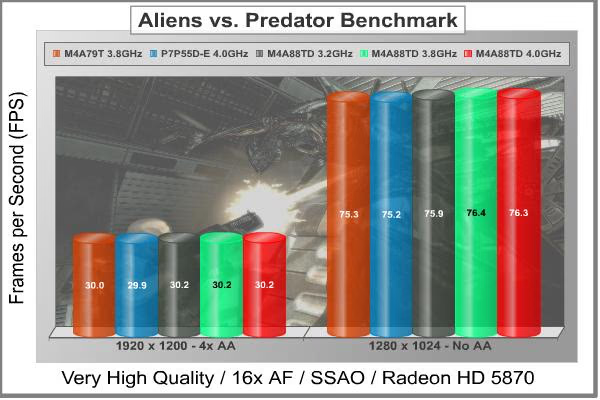
We generally see very minor differences, if any in typical gaming benchmarks while testing motherboards and CPUs. At best, Crysis will stress the CPU enough to show some variation, as we just saw above, but most of the other benchmarks are all GPU bound. Aliens vs. Predator is brand new, and it looks like we finally have another gaming benchmark that uses the CPU for more than just housekeeping tasks. There's less variation in this chart than in the last comparison test I did, but that's because the lowest CPU clock we have here is the relatively high 3.2 GHz of the stock AMD 555 Black Edition.
What's really interesting is that the new AMD 880G/555BE system takes top marks in both low resolution and high resolution tests, even at its lowest clock speed. The largest differences in each test are due to the CPU and Motherboard in use, not the clock rates. The Intel entry is in last place both times, despite the high overclock of 4.0 GHz. My experience with this benchmark is that it is very stable and reliable, in that multiple runs typically vary by only 0.1 FPS. Even though the biggest difference is barely more than 1 FPS, it's very repeatable; I just wish there was a wider spread between the different results.
Well, it's a nice switch to finally see some CPU influence in our gaming benchmarks, even if there was no meaningful difference in the gaming experience. Let's finish up with some final thoughts and conclusions.
Motherboard Final Thoughts
What's the last big lump of work you threw at your CPU? Financial calculations? Nah, too easy; unless you are a PHD mathematician working on Wall Street. MP3 encoding? Yeah, that's my offense. MKV video might be yours. Either one will chew up some clock cycles like crazy. But after you've ripped all your CDs to your home media server and done the same for all your DVDs, what's next? More, new content? Who thinks their CPU can't keep up with a broadband connection, fiber even? Is there anything worthy of the extreme amount of processing power we all covet, in a never ending upgrade cycle?
I have a dream, and it goes like this. Just about all day, every day, I have one of life's little question, like "How much did gasoline really cost when I was a teenager, adjusted for inflation?" I flip open my phone, the smallest, sleekest, and handiest device for personal carry, and in a quiet, dulcet tone, ask my burning question of the moment in plain English. The response is a reassuring, "Hmmmm, let me think about that." My phone, or whoever/whatever is in the background doing all the thinking, already knows when I was born, where I grew up, all the little details about my first car, and the Clark gas station on the corner where we all hung out, and everything there is to know about my best friend in High School, including the things that only he and I know, and all about my first girlfriend, ditto for her. My phone knows everything, and just like the best friend that it is, it won't tell anyone anything unless I ask it to. I have this same dream every night.
How are you going to fit all that into a phone, you ask? You can't, at least not yet. But I bet I could fit it all onto a medium-sized server and SAN in my house, if I tried hard enough. I also bet my phone can communicate with my server, that's child's play. Now all I need is an app.
Classic Systems Engineering principles teach that the way things are interfaced, or linked, is at least as important as the characteristics of the individual components. So it is with information. Maybe I can document every gallon of gasoline I've ever purchased, but without a rich network of contextual information, that list of purchases doesn't tell me enough. Maybe I want to write a chastising letter to BP and tell them how much money I've passed their way over the years, and an estimate of the future purchases I'm not going to make from them unless they clean up their act. I need a completely different set of contextual links, to go along with the base data set of my purchasing history, than I did to answer the first question I had today regarding gasoline.
So, I already know that such an outcome is already available for a fee. Congress does it, the idle rich do it, my boss does it; everybody's got a service monkey, except me.
By now, you're no doubt asking, "What does this have to do with an article about a lower midrange motherboard that uses one of AMD's latest bargain screamer processors?" Well, there's a certain element of "Build it and they will come." at work here. The very existence of the iPhone generated an explosion of apps, and in amongst the drivel was some very useful functionality. So, I keep building faster and more powerful computers, in the evergreen hope that one day my app will come.

The success of Google is not an anomaly, you know; people have questions, and the answers are out there. The thing is, we all want our very own, personal Google. And my Google will be so smart, and so powerful, and so in touch with ME, that it will become a part of me. Here's the kicker: I don't want my Google in the cloud. I want it tucked away behind a firewall in my basement. I may use the cloud as a communication network, I will have to use it to access other pools of information, but my Google needs to belong exclusively to me. I don't ever want it in the public domain, ever! When I die, I want my Google buried along with me.
What do you think, dream or nightmare? Check out this discussion topic here at Benchmark Reviews and let me know your thoughts. Please don't use the comments section below, as this discussion is by design, a bit off-topic...and bound to get even further so as it unfolds.
ASUS M4A88TD-V EVO/USB3 Conclusion
Although we strive to be as objective as possible, any review will reflect to some extent the perceptions and biases of the reviewer. Also, keep in mind that the computer market is very volatile, and that today's killer super product can easily become yesterday's also-ran as the market competition changes. Don't base a purchase decision solely on this review, but use it as part of your research.
The performance of the ASUS M4A88TD-V EVO/USB3 motherboard was excellent, with its easy access to overclocking, and a willing Northbridge leading the way. The true 8+2 power supply works well here, even if it doesn't have the bragging rights of the 12+2 and 16+2 systems available on Intel-based boards. Once the next generation of SSDs gets designed and built, the SATA 6Gb/s capability will allow even higher performance. The USB 3.0 performance is wonderful, right now, and I'm loving it. The Turbo Unlocker and Core Unlocker make a substantial impact to performance, especially if you have a CPU that cooperates. Even without that lucky chip, Turbo Unlocker can give you an extra boost to any Black Edition CPU clock, exactly when you need it. Memory performance on the AMD side is not as good as the Intel P55 series chipsets and a Core i5 processor, but it's unlikely to hold you back in most applications.
The appearance of this motherboard is very nice, and I especially like the anodizing treatment on the heatsinks. I don't understand why they used the Blue-Grey-White color scheme for this series of motherboards, though. Red anodizing, anybody...? Not only is it hard to tell products from the top two motherboard competitors apart from across the room, you can't tell if they are based on Intel or AMD platforms. The heat sinks for the Northbridge and PWM MOSFETS are works of art, in addition to being functional. It's too bad that they are mostly obscured, by the graphics card in the top PCI Express x16 slot and the CPU cooler. There are a number of status LEDs that provide a light show during system startup, and they are helpful in troubleshooting a balky system that can't get through POST.

Construction quality was excellent, especially considering the low cost. It's interesting to note that the assembly and soldering was better than I've seen lately on several video cards. I guess motherboard buyers have a longer history of being ultra picky about manufacturing quality. ASUS knows this and has done what it takes to get the top tier and stay there. My only complaint on the component layout is the vertical SATA and IDE ports; at least they were located where they wouldn't interfere. With one double width video card installed, there is still access to one PCI Express x1 slot (for small cards only) and an x4 slot for full length PCI Express expansion cards.
Functionally, the M4A88TD-V EVO/USB3 has everything a budget enthusiast might want, with one exception. Although the box proudly claims "CrossFireX support", the second PCI Express x16 slot is only capable of supporting an x4 connection, period. Forget about dropping a pair of HD5770 cards in there. I know single graphics cards often offer comparable value, but budget consumers have to ration their spending sometimes, which means buying one video card now and another one, six to nine months down the road. This is a limitation of the 880G Northbridge and a holdover from the 785G which it is derived from; the 890GX is required if you need a pair of x8 interfaces. Everything else is well supported, including SATA 6Gb/s and USB 3.0. The Core Unlocker function is a welcome touch, as is the Turbo Unlocker, which automatically boosts the CPU clock by up to 500MHz, under load. This feature is included in only the very latest CPUs from AMD; now with these ASUS boards, every Black Edition processor can be enhanced this way. One cautionary note: If you plan on running RAID 5 from the on-board controller, better buy one of these boards now, before they get replaced by models sporting an SB810 Southbridge.
The ASUS M4A88TD-V EVO/USB3 sits near the top of the stack when it comes to pricing for 880G/SB850-based motherboards. There are only a few boards with this chipset that are full size ATX models, and future models may well feature the SB810 Southbridge. Compared to the mainstream Intel H55 motherboards, this board is priced slightly lower at $107.99 from NewEgg. While the integrated graphics processor is far below the performance available from discrete graphics, it still beats the Intel IGP products. By integrating SATA 6Gb/s into the motherboard chipset, AMD has created a real challenger to the Intel-based boards, especially at the sharp end of the market.
Pros:
+ Six SATA 6Gb/s ports, two USB 3.0 ports
+ 6Gb/s on eSATA port
+ Turbo Unlocker gives dynamic clock boost technology to all AMD BE CPUs
+ Core Unlocker tests your luck on getting extra CPU cores for free
+ Excellent build quality
+ Plenty of PCI slots for older peripherals
+ IGP is perfect for mainstream 2d usage (not CADD)
+ More overclocking features than you will ever use
+ Power supply is very stable and efficient
Cons:
- CrossFireX capability limited by PCI Express x4 connection on 2nd slot
- No real progress in IGP performance
- Blue anodizing does not equal AMD (Red's the same price, you know...)
- DIMM sockets too close to the CPU socket, need low-profile RAM
Ratings:
-
Performance: 9.25
-
Appearance: 8.25
-
Construction: 9.00
-
Functionality: 9.50
-
Value: 9.25
Final Score: 9.05 out of 10.
Excellence Achievement: Benchmark Reviews Golden Tachometer Award.
Questions? Comments? Benchmark Reviews really wants your feedback. We invite you to leave your remarks in our Discussion Forum.
Reader comments from the original article
4 comments were posted before commenting closed. They are preserved as written. Original avatars no longer resolve and are shown as a placeholder.
Good review, dubious comparisons BernardP Permalink:
A well-written, detailed review, with good explanations of the features of this particular motherboard. However, knowing that the i5-750 eats Phenoms quad-cores for breakfast, showing comparative benchmarks of the i5-750 with X2 and X3 Phenoms is not representative. I would have liked to see comparative benchmarks involving a Phenom II X4 945, which has the same 95W TDP as the 15-750. Also, there are no comments about the Core Unlocking and Turbo Core performance.
Agreed Bruce Normann Permalink:
I would have preferred to compare apples-to-apples on the CPU, but I used what I had available. For this board, I actually would have liked to compare one of the new Clarksdale CPUs from Intel either the Pentium G6950 Clarkdale 2.8GHz or the Core i3-530 Clarkdale 2.93GHz. They're on either side of the price for the X2 555BE I tested with. I had a Core2Duo Wolfdale in house, but that's not really comparable. My X2 chip wouldn't unlock unfortunately, so I can't offer performance comparisons for the Core Unlocker. The Turbo Unlocker is tough to measure accurately, as it is dynamic and doesn't always respond the same way every time. I will try and do some more testing and will update the review if I can get reliable results. Thanks for the feedback.
RE: Agreed BernardP Permalink:
Thanks for you reply and explanations. Interesting to know your Phenom X2 sample wouldn't unlock. Many people seem to think that X2 and X3 processors *have* to unlock and feel cheated when they don't.
AMD Gamer Phil Holmes Permalink:
##facebook.com/DJ.Decibels.4DFx#!/photo.php?fbid=10150548993280384&set=a.10150548993275384.648430.543020383&theater Benchmark ASUS M4A88TD-V EVO with 4GB DDR3 1333MHz / AMD PhenomII x4 965 Black Edition 124w