
SilverStone Fortress FT01 Case SST-FT01B-W
SilverStone Fortress SST-FT01B-W
What's the first thing you look at when presented with a new computer chassis? Since we're not talking about a video card, then it's probably not going to be a picture of a drop-dead gorgeous girl brandishing an edged weapon. All the same, I think we judge it on appearances; first impressions count. Interestingly enough, just like humans, there are no two Mid-Tower Computer cases that are exactly alike. So every time we see a new one, whether we've got a beauty of our own at home or not, we evaluate it, rate it, and imagine what our system would like, installed inside. Who knew we had such a rich and heartwarming relationship with a series of empty, rectangular, metal boxes.
SilverStone has a long history of designing and building fantastic looking products, and the Fortress Series is no exception, especially the SST-FT01B-W model. Benchmark Reviews has investigated a few SilverStone products up to now, and we've always come away impressed by their good looks, thoughtful design, and premium build quality. Things are definitely looking up; let's take it home and see what it can do with this premium computer case.
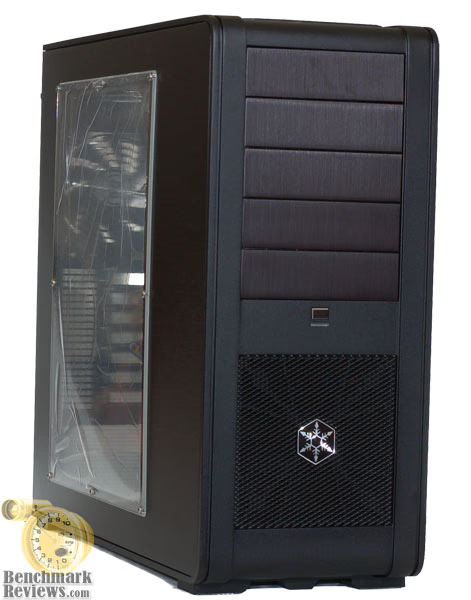
So, after we get over the fact that it's a stunning looker, we take a peek inside to find out what it's really made of. The FT01BW makes this easy, with its large, clear, side window and black interior finish. The Fortress Series FT01 models impress with uni-body construction, acoustic foam on the sleek side panels, a couple of 180mm slow speed fans, and modular drive bays for the HDDs. Things are definitely looking up; let's take it home and see what it can do.
SilverStone Fortress Features
More than two years after the introduction of the world's first uni-body PC chassis, the SilverStone Temjin TJ07, a new product line was created to extend this unique construction further into other applications. The first model for this line is the Fortress FT01, which sports the same super strong uni-body frame as its predecessor but with a sleeker profile thanks to its smaller size. Designed with positive air pressure concept, it enables better cooling performance than traditional chassis but also helps to prevent dust from penetrating into the chassis by use of filters on intake fans and forcing air out of the chassis through unfiltered vents and gaps. Comprised of modern touches such as quick release drive cages and dual 180mm fans, this case is easily the top choice for anyone looking to assemble a top of the line midsize system.
Special Features
-
Positive air pressure design optimizes cooling performance
-
Uni-body frame construction from the flagship Temjin TJ07
-
Artful, understated design with excellent ergonomics
-
Dual 180mm silent fans included for outstanding cooling and quietness
-
Minimal use of rivets for maximum serviceability
-
Highly flexible drive storage options with hot-swappable SATA adapter
SST-FT01B-W Specifications

About the company: SilverStone Technology
Founded in 2003, SilverStone is an established leader in its field, with an elite team of engineers; we started our quest of providing products that create inspirations. We have since expanded the lines of products as well as types of products we produce, giving our customers a wide selection of choices. With distribution centers in different areas of the globe, SilverStone products can be seen all over the world, not just for computer users but also for home entertainment use. Providing leisure with integration of advanced technologies that is functional and making them enjoyable to use.
Here at SilverStone Technology, we continue to pride ourselves in providing the highest level of standards in designing and manufacturing computer enclosures, power supplies, and accessories. Our pursuit for the first class aesthetic appeal is relentless; our teams of devoted engineers are constantly searching for the best technologies that suit end-users with different needs and will make our products as technologically sound as they are beautiful.
If you have any doubts about SilverStone Technology's ability to stay on the leading edge of technology, take a look at just two of the 2008 Milestones listed on their website:
-
January - SilverStone NVIDIA ESA Certified Chassis, Temjin J10-ESA announced
-
July - SilverStone announced ZM1200 & ZU1200 to support GTX 280 in 3-way SLI
Closer Look: Exterior
The SilverStone FT01BW is a sleek looking mid-tower case, largely constructed of Aluminum. It is the first mid-tower made by SilverStone with their uni-body construction, which they introduced in September of 2005, with the Temjin TJ07. That model was widely hailed as a pioneer in case design. With all the different models that SilverStone produces, it's difficult to call it the top of their line, but it clearly benefited from a no-holds-barred design approach. There were generally two criticisms laid on the TJ07; the fans were too noisy, with an irritating quality, and some of the larger, thinner panels tended to vibrate. SilverStone has responded with some design changes in the FT01 series that tackle those problems head on.
The ventilation system in the FT01 is all new and follows some industry trends, but with a unique twist. There are three fans included with the FT01, two 180mm intakes and one 120mm exhaust. The idea is to provide a decidedly positive pressure inside the case, in order to keep dust from getting sucked in through all the unfiltered holes, large and small, that are part of most electronics enclosures. The two large fans, in front and on top, are consistent with current practice and really help to reduce noise while still providing serious airflow. In order to keep the width from growing too much, SilverStone used a non-tradition fan size of 180mm. This allowed them to keep a 220mm overall width, which is common with several of their tower type cases. In contrast, Antec went with a standard 200mm size on their Mini P182, and had to increase the case width to 283mm.

The twist on airflow management that SilverStone is promoting, positive case pressure, is a valid one. While the main areas of inward airflow can always be fitted with a filter, all the small gaps and holes remain as entry points for dust if the interior of the case has a lower pressure than ambient. Their website has a good explanation of the subtleties surrounding this design choice: https://www.silverstonetek.com/tech/wh_positive.php?area
I've always been annoyed at the dust that accumulates inside my computers and all the other electronics I have in the house. The computer has by far the largest volume of airflow, so it gets the dirtiest, the fastest. It would be just an annoyance, if it weren't for one thing: overclocking.
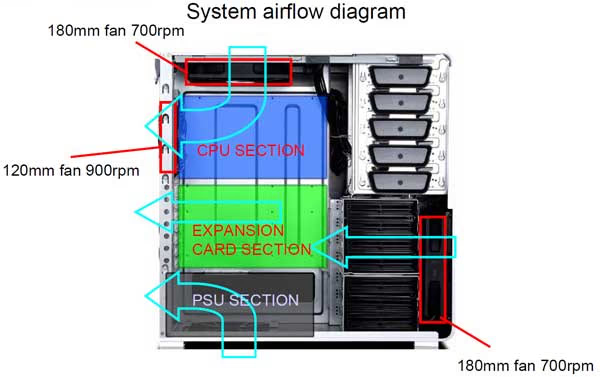
While some cases offer a myriad of choices on fan sizes, locations and airflow, the SilverStone FT01 seems to offer little or no choice. Sometimes, too much choice is a bad thing. Some people make good choices, some people make bad choices. At least with the FT01 you know that you are getting a configuration that is tested. The main problem is that there is no way of knowing what kind of thermal load the end user is going to put on it. Will it be a 125W AMD Phenom and a 4870X2 GPU, or a 45nM Intel Penryn and one of the lower power 9800GTX GPUs?
Choose your CPU HSF and mounting method carefully, a horizontal flow unit that can be oriented to direct air toward the rear fan will work best. Some combinations of CPU and HSF are more flexible than others. A recent build with an AMD CPU and a Xigmatek HDT-S1283 limited my choices to straight up or straight down. There was no way to get the airflow horizontal, without buying extra mounting accessories. I don't see either of those options being a good fit for this case, unless you break the rules and reverse the top fan to make it an exhaust. If you want to replace any of the fans with a more powerful unit, the 180mm top and front fans are an odd size, and although the mounting brackets will support 120mm fans, you would have to give up the noise performance of the larger diameter units that are already installed. A higher speed 180mm fan, with speed controls would have enabled more flexibility and increased the overall cooling performance envelope.
SilverStone makes a compelling case for filtered intakes, in order to keep dust out of the system. There are three filters in the FT01: one above the top 180mm fan, one in front of the front 180mm fan and one below the PSU mounting location. They are all plastic mesh screen captured in a rigid plastic frame. The one in front is easily removable from the side, once the windowed side panel is off.

The other two are removable, only in the sense that they are fastened to the case with screws and can be uninstalled. They also require the removal of the fan for the top filter, and the PSU for the bottom filter. Neither of these is a piece of cake in a fully populated system, making it very likely that these two filters will rarely be cleaned. It's a shame, as I think that a simple design modification would allow both of them to be removed from the rear, without compromising the integrity of the unibody frame.
Detailed Exterior Features
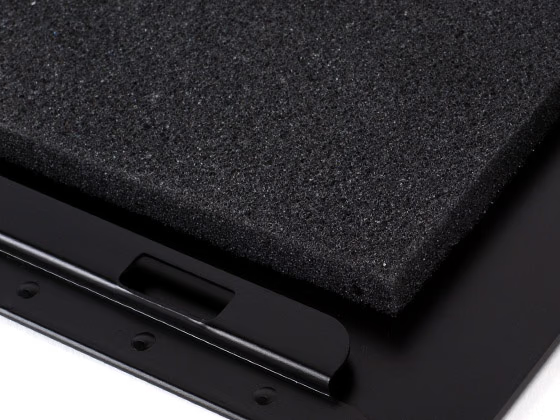
The side panels on the FT01 series are basically flat aluminum sheets, 1mm thick, with a grained finish. Like the rest of the case, the finish is high quality and extremely consistent. In contrast to the earlier products, both side panels are lined with sound dampening foam. This type of material is better at absorbing high frequency noise than it is at damping panel flexure, but it does a little bit of both, which might be the right choice. I've yet to see any manufacturer go full bore on acoustic treatments, which is strange, since it is relatively mature technology and is readily available in what I would call a companion marketplace, car audio. So far, only the case modder crowd is using the combination of constrained layer damping, and isolation, barrier, and absorbing layers. The reason you probably don't need to go to these lengths is that most cases have lots of open areas, large and small, for sound to leak through.
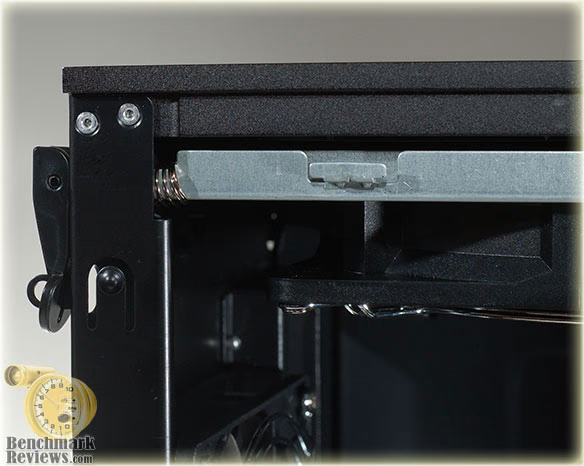
The side panels are held on by a series of tabs and slots on the upper edge. There are two flip levers on the back of the case that control the locking slides on each side. These slides are one of the reasons the top filter is not easily removed for cleaning, like the front one is.
The external ports; USB, Firewire, and Audio, are located in a fixed inset panel on the top of the FT01. The jacketed cables leading from this panel are quite long and will have no problem reaching any corner of an ATX style motherboard. The markings on the ports are pretty much too small to be useful, but if you don't know what a USB port looks like, you probably aren't reading this. The audio ports are color coded to the standard scheme, so at least they are readily identifiable. I expected to see an eSATA port on a product this new, however.

The bottom of the chassis has fairly rigid feet located at the four corners. They are part of a sturdy hard plastic assembly that bolts into the thickest part of the unibody frame extrusion. There is no question of the durability of these feet; they were made to take a beating, if necessary. This image also shows a good view of the lower PSU intake filter and its location directly below the PSU.

The rear of the chassis has all the usual features, including the obligatory water cooling grommets, and is extremely well ventilated, as you can see.

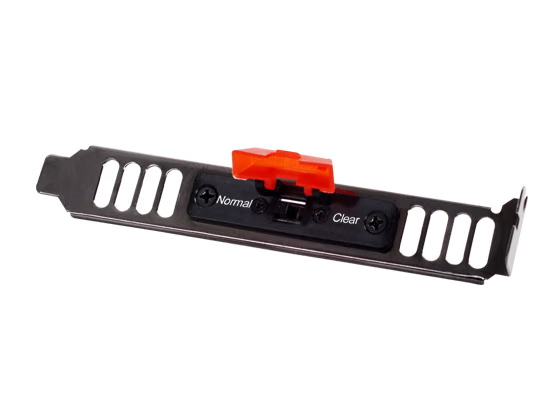
The rear of the case has a dedicated mounting spot for one of SilverStone's handy CMOS reset button assemblies. As you can see, there are two mounting options. The one on the chassis looks a little neater, but it is nice to have the card slot cover option available.

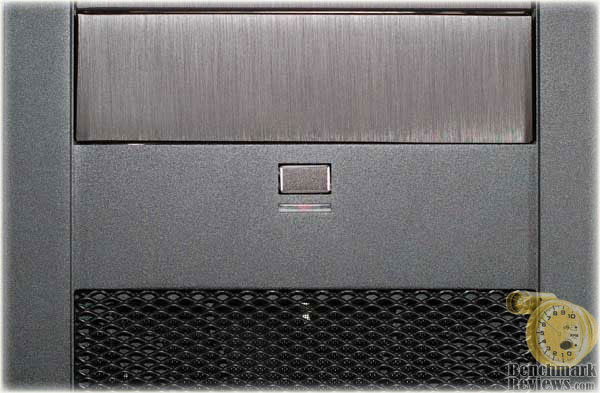
The front of the case sports a centrally located power switch and an LED that lights up blue when the system is powered up. It's a normal strength LED, no blinding blue lights burning a hole in your retina late at night. This image shows one of the few visual miscues that the case makes.
The covers for the empty 5.25" drive bays are brushed finish aluminum, while the main (unibody) part of the chassis is a matte finish. The colors are slightly different, as well and I think it looks a bit amateurish. Each of the two finishes is executed in a high quality fashion; they just don't match up very well, visually. The rest of the metal finishing is impeccable, this is the only area I think could be improved. The side panels have a finish that is more pure black, and it matches better with the main unibody. The drive covers have a purplish cast to them. Aluminum anodizing is one of the least repeatable processes in terms of appearance, so this is a common problem for consumer products. It is also one that has been mastered by the top metal finishers, so this is an easy fix.
Closer Look: Interior
The interior always makes or breaks a computer case for me, because it's where I do all my work. I'm not a case modder that unleashes my own brand of artistry on the original canvas, so the only real pride I can take from the physical product of my efforts is how well the system build is put together. Let's see how I got on with the SilverStone FT01BW.
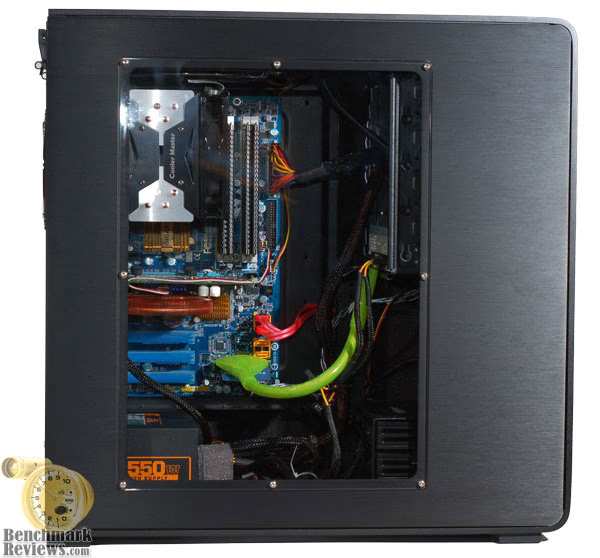
The first thing you notice about the FT01BW is the full-on black interior, it's only offered on the black model with the side window. The matte finish powder coat is as carefully applied as it is on the outside. Everything else inside the chassis just jumps out at you, sort of like a painting on black velvet. Well, maybe better than that.....yeah, quite a bit better than that. Lets look at the major sections first.
There is a small lip at the bottom of the motherboard tray that defines the upper limit of the power supply area. There is a small rubber pad on the back end that presses tight against the power supply, to reduce vibration. It does make the installation of the PSU a little fiddly, but once installed, everything fit nice and snug.
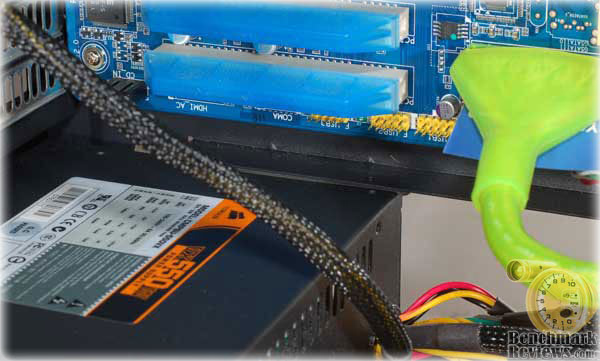
The chassis allows the PSU to be installed "right side up" or upside down. This is only an issue if the PSU has a bottom (or top) mounted fan. In the "right side up" configuration shown above, the fan pulls air into the PSU from the filtered bottom intake and exhausts it out the back, into the room. This is a nice short, independent path to get cool air into the PSU and hot air out of the case. In the upside down configuration, the PSU fan would pull hot air away from the video card area and exhaust it out the back. I like the idea of cool, fresh air passing thru the PSU, so I chose the "right side up" orientation.
While we're on the subject of the PSU, I had a hard time finding a good place to store all of the unused cables. A modular power supply would obviate this issue, but not everyone has or wants a modular PSU. I ended up with all the cables lying on the bottom, admittedly out of the way, but not very attractive. Unfortunately, the side window extends quite low on the panel and the snake pit of cables is easily visible to the casual observer. Please do forgive the block of acoustic foam mounted on the PSU, it's a leftover from another build, and I really should have removed it before I took the photos. My bad....OTOH those snakes need something to chew on .

The upper bank of drive bays will accommodate five 5.25" drives, each of them sliding in from the front and latching in place with the tool-less locking levers. The fit and finish of the metalwork in these bays is first class, not a sharp edge anywhere.

The tool free locking assemblies operate very easily and are pretty foolproof. The locking pins on the inside engage the mounting holes on the side of the drive, securing it in place. I tried several drives in different bays and they all fit the same, very snug. I see no reason to add the optional mounting screw on the back side, unless I was going to subject the case to severe vibration.

There is one area where I really felt let down by this case, and maybe wrongly so, but I really struggled with cable management. Take a look at the back side of the motherboard tray on the completed systems and I think you'll see why.
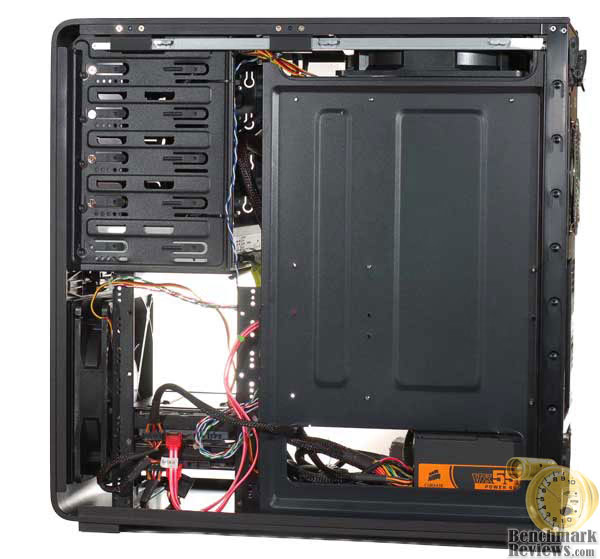
There's a distinct lack of any accommodation on the MB tray for cable routing. No intermediate pass-thrus, no tie-down points, and the clearance between the back of the tray and the rear side panel is too slim to allow passage of the main ATX power cable. There are several pass-thrus between the PSU and the HDD area, but the middle two SATA power connectors wouldn't fit through without removing the rubber grommets. I know, I should have made the effort, but it was thin enough to snake around the back, so I took the easy route, literally.
Maybe I lost my hair shirt somewhere along the way, and now I'm just spoiled and lazy, but there have been several cases reviewed here lately that make it so much easier to create a neat presentation. The fact that this case had a big, clear window on the side, showing all of my cable management transgressions didn't make me feel any better. I can blame some of it on the "medium length" cables supplied with the Corsair PSU, but I've used the same PSU on other builds and got the routing a little cleaner.
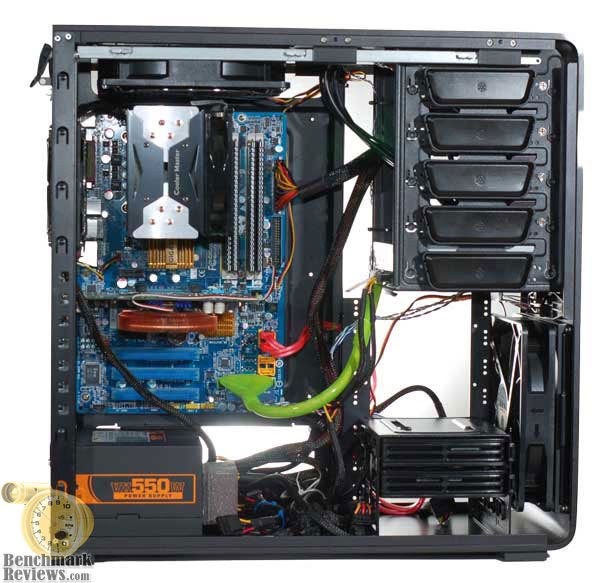
In the "olden" days, it was up to the system builder to make the cables look good; the more challenging, the better. There was a real sense of achievement and pride, because it was all up to the builder and their own creativity and hard work. Nothing was easy back then, and we can thank those early pioneers for the improvements that case makers have incorporated into their newer designs. There is still a contingent of old school folks who scoff at how easy it is today, but I just don't want to work that hard anymore. So there lies the truth: I am actually just spoiled and lazy, and it showed on this occasion.
Drive Cage Features
The HDD area has two sections, housing seven cages in groups of four and three. Each section can be removed independently, allowing for flexibility in video card installation and fine tuning of the airflow inside the chassis. Here's how they look as the case comes from the factory.
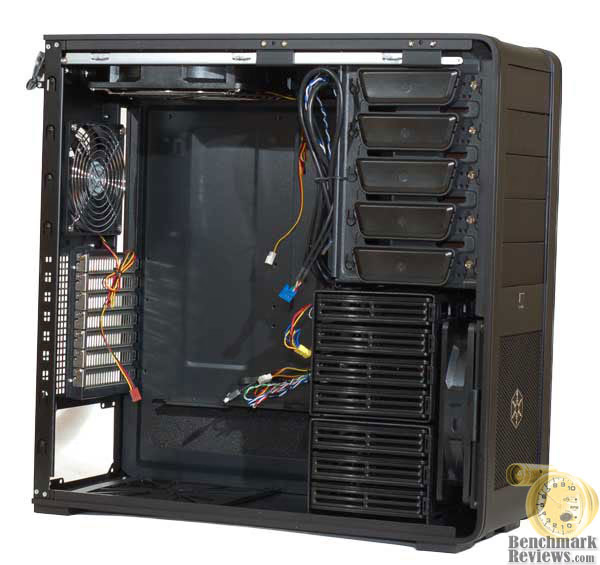
Here's a closer look of the internal design, and a view of how they are mounted in relation to the front fan.

I ended up choosing to remove the upper cage assembly, to provide better airflow to the center section of the case. I felt that the air from the upper fan was short circuiting out the rear and not providing enough cool air for the Northbridge, which is a critical element in the overclocking of any Intel P35 motherboard.
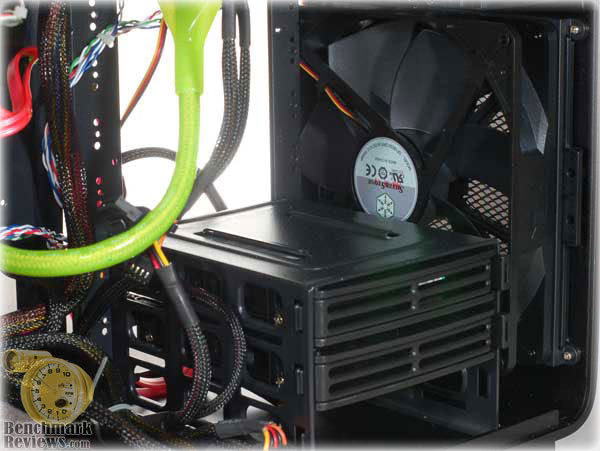
Each of the plastic drive cages is set up to hold a standard 3.5" drive, with four screws riding in elastomeric shock mounts. The mounts come preinstalled in the cage; the screws are in the accessory kit.
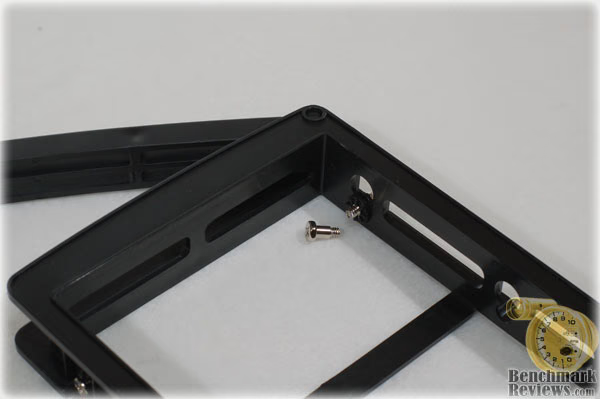
The drives fit tightly in the cage, requiring a little bit of squirming to get them in without messing up the alignment of the soft shock mounts. The screws installed easily once all the holes were lined up and the whole assembly slid smoothly into the drive rack.

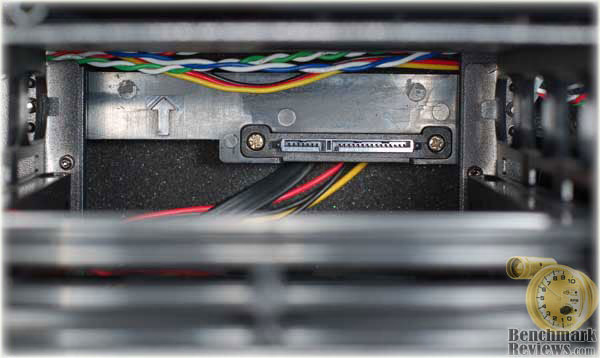
One of the stand-out features of this case is the incorporation of the CP05 hot swappable connectors for SATA HDDs. There are mounting points on at each HDD locations and one connector kit is preinstalled. Here's how it installs from the back side, ...
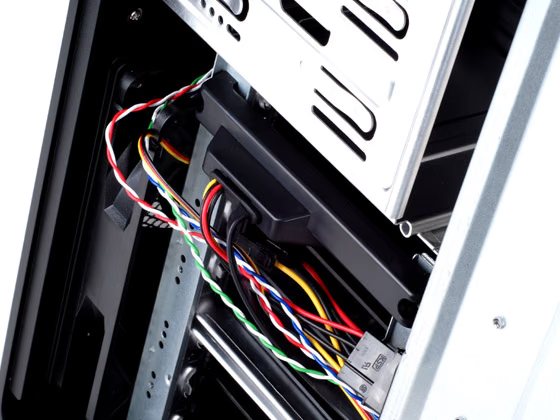
... and a view from the drive side. Everything worked fine when I tried it out. The alignment was spot on and there was no significant flex of the mounting bracket during the connector mating process. Sorry, that sounded a little too much like Animal Planet. No more talk about mating processes.
Detailed Interior Features
In some cases (no pun intended) the interior is a wonderful surprise; think of Forrest Gump's analogy of a box of chocolates. You don't really know what you're going to get until you bite into it. In our case (sorry...) until you actually build a system with a given chassis, you can't really appreciate the subtle design details that separate the dreams from the nightmares. Lets have a look and see whether the SilverStone Fortress Series FT01 case is a chocolate covered cherry or a date. We all hate dates, right...?

The seven card slots have perforated covers for ventilation and are attached the old fashion way, with screws. I'm actually OK with this method, since the one screw is right there, easily accessible while you're installing or removing the card. That's not generally true in the case of drives, so tool-less methods make more sense there.

This view of the top and rear fans shows the power cables and their connectors. Silverstone wisely chose to use standard three pin fan connectors, which will plug directly onto the headers included on most motherboards. They also include an adapter in the accessory kit, to allow connection to a four pin Molex HDD connector. I used that for the front fan, as it was the closest to the PSU.

You can also see the filter frame sticking out towards the front of the case, behind the fan. The filter frame is able to slide out a short distance towards the front, but is blocked by the top mounted external ports. I'm sure that if the assembly were turned 180°, and a slot were cut on the back panel, the filter could be removed from the rear, without even opening up the side panel.
The parts kit included with the FT01 looks pretty spartan, but everything you need is included.

Thermal Testing
Testing Methodology
I tested the thermal performance of the SilverStone Fortress FT01BW with my standard test platform, which normally resides in an Antec Sonata II case. The old case has only two 120mm fans; one intake in the front and one exhaust in the rear. It was the standard configuration for mid tower cases for many years and it works reasonably well. Time and innovation have marched on, however and I expected the newer case to outperform it. Here's the test system details, somewhat of a budget build, i.e. not quite ready for serious gaming without a GPU upgrade:
-
Motherboard: Gigabyte GA-P35-DS3L Rev 2.0
-
System Memory: 4X 1GB Corsair Dominator DDR2 800MHz
-
Processor: Intel E2180 Core 2 Duo 2.00GHz (Overclocked to 3.0 GHz)
-
CPU Cooler: CoolerMaster Hyper 212 RR-CCH-LB12-GP
-
Audio: On-Board Realtek ALC888 Audio
-
Video: EVGA 256-P2-N751-TR GeForce 8600GT 256MB GDDR3 PCI-E
-
GPU Cooler: Zalman VF900-Cu
-
Disk Drive 1: Western Digital WD6400AAKS 640GB (320GB/Platter) SATAII
-
Disk Drive 2: Seagate ST3750330AS 750GB 7200RPM SATAII
-
Optical Drive: Sony NEC Optiarc AD-7190A-OB 20X IDE DVD Burner
-
Enclosure No. 1: Antec Sonata II Mid-Tower ATX Case
-
Enclosure No. 2: SiverStone Fortress FT01BW ATX Case
-
PSU: Corsair CMPSU-550VX ATX12V V2.2 550Watt
-
Monitor: SOYO 24" Widescreen LCD Monitor (DYLM24E6) 1920X1200
-
Operating System: Windows XP SP3
I used a combination of benchmarking tools to load up the CPU and GPU and recorded the maximum temperatures of various system components at both idle and full load. The test applications included:
-
3DMark06 v1.1.0
-
PCMark05 v1.2.0
-
FurMark v1.4.0
-
HWMonitor v1.06
I used three configurations: an open case, with no airflow restrictions and a mild breeze from a desktop fan located about 3 feet away (best case scenario), the Antec Sonata II with both fans operating at full speed, and the SilverStone FT01BW with all three fans at full speed. Here are the results for the idle condition:

Here are the results for the fully loaded condition:

The results are pretty conclusive, at least for this test system. With the exception of the GPU, the Silverstone FT01 came pretty close to the open case results. With this particular GPU and cooler, I've seen the best results from cases that had side mounted fans blowing cool air directly into the intake area of the GPU cooler fan. Every configuration is slightly different, but I believe the SilverStone FT01 would benefit from a GPU cooler that has a fan intake closer to the front of the case and exhausts to the outside. This is a common configuration for modern, high end video cards, and is exactly the type that SilverStone shows in their product data for the FT01 Fortress series.
Fortress Series Final Thoughts
The packaging for the FT01 is more than adequate to protect the contents. The box came to my doorstep via UPS, and despite the singe box packing, there was little damage to the outside of the box and none inside. The large styrofoam inserts at the top and bottom of the box held everything in place and there was ample space between the sides of the chassis and the exterior of the box. The case was wrapped in a large polyethylene bag and some desiccant was included to absorb any moisture that may have been trapped in the bag.
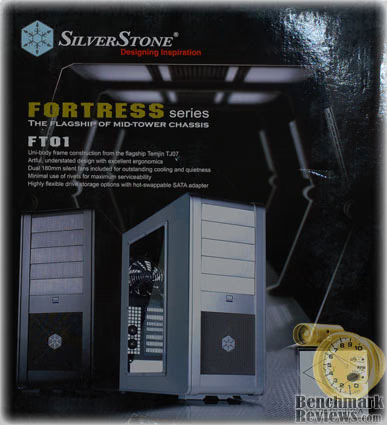
SilverStone Technology chose a subtle and classy color scheme to make their product stand out on the shelves. The combination of dark black background and the high quality photos of the product makes a very positive impression. There are complete descriptions of the product spread across the various surfaces, including images and descriptions to highlight the flagship feature of the FTS01.
As an object d'art, the SilverStone Fortress Series, especially the FT01BW, excels. Artwork often needs a certain scale to be successful; the Mona Lisa would not work as a miniature portrait, she needs that human scale to pull off the trick of watching you from every corner of the room. Certain works only succeed when constructed in epic proportions; think of a Bentley or a Rolls, a small version would look silly. The design of the FT01 is correct for its proportions and the combination makes a powerful statement of solid, certain, capability. Think of the BMW 750i, before Chris Bangle messed it up with a bustle in the back, and you have some idea of the purposeful impact of its visual design. I can certainly argue against five exposed 5.25" drive bays, and seven 3.5 internal HDD bays as being less than useful in today's computing environment, but it's part of the package that comes with the genre of a high end, slightly larger than needed, mid tower case.
SST-FT01BW Conclusion
The SilverStone FT01is in some ways, a carefully tuned product; it's airflow, for instance. In other aspects it's a blank canvas for serious builders. There's no denying its good looks, particularly the version I reviewed, with the large, clear side window and black interior. It really highlights the system components, especially if you add a splash of color with cables and such. Unfortunately, you're going have to work a little harder than normal to make everything look nice and tidy. It's not impossible, but an extra dose of creativity and effort is required to overcome the minimal cable management features. Some will welcome the challenge, others will complain loudly to no one in particular.
The metalwork and finish quality are top notch, and although the effect is subtle, it's obvious to those who know the difference. The unibody construction results in a very light and strong chassis, and this is one feature that won't change or wear out over time. The reduction in number of fasteners pays off in both strength and durability. All the (12) drive sections are removable to improve access during the build process. Once again, for those willing to make an extra effort, the case will reward you.
The airflow will be the most controversial element of this case. For some, it will be too little, in the wrong places, and entering where they want it to exit. Choose your CPU HSF and mounting method carefully, or you could end up with dueling fans, and the case fan will win. There is always the possibility of reversing one of the three supplied fans, although the dust reduction performance will suffer.
NewEgg currently sells the SilverStone FT01B-W Black Aluminum ATX Mid Tower Uni-body Computer Case currently sells for $229.99, while the non-window versions are $10 less. Of course, with the help of our price comparison tool you might find a better deal. This not a budget case, nor is it a $1,000 rocket ship masquerading as a consumer product for enthusiasts. The value proposition has to be on the basis of looks and construction quality, in my opinion. The feature set isn't extraordinary, the airflow design lacks flexibility, and cable management is not up to class-leading standards. If these are minor or non-issues for you, the positive aspects of the design will make it a worthwhile purchase.
In thinking over my experience with this case, it all boiled down to my intended use. If I'm planning on building a really nice system, and leaving it alone for long stretches at a time, this is a great looking case that will reward me every time I walk in the room and admire its sleek design and high quality construction. But, if I'm planning on using it as a platform for continuous component upgrades, I'll probably be unhappy every time I have to remove and reinstall major system components. I won't want to make the extra effort to make it look special, and over time that will grate on me. This is a clear case of "You pays your money, and makes your choices." Hopefully you will have a clear idea of your needs before you make a buying decision. Buy this case for the right reasons and you will be pleased every time you use it. Just don't blame me if you have a chronic case of the upgrade bug and you find it difficult to keep the internal appearance in step with the outside.
Pros:
+ Classic design principles, executed with precision
+ Light weight, strong construction
+ Quiet design with high quality fans
+ Dust-Free pressurized case design
+ Flexible HDD drive bay provisions
+ SATA hot-swap feature available, one included
+ Flexible mounting of PSU
+ Did I mention how good it looks...?
Cons:
- Two of three filters not easily removed and/or cleaned
- Cable management could use improvements
- Airflow options are limited
- Slight mismatch of anodized finish on external drive bay covers
- No eSATA connector on external patch panel
Ratings:
-
Presentation: 8.75
-
Appearance: 9.50
-
Construction: 9.50
-
Functionality: 8.50
-
Value: 8.50
Final Score: 8.95 out of 10.
Quality Recognition: Benchmark Reviews Silver Tachometer Award.
Questions? Comments? Benchmark Reviews really wants your feedback. We invite you to leave your remarks in our Discussion Forum.
Reader comments from the original article
1 comment were posted before commenting closed. They are preserved as written. Original avatars no longer resolve and are shown as a placeholder.
Top filter Problem solved charliesierra Permalink:
Now , no problem with the top filter, Silverstone has done an improvement , you can now extract the filter by the left side, without difficulties