
ASUS P8Z77-V Deluxe Benchmark Performance
ASUS P8Z77-V Deluxe Motherboard Benchmark Performance
Manufacturer: ASUSTeK Computer Inc.
Model Number: P8Z77-V Deluxe
Product Name: Intel Z77 Express motherboard
Price: $274.99 at Newegg
Full Disclosure: ASUSTek Computer Inc. provided the product sample used in this article.
Note: Benchmark Reviews offers the ASUS P8Z77-V Deluxe Motherboard Components and Features Overview in separate articles.
ASUS' motherboard product line is so diverse that even reviewers need a score card. For LGA1155 alone, there are nine different chipsets in ASUS' current offerings, and subdivisions within each chipset line. There are eleven current ASUS Z77-based motherboards, and that's not counting a few that have been shown to the press but not formally introduced yet.
ASUS enthusiast motherboards fall into three broad categories: the Republic of Gamers series, with features that cater to extreme overclockers and gamers; specialty lines like the workstation oriented "WS" series, and the mainstream line. What Benchmark Reviews has today is the top end of ASUS' mainstream P8Z77 line, the P8Z77-V Deluxe.
Every panel on this box (including the flip-up lid over the display window, through which you can see your shiny new motherboard without having to open the box) is covered with layer upon layer of feature and specification listings. This motherboard seemingly has everything except the kitchen sink, but how much of it can you really use?
Testing Methodology and Specifications
I was fortunate enough to have three new Intel Z77 Express motherboards available: the MSI Z77A-GD65 that I've previously reviewed, a new Intel DZ77GA-70K, and the subject of this performance comparison, the ASUS P8Z77-V Deluxe.
I compared the performance of the motherboards at stock speeds using the benchmark programs listed below, with a spiffy new Ivy Bridge Core i7-3770K CPU. Since the Core i7-3770K's "HD 4000" integrated graphics shares L3 cache and memory bandwidth with the CPU cores, I disabled it and use and AMD Radeon HD5770 video card for all benchmarks. I used the same processor, hard disk, and memory on each motherboard, so that the motherboards were the only thing that changed between tests. Any performance differences at stock clock speeds are thus due to the motherboards.
On the ASUS motherboard, I also ran the benchmarks at the highest overclock I could achieve.
Intel Z77 Express Test Platform
- Motherboard: MSI Z77A-GD65 (BIOS 10.3B6)
- Motherboard: Intel DZ77GA-70K (BIOS GA7710H.86A.3000.R09.1203090931)
- Motherboard: ASUS P8Z77-V Deluxe (BIOS 0906)
- Processor: 3.5GHz Intel Core i7-3770K
- System Memory: 8GB (2 4GB DIMMs) DDR3-1600 (9-9-9-27)
- Primary Drive: Seagate Barracuda ST3500418AS 500GB
- Graphics Adapter: AMD Radeon 5770
- CPU cooler: Thermalright Silver Arrow
Benchmark Applications
- Operating System: Windows 7 Home Premium 64-Bit
- AIDA64 Extreme Edition v2.20.1800
- Futuremark PCMark 7 v1.04
- Productivity
- Creativity
- Computation
- Maxon CINEBENCH R11.5 64-Bit
- Street Fighter IV benchmark
- x264Bench HD 3.0
- SPECviewperf-11:
- Lightwave 9.6
- Autodesk Maya 2009
- Siemens Teamcenter Visualization Mockup
- SPECapc LightWave 3D v9.6
- Handbrake 0.96 video transcoding
- Blender 3D rendering
- POV-Ray 3D rendering
- ATTO Disk Benchmark 2.46
- CrystalDiskMark 3.0.1a
ASUS P8Z77-V Deluxe Specifications
Specifications supplied by ASUS.
| CPU | Intel® Socket 1155 for 3rd/2nd Generation Processors Supports Intel® 22 nm CPU Supports Intel® 32 nm CPU Supports Intel® Turbo Boost Technology 2.0 |
|---|---|
| Chipset | Intel Z77 |
| Memory | 4 x DIMM, Max. 32GB, DDR3 MHz Non-ECC, Un-buffered Memory Dual Channel Memory Architecture Supports Intel® Extreme Memory Profile (XMP) |
| Graphics Support |
Integrated Graphics Processor |
| Multi-GPU support | Supports NVIDIA® Quad-GPU SLITM Technology Supports AMD Quad-GPU CrossFireXTM Technology Supports AMD 3-Way CrossFireXTM Technology Supports LucidLogix® VirtuTM MVP Technology |
| Expansion Slots | 2 x PCIe 3.0/2.0 x16 (x16, x8) 1 x PCIe 2.0 x16 (x4 mode, black) 4 x PCIe 2.0 x1 |
| Storage | Intel® Z77 chipset : 2 x SATA 6Gb/s port(s), gray 4 x SATA 3Gb/s port(s), blue Support Raid 0, 1, 5, 10 Supports Intel® Smart Response Technology, Intel® Rapid Start Technology, Intel® Smart Connect Technology Marvell® PCIe 9128 controller : 2 x SATA 6Gb/s port(s), navy blue Support Raid 0, 1 ASMedia® PCIe SATA controller : 2 x eSATA 6Gb/s port(s), red |
| LAN | Intel® 82579V, 1 x Gigabit LAN Controller(s) Realtek® 8111F, 1 x Gigabit LAN Controller(s) Dual Gigabit LAN controllers- 802.3az Energy Efficient Ethernet (EEE) appliance Intel® LAN- Dual interconnect between the Integrated LAN controller and Physical Layer (PHY) |
| Wireless data network | Wi-Fi 802.11 a/b/g/n Supports dual frequency band 2.4/5 GHz |
| Bluetooth | Bluetooth V4.0 Bluetooth V3.0+HS |
| Audio | Realtek® ALC898 8-Channel High Definition Audio CODEC - Supports : Jack-detection, Multi-streaming, Front Panel Jack-retasking Audio Feature : - Absolute Pitch 192kHz/ 24-bit True BD Lossless Sound - Blu-ray audio layer Content Protection - DTS Ultra PC II - DTS Connect - Optical S/PDIF out port(s) at back panel |
| IEEE 1394 | 1 x IEEE 1394a port(s) |
| USB Ports | ASMedia® USB 3.0 controller : 4 x USB 3.0 port(s) (4 at back panel, blue) Intel® Z77 chipset : 4 x USB 3.0 port(s) (2 at back panel, blue, 2 at mid-board) Intel® Z77 chipset : 8 x USB 2.0 port(s) (4 at back panel, black, 4 at mid-board) |
| Back I/O Ports | 1 x DisplayPort 1 x HDMI 2 x eSATA 6Gb/s 2 x LAN (RJ45) port(s) 6 x USB 3.0 4 x USB 2.0 1 x Optical S/PDIF out 6 x Audio jack(s) 1 x Bluetooth V4.0 connector(s) for ASUS Wi-Fi GO! card 1 x USB BIOS Flashback Button(s) |
| Internal I/O Ports and buttons | 1 x USB 3.0 connector(s) support(s) additional 2 USB 3.0 port(s) (19-pin) 2 x USB 2.0 connector(s) support(s) additional 4 USB 2.0 port(s) 4 x SATA 6Gb/s connector(s) 4 x SATA 3Gb/s connector(s) 1 x CPU Fan connector(s) 4 x Chassis Fan connector(s) 1 x Optional Fan connector(s) 1 x S/PDIF out header(s) 1 x 24-pin EATX Power connector(s) 1 x 8-pin ATX 12V Power connector(s) 1 x Front panel audio connector(s) (AAFP) 1 x System panel(s) 1 x MemOK! button(s) 1 x TPU switch(es) 1 x EPU switch(es) 1 x Power-on button(s) 1 x Reset button(s) 1 x Clear CMOS jumper(s) |
Let's get to the benchmarks!
AIDA64 Extreme Edition Tests
AIDA64 Extreme Edition is the evolution of Lavalys' "Everest Ultimate Edition". Hungarian developer FinalWire acquired the rights to Everest in late November 2010, and renamed the product "AIDA64". The Everest product was discontinued and FinalWire is offering 1-year license keys to those with active Everest keys.
AIDA64 is a full 64-bit benchmark and test suite utilizing MMX, 3DNow! and SSE instruction set extensions, and will scale up to 32 processor cores. An enhanced 64-bit System Stability Test module is also available to stress the whole system to its limits. For legacy processors all benchmarks and the System Stability Test are available in 32-bit versions as well. Additionally, AIDA64 adds new hardware to its database, including 300 solid-state drives. On top of the usual ATA auto-detect information the new SSD database enables AIDA64 to display flash memory type, controller model, physical dimensions, and data transfer performance data. AIDA64 v1.00 also implements SSD-specific SMART disk health information for Indilinx, Intel, JMicron, Samsung, and SandForce controllers.
All of the benchmarks used in this test- Queen, Photoworxx, ZLib, hash, and AES- rely on basic x86 instructions, and consume very little system memory while also being aware of Hyper-Threading, multi-processors, and multi-core processors. Of all the tests in this review, AIDA64 is the one that best isolates the processor's performance from the rest of the system. While this is useful in that it more directly compares processor performance, readers should remember that virtually no "real world" programs will mirror these results.

The Queen and Photoworxx tests are synthetic benchmarks that iterate the function many times and over-exaggerate what the real-world performance would be like. The Queen benchmark focuses on the branch prediction capabilities and misprediction penalties of the CPU. It does this by finding possible solutions to the classic queen problem on a chessboard. At the same clock speed theoretically the processor with the shorter pipeline and smaller misprediction penalties will attain higher benchmark scores.
Like the Queen benchmark, the Photoworxx tests for penalties against pipeline architecture. The synthetic Photoworxx benchmark stresses the integer arithmetic and multiplication execution units of the CPU and also the memory subsystem. Due to the fact that this test performs high memory read/write traffic, it cannot effectively scale in situations where more than two processing threads are used, so quad-core processors with Hyper-Threading have no real advantage. The AIDIA64 Photoworxx benchmark performs the following tasks on a very large RGB image:
- Fill
- Flip
- Rotate90R (rotate 90 degrees CW)
- Rotate90L (rotate 90 degrees CCW)
- Random (fill the image with random colored pixels)
- RGB2BW (color to black & white conversion)
- Difference
- Crop
As you might expect with three motherboards running the same chipset and processor, the performance results are very close, with the MSI motherboard running just a few percent behind the Intel and ASUS motherboards. Overclocking to 4.7GHz on all cores helps the Queen score a bit (20%) but doesn't do much for Photoworxx.

Overclocking buys us 20% improvements in both ZLIB and Hash (the ZLIB results don't look as impressive due to the scaling of the chart).
The AES test shows virtual parity between all platforms, although going by the numbers the MSI motherboard wins this one. Oddly, overclocking the ASUS motherboard lowers the score very slightly.

Let's move on to the PCMark 7 benchmark.
PCMark 7 Tests
PCMark 7 is Futuremark's successor to PCMark Vantage. The full suite of tests comprises seven different sequences with more than 25 sub-tests that exercise your system's abilities in storage, computation, image and video manipulation, web browsing and gaming. It was developed with input from the designers, engineers and product managers at AMD, Compal, Dell, Hitachi GST, HP, Intel, NVIDIA, Samsung, Seagate, Western Digital and many other well-known companies.
For this benchmark I chose the PCMark test, which provides a number indicating total system performance, as well as the Productivity, Creativity, and Computation test suites.
Productivity Test
The Productivity test is a collection of workloads that measure system performance in typical productivity scenarios. Individual workloads include loading web pages and using home office applications. At the end of the benchmark run the system is given a Productivity test score. The Productivity test consists of:
- Storage
- Windows Defender
- Starting applications
- Web browsing and decrypting
- Productivity
- Data decryption
- Text editing
Creativity Test
The Creativity test contains a collection of workloads to measure the system performance in typical creativity scenarios. Individual tests include viewing, editing, transcoding and storing photos and videos. At the end of the benchmark run the system is given a Creativity test score.
- Storage
- importing pictures
- video editing
- Image manipulation
- Video transcoding - high quality
Computation Test
The Computation test contains a collection of workloads that isolate the computation performance of the system. At the end of the benchmark run the system is given a Computation test score.
- Video transcoding - downscaling
- Video transcoding - high quality
- Image manipulation
It's important to note that since PCMark 7 was designed as a system test, the scores are dependent on the configuration of the entire system being tested, including things like the memory, hard disk, and graphics cards used: it's not an isolated test like most of the other benchmarks I'm using in this review. However, since all other hardware (CPU, video card, memory, hard disk, etc.) was identical, with only the motherboards being changed, any performance differences here can be attributed to differences in motherboard performance.

Except in the Computation section, overclocking doesn't help the scores that much. It does boost the Creativity score by 7%, but that won't be noticeable outside benchmark use. But in Computation, we get a nice 25% boost. At stock clock speeds, the ASUS P8Z77-V Deluxe wins in every test except Creativity, where it's edged by the Intel board to the infinitestimal tune of 0.31%. However, it's worth nothing that larger differences than this can be seen between sucessive runs of this benchmark.
In the next section I run everyone's favorite benchmark: CINEBENCH!
CINEBENCH R11.5 Benchmarks
Maxon CINEBENCH is a real-world test suite that assesses the computer's performance capabilities. CINEBENCH is based on Maxon's award-winning animation software, Cinema 4D, which is used extensively by studios and production houses worldwide for 3D content creation. Maxon software has been used in blockbuster movies such as Spider-Man, Star Wars, The Chronicles of Narnia, and many more. CINEBENCH Release 11.5 includes the ability to more accurately test the industry's latest hardware, including systems with up to 64 processor threads, and the testing environment better reflects the expectations of today's production demands. A more streamlined interface makes testing systems and reading results incredibly straightforward.
The CINEBENCH R11.5 test scenario comprises three tests: an OpenGL-based test that models a simple car chase, and single-core and multi-core versions of a CPU-bound computation using all of a system's processing power to render a photo-realistic 3D scene, "No Keyframes", the viral animation by AixSponza. This scene makes use of various algorithms to stress all available processor cores, and the CPU performs all rendering: the graphics card is not involved except as a display device. The multi-core version of the rendering benchmark uses as many cores as the processor has, including the "virtual cores" in processors that support Hyper-Threading. The resulting "CineMark" is a dimensionless number only useful for comparisons with results generated from the same version of CINEBENCH.

Here we see virtual parity between the Intel and ASUS boards, with the MSI board trailing ever so slightly. Overclocking nets a 19% improvement in multi-core rendering and single-core rendering.
Let's take a look at some CPU-limited gaming results in the next section.
CPU-Dependent 3D Gaming
Street Fighter IV uses a new, built-from-scratch graphics engine that enables CAPCOM to tune the visuals and performance to fit the needs of the game, as well as run well on lower-end hardware. Although the engine is based on DX9 capabilities, it does add soft shadows, High Dynamic Range lighting, depth of field effects, and motion blur to enhance the game experience.
The game is multi-threaded, with rendering, audio, and file I/O all running in different threads. The development team has also worked to maintain a relatively constant CPU load in all parts of the game so that on-screen performance does not change dramatically in different game scenarios.

I ran the Street Fighter IV benchmark at its lowest resolution (640x480) will all graphical features turned down to the minimum possible settings. This makes the video card much less of a factor in the results, biasing towards processor performance. The ASUS board performs noticeably better than its competition here, with a score 12% better than its next closest competitor, but overclocking doesn't help it much.
Handbrake Media Encoding
It's a truism that consumer-level computer performance reached the "fast enough" point years ago, where increases in system performance don't make thing any faster for most people. Web browsing, e-mail, word processing, and even most games won't benefit dramatically from a super-fast CPU. There are some exceptions, though, and media encoding is one of them: transcoding video, especially high-definition video, can bring the strongest system to its knees. Fortunately, media transcoding is one of those things that (depending on the design of the code, of course) that scales really well with both clock speed and the number of cores, so the more you have of both, the better your results will be.
The free and open-source Handbrake 0.96 video transcoder is an example of a program that makes full use of the computational resources available. For this test I used Handbrake 0.96 to transcode a standard-definition episode of Family Guy to the "iPhone & iPod Touch" presets, and recorded the total time (in seconds) it took to transcode the video.

Here the Intel and ASUS performance is identical, both being slightly better than the MSI board. Overclocking saves a total of 18 seconds on this relatively short transcode.
x264 HD Benchmark 3.19
Tech ARP's x264 HD Benchmark comprises the Avisynth video scripting engine, an x264 encoder, a sample 720P video file, and a script file that actually runs the benchmark. The script invokes four two-pass encoding runs and reports the average frames per second encoded as a result. The script file is a simple batch file, so you could edit the encoding parameters if you were interested, although your results wouldn't then be comparable to others.

The ASUS board takes a dive here, turning in significantly lower scores than its competition in each of the four x264HD runs.

The P8P77-V Deluxe' performance dip here is something I can't explain. It's significant, too, being about 13% slower than the Intel board every time. Overclocking helps a huge amount, though: at 34% better than non-overclocked, this is the largest delta we'll see overclocking provide in any of these performance tests.
SPECviewperf 11 tests
The Standard Performance Evaluation Corporation is "...a non-profit corporation formed to establish, maintain and endorse a standardized set of relevant benchmarks that can be applied to the newest generation of high-performance computers." Their free SPECviewperf benchmark incorporates code and tests contributed by several other companies and is designed to stress computers in a reproducible way. SPECviewperf 11 was released in June 2010 and incorporates an expanded range of capabilities and tests. Note that results from previous versions of SPECviewperf cannot be compared with results from the latest version, as even benchmarks with the same name have been updated with new code and models.
SPECviewperf comprises test code from several vendors of professional graphics modeling, rendering, and visualization software. Most of the tests emphasize the CPU over the graphics card, and have between 5 and 13 sub-sections. For this review I ran the Lightwave, Maya, and Seimens Teamcenter Visualization tests. Results are reported as abstract scores, with higher being better.
Lightwave
The lightwave-01 viewset was created from traces of the graphics workloads generated by the SPECapc for Lightwave 9.6 benchmark.
The models for this viewset range in size from 2.5 to 6 million vertices, with heavy use of vertex buffer objects (VBOs) mixed with immediate mode. GLSL shaders are used throughout the tests. Applications represented by the viewset include 3D character animation, architectural review, and industrial design.
Maya
The maya-03 viewset was created from traces of the graphics workload generated by the SPECapc for Maya 2009 benchmark. The models used in the tests range in size from 6 to 66 million vertices, and are tested with and without vertex and fragment shaders.
State changes such as those executed by the application- including matrix, material, light and line-stipple changes- are included throughout the rendering of the models. All state changes are derived from a trace of the running application.
Siemens Teamcenter Visualization Mockup
The tcvis-02 viewset is based on traces of the Siemens Teamcenter Visualization Mockup application (also known as VisMockup) used for visual simulation. Models range from 10 to 22 million vertices and incorporate vertex arrays and fixed-function lighting.
State changes such as those executed by the application- including matrix, material, light and line-stipple changes- are included throughout the rendering of the model. All state changes are derived from a trace of the running application.
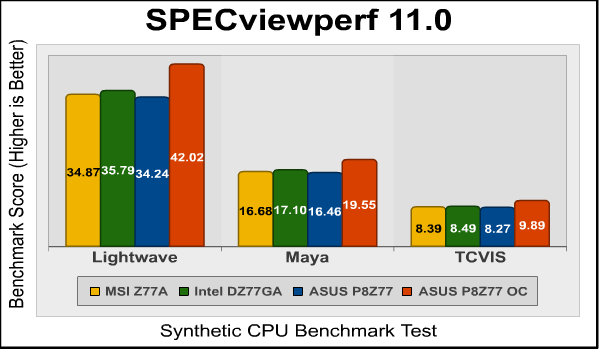
I like tests like the SPECviewperf suite because being base on real-world code that's actually used in commercial applications, they provide a better indicator of real-world performance than do purely synthetic benchmarks. Here the ASUS board trails the Intel and MSI boards very slightly.
SPECapc Lightwave
SPECapc (Application Performance Characterization) tests are fundamentally different from the SPECviewperf tests. While SPECviewperf tests incorporate code from the various test programs directly into the benchmark, the SPECapc tests are separate scripts and datasets that are run against a stand-alone installation of the program being benchmarked. SPECapc group members sponsor applications and work with end-users, user groups, publications and ISVs to select and refine workloads, which consist of data sets and benchmark script files. Workloads are determined by end-users and ISVs, not SPECapc group members. These workloads will evolve over time in conjunction with end-users' needs and the increasing functionality of PCs and workstations.
For this test, I ran the SPECapc "Lightwave" benchmark against a trial installation of Newtek's Lightwave 3D product. The benchmark, developed in cooperation with NewTek, provides realistic workloads that simulate a typical LightWave 3D workflow. It contains 11 datasets ranging from 64,000 to 1.75 million polygons and representing such applications as 3D character animation, architectural review, and industrial design. Scores for individual workloads are composited under three categories: interactive, render and multitask.
The benchmark puts special emphasis on processes that benefit from multi-threaded computing, such as animation, OpenGL playback, deformations, and high-end rendering that includes ray tracing, radiosity, complex textures and volumetric lighting. The test reports three scores: Animation (multitasking), Animation (interactive), and Rendering. The numeric scores represent the time it took to complete each section of the benchmark, in seconds, so lower scores are better.
I've found the SPECapc Lightwave 3D test to be an excellent indicator of overclock stability. In many cases, overclocked systems that will make it through every other benchmark here will crash in this test. It's also one of the most "fun" benchmarks to watch, as multiple windows with various complex rendering tasks appear and disappear on your screen.

This is one of the most "real" benchmarks, since it's just a set of scripts that control a standard Lightwave installation (SPECviewperf uses embedded Lightwave code). Here the ASUS board beats the other two boards in two of the three tests, losing by 13 seconds to the Intel board in the Rendering section.
Blender
Blender is an open-source, free content creation suite of 3D modeling, rendering, and animation capabilities. Originally released in 2002, it's available in versions for Mac OS X, Windows, Linux, and several Unix distributions. It supports rigid and soft-body objects and can handle the draping and animation of cloth, as well as the rendering and animation of smoke, water, and general particle handling.
Our Blender test renders multiple frames of an animation of a rotating chunk of ice, with translucency and reflections. Rendering of this model uses ray-tracing algorithms and the program reports the rendering time for each of the animation's 25 frames. The results are a summation of the rendering times for all frames and the lower the score, the better.

A nice progression of performance, here, with the ASUS winning at stock speeds. Overclocking boosts performance in this test by about 15%.
POV-Ray
The Persistence of Vision ray tracer is a free, open source 3D modeling program that uses ray-tracing algorithms to generate realistic three-dimensional images. Ray tracing is very computationally intensive, and the POV-Ray program has a handy built-in benchmark to let you check the performance of your system.
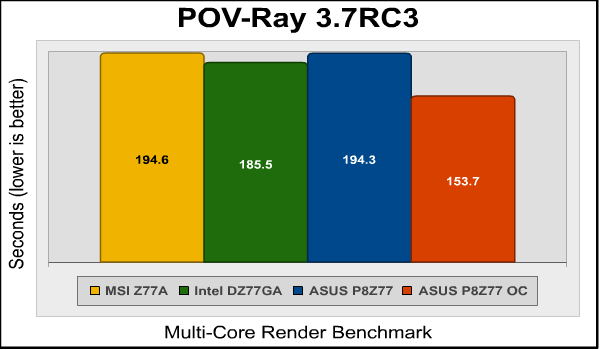
Here the ASUS P8Z77-V Deluxe comes in second, 5% slower than the Intel board.
But there's more to this motherboard's performance than just CPU horsepower. ASUS outfits this motherboard with eight USB 3.0 ports: four from the native controller in the Intel Z77 Express chipset, and four more courtesy of two ASMedia USB 3.0 controllers. ASUS can enhance the performance of each type of connection with their proprietary USB 3.0 Boost. Join me in the next section as I exercise this feature.
ASUS USB 3.0
Since the introduction of USB 3.0, aka "Superspeed USB", in January of 2010, motherboards have implemented this feature using third-party controllers from companies like NEC, Renesas, and ASMedia. Each port supplied by one of these controllers required a PCI-E lane from the motherboard's chipset, which, while workable, reduced the already limited number of PCI-E lanes available on LGA1155 motherboards.
With the Z77 Express chipset, Intel finally gives us four native USB 3.0 ports, none of which require an extra PCI-E lane. However, on the P8Z77-V Deluxe, ASUS also includes four additional USB 3.0 ports, courtesy of two ASMEdia ASM1042 controllers. While these could limit the use of other ports on the motherboard (like the extra SATA6G ports), ASUS also includes a PLX Technology PLX8608 chip, which provides an additional eight PCI-E Gen 2 lanes, so you don't have to worry about "stealing" lanes from other functions of the motherboard.
But where it gets interesting is ASUS' USB 3.0 Boost feature. You see, standard USB protocol is called BOT or "bulk-only transport." This protocol was created in 1999 with the original USB spec and designed to support USB 1.1, which had a transfer rate of 12 million bits per second...a bit slower than USB 3.0's 4 gigabits per second. With BOT, SATA6 SSDs connected to a standard USB 3.0 port couldn't deliver anywhere near their rated performance.
ASUS improves on bulk-only transport in two ways, both under the umbrella term USB 3.0 Boost: for USB 3.0 ports connected to the ASMedia controllers, ASUS implements USB Attached SCSI Protocol, aka UASP, as well as their own "Turbo" protocol. Which protocol is used depends on the device you connect, since not all devices support UASP.
For USB ports connected to the Z77 Express chipset, "Turbo" is the only choice since Intel's USB 3.0 controller doesn't support UASP just yet. When you enable USB 3.0 Boost in ASUS' AI Suite utility, the faster protocols are used automatically when a compatible device is connected.
So how much of a difference does USB 3.0 Boost make? To find out, I used an Intel SSD 520 series 240GB SATA6 SSD connected to the P8Z77-V Deluxe's USB 3.0 ports via a USB 3.0 SATA dock. Let's start with AIDA64's built-in disk test utility and check out the read performance.
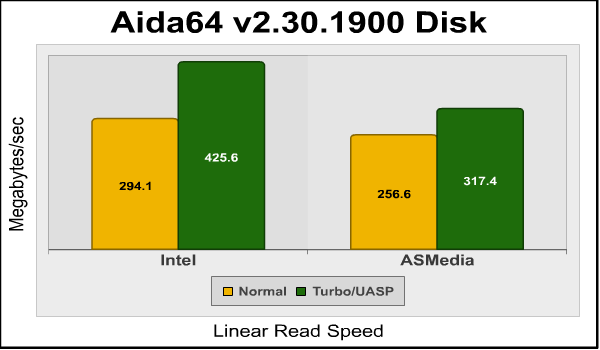
Connected to the Intel USB 3.0 port, the Intel SSD turned in 294 megabytes per second with USB 3.0 Boost off, and 425.6 megabytes per second with USB 3.0 boost on. That's a 45% increase! On USB ports connected to the ASMedia controllers, the read rate isn't as fast, but even so, turning on USB 3.0 Boost gives a 24% performance boost. Let's take a look at the transfer rates in the ATTO disk benchmark:

For the ASMedia controller, we see decent read and write speeds maxing out at 256 MB/s and 291MB/s, respectively. Now let's try it with USB 3.0 Boost:

Read and write maximums increase to 336MB/s and 385MB/s, respectively. Now for the Intel controller's standard performance:

And boosted with ASUS' "Turbo" protocol:

Here we see another huge increase, from standard read and write maximums of 270MB/s and 302MB/s to 431MB/s and 410MB/s. Follow me to the next section as I continue to benchmark this feature.
USB 3.0 Continued
In the previous section I showed how enabling ASUS' USB 3.0 Boost improved the performance of simple reads and writes. In this section I'll use Crystal Diskmark 3.0 to test the performance. Crystal Diskmark is better at measuring IOPS performance (I/O operations per second) under loads. First, let's look at the ASMedia controller. The chart on the left below is the standard USB 3.0 protocol, while the chart on the right is UASP via USB 3.0 Boost:

Again we see a substantial improvement with USB 3.0 Boost turned on. Remember, in the case of the ASMedia controller, it's switching to USB Attached SCSI Protocol (UASP). Now let's check out the Intel controller. Again, the leftmost chart is standard USB 3.0, while the rightmost chart is with USB 3.0 Boost:

Look at the bottom row of the rightmost chart here, the one labeled "4K QD32". Note that at 31.12 megabytes per second, it's less than half the 78.96 megabytes per second the Intel SSD 520 can do when connected to the ASMedia port. When the queue depth stacks up, the ASMedia controller is the clear winner; for straight linear performance, the Intel port wins.
This performance disparity is probably because USB Attached SCSI Protocol dispatches commands more efficiently than the "Turbo" protocol ASUS uses for the Intel controller. I'd guess that once Intel supports UASP on their USB 3.0 ports, we'll see the Intel controller catch up. In the meantime, if you're running a database server or something else that pounds out the IOPS, connect your USB 3.0 storage device to the ASMedia controller ports.
P8Z77-V Deluxe Overclocking
If you've read our review of the Intel Core i7-3770K processor, you've seen this part. If you haven't, the short version is that Ivy Bridge processors do not, at least in their current stepping, overclock as well as Sandy Bridge processors. Despite their vaunted 22nm, "3D" transistors, at 4.8GHz individual core temperatures spiked to over 100 degrees Celsius, leading the CPU throttling under load, even though I was using a Thermalright Silver Arrow cooler, the best air cooler I've ever tested.
So the best overclock I was able to get was 4.7GHz on all cores under load. While I didn't have to increase the voltage to reach this level, individual core temperatures were still in excess of 90 degrees, so it's not something I'd recommend doing long term. I've tried overclocking this CPU on three Z77 Express motherboards now, with identical results on each one, so I'm pretty sure the CPU is the limiting factor here.
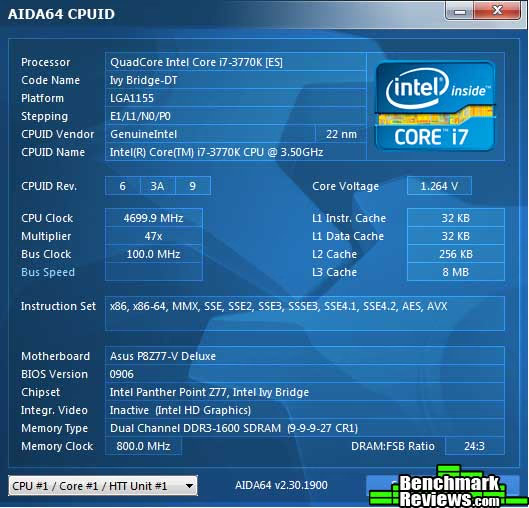
It's a little sad since the ASUS P8Z77-V Deluxe has elaborate power circuitry with very fine-grained controls, and I'm sure it could do much better with, say, a Sandy Bridge processor. But in this case I was limited by the CPU, not the motherboard. Hopefully future Ivy Bridge steppings will increase their overclockability.
Z77 Express Motherboard Final Thoughts
The ASUS P8Z77-V Express motherboard is packed with both features and performance. Of the 25 CPU benchmarks I ran for this review, the P8Z77-V won 12 of them outright, and only really fell down in the x264 HD encoding benchmark. Although most of the wins were very narrow, as you'd expect from motherboard using the same chipset, processor, and memory, it's still impressive for one motherboard to win half the performance tests when compared against two other similar motherboards.
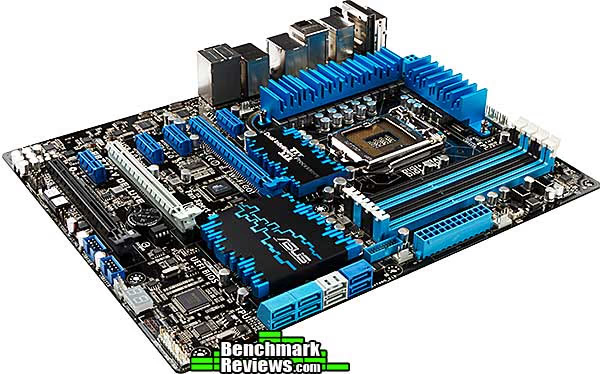
ASUS is known for sweating the details, and features such as their 20-phase power circuitry (16 phase CPU, 4 phase iGPU) should provide additional overclocking headroom when Ivy Bridge CPUs can support it. They've even gone so far as to adopt a "T topology" layout for the traces from the CPU socket to the DIMM sockets, such that traces for each pair of DIMMs (channel 1 and channel 2) are equal length. ASUS says that this should give memory overclockers an additional 15% headroom.
Of course, there's more to motherboard performance than just how well the CPU runs, and ASUS' USB 3.0 Boost feature, which we've seen on previous motherboard, fully comes into its own with the Intel USB 3.0 ports provided by the Z77 Express chipset. Even after USB 3.0 was introduced back in January 2010, if you'd told me that you'd be able to suck more than 400 megabytes per second through a USB port, I'd have laughed at you. This feature in combination with inexpensive USB 3.0 docks makes transferring very large files and external backup devices much more viable propositions than they've ever been.
And there's even more: most LGA1155 systems struggle with a paucity of PCI-E lanes: 16 from the processor and 8 from the chipset. ASUS' use of a PLX Technologies chip to add another 8 PCI-E 2.0 lanes means that you no longer have to worry about "stealing" lanes from other parts of the system, and even makes triple-card SLI and CrossFireX systems possible. Adding this capability is neither easy nor cheap, but it's another feature that works to justify the cost of this motherboard.
ASUS P8Z77-V Deluxe Conclusion
IMPORTANT: Although the rating and final score mentioned in this conclusion are made to be as objective as possible, please be advised that every author perceives these factors differently at various points in time. While we each do our best to ensure that all aspects of the product are considered, there are often times unforeseen market conditions and manufacturer changes which occur after publication that could render our rating obsolete. Please do not base any purchase solely on our conclusion, as it represents our product rating specifically for the product tested which may differ from future versions. Benchmark Reviews begins our conclusion with a short summary for each of the areas that we rate.
ASUS' Deluxe level motherboards offer a host of features and capability, and represent the most powerful and functional motherboards for everyone except hard-core overclockers and gamers. And they're priced accordingly: the P8Z68 Deluxe is $259.99 at Newegg, while the P9X79 Deluxe is $359.99. The P8Z77-V Deluxe comes in at just $15 more than its Z68 forebear ($274.99 at Newegg), and that's not much extra to pay for the native USB 3.0, the PLX chip, and the other new features. Granted, it's an expensive board, but you won't find anything at this level for much less.

You might be tempted by the P8Z68-V Pro motherboard, which I reviewed here and is my previous favorite ASUS motherboard. And it's still a very nice board...but even if you're planning a Sandy Bridge build, the P8Z77 has several advantages, like the four native USB 3.0 ports the Intel Z77 Express chipset provides or the PLX chip that adds another eight PCI-E lanes. A POST code display and other niceties round out the package. Personally, I also welcome the fact that ASUS eliminated PCI slots from this board (the P8Z68-V Pro has two of the things), and the WiFi Go! module adds a whole new level of capability.
Aesthetically, the P8Z77-V Pro hews to ASUS' standard "mainstream" colors, as opposed to the red and black of the Republic of Gamers line. The result is an attractive if not particularly striking motherboard.
The build quality is first-rate, as one would expect from ASUS.
The performance is a little harder to judge. It did well compared against other Z77 Express motherboards, but the Core i7-3770K CPU I used was the limiting factor in overclocking. I suspect the board has the ability to support much higher overclocks than I was able to achieve.
So is there anything I don't like? Well, I scratched my head over this one. The board's pretty pricey (although still less than many X79 motherboards), so there's that. And the original reason for ASUS' single-latch DIMM slots (to prevent a long graphics card in the first slot from interfering with removing DIMMs) has been exorcised with ASUS' current board layouts, and there have been a couple of times where I've had problems traceable to improperly-seated DIMMs. Yeah, I know, but with latches on both sides it's easier to ensure that a DIMM's all the way in its slot.
Also, the standard-sized motherboard manual is a sparse concerning the configuration and use of some of the more advanced features. Heck, WiFi Go rates an entire manual on its own! There's some documentation on the driver/utilities CD, but frankly I think ASUS should provide copies of their reviewer's guides and notes to all purchasers, since there's a lot of good information in those.
If you're not going to build an X79 system...and let's face it, X79 is basically silly for most consumer/gaming systems...the P8Z77-V Deluxe would be an excellent foundation for your next build, even with a Sandy Bridge CPU. You'll never want for features or performance, and this board should easily carry you through the next few years of Intel desktop CPUs. It's expensive, but a good value nonetheless.
Pros:
+ Z77 Express brings native USB 3.0 at last
+ USB 3.0 Boost provides dramatic performance increase for both Intel and ASMedia ports
+ PLX Technologies chip for more PCI-E lanes
+ Wifi Go module provides advanced WiFi and Bluetooth capabilities
+ POST code display...always useful!
+ BIOS Flashback feature allows BIOS updates with no CPU. Or RAM!
Cons:
- Expensive enthusiast product
- Sparse documentation for advanced features
- Single sided DIMM sockets make it too easy to have improperly inserted DIMMs
Ratings:
- Performance: 9.0
- Appearance: 8.5
- Construction: 9.50
- Functionality: 9.75
- Value: 9.0
Final Score: 9.15 out of 10.
Excellence Achievement: Benchmark Reviews Golden Tachometer Award.
Benchmark Reviews invites you to leave constructive feedback below, or ask questions in our Discussion Forum.
Reader comments from the original article
34 comments were posted before commenting closed. They are preserved as written. Original avatars no longer resolve and are shown as a placeholder.
Hey Mom! Here are the Specs! Michael Permalink:
Thanks David! The plan review doesn't tell me the hardware info I need. The review article was as good and maybe better than many others. Yet this is the information and the reason I subscribe to Benchmark. Thanks again.
RE: ASUS P8Z77-V Deluxe Benchmark Performance Athlonite Permalink:
Would have been nicer if the PLX chip combined with the 8 lanes of the z77 to give x16 x16 for two cards in CF or SLI and x16x8x8 for 3 cards otherwise the PLX chip is wasted if you don't run 3 cards
Help Moogle Stiltzkin Permalink:
I got the motherboard the ASUS P8Z77-V Deluxe, Intel Core i7-3770 (the non k version) and the Nvidia Asus 680 Gtx (this is the reference card, not the newer version with the fancy fan cooler). So i updated windows 7 with all the patches and everything. Installed the motherboard drivers from the dvd, as well as updated my graphics card drivers. But i have an issue of my pc crashing and i don't know why seeing as this was just reformated to install these brand new hardware. So i haven't been installing anthing much before these crash issues. I noted that when i play my video player it will very likely crash. I'm using the potplayer using this guide to set it up with the relevant codecs #imouto.my/configuring-potplayer-for-gpu-accelerated-video-playback-with-dxva-or-cuda-and-also-high-performance-software-decoding/ Speaking of which, i noticed when watching high quality 1080p anime of Claymore, the video shows tearing, even i used a different video player HC-mpc with CCCP codec pack at default settings. The same video and other videos never had this issue. I was previously using this graphics card for my older nephalem rig and it worked fine then. So the issue may have to do with the motherboard is my guess. I also set my bios to default settings, but using the AHCI for SATA. Because when i tried to change it to IDE, the PC spazzed out and wouldn't boot. I did upgrade to the latest bios firmware which is 0906 , release date 03/26/2012 I'm totaly clueless why this is happening, please help :{
RE: Help Olin Coles Permalink:
It's either your video card, or the graphics driver. I suggest downloading the latest driver for the GeForce GTX 680, then uninstalling the NVIDIA driver software, restarting the system, and install the new driver.
RE: RE: Help Moogle Stiltzkin Permalink:
i deleted the potplayer and all those codecs. then i just installed cccp with the default settings and play the video with hc-mpc that came with cccp. video works without tearing. But my pc still locks up for some reason. Meaning i don't get BSOD, but instead my whole screen becomes unresponsive and frozen. The mouse pointer doesn't move, and control alt delete doesn't do anything. I'm using Corsair TR3X6G1600C8D which is a 6gb (3x2gb ddr3 tri kit) /index.php?option=com_content&task=view&id=258&Itemid=67
RE: RE: RE: Help Olin Coles Permalink:
I still recommend the steps I previously suggested, but also add MemTest 86+ afterward to test memory. The tests could take a few hours to complete at least three full passes, but they're worth it.
RE: ASUS P8Z77-V Deluxe Benchmark Performance Moogle Stiltzkin Permalink:
ok i will run memtest. also for your info, this was all reformated, so when i did install it was indeed using the latest nvidia driver for the 680 :X so i'm very doubting it was that. My friend's solution was to change the settings to 1600 mhz and the voltage to 1.65 which is what the review on benchmarkreviews says the ram ought to be. My auto settings put it at 1300 mhz and 1.4 for some reason hm.... so anyway no freeze up yet .... although i'll only call it a success if it doesn't crash within 24 hours :X
RE: ASUS P8Z77-V Deluxe Benchmark Performance Moogle Stiltzkin Permalink:
by the way, what is the suggested settings in bios for this motherboard with the ivy bridge i7 non k quad core cpu ? Like i already know the sata ought to use AHCI. But what about the other settings ? I really hope you add this into your review for newbies like me that aren't sure what needs to be enabled/disabled for best features and performance. A typical example would be the latest intel internal graphics card thing called quick something .... should this be enabled or not ? Because i noticed tearing in my video player. It only resolved when i set the PCIE to be my main graphics card, and disabled the integrated graphics card. I also didn't install the internal graphics drivers because i think it would conflict with my nvidia 680 gtx drivers.
RE: RE: ASUS P8Z77-V Deluxe Benchmark Performance David Ramsey Permalink:
In general the board's default settings are all you need for proper operation. The P8Z77-V Deluxe is a very complex, top-end motherboard aimed at knowledgeable enthusiasts, and a full trip through all the possible settings for any given CPU would be dozens of pages long. You should install the integrated graphics driver (if you're going to use the integrated graphics, either to drive a separate monitor or with Lucid Virtu). They will not conflict with any other graphics driver in your system. To get the best performance, of course, you need to overclock. Since you're a self-described newbie, I'd suggest that rather than trying to tweak BIOS settings manually, you start out simple with ASUS' "CPU Level Up" feature, will apply a safe overclock to your processor. Later, you can use ASUS' "Turbo V Evo" utility in Windows to run a "tuned" overclock, which will iterate through various settings, run stress tests, and so forth until it finds the best overclock it can. Later, as you become more familiar with the various settings, you can experiment more on your own.
RE: ASUS P8Z77-V Deluxe Benchmark Performance Moogle Stiltzkin Permalink:
i looked at memtest 86 but it requires a dvd. the thumb drive says linux only .... none of these things i have :X I do have a thumb drive but the software says it will only work if i use linux which i am currently using win 7.
RE: RE: ASUS P8Z77-V Deluxe Benchmark Performance Olin Coles Permalink:
You can burn it to CD-ROM.
RE: RE: RE: ASUS P8Z77-V Deluxe Benchmark Performance Moogle Stiltzkin Permalink:
i think i got cds, i'll check in a bit.
RE: RE: RE: RE: ASUS P8Z77-V Deluxe Benchmark Performance Olin Coles Permalink:
You don't need Linux, you need an empty flash drive to save it to.
RE: RE: RE: RE: RE: ASUS P8Z77-V Deluxe Benchmark Performance Moogle Stiltzkin Permalink:
i found a mem86 that worked for windows usb :X i ran it for an hour and no bugs ....
RE: RE: RE: RE: RE: RE: ASUS P8Z77-V Deluxe Benchmark Performance Moogle Stiltzkin Permalink:
my pc has been up for an hour + and hasn't frozen yet. So i'm waiting 24 hours before i say anything further, but i'm suspecting the issue was because the ram was not configured properly .... the auto settings for the frequency and voltage had to be changed apparently.... to the manual spec :X
RE: ASUS P8Z77-V Deluxe Benchmark Performance Moogle Stiltzkin Permalink:
Another thing i would like to see in your review is in regards to the Realtek® ALC898 and how it would compare to other dedicated sound cards like the Asus Xonar. ##overclock.net/t/1236188/realtek-alc898-vs-asus-xonar-dx The reason i ask is, i had to remove my Auzentech XFI prelude sound card, because it uses the regular pci lanes missing from this Asus board. I'm not angry about it, as i don't want to use legacy stuff anyway. So the question now is, is it worth getting a new PCIE x 1 sound card like an Asus Xonar ? Or is the internal soundcard sufficient ? I got some Aktimate stereo Hifi speakers. I also have ATH-A900 Audio Technica headphones. I also have a blue yeti microphone :X so those are all my audio gear ... so will the alcatel for this mobo be sufficient ? The stuff i listen to is usually FLAC lossless.
ehh Joe Permalink:
"ASUS has not previously offered a "Deluxe" level motherboard for Socket LGA1155; the fanciest previous motherboard has been the P8Z68-V Pro." This is not true. The P8Z68 Deluxe is beyond the Pro. ##asus.com/Motherboards/Intel_Socket_1155/P8Z68_DELUXEGEN3/
RE: ehh David Ramsey Permalink:
You're right...dunno how I missed that. It must have come after the initial rush of Z68 boards.
RE: ASUS P8Z77-V Deluxe Benchmark Performance Moogle Stiltzkin Permalink:
my pc gaming rig hasn't frozen or locked in the past 24 hours, where as before it did within less than an hour of operation. so i can conclude that leaving auto settings on the asus z77 deluxe panther point is not recommended. The frequency and voltage of the ddr3 stick installed has to match the specification of the stick, seeing as leaving it on auto may cause freeze/lockups. i would appreciate further tips of what other settings in the bios i ought to configure.
RE: RE: ASUS P8Z77-V Deluxe Benchmark Performance bob Permalink:
sounds like over heating to me
RE: RE: RE: ASUS P8Z77-V Deluxe Benchmark Performance Moogle Stiltzkin Permalink:
it isn't... the temps are fine :X
RE: ASUS P8Z77-V Deluxe Benchmark Performance Moogle Stiltzkin Permalink:
I found out the issue. Apparently my Corsair Dominator although rated for 1600mhz, actually runs stable on 1333mhz. The voltage has to be manually set to 1.65 volts, rather than leaving it on auto. Also the fact that since it's an older ddr3 6gb kit, it may not have the necessary tech to be fully compatible with this latest motherboard, hence why the settings needed to be manually set. My pc has been running for days and it hasn't crashed with my new settings. So mission accomplished :} But i do think i would rather upgrade my ram to 16gb (4x4GB) DDR3 1600 mhz kit seeing as ram prices are 80% less than what they use to be.
RE: RE: ASUS P8Z77-V Deluxe Benchmark Performance David Ramsey Permalink:
I would contact Corsair. You bought premium grade memory and there's no reason it shouldn't function at its rated speed.
RE: RE: RE: ASUS P8Z77-V Deluxe Benchmark Performance Athlonite Permalink:
Corsair can not make old ram compatible with new Motherboards or CPU's that's upto motherboard manufactures to do via new BIOS firmware but chances are you should be able to get it stable at 1600MHz it may just take a bit of tweaking in the BIOS I never rely on auto settings I much prefer to set all timings and voltages myself
RE: ASUS P8Z77-V Deluxe Benchmark Performance Moogle Stiltzkin Permalink:
so my corsair DDR3 dominator can't run stable at the rated 1600 mhz the reviews say it can run, but in reality is only stable at 1333 mhz freq at 1.65 volt on this mobo. But as Athlonite pointed out, Corsair cannot guarantee an older ddr3 kit will work on this newer Asus Z77 deluxe motherboard with out stability issues. Do you still reckon i amble still able to contact Corsair regarding this ? Or is this sort of thing not able to ask help on ?
RE: RE: ASUS P8Z77-V Deluxe Benchmark Performance David Ramsey Permalink:
The DDR3 standard hasn't changed; the signals and protocols are the same now as they were back when it was introduced. Any existing DDR3 memory kit should be able to run at its rated speed on any system that supports DDR3 memory (obviously we're not talking about ECC memory or anything like that, just normal desktop memory). Now, things like XMP standards have changed. But that's just what your motherboard can (optionally) use to automatically set timing and voltages. You should still be able to set things manually. So yes, I'd still recommend contacting Corsair. They have a company-supported set of forums on their web site, and even if I'm wrong about compatibility at least you'll have some definitive information from the vendor, rather than guesswork.
RE: RE: RE: ASUS P8Z77-V Deluxe Benchmark Performance Moogle Stiltzkin Permalink:
wow thx. now i feel more confident i do have a case then. Okay i created a support ticket. Hm.... i wonder, so seeing as i'm running my rig on non oc settings with updates drivers, on a clean and recently installed rig, and it's confirmed that my ddr3 corsair dominator 6gb kit cannot run at 1600mhz freq at 1.65v, what are the solutions you think ? 1. pr bs that this should be expected as it wasn't designed/tested for this mobo. i pretty much get nothing. 2. some vague promise about asking asus to add bios support for this kit ? 3. they send in a replacement for the exact same model and hope it works ? 4. or they send me a spanky new vengeance or newer corsair dominator 6gb kit :D !?!?!
RE: ASUS P8Z77-V Deluxe Benchmark Performance Moogle Stiltzkin Permalink:
Some article i read said this "X.M.P: Extreme memory profile, use this option if you have Sandy Bridge/Ivy Bridge qualified XMP memory. X.M.P. profiles contain pre-sets for system buses and in some cases voltages. If the specified speed of the DIMMs is greater than the supported memory frequency of the platform, a platform specific X.M.P. profile option becomes mandatory because processor core and memory controller voltage requirements vary from architecture to architecture. High-speed enthusiast memory kits manufactured before the inception of the Sandybridge/Ivy Bridge platforms may not contain the necessary/adequate voltage offset settings for the system to be completely stable. In such instances, manual adjustments of memory controller voltage and memory timings may be necessary." ##overclock.net/t/1248928/asus-z77-series-information-thread-drivers-bioses-overclocking-reviews-updated-5-3
RE: ASUS P8Z77-V Deluxe Benchmark Performance Moogle Stiltzkin Permalink:
"The TR3X6G1600C8D is a 6144 MB kit of DDR3 SDRAM DIMMs based upon Corsair's high performance Dominator family of memory which includes Intel's Extreme Memory Profiles (XMP 1.2). This enables a robust, profile based high performance DDR3 over-clocking solution for Intel X58 platforms targeted for enthusiasts, gamers and overclockers who want to extract maximum performance from their platforms. Built using Corsair's Dual-path Heat Xchange (DHX) technology, this part delivers outstanding performance in the latest generation of X58 DDR3-based motherboards. This memory has been verified to operate at 1600MHz at latencies of 8-8-8-24 at 1.65V VDIMM." So my ram does have XMP but is 1.2 not the newer 1.3 (should this matter ?) but i can confirm right now this ram is not stable at 1600 mhz freq for this Asus Z77 Deluxe mobo. 1333mhz is stable however.
RE: RE: ASUS P8Z77-V Deluxe Benchmark Performance Athlonite Permalink:
then you need to play with the IMC (internal memory controller) and dimm voltages until it becomes stable..... Like I said in the second part of my reply do not rely on auto settings to get it right it may take you tweaking settings in the BIOS to get them to run stable at 1600MHz
RE: ASUS P8Z77-V Deluxe Benchmark Performance Moogle Stiltzkin Permalink:
David, i just found an awesome comparison chart for the Asus Z77 motherboards, check this out #event.asus.com/2012/mb/P8Z77_Series_Motherb oards/page7_AvailableModel s.htm I think ought to make a screenshot of that comparison chart and add to your review :D It's a very general comparison for the readers to know which will suit them better.
RE: ASUS P8Z77-V Deluxe Benchmark Performance PC Games Permalink:
best for ivy bridge pcs
RE: ASUS P8Z77-V Deluxe Benchmark Performance Lesfry Permalink:
I bought this motherboard right befor the Ive bridge Processers came out. I have the Sandy bridge 2700k in it. and a gtx580 . do I need to upgrade to the ivy bridge, to take avantage of this bords potental ??? and will the gtx 680 and gtx 690 work with the processer I have. It seams like there throughing all these parts out there, and not giving us a clue as to how they work together.
RE: RE: ASUS P8Z77-V Deluxe Benchmark Performance David Ramsey Permalink:
Moving to an Ivy Bridge CPU will get you PCI-E 3.0 lanes, almost doubling the throughput to your graphics cards and other devices. However, this won't make any real-world difference in performance. The NVIDIA GTX 680/690 will work fine with your current processor. Right now there's no reason for you to switch to an Ivy Bridge.