

| HIS Radeon HD6850 IceQ-X Turbo Video Card |
| Reviews - Featured Reviews: Video Cards | ||||||||||||||||||||||||||||||||||||||||||||||||||||||||||||||||||||||||||||||||||||||||||||||||||||||||||||||||||||||||||||||||||||||||||||||||||||||||||||||||||||||||||||||||||||||||||||||||||||||||||||||||||||||||||||||||||||||||||||||||||||||||||||||||||||||||||||||||||||||||||||||||||||||||||||||||||||||||||||||||||||||||||||||||||||||||||||||||||||||||||||||||||||||||||||||||||||||||||||||||||||||||||||||||||||||||||||||||||||||||||||||||||||||||||||||||||||||||||||||||||||||||||||||||||||||||||||||||||||||||||||||||||||||||||||||||||||||||||||||||||||||||||||||||||||||||||||||||||||||||||||||||||||||||||||||||||||||||||||||||||||||||||||||||||||||||||||||||||||||||||||||||||||||||||||||||||||||||||||||||||||||||||||||||||||||||||||||||||||||||||||||||||||||||||||||||||||||||||||||||||||||||||||||||||||||||||||||||||||||||||||||||||||||||||||||||||||||||||||||||||||||||||||||||||||||||||||||||||||||||||||||||||||||||||||||||||||||||||||||||||||||||
| Written by Steven Iglesias-Hearst | ||||||||||||||||||||||||||||||||||||||||||||||||||||||||||||||||||||||||||||||||||||||||||||||||||||||||||||||||||||||||||||||||||||||||||||||||||||||||||||||||||||||||||||||||||||||||||||||||||||||||||||||||||||||||||||||||||||||||||||||||||||||||||||||||||||||||||||||||||||||||||||||||||||||||||||||||||||||||||||||||||||||||||||||||||||||||||||||||||||||||||||||||||||||||||||||||||||||||||||||||||||||||||||||||||||||||||||||||||||||||||||||||||||||||||||||||||||||||||||||||||||||||||||||||||||||||||||||||||||||||||||||||||||||||||||||||||||||||||||||||||||||||||||||||||||||||||||||||||||||||||||||||||||||||||||||||||||||||||||||||||||||||||||||||||||||||||||||||||||||||||||||||||||||||||||||||||||||||||||||||||||||||||||||||||||||||||||||||||||||||||||||||||||||||||||||||||||||||||||||||||||||||||||||||||||||||||||||||||||||||||||||||||||||||||||||||||||||||||||||||||||||||||||||||||||||||||||||||||||||||||||||||||||||||||||||||||||||||||||||||||||||||
| Tuesday, 07 June 2011 | ||||||||||||||||||||||||||||||||||||||||||||||||||||||||||||||||||||||||||||||||||||||||||||||||||||||||||||||||||||||||||||||||||||||||||||||||||||||||||||||||||||||||||||||||||||||||||||||||||||||||||||||||||||||||||||||||||||||||||||||||||||||||||||||||||||||||||||||||||||||||||||||||||||||||||||||||||||||||||||||||||||||||||||||||||||||||||||||||||||||||||||||||||||||||||||||||||||||||||||||||||||||||||||||||||||||||||||||||||||||||||||||||||||||||||||||||||||||||||||||||||||||||||||||||||||||||||||||||||||||||||||||||||||||||||||||||||||||||||||||||||||||||||||||||||||||||||||||||||||||||||||||||||||||||||||||||||||||||||||||||||||||||||||||||||||||||||||||||||||||||||||||||||||||||||||||||||||||||||||||||||||||||||||||||||||||||||||||||||||||||||||||||||||||||||||||||||||||||||||||||||||||||||||||||||||||||||||||||||||||||||||||||||||||||||||||||||||||||||||||||||||||||||||||||||||||||||||||||||||||||||||||||||||||||||||||||||||||||||||||||||||||||
HIS HD6850 IceQ X Turbo 1GB Video Card
Manufacturer: Hightech Information System Limited Full Disclosure: The product sample used in this article has been provided by HIS. HIS first introduced its IceQ coolers in 2003 to its Radeon 9800PRO series of video cards, eight years later HIS return with the IceQ X cooler, which thankfully performs much better than it looks. In this review the IceQ X cooler is strapped onto a HIS HD6850 Turbo 1GB video card which comes factory overclocked at 820MHz GPU and 1100MHz Memory. Increasing clocks on any video card requires above average cooling and HIS know that they have nothing to worry about, their IceQ cooler is up to the job. As was the case with the HIS HD6870 IceQ X Turbo X, the HIS HD6850 IceQ X Turbo also has a very relaxed fan profile. Thankfully this model did not suffer any shutdown issues like its bigger brother, but it was happy to sit at 79°C while the fan was only spinning at 53%. Any other video card cooler fan would be 70% at the least with this GPU temperature so a more aggressive profile is needed, considering the fan is not very loud at high speeds.
For this review we have a wide range of video card comparisons in our usual mixture of DX10 / DX11 synthetic benchmarks and current games to get a good idea where it fits in performance and price wise. We also intend to overclock the HIS HD6850 IceQ X Turbo to its limits and see if the IceQ X cooler really has what it takes to cool the GPU and other components effectively, so without further delay let's move on and get stuck in. Closer Look: HIS HD6850 IceQ X TurboIn this section we will have a good tour of the HIS HD6850 IceQ X Turbo video card and discuss its main features.
The HIS HD6850 IceQ X Turbo is packed in a relatively small package, about the size and shape of a shoe box. In the box you get a fairly standard bundle that includes an installation package (driver disk and manual), one molex to 6-pin power cable converter, a DVI to VGA adapter and a CrossFireX bridge.
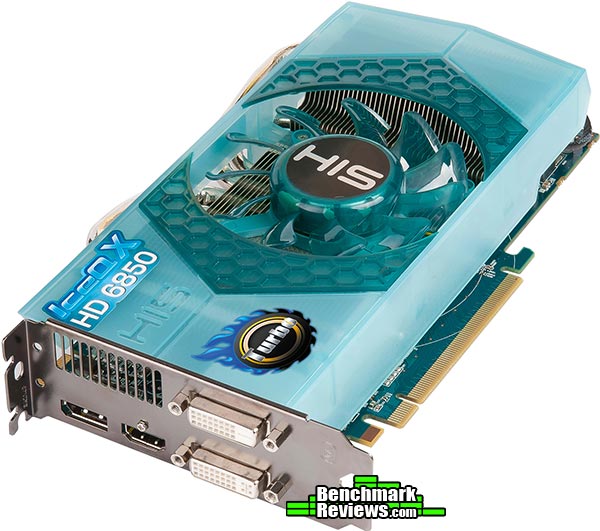
The HIS HD6850 IceQ X Turbo video card is fairly big, measuring 13.5 cm tall x 23.5 cm long and is also a dual slot design. Bang smack in the middle is a 92mm fan that effectively cools the overclocked HD6850 GPU while still remaining fairly quiet. The big, in your face, aqua colored shroud that covers the IceQ X cooler is a little bit loud for my liking, its design is more of a metaphor but it is quite functional at the same time. When installed in your system you only see the side view which actually looks quite nice, as you will see below.
The HIS HD6850 IceQ X Turbo video card requires one 6-pin PCI-E power connector from your PSU, while HIS supply a molex to 6-pin converter it is strongly recommended that you use a PSU that actually has a 6-pin connector present to power this card. HIS also recommends using a 500W or greater PSU.
For output we have one display port connector, a HDMI port and two DVI-I connectors (top is single link and bottom is dual link). Bundled with the card you get a DVI to D-SUB adapter, so as far as connectors go HIS have really covered all the bases here. The top half of the PCI bracket has a small vent cut out, but the design of the cooler exhausts the hot air inside the case rather than out here.
It is likely going to be the case that if you buy this video card then you will most certainly have a side window in your PC case of choice. Until recently most video cards aesthetic features were on the front only, this is no longer the case here as this side view demonstrates. The semi transparent aqua shroud is quite pleasing on the eye when viewed from the side where the visual metaphor really works.
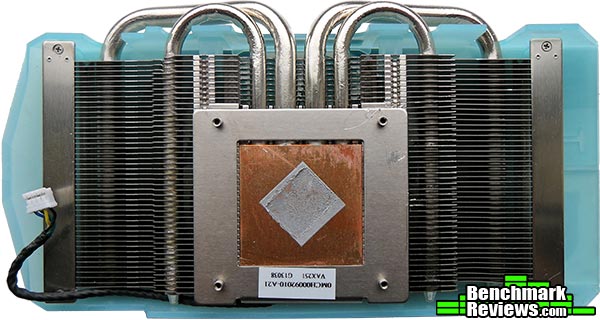
The IceQ X cooler is somewhat smaller than I had first suspected. A pair of 8mm and a pair of 6mm heatpipes take the heat from the GPU and into the aluminum fin array where it is met with cool air from the 92mm fan seen earlier. The shroud makes sure that the cool air is evenly distributed and not wasted. It's nice to see that HIS have not over done it with the thermal interface, leaving not much room for improvement. HIS HD6850 IceQ X Turbo DetailsIn this section we shall take an in depth look at the HIS HD6850 IceQ X Turbo video card and see what makes it tick. The HIS HD6850 IceQ X Turbo has only one CrossFireX connector limiting it to a 2-way CrossFireX configuration
With the cooler assembly and the VRM heatsink fully removed we can get a better look at the board. The overall layout of all the components is a little different with the 6000 series, the standard layout has moved the power phase/VRM section to the left hand side of the GPU, into an area that is normally left somewhat unoccupied. On this model only three of the four phases are installed. All in all the PCB looks good with no real waste of space and the soldering quality is of a very high standard as you will see in the close-up shots further down the page.
The back of the PCB is utilised mainly for resistors and the soldering quality is excellent for such tiny components, man loses the war to the machine when it comes to detailed work like this. These days you don't generally see RAM on the reverse side of a 1GB video card design thanks to the smaller manufacturing process that allows more density in a smaller package. There are a few points of interest that we will look at in more detail in this section.
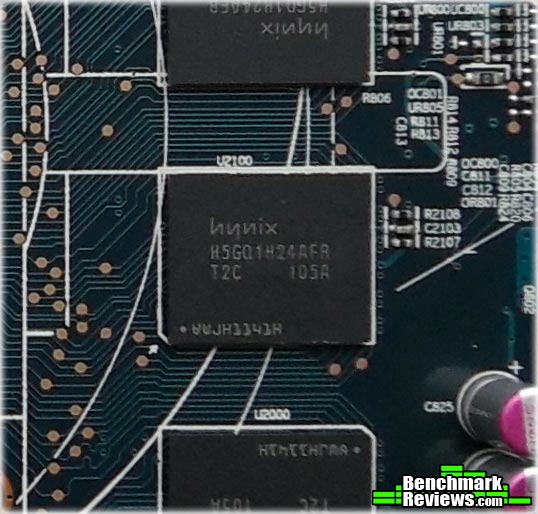
The HIS HD6850 IceQ X Turbo uses 1GB of hynix H5GQ1H24AFR-TC2 memory rated at 1250MHz (5GHz effective) at 1.5V.
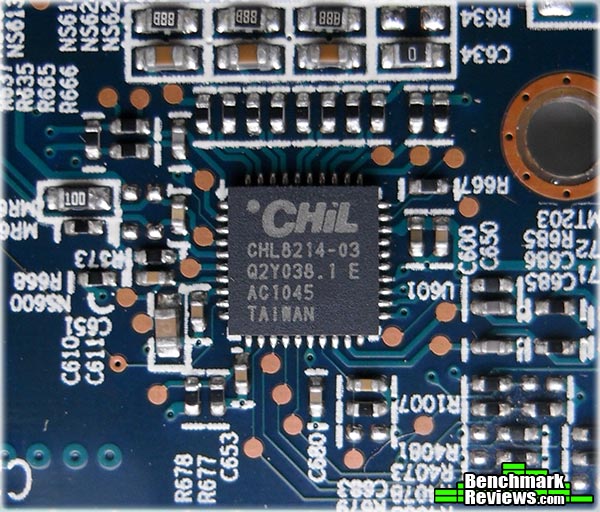
For voltage control HIS have utilized a CHiL CHL82414-03 Dual output 4+1 phase PWM Controller, although this video card only has 3 of the 4 phases physically installed. Below is a snippet from the product description. The CHL8212/13/14 are dual-loop digital multi-phase buck controllers and the CHL8203 is a single-loop digital multiphase buck controller designed for GPU voltage regulation. Dynamic voltage control is provided by registers which are programmed through I2C and then selected using a 3-bit parallel bus for fast access. The CHL8203/12/13/14 include CHiL Efficiency Shaping Technology to deliver exceptional efficiency at minimum cost across the entire load range. CHiL Dynamic Phase Control adds/drops active phases based upon load current and can be configured to enter 1-phase operation and diode emulation mode automatically or by command. SOURCE: chilsemi.com
The uP6122AF from uPI Semiconductor provides voltage control to the I/O buffer.
A uP6101BU8 is somewhat of an older chip seen on much earlier 4000 series AMD Radeon video cards, provides voltage control for the memory.
Two uP7701U8 (above and below) voltage control chips are present, one on the front and one on the reverse of the PCB. Specifications for these chips are not readily available but there is a good chance that they are an improvement on an older design. They provide voltage control for the GPU.
One can only speculate as to why there are two controllers but they may not be both performing the same task. When we look at the vital statistics of this video card in GPU-Z we see lots of extra info not normally seen on this level of card. For instance, instead of just a regular vCore reading we get readings for 12V line quality, VDDC usage in volts and VDDC current usage in amps. In the next section we will look at the main features and specifications of the HIS HD6850 IceQ X Turbo video card. HIS HD6850 IceQ X Turbo FeaturesHIS HD6850 IceQ X Turbo Features
IceQ X Cooling Technology
HIS HD6850 IceQ X Turbo Specifications
Source: hisdigital.com VGA Testing MethodologyThe Microsoft DirectX-11 graphics API is native to the Microsoft Windows 7 Operating System, and will be the primary O/S for our test platform. DX11 is also available as a Microsoft Update for the Windows Vista O/S, so our test results apply to both versions of the Operating System. The majority of benchmark tests used in this article are comparative to DX11 performance, however some high-demand DX10 tests have also been included. According to the Steam Hardware Survey published for the month ending May 2011, the most popular gaming resolution is 1920x1080 with 1680x1050 hot on its heels, our benchmark performance tests concentrate on these higher-demand resolutions: 1.76MP 1680x1050 and 2.07MP 1920x1080 (22-24" widescreen LCD monitors), as they are more likely to be used by high-end graphics solutions, such as those tested in this article. In each benchmark test there is one 'cache run' that is conducted, followed by five recorded test runs. Results are collected at each setting with the highest and lowest results discarded. The remaining three results are averaged, and displayed in the performance charts on the following pages. A combination of synthetic and video game benchmark tests have been used in this article to illustrate relative performance among graphics solutions. Our benchmark frame rate results are not intended to represent real-world graphics performance, as this experience would change based on supporting hardware and the perception of individuals playing the video game.
Intel P55 Test System
DirectX-10 Benchmark Applications
DirectX-11 Benchmark Applications
Video Card Test Products
DX10: 3DMark Vantage3DMark Vantage is a PC benchmark suite designed to test the DirectX10 graphics card performance. FutureMark 3DMark Vantage is the latest addition the 3DMark benchmark series built by FutureMark corporation. Although 3DMark Vantage requires NVIDIA PhysX to be installed for program operation, only the CPU/Physics test relies on this technology. 3DMark Vantage offers benchmark tests focusing on GPU, CPU, and Physics performance. Benchmark Reviews uses the two GPU-specific tests for grading video card performance: Jane Nash and New Calico. These tests isolate graphical performance, and remove processor dependence from the benchmark results.
3DMark Vantage GPU Test: Jane NashOf the two GPU tests 3DMark Vantage offers, the Jane Nash performance benchmark is slightly less demanding. In a short video scene the special agent escapes a secret lair by water, nearly losing her shirt in the process. Benchmark Reviews tests this DirectX-10 scene at 1680x1050 and 1920x1080 resolutions, and uses Extreme quality settings with 8x anti-aliasing and 16x anisotropic filtering. The 1:2 scale is utilized, and is the highest this test allows. By maximizing the processing levels of this test, the scene creates the highest level of graphical demand possible and sorts the strong from the weak.
Cost Analysis: Jane Nash (1680x1050)Test Summary: In the charts and the cost analysis you will notice not one but three HIS HD6000 series cards, this is a clue of future articles to come but this review is focusing on the HIS HD6850 IceQ X Turbo. This also goes to dispel an old myth/misconception that someone new to buying video cards may encounter, the HIS HD6870 is the highest clocked video card of the trio but it still fails to match or outperform its bigger brother, the HD6950 (even at reference speeds). The point I am trying to address here is that a higher clock speed on a lower tier video card will not perform better than a lower clock on a higher tier video card. When buying a video card it is always best to do your homework. 3DMark Vantage GPU Test: New CalicoNew Calico is the second GPU test in the 3DMark Vantage test suite. Of the two GPU tests, New Calico is the most demanding. In a short video scene featuring a galactic battleground, there is a massive display of busy objects across the screen. Benchmark Reviews tests this DirectX-10 scene at 1680x1050 and 1920x1080 resolutions, and uses Extreme quality settings with 8x anti-aliasing and 16x anisotropic filtering. The 1:2 scale is utilized, and is the highest this test allows. Using the highest graphics processing level available allows our test products to separate themselves and stand out (if possible).
Cost Analysis: New Calico (1680x1050)Test Summary: The tables have turned in the New Calico Vantage test, here the results show that the FERMI architecture is the more advanced. The performance scaling is as expected, the HIS HD6850 IceQ X Turbo has a slight performance lead over its reference 6850 counterpart which actually offers better value when we analyse the cost per FPS results of the two cards. Even with its overclock the HIS HD6850 is unable to meet or match the performance of the HD6870 or the GTX 460.
DX10: Street Fighter IVCapcom's Street Fighter IV is part of the now-famous Street Fighter series that began in 1987. The 2D Street Fighter II was one of the most popular fighting games of the 1990s, and now gets a 3D face-lift to become Street Fighter 4. The Street Fighter 4 benchmark utility was released as a novel way to test your system's ability to run the game. It uses a few dressed-up fight scenes where combatants fight against each other using various martial arts disciplines. Feet, fists and magic fill the screen with a flurry of activity. Due to the rapid pace, varied lighting and the use of music this is one of the more enjoyable benchmarks. Street Fighter IV uses a proprietary Capcom SF4 game engine, which is enhanced over previous versions of the game. Using the highest quality DirectX-10 settings with 8x AA and 16x AF, a mid to high end card will ace this test, but it will still weed out the slower cards out there.
Cost Analysis: Street Fighter IV (1680x1050)Test Summary: The Street Fighter IV test comes across a little biased towards the green team, perhaps the good old 'NVIDIA The way it's meant to be played' logo displayed when you launch the benchmark gives that away. As you will see later in the performance analysis, this analogy is turned on its head when a game that was touted as an NVIDIA game (METRO 2033)actually performs better on AMD hardware when PhysX is disabled. Street Fighter IV is a very fast paced game but even the HIS HD6850 IceQ X Turbo manages to get an 'A' rating.
DX11: Aliens vs PredatorAliens vs. Predator is a science fiction first-person shooter video game, developed by Rebellion, and published by Sega for Microsoft Windows, Sony PlayStation 3, and Microsoft Xbox 360. Aliens vs. Predator utilizes Rebellion's proprietary Asura game engine, which had previously found its way into Call of Duty: World at War and Rogue Warrior. The self-contained benchmark tool is used for our DirectX-11 tests, which push the Asura game engine to its limit. In our benchmark tests, Aliens vs. Predator was configured to use the highest quality settings with 4x AA and 16x AF. DirectX-11 features such as Screen Space Ambient Occlusion (SSAO) and tessellation have also been included, along with advanced shadows.
Cost Analysis: Aliens vs Predator (1680x1050)Test Summary: In the Alien vs Predator benchmark it is the turn of the AMD hardware to show what it is made of. With its 'Turbo' overclock the HIS HD6850 is able to beat an overclocked GTX 460. If this is your sort of game you would be best to own an AMD card. The HIS HD6850 IceQ X Turbo handles its own and delivers average frame rates at both resolutions.
DX11: Battlefield Bad Company 2The Battlefield franchise has been known to demand a lot from PC graphics hardware. DICE (Digital Illusions CE) has incorporated their Frostbite-1.5 game engine with Destruction-2.0 feature set with Battlefield: Bad Company 2. Battlefield: Bad Company 2 features destructible environments using Frostbit Destruction-2.0, and adds gravitational bullet drop effects for projectiles shot from weapons at a long distance. The Frostbite-1.5 game engine used on Battlefield: Bad Company 2 consists of DirectX-10 primary graphics, with improved performance and softened dynamic shadows added for DirectX-11 users. At the time Battlefield: Bad Company 2 was published, DICE was also working on the Frostbite-2.0 game engine. This upcoming engine will include native support for DirectX-10.1 and DirectX-11, as well as parallelized processing support for 2-8 parallel threads. This will improve performance for users with an Intel Core-i7 processor. Unfortunately, the Extreme Edition Intel Core i7-980X six-core CPU with twelve threads will not see full utilization. In our benchmark tests of Battlefield: Bad Company 2, the first three minutes of action in the single-player raft night scene are captured with FRAPS. Relative to the online multiplayer action, these frame rate results are nearly identical to daytime maps with the same video settings. The Frostbite-1.5 game engine in Battlefield: Bad Company 2 appears to equalize our test set of video cards, and despite AMD's sponsorship of the game it still plays well using any brand of graphics card.
Cost Analysis: Battlefield: Bad Company 2 (1680x1050)Test Summary: As DirectX 11 titles go, Battlefield: Bad Company 2 is not the most demanding. Even the low end GTX 550Ti can deliver above standard frame rates. The good news is that if you have a HD6850 you can rest assured that your video card won't be the cause of your lag in BF: BC2.
DX11: BattleForgeBattleForge is free Massive Multiplayer Online Role Playing Game (MMORPG) developed by EA Phenomic with DirectX-11 graphics capability. Combining strategic cooperative battles, the community of MMO games, and trading card gameplay, BattleForge players are free to put their creatures, spells and buildings into combination's they see fit. These units are represented in the form of digital cards from which you build your own unique army. With minimal resources and a custom tech tree to manage, the gameplay is unbelievably accessible and action-packed. Benchmark Reviews uses the built-in graphics benchmark to measure performance in BattleForge, using Very High quality settings (detail) and 8x anti-aliasing with auto multi-threading enabled. BattleForge is one of the first titles to take advantage of DirectX-11 in Windows 7, and offers a very robust color range throughout the busy battleground landscape. The charted results illustrate how performance measures-up between video cards when Screen Space Ambient Occlusion (SSAO) is enabled.
Cost Analysis: BattleForge (1680x1050)Test Summary: Battleforge with all the settings cranked up looks very nice indeed, once again the GTX 560Ti result sticks out like a sore thumb. The HIS HD6850 IceQ X Turbo delivers some respectable frame rates and its Cost per FPS is the best in the group, the question now is... How much power does one need?
DX11: Lost Planet 2Lost Planet 2 is the second instalment in the saga of the planet E.D.N. III, ten years after the story of Lost Planet: Extreme Condition. The snow has melted and the lush jungle life of the planet has emerged with angry and luscious flora and fauna. With the new environment comes the addition of DirectX-11 technology to the game. Lost Planet 2 takes advantage of DX11 features including tessellation and displacement mapping on water, level bosses, and player characters. In addition, soft body compute shaders are used on 'Boss' characters, and wave simulation is performed using DirectCompute. These cutting edge features make for an excellent benchmark for top-of-the-line consumer GPUs. The Lost Planet 2 benchmark offers two different tests, which serve different purposes. This article uses tests conducted on benchmark B, which is designed to be a deterministic and effective benchmark tool featuring DirectX 11 elements.
Cost Analysis: Lost Planet 2 (1680x1050)Test Summary: Lost Planet 2 is a tough cookie to crack, in our tests we had to use relatively moderate settings just to get some acceptable numbers. This game wants high level hardware to play maxed out. The overclocked HIS HD6850 IceQ X Turbo delivers below average framerates at a mid/high cost/performance ratio.
DX11: Tom Clancy's HAWX 2Tom Clancy's H.A.W.X.2 has been optimized for DX11 enabled GPUs and has a number of enhancements to not only improve performance with DX11 enabled GPUs, but also greatly improve the visual experience while taking to the skies. The game uses a hardware terrain tessellation method that allows a high number of detailed triangles to be rendered entirely on the GPU when near the terrain in question. This allows for a very low memory footprint and relies on the GPU power alone to expand the low resolution data to highly realistic detail. The Tom Clancy's HAWX2 benchmark uses normal game content in the same conditions a player will find in the game, and allows users to evaluate the enhanced visuals that DirectX-11 tessellation adds into the game. The Tom Clancy's HAWX2 benchmark is built from exactly the same source code that's included with the retail version of the game. HAWX2's tessellation scheme uses a metric based on the length in pixels of the triangle edges. This value is currently set to 6 pixels per triangle edge, which provides an average triangle size of 18 pixels. The end result is perhaps the best tessellation implementation seen in a game yet, providing a dramatic improvement in image quality over the non-tessellated case, and running at playable frame rates across a wide range of graphics hardware.
Cost Analysis: HAWX 2 (1680x1050)Test Summary: HAWX 2 is a strange game in that you need to look very close to see the difference in quality settings, the main difference is in the terrain but this is easily overlooked as you are busy fighting with the controls just to fly in a straight line. The GTX 560Ti pummels on all of the video cards in this line up, beating them in both FPS performance and price per FPS, but all of the other cards also deliver excellent frame rates. The landscapes are beautifully rendered making the game scenery pleasurable, now I just need to master the controls.
|
||||||||||||||||||||||||||||||||||||||||||||||||||||||||||||||||||||||||||||||||||||||||||||||||||||||||||||||||||||||||||||||||||||||||||||||||||||||||||||||||||||||||||||||||||||||||||||||||||||||||||||||||||||||||||||||||||||||||||||||||||||||||||||||||||||||||||||||||||||||||||||||||||||||||||||||||||||||||||||||||||||||||||||||||||||||||||||||||||||||||||||||||||||||||||||||||||||||||||||||||||||||||||||||||||||||||||||||||||||||||||||||||||||||||||||||||||||||||||||||||||||||||||||||||||||||||||||||||||||||||||||||||||||||||||||||||||||||||||||||||||||||||||||||||||||||||||||||||||||||||||||||||||||||||||||||||||||||||||||||||||||||||||||||||||||||||||||||||||||||||||||||||||||||||||||||||||||||||||||||||||||||||||||||||||||||||||||||||||||||||||||||||||||||||||||||||||||||||||||||||||||||||||||||||||||||||||||||||||||||||||||||||||||||||||||||||||||||||||||||||||||||||||||||||||||||||||||||||||||||||||||||||||||||||||||||||||||||||||||||||||||||||









| Graphics Card | GeForce GTX550-Ti (OC) |
Radeon HD6850 |
GeForce GTX460 (OC) |
Radeon HD6870 |
GeForce GTX 560Ti |
Radeon HD6950 |
HIS HD6850 IceQ X Turbo |
HIS HD6870 IceQ X TurboX |
HIS HD6950 IceQ X TurboX |
| GPU Cores | 192 | 960 | 336 | 1120 | 384 | 1408 | 960 | 1120 | 1408 |
| Core Clock (MHz) | 950 | 775 | 715 | 900 | 822 | 800 | 820 | 975 | 880 |
| Shader Clock (MHz) | 1900 | N/A | 1430 | N/A | 1645 | N/A | N/A | N/A | N/A |
| Memory Clock (MHz) | 1075 | 1000 | 900 | 1050 | 1002 | 1250 | 1100 | 1150 | 1300 |
| Memory Amount | 1024MB GDDR5 | 1024MB GDDR5 | 1024MB GDDR5 | 1024MB GDDR5 | 1024MB GDDR5 | 2048MB GDDR5 | 1024MB GDDR5 | 1024MB GDDR5 | 2048MB GDDR5 |
| Memory Interface | 192-bit | 256-bit | 256-bit | 256-bit | 256-bit | 256-bit | 256-bit | 256-bit | 256-bit |
DX11: Unigine Heaven 2.1
The Unigine Heaven 2.1 benchmark is a free publicly available tool that grants the power to unleash the graphics capabilities in DirectX-11 for Windows 7 or updated Vista Operating Systems. It reveals the enchanting magic of floating islands with a tiny village hidden in the cloudy skies. With the interactive mode, emerging experience of exploring the intricate world is within reach. Through its advanced renderer, Unigine is one of the first to set precedence in showcasing the art assets with tessellation, bringing compelling visual finesse, utilizing the technology to the full extend and exhibiting the possibilities of enriching 3D gaming.
The distinguishing feature in the Unigine Heaven benchmark is a hardware tessellation that is a scalable technology aimed for automatic subdivision of polygons into smaller and finer pieces, so that developers can gain a more detailed look of their games almost free of charge in terms of performance. Thanks to this procedure, the elaboration of the rendered image finally approaches the boundary of veridical visual perception: the virtual reality transcends conjured by your hand.
Although Heaven-2.1 was recently released and used for our DirectX-11 tests, the benchmark results were extremely close to those obtained with Heaven-1.0 testing. Since only DX11-compliant video cards will properly test on the Heaven benchmark, only those products that meet the requirements have been included.
- Unigine Heaven Benchmark 2.1
- Extreme Settings: (High Quality, Normal Tessellation, 16x AF, 4x AA)

Cost Analysis: Unigine Heaven (1680x1050)
Test Summary: Unigine heaven is also quite hard on video cards, only the best video cards will be able to run it smooth at the highest settings, certain parts of this benchmark put more work on the GPU than others. With the exception of the GTX 460 and GTX 560Ti results we see nearly perfect scaling in the line-up. The higher core count of the HD6950 GPU certainly makes a lot of difference in our tests.
In the following sections we will report our findings on power consumption and overclocking.
| Graphics Card | GeForce GTX550-Ti (OC) |
Radeon HD6850 |
GeForce GTX460 (OC) |
Radeon HD6870 |
GeForce GTX 560Ti |
Radeon HD6950 |
HIS HD6850 IceQ X Turbo |
HIS HD6870 IceQ X TurboX |
HIS HD6950 IceQ X TurboX |
| GPU Cores | 192 | 960 | 336 | 1120 | 384 | 1408 | 960 | 1120 | 1408 |
| Core Clock (MHz) | 950 | 775 | 715 | 900 | 822 | 800 | 820 | 975 | 880 |
| Shader Clock (MHz) | 1900 | N/A | 1430 | N/A | 1645 | N/A | N/A | N/A | N/A |
| Memory Clock (MHz) | 1075 | 1000 | 900 | 1050 | 1002 | 1250 | 1100 | 1150 | 1300 |
| Memory Amount | 1024MB GDDR5 | 1024MB GDDR5 | 1024MB GDDR5 | 1024MB GDDR5 | 1024MB GDDR5 | 2048MB GDDR5 | 1024MB GDDR5 | 1024MB GDDR5 | 2048MB GDDR5 |
| Memory Interface | 192-bit | 256-bit | 256-bit | 256-bit | 256-bit | 256-bit | 256-bit | 256-bit | 256-bit |
HIS HD6850 IceQ X Turbo Temperatures
Benchmark tests are always nice, so long as you care about comparing one product to another. But when you're an overclocker, gamer, or merely a PC hardware enthusiast who likes to tweak things on occasion, there's no substitute for good information. Benchmark Reviews has a very popular guide written on Overclocking Video Cards, which gives detailed instruction on how to tweak a graphics cards for better performance. Of course, not every video card has overclocking head room. Some products run so hot that they can't suffer any higher temperatures than they already do. This is why we measure the operating temperature of the video card products we test.
To begin my testing, I use GPU-Z to measure the temperature at idle as reported by the GPU. Next I use FurMark's "Torture Test" to generate maximum thermal load and record GPU temperatures at high-power 3D mode. The ambient room temperature remained at a stable 25°C throughout testing. FurMark does two things extremely well: drive the thermal output of any graphics processor higher than applications of video games realistically could, and it does so with consistency every time. Furmark works great for testing the stability of a GPU as the temperature rises to the highest possible output. The temperatures discussed below are absolute maximum values, and not representative of real-world performance.

As previously stated my ambient temperature remained at a stable 25°C throughout the testing procedure, the cooler is very efficient and a heavy load from FurMark raises the temperature from 41°C (39% fan speed) idle to 72°C load with an automatic fan speed of 50%. Putting the fan on manual and cranking it up to 100% saw the temperature drop to 65°C, and the noise level at max speed is honestly still quite bearable, giving us a 7°C improvement in load temperature.

In the next section we will look at power consumption figures, let's go.
VGA Power Consumption
Life is not as affordable as it used to be, and items such as gasoline, natural gas, and electricity all top the list of resources which have exploded in price over the past few years. Add to this the limit of non-renewable resources compared to current demands, and you can see that the prices are only going to get worse. Planet Earth is needs our help, and needs it badly. With forests becoming barren of vegetation and snow capped poles quickly turning brown, the technology industry has a new attitude towards turning "green". I'll spare you the powerful marketing hype that gets sent from various manufacturers every day, and get right to the point: your computer hasn't been doing much to help save energy... at least up until now.
For power consumption tests, Benchmark Reviews utilizes an 80-Plus Gold rated Corsair HX750w (model: CMPSU-750HX) This power supply unit has been tested to provide over 90% typical efficiency by Ecos Plug Load Solutions. To measure isolated video card power consumption, I used the energenie ENER007 power meter made by Sandal Plc (UK).
A baseline test is taken without a video card installed inside our test computer system, which is allowed to boot into Windows-7 and rest idle at the login screen before power consumption is recorded. Once the baseline reading has been taken, the graphics card is installed and the system is again booted into Windows and left idle at the login screen. Our final loaded power consumption reading is taken with the video card running a stress test using FurMark. Below is a chart with the isolated video card power consumption (not system total) displayed in Watts for each specified test product:
VGA Product Description(sorted by combined total power) |
Idle Power |
Loaded Power |
|---|---|---|
NVIDIA GeForce GTX 480 SLI Set |
82 W |
655 W |
NVIDIA GeForce GTX 590 Reference Design |
53 W |
396 W |
ATI Radeon HD 4870 X2 Reference Design |
100 W |
320 W |
AMD Radeon HD 6990 Reference Design |
46 W |
350 W |
NVIDIA GeForce GTX 295 Reference Design |
74 W |
302 W |
ASUS GeForce GTX 480 Reference Design |
39 W |
315 W |
ATI Radeon HD 5970 Reference Design |
48 W |
299 W |
NVIDIA GeForce GTX 690 Reference Design |
25 W |
321 W |
ATI Radeon HD 4850 CrossFireX Set |
123 W |
210 W |
ATI Radeon HD 4890 Reference Design |
65 W |
268 W |
AMD Radeon HD 7970 Reference Design |
21 W |
311 W |
NVIDIA GeForce GTX 470 Reference Design |
42 W |
278 W |
NVIDIA GeForce GTX 580 Reference Design |
31 W |
246 W |
NVIDIA GeForce GTX 570 Reference Design |
31 W |
241 W |
ATI Radeon HD 5870 Reference Design |
25 W |
240 W |
ATI Radeon HD 6970 Reference Design |
24 W |
233 W |
NVIDIA GeForce GTX 465 Reference Design |
36 W |
219 W |
NVIDIA GeForce GTX 680 Reference Design |
14 W |
243 W |
Sapphire Radeon HD 4850 X2 11139-00-40R |
73 W |
180 W |
NVIDIA GeForce 9800 GX2 Reference Design |
85 W |
186 W |
NVIDIA GeForce GTX 780 Reference Design |
10 W |
275 W |
NVIDIA GeForce GTX 770 Reference Design |
9 W |
256 W |
NVIDIA GeForce GTX 280 Reference Design |
35 W |
225 W |
NVIDIA GeForce GTX 260 (216) Reference Design |
42 W |
203 W |
ATI Radeon HD 4870 Reference Design |
58 W |
166 W |
NVIDIA GeForce GTX 560 Ti Reference Design |
17 W |
199 W |
NVIDIA GeForce GTX 460 Reference Design |
18 W |
167 W |
AMD Radeon HD 6870 Reference Design |
20 W |
162 W |
NVIDIA GeForce GTX 670 Reference Design |
14 W |
167 W |
ATI Radeon HD 5850 Reference Design |
24 W |
157 W |
NVIDIA GeForce GTX 650 Ti BOOST Reference Design |
8 W |
164 W |
AMD Radeon HD 6850 Reference Design |
20 W |
139 W |
NVIDIA GeForce 8800 GT Reference Design |
31 W |
133 W |
ATI Radeon HD 4770 RV740 GDDR5 Reference Design |
37 W |
120 W |
ATI Radeon HD 5770 Reference Design |
16 W |
122 W |
NVIDIA GeForce GTS 450 Reference Design |
22 W |
115 W |
NVIDIA GeForce GTX 650 Ti Reference Design |
12 W |
112 W |
ATI Radeon HD 4670 Reference Design |
9 W |
70 W |
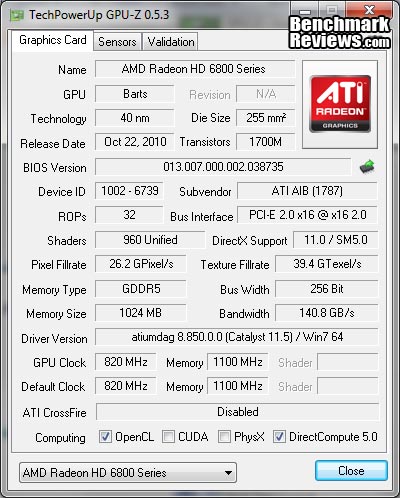
At Idle the HIS HD6850 IceQ X Turbo consumes 25 (144-119) watts at idle and 153 (272-119) watts when running full load using the test method outlined above. As we can see in the GPU-Z screenshot below the HIS HD6850 IceQ X Turbo uses 0.945v when idle, when under load it uses 1.148v.

In the next section we will be discussing our overclocking with the HIS HD6850 IceQ X Turbo video card.
HIS HD6850 IceQ X Turbo Overclocking
Before I start overclocking I like to get a little bit of information, firstly I like to establish operating temperatures and since we know these are nice and the IceQ X cooler is very capable we can quickly move on. Next I like to know what the voltage and clock limits are, so I fired up MSI's Afterburner utility. I established that vCore was adjustable between 0.800v and 1.299v and clock speeds were limited to 900MHz max on the GPU and 1250MHz (5.00GHz effective) maximum frequency for the memory. This is more than enough range to move forward with and I know I can squeeze every last drop of performance out of the HIS HD6850 IceQ X Turbo. My preferred weapons are MSI Afterburner (v2.2.0 Beta 3) for fine tuning while using FurMark (v1.9.0) to push the GPU.

Without needing to raise the vCore I was able to push the GPU to its 900MHz limit. Equally impressive was the memory overclock, increasing its speed to 1205MHz (4.82GHz effective) required very little effort at all. I am really impressed by the capabilities of the already overclocked HIS HD6850 IceQ X Turbo video card. At this speed it could qualify for the Turbo X OC rank from HIS
| Test Item | Standard GPU/RAM | Overclocked GPU/RAM | Improvement | |||
| HIS HD6850 IceQ X Turbo | 820/1100 MHz | 900/1205 MHz | 80/105 MHz | |||
| DX10: Street Fighter IV | 111.75 | 121.33 | 9.57 FPS (8.56%) | |||
| DX10: 3dMark Jane Nash | 22.52 | 24.73 |
2.20 FPS (9.78%) |
|||
| DX10: 3dMark Calico | 16.72 | 18.45 | 1.73 FPS (10.34%) | |||
| DX11: HAWX 2 | 71 | 77 | 6 FPS (8.45%) | |||
| DX11: Aliens vs Predator | 29.40 | 32 |
2.60 FPS (8.84%) |
|||
| DX11: Battlefield BC2 | 54.12 | 58.86 | 4.73 FPS (8.73%) | |||
| DX11: Metro 2033 | 22.90 | 24.62 | 1.71 FPS (7.47%) | |||
| DX11: Heaven 2.1 | 24.10 | 26.16 | 2.06 FPS (8.54%) | |||
| DX11: Battle Forge | 38.43 | 41.63 |
3.19 FPS (8.31%) |
|||
| DX11: Lost Planet 2 | 26.80 | 29.26 | 2.46 FPS (9.17%) |
Armed with a 80MHz GPU overclock (125MHz over reference design) and a 105MHz memory overclock (205MHz over reference design), we went back to the bench and ran through the entire test suite. Overall we saw an average 8.82% increase in scores (at 1920x1080 resolution), with performance on par with a reference speed Radeon HD6870.
We also re ran temperature tests at the overclocked speeds at a slightly higher ambient temperature of 26°C. The IceQ X cooler on the HIS HD6850 IceQ X Turbo once again did not fail to please, at idle the GPU sat at 44°C (39% fan speed). Pushing the temperature up with FurMark saw the GPU load temperature rise to 79°C (53% fan speed). The auto fan speed is quite relaxed so next I tested at 75% fan speed and the temperature dropped to 74°C. Cranking the fan on manual to 100% saw the temperature drop to 71°C.
That's all of the testing over, in the next section I will deliver my final thoughts and conclusion.
HIS HD6850 IceQ X Turbo Final Thoughts
The IceQ X Cooler with its 92mm fan is more than capable of taming the HD6850 GPU even with its extreme overclock, but not its default fan profile leaves some area for improvement. The fan isn't even that loud when set to 100% so I don't understand why the HIS labs have is spinning so slow. When I overclocked the GPU and put it through its paces the fan was happily spinning away at 53% while the GPU was heating up at 79°C, this was a little worrying and it would be more reassuring if HIS would be a little more aggressive with the fan profile or have a switch for users to select from silence/performance etc.
This video card overclocked very well though and performed much the same as a reference speed Radeon HD6870, the overclock limit was reached without needing to increase the voltage so there is more to be had if you want to be more adventurous. The 900MHz limit was the same in AMD Overdrive and Afterburner but I'm sure this card will do more.
HIS HD6850 IceQ X Turbo Conclusion
Important: In this section I am going to write a brief five point summary on the following categories; Performance, Appearance, Construction, Functionality and Value. These views are my own and help me to give the HIS HD6850 IceQ X Turbo Video Card a rating out of 10. A high or low score does not necessarily mean that it is better or worse than a similar video card that has been reviewed by another writer here at Benchmark Reviews, which may have got a higher or lower score. It is however a good indicator of whether the HIS HD6850 IceQ X Turbo is good or not. I would strongly urge you to read the entire review, if you have not already, so that you can make an educated decision for yourself.
The graphics performance of the HIS HD6850 IceQ X Turbo is good enough for playing most games at 1920x1080 resolution with lower settings but there are obviously some games that will struggle, then again this card isn't aimed at the high end price bracket. It does however deliver great price to performance out of the box, and then some more when you overclock the hell out of it. The HIS HD6850 IceQ X Turbo sits nicely between the GTX550-Ti and GTX460, coming within 1~2 FPS of the GTX 460 in some of our tests.
The appearance rating of the HIS HD6850 IceQ X Turbo is up for debate. The bright, in your face aqua/turquoise colored shroud and fan serve as a visual metaphor of ice (hence the name) and give this video card a very unique and individual look that is sure to appeal to some but to me it is a bit too much. The side view is its saving grace, the IceQ cooler looks nicer from the side and makes all the difference once you install the card into your system. There are some that will surely disagree but thanks to the graphic nature of this review you can easily make your mind up for yourself.
Construction is excellent as you would expect from a company with a good reputation like HIS, despite the use of plastic for the shroud the whole package feels quite solid. Taking the card to pieces and reconstructing it was a breeze and everything lined up perfectly, the IceQ heatsink is solid and really adds some weight and girth to the card which reassures you that it is no fragile piece of hardware.
Functionality is very good, I can't help but keep singing praise for the IceQ cooler, it really is so good, it would be even better with a more aggressive fan profile. There are some extra sensor readings in GPU-Z not seen on all other cards and help you keep track of things in real time when overclocking or load testing.
The HIS Radeon HD6850 IceQ X Turbo video card model H685QNT1GD will cost you $184.99 at NewEgg and Amazon retailers, and at this price point it is on par with the NVIDIA GTX460. On average the HIS HD6850 IceQ X Turbo costs $5.46/FPS in our benchmark tests, and I believe this to be very reasonable for a performance card like this.
I have no problems recommending this card to anyone who is in the market for a great mid range card, you certainly could do much worse.
Pros:
+ IceQ cooler is excellent
+ Fan at 100% is not too loud
+ Excellent build quality
+ Good performance
+ Good value for money
+ CrossFireX Support
+ Overclocked to limit without extra voltage
+ Variety of outputs: Display Port, DVI-I and HDMI
Cons:
- Hot air from GPU exhausted into case
- Looks are not its best feature
- Fan profile is very relaxed
Ratings:
- Performance: 8.75
- Appearance: 8.50
- Construction: 9.50
- Functionality: 9.00
- Value: 9.00
Final Score: 8.95 out of 10.
Quality Recognition: Benchmark Reviews Silver Tachometer Award.
Questions? Comments? Benchmark Reviews really wants your feedback. We invite you to leave your remarks in our Discussion Forum.
Related Articles:
- ASUS F1A75-M PRO FM1 Motherboard
- Noctua NH-U12P Heatpipe CPU Cooler
- MSI 990FXA-GD80 AM3+ Motherboard
- OCZ Agility MLC SSD OCZSSD2-1AGT120G
- Kingston HyperX Genesis 16GB DDR3-1600
- Foxconn GeForce 9500 GT G96 Video Card
- MyDigitalSSD BP4 Slim 7 Solid State Drive
- ASUS P8Z77-V Deluxe Benchmark Performance
- Logitech G700 Wireless Gaming Mouse
- Patriot Wildfire SF-2281 Solid State Drive