
Synology Cube Station CS407 4-Bay SATA Gigabit NAS
Synology Cube Station CS407
Time is money in the SMB and Corporate Enterprise sector, and anything that can cost less while saving time is sure to be a popular commodity. The Synology Cube Station CS407 4-Bay SATA NAS is a Gigabit network appliance which offers more features and functionality than most Windows Server 2003 R2 domain controllers... for less than the price of the Server Operating System! Benchmark Reviews gives this Network Attached Storage server a full host of tests as we uncover the value inside.
The Synology Cube Station CS407 4-Bay SATA Gigabit NAS is designed with Windows ADS authentication, USB printer sharing, dynamic website hosting, and data backup. With terabyte competency and hi-performance file sharing, CS407 gives business users the freedom to store massive data efficiently. The RAID 1/5 protection further prevents data loss from inevitable disaster.
Storing and Sharing Files via Internet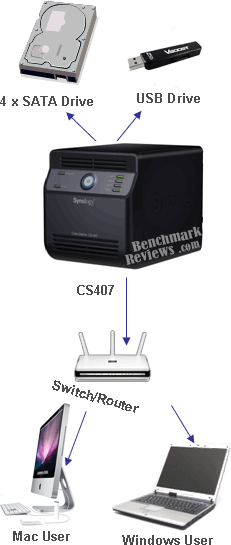
Windows users and Mac users can easily share files within Intranet or through Internet. Unicode language support makes sharing different language files from Synology Server smoothly.
PC Data and Server Data Backup
Synology Server provides various backup solutions to back up Synology Server data or back up PC data to Synology Server and rsync compatible server.
Transferring Data via FTP
Synology Server provides FTP service with bandwidth restriction and anonymous login. To transfer data safely, "FTP over SSL" or "FTP over TLS" is also available on advanced models.
Managing Files through Web Browsers
File Station makes it possible for users to manage their files on the Synology Server easily through a web interface. Simply point the web browser to Synology File Station, and you have one more access to your files.
Sharing Photos and Videos with Photo Station 2 + video
"Photo Station 2 + video" provides intuitive user interface to share your photos and videos online in a snap.
Enjoying Entertainment Data Stored on Server
"Download Station" allows you to download files from Internet through BitTorrent, FTP, and HTTP to Synology Server. Moreover, if you have UPnP DMA connected in the LAN, you can enable "Multimedia Service" and share the multimedia files on Synology server. If you just want to share and play mp3 files stored on Synology Server, you can enable "iTunes Service", and enjoy the music through any iTunes clients on LAN.
Enjoying Music instantly with USB Speakers
"Audio Station" allows users to collate music stored in Synology Server into playlist, play music stored on the Synology Server or from the connected iPod, or even stream Internet Radio Stations. With USB speakers connected to the Synology Server, you're able to bathe in music at anytime you want.
Programming your Own Web Site
Personal or corporate website can be easily setup using "Web Station" function. By integrating with PHP and MySQL, user can also set up blog or even online shop.
USB Printer Server
You can share USB 2.0 Printer through Local Area Network.

About the company: Synology, Inc.
Synology Inc., founded in April of 2000, creates next generation Network Attached Storage servers for the international market. Providing a secure way of storing and sharing digital content, Synology products are stylish in appearance, compact in size and energy efficient. Customer's investment is enhanced with free software upgrades and 24/7 online support. This makes the Synology product an ideal choice for the Home, Small Business and Corporate setting.
Closer Look: Cube Station
The corporate server landscape has become much more simplistic over the past years. Even after visiting the recent SuperComputing Conference SC07 event I was surprised by how dull some of the server designs were. But that is the popular approach to Enterprise design these days: keep it simple. That's a fine idea, and someone out there thought that it wasn't simple enough.
Synology has been offering high-performance server alternatives for some time now, and their new Cube Station CS407 4-Bay SATA Gigabit NAS is simple while offering more than any Windows Server ever has out of the box (and for a much lower cost).
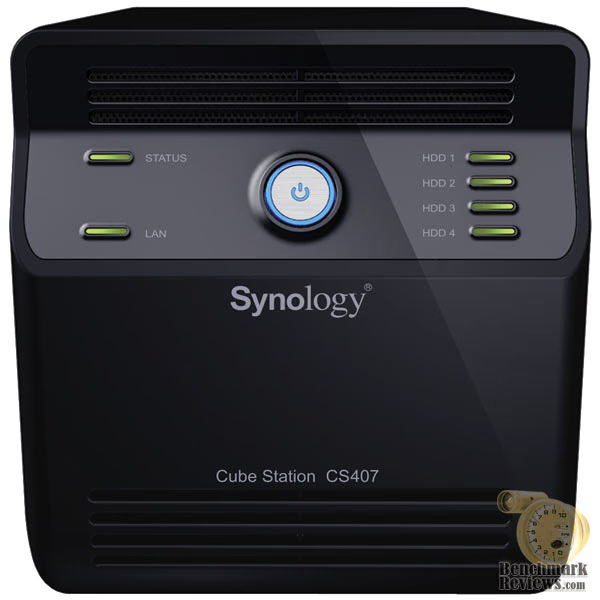
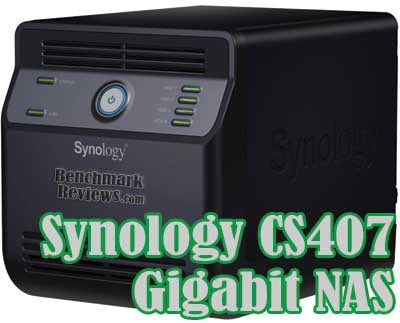
The image above is a front view of the Synology Cube Station CS407, and it is nearly displayed to scale. The CS407 is a 4-Bay SATA Gigabit network attached storage server (NAS) which offers everything from single disk arrangement, to complex RAID-5 disk arrays. The disk array capability alone may be enough to sell this product, but you would be cheating yourself if you didn't learn about the many other features it offers.
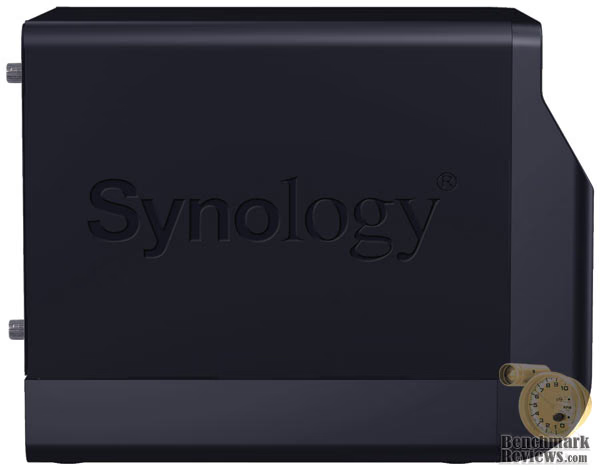
As a product analyst, I get to research many products that most consumers may never see on store shelves. Even though I also own and operate a small business which manages corporate networks, the list of products I get to work with still pales in comparison to the items our sponsors send. So when someone in my position is blown away at the myriad of features and functions embedded into this extremely affordable product, it's worth taking to heart. Because this product has so many important functions (honestly, it's more robust than a Rambo survival knife combined with a Leatherman Pocket Tool) that my review of the product only introduces the most popular features.
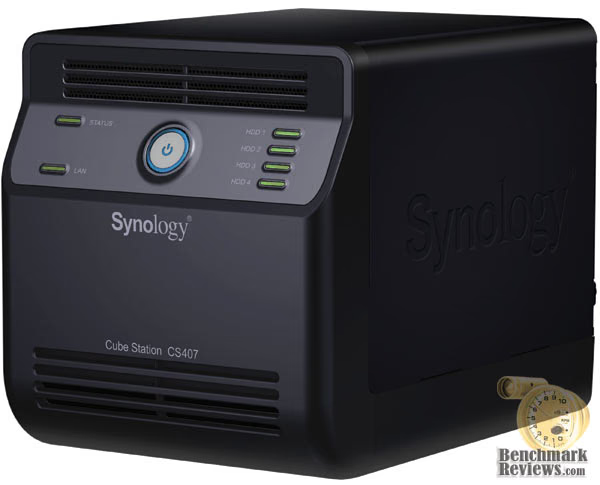
Given a solid-black finish and engineered to use a small footprint, the Synology "Cube Station" is more than you bargain for. The face of the CS407 NAS is simple and straightforward, but offers enough information to keep the most anxious Network Administrator content with status detail. If the power, LAN, and four hard disk drive status lights don't send the message, there is a status LED that flashes in a method which matches diagnostic codes (located in the manual).
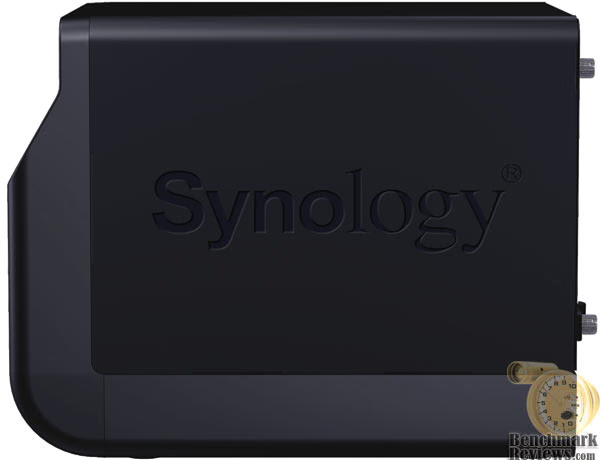
The Synology Cube Station CS407 measures 9.06" long, by 6.61" wide, and 7.24" tall. Since the standard rack unit measures 1.75" tall by 19.0" wide per unit, the CS407 is just slightly taller than a 4U height rack case. I'm not sure if Synology took this into consideration, but had the CS407 been designed to be a mere 0.24" shorter and had reduced the width only 0.27", then this Cube Station could fit three units in the same space as a 4U server. Hopefully this will be adjusted in future revisions.
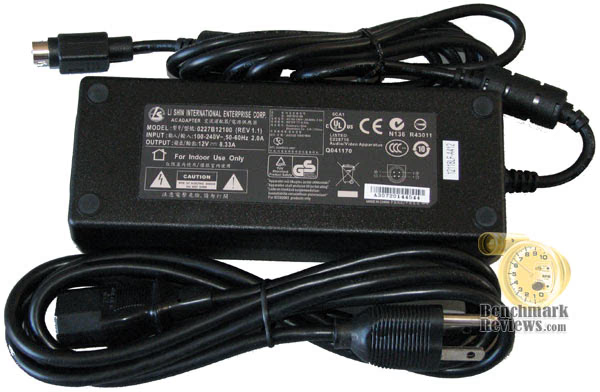
So far, the Synology Cube Station has been exactly that. However, all of that compact space means that there isn't an integrated power supply unit in the CS407. In this case, a Li Shin AC power adapter brick supplies 99 watts (12V / 8.33A) to this 4-Bay SATA Gigabit NAS.
In our detailed features section, the CS407 will be disassembled and inspected for design flaws. Please continue on to learn more about this great little product.
CS407 Detailed Features
As we continue to uncover the details hidden inside the Synology Cube Station CS407, it's time to remove the four thumb-screws and drop the back panel door down to expose the 4-Bay SATA Gigabit NAS internals.
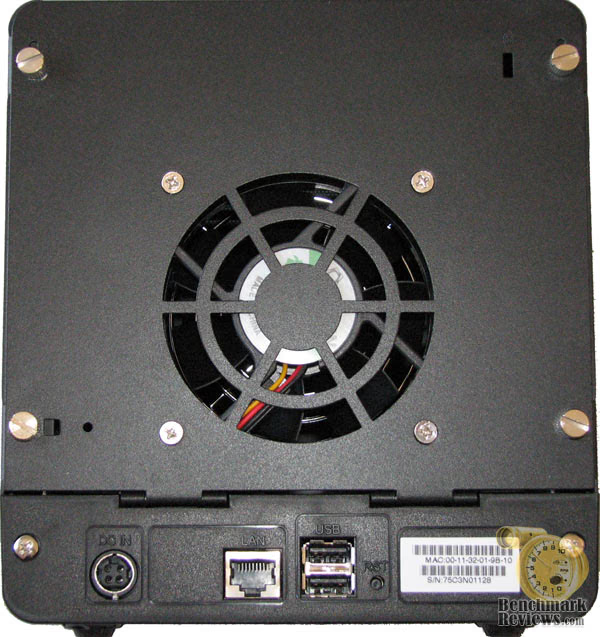
From this rear view, you can see the 80mm cooling fan mounted to the back panel door. Below this is the power brick input port, RJ-45 Gigabit Ethernet port, two High-Speed USB 2.0 ports, and a reset button. Also displayed in plain view is the MAC address information, which comes in handy for network routing, and the serial number for asset management.
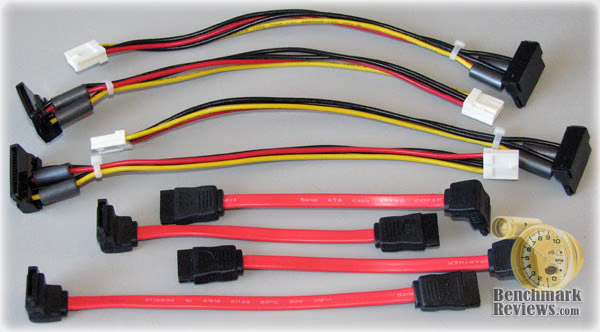
Synology has included everything you will need to get the four SATA hard disk drives loaded and ready for use inside the Cube Station CS407 NAS. There are four custom length SATA cables, which utilize the 90-degree connection at one end. There are also four power custom power connections, all which have two ferrite core chokes isolating leaked surface current. The one item that came with this kit that wasn't so impressive was the CAT-5e cable.
Gigabit Ethernet will operate on CAT-5e, especially at patch-cord lengths, but this is yesteryear's standard and has been replaced by CAT-6 cable almost two years ago. The manufacturers cost is a difference of about two to three pennies per cord at 100-unit prices, so I can't find a valid reason as to why every network product Benchmark Reviews has seen still comes with the old cables. For the past year I have seen all of my new network construction and rebuilds fitted with CAT-6 infrastructure and patch cords, so let's hope the manufactures catch on.
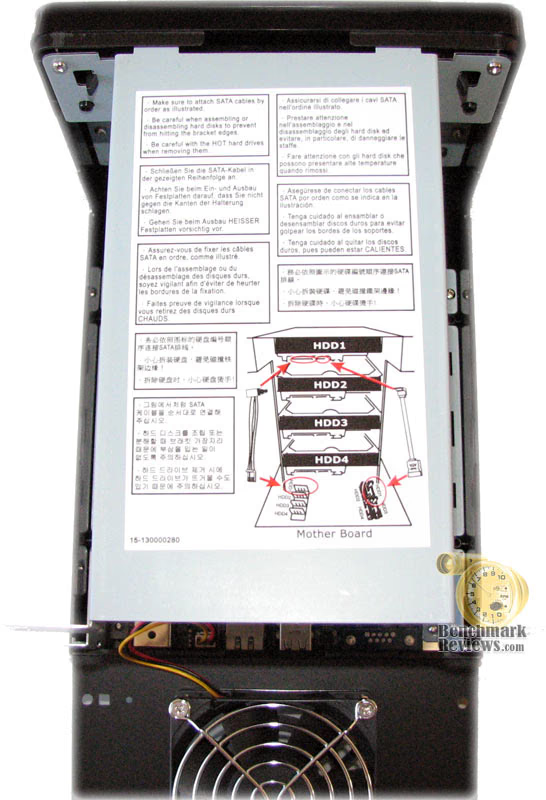
Once the four thumb-screws have been removed the steel cover easily slides up and out to expose the hard drive cage inside the Synology Cube Station CS407. The simplified instructions are displayed in eight languages and one universally understandable image on the poster sticker.
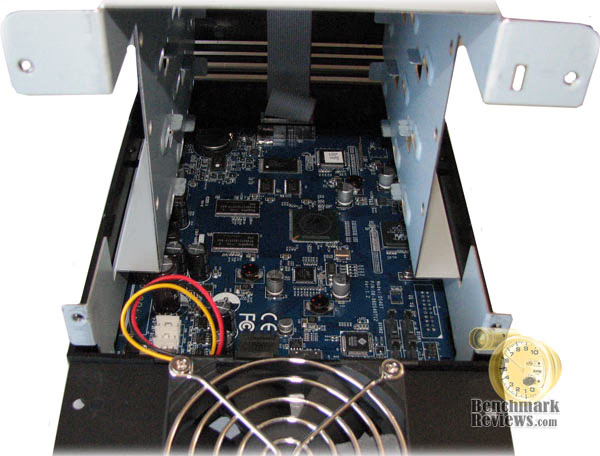
Looking down into the Cube Station you can clearly see the CS407 motherboard with 500MHz of air-cooled processor and two 64MB SDRAM modules of system memory.
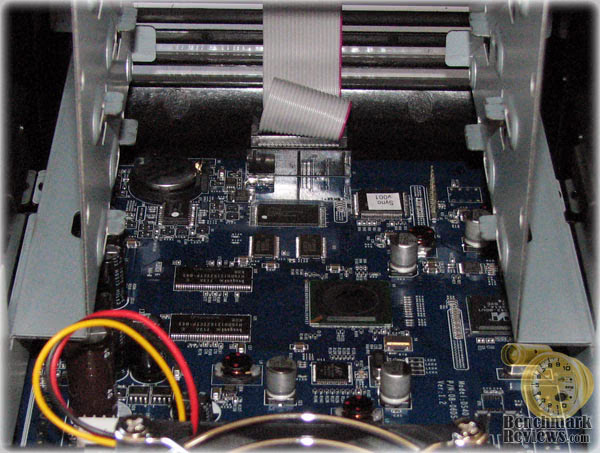
Looking a little closer, you can see that Synology made use of many new solid-state electronic devices, included solid capacitors. You don't have to be an IT professional to appreciate the effort placed on maintaining years of stable use our of the CS407. For corporate buyers, this translates into fewer maintenance and repair cycles and a lower total cost of ownership.
When it's all said and done, Synology has done a great job of producing a quality product with long-lasting components. In our next section, the detailed features and specifications are revealed. Normally this is something most readers would scan over on their way to the next page, but I sincerely think you will see that there is a lot more to the Cube Station CS407 than just 4-bays worth of SATA hard drive storage.
Synology CS407 Features
Speedy & Flexible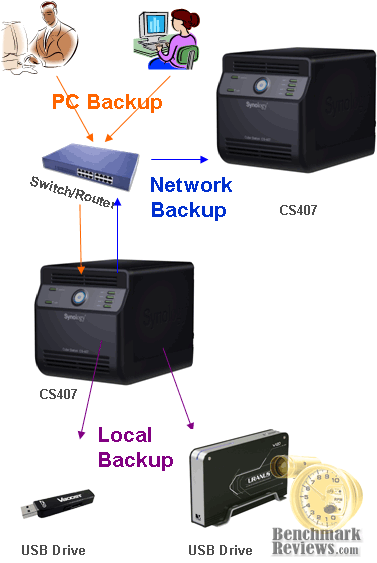
CS407 provides speedy data transmission and powerful computing capability, which is not only suitable for corporate environments that demand on efficiency, but also a great choice for power users who massively access data on the server.
Works with Windows ADS
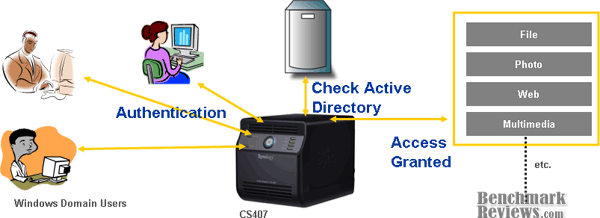
CS407 is compatible with Windows ADS and NT4 domain. Windows domain users are able to access data shared from CS407 when they pass the Active Directory authentication. This will greatly save your time on creating large amount of accounts for the domain users.
Flexible Storage Management
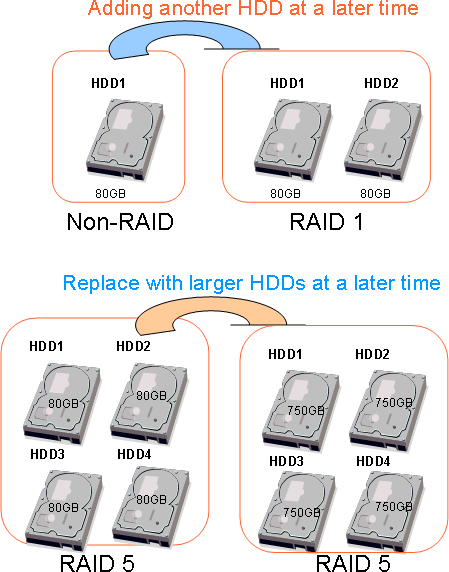
CS407 allows you to create RAID 0, RAID 1, or RAID 5 volume on it. For budget-sensitive users, CS407 has the flexibility to assemble smaller hard drives first, and expand RAID 1 or RAID 5 volume by replacing existing hard drives with larger ones one by one when the budget is allowed. When the hard drives on CS407 are full, you can expand more storage simply by attaching an external hard drive to the USB port of CS407.
Security Enhancements
Encrypted FTP allows you to transmit data using "FTP over SSL" or "FTP over TLS" option. HTTPS support encrypts all HTTP connections with SSL transport mechanism. Encrypted Network Backup ensures Network Backup is done with encrypted data transmission. You won't be worried about critical data being exposed in danger.
Share Files between Windows and Mac
CS407 is designed for Windows users and Mac users to share files seamlessly. Windows users can access CS407 via Samba and FTP, and Mac users via Samba, FTP, and AFP. Unicode support allows sharing files smoothly in different languages.
Even more, File Station is a great way for you to remotely access and manage files stored on CS407. Simply use a web browser to connect to CS407, and you'll have total control over the files. With File Station, moving files among shared folders will now be only seconds away!
Build Up Dynamic Website
Web Station runs Apache web server that allows you to publish website with only few steps. With pre-installed PHP+MySQL, you are free to install popular blog or bulletin board programs on CS407. No advanced IT knowledge is required to build up your community.
Total Backup Solutions
Data backup is so important but people tend to ignore it, CS407 makes data backup so complete and automatic that backup always be done without your attention. You can always find the backup alternatives that fit your needs.
-
Network Backup is designed for you to back up data from CS407 to another Synology product that also supports Network Backup function or resync-compatible server.
-
Local Backup allows you to back up data from CS407 to external hard drive attached to CS407 via the USB port.
-
Desktop Backup simplifies desktop backup with Data Replicator II. PC users will enjoy the easy-to-use backup tool to back up important data automatically.
Cool and Quiet
Inside the stylish and elegant cube, the good ventilation airflow and quiet fan operation make CS407 perfectly fit into any corner of your office.
Synology CubeStation Specifications
|
Hardware
Power Consumption(1)
Certification
Networking Protocols
Windows ADS Domain Integration
Security
File System
File Sharing
Utilities
|
Applications
UPnP Multimedia Service Support
iTunes Server Support
Audio Station Support
Photo Station 2 + video Support
Management
|
RAID Management
Backup Solutions
3rd-Party Backup Support
Supported Clients
Printer Support
Languages
Environment
Package Content
(1) Measured with 4 Seagate 750GB ST3750640NS hard drives. The figures could vary on different environments. |
I know that most times the testing methodology is just a page more comparible to any legal disclaimer. But hopefully, I can persuad you to read it through. You see, I will do something more people should do in their work: I will educate you. It's almost guaranteed.
Please continue on to the next page to learn the difference between a Megabyte, and a Mebibyte. You probably had no idea there was such a thing, but it's time to correct our slow-learning industry with the facts.
NAS Testing Process
Since Benchmark Reviews doesn't have a vast array of Network Attached Storage devices in our collection product resources, we do our best to compare products to as many related devices as possible. In this review, the Synology Cube Station CS407 4-Bay SATA Gigabit NAS was compared to the reigning champ, the D-Link DNS-323 SATA RAID Gigabit NAS, as well as the older QNAP TS-201 SATA Gigabit NAS Server. All three are Gigabit-speed Ethernet network devices, and all three share the same RAID-0, RAID-1, JBOD, and single disk capability.
In case you're not up to speed with network terminology, our you're just new to the technology, here is a little refresher for you. The basic unit data measurement is called a bit (one single binary digit). Computers use these bits, which are composed of ones and zeros, to communicate their contents. All files are stored as binary files, and translated into working files by the Operating System. This two number system is called a "binary number system". In comparison, the decimal number system has ten unique digits consisting of zero through nine.
Have you ever wondered why your 500GB hard drive only has about 488GB once it has been formatted? Most data files use the binary number system to express file size, however the prefixes for the multiples are based on the metric system. The nearest binary number to the metric amount of 1,000 is 1,024; which means that 1,024 bytes is named a Kilobyte. So even though a metric "Kilo" equals 1,000, a binary "Kilo" equals 1,024. Are you confused yet? Don't be surprised, because even the most tech savvy people often mistake the two. Plainly put, the Kilobyte is expressed as 1000 bytes, but it is really comprised of 1,024 bytes.
Most network engineers (myself included) are not fully aware that the IEC changed the way we calculate and name data chunks when they published the new International Standards back in December 1998. The International Electrotechnical Commission (IEC) removed the old metric prefixes for multiples in binary code with new prefixes for binary multiples made up of only the first two letters of the metric prefixes and adding the first two letters of the word "binary". For example, instead of Megabyte (MB) or Gigabyte (GB), the new terms would be mebibyte (MiB) or gibibyte (GiB). While this is the new official IEC International Standard, it has not been widely adopted yet because it is either still unknown by institutions or not commonly used.
Personally, I think the IEC took a confusing situation and simply made it more of a mess. As I mentioned earlier, the Kilobyte was previously expressed as 1000 bytes, even though it was really comprised of 1,024 bytes. Now, the Kilobyte really is expressed correctly as 1000 bytes, and the Kibibyte is the item comprised of 1,024 bytes. In essence, the IEC just created a new name for the binary item and left the existing name for the metric item. Hopefully that clears things up, and you can thank Benchmark Reviews for training the next generation of Network Engineers.
Testing Methodology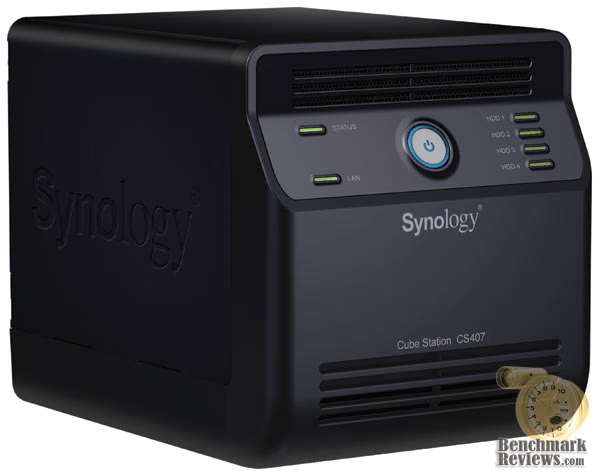
Although each of the devices we tested can accommodate several different disk configurations, it was decided that the single disk test was the best way to measure throughput. This configuration removed the chance that RAID array overhead would effect the test results.
Connected directly to the Marvell Yukon 88E8056 NIC by a CAT6 patch cable, the NAS products received one test transfer followed by three timed transfers. Each test file was sent to 500GB Seagate 7200.10 HDD installed in the NAS for a time write test, and that file was sent back to an identical 500GB Seagate 7200.10 drive in the test system to record the read test.
The two transfer tests: read and write, were conducted on each NAS appliance using the 100 MiB file and then the 1 GiB file. Additionally, a second set of tests were conducted with Jumbo Frame enabled. While the Synology Cube Station CS407 and QNAP TS-201 had 9000K MTU Jumbo Frame settings available, the D-Link DNS-323 did not have any. In the Jumbo Frame tests the Marvell Yukon 88E8056 Integrated NIC was set to use the 9014 Bytes value with Jumbo Frame enabled.
NAS Comparison Products
-
Synology Cube Station CS407 4-Bay SATA Gigabit NAS
-
QNAP TS-201 SATA Gigabit NAS Server
Support Equipment
-
Seagate 500GB 7200.10 SATA-II 7200 RPM Hard Disk Drives
-
3-Foot Category-6 Solid Copper Shielded Twisted Pair Patch Cable
-
Marvell Yukon 88E8056 PCI-E Gigabit Ethernet Controller (Driver Version 8.59.1.3)
-
100 Binary Megabytes Test File (100 MiB/Mebibyte = 104,857,600 bytes)
-
1024 Binary Megabytes Test File (1 GiB Gibibyte = 1,073,741,824 bytes)
Test System Hardware
-
Motherboard: ASUS P5K3 Deluxe (Intel P35 chipset) with BIOS 810 (11/02/2007)
-
Processor: Intel E6550 Core 2 Duo 2.33GHz with 1333MHz Front Side Bus
-
Video: FOXCONN GeForce 8800 GTS 640MB overclocked to 600MHz Core / 900MHz RAM
-
O/S Hard Disk: Western Digital WD360GD 10,000 RPM SATA
-
Data Hard Disk: Seagate 500GB 7200.10 SATA-II 7200 RPM
-
Optical Drive: Toshiba Samsung SH-S203B SATA 20x DVD R/W
-
Enclosure: Lian Li PC-B25B Black Aluminum Mid-Tower ATX Case with 2x120mm cooling fans
-
Operating System: Windows XP Professional SP-2 (optimized to 16 processes at idle)
NAS Testing Results
When I first began testing the different NAS products, I wasn't sure how the Synology Cube Station CS407 4-Bay SATA Gigabit NAS would compare to the already-impressive D-Link DNS-323 SATA RAID Gigabit NAS. I knew the QNAP TS-201 SATA Gigabit NAS Server would not pose any real threat, and would more likely be used (sadly) as a worse-case baseline to compare against the others.

Starting with the 100 MiB (100 binary megabytes / 104,857,600 bytes) read test the Synology Cube Station CS407 Gigabit NAS proved to be a real contender. Boasting a phenomenal 2-second transfer time at 50.0 MBps, I was stunned at how quickly the test ended. While the D-Link DNS-323 does not offer Jumbo Frame configuration on the NAS itself, there was also no improvement to be had by adding Jumbo Frame settings to the NIC for its tests. Even still, the DNS-323 produced competitive results without the added boost. The QNAP TS-201 offered pretty poor results, considering that the best performance was a 10-second Jumbo Frame transfer at 10 MBps. The Synology CS407 was the clear winner in the 100 MiB read bandwidth test.
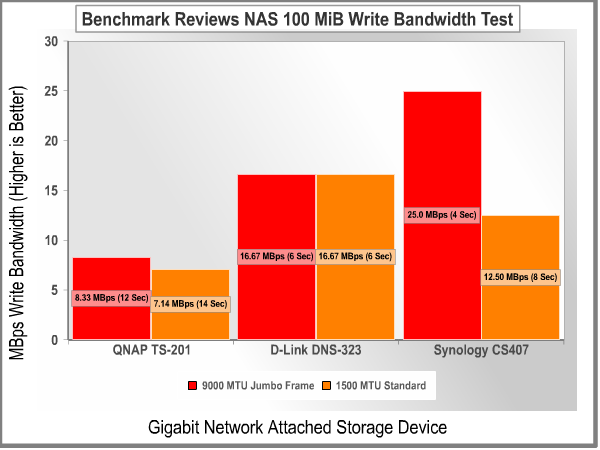
Moving on to the 100 MiB write bandwidth test, the collective results confirmed that it is still faster to pull a file from the NAS servers then it is to push a file to it. All of the Network Attached Storage servers did not degrade bandwidth by much, when compared to their respective read test results. The QNAP TS-201 offered no more than 8.33 MBps utilizing Jumbo Frame, which is very poor for any Gigabit Ethernet device. The D-Link DNS-323 did exactly as was expected, and gave matching results of 16.67 MBps. Oddly enough the Synology Cube Station CS407 did not perform better than the DNS-323, until Jumbo Frame settings were added which improved the bandwidth to 25.0 MBps. This put the CS407 on the same level as the DNS-323 in the 100 MiB write bandwidth test.

Next up was the 1 GiB (1024 binary megabytes / 1,073,741,824 bytes) read test, which was offered results very similar to the 100 MiB read tests. The QNAP TS-201 continued to plummet, barely able to be called a Gigabit device with a best of 9.48 MBps using Jumbo Frame. The D-Link DNS-323 was just barely improved to 18.62 MBps by enabling the Jumbo Frame support 9014 Bytes value on the Marvell Yukon 88E8056 PCI-E Gigabit Ethernet Controller. Similarly, the Synology Cube Station CS407 improved from 32.0 MBps to 33.03 MBps with Jumbo Frame support. Just as in the previous read bandwidth test, the Synology CS407 lead by a clear margin.
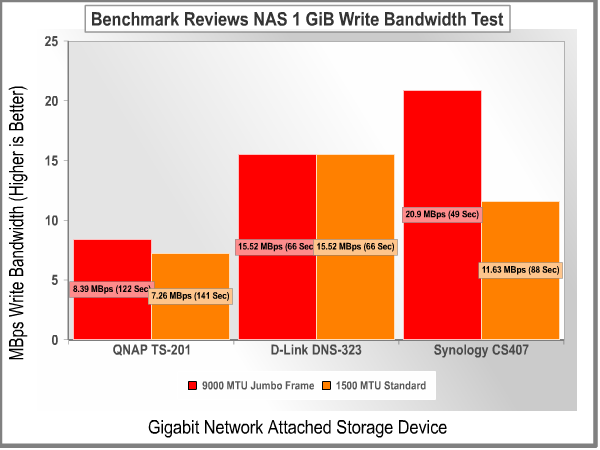
Finishing off our bandwidth readings was the 1 GiB write test. The QNAP TS-201 was the epitome of Gigabit network appliances, registering a pathetic 7.26 MBps at 1500 MTU and a barely-improved 8.39 MBps with a 9000 MTU Jumbo Frame. The D-Link DNS-323 scored identical bandwidth results, giving 15.52 MBps. And finally, the Synology CS407 Gigabit NAS dropped the ball with an 11.63 MBps standard write transfer, but recovered with an appealing 20.9 MBps when Jumbo Frame was added.
Final Thoughts
Where do I begin? This is supposed to be my final thoughts, and quite frankly I just barely touched the surface of what the CS407 offers. So let's recap the highlights that will most likely capture interest:
-
Four SATA-II hard disk drive storage, with single disk and RAID 0/1/5/JBOD capability.
-
Windows Active Directory Services and NT4 support with login via Samba/AFP/FTP for domain users.
-
Web Station runs Apache web server, and the pre-installed PHP+MySQL allows you to run your own dynamic web site from the CS407.
-
Two High-Speed USB 2.0 ports capable of connecting external hard disk drives or flash storage, as well as compatible printers.
And this is by no means the most important features, only the ones I think are unique and different. Taking into consideration that the feature set reads like a chefs shopping list, it's no wonder these NAS products are quickly replacing Windows Server products. After all, for the price of the CS407 and four 750GB SATA-II hard disk drives, you are still well beneath the cost of the Windows Server 2003 R2 Operating System and additional client access licenses (remember that the CS407 comes with 50)!
So where does this a product like this call home? Well, that's the good news; as it's capable of delivering the best to both worlds. I like the idea of plugging in USB speakers and using the CS407 as an iTunes server or as a Torrent download station, but it fits in just as well (or even more so) in the Corporate Enterprise sector which is more likely to utilize the four drive bays on this Gigabit NAS.
Conclusion
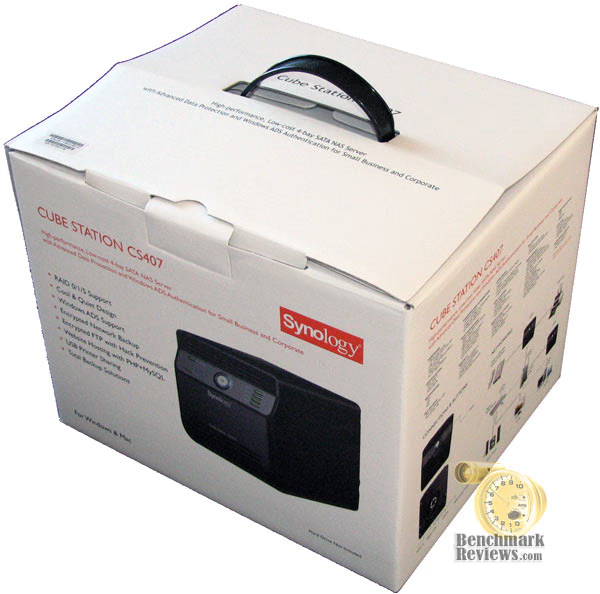
Our rating of the overall packaging and presentation is somewhat high, as Synology has done an excellent job of educating consumers with plenty of box-top information so they can make an informed purchase. The concept of truth in advertising is getting further and further away every year, but for once i can see that not every company is out to cover their product with catch phrases and slogans. Synology dresses the CS407 in an appropriate retail package which matches the sophistication help inside.
While the CS407 certainly lives up to the name "Cube Station" with it's breadbox-like shape, the overall appearance is still appealing and surprisingly modern. The ventilation grill at the top and bottom of the front bezel help to add dimension as the green LED lights keep things in motion. Keeping the home users happy with a design that doesn't look boring isn't easy, just as it is difficult to keep the corporate image intact without too much pizazz.
Synology has built one solid little NAS out of the CS407 Cube Station. The plastic front bezel is thick enough to sustain direct impact without suffering damage, while the rest of the unit is constructed of steel. Not that a network appliance will see a lot of careless handling or harsh environments, but the CS407 appears to be built ready for the worst.
As Gigabit Ethernet finds its way into the mainstream, the bandwidth throughput has gradually grown for all product involve. The Synology CS407 is no different, and it handily outperformed the competition. With tremendous bandwidth readings peaking at 50 MBps and dropping no lower than about 12 MBps, the Cube Station proved itself to be a real performer. The list of functionality features is nearly endless, and could almost be considered too much for one device since it might overwhelm the average home network enthusiast or even a trained IT professional. But as the saying goes: "It's better to have and not need then to need and not have".
While most home users might not be interested in paying over $600 for something they will use to store music and video, the corporate Enterprise segment has never seen so much value. In a market where everything seems to cost more than a should, the CS407 could please everyone from the accountant to the IT/IS manager. In all regards, the CS407 is far more valuable than the going street price; but there aren't too many consumers who will use it for everything it can offer.
The Synology Cube Station CS407 4-Bay SATA Gigabit NAS is going to be an excellent alternative to the basic workgroup and domain level file servers most resellers use for small business networks, and the additional functionality should not go overlooked. While home users might be better suited with the Synology Disk Station DS-207+ SATA Gigabit NAS we reviewed not long ago, there is certainly a home for the CS407 in the storage-space intensive enthusiast market. Whether you find yourself positioning the CS407 in a home, SOHO, or Enterprise environment, just remember: this little workhorse could be your next web server as much as your next file server.
Pros:
+ Most versatile NAS on the market!
+ Excellent Gigabit Ethernet network performance
+ Single, JBOD, RAID 0/1/5 disk arrays
+ Convenient compact footprint and size
+ High-quality metal enclosure
+ Elegant yet simple black appearance
+ Windows ADS compatible
+ Two High-Speed USB 2.0 ports
+ Simple HTML administration interface
+ Frequent firmware development and software support
+ Pre-installed PHP+MySQL and Apache web server
+ 4 Terabyte storage capacity
+ Sufficient cooling and ventilation
Cons:
- Does not offer eSATA connectivity
- Large AC power adapter brick adds to overall footprint
- Product dimensions are just short of 4U rack mount constraints
- Rear panel could support a 120mm cooling fan
- Package includes obsolete CAT-5e Ethernet patch cable
Ratings:
-
Presentation: 9.25
-
Appearance: 9.00
-
Construction: 9.25
-
Functionality: 10.0
-
Value: 7.75
Final Score: 9.05 out of 10.
Excellence Achievement: Benchmark Reviews Golden Tachometer Award.
Questions? Comments? Benchmark Reviews really wants your feedback. We invite you to leave your remarks in our Discussion Forum.
Reader comments from the original article
5 comments were posted before commenting closed. They are preserved as written. Original avatars no longer resolve and are shown as a placeholder.
Media Enclosure Support Siavash Amiri Permalink:
Hi Could you please tell me whether this unit support the Ellion HMR 700A media recorder and devices like that? I mean can I connect the unit to media recorder and record directly to this unit? And finally can this unit support 1 tb and 2 tb hard drives separately? Putting a 1 tb or 2 tb hard drive in to each bay? Thank you
Nowhere near Gigabit Carl Permalink:
I don't know why they call this unit a "Gigabit" Device. The transfer speeds are not even capable of 100MB standards.
Gigabit Ethernet Bruce Permalink:
This review is over six years old now, but the limiting factor for many NAS devices is the effective transfer rate of the primary interface. In this case, the NAS uses the GbE (Gigabit Ethernet) interface, which has a maximum theoretical transfer rate of 125 MByte/s. Some of the newer, more powerful models are bumping up against this limit, with R/W speeds above 110 MByte/s.
RE: Synology Cube Station CS407 4-Bay SATA Gigabit NAS doom3 Permalink:
Carl... units are in megabytes per sec :) so the real speed in Mbit/s was something about 450 Mbit/s.
Still not close... Carl Permalink:
in my experience. I get transfer rates of between 39Mb/s to a maximum of 65Mb/s So still nowhere near the theoretical possibilities. Carl