
Patriot Corza Network Storage Server PCZ35SNAS2
Patriot Corza NAS PCZ35SNAS2
Network Attached Storage (NAS) systems have found their way into homes just as they did with the office space years ago. Prices for NAS server products have dropped to the point where it's more expensive to buy the drive that goes in them than the actual storage device itself. Patriot, a company based around memory technologies, has recently began to sell the Patriot Corza Network Storage Server PCZ35SNAS2 to retailers for under $100. This dual-bay SATA NAS can accommodate either SSD or hard disk storage media, and offers RAID-0/1/JBOD configurations over a gigabit Ethernet network connection. In this article, Benchmark Reviews tests the transfer speeds for the Patriot Corza NAS against some of the biggest names in the industry, and determines just how much value you can get from this network storage appliance.
There's no denying that network storage appliances are in high demand, but the problem is usually the price. Patriot set out to offer a basic network device that the end-user could simply add disks to and begin storing files. Some manufacturers load their NAS products with several server-side applications, making them perfect for SOHO and corporate environments. The Patriot Corza PCZ35SNAS2 doesn't do any of this; instead the Corza offers a Spartan level of features at an extremely affordable price. But what do you get for the money? That's what Benchmark Reviews intends to reveal...
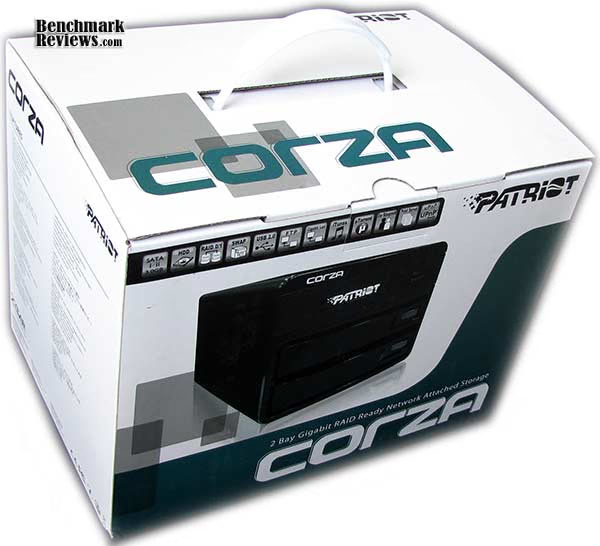
About Patriot Memory (PDP Systems, Inc.)
Established in 1985, Patriot Memory builds a full range of memory module and flash memory products, offering a perfect blend of quality and value. Patriot products include Extreme Performance (EP), Signature Lines (SL) and Flash Memory solutions (FM).
Patriot has sales offices located throughout the U.S. and Asia. Patriot sells through the distribution channels throughout North America, Europe, Asia Pacific, Middle East, Africa, and Latin America.
Patriot's development and manufacturing facility are located in Fremont, California USA. Our manufacturing segment is composed of a highly skilled production staff and multiple production lines optimized for modules, giving Patriot the ability and resources necessary to provide a full line of memory module solutions. Patriot Memory is a trademark of PDP Systems, Inc.
Corza NAS Features
-
Dual 3.5" Hotswappable Bays
-
SATA I/II 1.5Gb/s - 3Gb/s
-
USB2.0 Backwards Compatible to USB 1.1
-
10/100/1000M LAN
-
Raid Support: 0, 1, Linier
-
Up to 4TB (2x2TB) Drive Support
-
Automatic Temperature Control
-
Precious Aluminum design
-
User Management Support
-
FTP, File Server
-
Print Server
-
Torrent Download Management
-
iTunes music Server
-
FCC, CE, RoHS Certified
-
Compatible with Windows XP, Vista, 7, Mac OSX 10.2 and better, Linux
-
100% Tested
-
2 Year Warranty
SL3640-2S-LB2 Specifications
-
System Requirement: Windows 2000, XP, Vista, 7 / Linux / Mac OS 10.2 or better
-
System Log: Samba, FTP, DHCP, System, Administration
-
Management System: Web-Based GUI
-
Authority: Manage User, Group
-
Multi-media Server: Photo, Music, Movies, DATA, File Sharing
-
RAID Level: 0, 1, Liner
-
File Protocol: CIFS/SMB, NFS, AFP, FTP, iTunes, uTorrent
-
File Systems: Ext2, Ext3, FAT32
-
IP Configuration: Fixed IP, DHCP
-
Warranty: Two (2) Years
-
Certifications: CE/FCC/RoHS
-
Max HDD Capacity: Support 2x 2TB (4TB total)
-
Dimensions: 146W x 238D x 85H (mm) / 5.75"W x 9.37"D x 3.35"H
-
Weight 2 kg / 4.4 lb
-
Cooling Fan: Automatic self control 60mm Fan x 1
-
System Anti-Infection: Yes
-
Power Supply Input: AC 100 ~ 240V; Output: 70 Watts
-
Printer Sever Support: 1 x USB2.0 Port backwards compatible to USB 1.1
-
Support Hard Drive: 2 x 3.5" SATA II/I HDD
-
Host Interface: 1 x Gigabit LAN Port 10/100/1000
Closer Look: Patriot Corza
The Patriot Corza PCZ35SNAS2 is a two-bay network storage appliance with gigabit Ethernet functionality. The drive trays can accommodate 3.5" storage devices or smaller 2.5" drives with the use of an adapter (no included). The exterior finish is flat black around the metal enclosure, and plastic front bezel.

My very first impression of the Patriot Corza was an extremely positive one... for under $100 I certainly wasn't expecting a sharp-looking NAS with nicely designed disk trays. Kudos to Patriot for making the Corza not look or feel 'cheap', even though it's price tag is well below the next closest two-bay NAS.
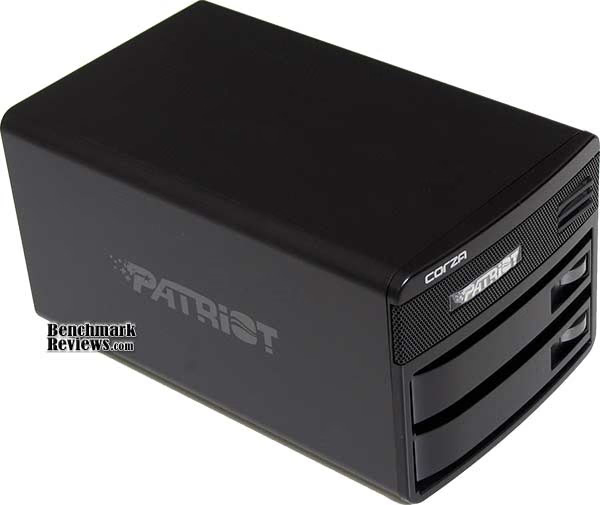
With a small footprint, the Patriot Corza NAS can easily find itself a home in the most cramped setting. The outer dimensions are 5.75"W x 9.37"D x 3.35"H, but an extra few inches for exhaust clearance in the back is recommended.

An underlying theme of simplicity is emphasized in the back-end design. There isn't an A/C power brick or feeble input jack to contend with, because Patriot instead used a common computer/monitor power cord to energize the Corza. In my opinion, every NAS should be this way, since power adapters create an unnecessary level of clutter. A master power switch is located directly beside the power cord, with a small but occasionally audible 60mm below.

A single gigabit Ethernet and USB 2.0 port are located beside the exhaust fan, and a Kensington K-Lock completes the back-end.
In the next section, Benchmark Reviews inspects the Patriot Corza's detailed features.
PCZ35SNAS2 Detailed Features
Dual-bay NAS appliances are among the most popular variety of network storage devices, primarily because two disk usually allow for RAID-1 (mirrored) or RAID-0 (striped) arrays. Although not as critical today as it was years ago when drive capacity was limited, dual-bay appliances also expand the overall capacity with JBOD (just a bunch of disks) functionality. With regard to the Patriot Corza PCZ35SNAS2, all three of these configurations are available, although JBOD and RAID-1 will likely be more popular than RAID-0 (which disregards data redundancy and adds additional risk).
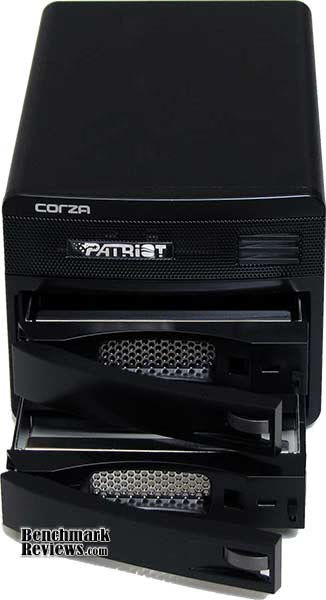
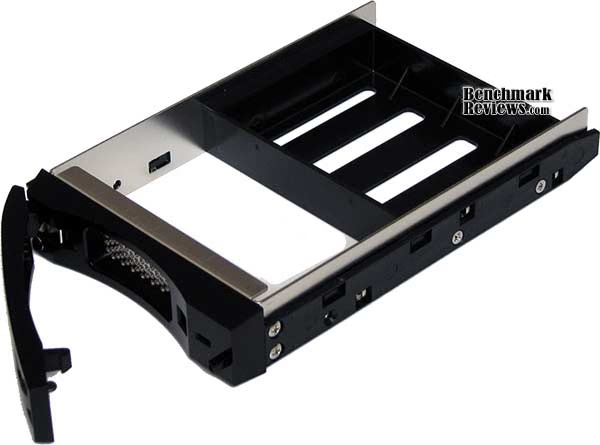
One of the nicest features I've seen on any NAS product is the simple-yet-effective drive trays found on the Patriot Corza. While it surprises me that a sub-$100 product can offer better trays than we've seen on more expensive network storage devices, there are still a lot of corners cut on the PCZ35SNAS2 model.

While I commend Patriot for giving the Corza a pair of capable drive trays, I really wish that they had included a 3.5"-to-2.5" drive bay adapter instead of the plastic frame blank that comes screwed to the sides. Fiber-optic filament travels up the side of the tray, and displays drive status and access indications whenever the disk is in-use. The trays found on the Patriot Corza do not offer locks, which might come in handy since this is not a hot-swappable drive product (despite Patriot's claim).
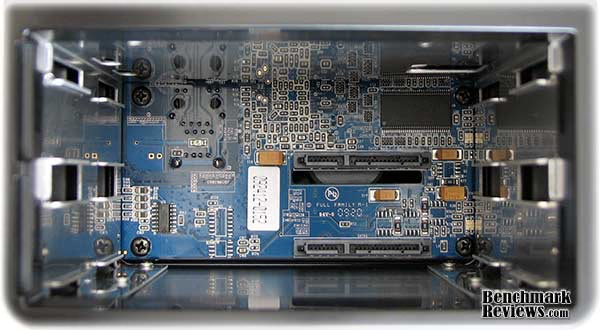
Nestled inside the Patriot Corza PCZ35SNAS2 is a single 256MB integrated DRAM chip, and a 400MHz processor. Patriot didn't offer any details when asked, and there wasn't much to be learned. What I am certain of is that the Patriot Corza NAS doesn't share the same powerful processor we see in other network storage appliances. Benchmark Reviews will soon determine if this poses a problem for high-speed data transfers.
In the next section, we'll review the status signal function and web browser configuration interface featured on Patriot Corza...
Corza Web Interface
Since the Patriot Corza NAS server lacks a display screen or LED panel, the PCZ35SNAS2 relies on a backlit power button to illuminate the system status. Additionally, each drive tray offers its own series of flashing codes to display status.

Unlike QNAP and Synology, which lead the market in GUI-based server control, the Patriot Corza offers a layout that exaggerates simplicity. It's better that we don't display a screen shot of the menu, which really looks a lot like the most basic website menu's did in the early 1990's, and instead offer a menu-tree with sequential options below. If it's not in the chart below, the feature doesn't exist on the Corza.

I'll be the first to admit that the Patriot Corza doesn't offer anything more than the most basic functionality: disk, user, and folder management. If you're looking for ANYTHING more than just basic network-attached storage, then keep searching because the Corza isn't up to the task. But can it handle the one single task it assumes with relative ease? We'll soon see.
Network Terminology
Benchmark Reviews has decided to abandon our effort to educate readers on the difference between a Gigabyte, and a Gibibyte. This article will use the common metric terminology for data measurement, instead of the binary units we've used in past articles. Sadly, too many people are more interested in comfortable reading, even if it means being technically inaccurate. But for anyone who might still be interested in learning real technical terms relevant to the industry, I've added a small explanation below:
The basic unit data measurement is called a bit (one single binary digit). Computers use these bits, which are composed of ones and zeros, to communicate their contents. All files are stored as binary files, and translated into working files by the Operating System. This two number system is called a "binary number system". In comparison, the decimal number system has ten unique digits consisting of zero through nine. Essentially it boils down to differences between binary and metric measurements, because testing is deeply impacted without carefully separating the two. For example, the difference between the transfer time of a one-Gigabyte (1000 Megabytes) file is going to be significantly better than a true binary Gigabyte (referred to as a Gibibyte) that contains 1024 Megabytes. The larger the file used for data transfer, the bigger the difference will be.
Have you ever wondered why your 500 GB hard drive only has about 488 GB once it has been formatted? Most Operating Systems utilize the binary number system to express file data size, however the prefixes for the multiples are based on the metric system. So even though a metric "Kilo" equals 1,000, a binary "Kilo" equals 1,024. Are you confused yet? Don't be surprised, because even the most tech savvy people often mistake the two. Plainly put, the Kilobyte is expressed as 1000 bytes, but it is really comprised of 1,024 bytes.
Most network engineers (myself included) are not fully aware that the IEC changed the way we calculate and name data chunks when they published the new International Standards back in December 1998. The International Electrotechnical Commission (IEC) removed the old metric prefixes for multiples in binary code with new prefixes for binary multiples made up of only the first two letters of the metric prefixes and adding the first two letters of the word "binary". For example, instead of Megabyte (MB) or Gigabyte (GB), the new terms would be Mebibyte (MiB) or Gibibyte (GiB). While this is the new official IEC International Standard, it has not been widely adopted yet because it is either still unknown by institutions or not commonly used.
Personally, I think the IEC took a confusing situation and simply made it more of a mess. As I mentioned earlier, the Kilobyte was previously expressed as 1000 bytes, even though it was really comprised of 1,024 bytes. Now, the Kilobyte really is expressed correctly as 1000 bytes, and the Kibibyte is the item comprised of 1,024 bytes. In essence, the IEC just created a new name for the binary item and left the existing name for the metric item. Hopefully that clears things up, and you can thank Benchmark Reviews for training the next generation of Network Engineers.
NAS Testing Methodology
Although each of the devices we tested can accommodate several different disk configurations, it was decided that basic (single) disk and RAID-5 configurations were the best way to measure data throughput for our NAS servers.
Connected directly to the Realtek RTL8168 Gigabit Ethernet NIC by a three-foot CAT6 patch cable, the NAS products received one test transfer followed by three timed transfers. Each test file was sent to the Seagate 1.5 TB 7200.11 SATA-II HDD installed in the NAS for a timed write test, and that same file was sent back to an identical Seagate 1.5 TB 7200.11 HDD drive (ST31500341AS) in the test system to record the read test. Each test was repeated, and the first three identical results were recorded and charted.

The two transfer tests: read and write, were conducted on each NAS appliance using the 100 MB file and then the 1 GB file. Additionally, a second set of tests were conducted with Jumbo Frame enabled when available. While the Synology Disk Station DS209, DS408, Cube Station CS407, and QNAP TS-409 Pro/TS-209 Pro each offered 9000K MTU Jumbo Frame settings available, the Patriot Corza, D-Link DNS-323, and QNAP TS-509 Pro do not. In the Jumbo Frame tests the Realtek RTL8168 Gigabit NIC was set to use the 4K MTU value with Jumbo Frame enabled. For the sake of benchmark results, the TS-509 Pro was also tested in the RAID-5 configuration (four disks), and included 10 GiB file transfers.
NAS Comparison Products
-
D-Link DNS-323 Gigabit 2-Bay SATA NAS server
-
QNAP TS-209 Pro Gigabit 2-Bay SATA NAS server
-
QNAP TS-409 Pro Gigabit 4-Bay SATA NAS Server
-
QNAP TS-509 Pro Gigabit 5-Bay SATA NAS server
-
QNAP TS-809 Pro 8-Bay SATA Turbo NAS server
-
Synology Disk Station DS209 2-Bay DS209 NAS server
-
Synology Cube Station CS407 Gigabit 4-Bay SATA NAS server
-
Synology Disk Station DS408 Gigabit 4-Bay SATA NAS server
-
Thecus N7700 Gigabit 7-Bay SATA NAS server
-
Patriot Corza PCZ35SNAS2 Gigabit 2-Bay SATA NAS Server
Support Equipment
-
Seagate 1.5 TB 7200.11 SATA-II 7200 RPM Hard Disk Drives
-
3-Foot Category-6 Solid Copper Shielded Twisted Pair Patch Cable
-
Realtek RTL8168 PCI-E Gigabit Ethernet Controller (Driver Version 5.674.807.2007)
-
1 metric Gigabyte Test File (1 GB / Gigabyte = 1,000,000,000 bytes)
-
10 metric Gigabyte Test File (10 GB / Gigabyte = 1,000,000,000 bytes)
Test System
-
Motherboard: Gigabyte GA-EX58-UD4P (Intel X58/ICH10R Chipset) with version F9d BIOS
-
Processor: Intel Core i7-920 Nehalem 2.66 GHz (BX80601920)
-
System Memory: OCZ 6GB 1600MHz CL7 DDR3 OCZ3P1600LV6GK
-
Disk Drive: OCZ Vertex 120GB SATA SSD OCZSSD2-1VTX120G
-
Operating System: Windows XP Professional SP-3 (optimized to 16 processes at idle)
NAS Testing Results
With so many features available to offer a broad range of functionality, NAS server products can be daunting when you try to nail down performance. In this article, Benchmark Reviews will refer to performance as the bandwidth speed results of a file transfer test. The first tests we perform utilizes a single 1GB (1000 megabytes / 1,000,000,000 bytes) file in a transfer to and from the NAS. On products that support the feature, tests using the EXT3 and EXT4 file format will be included. Using an FTP tool so that exact transfer time could be captured, each NAS was tested for transfer bandwidth.
As you can see for yourself in the chart below, QNAP has certainly set itself apart as the dominate force in file transfer speed... even without the aid of Jumbo Frame support on their NAS products. The TS-809 Pro is built from similar hardware found in the TS-509 Pro, and even without the extra Jumbo packet size we see that QNAP products are designed for optimal transfer performance. Offering an all-time best of 62.5 MB/s read speed (using EXT4), the TS-809 Pro leads the pack. Next in line is the TS-809 Pro with 58.8 MB/s using EXT3, matching the 58.8 MB/s read bandwidth of the QNAP TS-509 Pro. The single-drive QNAP TS-119 and Synology DS408 coming in close behind with a best of 55.6 MB/s each with Jumbo Frame. The Thecus N7700 comes in right behind the top three leaders, with a best of 50.0 MB/s, matching performance with the Synology DS209.

Moving on to the 1 GB write bandwidth test, our results suggest that while it may sometimes it will be faster to read files from a NAS server then it is to write files onto it, the opposite is true more often than not. The Network Attached Storage servers each have their own strengths, with some being more robust in write-to performance when others conformed to the traditionally impressive read-from performance.
At the top of our charts the QNAP TS-809 Pro offers the highest performance with EXT4, as it did in 1GB read tests, and yields 76.9 MB/s. Formatted with EXT3, the TS-809 Pro offered 71.4 MB/s, followed by the QNAP TS-509 Pro which maintained 62.5 MB/s without the comfort of Jumbo Frame support. Next came the Thecus N7700 which produced a best of 62.5 MB/s. The Synology Disk Station DS209 narrowly beat the larger DS408, and scored a swift 43.5 MB/s write performance with Jumbo Frame enabled. A single-drive QNAP TS-119 held a steady 33.3 MB/s speed, scoring the same with and without Jumbo Frame enabled, and was tailed by the Thecus N3300 at 32.3 MB/s.

The lower-end spectrum consists of all the remaining NAS products, with the next closest competitor being the QNAP TS-409 Pro which reached only 20.3 MB/s write performance using Jumbo Frame, and 16.5 MB/s without it. The older Synology CD407 performed at roughly half the speed of its newer predecessor, and the remainder of the bunch trailed distantly behind. Let's move on to the larger file chunk testing, because next up is our 10 GB (1000 metric megabytes / 10,000,000,000 bytes) tests. Using only a single hard drive for testing in each NAS, network throughput would be put to the test.
Fresh out of the gates, QNAP's TS-809 Pro and TS-509 continued to impress us with the high-bandwidth read performance of 55.6 MB/s that lead the pack. QNAP's single-drive TS-119 offered the same performance once Jumbo Frame was enabled, but reduced to 47.6 MB/s at 1500 MTU. The Synology DS209 and DS408 maintained a close relationship with peak performance around 47 MB/s in normal mode, and improved to 49.3 and 48.3 MB/s read performance with Jumbo Frame enabled at both ends (respectively). The Thecus N7700 was able to sustain 44.5 MB/s using Jumbo Frame, and 41.5 MB/s without it, which was very similar to the N3200 Pro.

In our 10GB write performance tests, the charts were shuffled a bit. The Thecus N7700 makes up for above-average read performance by offering excellent large-file write performance and sustained 56.2/58.8 MB/s in normal and Jumbo Frame modes, and for once QNAP was not the performance leader. Next in line came the QNAP TS-809 Pro with 54.4 MB/s using EXT3 and 48.3 MB/s with EXT4. Then came the TS-509 Pro, which has held a top position for most tests until now, and scored 47.0 MB/s. The Synology DS209 and DS408 have performed in the middle of the pack for our 10GB file transfer tests, and performed at 42.9/40.0 and 36.8/36.3 MB/s in normal and Jumbo Frame modes.

The single-drive QNAP TS-119 and three-drive Thecus N3300PRO both score around 32 MB/s in our large file JBOD tests, and trail behind the leaders by almost 20 MB/s. Taking the entire test section as a whole, one thing becomes abundantly clear: QNAP keeps the bar high for NAS performance with their Turbo Station TS-509 Pro, even when compared against newer products.
In each and every test, the Patriot Corza NAS performed poorly compared to similar network storage appliances. Although our tests produced maximum speeds of 21.5 MBps read and 14.3 MBps write, slightly faster performance was realized when disks were configured into a RAID-0 array. The performance gain was minimal at best however, with a maximum speed of 25.6 MBps read and 18.9 MBps write, but the risk of data corruption and loss is hardly worth the risk.
NAS Comparison Products
-
D-Link DNS-323 Gigabit 2-Bay SATA NAS server
-
QNAP TS-209 Pro Gigabit 2-Bay SATA NAS server
-
QNAP TS-409 Pro Gigabit 4-Bay SATA NAS Server
-
QNAP TS-509 Pro Gigabit 5-Bay SATA NAS server
-
QNAP TS-809 Pro 8-Bay SATA Turbo NAS server
-
Synology Disk Station DS209 2-Bay DS209 NAS server
-
Synology Cube Station CS407 Gigabit 4-Bay SATA NAS server
-
Synology Disk Station DS408 Gigabit 4-Bay SATA NAS server
-
Thecus N7700 Gigabit 7-Bay SATA NAS server
-
Patriot Corza PCZ35SNAS2 Gigabit 2-Bay SATA NAS Server
NAS Server Final Thoughts
It's not going to make a lot of sense for resellers and IT professionals to outfit a client with a Windows-based server if it's only going to be used for serving out files, sharing printers, and controlling Active Directory objects; one fairly inexpensive NAS does all this in its most basic form at less than half the cost. It's not until you consider that some manufacturers outfit their NAS series with full LAMP (Linux Apache MySQL and PHP) package for web servers, along with FTP and media tools, that the list of items a NAS product could potentially replace grows very large.

So what can you expect from most NAS products? More than you can with some pedestal or rack servers. This is supposed to be my final thoughts, and quite frankly I just barely touched the surface of features NAS products can offer. Most of my NAS reviews focus on performance, and sparingly supply feature lists. So let's recap some feature highlights that most modern NAS products offer:
-
Hot-swappable SATA-II drive storage bays, usually with 5.25-to-2.5" adapters available.
-
RAID-0, 1, 5, 6, 5 + Spare, 10, Single, and JBOD disk configurations.
-
Dual Gigabit Ethernet ports for failover redundancy or network teaming.
-
Windows Active Directory Services and NT4 support with login via Samba/AFP/FTP for domain users.
-
Linux based O/S with Apache-based web serving, usually partnered to PHP and MySQL allowing you to run dynamic web sites directly from the NAS.
-
eSATA and High-Speed USB 2.0 ports capable of connecting external hard disk drives, flash storage, and compatible printers.
Obviously the list could go on and on, especially if you noticed the multi-page layout of features and functionality. Taking into consideration that NAS products seem to all offer a feature-set that reads like a chefs shopping list, it's no wonder why these NAS products are quickly replacing Windows Server products. After all, for the price of one RAID-5 capable NAS and three 2.0 TB SATA-II HDDs you'll get four Terabytes of total storage space and still spend well below the cost of one single Windows Server Operating System and the required client access licenses.
While it's true that these NAS products will do almost everything a Windows Server platform can, they still fall very short of one important task: Windows software. Many of my clients have servers which require some form of server-side software to manage a database. Some of the most common applications that require almost no processing power but still require installation on a Windows O/S are QuickBooks and AutoCAD licensing server. Imagine the possibilities you could offer clients with a full server-in-the-box solution. I believe that this will be the next evolution in NAS products, as consumer demand more versatility out of their investment.
But there are still a few more things you can't do on a NAS, such as utilize the onboard O/S to install applications. Most NAS products utilize a Linux variant ('Nix) with little or no command interface, so even if you knew how to install from YUM or a similar repository the functionality doesn't exist. Even once that obstacle is navigated, I have a feeling that users will then demand a Windows emulator so they can install and utilize Windows-specific software on their NAS (such as license servers and anti-virus command points). It seems that these problems all revolve around side-stepping Microsoft products and licensing, which is not surprising.
Patriot Corza Conclusion
Reading through this review, it would seem that my opinion when from good to bad, but the truth is that I'm really undecided about the Patriot Corza network storage appliance. Similar to automobiles, there's a size and fit for everyone, and the most affordable cars are rarely the fastest. The same is true with the Patriot PCZ35SNAS2.
The Patriot Corza does offer redundant RAID-1 disk configuration, and the most basic network storage functions are delivered with complete ease, so the Corza still has some redeeming qualities. Nevertheless, a maximum read speed of 21.5 MBps and 14.3 MBps write bandwidth are far, nay, remotely distant, from everything else we've tested in the past two years.
The drive trays and general design aesthetics were both at the top of my list, but at the end of the day I'm left guessing at why a gigabit Ethernet device would be so underpowered that it would barely dent a 100Mb connection. While Patriot does an outstanding job of packaging the Corza in an appealing manner, and the physical appearance is both elegant and attractive, the performance doesn't match the looks... or rather, fashion comes before function.
The Corza NAS is built just as well as any other NAS we've seen, perhaps even better than some, and if the Corza happens to fail during the 2-year warranty period end-users can take advantage of free tech support by calling 1-800-800-9600 in the USA or completing a Patriot Customer Service Request Form.
The value rating does get some well-deserved recognition, however. As of August 2009, the Patriot Corza PCZ35SNAS2 sold for a mere $99.99 after rebate at NewEgg. At this price, which makes the Corza the most-affordable NAS we've tested, users might be able to forgive the lack of top-end network speed.
In conclusion, the Patriot Corza PCZ35SNAS2 offers the most basic network storage functionality in an attractive and afforable dual-bay NAS. An extremely affordable price and elegant appearance are the high points, and slow speeds with limited functionality beyond basic disk and user setup are the low points. If you're working on a thin budget and in need of the most basic network storage product, the Patriot Corza fits the build. But if you're expecting anything more I suggest you keep shopping.
Pros:
+ Very inexpensive NAS
+ Offers RAID-1 disk redundancy
+ Simple setup and management
+ Elegant looks and refined design
+ Integrated power supply removes AC adapter
+ 2-Year product warranty
Cons:
- Very slow network transfer speeds
- Lacks drive tray locks
- Limited GUI control panel
Ratings:
-
Presentation: 8.75
-
Appearance: 9.25
-
Construction: 9.50
-
Functionality: 6.25
-
Value: 8.50
Final Score: 8.45 out of 10.
Questions? Comments? Benchmark Reviews really wants your feedback. We invite you to leave your remarks in our Discussion Forum.