
D-Link DNS-323 SATA RAID Gigabit NAS
D-Link DNS-323 NAS
Benchmark Reviews has been lucky enough to receive the D-Link DNS-323. I won't leave much room for surprise: this SATA RAID Gigabit NAS is one hot little number, with plenty of features and performance available at an incredibly affordable price. Are you looking to compare network attached storage devices, or ready to buy? You had better read about the DNS-323 before you make that decision!
The D-Link DNS-323 2-Bay Network Storage Enclosure, when used with internal SATA drives, enables you to share documents, files, and digital media such as music, photos, and video with everyone on the home or office network. Remotely accessing files through the Internet is also possible with the built-in FTP server. Whether you are allowing access locally or over the Internet, keep data safe by only giving rights to specific users or groups. When configuring the DNS-323, you can create users and groups and assign them to folders with either read or read/write permissions. This is ideal for an office environment with employee-specific sensitive data or for the home where you can ensure your children will only have access to age appropriate material. The DNS-323 will be available to any computer (PC, MAC, or Linux-based) on your network, without the need to install any software on the client-side computer.

Back up your music, photo, and video collections to the DNS-323 for safekeeping. Then, enjoy the benefits of the built-in UPnP AV media server as you stream digital content to compatible media players (such as those found in D-Link's MediaLounge product line). This feature is highly convenient as it allows you to turn off a computer that would normally be needed for the same function. It is also an excellent addition to any HTPC setup.

The availability of four different hard drive modes (Standard, JBOD, RAID 0, RAID1) allows you to choose the configuration best suited to your needs. Standard mode creates two separately accessible hard drives. JBOD combines both drives in linear fashion for maximum space efficiency. RAID 0 combines both drives in a ‘striped' configuration, which provides the highest performance, enabling speeds up to 23MBps-Read and 15MBps-Write (MBps: Megabytes per second) when using a Gigabit Ethernet connection. RAID 1 causes the drives to mirror each other, providing maximum protection. This means that if one drive fails while configured as RAID 1, the unaffected drive continues to function as a single drive until the failed drive is replaced. The new drive will then be re-mirrored, allowing the DNS-323 to return to its full protection.
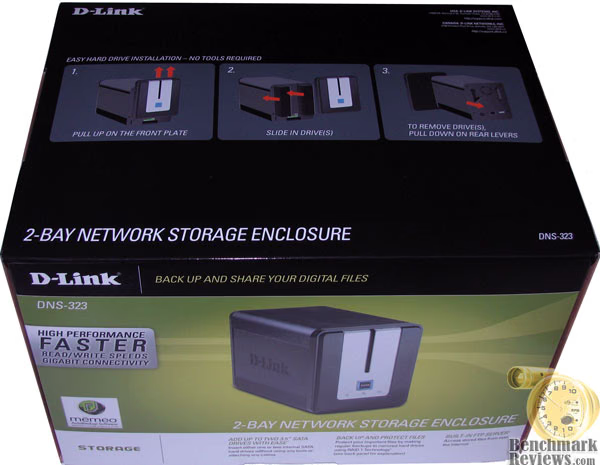
The included CD contains D-Link's Easy Search Utility. This utility allows you to easily locate the DNS-323 anywhere on the network. Once located, use the utility to map the hard drive(s) so they will appear in My Computer on your PC.
Backup software is also included on the CD. This will allow the back up of valuable files from a computer to the DNS-323 manually, by a schedule, or in real-time. Real-time backups are a great way to safeguard against unfortunate accidents that may result in the loss of precious files.
About the company: D-Link
D-Link is an award-winning designer, developer and manufacturer of networking, broadband, digital electronics, voice, data and video communications solutions for the digital home, Small Office/Home Office (SOHO), Small to Medium Business (SMB), and Workgroup to Enterprise environments.
DNS-323 Features & Specifications
Some would think that when you design a Network Attached Storage server, such as the D-Link DNS-323 SATA RAID Gigabit NAS, that the components and tools required would make this a complex product. In reality, the DNS-323 is really very simple, with only one thing needed by the owner: one or two SATA hard disk drives. No other tools are necessary, because it truly is a plug and play device.

DNS-323 Features:
-
10/100/1000 Gigabit Ethernet Port
-
USB Print Server Port
-
Built-In Fan Included
-
Two Hard Drive Bays for 3.5" SATA Hard Drives of Any Capacity
-
Simplified Hard Drive Installation Process - No Tools Required
-
Four Hard Drive Configurations: Standard, JBOD (Linear), RAID 0, and RAID 1
-
High Performance Gigabit Ethernet Connectivity (Up to 23/15MBps or 184/120Mbps Read/Write)
-
Built-in FTP Server for File Access from Over the Internet
-
Scheduled Downloads from Web or FTP Sites
-
Full or Incremental Backups
-
Real Time Backups With the Included Backup Software
-
Users and Groups Can Be Assigned to Folders with Read or Read/Write Permissions
-
Quotas For Users and Groups
-
Automatic E-Mail Notifications
-
Scandisk and Defragment Utilities
-
Power Management for Conserving Energy and Extending Hard Drive Life
-
UPnP AV Server for Streaming Music, Photos, and Video to Compatible Media Players
-
iTunes Software will be able to automatically find and play music directly from the DNS-323
-
Built-in USB Print Server for printing from any PC on the Network
-
D-Link Easy Search Utility
-
Configurable by Web Browser
D-Link Specifications:
| Standards |
|
||||||||||||
| Support Hard Drive Type |
|
||||||||||||
| Ports |
|
||||||||||||
| Drive Management |
|
||||||||||||
| Device Management |
|
||||||||||||
| LEDs |
|
||||||||||||
| Temperature |
|
||||||||||||
| Operating Humidity |
|
||||||||||||
| Dimensions |
|
||||||||||||
| Weight |
|
||||||||||||
| Warranty |
|
||||||||||||
| Minimum System Requirements |
|
||||||||||||
| Package Contents |
|
* 1-Year Warranty available only in the USA and Canada
** Latest software and documentation are available at https://www.dlink.com/redirectorSupport.asp?supportLink=home.
Closer Look: DNS-323 Exterior
D-Link has become a much larger contender in technology markets beyond their traditional focus on network appliances. Although remotely related, Network Attached Storage Servers (NAS) are quickly dominating the small and medium size business segments, and are popular as well with SOHO users. The DNS-323 SATA RAID Gigabit NAS is just one more extension to the quickly growing reach of D-Links engineering team.
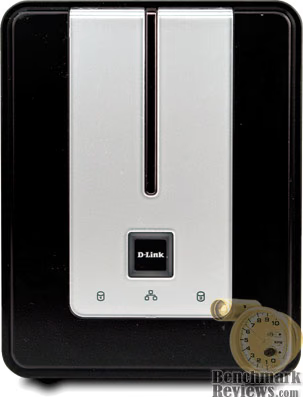
Not much larger than some of the external hard drive enclosures I have seen lately, the D-Link DNS-323 is a very compact NAS. With a footprint of 4.1” W x 7.8” D x 5.2” H, this NAS could easily be shelved beside other network appliances, or any inconspicuous area with an Ethernet connection.

Single button operation means that there is no steep learning curve for administrators and general users. D-Link has designed the DNS-323 SATA RAID Gigabit NAS to look great in any environment: corporate or residential. The all-black finish is complimented by a single portion of silver at the front, creating a refined appearance.

D-Link appears to have concentrated on giving as much functionality to the DNS-323 as possible, and leaving the extra costs of unnecessary fixtures and finishes to the competition. At the rear of the DNS-323 is a single exhaust fan, two separate SATA drive eject levers, a power input receptacle, one Gigabit Ethernet port, and a single USB print server port. The rear plate is made of thick black plastic.

Encased in a black metal chassis with grain-finish, the D-Link DNS-323 SATA RAID Gigabit NAS is capable of performing in the roughest indoor environments. Because of the all-black finish and limited cooling system, I would not recommend placing this NAS a high-heat or direct-sunlight environment.
Detailed Exterior Features
So far, the D-Link DNS-323 SATA RAID Gigabit NAS has really given me the impression that it was made with function and value at the forefront of design requirements. Ideally every product strives for this, because production costs often dictate the features and functionality of products more often times than consumers would ever realize. The DNS-323 is a perfect example of an efficient design.
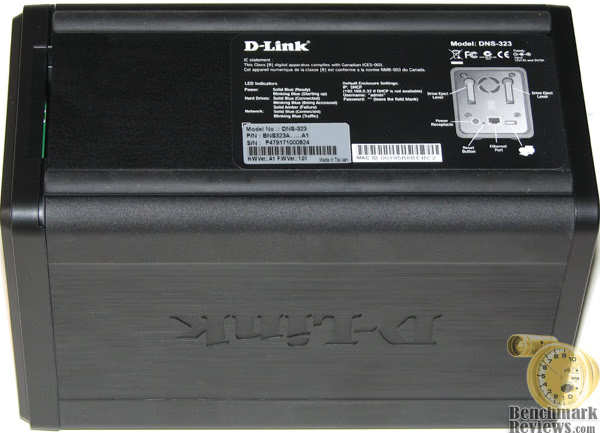
At the underside of the DNS-323, D-Link has provided a basic feature diagram along with some specification listings. There are two strips of rubber tubing which run the distance of the NAS enclosure, which I have found to be more than enough to keep the DNS-323 in place. These strips are so effective, that you will not be able to move the DNS-323 once it is loaded with SATA hard drives unless you use exceptional force.
From the image above (and below) you can see the only intake ventilation available on the DNS-323. At the front of the unit, on the underside of the faceplate, there is a small slot which allows cool air to be drawn into the unit.

One area which I felt D-Link overlooked is when the DNS-323 NAS is mounted on its side. There are no feet included for mounting this product on one of its sides, so keep this in mind.
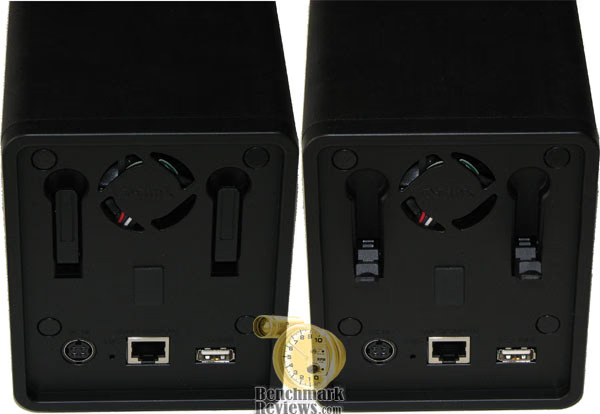
One of the few downsides to having such a small enclosure is how difficult it is to engineer effective cooling. This is where I see room for improvement in regards to cooling the DNS-323. There are no ventilation holes anywhere except the small keyed slot in the front panel. Additionally, the only fan is a silent low-speed 40mm unit position between the two hard drives at the rear of the enclosure.
D-Link has designed the DNS-323 with such critical efficiency that there are absolutely no tools required to mount and dismount the SATA drives. At the rear of the unit you will find a plastic lever arm which pushes the hard disk drive out of the power and data connection. With the faceplate lifted up and away, these levers push the drive far enough out to be easily removed by hand.
Closer Look: DNS-323 Interior
Upon closer inspection, it seems to me that the D-Link DNS-323 SATA RAID Gigabit NAS is really little more than a compact size enclosure with some basic electronics embedded discreetly into the lower portion of the unit. The size and weight might make this unit appealing for portable environments as well; such as job trailers and RV's.

Comprised of a single PCB at the bottom of the unit and one backplane panel at the rear, the D-Link DNS-323 SATA RAID Gigabit NAS is a very simple product indeed. Often times people think that something like a NAS device would be expensive and complicated, but thankfully D-Links engineering is helping to erase that image.

The D-Link DNS-323 has very little electronics inside the unit, which means that there is less chance for failure. From the image above you can see the narrow PCB which runs the length of the enclosure.

Clearly depicted in the image above is the simplified hard disk mounting system used in the D-Link DNS-323. Simply slide the SATA hard drive in place until it pushes into the power and data connectors, and replace he front panel. Pretty simple indeed.
Equally simple is the button interface: there is only one. There is a power button, which is lit by a single LED, and a network activity LED beneath it. Each SATA disk has its own activity LED to the left and right of the center column.
D-Link Software & Configuration
I must admit that as an IT professional, my disdain for unnecessary software runs deep. When it comes to network appliances (primarily routers) from D-Link, Linksys, Netgear, and similar others, I often jump directly to the HTML-based web interface to configure the device. The same thing could be said about my work with broadband modems; find the IP and program through the browser-based interface. The D-Link DNS-323 SATA RAID Gigabit NAS is not going to be an exception.

For those readers who are like me and discard the disc that comes with these devices, I will tell you everything you need to know right here: When first powered on, during the initial boot sequence, the DNS-323 will wait to be assigned an IP address via DHCP. If it does not receive a DHCP assigned IP address, by default it will have a self-assigned IP address of 192.168.0.32. So there you have it... experts, you can thank me by clicking the ad at the top or bottom of the page.
For everyone else, here is a rundown of the Easy Search Utility D-Link offers with the DNS-323 to help locate the NAS on your network and get you started. You can still click an ad if you want, I won't hold you back.
To run the Easy Search Utility, simply insert the CD-ROM that came with the DNS-323 NAS into your CD-ROM drive. A window will appear, and prompt you to highlight an available DNS-323 and click "Configuration" to access the web-based utility. When logging into the DNS-323 for the first time, you will be asked to choose a drive configuration and format the drives. There are four options, Standard, JBOD, RAID 0 and RAID 1. Standard configures each disk as a separate volume, while JBOD combines both disks into a single volume. RAID arrays will also need to select the disk format type. Available options are Ext2 and Ext3, with Ext2 providing better performance and Ext3 providing better support for crash recovery.

After the initial format is complete, the DNS-323 will restart itself. The DNS-323 has a setup Wizard that allows you to quickly configure some of the basic device settings, such as DHCP or static IP address, device name, and password.

You can also dive deeper into the configuration interface and setup user accounts and groups, as well as configure the DNS-323 as an FTP server, and an iTunes server. The DNS-323 can also be used as a DHCP Server, used to serve IP addresses to devices on your local network. This feature should not be enabled though if you already have a DHCP server, such as a router on your local network. Otherwise, you will have a lot of fun troubleshooting your network (sarcasm).
Really, this is much more than just an enclosure for network hard drives; which is why NAS devices are becoming so popular as file server replacements, and much more. This server provides the ability to share music and videos to computers on the local network running iTunes as well. If the iTunes server is enabled, the DNS-323 will be automatically detected in the iTunes program and the music and videos contained in the specified directory will be available to stream over the network. So the DNS-323 is not just strictly business after all.

As I previously suspected, the D-Link DNS-323 SATA RAID Gigabit NAS seems to suffer from poor cooling ventilation. Prior to taking the test readings I inspected the device information from the web browser interface. Despite an ambient room temperature of an even 25.0°C, you can see from the image above that the DNS-323 was already 113°F/45°C at a standing idle. That's not going to be very helpful in high-traffic heavy-load environments.
Testing & Results: DNS-323
Network equipment can be pretty, but it's a real letdown if all it does is look good. If it's inexpensive, that just ensures that it's affordable; but doesn't necessary mean anyone will buy it. Even if it's built like a tank and can withstand complete abuse, consumers are not often swayed. No, we are in the age of "perform or get off the stage". That's what we do here at Benchmark Reviews: set the stage and let the product sink or swim.
NAS Testing Methodology
Testing isn't as hard as most might think. Benchmark Reviews has already had the pleasure of testing other NAS devices in the past, so we have some idea what the D-Link DNS-323 should be capable of. The truth is, since I am writing this section after the testing has already occurred, I can admit that we really had no idea the results would come out this far from our past experiences.
Using two test files, one measuring exactly 100 MB (102,400 KB), and another measuring exactly 1 GB (1,240,000 KB), I would make four write transfers to the NAS device under a timed period. The first transfer was ignored, but the following three were averaged. It should be noted that the average was unnecessary since each test was identical. In all tests, the NAS device hard drives were operating in single disk mode, not RAID 0 or 1, which would have influenced overhead or transfer speed.
For my testing, a brand new 3' CAT-6 patch cord was used to connect the NAS device directly to the Realtek RTL8168/8111 PCI-E Gigabit Ethernet NIC built into the ABIT AB9 Pro motherboard. For some strange reason, the whole industry is stuck producing brand new cutting-edge products, but package them with sub-standard accessories. D-Link, like all of the others in the industry, is producing Gigabit Ethernet products, but still includes an antiquated CAT-5 patch cable with each product. You don't even get CAT-5e, which was the reigning standard for nearly the past decade, you get something from the early 1990's. But I digress - you probably understand my point.
Test System
-
Motherboard: ABIT AB9 Pro v1.6 BIOS (Intel 965 chipset)
-
Processor: Intel E6600 Core 2 Duo 2.2GHz operating at 3.2 GHz (356 MHz FSB)
-
Memory: 2 GB (1,024 MB x2 modules) Crucial PC2-8500 CL5 Ballistix DDR2 RAM
-
Audio Device: HT Omega 7.1 C-Media 8788 Oxygen Chipset
-
Hard Disks: (2) Western Digital WD360GD 10,000 RPM SATA in RAID-0 array
-
Optical Drive: Lite-On SH-16A7S-05 SATA DVD R/W
-
Enclosure: Antec P182 Performance One ATX Case
-
Operating System: Windows XP Professional SP-2 with IE7
Test Equipment
-
QNAP TS-201 SATA Gigabit RAID NAS
-
D-Link DNS-323 SATA RAID Gigabit NAS
-
3' Catagory-6 Patch Cable
-
Realtek RTL8168/8111 PCI-E Gigabit Ethernet NIC
-
Seagate 500GB SATA-II 7200.10 Hard Disk Drives
Results
UPDATE: D-Link has informed Benchmark Reviews that the DNS-323 offers identical performance to their no-frills DNS-321 NAS. Additionally, the DNS-323 has been re-tested against several newer products in our Featured Reviews: Network section.
Ok, so maybe I'm still in shock by what I have been seeing from the QNAP TS-201 versus what I just witnessed from the D-Link DNS-323 SATA RAID Gigabit NAS. After measuring three test transfers of 100 MB and 1 GB files, Here are the write transfer times (with approximate write transfer speed):
-
100 MB File Transfer Test
-
QNAP TS-201 SATA Gigabit RAID NAS: 12.0 Seconds @ 8.33 MBps
-
D-Link DNS-323 SATA RAID Gigabit NAS: 6.0 Seconds @ 16.66 MBps
-
-
1 GB (1024 MB) File Transfer Test
-
QNAP TS-201 SATA Gigabit RAID NAS: 122.0 Seconds @ 8.39 MBps
-
D-Link DNS-323 SATA RAID Gigabit NAS: 63.0 Seconds @ 16.25 MBps
-
So there you have it: the D-Link DNS-323 SATA RAID Gigabit NAS is clearly an easy winner compared to the QNAP TS-201, posting results nearly twice as fast. But there's more to it than that. Here are the relative results of other NAS devices based on test results based on benchmarks conducted by SmallNetBuilder:

Like anyone who tests a product, you like to rely on your own results to include in the review. Well, I have done that, but I think that having only two NAS devices on hand puts our readers at a disadvantage. This is where we call upon others who have a more specific focus on particular components. SmallNetBuilder is one such example, which is why you find their benchmark results displayed above for reference and comparison. Even in their benchmark results the D-Link DNS-323 SATA RAID Gigabit NAS offered better throughput than the majority of the competition.
Final Thoughts: D-Link DNS-323
It seems difficult to express how much I liked the D-Link DNS-323 SATA RAID Gigabit NAS without sounding like I own stock in the company (which I don't). To begin with, it is an extremely simple yet feature rich product. Beyond the myriad of additional functions it can host, there are persuasive performance results to sway my opinion. Finally, the DNS-323 is very inexpensive, costing the same as single-drive units, which feature far less extended functionality and performance. Although I don't have a unit from every single manufacturer to compare this to (there are about three-dozen commercially available), I have researched other sources to conclude that the DNS-323 offer the best value of them all.
Conclusion
D-Link has done a fine job with product presentation. There is plenty of consumer friendly information and product summary data on the retail box, which improves the chances that the DNS-323 SATA RAID Gigabit NAS will satisfy the consumer needs. Nobody likes surprises, and D-Link has made sure that you get the right tool for the job.
Appearance is somewhat basic, with no use of reflective (chrome/polished) accents or finish. The black metal enclosure and basic silver faceplate insert give the DNS-323 just enough polish to make it suitable for any environment: corporate or personal.
With very little wasted space, the construction is solid. Two drives are secured without tools, and the faceplate removes with a light lifting force, so the D-Link DNS-323 may not be suitable for rough abusive environments where it could fall or be dropped.
Functionality was just one of many highpoints. D-Link has included everything any user could ask for out of a desktop NAS. The DNS-323 SATA RAID Gigabit NAS goes way beyond holding files, and the additional FTP, DHCP, iTunes, and print server functions can take a little product a long way.
Presently the D-Link DNS-323 sells at NewEgg.com for $177.99, but there's also the no-frills D-Link DNS-321 SATA RAID Gigabit NAS with identical performance for $129.99. If you're after a bargain, you can also compare prices on the DNS-321 with our price comparison tool.
In summary, I can personally attest to the value and performance of the D-Link DNS-323 SATA RAID Gigabit NAS. I will keep my recommendation simple: if you are looking for a solid network storage device with plenty of performance and functionality for your dollar, this is it. Usually an inexpensive product compromises something somewhere, but the D-Link DNS-323 is one of the best products I have reviewed in quite some time.
Pros:
+ Extremely functional NAS
+ Very good data write speeds
+ Single, JBOD, RAID 0, and RAID 1 disk arrays
+ Convenient compact size
+ Simple HTML interface
+ High-quality metal enclosure
+ Tool-less design
+ Attractive yet simple black and silver finish
Cons:
- Poor cooling design
- Needs rubber feet for side mounting
- Includes outdate CAT-5 cable
Ratings:
-
Presentation: 8.5
-
Appearance: 9.0
-
Construction: 9.0
-
Functionality: 9.5
-
Value: 9.25
Final Score: 9.05 out of 10.
Award: Benchmark Reviews Golden Tachometer Award.
Questions? Comments? Benchmark Reviews really wants your feedback. We invite you to leave your remarks in our Discussion Forum.
Reader comments from the original article
4 comments were posted before commenting closed. They are preserved as written. Original avatars no longer resolve and are shown as a placeholder.
Ms Wen Permalink:
Hi: We bought a DNS 323. Networked to the system. I am trying to check if the info I added into the system is definitely mirrored onto the 2nd hard disk. Is there anyway I can check that? Tks for your help. Wen
RAID-1 test Olin Coles Permalink:
Pull out one of the drives and see if you can still access data.
data lost swamyee Permalink:
Hi, I pull out one of the drive and put it back within a moment. Nothing do to this drive. But i can't see the data folders after put it back. This one i configured for RAID0. Is there any other ways to get back my data folders ?
RE: data lost Olin Coles Permalink:
Nope. Since it was RAID-0 on an external device, your data may be lost.