
GIGABYTE Radeon HD 6850 GV-R685OC-1GD
GIGABYTE GV-R685OC-1GD Video Card Review
When we talk about different video card brands, there's always a factor which motivates us to choose one over any other. Most likely, we make our decisions depending on retail price, but there are things to consider: the bundle and accessories, factory overclocked speeds, and of course, included heatsinks and fans so that the GPU can be overclocked higher or simply work without being as loud and hot as a reference design. With this in mind, Benchmark Reviews tests the GIGABYTE GV-R685OC-1GD AMD Radeon HD 6850 video card. We've already tested some HD 6850 GPUs before, but GIGABYTE offers their newest design with the Windforce 2x GPU cooler and Ultra Durable VGA technology. Additionally, this is the factory OC version which brings 820MHz (against 775MHz) GPU Core clock and 4200MHz (instead 4000MHz) GDDR5 Memory clocks. Let's analyze the GV-R685OC-1GD model and see if it can be a serious contender against reference HD 6850 and GTX 460 graphics cards.
In October 2010 AMD launched the HD 6800 GPU series. The 6850 is one of the AMD's latest DX-11 video card, and uses an updated Cypress back-end to offer 'Barts' GPU architecture. Built to deliver improved performance to the value-hungry mainstream gaming market, the $189 GV-R685OC-1GD AMD Radeon HD 6850 video card supplements the 5800-series counterparts. The most notable new feature is Bart's 3rd-generation Unified Video Decoder with added support for DisplayPort 2.1a. AMD's UVD3 accelerates multimedia playback and transcoding, while introducing AMD HD3D stereoscopic technology with multi-view CODEC (MVC) support for playing 3D Blu-ray over HDMI 1.4a.
In this article Benchmark Reviews tests the GIGABYTE GV-R685OC-1GD Radeon HD 6850 video card, a 960 shader core DirectX-11 graphics solution that competes at the $189 price point with the 768MB NVIDIA GeForce GTX 460 video card and the Radeon HD 5830/5770 to a lesser extent. Graphical frame rate performance is tested using the most demanding PC video game titles and benchmark software available. DirectX-10 favorites such as Crysis Warhead, Just Cause 2, and PCMark Vantage are all included, in addition to DX11 titles such as Aliens vs Predator, Lost Planet 2, Metro 2033, and the Unigine Heaven 2.1 benchmark.
NVIDIA launched the GTX460 about four months ago, and it has been the darling of the gaming community since then. With performance per mm2 and performance per watt numbers that put the first Fermi chips to shame, it deserves all the success it has enjoyed. It's also an amazing overclocker, so its performance profile is a bit hard to pin down; it's a moving target from a marketing perspective. At the other side of the history, everyone seems to have massive heartburn over the product numbering scheme that AMD introduced with the new 68xx cards. The fact that AMD has successfully introduced an addition class of GPU (as defined by die size), to fill the product gap everyone complained about with the 5xxx series, seems to have been overlooked by all. Something had to give, and it was the auspicious title of HD x8x0 that got handed down from the previous King to the new Crown Prince.
You may have seen some benchmarks for the Radeon HD 6850 already, but let's take a complete look, inside and out, at the GIGABYTE GV-R685OC-1GD. Then we'll run it through Benchmark Review's full test suite. We're going to look at how this reference card performs with a standard 820 MHz factory clock on the graphics core (while AMDs reference design works at 775MHz), and if possible, we'll look through some overclocking, power consumption and heat tests. I think you have to allow increased core voltage to find out how this GPU really compares to the GF104 (GTX 460). That GPU won at least half of its acclaim from folks using MSI Afterburner and other utilities to turn up the wick on all those reference cards, so it seems fair to wait until that capability is available for the HD 6850.
Full Disclosure: The product sample used in this article has been provided by GIGABYTE.
AMD Radeon HD 6850 GPU Features
The AMD Radeon HD 6850 GPU contained in the GIGABYTE GV-R685OC-1GD card has all of the major technologies that the Radeon 5xxx cards have had since last September. AMD has added several new features, however. The most important ones are: the new Morphological Anti-aliasing, the two DisplayPort 1.2 connections that support four monitors between them, 3rd generation UVD video acceleration, and AMD HD3D technology. In case you are just starting your research for a new graphics card, here is the complete list of GPU features, as supplied by AMD:
AMD Radeon HD 6850 GPU Feature Summary:
- 775MHz Engine Clock
- 1GB GDDR5 Memory
- 1000MHz Memory Clock (GDDR5)
- 128 Gbps memory bandwidth (maximum)
- 1.5 TFLOPs compute power
- Double slot form factor
- TeraScale 2 Unified Processing Architecture
- 960 Stream Processors
- 48 Texture Units
- 128 Z/Stencil ROP Units
- 32 Color ROP Units
- PCI Express 2.1 x16 bus interface
- "Eye-Definition" graphics
- DirectX 11 support
- Shader Model 5.0
- DirectCompute 11
- Programmable hardware tessellation unit
- Accelerated multi-threading
- HDR texture compression
- Order-independent transparency
- OpenGL 4.1 support
- Image quality enhancement technology
- Up to 24x multi-sample and super-sample anti-aliasing modes
- Adaptive anti-aliasing
- Morphological anti-aliasing (MLAA)
- 16x angle independent anisotropic texture filtering
- 128-bit floating point HDR rendering
- AMD Eyefinity multi-display technology1
- Independent resolutions, refresh rates, color controls, and video overlays
- Display grouping
- Combine multiple displays to behave like a single large display
- AMD EyeSpeed visual acceleration2
- AMD Accelerated Parallel Processing (APP) technology3,4
- OpenCL 1.1
- DirectCompute 11
- Accelerated video encoding, transcoding, and upscaling
- UVD 3 dedicated video playback accelerator
- MPEG-4 AVC/H.264
- VC-1
- MPEG-2 (SD & HD)
- Multi-View Codec (MVC)
- MPEG-4 part 2 (DivX, Xvid)
- Adobe Flash
- Enhanced Video Quality features
- Advanced post-processing and scaling
- Dynamic contrast enhancement and color correction
- Brighter whites processing (Blue Stretch)
- Independent video gamma control
- Dynamic video range control
- Dual-stream HD (1080p) playback support
- DXVA 1.0 & 2.0 support
- AMD HD3D technology5
- Stereoscopic 3D display/glasses support
- Blu-ray 3D support
- Stereoscopic 3D gaming
- 3rd party Stereoscopic 3D middleware software support
- AMD CrossFireXTM multi-GPU technology6
- Dual GPU scaling
- Cutting-edge integrated display support
- DisplayPort 1.2
- Max resolution: 2560x1600 per display
- Multi-Stream Transport
- 21.6 Gbps bandwidth
- High bit-rate audio
- HDMI 1.4a with Stereoscopic 3D Frame Packing Format, Deep Color, xvYCC wide gamut support, and high bit-rate audio
- Max resolution: 1920x1200
- Dual-link DVI with HDCP
- Max resolution: 2560x1600
- VGA
- Max resolution: 2048x1536
- Integrated HD audio controller
- Output protected high bit rate 7.1 channel surround sound over HDMI or DisplayPort with no additional cables required
- Supports AC-3, AAC, Dolby TrueHD and DTS Master Audio formats
- AMD PowerPlayTM power management technology4
- Dynamic power management with low power idle state
- Ultra-low power state support for multi-GPU configurations
- AMD CatalystTM graphics and HD video configuration software
- Unified graphics display drivers
- Certified for Windows 7, Windows Vista, and Windows XP
- AMD Catalyst Control CenterTM
- Software application and user interface for setup, configuration, and accessing special features of AMD Radeon products
- 960 Stream Processors
- 48 Texture Units
- 128 Z/Stencil ROP Units
- 32 Color ROP Units
- DirectX 11 support
- Shader Model 5.0
- DirectCompute 11
- Programmable hardware tessellation unit
- Accelerated multi-threading
- HDR texture compression
- Order-independent transparency
- OpenGL 4.1 support
- Image quality enhancement technology
- Up to 24x multi-sample and super-sample anti-aliasing modes
- Adaptive anti-aliasing
- Morphological anti-aliasing (MLAA)
- 16x angle independent anisotropic texture filtering
- 128-bit floating point HDR rendering
- Independent resolutions, refresh rates, color controls, and video overlays
- Display grouping
- Combine multiple displays to behave like a single large display
- AMD Accelerated Parallel Processing (APP) technology3,4
- OpenCL 1.1
- DirectCompute 11
- Accelerated video encoding, transcoding, and upscaling
- UVD 3 dedicated video playback accelerator
- MPEG-4 AVC/H.264
- VC-1
- MPEG-2 (SD & HD)
- Multi-View Codec (MVC)
- MPEG-4 part 2 (DivX, Xvid)
- Adobe Flash
- Enhanced Video Quality features
- Advanced post-processing and scaling
- Dynamic contrast enhancement and color correction
- Brighter whites processing (Blue Stretch)
- Independent video gamma control
- Dynamic video range control
- Dual-stream HD (1080p) playback support
- DXVA 1.0 & 2.0 support
- Stereoscopic 3D display/glasses support
- Blu-ray 3D support
- Stereoscopic 3D gaming
- 3rd party Stereoscopic 3D middleware software support
- Dual GPU scaling
- DisplayPort 1.2
- Max resolution: 2560x1600 per display
- Multi-Stream Transport
- 21.6 Gbps bandwidth
- High bit-rate audio
- HDMI 1.4a with Stereoscopic 3D Frame Packing Format, Deep Color, xvYCC wide gamut support, and high bit-rate audio
- Max resolution: 1920x1200
- Dual-link DVI with HDCP
- Max resolution: 2560x1600
- VGA
- Max resolution: 2048x1536
- Output protected high bit rate 7.1 channel surround sound over HDMI or DisplayPort with no additional cables required
- Supports AC-3, AAC, Dolby TrueHD and DTS Master Audio formats
- Dynamic power management with low power idle state
- Ultra-low power state support for multi-GPU configurations
- Unified graphics display drivers
- Certified for Windows 7, Windows Vista, and Windows XP
- AMD Catalyst Control CenterTM
- Software application and user interface for setup, configuration, and accessing special features of AMD Radeon products
AMD Radeon HD 6850 GPU Detail Specifications

GPU Engine Specs:
Die Size: 255mm2
No. of Transistors: 1.7 Billion
SIMD Engines: 14
Stream Processors: 960
Texture Units: 48
Engine Clock Speed: 775 MHz
Texel Fill Rate (bilinear filtered): 37.2 Gigatexels/sec
Pixel Fill Rate: 24.8 Gigapixels/sec
Maximum board power: 127 Watts
Minimum board power: 19 Watts
Memory Specs:
Memory Clock: 1000 MHz - DDR
Memory Configurations: 1 GB GDDR5
Memory Interface Width: 256-bit
Memory Data Rate: 4.0 Gbps
Memory Bandwidth: 128.0 GB/sec
Display Support:
Maximum DVI Resolution: 2560x1600
Maximum VGA Resolution: 2048x1536
Maximum Display Output: 4x - 1920x1200
Standard Display Connectors:
- One Dual-Link DVI
-
One Single-Link DVI
-
One Mini HDMI v1.4a
-
Two Mini Display Port v1.2
Closer Look: GIGABYTE Radeon HD 6850
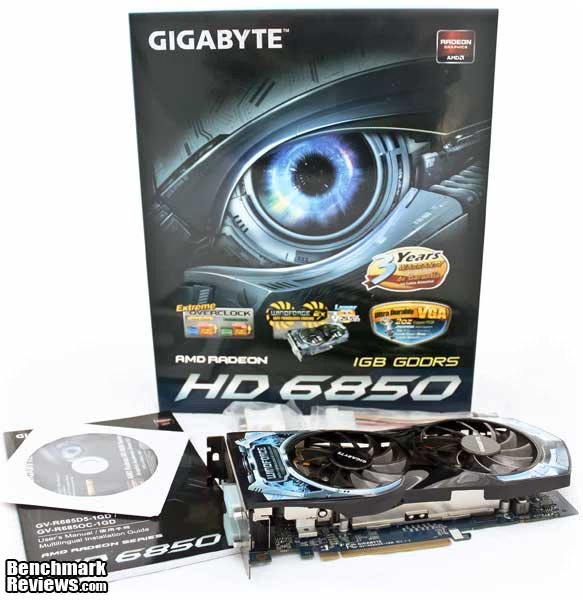
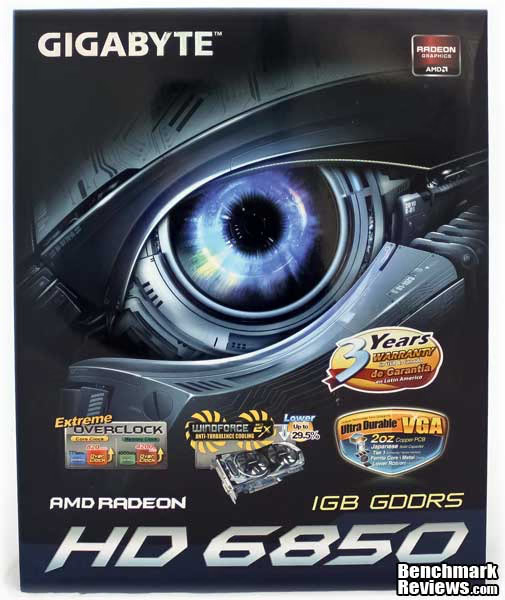
As usual, GIGABYTE packages its GPUs in a quiet nice box. Any technologies, features and bundles are displayed on the frontal and back side of the package. There's a big sticker claiming a 3 years warranty, and they show you their new windforce 2x heatsink design along with GV-R6850C-1GD overclocked speeds against reference clocks.
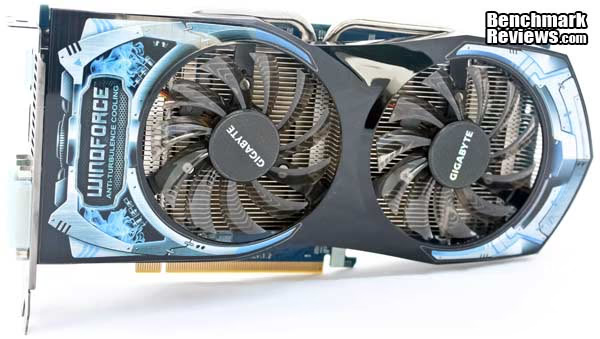
GIGABYTE GV-R685OC-1GD completely gets out of AMD's reference design. With their newest Windforce cooler and its anti-turbulence design, they included a massive heatsink for this GPU, paired with 2x80mm fans instead of the commonly used (but still efficient enough) single fan. The GV-R685OC-1GD promises to be one hell of a quiet card, while delivering superb performance and low heat levels. Since this is an overclocked design, it also means we could try to add some extra volts and reach higher clocks with lower temperatures.

With high-end video cards, the cooling system is an integral part of the performance envelope for the product. Make it run cooler, and you can make it run faster, has been the byword for achieving gaming-class performance with all recent GPUs. Even some midrange models have turned out to be supreme overclockers with enhanced cooling. Windforce anti-turbulence cooling uses specially selected fans with inclined fins and PWM support. Inclined-fins redirect airflow and help to reduce excessive heat and turbulence. Depending on its orientation, there are three types of inclined-fin designs: parallel-inclined, mirroring-inclined and 3D-inclined. Each type contributes to generating excellent exterior airflow for efficient heat dissipation from the interior GPU core. This specific GPU model includes the parallel-inclined design, which moves the air through one direction only, instead of pushing it directly into the PCB and spreading everything to all the available sides.
As it's usual, GIGABYTE uses a blue PCB design with high quality components to sustain their Ultra Durable VGA series. This card is powered by an AMD Radeon HD 6850 GPU, and it supports PCI-Express 2.1 as well as DX-11 AMD CrossfireX and Avivo HD technology.
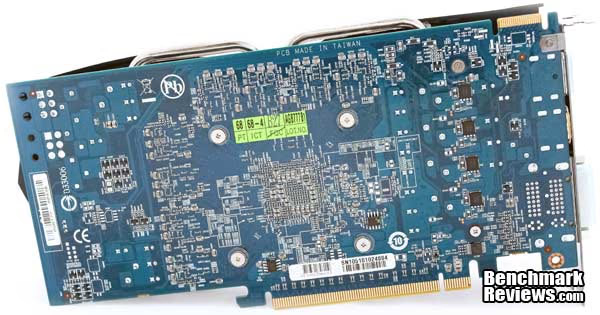
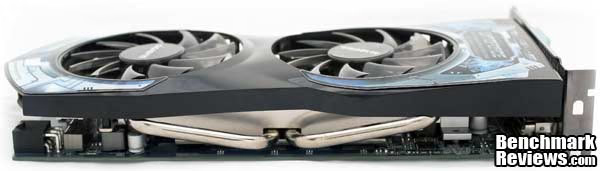
A closer look reveals that the GPU heatsink is actually larger than the PCB itself. I think this isn't necessary, but who knows. Anyway, under this heatsink cover there's the 6-pin PCI-e PSU connector, which has enough open space around to be manipulated even in small-room conditions (mini-ITX builds for example).

There's one different thing from AMD's reference design to the GV-R685OC-1GD. GIGABYTE includes a pair of dual link DVI ports, one HDMI port and a full size DisplayPort connector. However, AMD's reference design initially included a pair of mini-display port connectors instead of a single full-sized one. Anyway, you're still able to connect 3 displays in this card using their newest DP adapter which fully utilizes bandwidth to connect 3 monitors on it and enable Eyefinity.

In the next section, let's take a more detailed look at some of the new components on this reference board. I did a full tear-down, so we could see everything there is to see...
GIGABYTE GV-R685OC-1GD Detailed Features
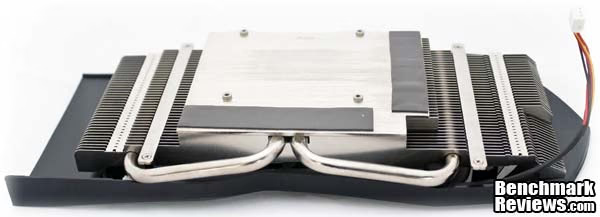
The first job is to uninstall the windforce anti-turbulence cooler to see everything below it. This cooler is quite easy to take off as it's retained by 4 little screws. As usual, GIGABYTE put a lot of thermal paste between the AMD core and the heatsink which I had to clean and re-apply after removing it. We'll check cooler performance in the next sections to see if 2 heat-pipes and a pair of fans are enough to keep the HD 6850 at reasonable levels (even at overclocked conditions).
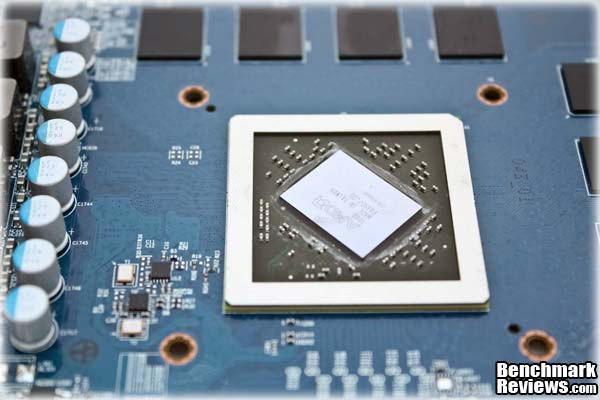
Here's the HD 6850 GPU Core. This image clearly shows how much thermal paste it had before removing the heatsink. Even that, I 'll make clear that the temperature tests were done before re-applying TIM, since many users won't disassemble their GPU just to re-apply TIM, and we need to know performance from factory settings
GIGABYTE'S PCB Quality is great. As they were one of the first brands to solid capacitors, ferrite core/metal chokes and low RDS MOSFETs along with a 2 oz. Cooper PCB the next images just speak for themselves. The PCB design is also nice and clean, which leads to high-quality/solid components.
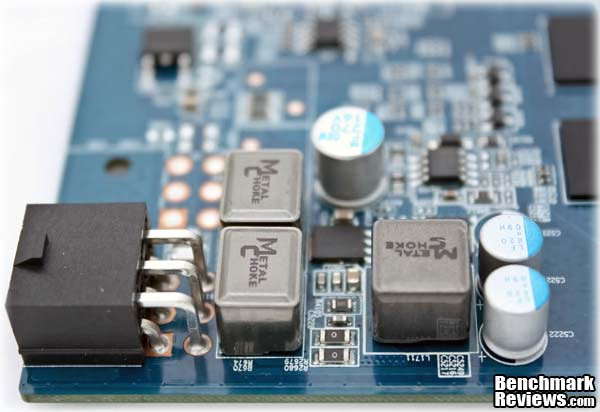
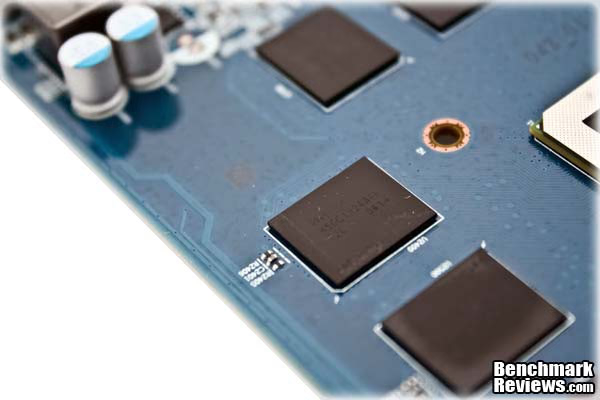
The VRM section includes a little heatsink for the MOS-FETs which receives airflow directly from the fans. There are metal chokes and solid capacitors here too.
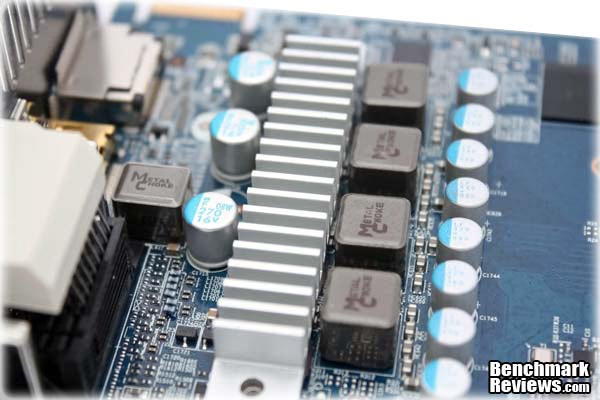
I didn't really captured it well in the next image, but besides being just another shot of the same thing in another angle, in this one you can actually see a part of the GPU voltage controller (just below the metal chokes). This is the NCP5395 IC, which at the time seems to have no software voltage regulation yet. Those are bad news for anyone looking for a new super-overclocker GPU, unless there's an application to support this IC and allow some extra voltage to enhance overclocking capabilities. The non-overclocked version of this GPU however, includes the commonly known CHIL8214-03 IC, which supports voltage control via Sapphire TriXX or MSI Afterburner software.
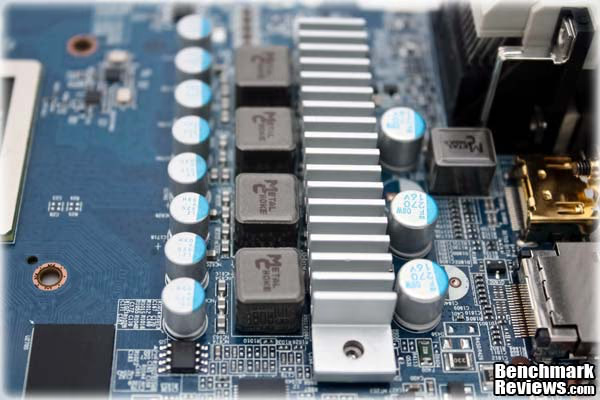
At the back side of the core there are lots of resistors, capacitors and ICs, which just re-affirm the excellent solder quality from GIGABYTE's products. Being one crowded section of a graphics card, they're still able to solder with good precision any component needed. The small SMD capacitors located side-by-side in this view are placed on 1mm centers. This is one of the most critical sections of the PCB for build quality, as variations in stray capacitance here could impact the performance of the GPU, and certainly its overclocking ability. Finally, that little IC that stands out on the photo (the black one, of course) is the UP7706U8 Memory Voltage Regulation IC.

Now that we've had the grand tour of the GIGABYTE GV-R685OC-1GD, inside and out, it's time to put it to the test. Well, Benchmark is our first name, so don't worry. Let's start off with a complete description of the Video Card Testing Methodology.
Video Card Testing Methodology
The Microsoft DirectX-11 graphics API is native to the Microsoft Windows 7 Operating System, and will be the primary O/S for our test platform. DX11 is also available as a Microsoft Update for the Windows Vista O/S, so our test results apply to both versions of the Operating System. The majority of benchmark tests used in this article are comparative to DX11 performance, however some high-demand DX10 tests have also been included.According to the Steam Hardware Survey published for the month ending September 2010, the most popular gaming resolution is 1280x1024 (17-19" standard LCD monitors). However, because this 1.31MP resolution is considered 'low' by most standards, our benchmark performance tests concentrate on higher-demand resolutions: 1.76MP 1680x1050 (22-24" widescreen LCD) and 2.30MP 1920x1200 (24-28" widescreen LCD monitors). These resolutions are more likely to be used by high-end graphics solutions, such as those tested in this article.
In each benchmark test there is one 'cache run' that is conducted, followed by five recorded test runs. Results are collected at each setting with the highest and lowest results discarded. The remaining three results are averaged, and displayed in the performance charts on the following pages.
A combination of synthetic and video game benchmark tests have been used in this article to illustrate relative performance among graphics solutions. Our benchmark frame rate results are not intended to represent real-world graphics performance, as this experience would change based on supporting hardware and the perception of individuals playing the video game.
Intel P55 Express Test System
-
Motherboard: ASUS Maximus III Formula (2001 BIOS)
-
System Memory: 2x 2GB Patriot Viper II Sector 5 2400MHz (8-11-8-24)
-
Processor: Intel Core i7-860 (OC @ 3.8 GHz)
-
CPU Cooler: Prolimatech Megashadow (2x Noctua NF-P12 Fans)
-
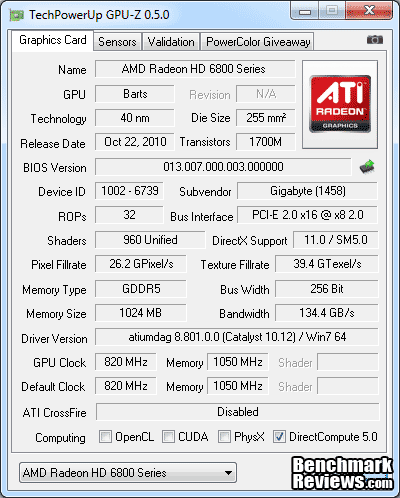
Video: GIGABYTE GV-R685OC-1GD (Catalyst 10.12)
-
Drive 1: Intel X-25M 80GB
-
Drive 2: Seagate 1.5TB
-
Enclosure: Corsair Obsidian 800D Full-Tower
-
PSU: Antec Signature 850 Watts
-
Monitor: Samsung 24"; Widescreen LCD Monitor 1920X1200
-
Operating System: Windows 7 Ultimate x64 (Build 7600)
DirectX 10 Benchmark Applications
- 3DMark Vantage v1.02
- Extreme Settings: (Extreme Quality, 8x Multisample Anti-Aliasing, 16x Anisotropic Filtering, 1:2 Scale)
- Crysis Warhead v1.1 Benchmark
- Extreme Settings: (Very High Quality, 4x and 16x AF, Airfield Demo)
- Just Cause 2
- Extreme Settings: (Max Display Settings, 8x Anti-Aliasing, 16x Anisotropic Filtering, Motion Blur ON, GPU Water Simulation OFF, Bokeh OFF)
DirectX 11 Benchmark Applications
- Aliens vs Predator Benchmark 1.0
- Extreme Settings: (Very High Quality, 4x AA, 16x AF, SSAO, Tessellation, Advanced Shadows)
- Lost Planet 2 Benchmark 1.0
- Moderate Settings: (2x AA, Low Shadow Detail, High Texture, High Render, High DirectX 11 Features)
- Metro 2033
- Moderate Settings: (Very-High Quality, AAA, 16x AF, Advanced DoF, Tessellation, Frontline Scene)
- Unigine Heaven Benchmark 2.1
- Moderate Settings: (High Quality, Normal Tessellation, 16x AF, 4x AA)
Video Card Test Products
-
NVIDIA GeForce GTX 460 1GB (675 MHz GPU/1350 MHz Shader/900 MHz vRAM - Forceware 260.99)
-
AMD Radeon HD 6870 (900 MHz GPU/1050 MHz vRAM - AMD Catalyst Driver 10.12)
-
ATI Radeon HD 5870 (850 MHz GPU/1200MHz vRAM - AMD Catalyst Driver 10.12)
-
AMD Radeon HD 6850 (732 MHz GPU/1464 MHz Shader/950 MHz vRAM - AMD Catalyst 10.12)
-
AMD Radeon HD 6850 CFX (775 MHz GPU/1000 MHz vRAM - AMD Catalyst 10.12)
-
NVIDIA GeForce GTX 460 1GB SLI (675 MHz GPU/1350 MHz Shader/900 MHz vRAM - Forceware 260.99)
| Graphics Card | GeForce GTX460 | Radeon HD6850 | Radeon HD6870 | Radeon HD5870 |
|---|---|---|---|---|
| GPU Cores | 336 | 960 | 1120 | 1600 |
| Core Clock (MHz) | 675 | 775 | 900 | 850 |
| Shader Clock (MHz) | 1350 | N/A | N/A | N/A |
| Memory Clock (MHz) | 900 | 1000 | 1050 | 1200 |
| Memory Amount | 1024MB GDDR5 | 1024MB GDDR5 | 1024MB GDDR5 | 1024MB GDDR5 |
| Memory Interface | 256-bit | 256-bit | 256-bit | 256-bit |
3DMark Vantage Performance Tests
3DMark Vantage is a PC benchmark suite designed to test the DirectX10 graphics card performance. FutureMark 3DMark Vantage is the latest addition the 3DMark benchmark series built by FutureMark corporation. Although 3DMark Vantage requires NVIDIA PhysX to be installed for program operation, only the CPU/Physics test relies on this technology.
3DMark Vantage offers benchmark tests focusing on GPU, CPU, and Physics performance. Benchmark Reviews uses the two GPU-specific tests for grading video card performance: Jane Nash and New Calico. These tests isolate graphical performance, and remove processor dependence from the benchmark results.
- 3DMark Vantage v1.02
- Extreme Settings: (Extreme Quality, 8x Multisample Anti-Aliasing, 16x Anisotropic Filtering, 1:2 Scale)
3DMark Vantage GPU Test: Jane Nash
Of the two GPU tests 3DMark Vantage offers, the Jane Nash performance benchmark is slightly less demanding. In a short video scene the special agent escapes a secret lair by water, nearly losing her shirt in the process. Benchmark Reviews tests this DirectX-10 scene at 1680x1050 and 1920x1200 resolutions, and uses Extreme quality settings with 8x anti-aliasing and 16x anisotropic filtering. The 1:2 scale is utilized, and is the highest this test allows. By maximizing the processing levels of this test, the scene creates the highest level of graphical demand possible and sorts the strong from the weak.

Jane Nash Extreme Quality Settings
3DMark Vantage GPU Test: New Calico
New Calico is the second GPU test in the 3DMark Vantage test suite. Of the two GPU tests, New Calico is the most demanding. In a short video scene featuring a galactic battleground, there is a massive display of busy objects across the screen. Benchmark Reviews tests this DirectX-10 scene at 1680x1050 and 1920x1200 resolutions, and uses Extreme quality settings with 8x anti-aliasing and 16x anisotropic filtering. The 1:2 scale is utilized, and is the highest this test allows. Using the highest graphics processing level available allows our test products to separate themselves and stand out (if possible).

New Calico Extreme Quality Settings
| Graphics Card | GeForce GTX460 | Radeon HD6850 | Radeon HD6870 | Radeon HD5870 |
|---|---|---|---|---|
| GPU Cores | 336 | 960 | 1120 | 1600 |
| Core Clock (MHz) | 675 | 775 | 900 | 850 |
| Shader Clock (MHz) | 1350 | N/A | N/A | N/A |
| Memory Clock (MHz) | 900 | 1000 | 1050 | 1200 |
| Memory Amount | 1024MB GDDR5 | 1024MB GDDR5 | 1024MB GDDR5 | 1024MB GDDR5 |
| Memory Interface | 256-bit | 256-bit | 256-bit | 256-bit |
DX10: Crysis Warhead
Crysis Warhead is an expansion pack based on the original Crysis video game. Crysis Warhead is based in the future, where an ancient alien spacecraft has been discovered beneath the Earth on an island east of the Philippines. Crysis Warhead uses a refined version of the CryENGINE2 graphics engine. Like Crysis, Warhead uses the Microsoft Direct3D 10 (DirectX-10) API for graphics rendering.
Benchmark Reviews uses the HOC Crysis Warhead benchmark tool to test and measure graphic performance using the Airfield 1 demo scene. This short test places a high amount of stress on a graphics card because of detailed terrain and textures, but also for the test settings used. Using the DirectX-10 test with Very High Quality settings, the Airfield 1 demo scene receives 4x anti-aliasing and 16x anisotropic filtering to create maximum graphic load and separate the products according to their performance.
Using the highest quality DirectX-10 settings with 4x AA and 16x AF, only the most powerful graphics cards are expected to perform well in our Crysis Warhead benchmark tests. DirectX-11 extensions are not supported in Crysis: Warhead, and SSAO is not an available option.
- Crysis Warhead v1.1 with HOC Benchmark
- Moderate Settings: (Very High Quality, 4x AA, 16x AF, Airfield Demo)
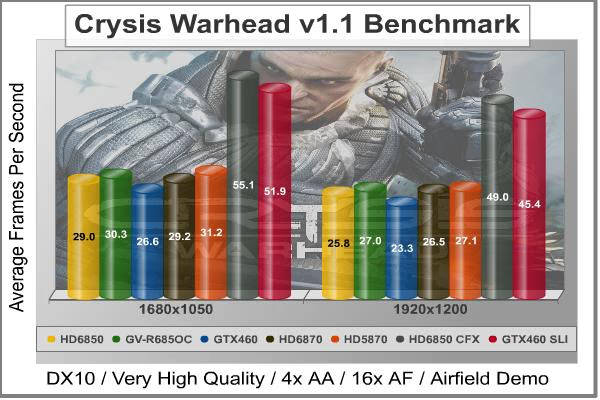
Crysis Warhead Moderate Quality Settings
| Graphics Card | GeForce GTX460 | Radeon HD6850 | Radeon HD6870 | Radeon HD5870 |
|---|---|---|---|---|
| GPU Cores | 336 | 960 | 1120 | 1600 |
| Core Clock (MHz) | 675 | 775 | 900 | 850 |
| Shader Clock (MHz) | 1350 | N/A | N/A | N/A |
| Memory Clock (MHz) | 900 | 1000 | 1050 | 1200 |
| Memory Amount | 1024MB GDDR5 | 1024MB GDDR5 | 1024MB GDDR5 | 1024MB GDDR5 |
| Memory Interface | 256-bit | 256-bit | 256-bit | 256-bit |
Aliens vs. Predator Test Results
Aliens vs. Predator is a science fiction first-person shooter video game, developed by Rebellion, and published by Sega for Microsoft Windows, Sony PlayStation 3, and Microsoft Xbox 360. Aliens vs. Predator utilizes Rebellion's proprietary Asura game engine, which had previously found its way into Call of Duty: World at War and Rogue Warrior. The self-contained benchmark tool is used for our DirectX-11 tests, which push the Asura game engine to its limit.

In our benchmark tests, Aliens vs. Predator was configured to use the highest quality settings with 4x AA and 16x AF. DirectX-11 features such as Screen Space Ambient Occlusion (SSAO) and tessellation have also been included, along with advanced shadows.
- Aliens vs Predator
- Extreme Settings: (Very High Quality, 4x AA, 16x AF, SSAO, Tessellation, Advanced Shadows)

Aliens vs Predator Extreme Quality Settings
| Graphics Card | GeForce GTX460 | Radeon HD6850 | Radeon HD6870 | Radeon HD5870 |
|---|---|---|---|---|
| GPU Cores | 336 | 960 | 1120 | 1600 |
| Core Clock (MHz) | 675 | 775 | 900 | 850 |
| Shader Clock (MHz) | 1350 | N/A | N/A | N/A |
| Memory Clock (MHz) | 900 | 1000 | 1050 | 1200 |
| Memory Amount | 1024MB GDDR5 | 1024MB GDDR5 | 1024MB GDDR5 | 1024MB GDDR5 |
| Memory Interface | 256-bit | 256-bit | 256-bit | 256-bit |
Just Cause 2 Performance Tests
"Just Cause 2 sets a new benchmark in free-roaming games with one of the most fun and entertaining sandboxes ever created," said Lee Singleton, General Manager of Square Enix London Studios. "It's the largest free-roaming action game yet with over 400 square miles of Panaun paradise to explore, and its 'go anywhere, do anything' attitude is unparalleled in the genre." In his interview with IGN, Peter Johansson, the lead designer on Just Cause 2 said, "The Avalanche Engine 2.0 is no longer held back by having to be compatible with last generation hardware. There are improvements all over - higher resolution textures, more detailed characters and vehicles, a new animation system and so on. Moving seamlessly between these different environments, without any delay for loading, is quite a unique feeling."Just Cause 2 is one of those rare instances where the real game play looks even better than the benchmark scenes. It's amazing to me how well the graphics engine copes with the demands of an open world style of play. One minute you are diving through the jungles, the next you're diving off a cliff, hooking yourself to a passing airplane, and parasailing onto the roof of a hi-rise building. The ability of the Avalanche Engine 2.0 to respond seamlessly to these kinds of dramatic switches is quite impressive. It's not DX11 and there's no tessellation, but the scenery goes by so fast there's no chance to study it in much detail anyway.
Although we didn't use the feature in our testing, in order to equalize the graphics environment between NVIDIA and ATI, the GPU water simulation is a standout visual feature that rivals DirectX 11 techniques for realism. There's a lot of water in the environment, which is based around an imaginary Southeast Asian island nation, and it always looks right. The simulation routines use the CUDA functions in the Fermi architecture to calculate all the water displacements, and those functions are obviously not available when using an ATI-based video card. The same goes for the Bokeh setting, which is an obscure Japanese term for out-of-focus rendering. Neither of these techniques uses PhysX, but they do use specific computing functions that are only supported by NVIDIA's proprietary CUDA architecture.
There are three scenes available for the in-game benchmark, and I used the last one, "Concrete Jungle" because it was the toughest and it also produced the most consistent results. That combination made it an easy choice for the test environment. All Advanced Display Settings were set to their highest level, and Motion Blur was turned on, as well.
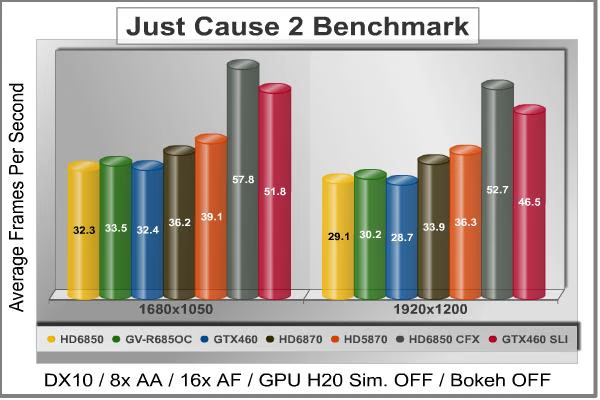
Just Cause 2 Concrete Jungle Benchmark High Quality Settings
| Graphics Card | GeForce GTX460 | Radeon HD6850 | Radeon HD6870 | Radeon HD5870 |
|---|---|---|---|---|
| GPU Cores | 336 | 960 | 1120 | 1600 |
| Core Clock (MHz) | 675 | 775 | 900 | 850 |
| Shader Clock (MHz) | 1350 | N/A | N/A | N/A |
| Memory Clock (MHz) | 900 | 1000 | 1050 | 1200 |
| Memory Amount | 1024MB GDDR5 | 1024MB GDDR5 | 1024MB GDDR5 | 1024MB GDDR5 |
| Memory Interface | 256-bit | 256-bit | 256-bit | 256-bit |
Lost Planet 2 DX11 Benchmark Results
Lost Planet 2 is the second installment in the saga of the planet E.D.N. III, ten years after the story of Lost Planet: Extreme Condition. The snow has melted and the lush jungle life of the planet has emerged with angry and luscious flora and fauna. With the new environment comes the addition of DirectX-11 technology to the game.
Lost Planet 2 takes advantage of DX11 features including tessellation and displacement mapping on water, level bosses, and player characters. In addition, soft body compute shaders are used on 'Boss' characters, and wave simulation is performed using DirectCompute. These cutting edge features make for an excellent benchmark for top-of-the-line consumer GPUs.
The Lost Planet 2 benchmark offers two different tests, which serve different purposes. This article uses tests conducted on benchmark B, which is designed to be a deterministic and effective benchmark tool featuring DirectX 11 elements.
- Lost Planet 2 Benchmark 1.0
- Moderate Settings: (2x AA, Low Shadow Detail, High Texture, High Render, High DirectX 11 Features)
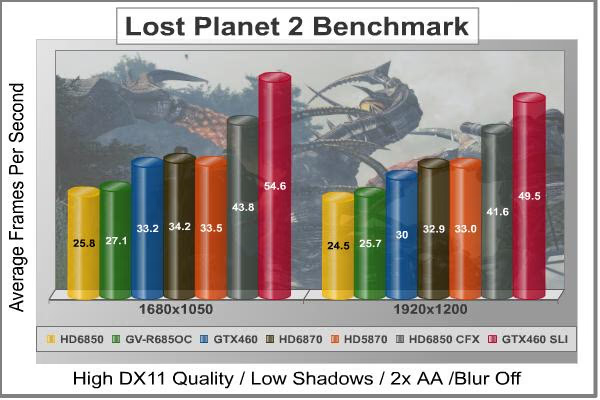
Lost Planet 2 Moderate Quality Settings
| Graphics Card | GeForce GTX460 | Radeon HD6850 | Radeon HD6870 | Radeon HD5870 |
|---|---|---|---|---|
| GPU Cores | 336 | 960 | 1120 | 1600 |
| Core Clock (MHz) | 675 | 775 | 900 | 850 |
| Shader Clock (MHz) | 1350 | N/A | N/A | N/A |
| Memory Clock (MHz) | 900 | 1000 | 1050 | 1200 |
| Memory Amount | 1024MB GDDR5 | 1024MB GDDR5 | 1024MB GDDR5 | 1024MB GDDR5 |
| Memory Interface | 256-bit | 256-bit | 256-bit | 256-bit |
DX11: Metro 2033
Metro 2033 is an action-oriented video game with a combination of survival horror, and first-person shooter elements. The game is based on the novel Metro 2033 by Russian author Dmitry Glukhovsky. It was developed by 4A Games in Ukraine and released in March 2010 for Microsoft Windows. Metro 2033 uses the 4A game engine, developed by 4A Games. The 4A Engine supports DirectX-9, 10, and 11, along with NVIDIA PhysX and GeForce 3D Vision.
The 4A engine is multi-threaded in such that only PhysX had a dedicated thread, and uses a task-model without any pre-conditioning or pre/post-synchronizing, allowing tasks to be done in parallel. The 4A game engine can utilize a deferred shading pipeline, and uses tessellation for greater performance, and also has HDR (complete with blue shift), real-time reflections, color correction, film grain and noise, and the engine also supports multi-core rendering.
Metro 2033 featured superior volumetric fog, double PhysX precision, object blur, sub-surface scattering for skin shaders, parallax mapping on all surfaces and greater geometric detail with a less aggressive LODs. Using PhysX, the engine uses many features such as destructible environments, and cloth and water simulations, and particles that can be fully affected by environmental factors.
NVIDIA has been diligently working to promote Metro 2033, and for good reason: it's one of the most demanding PC video games we've ever tested. When their flagship GeForce GTX 480 struggles to produce 27 FPS with DirectX-11 anti-aliasing turned two to its lowest setting, you know that only the strongest graphics processors will generate playable frame rates. All of our tests enable Advanced Depth of Field and Tessellation effects, but disable advanced PhysX options.
- Metro 2033
- Moderate Settings: (Very-High Quality, AAA, 16x AF, Advanced DoF, Tessellation, Frontline Scene)

Metro 2033 Moderate Quality Settings
| Graphics Card | GeForce GTX460 | Radeon HD6850 | Radeon HD6870 | Radeon HD5870 |
|---|---|---|---|---|
| GPU Cores | 336 | 960 | 1120 | 1600 |
| Core Clock (MHz) | 675 | 775 | 900 | 850 |
| Shader Clock (MHz) | 1350 | N/A | N/A | N/A |
| Memory Clock (MHz) | 900 | 1000 | 1050 | 1200 |
| Memory Amount | 1024MB GDDR5 | 1024MB GDDR5 | 1024MB GDDR5 | 1024MB GDDR5 |
| Memory Interface | 256-bit | 256-bit | 256-bit | 256-bit |
Unigine Heaven 2.1 Benchmark
The Unigine Heaven 2.1 benchmark is a free publicly available tool that grants the power to unleash the graphics capabilities in DirectX-11 for Windows 7 or updated Vista Operating Systems. It reveals the enchanting magic of floating islands with a tiny village hidden in the cloudy skies. With the interactive mode, emerging experience of exploring the intricate world is within reach. Through its advanced renderer, Unigine is one of the first to set precedence in showcasing the art assets with tessellation, bringing compelling visual finesse, utilizing the technology to the full extend and exhibiting the possibilities of enriching 3D gaming.
The distinguishing feature in the Unigine Heaven benchmark is a hardware tessellation that is a scalable technology aimed for automatic subdivision of polygons into smaller and finer pieces, so that developers can gain a more detailed look of their games almost free of charge in terms of performance. Thanks to this procedure, the elaboration of the rendered image finally approaches the boundary of veridical visual perception: the virtual reality transcends conjured by your hand.
Although Heaven-2.1 was recently released and used for our DirectX-11 tests, the benchmark results were extremely close to those obtained with Heaven-1.0 testing. Since only DX11-compliant video cards will properly test on the Heaven benchmark, only those products that meet the requirements have been included.
- Unigine Heaven Benchmark 2.1
- Extreme Settings: (High Quality, Normal Tessellation, 16x AF, 4x AA
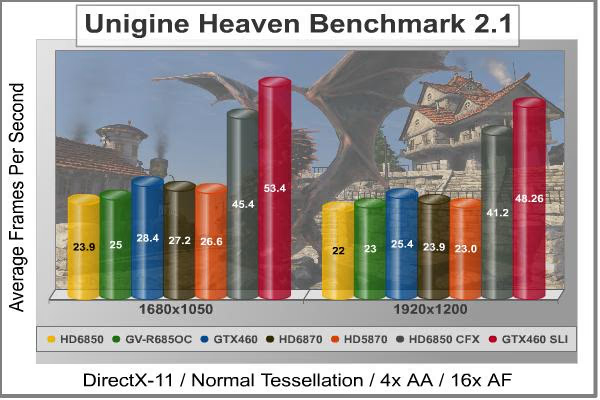
Heaven 2.1 Moderate Quality Settings
| Graphics Card | GeForce GTX460 | Radeon HD6850 | Radeon HD6870 | Radeon HD5870 |
|---|---|---|---|---|
| GPU Cores | 336 | 960 | 1120 | 1600 |
| Core Clock (MHz) | 675 | 775 | 900 | 850 |
| Shader Clock (MHz) | 1350 | N/A | N/A | N/A |
| Memory Clock (MHz) | 900 | 1000 | 1050 | 1200 |
| Memory Amount | 1024MB GDDR5 | 1024MB GDDR5 | 1024MB GDDR5 | 1024MB GDDR5 |
| Memory Interface | 256-bit | 256-bit | 256-bit | 256-bit |
GIGABYTE GV-R685OC-1GD Temperatures
Benchmark tests are always nice, so long as you care about comparing one product to another. But when you're an overclocker, gamer, or merely a PC hardware enthusiast who likes to tweak things on occasion, there's no substitute for good information. Benchmark Reviews has a very popular guide written on Overclocking Video Cards, which gives detailed instruction on how to tweak a graphics cards for better performance. Of course, not every video card has overclocking head room. Some products run so hot that they can't suffer any higher temperatures than they already do. This is why we measure the operating temperature of the video card products we test.
To begin my testing, I use GPU-Z to measure the temperature at idle as reported by the GPU. Next I use FurMark's "Torture Test" to generate maximum thermal load and record GPU temperatures at high-power 3D mode. FurMark does two things extremely well: drive the thermal output of any graphics processor much higher than any video games realistically could, and it does so with consistency every time. Furmark works great for testing the stability of a GPU as the temperature rises to the highest possible output. During all tests, the ambient room temperature remained at a stable 18°C. The temperatures discussed below are absolute maximum values, and may not be representative of real-world temperatures while gaming:
|
Load |
Fan Speed |
GPU Temperature |
|---|---|---|
|
Idle |
40% - AUTO |
33C |
|
Furmark |
60% - AUTO |
71C |
|
Furmark |
100% - Manual |
67C |
Since this card comes with 2 fans instead of one, it seems like all this screws up rpm readings, which is why I didn't included them. Sometimes GPU-Z (or any other software) would say the fan was at 0rpm, while other times it would go above 50,000rpm, which would be completely insane. I think 71C is a decent result for temperature stress testing. I've become used to seeing video card manufacturers keeping the fan speeds low, but it's not really the case with the GV-R685OC-1GD. In this case, the fan controller went from idle speed of 40% (a little high, but very quiet) to the 60% mark when running at full load on auto. At that moment, the noise was noticeable, but it wasn't annoying since it produces a low frequency sound, more like a hummmm. However, at 100% the card was very noisy, and considering the temperature difference between 100% and auto mode, I'd stay in auto mode without thinking it twice.
When I started gaming with some demanding titles the temperatures were much lower. After running Unigine's Heaven Benchmark for 30 minutes, the GPU core barely reached 59 degrees, which is great for overclocking. Any other game like Metro 2033 or Crysis produced less heat, barely passing 55 degrees. At this time, I can confirm that the windforce 2x anti-turbulence cooler works great, as it really performs better than the stock heatsink which reported similar Idle results but 10 degrees higher at full load in our AMD Radeon HD 6850 Review. Now let's see what clocks we can achieve with this great cooling system.
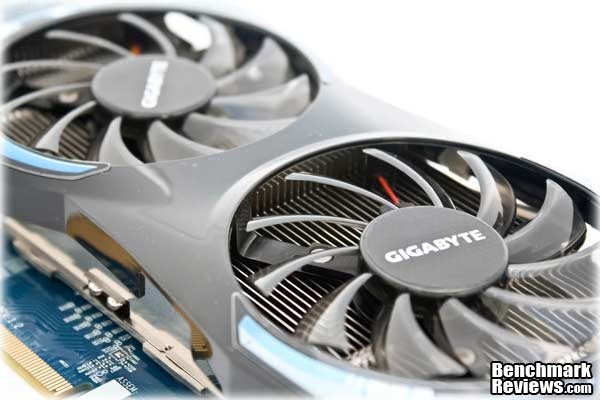
GIGABYTE GV-R685OC-1GD Overclocking
When it comes to overclocking I usually get excited and try many things to achieve the best solid overclock with the GPU, especially if it's known to be a good one, which is the case of HD 6850 GPUs. Now that we've voltage control over many GPUs via software applications like MSI Afterburner, the only thing we need to keep in mind is heat. Since this is an already OCed card, but it's far from being on the limits of the HD 6850 Core, I quickly installed the latest version of MSI Afterburner and Sapphire TriXX to start doing some 3DMark damage at the orb. The whole story turned around and can be described in the next 3 sentences:
Yeah, there you have it... GIGABYTE ruined their AMD HD 6850 OC version by using a non-common Core voltage controller which has no software support, which means we're limited to stock voltage overclocking. I was able to achieve 860MHz with stock voltage and I did some tests, but considering I already had tested the GPU at 820/1050 MHz, the difference was so minimal that it wasn't worth to put them up in the charts. Of course, compared to a reference 775MHz HD 6850, that's a 85MHz overclock, but I know the HD 6850 could do much more (900-950MHz easily) if there was any way to control GPU Core voltage.
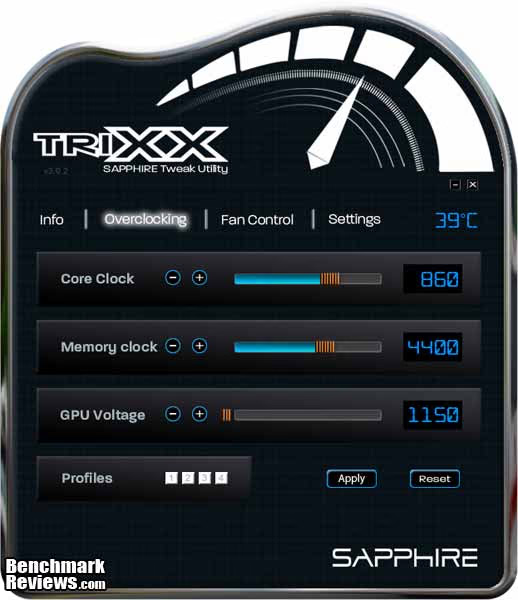
You know what's better? The non-OC version of this specific model with Windforce 2x cooler costs $10 less, and it has full support for voltage control, which means it might be able to achieve 900MHz or possibly more thanks to the included cooler. In other words, GIGABYTE made the overclocked version a non-overclockable one, while it keeps the non-overclocked version quite overclockable for the masses with the proper software. What a joke!
VGA Power Consumption
Life is not as affordable as it used to be, and items such as gasoline, natural gas, and electricity all top the list of resources which have exploded in price over the past few years. Add to this the limit of non-renewable resources compared to current demands, and you can see that the prices are only going to get worse. Planet Earth is needs our help, and needs it badly. With forests becoming barren of vegetation and snow-capped poles quickly turning brown, the technology industry has a new attitude towards turning "green". I'll spare you the powerful marketing hype that gets sent from various manufacturers every day, and get right to the point: your computer hasn't been doing much to help save energy... at least up until now. Take a look at the idle clock rates that AMD programmed into the BIOS for this GPU; no special power-saving software utilities are required.

The HD 6850 works at 100/300MHz in idle mode, while VDDC lowers to 0.950 volts. At full load it increases frequencies to 820/1050 and VDDC goes up to 1.15 volts. The good part is that the HD 6800 series can be overclocked while keeping idle frequencies, saving some energy and keeping lower temperatures. This wasn't possible with HD5800 without modified BIOS.
To measure isolated video card power consumption, I used the Kill-A-Watt EZ (model P4460) power meter made by P3 International. A baseline test is taken without a video card installed inside our computer system, which is allowed to boot into Windows and rest idle at the login screen before power consumption is recorded. Once the baseline reading has been taken, the graphics card is installed and the system is again booted into Windows and left idle at the login screen. Our final loaded power consumption reading is taken with the video card running a stress test using FurMark. Below is a chart with the isolated video card power consumption (not system total) displayed in Watts for each specified test product:
VGA Product Description(sorted by combined total power) |
Idle Power |
Loaded Power |
|---|---|---|
NVIDIA GeForce GTX 480 SLI Set |
82 W |
655 W |
NVIDIA GeForce GTX 590 Reference Design |
53 W |
396 W |
ATI Radeon HD 4870 X2 Reference Design |
100 W |
320 W |
AMD Radeon HD 6990 Reference Design |
46 W |
350 W |
NVIDIA GeForce GTX 295 Reference Design |
74 W |
302 W |
ASUS GeForce GTX 480 Reference Design |
39 W |
315 W |
ATI Radeon HD 5970 Reference Design |
48 W |
299 W |
NVIDIA GeForce GTX 690 Reference Design |
25 W |
321 W |
ATI Radeon HD 4850 CrossFireX Set |
123 W |
210 W |
ATI Radeon HD 4890 Reference Design |
65 W |
268 W |
AMD Radeon HD 7970 Reference Design |
21 W |
311 W |
NVIDIA GeForce GTX 470 Reference Design |
42 W |
278 W |
NVIDIA GeForce GTX 580 Reference Design |
31 W |
246 W |
NVIDIA GeForce GTX 570 Reference Design |
31 W |
241 W |
ATI Radeon HD 5870 Reference Design |
25 W |
240 W |
ATI Radeon HD 6970 Reference Design |
24 W |
233 W |
NVIDIA GeForce GTX 465 Reference Design |
36 W |
219 W |
NVIDIA GeForce GTX 680 Reference Design |
14 W |
243 W |
Sapphire Radeon HD 4850 X2 11139-00-40R |
73 W |
180 W |
NVIDIA GeForce 9800 GX2 Reference Design |
85 W |
186 W |
NVIDIA GeForce GTX 780 Reference Design |
10 W |
275 W |
NVIDIA GeForce GTX 770 Reference Design |
9 W |
256 W |
NVIDIA GeForce GTX 280 Reference Design |
35 W |
225 W |
NVIDIA GeForce GTX 260 (216) Reference Design |
42 W |
203 W |
ATI Radeon HD 4870 Reference Design |
58 W |
166 W |
NVIDIA GeForce GTX 560 Ti Reference Design |
17 W |
199 W |
NVIDIA GeForce GTX 460 Reference Design |
18 W |
167 W |
AMD Radeon HD 6870 Reference Design |
20 W |
162 W |
NVIDIA GeForce GTX 670 Reference Design |
14 W |
167 W |
ATI Radeon HD 5850 Reference Design |
24 W |
157 W |
NVIDIA GeForce GTX 650 Ti BOOST Reference Design |
8 W |
164 W |
AMD Radeon HD 6850 Reference Design |
20 W |
139 W |
NVIDIA GeForce 8800 GT Reference Design |
31 W |
133 W |
ATI Radeon HD 4770 RV740 GDDR5 Reference Design |
37 W |
120 W |
ATI Radeon HD 5770 Reference Design |
16 W |
122 W |
NVIDIA GeForce GTS 450 Reference Design |
22 W |
115 W |
NVIDIA GeForce GTX 650 Ti Reference Design |
12 W |
112 W |
ATI Radeon HD 4670 Reference Design |
9 W |
70 W |
The GIGABYTE GV-R685OC-1GD pulled just 29 (164-135) watts at idle and 148 (283-135) watts when running full out, using the test method outlined above. Consider PSU efficiency into the equations as I'm using an 80 plus bronze power supply. AMD has fixed the idle frequency problems that plagued the HD5xxx series, especially in CrossFireX mode. In idle mode, the BIOS needs to run the clocks WAY down, without any ill effects. We've become used to the low power ways of the newest processors, and there's no turning back.
I'll offer you some of final thoughts and conclusion on the next page...
AMD Radeon HD 6850 Final Thoughts
If there's something NVIDIA did well with their Fermi GPUs, it was the GF104, known as the NVIDIA GTX 460. This little $230 GPU overclocks like hell, and consumes less power than all the rest of the GTX 400 series. If there's something magic about that card, is that I could overclock it to insane frequencies reaching the performance of the GTX 470, and of course, it even blows the HD 6850 out of the table. While the HD 6870 can't be overclocked that far, the HD 6850 has the ability to reach high frequencies, and it certainly behaves similarly to the GTX 460, just without the steroids. That's why I consider the GV-R685OC-1GD an act of suicide for GIGABYTE, as they practically limited overclocking to stock voltage, and thus means it won't be able to compete with higher GPUs or the super-ultra-clocked GTX 460 Editions out there.
The worst thing is that we have a super GPU which lets you play almost the latest titles in the market and it performs really well because of the included windforce heatsink, and even that, you're not able to max it out. It's like having a super-overclocker CPU like the new Core i5 2600K and using it always at stock speeds. For me, that's what this model represents. However, I know many people won't care that much about overclocking, and some other will be happy to reach what it gives at stock voltage, so it's not a decisive thing.
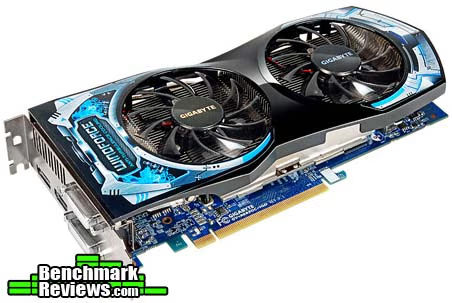
Here's the real thing. What happens when GIGABYTE sells the non-OCed version of this same beatiful model with the same great GPU cooler and costs $10 less? Ah, and by the way, did I mention it fully supports GPU Voltage control? Well, that means you can save $10 and get more performance after doing some tests and tweaks. The HD 650 paired with this cooler shouldn't have problems to reach 900-950MHz. Heck; some other sites even passed the 1GHz barrier, which puts this little GPU back into the game competing with the GTX 460. At those frequencies, the HD 6850 should perform better than the HD 6870, so why not have the opportunity to do it if you already have a great cooler to keep it under your control?
Anyway, in the other hand you have a good GPU which performs well in every test, sometimes exceeding the GTX 460 and sometimes performing somewhat below. If you don't want to play the more demanding games (Crysis or Metro 2033) at full HD resolutions and AA/AF filters one, this GPU will satisfy you everywhere else. Let's move into the conclusions of the GV-R685OC-1GD Radeon Video Card.
GIGABYTE GV-R685OC-1GD Conclusion
From a performance standpoint, the HD 6850 is a very decent GPU. It surpasses the HD 5830 which used to occupy this price point. In stock form, it competes well with GTX460 cards. Sometimes it performs better than the GTX 460, sometimes it stands below. I'm going to wait for voltage control to be widely supported before I pass judgment on its full potential. Until then, I can only say that it is a capable performer, and it fills the large performance gap AMD had in the product line. I'm quite satisfied with the cooling solution, due to its great effectiveness and the reduced noise with a pair of fans which introduce a new way to exhaust air from your case without being a totally closed model.
The appearance of the GV-R685OC-1GD is great. The PCB does really well with the heatsink and even the box looks cool. That pair of fans look as great as they perform, and the Windforce logo looks nice, as if it had some ice on it. Despite being large, the cooler still uses 2 PCI slots only, and won't hinder CFX setups. If there's something I could say it would be that it won't mix well with red/black setups, but that's up to everyone depending on their configurations.

The build quality of the GV-R685OC-1GD just shines. You can have a deeper look at our photo gallery in the past sections so that you confirm it by yourself. GIGABYTE Ultra Durable VGA technology means they'll use high quality components like resistors, transistors, MOS-FETs and capacitors all the time, and they really love to keep solder quality at the top. The heatsink feels solid and performs well adding the use of heat-pipes and low-noise fans to get the job done. All in all, this GPU feels very solid and quality is top-notch.
The basic features of the GIGABYTE HD 6850 are mostly comparable with the latest offerings from both camps, but it lacks PhysX Technology, which is a real disappointment for some. The big news on the feature front is the new Morphological Anti-aliasing, the two DisplayPort 1.2 connections that support four monitors between them, 3rd generation UVD video acceleration, and AMD HD3D technology. That's quite a handful of new technologies to introduce at one time, and proof that it takes more than raw processing power to win over today's graphics card buyer.
As of January 2011, the price for the GIGABYTE GV-R685OC-1GD model is $189.99 at Newegg. However, you can find the non-OC model at $179.99 and overclock it way higher than this model, which makes me feel like there's something going wrong here. For some people, factory overclock is better and they're happy with it. If that's the case for you, then just take this card and enjoy it. But if you are one of the remaining people who want to get some extra juice, then I'll ask you to get the non-OC version and overclock the hell out of it. You'll also save $10, which can't be all that bad. GIGABYTE doesn't have special overclocking software for this GPU, and so there are other brands like MSI or Sapphire offering extra stuff in this area, so if you're not really convinced with this model, don't forget there are some others which might do the trick. But I promise if you're OK with factory overclocked frequencies, the GV-R685OC-1GD won't disappoint you.
Pros:
+ Lower power consumption than HD 5xxx and GTX 400 series
+ Excellent quality and construction
+ Windforce cooler works better and quieter than AMD's reference heatsink
+ Heat gets exhausted through the rear even if it's not a closed heatsink
Cons:
- Low overclocking headroom at stock voltage
- No SW Voltage control support
Ratings:
- Performance: 9.00
- Appearance: 9.50
- Construction: 9.50
- Functionality: 8.50
- Value: 8.00
Final Score: 8.90 out of 10.
Quality Recognition: Benchmark Reviews Silver Tachometer Award.
What do you think of the GIGABYTE GV-R685OC-1GD Video Card? Leave your comment below or ask questions in our Discussion Forum.
Reader comments from the original article
18 comments were posted before commenting closed. They are preserved as written. Original avatars no longer resolve and are shown as a placeholder.
Uhh what? Cody Permalink:
I'm an owner of the 775 model version, I have the card running stable at 950 Core clock / 1200 Memory with the standard voltage. Bumping the voltage to 1200 in Trixx results in a stable 1000 GPU core clock. You need to update Trixx to the latest version. ##hardwarecanucks.com/forum/overclocking-tweaking-benchmarking/39957-gigabyte-6850-3-decent-ocr-seems.html
RE: Uhh what? Servando Silva Permalink:
I used the latest version of TriXX, it just wouldn't go above 860-870MHz (Core) without getting artifacts. Anyway, you've got the non-OC version with different ICs, which is one of my key-points in my article.
RE: GIGABYTE Radeon HD 6850 GV-R685OC-1GD Cody Permalink:
I have experience with the OC version as well, it can hit 1GHz @ 1250 (Voltage setting in Trixx) and run stable however it runs a bit hot after a while in Furmark. Currently I have his OC'd to 950 / 1150 without artifacts at the stock voltage with the fan speed at 1175. Perhaps you just got unlucky?. Either way I liked your review.
RE: RE: GIGABYTE Radeon HD 6850 GV-R685OC-1GD Servando Silva Permalink:
Really? Everywhere I read about a person getting the OC version just complains about not supporting voltage changes and trying to change it for the non-OC version. There are some threads at Xtreme Systems about volt-modding as that's the only way to do it. Just to add, you're using TriXX 3.0.2 BETA, right? That's the latest version announced at Sapphire's homepage. Glad you liked the review.
RE: RE: RE: GIGABYTE Radeon HD 6850 GV-R685OC-1GD Cody Permalink:
Yes 3.0.2, the slider just slides over. I was at my buddies house looking at the card to make sure it was the OC version and it allowed the voltage to be modified. He however bought it Openbox (which I didn't know) so perhaps the person who sold it to him already unlocked the voltage. That or maybe it's not actually adjusting the voltage.
RE: RE: RE: RE: GIGABYTE Radeon HD 6850 GV-R685OC-1GD Servando Silva Permalink:
It's not that the voltage is locked, problem is that this specific version includes a different GPU Core voltage controller, which has no software support (yet), not even with TriXX or MSI AF. Since the controller they used isn't very common, I doubt we'll see something avalable soon. Anyway, if you can re-check and try to modify voltage, that would be great, because that could mean GIGABYTE is making a different version (revision) with another GPU controller. Thanks.
black screen no signal ! Agassizi Permalink:
Unfortunatelly is a lot os problems with this (GigabyteHD6850)vide ocards.There ara many users who reported when he playing games after a short period of time the monitor instantly turn off and apear the NO SIGNAL labell, and nothings help just a restart.Can I ask which BIOS version are you used when you make this rewiew? Because in the last 3 months arived 3 BIOS versions.The last BIOS changed the card specification. IDLE 40% cooler, and the GPU RAM ferequency was modyfied to 775/1005.(the original was 25%cooler speed and 775/1000. Another strange thing, the factory original bios set the coolers to run at 73% and ofcourse the sound level was really anoying.
RE: black screen no signal ! Servando Silva Permalink:
I didn't have any of the problems mentioned. I used the BIOS shipped with this sample, which is displayed at the testing methodology section. Another thing is that this is the OCed version, which means it's got 820 MHz/ 1050MHz instead of 775MHz. GIGABYTE doesn't display any BIOS update for this model, but I've checked and there's a BIOS update for the non-OC model.
BS no signal error Agassizi Permalink:
Hi, Yes on the Gigabyte webpage ,is a new BIOS for "basic" Gigabyte HD 6850 cards (775/1000).This arrived at 14 january 2011 .As I mentioned in my previous post the Vram clock and the cooler speed was changed (Vram from 1000 to 1005 and cooler from 25% to 40%).Unfortunatelly doesent solve the black screen problems for everybody.Some users reported the BS with this bios version to.
RE: BS no signal error Servando Silva Permalink:
I'm sorry to hear that. Well, I'm still using this little puppy and it's not giving me any problems. Could you tell us what are the conditions or signals before going to black screen? Perhaps I could try.
RE: GIGABYTE Radeon HD 6850 GV-R685OC-1GD Agassizi Permalink:
win 7 64bit genuine, PSU enermax 600W 87+,HD Gigabyte HD 6850 BIOS F3_B , Catalyst 10.12(but the new 11.1 give the same BS problem) The problem I meet undert FarCry2 benchmark ultra high settings full hd dirX10, Crysis- paradise lost level ,GTA4 and NFSShift (all games full HD aa8x vsync on) The GPU temperature never exceed 68C. Far Cry2 bench ~ 55C , Crysis 67 C, GTA IV 68C.The RAM temperature I don't know because I don't know any software which can mesure this.There is some rummors which say the memory are faulty , but I don't want comment this because until today I don't see any official evidence as the Hynix memory cause this problem. I check my card temperRATURE with ccc OVERDRIVE, aida64 and MSI AFTERBURNER all programs show me the same temperature so resulting the heat level is ok. The F3_C bios fom 14 january seems to resolve the BS problem to me but I am not calm at all because I know a couple of users which card is faulty with this BIOS version to.I atach a couple of videos what I find to youtube.My system (and my buddys sitem ) behaviour is 100% the same. None of us overclocked her card! every card working on factory clocked level 775/1000 1,5 V. Many serbian, hungarian, romanian (but not only this country) forums is full with users who have exact the same problem.Most error was reported with have gigabyte cards , but is other vendors card which have this BS NO Signal problem too. Asus,Saphire,MSI ,etc I will atach a couple of youtube videos to see what I takling about ##youtube.com/watch?v=r53or6LNwBc&feature=player_embedded ##youtube.com/watch?v=cRUWC15lsQQ ##youtube.com/watch?v=ilD2649KNF8
Gigabyte BS No signal error Agassizi Permalink:
I forgot to tell one thing, last year in november -december when the it was not aviable the F3C(fixed?) Bios on the Gigabyte page , a couple of users trying different "tricks? and a couple of person report , if downclock her cards memoryclock at 900 the problem disapear.( 775/900 )MHZ)_. Anyway in my opinion this is not a correct sollution.NObody spending her money to be forced to downclocked her card. Here is the link with the new BIOS.If somebody have the same problem he can try it maybe will help but not 100%.And once again! the cooler rotaion will become 40% (original os 25%)and the memory frequencies will rising from 1000 to 1005 Mhz.This BIOS is only for GV-R685D5-1GD cards. I don't know why was necessary this modification but to be honest I like att all,especially after saw a couple of the same cards ,which working perfect with original BIOS(775/1000, 1,5V ) and doesent make Black screen error. ##gigabyte.com/products/product-page.aspx?pid=3614#bios
BS + FREEZING HD 6850 rdizzle Permalink:
I recently had the same issue with my HD 6850. Mine has been OC'd to 950/1200 on stock voltages. Ran OCCT for an hour with no errors detected. Did a memtest for a whole night with no errors. My problem is after playing CS:Source for more than an hour..my computer screen turns black and shows "No Signal" and at the same time my computer freezes and the sound just keeps repeating the last thing that was heard. I can't do anything but do a hard reset..and now I notice when I boot up Windows there's an extra black screen with a messed up windows logo right before Windows actually loads up. CS:Source FPS average around 299 Specs: Intel i5 760 Motherboard: Sabertooth 55i Graphics Card: Gigabyte HD6850 Memory: Ripjaws (2x4)8GB PC3-10666 Hard Drive: WD Black 1TB Optical Drive: Samsung SH-S243D Power Supply: Corsair TX750W Display: Acer p244w 24" 1920 x 1080 Operating System: Win7 64bit Speeds CPU Stock: 2.8 Memory Stock: 1333 Memory - Timings Stock: 9-9-9-24 1.5V Graphics Card - Core Stock: 775 Overclocked: 950 Graphics Card - Memory Stock: 1000 Overclocked: 1200
Msi Afterburner beta 7 rdizzle Permalink:
I also forgot to mention that I recently updated MSI Afterburner 2.1.0 beta 7 coming from beta 6...and I noticed this happening... I might revert back to the old beta 6 later when I get home and do some more gaming to see if that fixes the problem...
Oc rates Pedro Permalink:
Hi Folks i've just installed my brand new HD 6850 GV-R685OC-1GD, and as per i upgraded from Sapphire 5570 1GB DDR3 to this new one i've already had the Catalyst Control Center installed. I just put the GPU and the driver was automatically installed by w7 and updated by Catlayst (i did not installed the Gigabyte installation CD) On AMD software by checking the box to enable Graphics Over Drive: Automatic OC options on AMD Vision Control Center are: GPU range: from 600 to 985 (just drag the bar) MeM range: from 1050 to 1260 (just drang the bar) My question: can i safely drag to 958 and 1260? as they appear as option to me? very good review by the way Specs: AMD Phenom II X4955 Black Edition (800-3800oc by AMD auto tune) Motherboard: ECS A785GM-M Graphics Card: Gigabyte Radeon HD 6850 GV-R685OC-1GD Memory: Ripjaws (4x4)16GB PC3-10666 Markvision 1333Mhz Hard Drive: Samsung HD-322HJ Optical Drive: LG GH22NS50 Power Supply: Akasa 600W (AK-P600G-SLAM) Display: LG W2353V 23" 1920 x 1080 Operating System: Win7 64bit
RE: Oc rates David Ramsey Permalink:
You can do it safely, as in "it won't physically damage your card". However, there's no guarantee the card will run with those settings: you could see visual artifacts, or the computer could lock up or crash.
RE: Oc rates Olin Coles Permalink:
The Radeon HD 6850 is a good overclocking card, but the limit varies from card to card. I suggest finding the maximum GPU and Memory overclock (GPU is more important, and memory really doesn't/shouldn't be overclocked), then backing down 10MHz or more.
RE: Oc rates Tony Permalink:
i know this is a year late but ive gotten mine to 920/1200 with no problems on stock voltage with msi afturburner 2.3x with unoffical oc'ing enabled.