
Seagate FreeAgent Go 640GB External Hard Drive
Seagate FreeAgent GO External Drive Review
Mobile storage of music, videos, pictures, files, and pretty much anything else you can think of is rapidly becoming more and more popular. Even the recent release of Windows 7 has seen unheard of amounts of people wanting to install the operating system using external storage devices such as flash drives rather than a DVD. Many workstations in offices don't include any sort of optical or other removable media devices other than USB drives. Seagate has always been a name well associated with storage and their most recent external hard drive series is another push forward helping people with all kinds of storage needs. Benchmark Reviews is taking a look at the Seagate FreeAgent Go 640 GB USB 2.0 External Drive, which is loaded with features, and even software, to make your life easier.
There may have been a time in recent history when computers were not as important in our daily lives. Now it is very unlikely that you won't interact with a personal computer on at least a daily basis. Many of us use multiple computers and store all kinds of personal files and keepsakes on them. The Seagate FreeAgent GO series seeks to alleviate some of the difficulties of juggling our files between work, home, and play. The FreeAgent GO (model ST910004FAA2E1-RK) comes pre-loaded with software specifically intended to make backup, encryption, and syncing easier than ever.
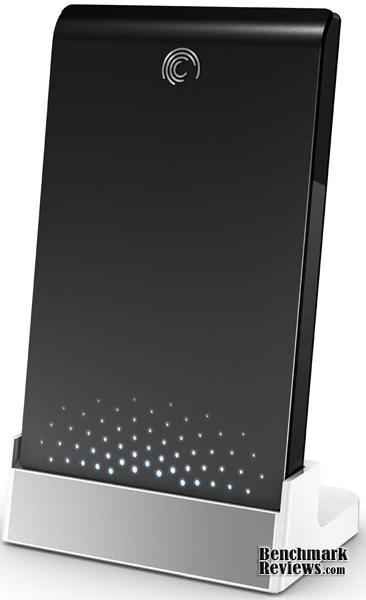
With all the media we need stored and accessible at the same time, it is important to find a reliable and easy to use solution. Benchmark Reviews invites you to join us as we explore the Seagate FreeAgent GO and test its usefulness in safeguarding, storing, and making available all that we hold dear.
About Seagate Technology
As digital content, such as music, video, photos and games, becomes more integrated into everyday life, the idea of static data storage is becoming obsolete. In today's on-demand world, you want to access, share and secure your digital content using dynamic storage solutions that give you the freedom to do business, create and interact-anytime, anywhere. From protecting treasured family photos and personal music collections to developing next-generation consumer electronics devices and large enterprise networks, Seagate delivers advanced digital storage solutions to meet the needs of today's consumers and tomorrow's applications.
Seagate Technology has been at the forefront of the storage industry for nearly 30 years. With corporate offices in Scotts Valley, California, Seagate employs more than 55,000 people around the world-all contributing to the development of the company's next-generation storage products. From the first 5.25-inch hard drive for the PC to the development of perpendicular recording technology, the company has been pioneering new industry standards that have fueled advancements in the digital information age. Through technology leadership and innovation, Seagate continues to help individuals and businesses maximize the potential of their digital content in an ever-evolving, on-demand world.
Seagate FreeAgent GO Features
Big capacity. Small package.
Get a lot without carrying a lot. And look good while you do it.
-
Available in a range of capacities, from 250GB to 1TB
-
The thinnest portable drive available. Even the cables are compact
-
Multiple colors to suit your style and let you tell one FreeAgent Go from the next
Simple backup and sync.
If it's not easy, it won't happen.
-
Automatic backup for peace of mind
-
Encryption technology keeps your files safe
-
Easy synchronization means you always have the most current version with you
-
Fast data transfer with USB
Go cable-free.
An optional desktop dock makes syncing a snap.
-
Access your files without fumbling for cables
-
Preloaded software means easy setup
All the little extras.
You don't choose a drive based on these things. But you love them once you have them.
-
Power management features save energy
-
Five-year limited warranty
ST906403FAA2E1-RK Specifications
|
Specifications |
|
|---|---|
|
Model Number |
ST906403FAA2E1-RK |
|
Interface |
USB 2.0 |
|
Capacity |
640 GB |
|
Dimensions |
3.15 in Horiz x 5.12 in Vert in x 0.49 in Depth Weight: 0.35 lbs (0.16 kg) |
Closer Look: Seagate FreeAgent GO
To begin, something really has to be said about Seagate. The day after talking to them about reviewing the FreeAgent GO, it arrived. Now that is definitely a company I can handle doing business with. The FreeAgent GO 640 GB USB External Drive arrived packed snugly in its container. The packaging certainly looked cool. The FreeAgent GO drive is suspended in clear plastic packaging so you can see the drive clearly. I received the Tuxedo Black model, but the FreeAgent GO actually comes in up to 10 different colors; Titanium Silver, Tuxedo Black, Ruby Red, Royal Blue, Sky Blue, Solar Orange, Think Pink, Champagne Gold, Spring Green, Forest Green. The 250Gb and 320Gb drives have all the color options, the 500Gb has six options, the 640 GB comes in white, black, or red, and bigger than that comes only in black.

With all that color, I am quite sure that the FreeAgent GO stands out on store shelves. The packaging definitely shows it off. Along with the FreeAgent GO, I received the Seagate FreeAgent GO Dock+. The dock was similarly packaged, though not visible through the plastic casing. In all honesty, the package looks quite impressive. Unfortunately, trying to get the FreeAgent drive and dock OUT of the packaging caused quite a bit of heartache and frustration. After fruitlessly trying to remove the items without mechanical help, I enlisted a pair of heavy duty scissors. The package would not cut along the seams and was still terribly difficult to open, so I got about a pair of kitchen shears. With those mighty tools, I was finally able to best the plastic beast that was holding my prize. Something really needs to be done to improve this. Although if burning calories while extracting your product is something you enjoy, the Seagate FreeAgent GO caters to you.
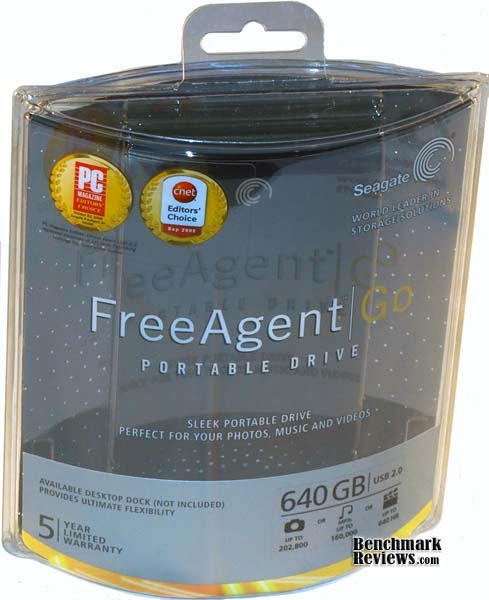
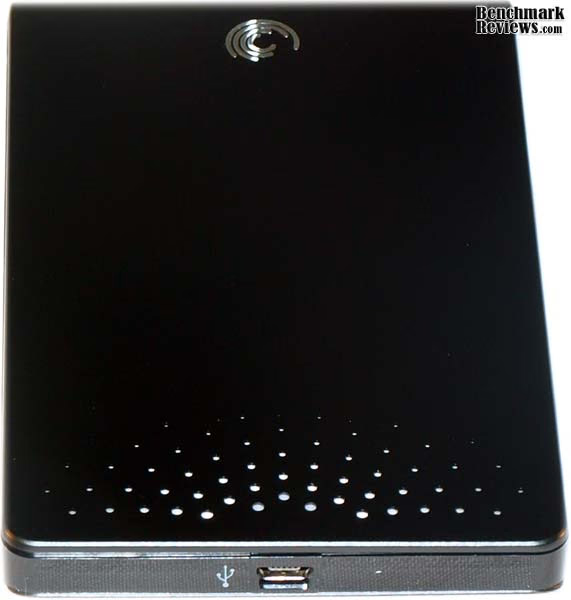
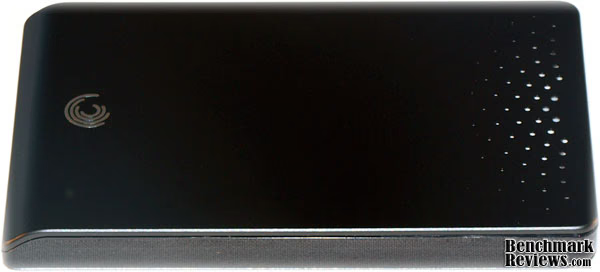
After a short rest to catch my breath, I took a good look at the FreeAgent GO drive and dock. The drive is only slightly larger than the palm of my hand and it is extremely light. The slim design of the FreeAgent GO is very appealing. The top and bottom of the casing are metal and the sides are plastic. The rectangular shape curves at the front where the Seagate logo is located. The other end of the FreeAgent GO has a starburst pattern of perforation near where the USB connector is located. When plugged in, some of these perforations are lit by LEDs that pulsate gently when the drive is in use. The lights can be turned off using the Seagate Manager software. Though the packaging is quite a bit larger than the FreeAgent GO drive itself, it contains relatively little. It contains the drive, a quick start guide, a warranty manual, and a 6" USB cord. The cord is very short, so plan on using a USB hub if you don't have the dock.

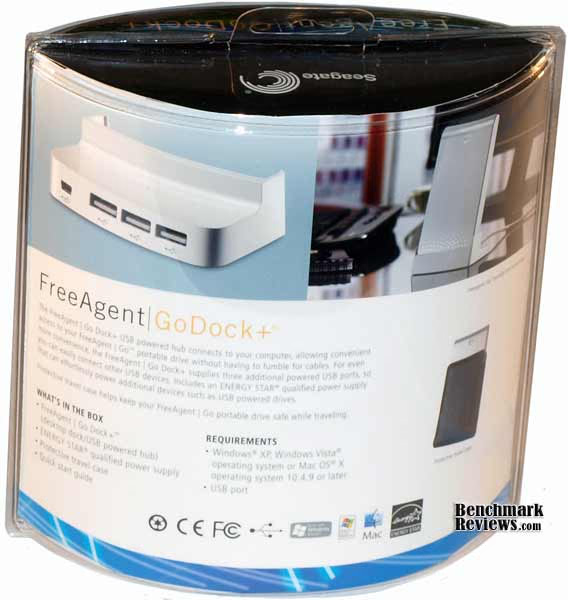
The FreeAgent GO Dock+ is a standing dock for the FreeAgent GO drives that doubles as a USB 2.0 hub. The FreeAgent GO Dock+ is powered by an AC Adapter and plugs into the computer through a much longer USB Cable than the one that comes with the FreeAgent GO drive. The packaging that the dock came in was just as difficult to deal with as the packing of the drive, but it was easily overcome. The AC Adapter plugs into the FreeAgent GO Dock+ on right side and the USB plugs into the back. The three USB 2.0 ports are also in the back. Seagate offers a couple of different solutions for the dock. The FreeAgent GO Dock is a simply that, just a dock, the Dock+ has the three USB 2.0 ports, and the FreeAgent DockStar is a USB 2.0 hub for 3 devices as well as acting as a wireless device by connecting to your wireless network. This allows you to access files from your FreeAgent GO drive from any computer in your house.
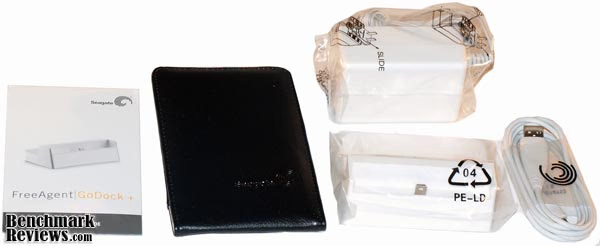
There were quite a few more contents in the FreeAgent GO Dock+ box. The package included the Dock+, the AC Adapter, a 3 foot long USB Cable, the User Manual, and a handy carrying case. The carrying case appears to made of leather with an elastic cloth band around the backside that forms a pocket of sorts. The carrying case is an extremely handy accessory for the FreeAgent GO drive, allowing it to be protected from dings and scratches during travel. It certainly affords the user the ability to consider the FreeAgent GO as an actual portable drive. Many other drives are touted as portable, but Seagate really tries to make it easy for you. In fact, the drive is intended to be "hot-swappable", meaning that there should be no issues with removing the device without first safely removing it in Windows.
The size and portability of the Seagate FreeAgent GO really make it stand out from other external drives. I have a 400Gb Western Digital My Book drive and I borrowed a Western Digital My Passport Essential drive to test against the FreeAgent GO. The My Book is definitely not a portable drive, and the My Passport is of comparable size to the FreeAgent GO, but doesn't come with the handy carrying case or dock options. Also, the software provided by Seagate for the FreeAgent GO drives really pushes it over the top. We will discuss the software in more detail a litte further on.
FreeAgent GO Detailed Features
The FreeAgent GO is extremely light and thin. It weighs just over 1/3 of a pound, about 5 ounces, and is only half an inch thick. The top and bottom plates on the FreeAgent GO are metal, rather than the usual plastic casing on other external drives. This gives the drive a nice look and feel, and also seems more protective of the insides of the FreeAgent GO. At the same time, the plates are not attached as securely as I would like to the plastic center of the drive casing. As I was taking the FreeAgent GO from one room to another and the top plate got caught on my sleeve. No permanent damage to drive or sleeve was experienced, but I was concerned that plates weren't securely fastened to the rest of the body.

The FreeAgent GO comes preloaded with Seagate Manager software that will autorun when you first plug in the drive. The software is very inclusive and provides a lot of options for the drive. While the software used to only work on 32 bit operating systems, Seagate has updated it and it now works with 64 bit operating systems as well. I know that many people don't like to deal with software pre-loaded on the external drives, as they simply want to get right to using the drive as extra storage. In the case of the Seagate Manager software on the FreeAgent GO drives, I highly recommend actually installing the software. Though it only works with Seagate drives, it will really help you manage the drive and, in particular, the drive settings. By simply deleting the program and not installing it, you are forced to run the drive with the default settings. I used the software to turn off the pulsing lights (they were lulling me to sleep), and to stop the drive from shutting down after an adjustable amount of inactive time. The settings portion of the software also has a program to test the drive.

In addition to the drive settings, the software that comes with the FreeAgent GO allows you to easily back up files and folders, or an entire drive. A simple or a custom backup can be performed. The simple backup copies the Personal folder that you choose every day at a specified time. The custom backup allows you to choose which files and directories you want backed up and how often. The backup settings are defaulted to backing up your entire C: drive on a daily basis. I quickly turned this option off. Another option the Seagate Manager software gives you is that of syncing certain folders between your drive and as many computers as you may use it on. The simple and custom options of the Syncing process are the same as for the backup process.
The software on the FreeAgent GO also gives you the opportunity to encrypt the files on the drive. The encryption tool is software based, and doesn't require the software to be installed on the computer the drive is connected to. However, since it is software based, the actual drive itself is not encrypted, just the files. Still, providing this service for a portable drive that may be used for transporting sensitive files is a big step in the right direction. Seagate previously offered the Ceedo program with their software package that users to actually install and run programs directly from the drive, but this program is absent in the Seagate Manager software.
Really, the software is something that really sets the Seagate FreeAgent GO apart from the competition. The broad scope of utilities provided by the software really makes the FreeAgent GO a portable, secure, and versatile drive. I have been able to easily, and very quickly, consolidate all of my music, pictures, and videos onto the drive, which I don't mind carrying back and forth throughout the house or even to work due to its compact size. The FreeAgent GO uses very little powered and can be used with only a single USB port. The older versions of this drive required the use of two USB ports, or an AC Adapter. That's another main advantage of the FreeAgent GO over my older Western Digitial My Book. To move the drive, I don't have to carry around a lot of cords. The 6" USB cable that came with the drive is all I need.

Recently, I went on a trip with my family and our drive time was upwards of 12 hours one way. I built a PC into my car a while ago, so we just loaded up the FreeAgent GO with movies and music and plugged it in during the drive. My family was able to enjoy movies during the trip and I always had good music available, even when no radio signal could be found. Prior to the FreeAgent GO, an iPod was the closest thing to portable media that had ever really been feasible for me. Even once we got to our destination, we were able to easily share home videos and pictures with relatives by carrying around something no larger than the palm of my hand.
Testing & Results
Testing Methodology
We have already established that the Seagate Manager software that comes with the FreeAgent GO drive is very useful and versatile, setting the drive apart from the competition. The size and portability of the FreeAgent GO also make it excellent for a portable drive. Now we will test the Seagate FreeAgent GO 640 GB USB drive against two Western Digital External drives to see how it holds up in speed tests, access time, and CPU usage against the competition. I tested the drives using my Home Theater PC, since that is system that will get the most use out of the FreeAgent GO.

Test System
-
Motherboard: Intel BOXDG41MJ LGA775 Intel G41 mini-ITX Motherboard
-
System Memory: WinTec AMPX 2GB 240-pin DDR2 800 SDRAM (PC 6400)
-
Processor: Intel Pentium E5300 2.6Ghz LGA775 65W Dual-Core Processor
-
Audio: Realtek ALC888VC 6 Channel Onboard Audio
-
Video: Intel GMA X4500 Onboard Video
-
Disk Drive 1: Western Digital Caviar Blue WD3200AAJS 320Gb 7200 RPM
-
Optical Drive: Panasonic UJ-875A Slim Optical Drive
-
Enclosure: SilverStone SUGO SST-SG06B Mini-ITX Case
-
PSU: SFX 300W with 80 PLUS Certification
-
Monitor: Olevia 227V 27" HDTV
-
Operating System: Windows 7 Home Premium
Test Equipment
-
Seagate FreeAgent GO 640 GB USB 2.0
-
Western Digital My Book 400Gb 1394b
-
Western Digital My Passport Essential 400Gb USB 2.0
FreeAgent GO Results
I started off the testing with HD Tune 2.55. HD Tune is a hard disk benchmarking and information tool. You can use it to measure the raw performance of your drives, including transfer rate, burst rate, access time, CPU usage, and more. In addition, it provides detailed information about supported hard drive features, as well as current temperature, S.M.A.R.T information (if available) and an error scanner. The test system was completely rebooted between tests. It's really not difficult with Windows 7, as the boot time for the system is somewhere around 20 seconds. Each test was run five times, the best and worst results were discarded, and the average of the other three tests were taken for the results.
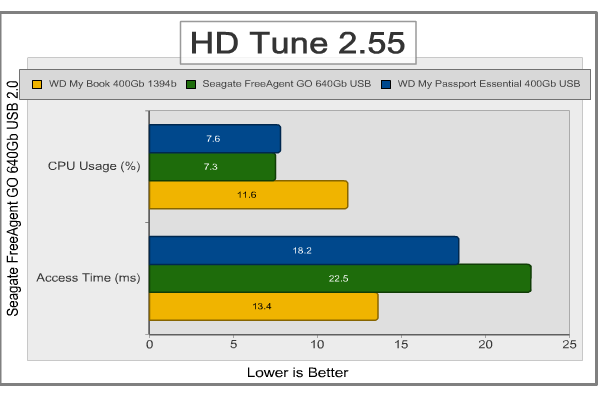
As you can see above, the two USB 2.0 drives have practically the same CPU Usage, and it's really not all that much. The 1394b drive kind of worries me, but it is a much older drive than the other two. As far as access time is concerned, the Seagate FreeAgent GO drive is much slower than the two Western Digital Drives. Compared to the 1394b drive, this is to be expected, but against the other USB 2.0 drive, it is somewhat surprising; although, 4 milliseconds isn't going to be very noticeable.
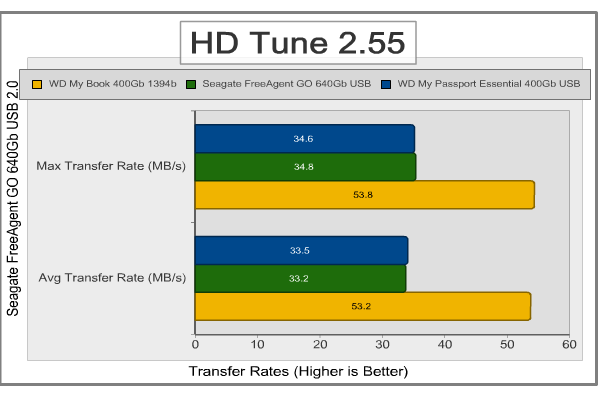
The transfer rate tests from HD Tune show again that the two USB 2.0 hard drives are very evenly matched. For both the Seagate FreeAgent GO and the Western Digital My Passport, the Average and Maximum Transfer Rates were very close. This is a very good sign, showing that the drives run consistently very close to their maximum rates. The fact that the 1394b My Book is quite a bit faster than the other is to be expected.

For the real file transfer tests I used actual files on the computer and clocked them with a stopwatch to see how close the transfer rates actually came to those provided by HD Tune. For the large file transfers I moved two DVD ISO files totaling 9.22 Gbs between the test system and the test drives. For the small files, I moved 30.44 Gbs of MP3 files. The system was rebooted between each transfer.
As you can see, the file transfer rates for the large files were very close to the average times produced by HD Tune, with a slight decrease in transfer rate during the write test. There was also nearly a 10 MB/s decrease in transfer rate on the FreeAgent GO drive between the large file read test and small file write test. Also notable was the fact that the difference in read/write speeds were closer for the Wester Digital My Passport drive than for the Seagate FreeAgent GO. During the read tests, the FreeAgent GO consistently beats the My Passport Essential, but the opposite is true in the write tests. Again, the 1394b drive easily outpaces the USB 2.0 drives.
The tests prove that the Seagate FreeAgent GO can certainly keep pace with the competition. It doesn't impress by beating out the other USB 2.0 drive, but it also doesn't lag behind at all. The speeds for the drive are very consistent and very good overall. Add to that the software that comes with the FreeAgent GO, the dock, the carrying case, and the metal casing, and I'd say Seagate has a hand up on comparably priced Western Digital drives.
FreeAgent GO Final Thoughts
External Hard Drives and other means of portable storage are becoming smaller, more spacious, and more portable than ever before. They are also becoming much more appealing to the eye. Seagate has always been a reliable name in storage and the FreeAgent GO family of drives only further solidifies their standing. The FreeAgent GO meets up to the standard in drive performance, easily keeping pace with the Western Digital My Passport Essential drive. Seagate really pushed the FreeAgent GO to the front, though, with their innovative design, making one of the thinnest drives available. The docking options available for the FreeAgent GO, as well as the excellent software provided on the drives really makes them stand out as well. The Seagate Manager software makes it easy for anyone to backup or sync their FreeAgent GO drive and centralize all of their media onto a single device that can be easily carried wherever you go.
For a family such as mine, with many different computers all over the house, office, even in the car, the FreeAgent GO provides a great solution. Recently, my wife has been worried about natural disasters and how we can easily secure perishable keepsakes and media in case of an emergency. The FreeAgent GO gives us a certain piece of mind, knowing that we need only grab a palm-sized device to save all our photos, videos, recordings, etc. The handy travel case protects the drive while we take it to share our media with family and friends.
Overall, the Seagate FreeAgent GO is an excellent portable storage device. It is clear that Seagate put a lot of thought into the consumer when creating the FreeAgent GO series and they have even listened to and made changes from customer feedback. Making software for the increasingly popular 64 bit operating systems is one example of that.
ST910004FAA2E1-RK Conclusion
The Seagate FreeAgent GO drive met the performance standard for it's class. There was nothing spectacular or overly significant about the FreeAgent GO's performance, but it certainly didn't disappoint. The FreeAgent GO stood up to it's testing against the Western Digital My Passport Essential and it held its own ground, not allowing the other drive to get very far ahead in any area. Performance is not an area where the Seagate FreeAgent GO really outshines the competition, but it maintains a very good transfer rate, access time, and CPU usage.
The sleek and slim design of the FreeAgent GO makes it very appealing to the eye. It's small size makes it ideal for transport, and it even has LEDs on the bottom that pulsate gently when the drive is in use. Standing next to a plain, bare external drive, the FreeAgent GO is definitely more visually assertive. The FreeAgent Dock+ and carrying case add to the appearance of the FreeAgent GO drive. The dock allows the drive to stand regally on your desktop (or entertainment center in my case). The carrying case makes taking a cold metal box with you almost fashionable. In all, the FreeAgent GO does outpace the competition in its appearance.
The FreeAgent GO certainly gains a leg up on the competition through its construction. While many external drives are only protected by a plastic shell, the FreeAgent GO offers a metal casing to provide extra security. There is only one issue with this, as I mentioned earlier. It seems as though the top and bottom metal plates of the FreeAgent GO are not completely secured to the plastic mid-section of the drive casing. This will probably not be an issue at all most of the time, but if an edge of one of the plates catches on something, it could bend or break. I suppose that is the trade off, though, for having the look, feel, and security of a metal casing.
The Seagate Manager software that comes with the FreeAgent GO really elevates the drive from standard to excellent. The ease of use and functionality of the software gives even the least tech savvy of users a feeling of comfort and security. Backup and syncing only require a couple of clicks, and then take place automatically. Securing your files is also extremely easy. Another nice feature is the hot swappable nature of the drive, meaning you can just grab it and go, without worrying about safely removing the hardware. The FreeAgent Dock+ provides extra functionality along with the drive. Three extra USB 2.0 ports puts all of your devices within your reach and the dock itself lets avoid any fumbling with cables to plug in and unplug the FreeAgent GO drive.
As of December 2009 the Seagate FreeAgent GO 640 GB USB 2.0 drive (model ST910004FAA2E1-RK) sells for $129.99 at Newegg.com, and has also been found in our Price Comparison Tool. Also as of this writing, Newegg.com has the Special Edition silver-chrome version of the FreeAgent GO 640 GB for $139.99 (ST906403FSA2E1-RK), and that drive comes with a dock. At the price, the FreeAgent GO is directly in line with the price of competing drives. Add in the dock that comes with the special edition drive, and you have quite a good deal on your hands. The extra features provided by the Seagate Manager software add enough to make the Seagate FreeAgent GO drive a better value. There are definitely 640 GB drives that cost less than the FreeAgent GO, but the portability, the software, and size certainly make up for that.
Overall, I really enjoyed testing and using the Seagate FreeAgent GO 640 GB USB 2.0 drive. It is a great drive, and very reliable. The peformance meets the standard and the appearance, construction, and functionality exceed the standard. One thing I really like about the FreeAgent go is that it has pleased my wife and meets the needs of my family in our increasingly digital lifestyle. Just the fact that my wife allows the FreeAgent GO to stand on our entertainment center next to the fru-fru she puts in is saying a lot.
Pros:
+ Sleek, Slim, Ultra Portable
+ Metal Top and Bottom Plates
+ Hot Swappable
+ 3 USB 2.0 ports on the dock
+ Handy Carrying Case
+ Excellent Software Package
+ Powered by a Single USB Port
Cons:
- Packaging Needs an Overhaul
- USB Cord for Drive is too Short
- Metal Plates are not Securely Attached to the Casing
Ratings:
-
Performance: 7.50
-
Appearance: 9.00
-
Construction: 8.25
-
Functionality: 9.50
-
Value: 7.50
Final Score: 8.35 out of 10.
Questions? Comments? Benchmark Reviews really wants your feedback. We invite you to leave your remarks in our Discussion Forum.