
Hitachi LifeStudio Mobile Plus 500GB External Drive
Hitachi LifeStudio Mobile Plus Review
Hard drive capacities are expanding so fast it is easy to think, "Who actually uses a whole terabyte!?" But as storage space increases, so does the demand for fatter content. Managing even a gigabyte of files can be a cumbersome task, just imagine what it will be like to corral 1000 times that many files. "Where did that file just get saved?" To address this growing problem Hitachi Global Storage Technologies has evolved the portable hard drive by marrying the hardware with built-in content management software. Benchmark Reviews got hold of a 500 GB version of one of these new drives. Model HLSMPUA5001ABB is part of the LifeStudio Mobile Plus series and geared towards small and large storage portability. Benchmark Reviews will analyze this new breed of storage technology to see what the LifeStudio line has to offer.
Once upon a time, perhaps only five or ten years ago, it was possible for the average user to store all personal files within the "My Documents" or "Home" folders on a computer. Initially it is easy to keep files logically ordered by storing things in separate folders. Then come all the personal projects. There could be a thousand images downloaded from a digital camera (only 50 of which are properly labeled), 100 different music albums (half-heartedly grouped by genre), folders for school, work, movies, receipts, taxes, funny emails, and a hundred other things you just wanted to save because you'll get to it someday. Suddenly the documents folder becomes a vast world filled with memory rich islands of files and garbage strewn everywhere. Let's not mention what happens to this world when the hard drive crashes.

Sure, a lot of this can be avoided with meticulous care and savvy expertise, but sometimes life just gets a little messy. Much of the pain can concern (especially in the case of hard drive crashes) could be avoided by using some of the tools already available in the operating system or by purchasing software. The business world uses enterprise systems and content management software to keep their plethora organized, why can't home users take advantage of the "CMS" paradigm? Usually because the cost is prohibitive. Hitachi may have generated an excellent opportunity by providing both the storage and the software in a single, affordable package.
Manufacturer: Hitachi Global Storage Technologies
Product Name: LifeStudio Mobile Plus 500 GB
Model Number: HLSMPUA5001ABB
Price As Tested:$104 Online
Full Disclosure: The product sample used in this article has been provided by Hitachi.
LifeStudio Features
- Easily find, organize, and share your files using a stunning, interactive 3D interface
- Includes detachable auto-sync USB key for ultimate flexibility on-the-go
- Protect your files with two levels of reliable backup: local and online
- Includes USB dock for drive and USB key enabling easy access to your content without fumbling with cables
- Small size makes it convenient to take with you
- 500GB and 320GB capacity options
- Graphite and Platinum color options
- USB 2.0 interface, for PC and Mac
- 3-Year Hitachi factory warranty
Package Includes:
- 2.5" external hard drive
- 4GB MicroSD USB Key
- USB 2.0 dock for drive and USB key
- USB 2.0 cable
- Preloaded Hitachi Backup software
- Preloaded LifeStudio software
- QuickStart guide
HLSMPUA5001ABB Specifications
| Interface: | USB 2.0 compliant, USB 1.1 compatible |
|---|---|
| Connector: | USB 2.0, 5-pin Mini-B socket |
| Data Transfer Rate: | USB 2.0: up to 480Mbit/sec; USB 1.1: up to 12Mbit/sec |
| Power: | USB bus-powered or 5VDC |
| Operating Temp: | 41° - 95°F (5° - 35°C) |
| Relative Humidity: | 20-80% non-condensing |
| Operating Systems: | Windows XP, Vista, 7 and Mac OS X (10.5 or newer) |
| Web Browsers: | Internet Explorer (7 or newer), Mac Safari (4 or newer) |
| Dimensions: | 5.35 x 3.35 x 3.17 inches |
| Weight: | 0.86lbs (0.39kg) |
| System Requirements: | Windows users: Computer system running with XP, Vista, or 7 and an available USB 2.0 or USB 1.1 port Mac users: Mac computer running System 10.5 or newer with an available USB 2.0 or USB 1.1 port |
Closer Look: Mobile Plus Hard Drive
Portable hard drives seem to have a very routine look or style. I typically expect some kind of flat box about the size of a book. Lay it flat, stand on it's side, give it some curves, external drives just all look the same.
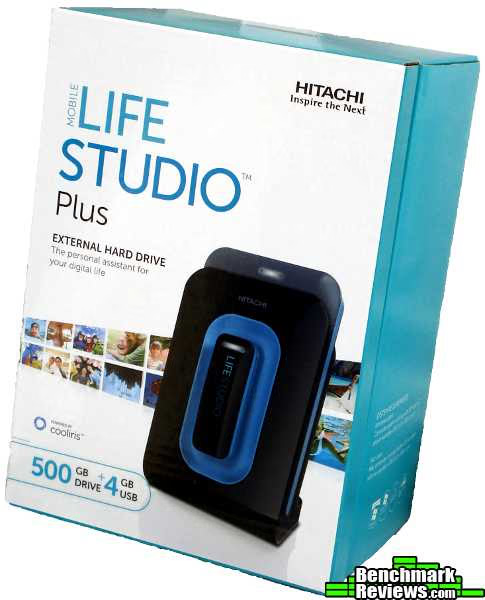
The LifeStudio Mobile Plus definitely brings a fresh look. It reminds me more of a PDA or pocket PC. It comes with a dock which sits the drive upright on the desk. The top of the drive sits up a little higher so the status light is visible. My Pocket PC docks the same way, and I never leave it there except to charge. The Mobile Plus makes me feel like I should be taking it with me when I leave my computer.

Another thing that really makes the Mobile Plus stand out visually is the USB drive. The USB key sits on the front of the dock and is accented by a blue panel. It has a status light of it's own since it operates independently of the hard drive. To keep the USB drive secured to the front the dock has a magnet which attracts and holds portable thumb drive in the proper orientation. A set of metal pads on the back of the drive complete the electrical connection to transfer the data.
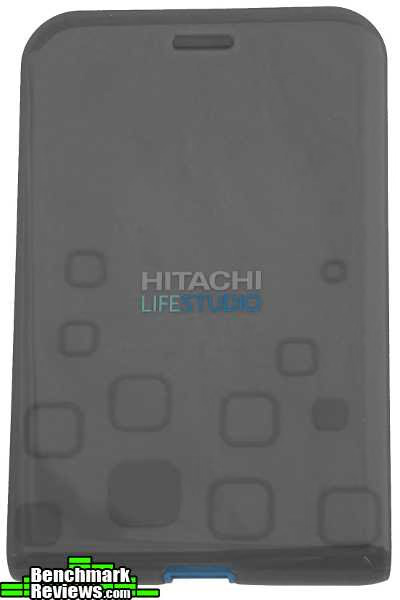
The actual hard drive holds true to the previously mentioned stereotype. It's thin, flat, gray and about the same size as a small paperback. The topside has a sleek, glossy finish with a logo printed on the front. The tapered edges add some visual interest but don't make it significantly different than every other drive on the planet.

The side has a slightly more unique profile since it shows more variation in the drive's design. The top and back sides are both flat and glossy. The bottom end of the drive is curved while the top end has a flat profile. All are accented by the same blue plastic found on the front of the dock.
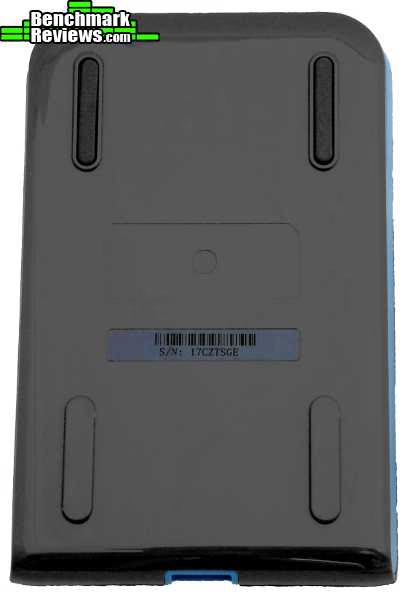
The backside is the most plain with the same glossy appearance as the front without the extra styling. The back side of the drive also contains four feet which help keep the drive in place when it is not sitting in the dock. Model HLSMPUA5001ABB is designed so that the dock can stay with a stationary computer or workstation while the actual hard drive and USB key can be ported elsewhere. Other LifeStudio models do not have the portable hard drive but are geared for higher capacities.

The bottom end contains the USB port used to connect the drive to the dock or an included USB cable. In order to keep this port properly aligned while seating the hard drive, the dock has grooves that channel the feet on the back side of the drive. When the feet are aligned in the channel there is virtually no way to misalign the drive from the dock. This is a great feature since many docks can easily be damaged with careless insertion or an accidental bump.
Overall the LifeStudio Mobile Plus has a stunning visual appearance that maintains aspects of typical hard drives while taking a fresh approach and fresh appearance.
HLSMPUA5001ABB Detailed Features
Since the LifeStudio Mobile Plus is meant to be used as a portable unit, the hard drive dock provides a quick and easy way to mount and hold the drive as well as synchronize the contents between the drive, the USB key and the host computer. The dual portability allows more flexibility while on the go.
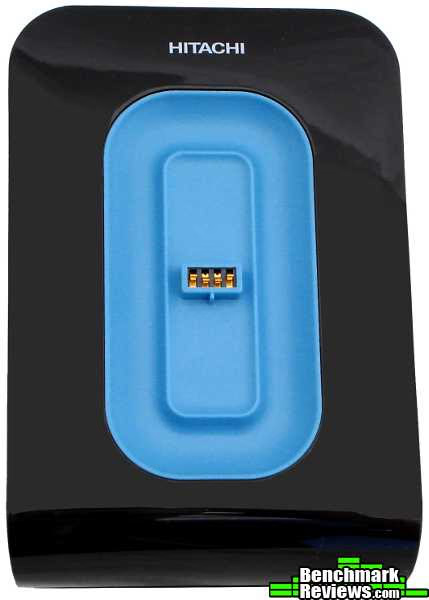
Sometimes it is only necessary to carry a small capacity of files between computers. Many college students rely USB keys to house their important work while they travel between home, the computer lab and class. Mobile workers may also face similar needs where a smart phone simply won't provide the storage space or interface that is required. In these situations a large USB key is a perfect choice for portability and compatibility. The Mobile Plus comes with a 4 GB USB drive that quickly mounts to the front of the drive.

In other circumstances it may be desirable to transport a great deal more files than will fit on a USB key. One potential application occurs when computer technicians make on-site visits to repair a crashed computer. There are a host of recovery and repair DVD's to help provide the necessary tools, but sometimes all that is needed is a large hard drive to create and restore an image or to temporarily receive and transmit user files. Regardless of the reason for needing lots of space, the Mobile Plus makes this option as easy as grabbing the USB key because the hard drive easily docks and undocks.

Both the USB and hard drives are powered and communicate by means of the USB port on the back of the dock. The dock comes with a special USB cable that has one jack for the dock and two jacks for the computer. The second jack allows power to be drawn from a second USB port. The dock also includes a DC power jack but the power adapter must be purchased separately.

Considering the capacity and features of the LifeStudio hardware the system has quite a small footprint. The base measures less than four inches in either direction. A rubber pad across the bottom keeps the dock from sliding.

The USB key has quite standard construction and dimensions. It is slightly thicker than many drives that are being made and probably won't fit well between two adjacent ports. The top of the USB drive has the same glossy finish as the front of the dock, and the bottom is accented in the same blue plastic.

The cap slides off as normal but remains attached to the drive by three strips of flexible plastic.The underside of the USB drive has a recessed, rectangular cutout where four metal pads are exposed. These pads allow the USB key to operate while connected to the front of the dock.
All of these features could be removed and the LifeStudio theme would still remain strong. It is the options provided by the different models that make each device more useful in different contexts. This model (HLSMPUA5001ABB) is geared towards users who are mobile and like to have flexibility in their portable storage. Other models available are the "Mobile", "Desk" and "Desk Plus". The mobile has a simple dock and no USB key. The Desk version has a stationary drive with a larger capacity. The Desk Plus has the stationary drive and large capacity but also includes a dockable USB key. All models come with the innovative software.
Hitachi LifeStudio Software
When first connecting the Mobile Plus hard drives about 6 USB device drivers were installed to the operating system. A quick check of hard drives showed that three drives had been installed; one CD drive, one hard drive, and one USB drive. The CD drive is embedded in the hard drive and contains the innovative LifeStudio software.

During installation two services and two applications were created. The first service was HitachiBackupServices.exe which consumes about 27 Kb at idle. This is the service responsible for performing scheduled backups to the main hard drive. The second service was LifeStudioTray.exe which consumes about 38 Kb at idle. This service is apparently responsible for monitoring the drives and synchronizing the content. Both appear to be necessary to take full advantage of the LifeStudio features.

As can probably be guessed, the first application created is Hitachi Backup.exe. Under idle conditions the program consumes 123 Kb of memory. The screenshot above shows the very basic interface for this program. By default the user profile is saved to the LifeStudio hard drive, but other folders can be manually added. Backups can be performed automatically by the software or on a daily schedule. The number of previous versions can also be specified.
Unfortunately there are no additional settings that can be configured. This limited interface leaves many questions unanswered. Doe the backup verify the files once they are copied? Are hidden and system files saved? If I backup a very large space are the backups full copies, differential or incremental? It would be nice to have included some little options like file types, backup type, compression, etc. Perhaps Hitachi wanted to keep things simple for a wide target market. One way to please advanced users is to have a slightly obscured "Advanced" page where these extra settings can be configured. Neglecting these additions results in a "nerfed" backup program. It will be adequate to save the family photos, but probably not appropriate for a system backup.
In addition to the local automatic storage the Hitachi software allows backups to be performed to an online "storage cloud". From Hitachi Backup you can sign up for a free trial or purchase additional online storage. When files are saved to the hard drive as well as online they have double the protection in case of unexpected calamity. A flood in the basement will nuke an external drive just as easily as it will your computer.

The last program installed with the LifeStudio package is the actual LifeStudio software. LifeStudio.exe is a medium-weight application powered by Coolpix. At idle the application consumed 230 Kb of memory. This program is the core of the entire LifeStudio product line. The software is centered around what Hitachi calls, "The 3D Wall". It is a virtual wall of images that represent individual files found on the LifeStudio hard drives, local hard drives or even on the internet. The number of rows on the wall is one of the few configuration options available inside the program.
The wall can be scrolled left or right either by a slider at the bottom of the window or simply by clicking and dragging the mouse. As the wall moves the perspective shifts to an angled view allowing more images to be seen as they fly by at a faster rate. Once the movement stops the wall returns to a normal, flat view. Files can be activated by clicking on an image. Once activate the image centers and magnifies. Clicking on this enlarged window puts the software into full screen mode.
In addition to manual browsing, LifeStudio has a slideshow mode which will show each image on the wall in sequential order.This works well for images, but it does not perform as expected for music or videos. Instead of playing each song or video in playlist fashion it shows the static image for each file in sequential order. When an external program is required to provide playlist functionality for music it defeats the purpose of using a content manager to access the files from one location. This is not a huge deal for videos, but it is a critical shortfall for music. On their website Hitachi says they make periodic updates to the LifeStudio software. Hopefully this feature will be added soon.
LifeStudio Software Features
When considering feature improvements there is another area that needs attention. When a file is activated it is displayed within the LifeStudio software in a flash application. This flash-based player provides extremely limited options for navigation or settings. Despite extensive searching I could not even find a progress bar. Most of the functions available in the player are already present as keyboard shortcuts. One huge oversight is the exit button...there isn't one. No back button either. You can go to the previous file on the wall, but there is no way to go back to the last file you played; no history either. Basically, there is no advanced functionality.
Despite the simplicity of the player it does a decent job of handling the most basic file formats. For images it would display JPG, GIF, PNG, BMP and TIFF. More exotic formats like TGA, SVG and PSD did not work. LifeStudio was able to play wmv, mp4, swf, flv, mov and a few basic avi videos. It did not support other video formats or draw from currently installed codecs. For music it could play mp3, wav and wma. Again, despite having other codecs installed it couldn't play other advanced music formats. Not every file type was tested, but the list of supported formats is probably not much longer than what I found. I was somewhat surprised to see the LifeStudio automatically grabbed and added basic documents to the wall. It displayed MS Office formats like doc, xls and ppt as well as pdf and txt. By default the files are displayed by date, e.g. in chronological order.
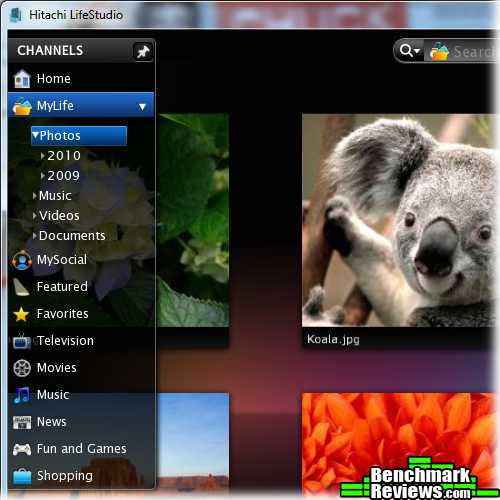
One of my favorite features about the LifeStudio software is the online content. LifeStudio searches the internet for images, videos and music and creates the 3D wall based on the selected channel. If the results are not specific enough a search bar at the top allows you to search for desired content. I found it very easy to stay engaged with the software watching some missed TV shows, checking out some new artists, and even finding some fun flash games. I was using the software on my normal computer but realized that it would go extremely well in a HTPC setup. Finally, for the socialites LifeStudio can directly upload content to FaceBook, Picasa and Flickr.In this sense you can make your files quickly available to anywhere with a web browser. The "MyLife" channel allows you to add custom folders, and your favorite content can be tagged into the ":Favorites" channel for quick access.
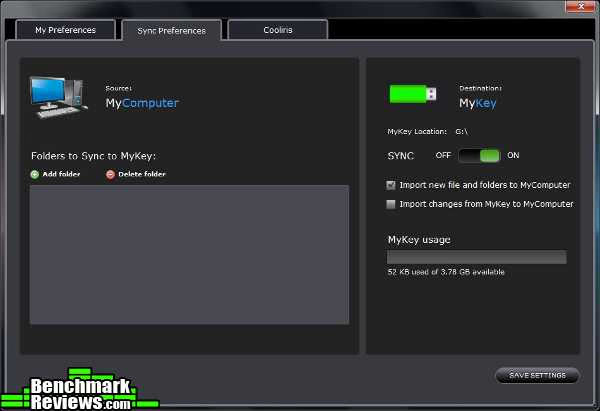
The last bit of the LifeStudio software worth mentioning is the USB sync. A preferences page allows a few simple options to enable automatic synchronization and select which folders should be synced. This is super handy for things like homework or major projects because files are changing frequently and having a backup can save weeks of extra work. For the technically inclined the USB drive is based on SD technology so the capacity can be upgraded with a mod.
Portable Hard Drive Final Thoughts
When new technologies are introduced they often suffer from problems due to a lack of experience and knowledge. Just think about the scary problems encountered when nuclear energy was first introduced. The issues were so severe that the impression still lingers across the world. Yet nuclear energy has matured to the point that one will be hard-pressed to find another energy source as clean, as powerful, as efficient, or as safe as nuclear energy. But those initial impressions make it difficult for many to re-evaluate the current state of the technology and update their attitudes.
Hitachi's LifeStudio platform faces a similar challenge since the technology they introduced is still relatively new. People haven't had much experience with a hard drive that comes with software to manage files, so Hitachi had to make some assumptions or judgment calls about what would make the product great. With regards to the interface they hit the answer squarely. The 3D wall is stunning, effective and provides a new way to interface files. The hard drive options and physical build are also a great success.
But other aspects still need some modification.The online content is constantly interrupted by advertisements which seem to be based on the number of clicks. This is not a great answer when users are browsing through files. It takes awhile to find the exact song or file you want which could mean watching 5 minutes of advertisements before getting to the correct online video. Advertisements really should be based on the time of content actually watched or users will get frustrated. Another miss was the lack of configuration options. Only the bare essentials of the user interface could be changed. I liked the interface but it could be made more intuitive by using document previews, playlist functionality, history, and better navigation options. Let me configure my keyboard shortcuts please. Lastly, it is a portable hard drive with custom software. Could the software be made portable so it doesn't have to be installed on every computer?!
Just to reiterate, it may not be fair to expect new software to be as configurable or easy to use as mainstream applications that have been around for decades. So I'll write it off as inexperience. But this idea is so good that if Hitachi doesn't stay on the ball then someone else will fill the opportunity.
LifeStudio Mobile Plus Conclusion
Since the drive is built with USB 2.0 technology it won't be winning any speed contests. But even large movie files transfer in under a minute. The installed applications consume a small amount of resources and can be run as one of many other open applications. The resources consumed make it hardly noticeable when a backup takes place. The drive comes formatted as a FAT 32 so it will work with any operating system, and the software is permanently stored in the drive's firmware. The net effect is a seamless user experience which is often just as important as file transfer speeds.
Most external hard drives tend to conform to a rank and file appearance. They're flat, square and usually about the size of a small book. Sometimes they may come with a flashy color or a stand, but they really all look the same. The LifeStudio line takes some small steps to break out of the mold. The drives come with docks or are styled like docks which makes them look more like active devices that should be used. The colors are modern, glossy and very attractive.
These hard drives are built to perform their intended task. The best example is the LifeStudio mobile Plus (model HLSMPUA5001ABB). This model is meant for maximum portability so it comes with a portable USB key. But even the main hard drive can be undocked and carried along for large file transfers or travel. All the parts are made from a solid plastic and are molded to fit together precisely. The dock has a magnet which keeps the USB key secured in place with the proper orientation, and the dock has slots which force the hard drive to be seated properly without fear of damaging the USB interface.
With regards to hardware features everything worked flawlessly. I couldn't ask for a better external hard drive (except for a little more space). The dock makes quick work of connecting and removing both the USB key and the hard drive. At an introductory level the software was extremely easy to use and worked without any problems. Setting up folders, backups and the USB sync couldn't be made any easier. This will probably satisfy a large portion of users. When it comes to advanced settings or configuration the LifeStudio software leave lots to be desired. If you can think of an advanced option then it is not available. This applied to backups, browsing and viewing content. Sadly, even the basic user interface was not entirely intuitive. Despite these drawbacks the 3D wall was very impressive and actually brought a new interest and feel to navigating files. The online content was exceptional and would make a great addition to an HTPC.
Hitachi's LifeStudio series aren't going to win any price wars either. The 500 GB "Graphite" version of the LifeStudio Mobile Plus can be found at NewEgg.com for $110. With some additional hunting, we found this model available for $104 elsewhere online. The other models can be found for less. This price puts the LifeStudio family a good step above other drives of the same capacity. A whole range of cheaper products can be found with similar hardware features. Other drives in the same or lesser price points have other features like security or backup software. The LifeStudio series is the only set I could find with dockable USB drive, backup software and content management software. The price is at the border where it becomes feasible for users to buy their own content software and put it on a cheaper drive. They may be able to get more control over the software by trading the simplicity of the integrated system. Another potential threat at this price are specialized media boxes designed to hold and play media from the network on the TV.
Hitachi has found a good balance with their LifeStudio hardware and software which provides a satisfying and engaging user experience. Hopefully they can seal the deal by rolling out an update with advanced options and a richer content player.
Pros:
+ Dockable USB key
+ Portable Hard Drive
+ Very easy to use
+ 3D Wall
+ Easy to access online content
+ Automatic backups
+ Automatic USB sync
+ Cloud storage option
+ Basic file support
Cons:
- No advanced options
- Content player lacks features
- Software must be installed
Ratings:
-
Performance: 8.75
-
Appearance: 9.0
-
Construction: 9.0
-
Functionality: 9.5
-
Value: 8.5
Final Score: 8.95 out of 10.
Quality Recognition: Benchmark Reviews Silver Tachometer Award.
Questions? Comments? Benchmark Reviews really wants your feedback. We invite you to leave your remarks in our Discussion Forum.
Reader comments from the original article
5 comments were posted before commenting closed. They are preserved as written. Original avatars no longer resolve and are shown as a placeholder.
RE: Hitachi LifeStudio Mobile Plus 500GB External Drive RealNeil Permalink:
This is a nice little drive. I like the included software and I see that it's also compatible with a Mac PC for us double dippers. Good review as well.
Linux The Techno Alien Permalink:
I use a Terabyte. Does it work on Linux?
RE: Linux Daniel Ferguson Permalink:
Yup. People who once that they would never fill a 20 GB drive may soon find themselves hogging a whole terabyte. I'll bet the drive can be accessed from linux, but the software probably won't install. I don't have a distro running so nothing test with. Hitachi's documentation only mentions Windows and Mac. I also found one article that had to be edited to remove a reference that suggested linux support.
Hitachi lifestudio angel guzman Permalink:
I buy this equipment at Officcemax I can need any CD rom for to use this equipment
Crap Software Brent Permalink:
There is no way to use this drive in Windows without install their garbage software I use XP64 and the drive constantly interferes with the boot up process and has to be unplugged in order to boot up,any descent company would write this crap to the hard drive so we could erase it if we wanted AKA all the WD externals but no guess Hitachi had to screw us up one more time before they were bought out by a real HD company,stay away from this drive there are far better for far less money!