
SilverStone SST-PS07B mATX Computer Case
SilverStone SST-PS07B mATX Mini-Tower Case
Manufacturer: SilverStone Technology Co., Ltd.
Product Name: SST-PS07B
Price As Tested: $78.99 (NewEgg)
Full Disclosure: The product sample used in this article has been provided by SilverStone.
It's a fact that has proven itself over and again: technology shrinks. Even for performance oriented enthusiasts, it isn't always better to “go big or go home.” In fact, the more technology shrinks, the more useful it becomes. Consider that the first commercially available computer's CPU and memory was 14' x 8' x 8' (4.3m x 2.4m x 2.6m), clocked in at a mind-numbing 2.5MHz, and weighed 29, 000 LBS (UNIVAC I )! Sixty years later and your smart phone occupies just 3/8” x 3” x 2” of space, weighs just over 4 ozs, and runs at 1500 MHz. Today, and in the spirit of shrinking technology, Benchmark Reviews investigates the SilverStone SST-PS07B Micro ATX mini-tower chassis.
As computer enthusiasts, we understand that bigger cases give us more space and more space is a good when swapping components, fitting cooling towers and radiators, and having enough space for drives and fans. We also know that full towers and even mid-towers come with a hefty space requirement. If we have space for a full tower, that's just fine, but as enthusiasts, we also look for efficiency. If we can get what we need in a Micro ATX case, like the Silverstone PS07, then there really isn't any reason to go big simply to go big. The question is, have micro-cases come far enough for us to seriously consider them?
Features
Easily removable front filter
Dual front 120mm silent fans
Removable motherboard tray and top panel
Quick access filters to prevent dust buildup
Convenient wire and cable routing pathways
Adjustable holder for large CPU coolers and extra-long card support rack
Motherboard back plate opening for quick CPU cooler assembly
Independent airflow channel for power supply
Accommodate up to six 3.5 inch hard drives
Removable drive cage
USB 3.0
Specifications
Material: High-strength plastic front panel & aluminum accent, steel body
Motherboard: Micro-ATX, DTX, Mini-ITX
Multimedia:
Drive Bay: External 5.25" x 2 / 3.5" x 1 (transfer bracket for hard drive installation)
Internal: 3.5" x 5 , 2.5" x1
Cooling System:
Front 2 x 120mm fan,950rpm, 18dBA / Rear: 1 x 120mm fan slot
Expansion Slots: 4
Front I/O Port: USB3.0 x 2 (backward compatible with USB2.0); Audio x 1; MIC x 1
Power Supply: Standard PS2(ATX) Optional, max length180mm*
Expansion Card: Compatible up to 13.5 inches in length
Limitation of CPU cooler: 165mm
Limitation of PSU: Unlimited
Net Weight: 5.2 kg
Dimension: 210mm(W)x374mm(H)x400mm(D)
Detailed Exterior Features
You may have noticed that we skipped right to the "Detailed Exterior" section and jumped over the "Closer Look" section. Once in a while cases don't warrant a section, usually this section (the "Detailed Exterior Section") but today the SilverStone PS07 doesn't warrant the "Closer Exterior Look" section, except for a few items we can quickly cover here.
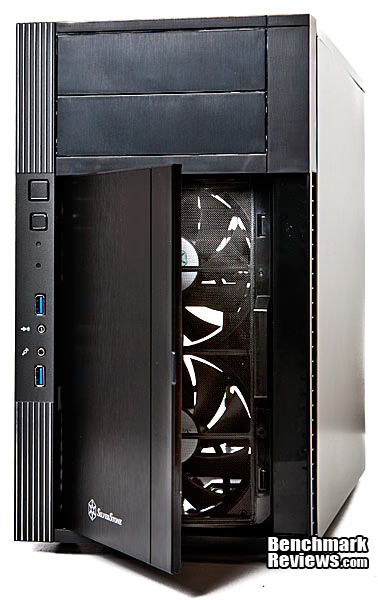
The front: Basic soup here with the basic I/O offering and two USB 3.0 ports. The USB cables have true motherboard plugs, and SilverStone includes a USB 2.0 converter. What is not basic is that on the side there is a release for each of the two front bay covers. Push the release inward and the front bay pops open, allowing you to remove it from the front. This is a nice addition if you have a recessed card reader and want to keep the bay cover on, or some other similar function where you need to remove and install the bay covers often, but other than that, it's arguably an over sophisticated but elegant bay release mechanism.

A few people have mentioned they wish case manufacturers would give them easy to clean filters, and many of us concur. There's nothing more frustrating than finding a case that fits your needs, only to find its filters are nearly impossible to clean without, in some degree, disassembling your case. Well, SilverStone must be listening because they absolutely got it right. Swing the door open, pop off the filter, and your done. All cases should have this option.
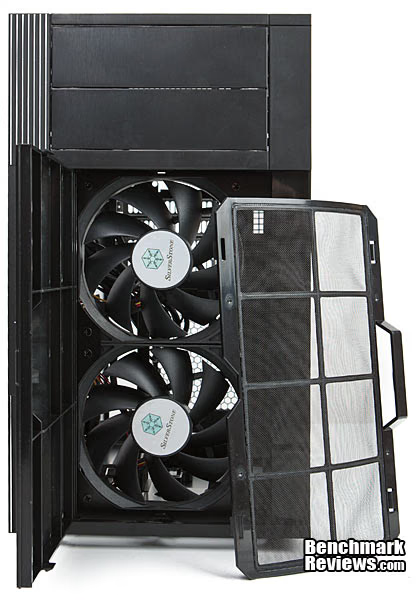
Except for a plain black top, we have a PSU intake filter--with another easy to clean filter. This filter mounts magnetically. Each corner has two magnets that keep the filter in place, and the filter frame is recessed.

A very screwy bottom and screws are something I will talk about later because this case has screws, and many of them. The bottom feet are made of soft rubber, no plastic, and are mounted with adhesive instead of pull through tabs. I tried pulling one off and you'd have to give it a fairly hard, sustained pull to remove it. On the left, you can see the bottom, front air intake. Image: (1) four screws to remove the hard drive cage; (2) adjustment screws for the cooling tower support; (3) set screw for the support that is yet different from the drive cage screws and the adjustment screws. Here we have a total of three different types of screws, with a total screw count of seven.

On the back we have four expansion slots and a back fan mount that will be almost impossible to use should you go with a fat tower cooler and more than one 3.5” and one 2.5” drive. There aren't any water holes back here, either, but there is a solution for those wishing to water cool.
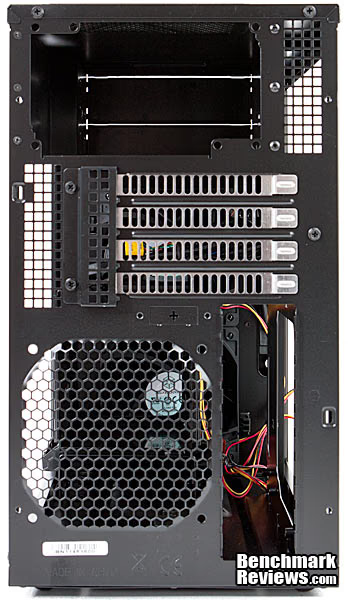
Here's the solution to the lack of water holes. The PS07 manual says this is for an optional cover for a CMOS reset button. However, if you don't need or want that, you can take the cover off and run hoses out of the back.

Last for the exterior section, we have a comparison between the Raidmax Seiran Midtower Chassis and the SilverStone PS07 Micro Chassis. You won't save tons of space, but in person, the size difference between the two cases is quite noticeable. You can also see one of the PS07's side air intakes.

Closer Look: Interior
Let's start off with a quick overview and clear image of what the PS07 has to offer: (1) bottom air intake; (2) side air intake; (3) four screws to remove the hard drive cage; (4) these are your internal 2.5” mounts; (5) PSU rack; (6) adjustable cooling tower brace.
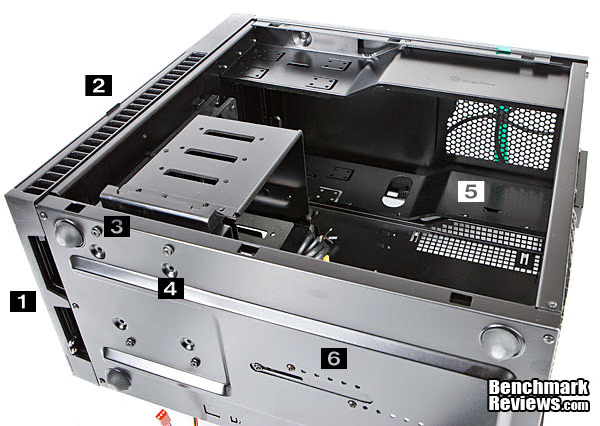
Breaking down the last image, we'll start with the removable hard drive cage. Four screws on the bottom of the case and the drive cage comes out. You can split the drive cage again by removing two more screws in the drive cage's side and then twisting them a part. The other side slides together without screws.

Here we have the drive cage split and you can see how it slides together. It's a nice, tight fit too. I really can't tell you why SilverStone created a split cage, since they recommend leaving it in for better airflow--even without drives mounted--except that when you change the front fans, you don't need to remove the bottom cage. Being right on the front fans, the cage functions as a fan shroud driving cool air directly into the tower cooler. Image: (1) & (2), high density foam for vibration damping.

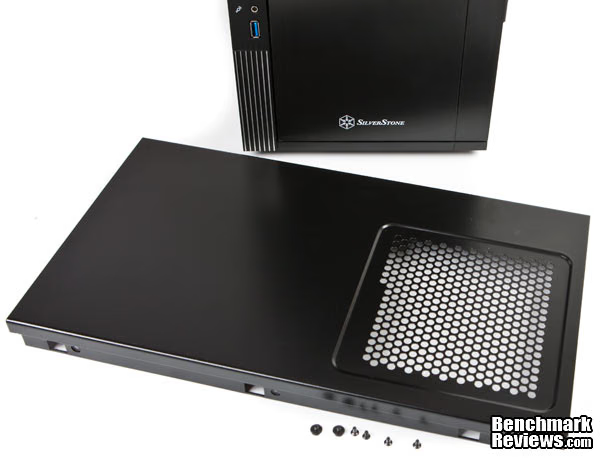
In order to get the PSU installed, you'll need to remove the top, which means removing six additional screws, two of which are different from the other four (see bottom of image).
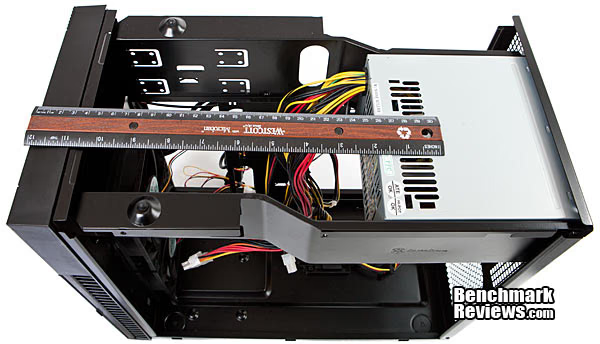
Once you have the top off, you can insert the PSU, and since were on the topic of PSUs, let's take care of the PSU measurement. (The manual is very detailed, giving you exact measurements for the fitting of all components, too.) This is what a 140mm PSU looks like mounted. From the manual: “Power supply and optical drive space in the PS07 share the same plane so the total limit is 399mm (15.7”). We recommend [sic] maximum size for power supply of up to 180mm (7.0”).”
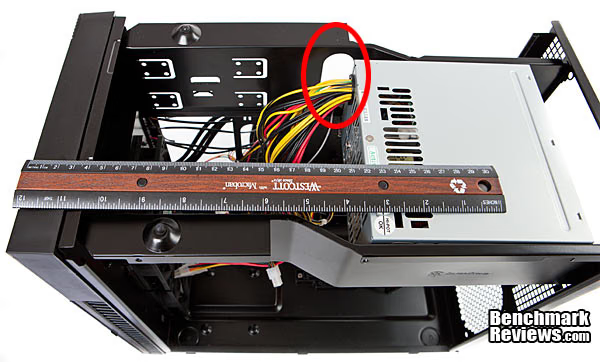
This is how much space you'll have if you decide to fit a whoop-ass 1000wt or 1200wt PSU at 180mm. You can see that at 180mm the PSU begins to encroach on the PSU cable routing hole. Still, you'll have 8.5” of optical drive space.
In order to get the motherboard out, you'll need to remove three screws, shown below.

Now let's take a little closer look inside and take some measurements.
Detailed Interior Features
Here's the chassis stripped of it's drive cage and motherboard. The cooling tower support is maxed out height-wise, and there is also a front to back adjustment.

You're eyes aren't playing tricks on you. That's 13.5” of video card space. Find the #1 on the top of the drive cage. That’s a 3mm video card support for cards with a backplates, and an included rubber stick on spacer can be used for cards without backplates. All measurements as to limitations are detailed in the owners manual also, including ram space height limitations, cooling tower limitations and placement, back fan limitations, PSU cable lengths, and alternative mounting scenarios. It's a very detailed guide.
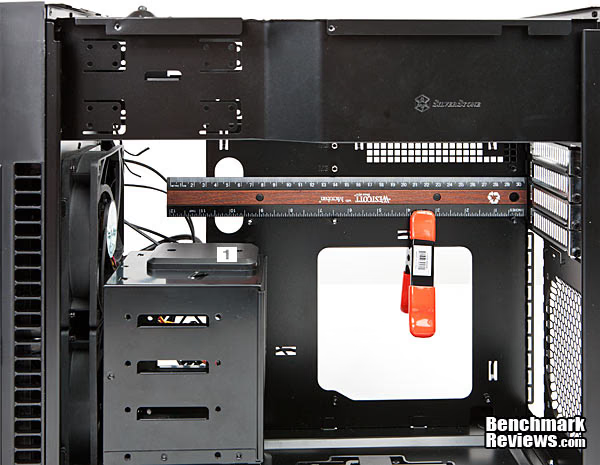
Here's the cooling tower measurement, but it's not really needed. That too is given in the meticulous manual: “The height limit is 165mm [6.5”] of clearance from the motherboard's edge” (PS07 manual). It goes on to explain that if you intend on filling the drive cage and depending on how fat your cooler is, you won't be able to mount the CPU tower cooler fan on the drive side. You'll need to mount it on the back. This means you can't use a rear exhaust fan, or it looks like that in the manual: “There is 186mm of clearance from the end of the installed hard drive space to the motherboard [They mean to the back of the MB, as I see it in the manual's picture] minus 11mm for 90 degree cable management. . . .” It also looks like that if you use a thin tower, you can get the fan mounted on the drive side. In any event, you can turn the tower fan to the back exhaust port and suck air through the cooler.

The maximum height for ram modules is also stated in the manual at 54mm to the hard drive. But if you don't have the cage full, you can move the drives around to accommodate taller ram, which most likely means ram with a cooler on it. If not, you can simply take the ram cooler off.
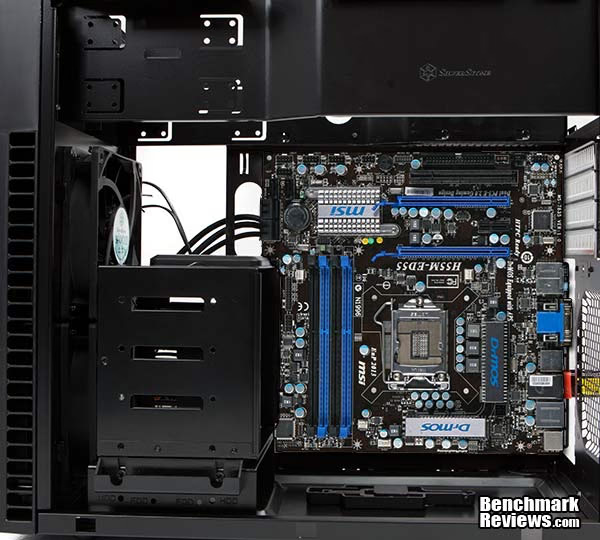
I thought this was good engineering on SilverStones's part: You can see looking from the back of the case to the front fans that the fans are offset so as to allow around 40% of the fan's blades to clear the drive cage which allows better airflow into the video card area.

Cable space is about as good as it gets at 15/16” (23.8mm).

The side panels are at 0.0275” This is 0.0055 thicker than some mid-towers we've been testing, and since the panels are very small, they are very stiff also. Where the PS07 is a little thin is in the PSU mount. Once the top is installed, however, there isn't any worry.

We could keep going because the manual is very detailed and gives you pretty much every possible configuration and alternative, plus every needed measurement and cable length requirement. It's one of the most detail oriented case manuals I've seen. It may save you a good amount of time if you read it first. Let's finish up with some words and a conclusion, and we'll see you next time here at Benchmark Reviews.
mATX Chassis Final Thoughts
First off, this isn't a case with which you'd want to constantly swap components. This is more of a "build it then leave it" style of case because you'll need to take the case completely a part screw by screw and install your components screw by screw, and this goes for the hard drives and optical drives too, as there are no tool-less mounts here. The front fans are fairly easy to remove though. Simply remove the drive cage and pull the fans out of the back (screws are in front for easy access).
For such a small internal area, SilverStone engineers obviously thought much about the PS07's design, and also about OCing in it. With nearly a inch of space for cable routing, and the ability to mount 180mm PSUs and 13.9" video cards along with a full tower cooler, they really did their job. The easy to clean front and power supply filters are also well designed, and even elegant.
Other than having a lot of screws, comparatively speaking, the PS07 takes into account almost every single detail which you might come up against. One problem is that if you use the top drive cage with drives in it, you'll need to mount the cooling tower fan on the back near the exhaust port (if you have a fairly fat tower). That's probably not a problem since you'll be sucking air through the tower and blowing it out of the back exhaust port. The manual says that SilverStone tested a nonOC'ed Core i7 with the PS07 using a tower cooler--without the fan--and it didn't overheat (PS07 manual 47). So, you have that option too.
If you aren't going to OC, and you're not planning on swapping components much, then the PS07 is unquestionably a very nice choice with everything you'll need plus the advantage of a small footprint. It's a solid and well thought out case. Of course you only get two 5.25" drive bays, but for most people, that's enough. (I could even do with that since I rarely use my internal card reader. Having only two bays would leave me with one optical drive instead of two, which I don't need, and my hot swap 3.5" bay, which I do need.)
The question whether or not we can seriously consider the PS07 while OCing, however, remains. The PS07 is touted as having excellent positive airflow and supports large tower coolers, with an option to water cool, and an option to run your PSU downward to help suck air out of the case, and so I'd say yes, we can OC in this box. I'm quite sure my air cooled i7 920 at 3.8Ghz would run just fine in this case. Of course, cooling performance varies depending on variables, so take that into consideration.
SilverStone PS07 Conclusion
With a small footprint and lots of internal space, there isn't much wrong with the SilverStone PS07. It's a well thought out case, with the arguable exception of so many screws needed for assembly.
Appearance is always subjective, but this case is marketed squarely for more mature tastes, with no fancy LEDs or other outside flair, while retaining a sleek and solid look. For that reason, the PS07 retains an all business appearance without being overly boring.
Construction of the PS07 is above average with the only aspect a little thin being the top PSU mount, which becomes substantially sturdy after the removable top is screwed down. There were somewhat sharp edges on the top outside edge of the frame, where the side panels mount on both sides, but they are outside of the working area. Aside from that, everything is smooth with attention to quality. The paint is very thick and the plastic has a matte-like aluminum finish to it.
Functionally speaking, the PS07 is a design with obviously much attention to detail. The manual is full of measurements in every aspect, such as cooling tower height, PSU and optical drive limitations (which are almost limitless), ram height to hard drive specs, and cable length recommendations. Along with that, the manual includes alternatives for placement of hardware. It's one of the best manuals I've seen.
It's hard to believe but you get 13.9" of video card space, 180mm of PSU space, 6.5" of tower height space, and nearly an inch (15/16th") of cable space, plus enough internal bays for five 3.5" drives and one 2.5" drive (or mix and match). On top of that, you get excellent and easy to remove front and top filters. This is excellent functionality. The only downside is that the PS07 is not a tool-less design, and incorporates many screws.
Value is good for a case with this much attention to detail. Costing less than $79 at NewEgg, price may be a little high for a micro case, but with all of the functionality, I can't really hit it either. Incredible functionality in such a small package is the main reason the SilverStone PS07 mini-tower computer case receives the prestigious Benchmark Reviews Silver Tachometer Award.
Pros:
+ Up to 13.5" video card
+ Cooling Tower space
+ Large PSU
+ Easy clean filters
+ Well layed out interior
+ Large drive capacity
+ Excellent manual
+ Solid construction
+ Nearly 1" cable routing space
+ Offset front fans = better cooling
+ USB 3.0 to 2.0 converter included
+ Internal USB 3.0 connector
+ Solid rubber feet
+ Novel front bay quick release buttons
Cons:
- Lots of screws
- No tool-less mounts
- Rubber feet glued on
- PSU rack a little thin
Ratings:
- Presentation: 8.75
- Appearance: 8.75
- Construction: 8.75
- Functionality: 9.20
- Value: 8.60
Final Score: 8.81 out of 10.
Quality Recognition: Benchmark Reviews Silver Tachometer Award.
Benchmark Reviews invites you to leave constructive feedback below, or ask questions in our Discussion Forum.
Reader comments from the original article
15 comments were posted before commenting closed. They are preserved as written. Original avatars no longer resolve and are shown as a placeholder.
well thats different Red1776 Permalink:
Nice review of an odd case joo-joo. It looks like they took a Level 10 and cut it off just below the interesting part :)
Timely Review DAM Permalink:
This review couldn't have come at a better time for me. I was selecting parts to replace my aging socket 939 system, and was looking to downsize from my 7 year old Chenbro server case. The Silverstone case will provide increased storage options over the Chenbro (albeit without the quick-swap drive cage) in a much more liveable size. Thanks!
RE: SilverStone SST-PS07B mATX Computer Case Doug Dallam Permalink:
Glad you liked it. I could see myself building a system in this case. As mentioned, I didn't like all of the screws, but after all, how many times do I need to swap out 5.1/4s and PSUs anyway? DAM--The drive cage is kinda quick. Only two screws gets you the top 2/3s. If Silverstone could figure out how to assemble this case without all of the screws, it would be gold for sure. I'd like to see the same design but with a 230mm fan in front.
RE: SilverStone SST-PS07B mATX Computer Case Jambe Permalink:
On page two a block of text was accidentally duplicated: "On the back we have four expansion slots and a back fan mount that will be almost impossible to use should you go with a fat tower cooler and more than one 3.5? and one 2.5? drive. There aren't any water holes back here, either, but there is a solution for those wishing to water cool. On the back we have four expansion slots and a back fan mount that will be almost impossible to use, should you go with a fat tower cooler and more than one 3.5? and one 2.5? drive. There aren't any water holes back here, either, but there is a solution for those wishing to water cool." A nice, helpful review! The measurement of the room for optical drives and PSUs was especially useful.
RE: RE: SilverStone SST-PS07B mATX Computer Case Olin Coles Permalink:
Fixed. I'm not sure how that happened, but thank you for bringing it to our attention.
Toolless is bad Chris Permalink:
Hey now, not having tool-less devices in a case is NOT a con. IMHO, most of the tool-less stuff out there is garbage. Even my 700D didn't even do it right. It's never really secure. Hell, I ripped out my tool-less # out of my 700D because it did not work.
RE: Toolless is bad Doug Dallam Permalink:
True, the tool-less 5 1/4" mechanisms are usually crap. I always bolt my optical. But hard drives are a different story. Remember too that "tool-less" also means a drive bay that you bolt the drive into with a screw driver, and then slide the carriage into the drive bay. Same for disassembly/reassembly. It can also refer to thumb screws, which are fine.
Screw ain't bad news! realneil Permalink:
I must one of the few that prefer screwing things together. I usually defeat screw-less designs and use screws anyways. This is a nice little case though. I like the design and the airflow is probably very good too. I have been looking for a small case for a planned build and had settled on a BitFenix Survivor ATX Mid-Tower case for $80.00,....but now I'm not sure. I like this one too.
RE: Screw ain't bad news! Doug Dallam Permalink:
It's not necessarily screws, but so many of them, and several different sizes too. The case could definitely be designed to use not only less screws, but also use the same type throughout. If SS does that. I look forward to reviewing the updated model and giving them a Gold award, all things being equal.
lousy service barry Permalink:
Problem is, Siverstone service sicks!! I have a Grandia GD06 case since Octber 2011, as part of an HTPC build. The 2 front hotswap bays don't work properly at all. I've notified Silverstone, actually a Joel who works there who offered to replace the drive cage upon receipt of my invoice. That was done a day later and he insists they sent it out by post. Well, I never received the 2 parcels he said he sent me. I doubt the postal service would want to steal a drive cage, and I've received packages through the postal service from Hong Kong since then with no problems, so I doubt that Silverstone even bothered to send anything at all. Next case, it will be something else. I guess Siversotne doesn't need my money, so screw them!
RE: lousy service Doug Dallam Permalink:
Good for you to chime in. I feel the same way you do about any group, person, or corporation/business that treats me like that. One thing we can't check is a manufacturer's customer service. I wonder if anyone else has had a good experience with SS service?
enthusiast case godrilla Permalink:
I was wondering if this or any other mATX cases can fit a h100 corsair cooler 2x 120mm radiator and fans?
It might.... Bruce Permalink:
It's a stretch, but if the hoses are long enough, you could mount the radiator to the twin front fans on the Lian Li PC-AO4 Aluminum Mini-Tower PC Case. The revies is here: /index.php?option=com_content&task=view&id=731&Itemid=61 You don't see many uATX cases with dual front fans.... I know that several packaged water cooling makers recommend pushing outside air through the radiator 'INTO' the case, for best performance. That's the way most front fans work anyway.
RE: It might.... godrilla Permalink:
thanks i just found a better one too, the arc mini dual 140 or 120 mm mounts on top #newegg.com/Product/Product.aspx?Item=N82E16811352008
Looks nice Bruce Permalink:
It's going to be a bit heavier, as it's steel - Lian Li is all aluminum. Good, modern design, though. Let us know how it works out, if you go that way.