
ASUS MY-CINEMA PHC3-150 TV-Tuner Card
The recent switch from analog to digital television was mainly driven by the benefits of digital technology over its analog predecessor. Though digital television has become ubiquitous the conversion cannot be instantaneous, nor will analog technology simply vanish. During this transitional period of converting analog infrastructures into a digital foundation, hybrid devices like the My Cinema PHC3-150 Combo TV-Tuner Card will be essential. These hybrid devices work with both signal types allowing for a smoother transition. In this article Benchmark Reviews tests the performance of the PHC3-150. Even if you've already made the transition to digital systems you may want to check out some tricks to extract even more utility from the hybrid features of this card.
The major benefits of digital signals are the clarity of reception and the larger bandwidth. Digital broadcast companies can choose how to best use this extra bandwidth. Some use it to provide high definition programming while others choose to break the bandwidth into smaller chunks and offer multiple channels (known as multi-casting). Regardless how the data gets sliced it has to be reconstructed for viewing by subscribers. Many content providers supply proprietary receivers, tuners or DVRs for this purpose. These devices do a great job, but they are always limited in features. One solution is to buy a TV-Tuner card, like the My Cinema PHC3-150 built by ASUS, and supply the software of your choosing.

When choosing a tuner card, everyone will have slightly different needs. Buyers need to consider things like what stations they want to receive, how frequently shows will need to be recorded, and what format the content is being provided (e.g. satellite, cable or over-the-air). As shall be shown, for first-time buyers and HTPC enthusiasts the spectrum of features from a hybrid card will fit most needs.
About ASUSTek Computer, Inc.
ASUS is one of the most respected manufacturers of computer hardware of the industry, including video cards. Here is what they have to say about their commitment to quality:

"ASUS, a technology-oriented company blessed with one of the world's top R&D teams, is well known for high-quality and innovative technology. As a leading company in the new digital era, ASUS offers a complete product portfolio to compete in the new millennium.
In 2007, one in three desktop PCs sold was powered by an ASUS motherboard; and the company's 2007 revenues reached US$6.9 billion.
ASUS products' top quality stems from product development. It's like learning Chinese Kung-Fu; one must begin with cultivating the "Chi" and inner strength. Besides innovating cutting-edge features, ASUS engineers also pay special attention to EMI (electromagnetic interference), thermal, acoustics and details that usually go unnoticed to achieve complete customer satisfaction. ASUS notebooks are the first TCO'99-certified notebooks worldwide.
The requirements for this honor include radiation emission control, energy (battery consumption), ecology (environment friendly) and ergonomics. To succeed in this ultra-competitive industry, great products need to be complimented by speed-to-market, cost and service. That's why all 8,000 over employees of ASUS strive for the "ASUS Way of Total Quality Management" to offer the best quality without compromising cost and time-to-market while providing maximum value to all customers through world-class services.
With unyielding commitment to innovation and quality, ASUS won 2,568 awards in 2007, meaning on average, the company received over 7 awards every day last year. BusinessWeek has ranked ASUS amongst its InfoTech 100 for the 10th straight year; and the company is ranked as No.1 in quality products and services by the Wall Street Journal. ASUS has also achieved the number one title on the annual league table of Taiwan Top 10 Global Brands with a brand value of 11.96 billion US dollars."
ASUS TV-Tuner Card Features
-
Record and receive TV programs in MPEG2 and H.264
-
TimeShift functions
-
Manually record by schedule
-
One-touch record from EPG
-
Record, edit and burn video into DVD or VCD
-
AV inputs for capturing an external source
-
MCE certified remote control kit for easy channel surfing
-
Snapshot of your favorite images
-
Equipped with V-chip for Parental Control
-
Hardware noise reduction technology built-in to enhance video quality
-
PBP mode (Picture beside Picture)
-
PIP mode (Picture in Picture)
-
Watch analog and digital TV (or digital TV through a standard coaxial cable) and record another, or record two different channels simultaneously.
PHC3-150 Specifications
| Video/Audio Decoder | Philips |
|---|---|
| Channel Decoder | Philips |
| TV Tuner | Philips |
| TV System | Digital TV ATSC QAM Analog TV NTSC |
| Bus Standard | PCI |
| PCB | ATX |
| Bracket | ATX |
| Connectors | Analog TV input IR Sensor input Video-in & Audio-in |
| OS | |
| Accessories | Remote Controller External Antenna Cable IR Sensor Cable Video-in & Audio-in Adaptor Driver / Utilities / User manual CD |
| Software Bundled |
Total Media |
System Requirements:
One available PCI slot
PC: Pentium 4 2.6GHz equivalent or above recommended for SD video. Core 2 Duo 2.0Ghz or above is recommend for HD video
Minimum 512MB system memory (1GB or more recommended)
Graphics card with 64MB or more of video memory is recommended
CD-ROM drive for driver installation
1GB of hard drive space is required
DirectX-compatible audio solution
DirectX 9 or above
Windows Media Player 9 or above
Microsoft Windows XP (Home edition or Professional edition) or above
Microsoft Windows Vista (HomeBasic, HomePremium, Business, Ultimate)
Microsoft Windows 7 (HomeBasic, HomePremium, Business, Ultimate)
-
All specifications are subject to change without notice. Please check with your supplier for exact offers. Products may not be available in all markets.
-
PCB color and bundled software versions are subject to change without notice.)
-
Brand and product names mentioned are trademarks of their respective companies.
Closer Look: ASUS MY-CINEMA PHC3-150
One thing I look for in product packaging is a clear listing of what to expect from your purchase. Too many purchases of poorly labeled packages have resulted in a piece of junk and poor customer service. The labeling is often a subtle indication of a company's integrity.

ASUS passes the packaging test with their flashy and clearly labeled box. Immediately I know that this card will support over-the-air digital (ATSC), unencrypted satellite and cable (QAM) and traditional American analog (NTSC). I also know not to expect results for anything else like PAL, SECAM, or radio. I also know what type of system I should be running to effectively use the PHC3-150. This card requires an open PCI slot, not PCI Express, so make sure to check your computer before buying the card.

Inside the box the hardware components are laid in form fitting plastic. Oddly, the software CD and instructions are sandwiched between two trays of plastic. Normally I expect to see the CD and instructions on the outside and the precious hardware nestled safely between the plastic trays, not exposed to the outside of the box. This didn't cause me any problems so I don't expect this to be a problem for anyone else.

Here is a look at the guts of the card. Two big metal boxes probably perform some type of reception, amplification or signal clarification before the real decoding work is done. Two boxes, presumably one for digital and one for analog. The signal then gets passed to the NXP chip on the top half of the card. A glance at the NXP features reveals potential support for 2 digital and 2 analog ports, HD, NTSC, PAL and SECAM formats, NICAM, A2 and FM radio, several audio formats, and a suite of video and audio enhancement technologies. However, this does not mean all those features are available from the card.
After the signal is decoded it is sent to the ViXS chip on the bottom center. Details on the XCode chip were scant, but as an MPEG encoder it likely supports conversion to various MPEG formats as well as time shifting and similar PVR features. All these decoding and encoding functions are supported by an on-board Winbond SDRAM module on the bottom right. Together these chips should significantly reduce the CPU and memory resources required to operate the card.

The back of the card is clean. This is probably for the best since nothing will snag on a neighboring card during installation. As far as card size goes, this one is big. It was harder to fit inside a normal case than most cards. Don't count on squeezing this one inside a case with a low profile or tight clearance budget.
ASUS MY-CINEMA PHC3-150 Detailed Features
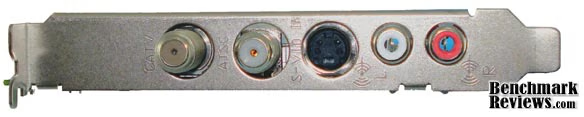
Hooking everything up - analog RF, satellite and cable connect to the top port labeled CATV while a digital antenna should be connected to the second coaxial port labeled ATSC. The black S-VID connection is for S-Video and will also accept composite via the supplied adapter. Finally RCA stereo inputs are provided for an alternate audio source.
While many software suites exist for using a TV tuner card, this review will only cover the software supplied with the card.

Installation was straight forward. Applications can be installed one at a time or all at once using the 'Smart install wizard'. The smart install will install all applications pertinent to the operating system. As my testbed uses Windows XP I did not test the ASUS GadgeTV component. This is a widget that allows the TV to be incorporated into a sidebar. Other users have favorably reported on this utility. For my first installation attempt I tried to install the driver alone. The installation froze and I had to restart the CD. On my second try I used the smart install without any problems.

The ASUS Video Security program was already covered in a Benchmark Reviews article for the ASUS My Cinema EHD3-100. The My Cinema PHC3-150 hybrid card allows two simultaneous video signals and can work simultaneously with the other bundled programs. Additionally, each security screen can be independently opened in a separate window, re-sized, and dragged onto different screens for monitoring. I had a few hiccups while trying to use the program. When starting the program an "unspecified error" occurs and the detection regions cannot be used. This program is a great feature for those who still rely on analog security systems. A security camera signal can be fed via composite, s-video or RF , recorded digitally, and monitored for unusual motion events.

Other ASUS cards have shipped with Cyberlink PowerCinema, but the PHC3-150 came with ArcSoft TotalMedia. As with most PVR applications TotalMedia has a typical "Media Center" style. All menu controls can be accessed using keyboard and mouse as well as the included remote. The menu options are relatively straight forward and the remote bar at the bottom of the screen is easy to read. One great advantage of a dual tuner card is the ability to work with two channels at once. This means two viewing, one view and one record, or two recording. The catch is that one of the channels comes from the analog port. To work around this, digital content from a second box (satellite, cable, converter, etc.) can be routed through the analog port and be viewed or recorded at 480i. When watching live TV, the default page includes a reception meter showing how well a signal is being received. This can be critical for digital broadcasts since, unlike analog, reception is either 100% or 0%. This could be important to make sure you don't miss a critical part of your favorite show because someone walked in front of an antenna during the recording.

TotalMedia includes an application for analog video capture. Output can be captured and saved from any composite, s-video or RF source. This could be a camcorder, VCR, DVD player, or even a computer. My kids have collected a library of their favorite VHS movies. The PHC3-150 makes it easy to copy a cassette into mpeg format and burn straight to a DVD. I had a few hiccups when trying this method. First, while the NXP decoder chip reports automatic VCR tuning capability, when I connected my VCR to the coaxial port, the signal popped in and out periodically. Everything worked fine when switching to the composite port. Second, I wanted to burn a video onto a CD, but TotalMedia will only recognize DVDs. Third, there is no option to convert already recorded videos into another format. Sometimes it is nice to scale a video down and put on PDA or media player to take on a flight or on the bus, but another application will be required for that purpose. Finally, when trying to record some analog streams I got an annoying message indicating the recording was disabled due to copyright constraints. But I was trying to record a homemade movie, so the detection was faulty.

TotalMedia may not include a video converter, but it does include an insitu video editor. Any compatible video can quickly be opened up for timeline editing. The editor allows commercials or other segments to be clipped from the stream, and a thumbnail to be chosen for the video preview. This is a nice feature not included in most of the PVR applications I've used.

The last component of the PHC3-150 kit merely makes the homemade PVR experience more convenient. In most applications, the tuner card gets installed as an intermediary between the user and their existing entertainment setup. The MCE compatible remote and accessories help make the interposition more seamless. The 40 button MCE remote is light, stylish, and puts the most frequently used functions under thumb. Its signals are received by a USB receiver that worked very well. The kit also includes an "IR Sensor Cable". I have to assume this meant the extra cable with two-lead stereo jack. This extra cable did not function for receiving a signal, so I believe it to be an IR emitter. If so, the emitter/blaster plugs into one of the two IR ports on the transceiver and attaches to an external device using sticky film. This would allow PVR software to change channels on the external device for viewing or recording. Sadly, the TotalMedia installation did not provide this capability so it could not be tested.
Testing & Results
Testing Methodology
Two aspects of TV card performance were of interest; resource consumption and recording quality. To monitor resource performance the ASUS My Cinema PHC3-150 TV Combo Card was run simultaneously on the same machine with the ATI TV Wonder HD 650 Dual Tuner. Percent CPU usage was recorded while streaming over-the-air channels at resolutions of 4801, 720p, and 1080i. Next, CPU usage was recorded while recording over-the-air streams at the same resolutions. In both tests the same signal was simultaneously sent to both the PHC3-150 and 650 HD. The recorded videos were then analyzed for recording quality. Two objective measurements were used to assess the quality of the recordings. First, the file size was divided by the total number of video frames to determine the kilobytes per frame. For identical file types, more kilobytes means a better image. Second, the recording bit-rate was divided by the combination of frame rate and resolution to determine the bits per pixel. This helps compare recording quality between different resolutions. For both metrics, higher values mean more information was captured and saved from the original stream.
As a subjective test, the videos were reviewed to see if there were any noticeable recording defects. Also, since the PHC3-150 reports automatic noise filtering, an old VHS video was recorded to see if there was an obvious improvement in quality.
Test System
-
Motherboard: Foxconn G33M02
-
System Memory: 2 x 1GB DDR2-667
-
Processor: Intel Core 2 Duo E7200
-
Audio: Realtek ALC888 7.1 HD
-
Video: ATI Radeon X850XT
-
Disk Drive 1: 173GB Hitachi HDP725025GLA380
-
Optical Drive: HL-DT-ST DVD+-RW
-
Enclosure: Dell Vostro OEM
-
Operating System: Microsoft Windows XP
Results
To start, there were major differences in recording settings between the ATI and ASUS applications. ATI has a wide range of selectable recording qualities including the ability to define a custom video. The maximum recording resolution for ATI was the same as the broadcast resolution. For TotalMedia, four options are available; 'High Quality', 'Standard Play', 'Long Play', and 'Extended Play'. Repeated tests indicate that the exact recording format for each option are automatically chosen by the software based on the broadcast resolution. For example, a high quality recording of both 1080i and 720p sources resulted in a 1920x1080 video, and a 480i broadcast resulted in 720x480 recording. The extended play option resulted in recordings with resolutions matching the broadcast resolution. There did not seem to be a way to capture really low quality video.
Based on those results, the 650 HD was set to capture the maximum resolution via Catalyst Media Center, and the PHC3-150 was set to capture the lowest quality via TotalMedia. This resulted in identical recording formats. For reference, the file details are included at the end of this section.
The CPU usage obviously doesn't stay at one value during the entire test. Reporting only one value thus oversimplifies the actual performance. For example, if the CPU were at 100% for half the test, and at 0% for the second half, the average CPU reported would be 50%. The average of 50% hardly describes what really happened. One way to show CPU performance over a length of time is to use a chart called a box plot. A box plot shows how frequently a range of values occur, or in this case how long the CPU stayed in a specific range.

The box plot is a box with a line in the middle and "whiskers" or lines that extend from the top and bottom of the box. The range of the box covers the range in the middle where the CPU stayed for half the test. The line in the middle of the box represents the middle most value experienced in the test. The ends of the whiskers show the maximum and minimum values encountered during the test. Finally, the length of the top whisker covers the range where the CPU stayed for 25% of the time. Likewise for the bottom whisker.
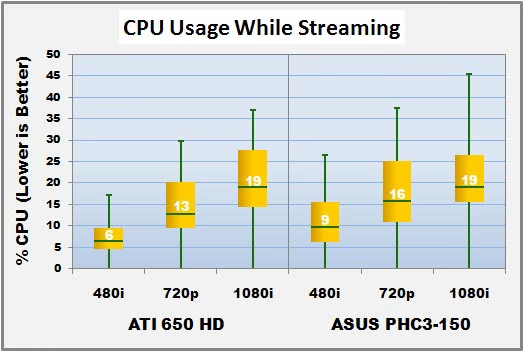
Interpreting the box plot above, the 650HD and PHC3-150 had similar performance. As the resolution increased the system demands also increased. Since no recording was taking place, this may be simply be the resources required by the application to display video. As a reference, Windows Media Player used an average 33% CPU to play back the 1080i video that was recorded. For both cards the averages, minimums and maximums are all comparable. For all resolutions the PHC3-150 took slightly more average CPU and had higher spikes.

The CPU required to record and stream simultaneously was only a few percent higher than the requirements to stream only. This indicates that the on-card mpeg encoder really does the majority of the work. There are some notable differences. The CPU spikes were higher and the 720p recordings were significantly higher. This is likely an indicator of the encoding performance since the progressive scan format of 720p uses twice the frame rate as 480i and 1080i.

For all resolutions, the kilobytes per frame for both cards are within a half kilobyte. This indicates the quality between tuner cards is well matched. As a reminder, the ATI is recording at the best setting while the ASUS is recording at it's lowest setting. If quality is important than the ASUS has more to offer in the higher resolutions.

The bits per pixel reveal slightly more information about the recordings. The bits per pixel decrease with increasing recording resolution. This means that the higher resolution frames are of lower relative quality. But the advantage of having more pixels outweighs the slight degradation. This metric more clearly shows the higher recording bitrate of the ASUS card. This means that on average the PHC3-150 captured more detail of the original stream than the 650 HD.
For the subjective analysis, videos from both cards shared common defects. At random times, especially during quickly moving scenes, horizontal bars of distortion could be seen. At some instants the image almost seemed fuzzy. The ASUS card at times would pause for a brief instant then snap to the present image. This is probably due to dropped frames during recording. Dropped frames are often a result of multi-tasking on the machine, and may have been affected by the simultaneous testing. It may also have been due to a flicker in signal strength as the recording was over-the-air. To determine if the dropped frames are due to the card or due to the signal a separate recording was performed using a satellite signal while running only the PHC3-150. The video recorded from this test did not suffer from dropped frames or horizontal bars. The only defects seen from this recording are the typical random blocks that is inherent in MPEG compression. With the over-the-air signal the ATI did not suffer from dropped frames, but there was a noticeable difference in the image quality. In many clips there were shaded, thatched lines that were not seen in the ASUS videos. While these may have been due to using different antennas, it was more likely due to the encoding process. These differences were not detected during the hours of video watched on both cards.
Recorded Video Details:
|
ATI 650 HD |
ASUS PHC3-150 |
|||||
|---|---|---|---|---|---|---|
|
Broadcast Resolution |
480i |
720p |
1080i |
480i |
720p |
1080i |
|
Container |
MPEG-PS |
MPEG-PS |
MPEG-PS |
MPEG-TS |
MPEG-TS |
MPEG-TS |
|
Bit-Rate (Kbps) |
3266 |
15800 |
10900 |
3461 |
16772 |
11400 |
|
Duration (s) |
287 |
267.8 |
276 |
290 |
271 |
264 |
|
Size (kB) |
130468 |
567974 |
410544 |
134857 |
572685 |
396386 |
|
Overhead (%) |
3.9 |
0 |
0.3 |
0 |
0.3 |
0.1 |
|
Video Type |
MPEG2 |
MPEG2 |
MPEG2 |
MPEG2 |
MPEG2 |
MPEG2 |
|
Bit-Rate (Kbps) |
15000 |
16772 |
65000 |
15000 |
16772 |
65000 |
|
Resolution |
640x480 |
1280x720 |
1920x1080 |
640x480 |
1280x720 |
1920x1080 |
|
Frame Rate (FPS) |
29.97 |
59.94 |
29.97 |
29.97 |
59.94 |
29.97 |
|
Audio Type |
AC-3 |
AC-3 |
AC-3 |
AC-3 |
AC-3 |
AC-3 |
|
Bit-Rate (Kbps) |
192 |
384 |
384 |
192 |
384 |
384 |
|
Sample Rate (Hz) |
48000 |
48000 |
48000 |
48000 |
48000 |
48000 |
|
Channels |
2 |
2 |
6 |
2 |
2 |
6 |
TV-Tuner Card Final Thoughts
Software installation and setup may be the single most reported problem with TV tuner cards. The more advanced features typically result in more headaches. Novice users will have best results when sticking with the software that comes with the cards. Advanced users should expect to encounter hiccups and incompatibilities when implementing more comprehensive software packages. Some users report no hang-ups using any software. For those willing to invest the time and patience to configure a system will reap the rewards of a supreme media system.
It also took some time to get accustomed to the slowness of digital broadcasting. Channel changing is noticeably slower than analog. This was also true on the 650 HD. When first opening TotalMedia and switching to TV viewing mode there is a long delay while the PHC3-150 collects channel information. This isn't a full channel scan, but it is apparently loading some kind of information into memory. After this initial pause, channel changes occur much faster, but still not as fast as analog.
The My Cinema PHC3-150 had no issues updating electronic program guide information. With other cards and other software the EPG has always been one source of frustration. With other packages the EPG data embedded in the stream would not be updated or had to updated manually, and in some cases the update would dominate computer resources until the data was acquired. With TotalMedia there were no issues. The update was happened automatically, behind the scenes and seamlessly. During the very first use it was a surprise to find all the information immediately available. This really reduced the frustration when scheduling a favorite show.
As for scheduling, there were no frills. The available options were to pick a show from the EPG, manually schedule according to channel and time, or record live TV. Scheduled recordings could be set to repeat based on selected rules.
It seems lately that instruction manuals keep getting slimmer and slimmer. Once upon a time, computers came with near comprehensive manuals that covered everything from first time installation to servicing the hardware. Any more there is little more than a quick-install guide with one or two, inapplicable troubleshooting steps. This is a particular pain with TV tuner cards since they are notorious for being tricky to install. I would love to see ASUS or any other company do a thorough job of documenting the typical problems that will be experienced during installation and use.
ASUS PHC3-150 Conclusion
When pitted against the ATI 650 HD, the ASUS My Cinema PHC3-150 performed quite comparably. The bundled hardware and software combination from ASUS required slightly more CPU to both stream and record than the ATI bundle. During recording, the PHC3-150 provided a more stable live picture at the expense of CPU while the 650 HD seemed to provide a choppier live image in trade for a smoother recording. This may be important depending on your viewing needs. To obtain videos that could be compared between cards, the PHC3-150 had to be set to its lowest quality while the ATI had to be set to its highest quality. This might be an indication that the PHC3-150 has more to offer in higher quality. Videos recorded at the same resolution had very similar quality and shared similar defects. The PHC3-150 consistently showed a slight advantage by capturing at a higher bit-rate and storing more kilobytes for each frame.
The visual quality of the recordings were also comparable. The PHC3-150 offered a clearer video frame by frame, but suffered from dropped frames on occasion. This was most noticeable during high speed scenes and quick movements. The 650 HD degraded by losing pixel quality while the PHC3-150 degraded by dropping frames. This is probably related to the live image differences mentioned earlier. The visual appeal of the software does not offer anything ground-breaking, but it did not have any setbacks. The menus were mostly intuitive, but some time may be required to memorize the locations of specific settings like the TV recording quality. The external accessories have a contemporary color scheme and with wiring that is standard fare in the PVR world.
The card, remote, transceiver and cabling are solidly constructed. The USB cable and IR cable are plenty long to extend from the computer to a visible location. Due to the size of the card it may be hard to squeeze inside a case with little vertical room.
The card functioned very well when acquiring both digital and analog signals. The slight delay when changing channels is a constant annoyance, but this seems to be the case with other cards as well. The hybrid nature of the card offers twice the utility over types of capture cards since the card can multitask viewing and/or recording two streams simultaneously. The TotalMedia software did an excellent job of working straight out of the box. Despite a small hiccup during installation, very little time was spent configuring the setup for use. The hardware detection, EPG update, and channel scans all performed exceptionally. There were a couple issues trying to capture analog streams when the VCR image faded in and out on the coaxial port and some composite streams could not be recorded due to false copyright detection. Finally, not all of the features potentially available through the hardware could be accessed by the software. An advanced setup with more features will require third party software.
Hybrid tuner cards have a lot to offer, but for similar types (on-board encoding for example) there are not great differences in performance. Most of the value in an off-the-shelf package will be determined by the functionality and software. The My Cinema PHC3-150 has good value with respect to the ease of installation. There were only a few minor hiccups which seem to be normal for any card. The main features simply worked. When considering the value provided by TotalMedia, it lacked advanced features for more experienced users. The absence of a video conversion utility is a major downfall. Similarly disappointing was the lack of control of recording format. While these can be obtained through third party applications, it impacts the inherent value of the package. On the positive side, the accessories are excellent. A remote control with receiver and IR blaster are still not standard options tuner cards. These are a very welcome bonus. Also, RCA audio jacks are also not standard. This makes cabling and setup much easier. The PHC3-150 currently sells for $79.99 at NewEgg.com where the customer reviews seem to be bimodal. Considering other cards and tuner devices in the same price range, this card has above average value.
Pros:
+ Fast, simple installation
+ On-board hardware encoding
+ Simultaneous view/record
+ Remote w/ IR 'cable'
+ Security software included
+ Insitu video editing
Cons:
- No video conversion program
- Little control over recording format
- Not all features work out of the box
Ratings:
-
Performance: 8.75
-
Appearance: 7.50
-
Construction: 8.50
-
Functionality: 7.50
-
Value: 8.00
Final Score: 8.05 out of 10.
Questions? Comments? Benchmark Reviews really wants your feedback. We invite you to leave your remarks in our Discussion Forum.
Reader comments from the original article
2 comments were posted before commenting closed. They are preserved as written. Original avatars no longer resolve and are shown as a placeholder.
TV turner Alpha Kiwale Permalink:
Please, I would really like to have more clarity on these two prodocts between EHD3-100TV and PHC3-150TV. Which is better interms of installed features.
RE: ASUS MY-CINEMA PHC3-150 TV-Tuner Card Jeffery Goodwin Permalink:
please send me what ever you can on your product thanks