
Enermax Aurora and Caesar Scissor-switch Keyboards
Enermax Aurora Keyboards
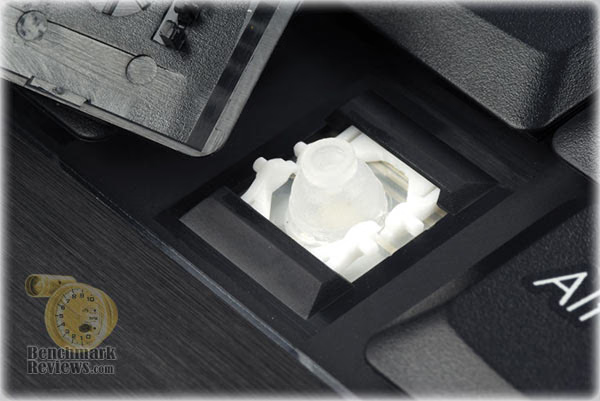
Keyboards are a very personal piece of pheriferal hardware, and the one-size-fits-all approach rarely satisifies everyone involved. As a professional writer, I find myself to be quite picky about the computer components I use on a regular basis. I believe myself to be the poster-child for adaptabiltiy, but it's no picnic when I give up my favorite mouse of keyboard for a new design. In this article, Benchmark Reviews tests three new keyboards from the Enermax Aurora Premium, Micro, and Caesar product lines. These keyboards all feature scissor-key compression mechanisms identical to most premium notebook computer keypads, and integrate High Speed USB 2.0 ports for added functionality.

Like your average pencil or ink pen, keyboards all feel differently to each of us. Some people love the feel of a notebook keyboard which uses scissor-lever actuation with confirming compression, while other people would never tolerate it. So this is going to be a review that caters to a specific group of people: those either willing to try something new, or those who know what they want - and this is it. In this article there are three premium keyboards featured, all made by Enermax (who is best know of power supply units).
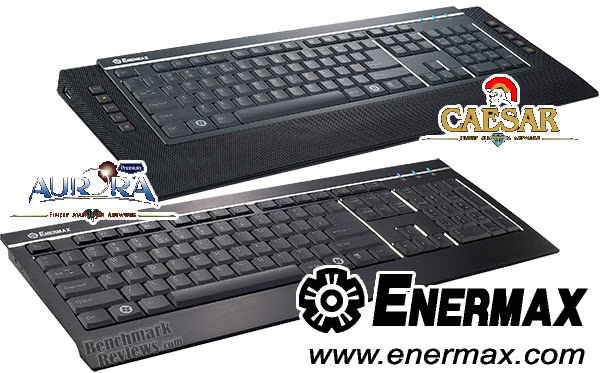
All three of the keyboards featured in this review utilize the scissor-style key compression mechanism, and wear an alloy skin. The Aurora Premium is a full size keyboard with integrated audio jacks, while the Aurora Micro is a product true to its namesake and ditches the integrated audio controller along with the numerical ten-key. The Enermax Caesar is a full size keyboard that offers just about everything you could image a keyboard capable of... and then some.
About the company: Enermax USA
Enermax Technology Corporation, founded in 1990, is a leading manufacturer of high-end computer products. Established with a passion for progress, Enermax believes that the needs of our customers drive our design and development. Our aim is mutual growth and strength, enabling our team to help solve the most complex business challenges. Our very forward solutions provision is an integral part of a result-oriented relationship. Long a mainstay of the computer industry, Enermax power supplies have been ranked first for mission critical applications and high-end systems.
Aurora Premium KB007U-B
The Enermax Aurora Premium KB007U-B is a full-size QWERTY alloy-aluminum keyboard with USB 2.0 and integrated audio controller. Enermax has given this keyboard two finishes: anodized black aluminum and brushed silver. Our sample is the black alloy version you will see in the images below.
My first impression of the Aurora Premium was positive. Without question this is a heavy keyboard, primarily because of the full alloy skin it received from Enermax. The underside features several rubber pads positioned in key locations, and combined with the added alloy weight this keyboard didn't slide around at all on my slick (new) desktop surface.

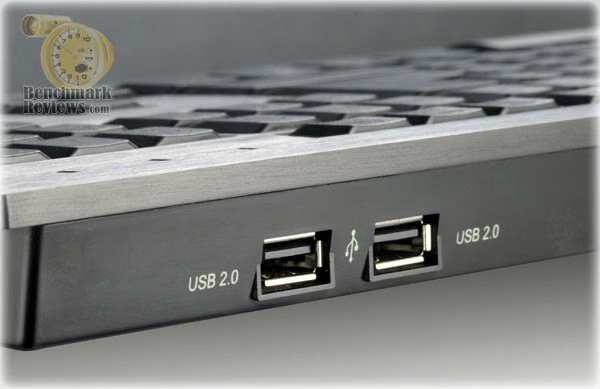
The Aurora Premium features two Full Speed USB 2.0 ports on the backside of the keyboard. I am thankful that Enermax avoided the phenomenal disaster Logitech created by placing a set of low-speed USB 1.0 ports on their brand new G15 2007 Programmable LCD Gaming Keyboard. Thankfully Enermax, a company with primary experience limited to making power supplies, doesn't make the same mistake with their first foray in the peripheral sector. These USB 2.0 ports support all High Speed devices: from USB flash drives, to ultra-dpi gaming mouse devices. Essentially, almost anything can be daisy-chained to these ports.
Enermax has made a point of keeping their Aurora Premium (and all other keyboards) fashioned with a perfectly flat bed of keys. Illustrated in the images below, you can see that the typing face of the keyboard is flat with 0° angle, and the keys each have a flat head. Most keyboards I have every used are also built with a flat bed, but the upper and lower row of keys have a higher rise than others, and all are concave. You can see how you own keyboard stacks up by taking a look from the side.

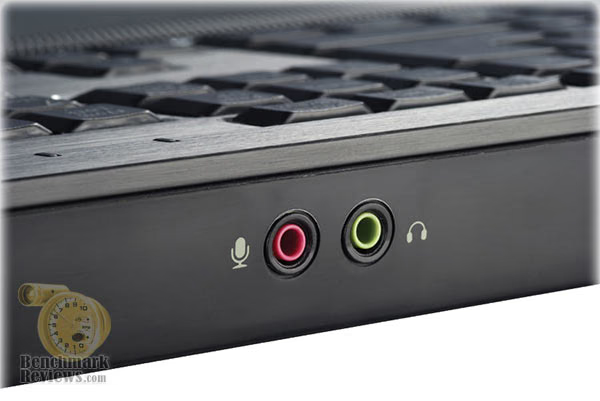
Another interested new idea Enermax introduces with their Aurora Premium is a built-in audio input/output. With a built-in audio controller, you are able to input a microphone or plug in headphones for convenient audio output. More and more, manufacturers are saving you from having to reach around the back of the computer to access the motherboard's I/O panel.

All in all, I found the Aurora Premium to be a very subtle replacement for the average keyboard. Its refined accents and glowing LEDs keep the attention away from it like bright displays and colored accents do on other keyboard products. The design looked very elegant, and worked very well right out of the box (no software necessary). The scissor-key switching mechanism requires just a little more effort than some of the light-touch rubber membrane keyboards I've used, but still easier than your average issue keyboard.

Hopefully this section has given you a good idea as to what you can expect from the Aurora Premium. While I would consider this my favorite of the bunch, namely because it offers a simple elegance than isn't too much to handle, Enermax offers a few others that are just as good in their own right.
| Aluminum Treatment | Brushed with diamond-cut edges |
| Connectivity | USB 2.0 |
| USB Hub | USB 2.0 *2 ports |
| Audio I/O | USB Audio (Built-in Audio chip) |
| Key Switch | Scissors structure |
| Key Zone | 3(full-sized) |
| Power Source | USB Bus Power +5V |
| Colors | Black & Silver |
| Dimensions | L455 x W172.5 x H25 |
| Weight | 1300g / 2.87 lbs |
In the next section, I will explore the Enermax Caesar keyboard.
Caesar KB005U-B
Enermax dubs the Caesar KB005U-B the "Emperor of Keyboards", which is really a bold way of saying everything else is merely a peasant in their kingdom. Really though, I find myself leaning on the side of minimalism when it comes to keyboards (and to a lessor extent, mousing devices). The Caesar keyboard throws-in every feature imaginable, and a few that probably push it overboard.

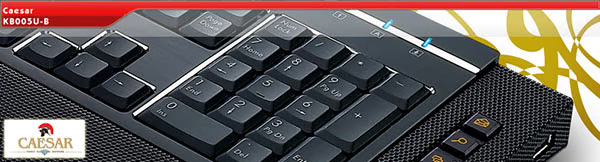
Think of the Aurora Premium as a introduction of things to come, because the Caesar takes everything the Aurora offered and adds several other creature comforts to the list. One of the primary features Enermax would have you know all about is the mesh metal finish. Touted as the world first mesh keyboard, I didn't seem too impressed and dismissed it as a cosmetic finish with no real purpose.

Something that really did impress me was the simplicity Enermax engineered into their keyboards. Logitech offers a large software bundle to use only the basic features of their premium keyboards, and even Microsoft has their own keyboard software for mapping key functions. All of these programs start-up when you boot into Windows, and they all consume system resources and waste performance.

It's amazing then that Enermax, a power supply company at its core, can devise a keyboard that offers multimedia and Windows hot-keys with added audio I/O with absolutely no software necessary. Everything is Plug-n-Play; something that seems to have been sacrificed by the competition.
Just as we discovered in the Aurora Premium, the Enermax Caesar is fashioned with a perfectly flat bed of keys. Illustrated in the images below, you can see that the typing face of the keyboard is flat with 0° angle, and the keys each have a flat head. i personally found this to be a hurdle for my personal tastes, and getting used to the missing convex keys took some getting used to.

Enermax borrowed an idea from Apple keyboard devices, and added a USB 2.0 port at each side-corner of the Caesar. This makes plugging in flash drives or other USB devices very convenient, but it also make it possible to daisy-chain your High-Speed USB mouse device without reaching behind the computer.

Another nice feature that I really liked in the Caesar was the extending keyboard feet (which is also available on both Aurora models). Adjustable-height feet make it possible to custom-tune the Caesar to you own personal angle for best comfort. Since Enermax uses scissor-mechanism keys without the convex key heads, it took some time getting used to the feel of a perfectly flat bead of keys. It almost felt like pretending to type on a surface of my desk, because I lost orientation more often than ever before.
There are some habits to make and break, no doubt. The index-finger key markers on the F and J keys are not present on the Enermax keyboards, and the backspace key is not double-sized like I'm used to because Enermax makes the Enter key double-row sized. This could be good for some people, but it became irritating to retrain myself to type... especially since I hit 100+ WPM when I'm in the zone.
| Aluminum Treatment | Brushed with diamond-cut edges |
| Connectivity | USB 2.0 |
| USB Hub | USB 2.0 *2 ports |
| Audio I/O | USB Audio (Built-in Audio chip) |
| Hot Keys | 5 Media keys (Play/Pause+ Stop+ Mute+ Volume Up+ Volume Down) |
| 5 Vista keys (Mail+ Search+ Flip 3D+Gadgets+Media Center Start) | |
| Key Switch | Scissors structure |
| Key Zone | 3(full-sized) |
| Power Source | USB Bus Power +5V |
| Colors | Black & Silver |
| Dimensions | L521 x W201 x H28 |
| Weight | 1.45kgs / 3.2 lbs |
The Caesar keyboard is going to be a luxury for most people, similar to the Aurora premium, but in the next section I review the Aurora Micro. This is the keyboard your average gamer will envy.
Aurora Micro KB006U-B
In the previous sections, Benchmark Reviews has skimmed over the Enermax Aurora and Caesar scissor-switch keyboards. Both are very nice keyboards in their element, but they are far from compact and portable. That's where the Aurora Micro comes into the picture. Anyone can tote a plastic kiddie-colored keyboard around to a LAN party, but only Enermax gives gamers back their dignity.
At first glance, the Aurora Micro appears identical to the Aurora Premium minus the ten-key number pad (although it's still available as a function inset). But looking a little closer, you'll notice that the Micro actually offers more keys than the Premium.
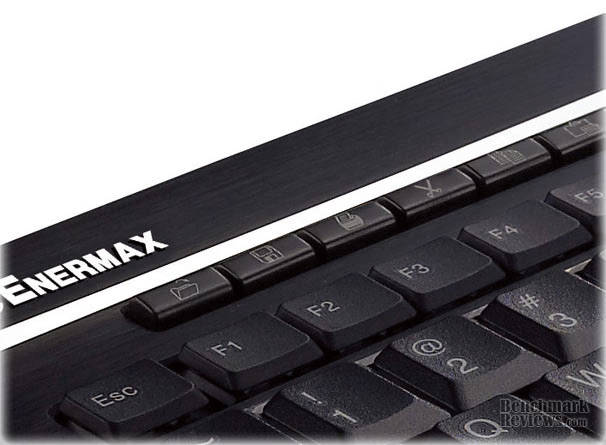
Along the top row of keys is a collection of macro- and hot-keys, which control everything from opening and saving files, to opening email and browser programs. Again, this is all without loading additional hardware to your computer system.
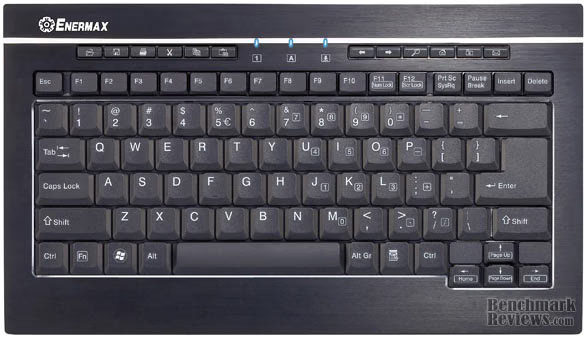
Additionally, similar to the Caesar, the Aurora Micro offers a High-Speed USB 2.0 port at each side-corner of the keyboard. This makes setup and LAN parties a breeze, and gives the cramped office workstation space a lot more convenience.

The full aluminum-alloy shell gives the Aurora Micro incredible durability; possibly more than any keyboard will realistically need. It also adds a bit of weight.
While the Enermax Aurora Micro fits perfectly in my Targus 15.4-Inch Corporate Traveler Laptop Case CUCT02A, it also adds a noticiable amount of drag to the package and is not ideal for long periods of standing with the case strapped over your shoulder.

Ultimately though the Enermax Aurora Micro found itself a perfect fit at my friends house, where we've set-up a half-dozen computer systems for the occasional LAN gaming event (all of these review make my friends very pleased with the gear they get to use).
| Aluminum Treatment | Brushed with diamond-cut edges | |
| Connectivity | USB 2.0 | |
| USB Hub | USB 2.0*2 ports | |
| Hot Keys | 6 Office keys | Open+ Save+ Print+ Cut+ Copy+ Paste |
| 6 Internet keys | Back + Forward+ Search+ Home+ My Favorite+ Mail | |
| Key-Top Surface Printing | Black | Double coating |
| Silver | Laser printing | |
| Key Switch | Scissors Structure (patented) | |
| Key Zone | 1 | |
| Power Source | USB Bus Power +5V | |
| Colors | Black & Silver | |
| Dimensions | L320mm x W183mm x H26mm | |
| Weight | 0.8kg / 1.76lbs | |
So while the Aurora Micro is somewhat traveler friendly, it's really best suited for cramped working quarters or gaming events. The scissor-mechanism keys make the touch response very pleasant, and the compact size doesn't sacrifice a standard QWERTY key layout and spacing.
Enermax Scissor Keyboards
You've probably caught my undercurrent of disdain for the glaring mistakes of the leading competition, and I can't rightly feel very sorry as I expose them. While this is somewhat off the topic of a product review, I think it's curiously amazing how a relative nobody in the peripheral industry can come along with a collection of keyboard products that outperform the biggest names in the business. The real shame of this is availability, and you'll be the one the suffers. As a product analyst I see a lot of great products that will never make it into the most popular online stores, which leaves consumers feeling falsly confident in a sub-par product just because it's received a dedicated marketing campaign.
Aurora & Caesar Conclusion
As a collective whole, each of the alloy Enermax keyboards featured in this article go well beyond durability and would be expected to survive the harshest conditions possible. The patented scissor-key mechanisms offer a predictive pressure for each stroke, and are good for over ten-million key-press cycles. I type a whole lot, and I've worn several keyboards out (I actually purchase Dell USB keyboards by the case - 12 per box), but the Enermax keyboards would easily go the distance. The diamond-cut edges add accent to the aluminum alloy finish, and the key heads are made solid with ever-lasting print etching.
The added incentive of having hot-keys available without a software installation being necessary is also very nice. I personally grudge installing peripheral support software, and wonder what ever happened to true Plug-n-Play hardware. Thankfully, Enermax reminded me how great it is to have something just simply work when it's plugged in. This includes the set of High-Speed USB 2.0 ports available on each model, and the PnP audio jacks for microphone and VoIP phone or headset support headset components. Essentially, you could plug your Enermax keyboard into the computer, and then connect everything else through the integrated connections. I had hoped for this kind of functionality out of the industry leader's premium gaming keyboard, but apparently a PSU manufacturer had to show them how it's done.
You might think that these keyboards would cost a fortune, which I attribute to the prices most competing manufacturer manage to sell their products for. But to my surprise, the Aurora Premium KB007U-B is being sold onlinefor just over $70. PriceGrabber currently offers several online retailers selling the Caesar KB005U-B for around $80. The Aurora Micro keyboard presently sells for $50-60 online, which isn't at all a bad price but a little higher than I would like. The street prices for these alloy keyboards is actually in-line with most wireless keyboard kits, even though these keyboards are not wireless. Nevertheless, if you demand fine quality and indestructible construction, the Enermax Aurora and Caesar keyboards are worth every penny.
In conclusion, I feel that the Enermax Aurora Premium and Caesar are both outstanding products for the discerning keyboard warrior. Personally, I had to throw in the towel and setup (yet another) basic Dell USB keyboard for my typing abuse, but I go through at least one of these keyboards at least few months... making them nearly disposable. This is not the situation with Enermax keyboards, which could outlast an entire case of the keyboards I've become used to. There's a learning curve, and if you're set in your ways with convex keys and index key markers you'll have some work ahead of you. If you're not a professional writer who can keyboard at 100+ WPM, this won't be an issue, and if you're a casual user the creature comforts will fit right in with your needs. The Plug-n-Play functionality and scissor-mechanism keys push these keyboards into the plush premium category. Plus, they're not plastic. Brushed aluminum takes your desktop appearance up a level, so make sure you're not up-staging co-workers.
Pros:
+ Scissor-mechanism lever keys
+ Rugged aluminum-alloy construction
+ High-Speed USB 2.0 ports
+ Plug-n-Play multimedia and hotkeys
+ Adjustable extension support stands
+ Integrated PnP audio support
+ Elegant diamond cut accents and anodized finish
Cons:
- Heavy-weight keyboards
- Flat bed of keys and missing marker keys cause disorientation
- Premium priced product
Quality Recognition: Benchmark Reviews Silver Tachometer Award.
Questions? Comments? Benchmark Reviews really wants your feedback. We invite you to leave your remarks in our Discussion Forum.