
Logitech G15 2007 Programmable LCD Gaming Keyboard
Logitech G15 2007 Gaming Keyboard
The computer keyboard is the first and longest standing peripheral hardware device to exist in our industry. Very few changes have altered the way casual users interact with their personal computer. But this is the new age of gaming-grade hardware, and basic equipment is not on the parts list. Logitech introduces the G15 2007 Programmable LCD Gaming Keyboard 920-000379, and Benchmark Reviews tests it with a few of the more popular video games.
Not many peripheral products can qualify as true gaming keyboards; especially since the majority of these products just simply add bold colors or large keys. Logitech takes the process more seriously, and the new and improved G15 (Revision 2 aka 2007) Programmable LCD Gaming Keyboard offers hardcore gamers something to take them to the next level.
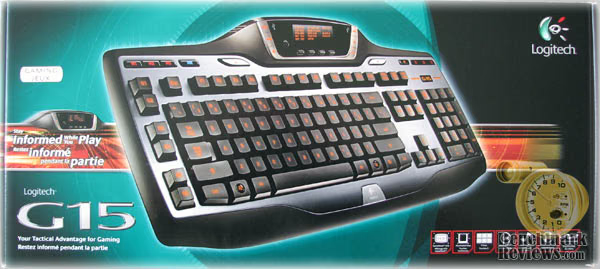
Good intel and the proper gear are the keys to victory, even in gaming. The Logitech G15 keyboard keeps you informed and outfitted to win.
With the Logitech-exclusive GamePanelTM LCD, you can easily find out what server your friends are using to play Battlefield 2142TM, or receive notification when your World of Warcraft battleground becomes available. You can even identify who's speaking in VentriloTM. Create useful macros on the fly and play them back with a single press of a G-key. Illuminated characters allow you to play late into the night.
About the Company: Logitech
Logitech is a world leader in personal peripherals, driving innovation in PC navigation, Internet communications, digital music, home-entertainment control, gaming and wireless devices. The company's products combine essential core technologies, continuing innovation, award-winning industrial design and excellent price performance.
Logitech's origins lie in the OEM sector, which remains an important part of its business, and represented 11.6 percent of the company's total sales in Fiscal 2006. To meet the demands of its OEM customer base, which includes most of the world's largest PC manufacturers, Logitech offers high-volume manufacturing with focused quality control, worldwide distribution and logistics, and the ability to leverage its infrastructure under changing demand conditions.
Logitech continues to broaden its product offering and its presence in the retail sector. This is fueled by a trend among consumers to enhance their basic PC systems with more fully featured personal peripherals that add functionality and cordless freedom to their desktops. They are also purchasing supplementary devices designed for new applications and specific purposes such as gaming, multimedia, or audio and visual communication over the Internet. Further, Logitech's retail business includes personal peripherals for platforms beyond the PC, such as gaming consoles, portable music players, mobile phones and home-entertainment systems.
Today, Logitech's retail business accounts for 88.4 percent of its revenue. To provide the market with a broadening array of best-of-category products, Logitech's business model calls for supplementing its internal engineering and manufacturing strength with additional products and technologies through a combination of strategic acquisitions and industry partnerships.
More information about Logitech is available on their company website.

System Requirements
-
Windows XP, Windows Vista
-
256 MB RAM
-
20 MB available hard disk space
-
USB port
-
CD-ROM drive
G15 2007 Package Contents
-
Logitech G15 Keyboard
-
Palm rest
-
Software CD (Logitech GamePanel Software v2.00.171 was downloaded)
-
Installation Guide
-
1-year limited hardware warranty
Video Game Support
-
America's Army by U.S. Army
-
Battlefield 2142 by Electronic Arts
-
Brothers In Arms Earned In BloodTMby UbiSoft
-
Command and Conquer 3 Tiberium WarsTM by Electronic Arts
-
Commandos Strike Force by EIDOS
-
DinoHunters by Kuma Reality GamesTM
-
Enemy Territory: QUAKE WarsTMby Activision
-
Falcon 4.0: Allied Force by Graphsim/Lead-Pursuit
-
F.E.A.R.TMPerseus Mandate by Sierra/TimeGate
-
GT Legends by SimBin
-
GTR by SimBin
-
GTR 2 by 10tacle Studios/SimBin
-
KumaWar by Kuma Reality GamesTM
-
Lord of the Rings OnlineTM: Shadows of AngmarTM by Midway
-
Neverwinter Nights 2 by Atari
-
Prey by Human Head Studios/2K Games
-
Red Orchestra: Ostfront 41-45 by Tripwire Interactive
-
Rise of Legends by Big Huge Games
-
Shootout! by Kuma Reality GamesTM
-
Sid Meier´s Civilization IV by 2K Games/Firaxis
-
Sid Meier´s Railroads! by 2K Games/Firaxis
-
SiN Episodes: Emergence by Ritual Entertainment
-
Star Wars Battlefront II by LucasArts
-
TimeShiftTM by Sierra
-
Titan Quest Immortal Throne by THQ
-
Tom Clancy's Rainbow Six LockdownTMby Ubisoft
-
Unreal Tournament 2004 by Epic Games
-
VendettaTM Online by Guild Software
-
War Front: Turning Point by 10tacle/Digital Reality
-
Warhammer: Mark of Chaos by Namco
-
World of Warcraft by Blizzard Entertainment
-
World of Warcraft: Burning Crusade by Blizzard Entertainment
Closer Look: G15 2007
Logitech knows peripherals, and when they set out to design gaming keyboards years ago they began with a strong vision. Moderately successful with their G11 and original G15 products, Logitech returned to the drawing board and created the all new G15 2007 Programmable LCD Gaming Keyboard 920-000379.

The G15 2007 gaming keyboard includes back-lighted keys for late-night gaming sessions and includes a game mode switch, which disables the Windows key, eliminating the inconvenience of accidentally closing a game.
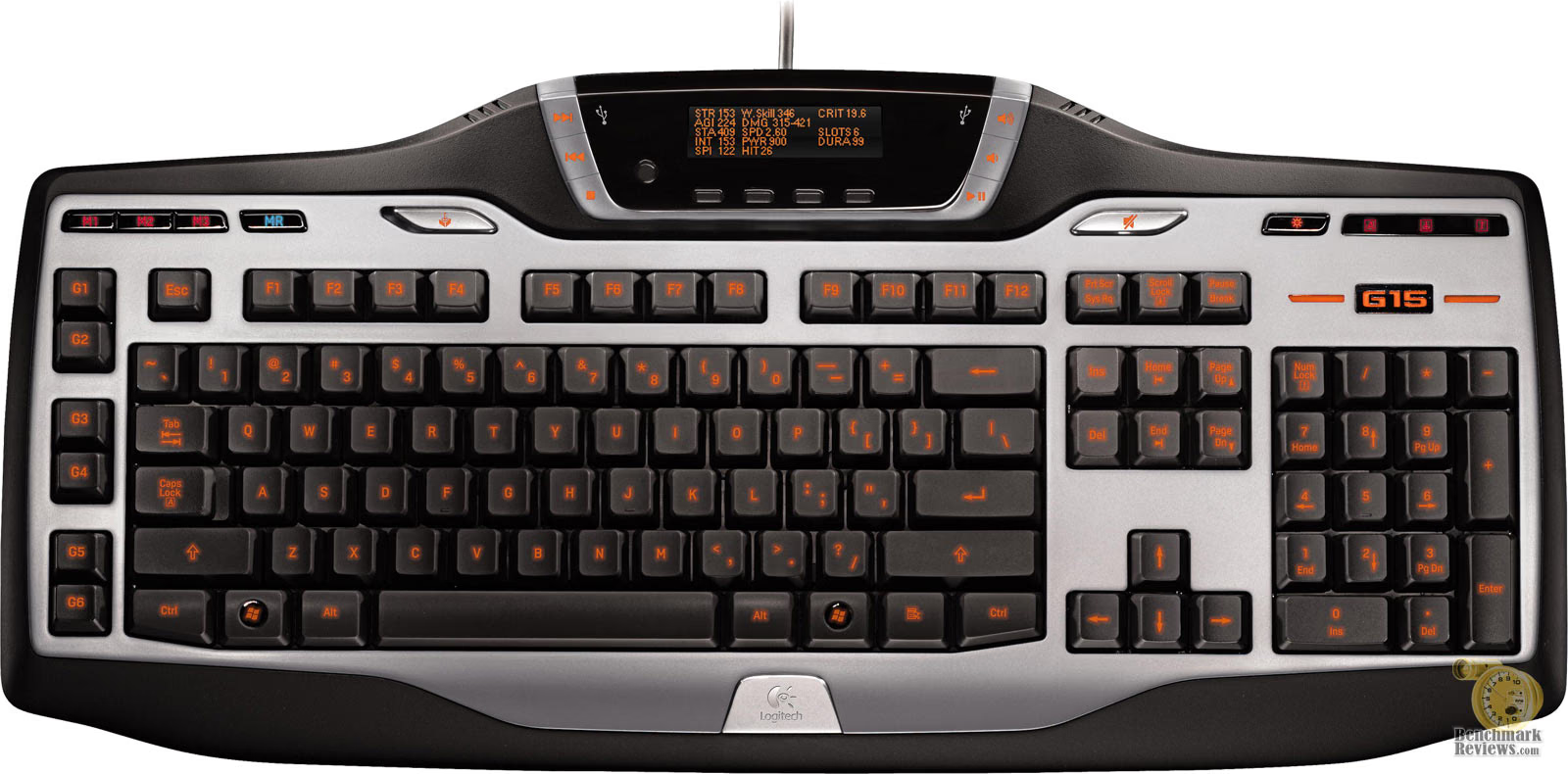
The most obvious new addition to the G15 is the high-visibility GamePanel LCD which displays game stats and other important system information. Not a full-time gamer? The Logitech G15 2007 Programmable LCD Gaming Keyboard also has all of the basic multimedia controls as well; making the G15 2007 a good alternative for those enthusiasts who dabble into both worlds.

To provide gamers with maximum versatility, the G15 2007 supports different combinations of keys for different games; the G15 2007 keyboard activates game-specific settings when a programmed title is launched. And with a reduction in the number of programmable keys to six, the updated G15 keyboard is more compact in size, offering gamers more space on their desk without sacrificing performance.

Logitech's marketing material, retail package, and website, all list the G15 2007 as having three levels of brightness on the illuminated characters. If one of those levels is "off", then yes, there are three. For everyone else who has an understanding of the term, there are two levels: low and medium.
The G15 2007 keyboard also offers six on-the-fly programmable macro keys with three modes, for a total of 18 programmable keys per game or application. This means, for example, World of Warcraft players can program the G keys to access their spells more efficiently.
In the next section, Benchmark Reviews digs deeper into the Logitech G15 2007 Programmable LCD Gaming Keyboard, and exposes a few new features that are sure to please; and a few that won't.
Detailed Features
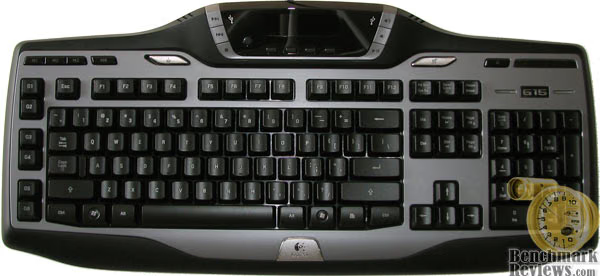
While the Logitech G15 2007 Programmable LCD Gaming Keyboard features illuminated keys, there is one small problem I encountered during the daylight hours where the rooms' lighting is brighter than that of the keyboards. Logitech uses an opaque translucent plastic instead of the standard bright white paint to mark the characters. So when the back-lighting is off, the keys all become difficult to make out. The image below was taken with a flash, and even so the keys are a difficult to make out; at least compared to keyboards marked with bright white letters.
Logitech introduced the 160 by 43 pixel GamePanel LCD screen in the new G15 2007 Gaming Keyboard. This feature helps to give gamers critical information to help them win. Not too many games are compatible with the feature (listed in the specifications from page one), and the information it displays is really more supplemental information than anything else. Out of the box you can also utilize the GamePanel software to:
-
Program the G15 2007 to display the time with user-selectable round dial-arm clocks
-
Configure a POP e-mail account notification
-
Utilize a stop-watch timer
-
Display CPU utilization and system memory (RAM) usage

For listed and compatible games, there was nothing extra which was necessary to have the GamePanel LCD display additional information while in-game. When Titan Quest: Immortal Throne was loaded the GamePanel LCD immediately displayed the game name, and then three different information screens rotated thereafter. I was pleased by how easy this worked, but I was left unimpressed by the very limited support for more popular games. The lack of a customizable interface also leaves something to be desired; although there is a free G15 software development kit available if you are keen to programming.
In the image below, all of the back-lit text appears bright and clear. That's because this picture was taken at a 90-degree angle from directly overhead the Logitech G15 2007 keypad in a completely dark room - which means it represents the absolute best lighting possible from the keyboard. Even in this image, which I would consider a baseline, there are already indications of dark edges near the upper portion of each key button.

I then moved the camera position to a 45-degree angle, similar to the location an average user would have while seated in relation to the Logitech G15 2007 Programmable LCD Gaming Keyboard. In the image below you can see how the upper portion of some characters are completely missing, especially the "!", "@", and "#" symbols as well as the "Tab" and "Caps Lock" keys. While not shown (I wanted emphasis on the letter keys), the block of six buttons above the arrow keys (starting with "Print Screen" and ending with "Page Down") were all the worst off.

Now for the real bad new: the image above had to receive a 40% increase in contrast just to have similar brightness to the baseline image, otherwise you would hardly be able to see the back-lit keys at all. Perhaps I could make a suggestion? In future iterations of the product, make the illumination much brighter with focused LED's.
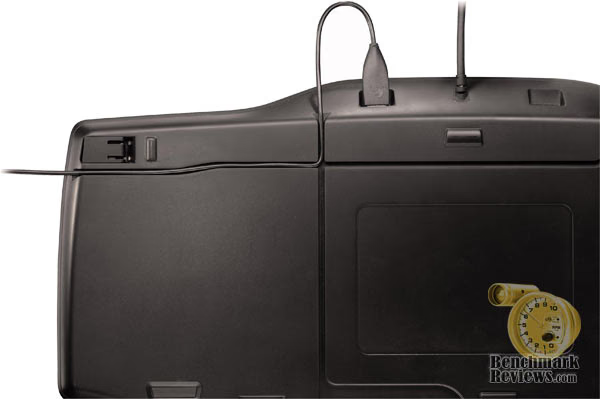
When I first discovered that there were two USB ports on the backside of the Logitech G15 2007, I was relieved that I wouldn't have to keep reaching behind the computer to plug in certain devices. While most mouse cords are as long (and usually longer) than the cord on this keyboard, it seems understandable that I might try to use other USB devices in these ports.

Logitech labels these USB ports "Full Speed", which is misleading. Officially, all obsolete USB standards, which presently include USB 1.0 (1.5 Mbps) and USB 1.1 (12 Mbps) are referred to as Original USB. Only the current standard of USB 2.0 (480 Mbps) is referred to as Hi-Speed USB.
When I plugged in the Logitech G9 3200 dpi Laser USB Gaming Mouse, it lit right up and didn't miss a beat. The large collection of mouse products I had collected also worked without a hitch. This was attributed to mouse peripherals requiring 1.5MBps, or in certain rare cases (such as Laser mouse products) they may require the 12 MBps that USB 1.1 provides. Suffice it to say, the ports work well with every mouse available, from the most simple roller ball to the complex laser.

But when I plugged in a simple OCZ VBoost USB Flash Drive the system immediately displayed a "USB Hub Power Exceeded" warning. Trying to plug in my camera worked fine (albeit slow), but my Motorola L2 cell phone would also give the Hub Power Exceeded error. Eventually I would discover that while the product is named G15 2007, it has the USB compatibility of 1997 because Logitech used USB 1.1 ports when it should have used the 2001-established standard of Hi-Speed USB 2.0.
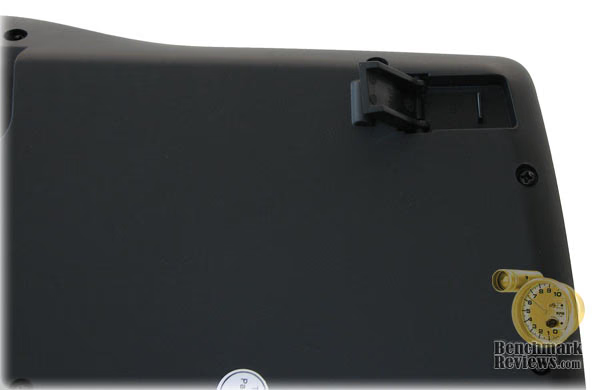
On the underside of the Logitech G15 2007 Programmable LCD Gaming Keyboard you will discover a very subtle piece of ingenuity. Nearly all keyboards have legs that swing out towards the back of the device, which is fine for most stationary keyboards. But when the gaming heats up, its very possible to have your keyboard shift and move on you, which is why Logitech has designed the legs in a transverse configuration; allowing them to remain extended and never collapse.
G15 2007 Final Thoughts
Many years ago I visited the North American International Auto Show with my father. This was the very early nineties, and aerodynamic designs were just beginning to be mainstream in the automotive industry. One of then-concept cars was the Chrysler Cirrus, which because of super low-profile tires and large wheels looked so far beyond its time that it drew large crowds. We took our pictures, and made assumptions on how fast this car would be if it was ever produced. Over fifteen years later, I have learned that sometime that ultra-sporty looking car can turn into a compact family sedan somewhere along the road.
Sometimes I see a really good-looking product, and because the right ingredients are all present I presume that it will work well. Whenever I catch myself doing this, I remember my early vision of the Cirrus, and I remember the letdown of when it arrived on showroom floors. So when I opened the box for the Logitech G15 2007 Programmable LCD Gaming Keyboard, I tried my very best not to get caught up in the looks and avoid creating a first impression until I had concluded testing. I am thankful that I did, and you should be too.
After a month of constant testing as my primary keyboard, I am actually a little let down by this product. You see, because I am a writer of review articles and the owner of a small business, I find myself constantly typing... often times after business hours when the sun has gone down. It didn't take long for me to get used to the slightly different feel of this keyboard, although I did have to re-train myself to make the use of the programmable keys into a natural movement. Ultimately, it was the dim back-lighting on the keypad turned me away.

Even though I have the QWERTY layout committed to memory, there are several times when I may need to actually look at the keyboard and find a particular key. The poorly lit keys would almost all appear dark black, as if they had no key markings at all, and the search would be a short frustration I didn't need distracting me. In the long run, if you use this keyboard for any level of serious use outside of gaming, you might want to rethink your needs. The Logitech G15 2007 excels in the field of programmable LCD gaming keyboards, and pure hardcore gamers will not have my complaints. But I can't play games all the time, and when playtime is over I find myself wanting the Logitech Cordless Desktop LX 710 Keyboard put back on my desk.
Logitech 920-000379 Conclusion
Logitech certainly knows how to package a product, and make it attractive to consumers. The retail package, website promotion, and related information was sufficient in getting me excited about their new G15 2007 Programmable LCD Gaming Keyboard.
In terms of product appearance, the Logitech G15 2007 (model 920-000379) keyboard was probably to blame for my high expectations. The keyboard not only looks good, it makes you want to play games even if you have other obligations. It's like that show car I described at the Auto Show: you don't want to simply drive it, you want to race it.
When I approach the construction rating the overall build quality is a key factor, but I also look at the materials used and durability. Logitech built the G15 2007 with a sturdy ABS plastic, which will prove necessary in the rough gaming environments it's sure to see. However, the opaque plastic material used in the translucent keys doesn't do a great job of transmitting the back-lighting effect to the surface.
Then comes functionality. Few products survive my wrath when I find a flaw, and although I really like the look and feel of Logitech's new G15 2007 Programmable LCD Gaming Keyboard I just cannot forgive some glaring issues. Why would anyone producing a premium-priced keyboard neglect the functionality of USB 2.0? Not to dog-pile the flaws, but the game support is so weak that the "unofficial" G15 sites poke fun at their feeble attempt to include popular games. Topping it all off is the limited visibility of the illuminated keys from the standard angle of operation. All of the other nice features combined just barely kept this rating on the positive side.
At the time of this writing (November 2007), the Logitech G15 2007 Programmable LCD Gaming Keyboard 920-000379 has been on the market only a few months and has become available at many of the most popular online retailers. NewEgg currently offers the Logitech G15 2007 for $89.99, however there are a few others that sell it for a bit less. With such a high-price premium to pay for a keyboard, the value rating takes a hit.
In conclusion, I find myself a little bitter because of the final outcome. I really had high hopes for the new G15 2007 Programmable LCD Gaming Keyboard, but I am left with the impression that the Logitech 920-000379 model was rushed to market. Gaming keyboards are tough to get perfect, but in my opinion this product needed a lot more time at the drawing board before it made retail shelves. The new G15 2007 looks unbeatable; at least until you expect that much out of it. Looks are deceiving, and the G15 gaming keyboard is not recommended.
Pros:
+ Supplemental information is displayed on the GamePanel LCD
+ Six programmable G-keys record macro or key press
+ Multimedia control buttons
+ Game mode switch disables the Windows key
+ Illuminated keys
+ Wrist pad included
+ GamePanel software offers out-of-game functionality
+ Transverse position keyboard legs prevent collapse from movement
Cons:
- USB 1.1 ports are obsolete and do not support some hardware
- Illuminated keys have offset back-lighting which dims edges
- Uses rubber membrane key action instead of scissor type
- Expensive product with few additional features
- GamePanel video game compatibility is very limited
Ratings:
-
Presentation: 8.50
-
Appearance: 9.00
-
Construction: 8.25
-
Functionality: 6.75
-
Value: 5.50
Final Score: 7.6 out of 10.
Questions? Comments? Benchmark Reviews really wants your feedback. We invite you to leave your remarks in our Discussion Forum.