
Professional Mechanical Keyboard Comparison
Professional Mechanical Keyboard Review
There are a lot of keyboards out there. Some keyboards are wireless; others offer lighting effects, programmable displays, and drivers that remap the keyboards to configurations optimized for specific applications and games. But if you're a serious typist - a professional who thinks that a keyboard's primary duty is to enable fast and accurate typing, and not to glow prettily or adjust your speaker volume or display the number of missiles left in your launcher, then you might be interested in a professional mechanical keyboard. Benchmark Reviews looks at a wide selection of available high quality keyboards to see which might be the best for you.
The Age of the Dinosaurs
Back when a typical desktop computer cost $2,000 or more, $200 keyboards were not uncommon. Professional-level kit like the IBM Model M, the Northgate OmniKey Ultra, and the Apple Extended Keyboard were examples of the care and thought manufacturers put into a product that would last for years under heavy use. Even computers ostensibly aimed at hobbyists like the Apple ][ or Atari 800 had keyboards comprised of individual mechanical switches.

Many of these keyboards still do daily duty in the hands of the faithful, who gladly pay high prices (as I write this, a restored Northgate OmniKey Ultra keyboard is for sale on eBay with a "buy it now" price of $399) for pristine examples.
What made these keyboards so expensive? Individual mechanical key switches, with long travel (3-4mm) mounted on heavy metal base plates; double-shot sculpted keys whose legends could not wear off, and a general quality feel set these keyboards apart from the modern variant, typically a featherweight plastic contraption using mushy, rubber-dome key switches.
What really distinguishes these keyboards apart from their modern brethren is the feel: the positive "snap" or "click" that a buckling-spring or snap-action mechanical key switch makes. The "snap" gives you tactile and auditory confirmation that the keystroke has registered and the computer has received the key stroke. With the better rubber dome keyboards, you'll feel a "pop" as the dome collapses, but that does not necessarily mean the keystroke has registered!
But individual mechanical key switches make a keyboard expensive, and a $200 keyboard makes no economic sense for a $399 desktop computer you pick up at Best Buy. Even a $50 keyboard is too much. Most OEM keyboards these days cost less than $5 to manufacture and are available at $20 or less at the retail level. Virtually all modern keyboards use some variant of the "rubber-dome" key spring, in which the spring action to push the key back up after it's been depressed is provided by a dome molded in a sheet of rubber under each key. Depending on the keyboard, the dome may be part of the actual switch mechanism, with conductive material on the underside of the dome bridging contacts on a circuit board beneath it when the key is pressed, or the dome may merely provide the spring effect for a membrane-switch keyboard.
For those of us who grew up with real keyboards, there's something profoundly unsatisfying about typing on even the best rubber dome keyboard. It just doesn't feel right. Add to this the fact that many low cost keyboards omit things like N-key rollover (the ability of the keyboard to sense when multiple keys have been depressed, one after the other, before the original key has been released), and fast typists suddenly find themselves slowing down and making mistakes. And somehow the ability to mute your computer's audio from the keyboard doesn't seem nearly as cool as it did in the store.
Mechanical keyboards
I'll define a "professional mechanical keyboard" as follows:
-
Must use individual mechanical key switches
-
Must have N-key rollover
-
Should have sculpted keys
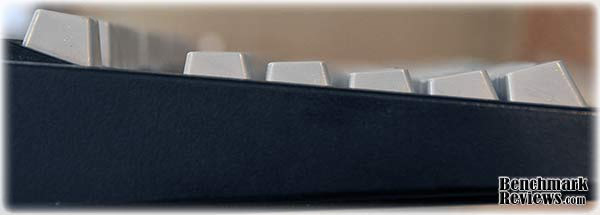
"Sculpted keys" means that the tops of the keys are arranged in a curve whose long axis is the width of the keyboard. OK, that's hard to visualize, so here's a side view of a keyboard with sculpted keys, the Unicomp Optimizer 104:
And here's a side view of a keyboard with "flat" keys, the Deck Legend:
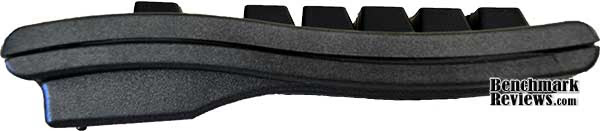
Sculpted keyboards are designed to accommodate the fact that your fingers have to reach different distances to press different keys. The difference in typing feel is subtle but noticeable. However, producing a sculpted keyboard is more difficult and expensive than producing a flat keyboard, so it's a relatively rare feature these days.
Mechanical keyboards have vanished as OEM equipment with new computers as well as from the retail channel. They're still being made, although you'll have to order them online. In this article I'll compare a number of modern mechanical keyboards, including models from IBM, Unicomp, Deck, Creative Vision Technologies, and Metadot.
Non-mechanical keyboards
By far the majority of keyboards sold are the modern, rubber-dome type. In the next section, I'll look at three examples of this breed of keyboard to see how they compare against mechanical keyboard from the perspective of a typist. Some of these keyboards will have many more features than the mechanical keyboards: specialized function keys, programmable macro keys whose definitions automatically change depending on the current application, and so forth. I'll cover these features briefly, but this review is focussed on the typing experience.
IBM Model M Keyboard
Sometimes they get it right the first time. A 25 year old computer is, at best, a curio or collectible; at worst it's useless junk, but a 25 year old IBM Model M keyboard is just as useful as the day it was built. If the primary purpose of a computer keyboard is to allow you to transcribe your thoughts as fast and accurately as possible, then the IBM Model M keyboard arguably represents the purest and best expression of this purpose.
Introduced in 1981, the Model M keyboard was built around IBM's newly-patented "buckling spring torsional snap actuator" key switch. With switches rated at 50 million cycles per key, this burly keyboard introduced a generation of secretaries, businessmen, and well-heeled consumers to computer data entry. It is keyboarding distilled to its Platonic ideal; bereft of modern features such as a "Windows" key, USB interface and hub, backlighting, or multimedia controls, it's precisely what you need and nothing more; and there are those who feel that all subsequent work on keyboard design, construction, and features has been irrelevant.

The key switches require (according to IBM docs) 60-70 grams of force to depress, which gives the keyboard a "heavy" feel by modern standards. The audible snapping noise each key makes as it's depressed is loud enough to wake people in the next room, but is considered by the faithful to be part and parcel of the Model M experience. The keys are heavily sculpted, more so than any other keyboard in this review.
Model M keyboards haven't been made since the early 1990s, but their tank-like construction means that even examples you find at a yard sale will probably need just a cleaning to provide another few decades of service - it's not uncommon to see these in use even today, perhaps covered in grime in the back of a warehouse or auto repair facility. You can find these keyboards on eBay for under $50.00, or you could check out ClickyKeyboards.com. Their inventory varies, and new-in-box examples are getting pretty rare, but don't be afraid of used versions-- they're completely cleaned and tested and still worlds better than what you can pick up at Fry's. If you plan to use the keyboard with a USB connection, make sure you get the PS/2 version of the keyboard, and buy the PS/2-USB adapter from Clicky Keyboards, since most standard PS2/ to USB adapters will not work.
There's a special cachet to having a "Mod M" on your desktop. Its old-school design and feel will impress those that know enough computing history to recognize it for what it is. Get one and feel the weight of history.
|
Price |
Varies, generally < $75 |
|---|---|
| Interface | AT or PS/2 |
| Switches | IBM bucklng spring |
| Sculpted | Yes, heavily so |
| Warranty | None but the judgment of history |
| The Good | Great typing feel, can hand down to grandchildren |
| The Bad | No Windows key |
| Sum-up | The primal keyboard |
Unicomp Customizer 104 Keyboard
You're intrigued by the Model M, but don't feel comfortable buying a 15 year-old keyboard and would really prefer something with a native USB interface. You're in luck...IBM sold their keyboard business to Lexmark in the early 1990s, and UniComp picked it up in 1996, and they sell brand-new keyboards through the rather sparse and visually uninteresting web site https://pckeyboards.stores.yahoo.net. This site offers a variety of keyboards, but the ones we're interested in are the Customizer 101 and the Customizer 104. The former is the scion of the Model M: it has the identical 101-key layout (no Windows keys) and color scheme. The latter has the modern 104-key layout (with Windows keys) and a rather strange gray-keys-on-black-frame color scheme.

Unicomp does not specify the key switches used other than that they're "buckling spring" (the keyboards are also available with, ick, "soft touch" rubber dome keys), but since that's an IBM-patented mechanism and Unicomp bought the rights to it, they're presumably similar or identical to the Model M key switches. Nonetheless, the key feel is not identical - the Unicomp Customizer 104 keyboard has a slightly heavier "feel" than the Model M. The nice thing about this keyboard is that you can buy one, brand new, for a mere $69.00, which makes it the price leader in the mechanical keyboard field, beating its next closest competitor by about $60!
Unicomp says that if there is a problem with any keyboard, you may return it within 30 days for a complete refund; however, I couldn't find any specific warranty information on their web site.
If you like the Model M, but would prefer something made this century, this is the way to go.
| Price | $69.00 |
|---|---|
| Interface | PS/2 or USB |
| Switches | Unicomp? Slightly different key feel from Model M. |
| Sculpted | Yes |
| Warranty | ? |
| The Good | Like a brand new Model M, cheapest new mechanical keyboard |
| The Bad | Strange color scheme on 104 model, no USB hub |
| Sum-up | Best bang for the buck |
Avant Stellar Keyboard
I mentioned the Northgate OmniKey mechanical keyboards - and the very high prices nice examples can command - in the introduction. As with the Model M, there's a modern clone: the Avant Prime and Avant Stellar mechanical keyboards by Creative Vision Technologies. The Prime model is a standard 104-key layout while the Stellar model duplicates the layout of the fabled OmniKey Ultra key-for-key, with a duplicate set of function keys at the left edge of the keyboard and the now out-of-fashion-but-God-I-love-it large L-shaped "Enter" key. In fact the FCC ID on the bottom of the keyboard is "GT6OMNIKEY", so there's obviously something going on here.

According to the Creative Vision Technologies web site:
Creative Vision Technologies, Inc. (CVT) manufactures high quality; state of the art, custom built computers as well as the “Avant” programmable keyboard for today’s extremely competitive market place.
Their "state of the art" desktop computers are all Pentium IV based models, while the servers use first generation Xeons running on 133mHz busses with ECC SDRAM memory. But that's OK, we're interested in the keyboards, not the computers.
The Avant Stellar is easily the largest keyboard you'll see today: its extra function keys made it a good two inches wider than most, and the 70s-era pencil tray at the top (the recessed area to the right of the "Avant Stellar" label) make it taller as well. You'll want to make sure you have enough room for this beast, especially if you're using a separate keyboard drawer or tray:
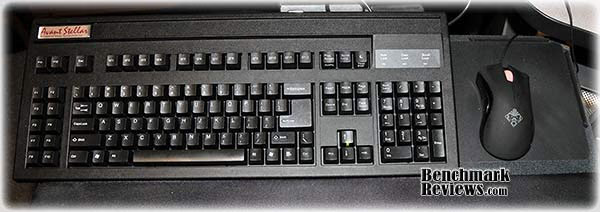
It's only available with a PS/2 interface, so you'll need a USB adapter if you plan to use it on a modern system. A thick metal baseplate gives the keyboard a heavy, substantial presence, and a two year warranty provides some peace of mind. The large Enter key means that the vertical bar-back slash key moves to a new position to the right of the right shift key, which shrinks slightly to make room.
Like its legendary forebear, the Stellar supports macros of up to 20 characters per key, as well as key remapping (for example, switching the Caps Lock and Control keys) and setting the key repeat rate. Software for programming the keyboard comes on a 3.5" diskette, and said software does not work with any version of Windows beyond XP. Fortunately, the software is just a convenience item since you can program/adjust the keyboard's features directly from the keyboard (there are no drivers required) provided you download the manual on how to do so from the web site, since it's not included with the keyboard (OK, it might have been on the diskette, but I don't have any computers with diskette drives, so I couldn't check.) Interestingly, for the purposes of macro programming and re-mapping, the top row and left side function keys are handled separately, so you can program useful macros into every left-side function key without affecting the operation of the top function keys.
The keyboard must be in "macro mode" for macros and remapped keys to function; an LED in the up-arrow key serves as an indicator that you're in "macro mode":
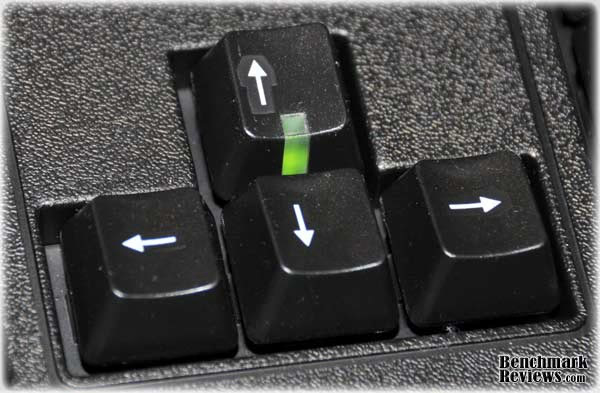
Mode changes persist across reboots and power-downs, which is nice. Also nice is the inclusion of a keycap puller and replacement Control and Caps Lock key caps so you can switch these keys to their "proper positions" should you choose.
The key action is lighter than the Model M and the Customizer keyboards. The vendor does not specify anything about the key switches other than that they're "mechanical", but they feel like Cherry MX series switches to me. Pulling a key cap reveals a switch with a white plunger, which matches one version of the Cherry MX switch, so that's my guess.
| Price | $189.00 (over $200 with shipping!) |
|---|---|
| Interface | PS/2 only |
| Switches | Cherry MX |
| Sculpted | Yes |
| Warranty | 2 years |
| The Good | Extra function keys, programmable macros, large "Enter", long warranty |
| The Bad | Too large for some keyboard trays, very expensive, no USB |
| Sum-up | The Hummer of mechanical keyboards |
Das Keyboard Ultimate Keyboard
Metadot Corp. has but two products: The Das Keyboard Professional and the Das Keyboard Ultimate. Each is a modern native-USB-with-hub keyboard built with high quality "German-engineered gold plated mechanical key switches" (i.e. Cherry MX switches). They are identical except that the Ultimate model has no lettering on the keys. That's right, you're looking at a black keyboard with 104 unlabeled black keys:

Having this nigrescent baby on your desk will impress everyone. You can casually explain that you find key labels "distracting", or that you type so much you simply wore them all off. I found I had no trouble with most typing but was occasionally stymied if my hands wandered off the home position or I needed to type a diacritical or non-alpha character: my fingers simply haven't memorized the location of the "%" sign. [Editor's note: it's over the "5" key, as it has been since the dawn of time.]
The blue status LEDs for Caps Lock, Scroll Lock, and Num Lock provide the only bit of color. Although Metadot does not reveal the switch manufacturer, pulling off a key cap reveals a blue plunger, so they're probably the ubiquitous Cherry MX switches.
Unique among the USB keyboards in this review is a two-port USB 2.0 hub (really, what's so hard about building in a USB hub?) The only thing about this keyboard that I didn't like was the mirror-shiny black plastic upper case, which attracts fingerprints and scratches. Metadot, apparently aware of this, does provide a tiny microfiber polishing cloth with the keyboard, but a textured upper case would be better.
The keyboards come with a 30-day money-back guarantee and a 1-year warranty valid unless (as noted on the web site) "Bigfoot steps on it."
The typing feel of this keyboard is identical to the Avant Stellar keyboard.
| Price | $129.00 |
|---|---|
| Interface | USB only |
| Switches | Cherry MX blue plunger |
| Sculpted | Yes |
| Warranty | 30 day money back guarantee, one year warranty |
| The Good | Geek cachet (with blank keys version), USB 2.0 hub |
| The Bad | Shiny surface attracts fingerprints, scratches |
| Sum-up | A modern mechanical keyboard anyone will like |
Deck Legend Keyboard
Deck keyboards are the only mechanical keyboards I've seen that are aimed at gamers and modders. All Deck keyboards have individually backlit keys, and you can choose the LED color: blue (ice), light blue (frost), green (toxic) or red (fire). You can also choose either "linear" or "tactile" Cherry mechanical key switches, and regular 104-key (Legend) or small-form-factor (Deck 82) 82-key layouts. According to the Deck website:
Deck keyboards are a line of premium keyboard input devices with unmatched backlighting capabilities. With Cherry mechanical key switches and one LED per key, we have the hands-down brightest keyboard illumination on the market. We can also say that without a doubt the letters on our keycaps will never wear off due to a process that prints the letter into the plastic instead of the top surface only. Backed by a 30-day money back guarantee and a 1 year warranty that covers your product even if you modify it, Deck keyboards are truly the last keyboard you will ever need.
Well, it's nice to see at least one manufacturer specifically say that they use Cherry key switches! Mac or Linux users can order a Deck keyboard with the appropriate key caps, which are also available as separate accessories. Deck includes instructions for modifying their keyboards on their web site, including painting, soldering in additional LEDs, and the like.
I tested a 104-key linear switch "fire" keyboard. The Cherry linear switches, while still mechanical, don't have the "click" of other mechanical switches: the key moves smoothly downwards and the key press is registered some time before the bottom of the key stroke. Although the switch mechanisms don't click, there's a distinct "thunk" when the key hits the bottom of its travel, so it's still a keyboard you can hear as you type on it.
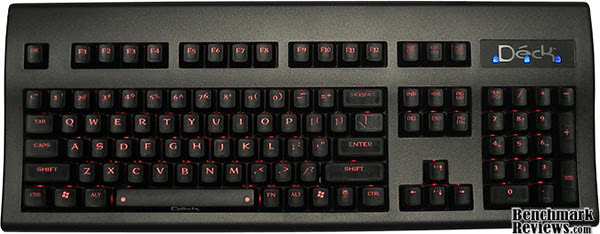
Each key is backlit by its own LED. A small "fn" key just to the right of the space bar is used with the 0-7 keys to set the LED brightness from off to full; alternatively, holding the "fn" key while pressing the up or down arrow keys will increase or decrease the brightness. They seem to take their modding claims seriously: Deck offers replacement LEDs and key caps, including a complete blank key cap set, on their web site, as well as providing instructions on how to solder in additional LEDs or paint the external casing if you wish. You can even buy replacement casings if your painting experiment doesn't work out.
After working with so many "clicky" keyboards, it took me a while to get used to the feel of the linear switches. While I still prefer the clicky switches, after an hour or so I was back typing at almost full speed. I say "almost" because the flat, unsculpted layout of the keys slowed me down a little. The Deck keyboard is the only keyboard in this review to offer double-shot keys whose legends cannot wear off.
Deck keyboards range in price from $119 to $176 depending on the model, key switch, and LED backlight color. They're available with either PS/2 or USB interfaces (and the latter does not include a hub).
| Price | $119.00 - $176.00 |
|---|---|
| Interface | PS/2 or USB |
| Switches | Cherry MX linear or clicky |
| Sculpted | No |
| Warranty | 30 day money back guarantee, 1 year warranty (even if modded) |
| The Good | Choice of layout, key switches, backlighting color; parts available |
| The Bad | No USB hub in USB version, flat key layout |
| Sum-up | Hacker's delight |
Dell SK-8115 keyboard
Expensive mechanical keyboards are all well and good; but let's take a look at some examples of what most people are actually using to see how they compare. We'll start with the Dell SK-8115, a keyboard included with many Dell computers sold to business and industry. You'll see in almost any business that uses Dell computers (in fact I saw two of them recently at the local Round Table Pizza). Dell refers to it on their web site as "USB keyboard for select Dell systems", whereas other sites refer to it as the "Dell compact USB keyboard". It's a standard 104-key layout with a very narrow bezel (thus the "compact" designation); the only oddity in the design is that the Windows key, alt key, space bar, and menu key are all about half again as deep as you'd expect, with the bottom edge of the keyboard bulging out to accommodate them. This surprising design touch actually does make a difference; using these keys felt easier and more natural.
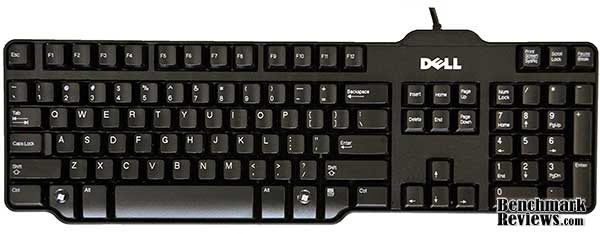
If the IBM Model M defined the computer keyboard of the 80s, this represents the standard computer keyboard of the 21st century. Constructed of thin, lightweight black plastic, with absolutely nothing that could be construed as an "extra feature", it's a pure typing keyboard, and Dell sells it new for $21.99. There are two customer reviews of the keyboard on Dell's web site and they both give it five out of five stars. There are no macros, media keys, backlighting, et cetera; it's just a very basic keyboard. So how does it compare to a mechanical keyboard for feel and usability?
After spending an hour or so typing on this keyboard, I was surprised to find that it's not as sublimely horrible as I'd expected. The keys are full-stroke desktop-style keys rather than the laptop style keys that are becoming more common on desktop keyboards, the key layout is nicely sculpted, and the rubber domes are assertive enough to imbue this keyboard with as much "key feel" as you'll ever get using this technology. The compact size is a plus if your desk space is at a premium. I couldn't type as fast and accurately on this keyboard as I could any of the mechanical models, but it's entirely usable. In fact, my wife, who's a professional programmer, thinks it's one of the best keyboards she's ever used.
Durability is an unknown, although it's likely to be far less than a mechanical keyboard. But durability wasn't a design criteria with this keyboard: it was designed to be cheap yet usable; just enough to keep a typical consumer going for a year or two, and if it dies, who cares? A new one is only $21.99!
EDITORS NOTE: It cost me less than $8 per unit to buy a 25-pack case of Dell SK-8115 keyboards, making them disposable.
| Price | $21.99 |
|---|---|
| Interface | USB |
| Switches | Rubber dome |
| Sculpted | Yes |
| Warranty | Unknown, but who cares? It's $21.99! |
| The Good | Cheap, compact layout, sculpted keys |
| The Bad | No USB hub, rubber dome switches |
| Sum-up | You could do worse. A lot worse, actually. |
Enermax Caesar keyboard
Our second non-mechanical comparison keyboard is the Enermax Caesar. This keyboard makes a visually striking first impression with its "diamond cut" keyboard bezel "embedded in massive mesh" (sic). All that metal imbues the keyboard with a rock-solid feel and gives it the heft of a vintage IBM Model M. Enermax is particularly proud of the mesh, with the box proclaiming "World's first meshed keyboard", as if this were the culmination of some long-sought keyboard industrial design goal. In reality land, though, the cool looks will fade rapidly as dirt and detritus collects in the holes of the mesh; keep a can of compressed air handy for cleaning it.
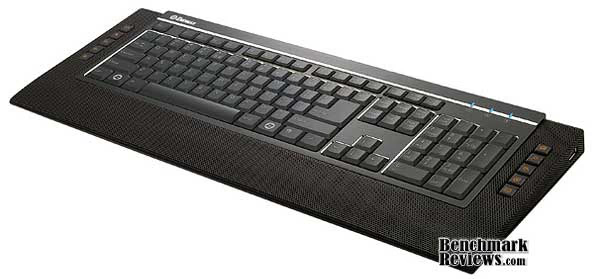
Enermax provides a number of extra features with this keyboard: it's a USB 2.0 hub, with an outlet on either side (preferable to outlets on the back); dedicated media control keys on the left (mute, volume up/down, play/pause, and stop) and dedicated Windows function keys on the right (mail, search, task flip, gadgets, and media center), none of which require any driver support. It's a less versatile approach than fully programmable keys but the driverless part is nice. The feet at the rear of the keyboard can be set to prop it up at two different levels, and built-in audio circuitry gives you plugs for your headset and microphone, as long as you've configured Windows to use USB audio I/O.
This is a very large keyboard, as wide as the Avant Stellar and almost as deep. The meshed area below the keyboard serves as a wrist rest.
The extras are all useful, but at the end of the day, it's about the typing, and that's where this keyboard falls down, for it uses what's basically a laptop keyboard (utterly flat keyboard layout with short-travel keys). For a laptop keyboard, it's very good: the keys are firm and non-wiggly (the key caps won't move or pivot slightly side-to-side as you type on them), and Enermax claims their special printing process will prevent the key legends from "bleaching". Actually, it's a great laptop keyboard - it reminds me of the keyboards on old IBM ThinkPad notebooks. But even the very best laptop keyboard simply isn't a very good desktop keyboard. A laptop keyboard is something you put up with given the space constraints of a laptop; there's no reason to put up with it on a desktop keyboard, especially one as large as this. Dressing it up with a flashy metal casing and extra function keys doesn't change this basic fact.
This keyboard is currently $62.99 at Newegg ($32.99 after rebate), but if you're more interested in typing than "massive metal mesh", you'd be better off with the Dell SK-8115.
| Price | $62.99 |
|---|---|
| Interface | USB |
| Switches | Rubber dome, laptop-style scissor key switches |
| Sculpted | No |
| Warranty | One year limited warranty |
| The Good | Visually cool, USB hub, driverless function keys |
| The Bad | The typing experience |
| Sum-up | Only if you value aesthetics over function |
OCZ Alchemy Elixir keyboard
Our last non-mechanical comparison keyboard is the OCZ Alchemy Elixir. This keyboard splits the difference between the Dell and the Enermax: a flat keyboard layout, but with full-travel keys. Like the Enermax Caesar, it has some pre-programmed macro keys for various Windows and Media Center functions, but it also has 5 blue user-programmable macro keys on either side of the keyboard, which you can set to emit a sequence of keystrokes or launch specific programs. Settings for the user-programmable keys can be assigned to a profile, and you can switch profiles on the fly.

The key layout is "standard 104 key" which two exception: there's no Windows key to the left of the space bar, presumably for gamers who hate to press this key accidentally, and the arrow and paging key arrangement has been compressed horizontally to make room for the function keys on either side. The result is a keyboard that's somewhat wider than most but not as wide as the Avant Stellar or Enermax Caesar keyboards.

Except for the dedicated Windows/media center function keys, which are hard plastic, the Alchemy Elixir's keys are coated with rubber. OCZ calls out this feature on the keyboard's packaging but does not explain why it's an advantage. I've never had a problem with my fingers slipping off the keys of other keyboards, but the feel of the rubber-coated keys is interesting. Unlike Enermax, OCZ makes no claim about the durability of their key legends, but they do include extra key caps for the ASWD keys, the arrow keys, the space bar, and one shift key. These extra keys are not mentioned in the documentation with the keyboard but are presumably intended as replacements for the original keys when the printing wears off.
One odd item emerged during my testing: when plugged into a Mac running Snow Leopard, the "User Event Agent" process, which mediates the control of USB devices, pegged one of the processor cores at 100% as long as the keyboard was plugged in. The keyboard still functioned perfectly, but this was a somewhat disturbing thing that I've never seen with any other keyboard.
As far as typing goes, this keyboard slots in neatly between the Dell and the Enermax: the flat layout means it's not as good to type on as the Dell, but it's much (much!) better to type on than the Enermax. The rubber domes provide some feel but not as much as the Dell. Where this keyboard wins is price: at $22.99 at Newegg, you pay a single dollar more than you would for the Dell for a total of 26 extra function keys, 10 of which are programmable. If you're willing to give up a little feel for a lot of extra functionality, this may be the keyboard for you.
| Price | $22.99 |
|---|---|
| Interface | USB |
| Switches | Rubber dome |
| Sculpted | No |
| Warranty | One year limited warranty |
| The Good | Lots of function keys, typing keys rubber coated, cheap |
| The Bad | Not as good a typing feel as Dell 8115 |
| Sum-up | Function keys and low price appealing if you're willing to compromise on feel |
Professional Mechanical Keyboard Conclusion
Which keyboard is best for you? Keyboards are an intensely personal preference; your favorite keyboard isn't likely to be mine, nor mine yours. Most keyboard advertising and reviews tout features that are irrelevant if you make your living in front of a keyboard; again, what counts is how fast and accurately you can type on it.
The price of keyboards I've looked at in this article vary by a factor of almost ten between the cheapest and most expensive, but if you make your living in front of a keyboard, price doesn't matter. A professional mechanic doesn't worry that his Snap-On tools cost more than the same tools at Wal-Mart, nor does a professional photographer begrudge Hasselblad or Nikon the thousands of dollars more their cameras command than a typical pocket camera. A mechanical keyboard is a professional tool, and they're priced accordingly. You're going to spend thousands of hours on any keyboard you buy, and scrimping here is a bad idea.
The mechanical keyboards fell into three groups: the Das Keyboard Ultimate and the Avant Stellar use the same Cherry key switches and have identical feel; the IBM Model M and Unicomp Customizer 104 with their somewhat heavier buckling-spring key switches, and the Deck Legend with its linear-travel Cherry switches. I can type faster and more accurately on any of these keyboards than I can on any of the rubber-dome keyboards. My personal preferences, in order, are:
Avant Stellar: Macro capability, remappable keys, and large "enter" key make this the overall mechanical winner. Very large size could be an issue for some.
Das Keyboard Ultimate: Same great key feel as the Avant Stellar, and smaller; plus you get a USB 2.0 hub.
IBM Modem M: The weight of computing history settles about your shoulders like a warm cloak as you crack your knuckles, lean back, and get to work.
Deck Legend (Tie, fourth place):Double shot keys and a lot of options, but the "linear" key switches and flat layout are turn-offs. Specify the clicky switches when you order yours.
Unicomp Customizer 101/104 (tie, fourth place): Real IBM ancestry and by far the lowest prices (not that it matters).
Of the rubber-dome keyboards, the Dell SK-8115 was surprisingly - almost shockingly - good. This would be a good keyboard to keep as a spare or for secondary computer. The Enermax Caesar keyboard is simply silly, and while the OCA Alchemy Elixir adds some useful macro functionality, I'd take the Dell SK-8115 over it every time.
Comments? Questions? Benchmark Reviews really wants your feedback. We invite you to leave your remarks in our Discussion Forum.
Reader comments from the original article
19 comments were posted before commenting closed. They are preserved as written. Original avatars no longer resolve and are shown as a placeholder.
RE: Professional Mechanical Keyboard Comparison Matt Permalink:
I got my Customizer 104 yesterday. I'd been getting pain while typing on my old keyboard but today on the Customizer is the first day of pain-free typing I've had in months....it's great.
RE: Professional Mechanical Keyboard Comparison Christian Permalink:
I miss the Cherry G80 on the list. Almost as old as the Model M, still in production in a great variety of models (chipcard reader, finger print sensor, etc) and still with this great feel. As an extra feature it brings the knowledge, that if it doesn't work properly it isn't broke (actually I don't think you can break it) it is just really dirty. In this case, I put all non-electrical part in the dishwasher and put it back together. By the way, mine has still this big round connector found in the old AT machines before the PS2-connectors where introduced and no Windows key.
RE: RE: Professional Mechanical Keyboard Comparison David Ramsey Permalink:
I didn't have any Cherry-branded keyboards because Cherry (while they supply mechanical switches for many other vendors' keyboards) doesn't have a consumer retail presence any more; you can still get their keyboards, but they're aimed at industrial users, POS systems, and the like.
RE: RE: Professional Mechanical Keyboard Comparison Christian Permalink:
First of all: Nice to see a comment answered that quickly at an article almost two years old. On the topic: It is sad to hear that Cherry isn't present in the consumer market in the US anymore. Here in Germany you can buy Cherry products in every good online store as well as the small retailer around the corner. But I admit they sell G83s, it maybe harder to get an G80 here as well. If you can't get one in the US without a problem, than you were right not to test it. But as you said in the article, a keyboard is a very personal thing, and it makes you a little sad when your favourite is not included in such a test
Megakeyboard Vakesakeum Permalink:
Khhhhhhh!!!! It seems i nearly become a keyboard geek with this awesome device :)
Unicomp vs Original Model M asalina Permalink:
I bought two of the Unicomp keyboards because they were advertised as being Model M clones. I have old Lexmark Model M's as well, and the Unicomps are junk by comparison. The plastic of the bodies is cheap and brittle whereas the old Lexmarks were made of ABS plastic. The keys stick and on one the TAB key triggers by itself. Since the key switches are of a monolithic design (one large plastic panel of key switches) they cannot be replaced individually, like the old Model M's. The Unicomp keyboards may LOOK like the original Model M's but they are of much lower quality. I'm not happy with them at all. Caveat Emptor.
RE: Unicomp vs Original Model M David Ramsey Permalink:
I've been very happy with the Unicomp keyboard I had-- the Customizer with grey keys mentioned in this test. What model did you have these problems with?
RE: RE: Unicomp vs Original Model M asalina Permalink:
Mine is exactly the same model as yours: 42H1292U. Just now, before replying to your post, I had to swap one of the function key plungers with the TAB key that's been giving me trouble. I think the problem is deeper than just the key plunger, but we'll see. So have you compared your Customizer with an older Lexmark-manufactured Model M? To me the Unicomp is like so many things made these days; they're like stage props compared to the things they're made to resemble. According to the history of the Model M at Wikipedia, Lexmark made the keyboards /for/ IBM, so they were held to IBM's standards, but when their contract ran out and they sold the patents to Unicomp there was no more impetus to maintain those standards.
RE: RE: RE: Unicomp vs Original Model M asalina Permalink:
P.S. I need to correct myself slightly here. Above I said "According to the history..." when I should have said "Going by the history..." The Wikipedia article does not imply that Unicomp lowered its standards; that's just my opinion.
RE: RE: RE: Unicomp vs Original Model M David Ramsey Permalink:
None of my 3 Model M keyboards say anything except "IBM" on their labels, so I'm not sure if I have any Lexmark-manufacturered units. The key feel of the Lexmark is slightly different, so perhaps the mechanism was changed at some point. I sold the Lexmark a while back to a friend who's a graphic designer and she still loves it. I suppose you could have simply gotten a lemon; it does happen.
RE: RE: RE: RE: Unicomp vs Original Model M asalina Permalink:
I think only Lexmark made IBM branded Model M's, so if yours have the IBM badge then they are probably Lexmarks. (The label on the underside might give more info.) Regarding the different key feel, that may be due to use of different materials rather than design. I've had both the Unicomps and the Lexmarks open and they seem to have exactly the same design. Yes, I believe these are lemons, but lets remember that I bought two of them and both have problems. That's not a good batting average. Anyway, thanks to your article I've been able to check out other brands of keyboards and have just ordered a DAS "Professional S." My thinking is that if it ever gives me trouble I at least have the option of replacing its Cherry MX blue key switches myself. I'm proficient enough at soldering so it shouldn't be a problem. Thanks for the reviews, asalina
Chief Opinion Officer Opinionated Guy Permalink:
For the record, Lexmark *IS* IBM. In 1991, IBM sold its printing / imaging business to an private equity firm, and that became Lexmark. They got the keyboards, too. This is much the same as the way IBM's personal computer / laptop division was spun into Lenovo.
I betcha kemohomo Permalink:
I bought six UNICOMP keyboards. Surely, quality is terrible. #1 almost no problem (customizer 101) #2 F2 keycap is slightly corrupt (customizer 101) #3 Backspace is noisy, tenkey '8' is not smooth #4 locking mechanism of stand is weak #5, #6 no problem (new spacesaver 104PC). The key feel is lighter than customizer. But UNICOMP is cheaper than original. I have several model M (three Lexmark and one 1390120). The key feel is different, but I also love UNICOMP's feel though quality is quite low.
RE: I betcha David Ramsey Permalink:
I could only judge the sample I had. There are many companies making mechanical keyboards today, more than there were when I originally wrote this review two years ago. You should be able to find some very nice keyboards from the likes of Deck, Razer, Filco, and others.
Keycaps look pad printed Pete Permalink:
The arrow keys in your shot appear to be pad printed and basically looks like a sticker. I wonder how well these sold since the keyboard snobs would have noticed that? I would really like function keys on the left but not on top, like that old IBM model I think it was the F. Have not found one in my research. I looked at a lot of these pricey new mechanical boards but decided to go with a nice refurb Model M for far less money. Couldn't be happier with it except for a bit of looseness on the backspace. Good write up though.
I meant on the Avant board Pete Permalink:
I didn't realize this was for all pages so I meant the keys on the Avant.
RE: Professional Mechanical Keyboard Comparison David Ramsey Permalink:
I don't have the Avant keyboard any more, but it does look as if you're correct, at least for the up arrow key. It's a moot point since the keyboard appears to have been discontinued.
Every day at work Anthony Permalink:
This is my every day keyboard at work, as a web developer. I need it's "classic layout" to type at full speed, and it gives a nice click stroke/depth/impact. A colleague spilt coke all over it, and I'm ordering another today.
Do NOT buy a unicomp unicompsucks Permalink:
Purchased this keyboard. Constant usb cut out, no other keyboard has this problem. Spent shipping cost, while under warrenty to have it repaired. They charged me 40 dollars to fix it because it was 'not covered'. Got the keyboard back, same random turn off problem DO NOT BUY A UNICOMP