
Genius Imperator Pro Gaming Keyboard
Manufacturer: Genius, KYE Systems Corp
Product Name: GX Gaming Imperator Pro
Model: Imperator Pro
UPC: 091163239123
Price As Tested: $75.61 (Amazon)
Full Disclosure: The product sample used in this article has been provided by Genius.
Genius introduced a strong lineup of gaming peripherals this year and today we will take a look at the GX-Gaming Imperator Pro MMORPG/RTS Gaming Keyboard. This is based on the Imperator baseline model except with extra features that you may want in a premium keyboard. Benchmark Reviews takes a look at this product today to see how well it stands against competition.
The GX series has 2 keyboards, the Imperator normal and pro editions. They are essentially the same keyboard except the Imperator Pro has 2 additional features: USB ports and 16 million color backlighting. They differ by about $40.00, which is a hefty premium to pay for these 2 additional features. I personally feel that's not a great deal, but there's no denying that a keyboard with backlighting looks significantly better.
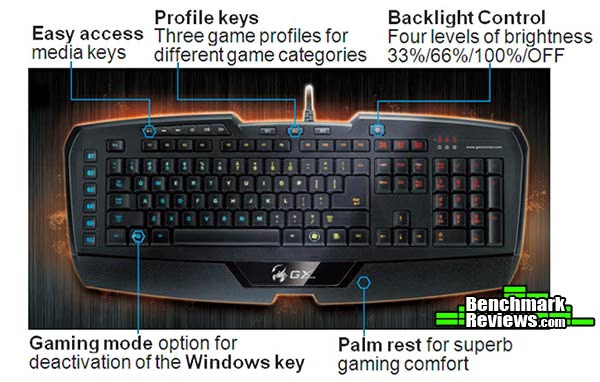
The Genius Imperator Pro uses classical rubber-dome keys. Mechanical keyboards are in general thought to be better for gaming, but classical rubber dome keyboards are equally good for many games. They also have a much better overall feel for typing and less prone to problems such as registering double-taps or accidental typing. For it's price tag, the Imperator Pro is no doubt an expensive gaming keyboard as you can grab some of the best keyboards made to date for this price. BenchmarkReviews will dive into more detail in this article.
Imperator Pro Features
- Easy access media keys
- Macro profiles & quick toggling
- Backlight Controls
- Gaming mode
- Palm rest
Imperator Pro Specifications
| USB Port |
2 |
|---|---|
| Media Keys | 6 |
| Backlight Key |
1 |
| Profile Keys |
3 |
| Programmable Macro Keys |
6 |
| Weight |
875g |
| Size (L x W x H) cm |
55 x 20.45 x 3.35 |
| Cable |
1.8m |
Closer Look: Genius Imperator Pro
The Genius Imperator Pro comes with the Imperator Pro MMORPG/RTS keyboard, driver CD, and a multi-language quick start guide. The drivers are only compatible with Windows so this is not a keyboard for gamers using Macs.
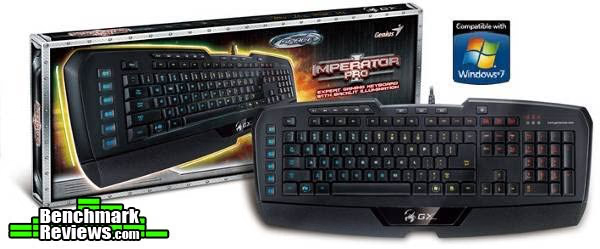
The overall look and feel of the Imperator Pro is solid. The keyboard definitely has some areas that are worth noting.
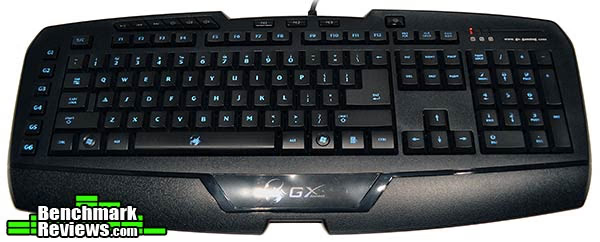
The "Enter" key spans two rows with the backspace compressed. This takes a week or so to get used to. It's a more popular keyboard layout in Europe than in the US. The F1-F12 keys are smaller than the rest of the keys which may be annoying for games that require function keys. The Imperator Pro doesn't look bad, but it's not particularly stylish either. The design, including font and hardware design, all seem slightly out of place. I also never understand why Genius is inclined to etch their website url on the keyboard, not to mention navigating to the site, the only thing I found by browsing there was a server having clear performance issues.
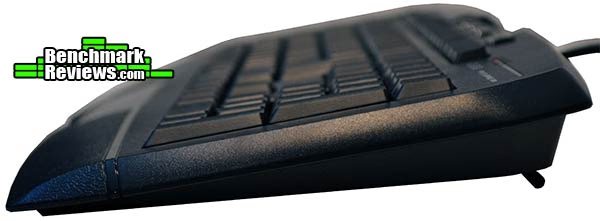
From the side we can observe the design of the keyboard a little more. Unlike Razer or Corsair's latest keyboard additions, you can see the exterior is not a huge departure from standard USB keyboards. The keys are also designed to be close to the surface of the keyboard. Pressing a key down will essentially level it with the surface. The back feet isn't necessary for using the keyboard given how the keyboard is already slanted, but for those who want some extra angle it's there for you.
The Imperator Pro keyboard comes with standard media keys present on most keyboards these days. However I'm extremely disappointed that you cannot press and hold on volume to make adjustments. Instead you have to continuously tap on it. If you were going from high volume to low, you would need to tap almost 50 times (going from 0 to 100% is 50 taps).
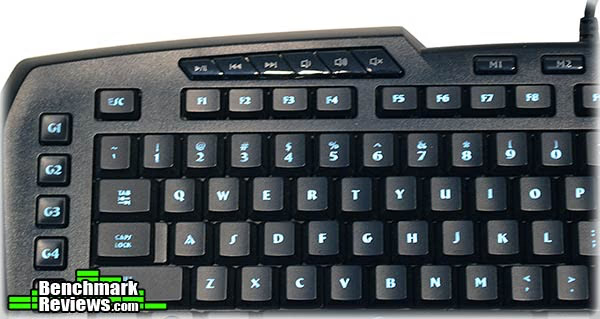
The macro keys are laid out on the left side of the keyboard. In general these are pretty hard to use during intense games like Lumia (so I found out) due to the positioning. However for games like Starcraft, this could be huge. You could program the macro keys to be something like "9-s-ddddddddd" which will select all your bases (assuming you keyed it to 9), and build out all drones, which is much faster than clicking it out yourself. I'm a huge fan of macro keys because if you know what you're doing, it can improve your game for sure. The upper limit of commands that it can remember is 40 (keypress and keyup are separate actions). Would've been nice to have a higher upper bound but pressing G1 twice beats pressing "d" 20 times any day.
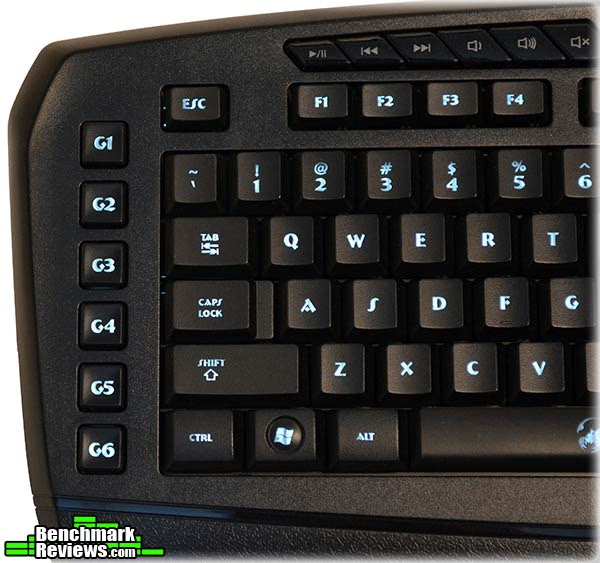
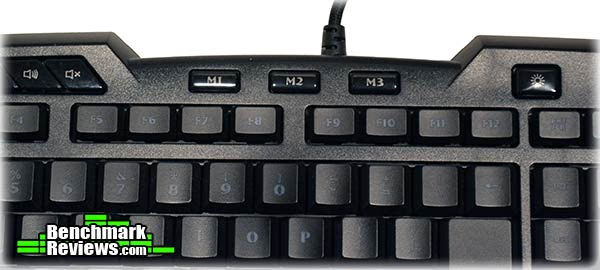
Even better, the Imperator Pro has 3 profile toggles for immediate profile switching. I like 3 distinct buttons so it makes on-the-fly macro toggling possible and faster and less error prone. On the right side there's also the lighting toggles, which lets you choose brightness and pulsing. However in terms of design choice I feel Genius has again lacked thinking. On this keyboard there are 6 types of buttons, all with different look and feel (normal keys, function keys, profile, media, macro, and lighting). Hardware's visuals is critical for a gaming keyboard's success and I hope Genius's design team can learn a couple tips from other large peripheral manufacturers.
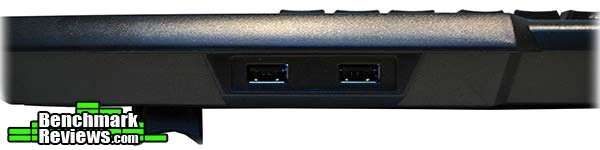
Last but not least, the Genius Imperator Pro also has 2 USB docks for easier access. Since the keyboard is fairly thick in the back, even the fatter USB accessories can be used here. There's also enough spacing between the ports to use both at the same time.
After taking an initial look at the Imperator Pro, there's some mixed feelings about it. It has all the features it needs to be a top tier gaming keyboard but some parts of it just aren't very user friendly, and the visual design of the keyboard needs some additional thinking. These are the fine edges that Genius needs to smooth out in future products to compete successfully with today's top companies. In the next section BenchmarkReviews takes a closer look at the software and drivers.
Genius Imperator Pro Detailed Features
In this section we'll take a closer look at Genius Imperator Pro's software. We're using version 1.3.0.
The main page of the Imperator Driver allows you to select macro key functions. A set of pre-defined macro functions are already present, including (ironically) media key controls that also don't register press-and-hold. What I don't like about the driver is that it's slow. Opening the drivers takes anywhere from 5-10 seconds, and applying a change takes a couple seconds as well.
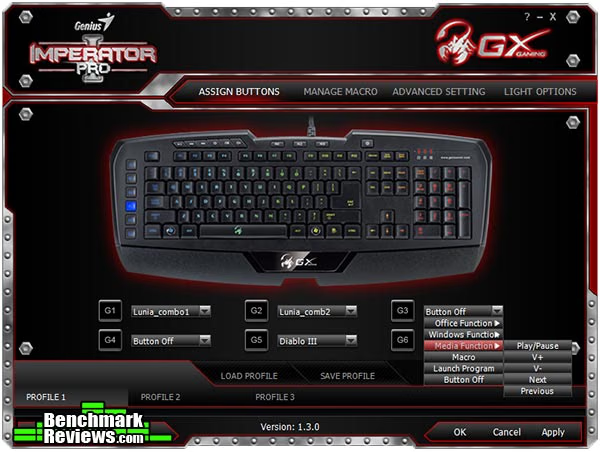
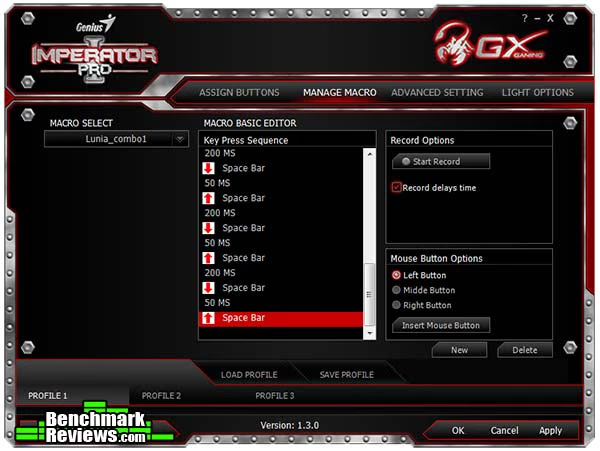
The Macro Editor is the key feature of this keyboard, and it works very well. Not all games are suitable to use macros, but if you can creatively figure out where you can save the most time, macro keys will do wonders. As mentioned earlier, for StarCraft you can keybind base to "9" and then program a macro that presses "9" and spams the keyboard shortcut for worker units. You will be able to instantly macro up with little effort (just press the G1 key every minute or so).
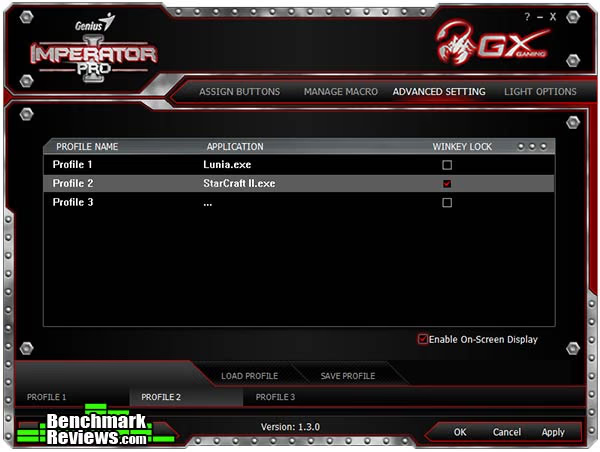
Under the "Advanced Setting" tab really is just macro profile settings. In addition to toggling between profiles, we can bind certain profiles to applications by default so that on-launch the profile switches automatically.
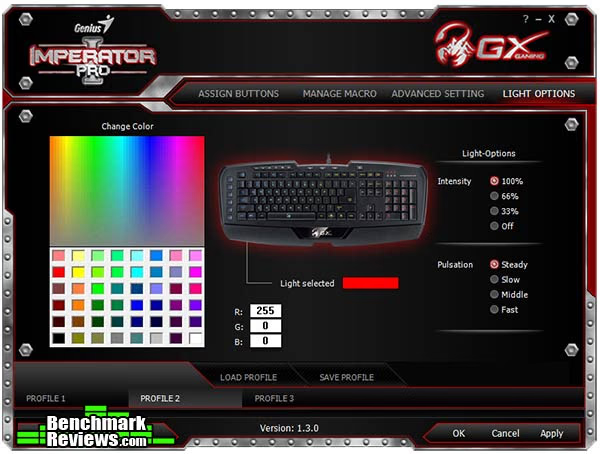
The last part of the driver allows lighting configuration for the keyboard. If we assume a USB port is worth $10 or so, then this is the $30 extra feature the Imperator Pro has over the standard edition. There's a variety of lighting settings, though nothing out of the ordinary. This lighting configuration works just like the Genius's gaming mice so if you bought a set they'd match, at least for lighting.
The Genius Imperator Pro drivers are solid. There's some performance tweaks that could make it more usable but functionality-wise it's great. While slightly lacking compared to Razer for style/usability, it certainly is a huge step up from Corsair's semi-broken beta drivers that were shipped with their latest keyboards.
Testing & Results
Testing Methodology
This keyboard was used as the primary keyboard over a period of 3 weeks. In addition to producitivty software and everyday browsing, the Imperator Pro was tested in several games: Crysis, StarCraft 2, League of Legends, and Might & Magic VI.
Test System
- Processor Intel i7-920
- Video Card: Nvidia GTX 285
- RAM: 16GB DDR3
- Monitor resolution: 1920x1080 pixels
Test Software
- StarCraft II
- League of Legends
- Diablo III
- Crysis
- Might & Magic VI
- Lunia
Results
Getting used to the Genius Imperator Pro took a while. The low keys, small back-space, and proximity of keys make it difficult to get the feel for. A mechanical keyboard would feel much more easy to get used to in comparison. Somehow due to the layout I feel the keys are slightly compressed. But I haven't noticed any drop in typing speed or increased mistake.
The macro performance was excellent in games. Naturally having a string of long macro commands can be troubling when you're carrying other actions at the same time. What's fun however is you can press a macro and arbitrarily stop it at anytime by hitting the macro again. Some of the most popular games today include StarCraft, Diablo, and League of Legends. Smart usage of macro keys can save you a lot of effort in these games. For example StarCraft is the perfect game for binding building commands to macro keys. League of Legends can also benefit by sequencing specific spell orders using smart-cast keys. For example Katarina's W -> Q -> E -> R combo, or Veigar's Stun then Deathfire Grasp item -> E -> Q -> Ul. Guaranteed no misclicks/mistakes. Because there's a delay between each command, we can record the macros by adding on-press events first then release keys after all key-down actions are done.
Unfortunately there are also some usability issues with the keyboard during day-to-day use. For example the volume control is essentially unusable. The positioning of the window key is also much closer to the left side, causing misclicks from CTRL to activate the windows key a lot. Luckily in game, the windows key can be disabled.
One interesting thing is the Imperator Pro can only handle 5 simultaneous key-presses at once. Any more than that and the keyboard simply ignores all keypresses at once. This is unfortunate for DDR-type game players.
Overall the Imperator Pro is a solid keyboard, delivering a lot of features, even though there are some rough edges.
Gaming Keyboard Final Thoughts
The Genius GX-Gaming family is comprised of many gaming peripherals, from mice, to keyboards, to audio systems. However when we look at the photos, none of them seem to belong in a set. If we switch over and look at Corsair's latest gaming family, you'll instantly notice the individual peripherals come together, visually, very well. Being new to the market, Genius should look into selling gaming equipment bundles but at least now the design seems all over the place. While it might be nice to have individual items that work very well, for $100 a piece, I'd sure like to get that visual spark. This is something other brands do much better than Genius.
Genius Imperator Pro Conclusion
Genius has delivered a solid gaming keyboard. The Imperator Pro has a large set of features, including programmable macro keys, keyboard profiles, 16m color lighting, media keys, and 2 USB ports. When any special onboard keys are used (not including standard keys and macros), a small text-only display will show up letting you know. For example if you toggle between profiles, the text will say which profile you've switched to. The Imperator has captured all of today's most common features present in today's high end gaming keyboard.
Traditionally Genius has always been a little lower among the ranks when it comes to visual design. The Imperator Pro is mediocre when it comes to visuals. They made attempts to use a high-tech looking font, using small caps for key descriptions, and shaping the keyboard nicely. However when you're holding the actual thing, it does not particularly stand out on the desk, except for the backlight. Genius for some reason loves placing their website URL on devices (whether keyboards or mice).There's also 6 types of buttons designs being used on one keyboard. The Caps/Num/Scroll lock light is also unchangeable and always glows a bright red. While as a whole, the device looks fine, it lacks a lot of details that other companies have captured.
The construction of the Imperator Pro is impressive. The thickness is just right to feel solid and strong. Every key feels solid gives good tactile feedback. There has been no quality issues discovered either, such as faulty keys. Rubber dome might be condemned as inferior to mechanical cherry switches for gaming, but if you don't find yourself in a spam-heavy game (where you spam 1 key continuously), then this keyboard will work great.
Functionality-wise, Genius has some finer details to consider. The keyboard media volume control doesn't register press-and-hold making it essentially useless as each individual press is only 1/50th of the full volume bar. The software also has some performance issues. These might not be deal-breakers but to be a top-tier keyboard these details need to be flushed out.
Value-wise, $75.61 (Amazon) is a hefty price to pay, especially when you can get the same keyboard for a much lower price if you're okay with giving up a keyboard USB port and the lighting. Genius also put its price right in line with Razer, Steelseries, and Corsair. There are some definite alternatives to the Imperator Pro at this price range so I can't say this is priced competitively, especially since they're still trying to establish their market in the US.
Overall I'd say this is an OK buy. Genius focuses on delivering the right set of features and at times have an oversight on some smaller details. I would say if you cared less about the appearance, then grab the Genius Imperator for at a much cheaper price but get all the high-end features you need.
Pros:
+ Programmable Macro Buttons and multiple profiles
+ 16m Color lighting
+ Quick profile toggling
+ On-board USB ports
Cons:
- Microsoft Windows Only
- Media keys - Volume controls have usability issues
- Expensive enthusiast product
- Some poor design choices (UI and feature)
- No anti-ghosting, only allows 5 simultaneous key-presses
Ratings:
- Performance: 9.25
- Appearance: 8.50
- Construction:9.25
- Functionality: 8.75
- Value: 8.00
Final Score: 8.75 out of 10.
Benchmark Reviews invites you to leave constructive feedback below, or ask questions in our Discussion Forum.
Reader comments from the original article
3 comments were posted before commenting closed. They are preserved as written. Original avatars no longer resolve and are shown as a placeholder.
Meh, Me Too.... Mergatroid Permalink:
So many companies seem to think that if they give you a row or two of macro keys and a few profiles that it makes a gaming keyboard. Sorry, there are many gaming keyboards available now, and a lot of them are better than this keyboard. No mechanical keys, no dedicated gaming keys (just macro keys). Meh, I'll stick with what I have. I would like a keyboard like the Merc Stealth, only with mechanical switches on ALL the keys, backlights (RGB backlights, with each key programmable for different colours would be best) and add some macro keys as well. I would be willing to pay a couple hundred bucks for a keyboard like that. I love the merc stealth design, but not so much the switches they used. Now I'm using a BW Ultimate and it will do until something better comes along. I guess this company missed or ignored the trend to mechanical keys on gaming keyboards. Now that I've tried them, I won't go back.
media keys zak kemp Permalink:
The volume-control media keys not registering press-and-hold is a driver related issue. If you uninstall the Imperator Pro driver then it will work presing and holding the volume control keys, as well as any other keys that you've programmed to have that function. When the driver is installed you will also not have the ability to play and pause windows media player with the dedicated play/pause media key. If you press it there will appear a notification in the bottom left corner of your display that the key has registered; however, it simply will have no effect on windows media player. Just like with the volume control keys, this issue will be fixed by unistalling the driver and using the keyboard with no software running in the background. This is more of a work-around than a solution, though, and hopefully Genus can release a driver/firmware update that will resolve this issue. Apart from this very unfortunate issue, it is a nice keyboard, especially if you pair it with other peripherals that also allow you to change the colour of their LEDs, like the Razer Mamba and Naga Epic.
Keyboard SUCKS Silverback784 Permalink:
Positive points: Lighting good and media keys ok NEGATIVE : can not use one side of the macro or any other macro key ( in other words you have to have a button and a button up (only momentary ) never hold on so you can't use TS or any other voice chat. Definitely not what I wanted.