
NZXT Sentry LX SEN-001LX Digital Fan Controller
NZXT Sentry LX SEN-001LX
With multiple core CPUs, multi-GPU video graphics sub-systems and hotter than hot mainboard north and southbridge chipsets it becomes necessary for most gaming computers to have more and more fans. With the fans comes noise. Of course there's water cooling, but not everyone is capable or even brave enough to give that a try. So what do you do? Well one option is to use a fan speed controller. There are many fan controllers available but today Benchmark Reviews will look specifically at the NZXT SEN-001LX Sentry LX aluminum digital dual-bay fan controller.
The NZXT SEN-001LX Sentry LX Aluminum dual bay fan controller has a beautiful brushed aluminum black anodized finish and a large multi-colored LCD screen. The screen shows temperatures and fan speeds for 5 different temp sensors and 5 different fans. It also has a clock and calendar. The unit allows for full adjustment of the five fan speeds individually among other things. Let's take a closer look at the Sentry LX and see if this is just eye candy or the real deal.

NZXT Sentry LX Specifications
-
Large dual 5.25" LCD screen
-
NZXT designed intuitive control, set and change fan speeds and settings on the fly
-
Auto/Manual modes, let the LCD take control or set fan speeds to your liking
-
Temperature alarm
-
Aluminum finish
-
NZXT Designed graphical interface, easy to read and understand
-
Saved Settings, calendar and fan settings are stored even during system off so settings don't need to be redone
-
Supports up to 4Watt per channel
About the company: NZXT
NZXT, a company built upon gamer's dreams, hopes to create products that put consumers first. With the objective of designing unique products catered for hardware enthusiasts and gamers, NZXT has grown into a globally renowned brand recognized for dedication towards creating the next great gaming product. NZXT has won numerous awards from media and publications from across the globe with a product line spanning from gaming chassis, power, and gaming input devices. As a corporation formed by gamers, NZXT continues to expand into new horizons and push the limits further with each product unveiling.
Our dedicated sales and customer service team will work diligently to earn your trust and loyalty. All our products are built with high quality material and engineered in the best conditions.
NZXT was established in 2004 in Los Angeles, California. NZXT products are designed and engineered in the United States and manufactured overseas in China and Taiwan.
Closer Look: Sentry LX
The Sentry LX SEN-001LX arrived to me double boxed. Inside the shipping box was a very attractive full color box. The simple box layout clearly described exactly what was inside and exactly what it does. Notice the simple blue boxes near the top that easily and clearly list the Sentry LX features.

Aside from the very nice looking box, it's what's inside that really matters. Inside the box is this gorgeous front LCD panel display. The front is black anodized brushed aluminum. This would match perfectly with many NZXT aluminum cases. It also matches very nicely with Lian-Li black anodized aluminum cases. The LCD comes with a clear protective screen. You'll want to remove this before using. My unit made it to me with zero damage and came out of the box looking perfect. You'll need two open 5.25" external bays to install this controller unit. This unit will screw into place exactly the same as any standard CD/DVD ROM.

The entire unit structure is made of aluminum. Along the left side are the controls for the unit. The LCD is an odd shape. I think NZXTs goal here was a little bit of a futuristic look. I think they pulled it off quite well. The LCD has two distinct parts to it. On the left is the clock with calendar as well. To the right are the 5 fan indicators and 5 temperature indicators. Read on to see the unit fully lit up and running. It's quite attractive. Of course beauty is in the eye of the beholder but I think this design is appealing enough without being too over the top. Next shot is the profile.

As you can see pictured above the Sentry LX will use the lower of the two CD/DVD mounting holes in your case. This should work fine in most screw less/tool less designs as well but for this I'd suggest using screws. It's not heavy but you don't want any wiggle when pushing buttons during fan/clock adjustments. Although the Sentry LX takes up two external 5.25" bays it's worth mentioning that it is not as deep as a CD/DVD drive.

The accessories bundled with the Sentry LX are quite sparse. Included are: 4 mounting screws, one CR2032; this is a standard motherboard battery so it will be easy to find when it needs replaced, and orange tape. The tape is used to fasten the temperature sensors to your various heat sources. Honestly what more would you really need for a control unit like this? I can think of one thing. I get into that later on. Read on.
SEN-001LX Detailed Features
This section will focus on the details of the Sentry LX fan control unit. Firstly we see the beautiful finish. The finish is horizontally brushed aluminum. The perimeter of the Sentry LX LCD is diamond cut to an almost chrome finish. Very nice accent against the dark black finish. This black anodizing is very black by the way. I've seen many different degrees of black on anodized aluminum from a purplish black to dark black. NZXT definitely has their anodizing down, this is a nice dark definite black.
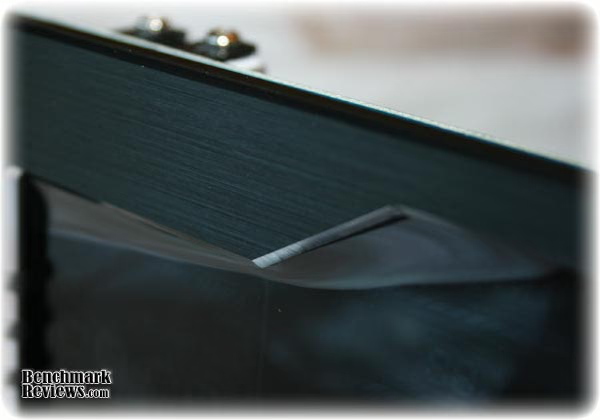
The finish is well done and will compliment almost any black case regardless of the material used on the case. Below are the controls for the NZXT Sentry LX. From the top down is the up/down (increase/decrease) adjustment buttons. You will use these to set your time, day, alarm on/off and fan speeds. The up arrow key when held will switch the unit between Celsius and Fahrenheit. Below these is the set button. This is used to scroll through your temperature probes and set each probes "alarm" temp; default is 70c. You can set each of your five probes alarm temps individually. When temps get too high, the Sentry LX gives you an audible warning. Next is the mode button. This will switch the Sentry LX between auto mode and manual mode. Auto mode will control your fans according to system temps. NZXT does not mention anything more on that subject... Manual mode allows you to individually adjust each of your five fans to your liking.
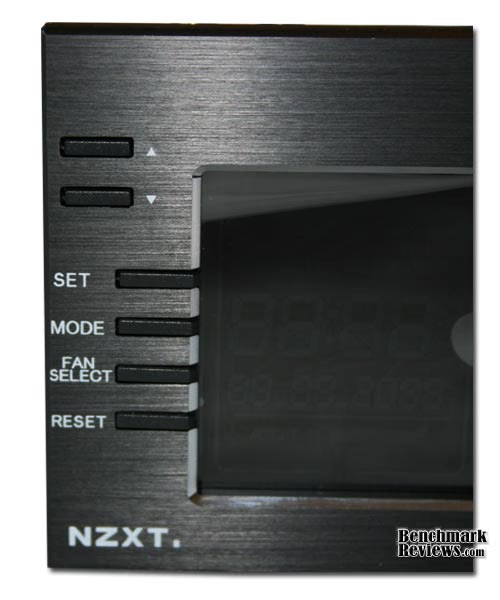
The fan select button is used while in manual mode. This switches between each of the five fan controls and will allow you to set each fans speeds individually. When used I've found my fans to respond almost immediately to input from the unit. This will show the actual fan speed in a digital format and the LCD shows an animated spinning fan which spins faster or slower depending on actual speeds. The last button is simple, it resets the unit to factory defaults. Now I do believe this is a necessary function, however I do think they could have been a bit smarter with their application of this feature. Say a flush small circular button that needs to be pressed with a pencil tip or something? This button is the same as all the others and very easily mistakenly pressed or bumped by accident. It could get frustrating if you spend your time setting this unit up perfectly to your liking and then move your case and bump the button... poof all that work is gone. Something NZXT needs to think about if they ever revise this or move to a Sentry LX II maybe.
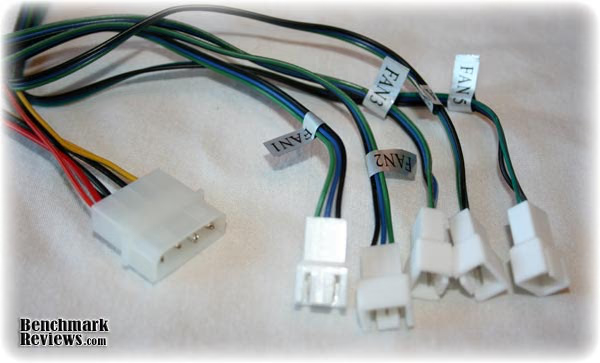
Here are all the fan connections and the main power connector. Now remember earlier when I mentioned there is one more thing I could ask for? This is it. The Sentry LX only has connections for 3 pin fans. No adapters are included for the standard 4 pin molex fans. I can understand their thinking to a degree, they want three pin fans to be used so the Sentry LX can tell you the actual RPMs on the LCD display, however they make no mention of the need for 3 pin fans anywhere except in their instruction manual. If you are reading the manual you've already bought the controller and if you have 4 pin fans, you are now stuck. The inclusion of adapters would be nice. It would also be nice to know prior to purchase that this controller only supports 3 pin fans. After all, this controller would certainly control two wire (4 pin molex) fans just fine but would lack the ability to display the speeds on the LCD. I do want to mention that NZXT has fixed this issue with their newest fan controller the Sentry 2 (which I am reviewing now so look for it very soon) with integrated 3 pin/4 pin plugs. It has both ends much like a fan with both types of connectors wired together. Kudos for NZXT but that doesn't help Sentry LX owners...
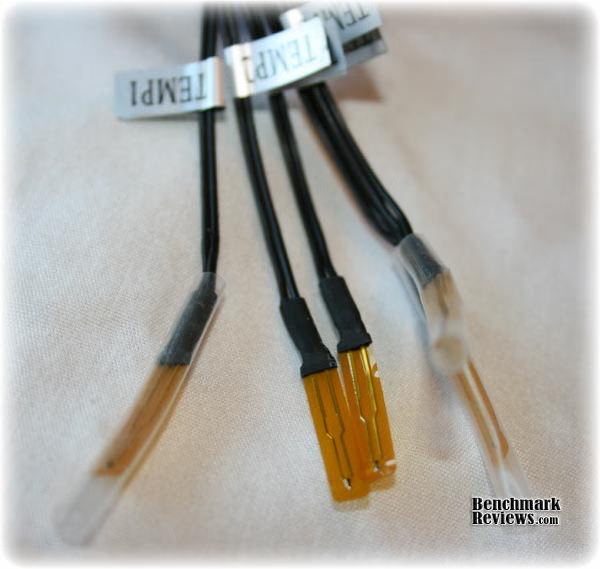
Here are your five temperature probes. They are protected in a plastic film just like electronics ribbon cables. NZXT recommends taping these probes close to their corresponding fans. This isn't bad advice but in the case of a CPU cooler such as the Xigmatech s1283 or the Thermalright TRU where the fan is raised quite a distance away from the CPU (heat source) you'll be better served by placing the probe as close to the actual CPU as you can. Another example might be a harddrive. It would be better to put the probe on the hottest part rather than close to the fan. Putting the probe too close to the fan may give inaccurate and lower temps than actual resulting in lower fan speeds and hotter hardware. This would be especially true in Auto Mode.

Here is the Sentry LX installed and running in my Lian Li PC7B Plus II case. It fits perfectly and is every bit as dark as the Lian Li case. It may not appear so in this picture but I assure you it is. If you own a black aluminum case you know depending on the grain of the brushed aluminum it reflects light differently on different panels. The Sentry LX doesn't look out of place or too over the top in my conservative Lian Li mid tower.
Sentry LX Final Thoughts
The Sentry LX certainly looks great and it works great as well. I had only two issues with this unit. One, the included battery was not strong enough to maintain the saved settings which resulted in losing all user settings and day/time settings each time the computer went to sleep or was restarted. Not a big deal really, but it did hold me up a bit during my review while I made a trip to the store to get a couple fresh batteries and two, the fan connections are 3 pin only. Again, not a deal breaker but some warning on the box would be nice as would the inclusion of 4 pin adapters.
Given those two issues I still believe the Sentry LX to be a very capable and solid fan controller. If offers solid control of up to 5 fans while showing fan rpm right on the screen. It also clearly shows your component temperatures at a glance. This is nice and could be handy for gamers. You can monitor all temps at a glance without the need to "alt-tab" out of game to see or make adjustments while in game for that matter.
You will want to take your time when placing the thermal probes. Patience and a bit of forethought will pay big dividend here with a clean looking installation and accurate temperature readings.
SEN-001LX Conclusion
The Sentry LX arrived to me double boxed. Inside was a very nice colorful and well laid out retail box. Clear glossy color photos of the Sentry LX were there as well as the list of specifications. All this was laid out in a very easy to read and understand format. For such a small box it had more than enough information and best of all those beautiful color pictures of the product. I'd say this box would definitely catch your eye if you were shopping the local computer store.
The Sentry LX itself is just gorgeous on the outside. The fit and finish was perfect. The color of the anodized aluminum was jet black with which should lend itself to many computer cases available today. I mean, it's black, what doesn't go with black? The LCD has several colors to really stand out when turned on. These colors and the size of the LCD make for one big statement. This unit has a lot of WOW factor!
The outer shell being constructed mainly of aluminum is very durable and very attractive. The inside is a bit more vulnerable with the circuit board completely exposed. I suppose this is par for this type of device but that is no reason to not consider improvements. All in all once installed, most users should not have issues with the internal circuit board but just like any other internal exposed board like the mainboard itself, it would not take much to damage the exposed components.
For the short time I worked with it, the Sentry LX performed flawlessly for me and with very little effort I was able to pull temp readings that were very close to what I was seeing with software monitors such as EVGA precision, cpu-z HWmonitor and cpu-z. This confirmed to me the accuracy of both the software monitors and the Sentry LX temperature probes. The Sentry LX was very sensitive to temp changes and updated its LCD readout on the fly immediately.
Available at NewEgg for $59.99 the Sentry LX is one of those items that even if it didn't work as well as it does, it still might be worth the price for the cool factor! With the cool factor and the ability to control 5 fans and monitor 5 temps, I think it's a good deal. Most of the competition can only control the fans and won't look half as cool while doing it!
Without a doubt I can easily recommend this fan controller to any gamer that is looking for solid control and who also wants to add a nice touch of bling to your case. Not as simple as standard knob controlled rheostats but definitely a lot more exciting with the visual perks while doing the same job.
Pros:
+ Solid construction
+ Beautiful appearance
+ Large LCD readout screen
+ Easy setup
Cons:
- Included battery was dead
- Only 3 pin fan compatible as shipped
- Temp probes add more work and clutter over standard fan control
Ratings:
-
Presentation: 9.00
-
Appearance: 9.50
-
Construction: 8.75
-
Functionality: 9.00
-
Value: 7.75
Final Score: 8.8 out of 10.
Quality Recognition: Benchmark Reviews Silver Tachometer Award.
Questions? Comments? Benchmark Reviews really wants your feedback. We invite you to leave your remarks in our Discussion Forum.