
nMedia HTPCKB Media Center Wireless Keyboard
nMedia HTPCKB Keyboard
Setting up an HTPC is the easy part. Making it easy to use on your TV is slightly more difficult. Controlling your HTPC is the hard part. The nMedia HTPCKB wireless keyboard and remote make controlling your HTPC that much easier. A 2.4ghz radio connection and 10m range allow you to control your computer anywhere in the livingroom without any of those pesky line of sight problems with other remotes, while keeping things simple using a driverless USB dongle to connect. Here at Benchmark reviews, we'll get the bottom line on the nMedia HTPCKB and all its wireless goodness.
Encoding, downloading or streaming movies to watch on your computer just keeps getting easier and easier. Staples of video watching through pay services, like iTunes or Netflix or free downloads like YouTube has lots of people glued to their computer screens. However, many people prefer the comfort of a plush couch or recliner to that of a desk chair. HDTVs have become increasingly prevalent in homes across America as the prices of LCD panels drop and content increases.
Enter the Home Theater PC. The HTPC is not particularly difficult to set up and considering video cards have been coming with composite or s-video ports since at least the Voodoo graphics card series. Utilities and graphics cards just make it easier by including HDMI and S/PDIF ports and connectors. However, the difficulty in an HTPC is making it accessible to someone across the living room. While a larger TV or larger icons make things easier to see, control, for the longest time, was limited to a mass of cables, wireless devices with woefully short ranges or excessive prices.
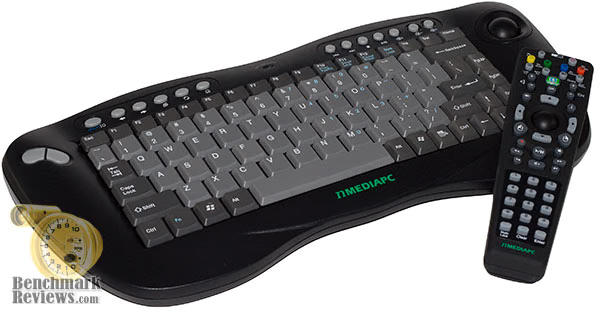
The nMedia HTPCKB set solves these problems. Included in the set is a wireless remote with optical trackball and a multitude of buttons for common functions and a keyboard meant to be held by both hands and ergonomically designed to rest on the lap comfortably. At $79.99, the combo provides a pretty good value as many other high powered RF wireless keyboards or remotes tend to be much more expensive. Here at Benchmark Reviews, we'll run you through the plusses and minuses.
About the company: nMedia Systems
Northern California, Castro Valley-based NMEDIA SYSTEM, INC. was founded in 2004. nMedia describes their vision as creating a future home entertainment PC system that is optimal for today's consumer electronic gear such as HDTVs and Home Theater Projectors.
nMedia manufactures Home Theater PC (HTPC) components to integrate various home Audio/Video functions and performance computing into one easy-to-use unit, and deliver consumers the rich home entertainment experiences for a new level of control and convenience.
Closer Look: nMedia HTPCKB
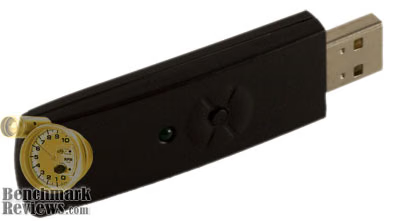
The nMedia HTPCKB box contained the keyboard device, the remote device, the USB dongle, a small instruction manual and 3 pairs of AA batteries. The remote takes 2 AA batteries and the keyboard takes 4 AA batteries. The batteries included were standard industrial batteries (the type that is manufactured but not sold to consumers).
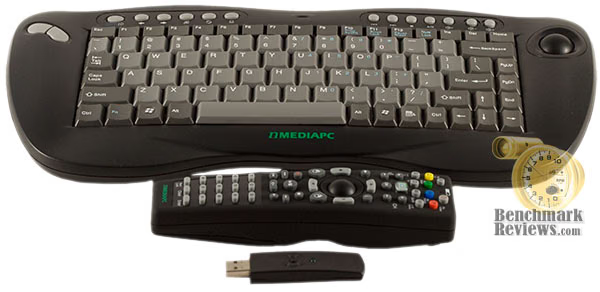
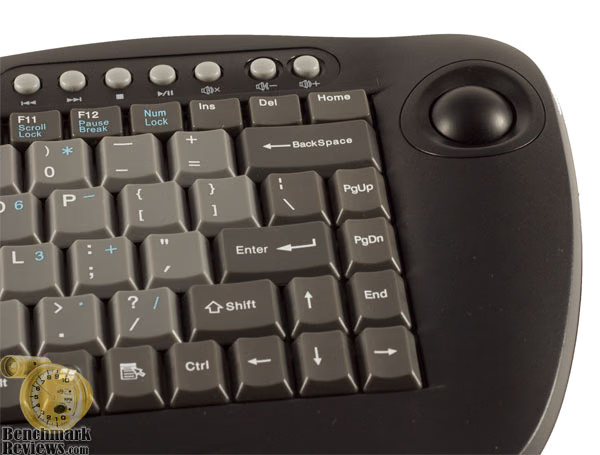
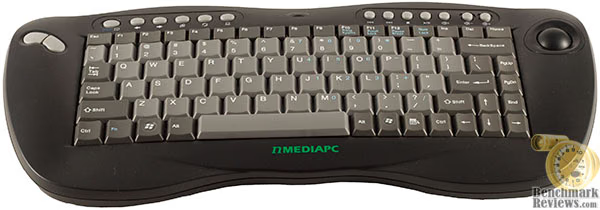
The keyboard itself is very ergonomically designed with curves in the right places. It's meant to be held like a game controller. The right side of the keyboard has an optical trackball that's easily accessible by the right thumb.
The left side of the keyboard has two buttons for the thumb that act as left and right mouse clicks.

The underside of the keyboard contains two trigger buttons for use with the index finger. The trigger on the right side is a button that acts as a left mouse button. The trigger on the left side is actually a scroll wheel, much like center scroll wheels on computer mice.
HTPCKB Details
The top row contains the typical assortment keyboard shortcut buttons, like back, forward, home, Windows Explorer, Volume up and down, play, stop, etc. In the center is a low battery indicator. The keyboard itself is small and fits comfortably on the lap. A number pad doesn't exist on the right side, but exists on the keyboard overlaid the regular keyboard, like on a laptop. These can be activated by pressing the num lock.
The remote has a trackball in the center with left and right mouse buttons right next to it. The remote contains an assortment of buttons that function with Windows Media Center, but not exactly with other versions of XP without MCE. The remote also contains the arrow keys, volume keys, multimedia keys, a number pad and some basic function keys like control and enter. The remote is made of a plastic that feels slightly rough, like rubber, so that it stays in the hands better and isn't nearly as slippery as a smooth plastic.

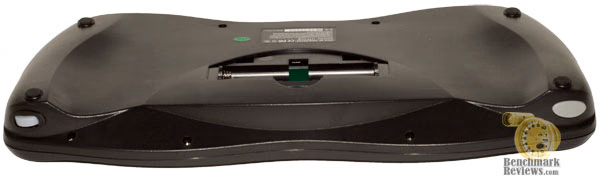
The back compartment houses both the batteries as well as a small ID button to sync with the USB dongle.

The back of the box said that the keyboard and remote are driverless. As such, I plugged the dongle into the back of my living room computer without bothering with the instructions. Lo and behold, the keyboard and remote both worked immediately. It was, by far, the most effortless installation I've encountered with input devices.
Unfortunately, the trackballs in each device cannot be removed. This means that grease and oil accumulation in the trackball area can be a problem later on and may necessitate the disassembly of the device in order to clean the components out. Most trackballs (and mice with rubber balls) allow for the ball to be remove to remove the dirt, dust and grime that can easily accumulate.
Keyboard Performance
The back of the nMedia HTPCKB's box indicates that the remote works for 10 meters. I can't say for certain if that's true, as my living room was quite small, but I found that it did, indeed, function correctly with my HTPC when I walked around the room and there didn't appear to be any lag or missing signals.
The trackballs on both devices are optical evidenced by the red light that you can see in glowing inside the devices when you turn the wheels. The keyboard's trackball has a very smooth turn that feels very light and doesn't require much force to move. The remote's trackball requires a bit more force to turn. I assume this is meant to maintain precision of the turning ball so that your thumb doesn't slip.
The first problem I encountered, though, was that both the remote and the keyboard have different trackball calibrations. That is to say, one rotation of the trackball on the keyboard is the equivalent of 2-3 rotations of the trackball on the remote. This can certainly be a problem if you plan on using both together. One other, more minute nitpicks of the devices is that the keys on the keyboard are a bit stiff and require that I push down harder for the keys to register.
After about 10 hours of use, the devices disconnected once. This necessitated the press of the ID buttons on the USB dongle and then successive presses on the remote, which is located near the batteries under the battery cover and on the keyboard, which is located near the left mouse buttons. Afterward, though, I didn't not experience any problems with disconnection.
Each device will go to sleep after a certain amount of time and must be activated by pressing a button on the device. It cannot be brought out of sleep by moving the trackball.
nMedia's remote really shined with watching movies as I was able to use all of the playback function keys, like play, pause, stop, etc with my computer like I were watching a DVD. Both Windows Media Player 10 as well as Media Player Classic functioned well with the remote.
Media Keyboard Final Thoughts
Before using these devices, I had a keyboard and mouse both sitting on a table near my recliner so that when I needed to control my HTPC, they were nearby. While this worked, it was rather cumbersome. The keyboard required a 12 foot extension cable plus the 6 feet of length of the keyboard to snake around my living room up to my chair. The mouse may have been wireless, but it required a surface.
The nMedia HTPCKB allowed me to set both on a table and pick them up when necessary like a TV remote and required no nearby table for either to sit on. This, alone, would probably be worth the price for people who want their HTPC to integrate seamlessly with the rest of their home theater equipment and seems like a much better value with more functionality than a lot of the IR remotes on the market today.
It should be mentioned that the keyboard really is not meant for a lot of video games out there, such as first person shooters and that a spare or gaming mouse ought to be kept around if games are going to be played on the HTPC.

The devices are not without their quirks, such as the lack of calibration between the two trackballs or the inability to remove the trackballs for cleaning. The remote sometimes will feel as though it's aligned only vertically and requires a quick spin to return it to normal (it's difficult to articulate the problem beyond that).
Then again, few things are perfect and the devices that function flawlessly for long periods of time also tend to be fairly expensive. At about $74.99, this product isn't cheap, but also provides about as much as $150 wireless system.
nMedia HTPCKB Conclusion
The nMedia HTPCKB came with all the necessary components to use immediately out of the box. It's plug and play at its finest as it worked as soon as I plugged in the USB dongle and added the batteries.
The nMedia HTPCKB's design is comfortable in the hands and isn't unduly burdensome. The buttons are easy to access and it's ergonomically designed for comfortable use. The remote's slightly rough surface is great for keeping the remote in your hand without slippage.
The construction of both the remote and keyboard feels fairly hardy. The remote feels heavy and strong. The trackball on the keyboard is nice and smooth. However, the trackball on the remote has a little too much resistance for my taste.
The nMedia HTPCKB remote and keyboard both functioned quite well. The keys on the keyboard were a little stiff for typing and disparity in trackball calibration was frustrating. Each performed very well wirelessly only dropping a connection once over use during a few long periods of time.
Offered for $74.99 at the time of this writing, this price tag puts the nMedia HTPCKB out of the reach of those that are building their HTPC on the super-cheap. However, for those looking for a good wireless control set for their HTPC, the HTPCKB is a great place to start for cutting out the wires and achieving a greater integration of their entire system.
Pros
+ Very sturdy construction
+ Optical trackballs
+ Ergonomic
+ Long distance usage
+ Both a remote and a keyboard included
Cons:
- Cannot clean the trackball
- Trackballs aren't calibrated to each other
- Stiff keys
- Poor control for video games
Ratings:
-
Presentation: 8.00
-
Appearance: 9.25
-
Construction: 8.50
-
Functionality: 9.00
-
Value: 8.00
Final Score: 8.55 out of 10.
Nomination: Benchmark Reviews Approved Quality Product
Questions? Comments? Benchmark Reviews really wants your feedback. We invite you to leave your remarks in our Discussion Forum.