
Microsoft Sidewinder X6 Gaming Keyboard
Microsoft Sidewinder X6
Over the past few years, gaming on the PC has transformed from a niche hobby to a market in and of itself. More and more gaming-grade devices come out each year. Some accessories are just hype or a means to squeeze a few extra dollars out of unsuspecting customers whereas others genuinely make the gaming experience that much better. At the same time gaming hardware has also come to be synonymous with expensive hardware as gaming hardware frequently pushes the current norms and standards to their limits of usability, functionality and style (or taste in the worst case scenario). However, what does that extra few bucks get you? Some gaming accessories are absolutely necessary to play the game and have fun, such as flight sticks for flight simulators and other accessories filed under gaming are superfluous and for those who also want to show off (like some of the utterly ridiculous computer cases that exist out there.
The gaming keyboard is slowly becoming the norm attached to any gamer that plays video games on a regular basis. Any gamer that selects their preferred keyboard will almost instantly swear by it, but those who have not tried one will question its necessity. So why buy a gaming keyboard? There are many reasons, such as comfort, usability, customization and little tweaks here and there that make the keyboard easier to use when gaming is in the question.
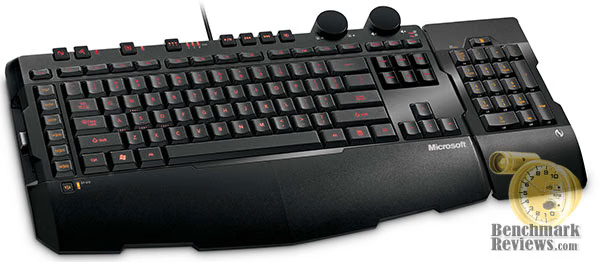
The Microsoft Sidewinder X6 (AGB-00001) tries to be the keyboard for the gamer's gamer. It features the ability to program 90 macros using 6 proprietary buttons, the number pad, and 3 banks. It has backlighting for playing the dark, cruise control, on the fly macro programming, large knobs for volume and backlight control and audio shortcut buttons. It features keys designed for quick presses and fast action. Does it deliver? Read on and Benchmark Reviews will deliver the scoop.
About the company: Microsoft
Microsoft Hardware was formed in 1982 to develop a device that would help people use the company's new word processing program. The device was a mouse and the application was called Word, laying the foundation for a future of delivering hardware that helps people better and more easily use software.
In the quarter century since, Microsoft Hardware has continually raised the bar, designing revolutionary peripherals that deliver groundbreaking performance, comfort and design.
From the original "green-eyed mouse" to groundbreaking products like the LifeCam NX-6000 and Wireless Entertainment Desktop 8000, Microsoft Hardware has delivered exceptional mice, keyboards, communication products, and gaming gear that has changed the way the world works, plays, and connects.
Closer Look: Microsoft Sidewinder X6
The Microsoft Sidewinder X6 comes in a large red box like most Microsoft hardware. The good thing about Microsoft hardware, unlike no-name or Chinese OEM hardware, is that there's a wealth of good information on the box itself as well as their website. The box itself, has a plastic frame surrounding the center image of the keyboard. The box, itself, comes with an instruction booklet, installation CD and the keyboard itself.
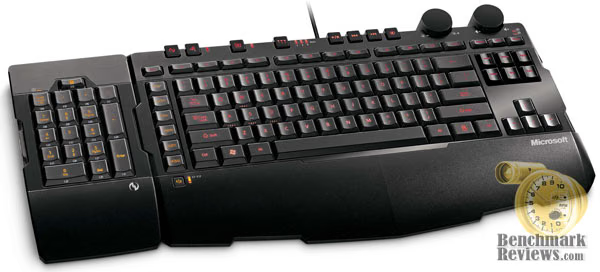
The packaging maintained the keyboard's integrity without showing any signs of shifting or breaking. The instruction manual is multilingual, short and sweet. It contains the necessities to get someone up and running with the Sidewinder X6 and contains short descriptions of the auxiliary keys. The CD contains the Intellitype 6.3 software as well as the necessary files to install (such as Windows Installer). All of these are available through Microsoft website, www.microsoft.com. The installed help file also contains even more help information on using the Sidewinder X6.
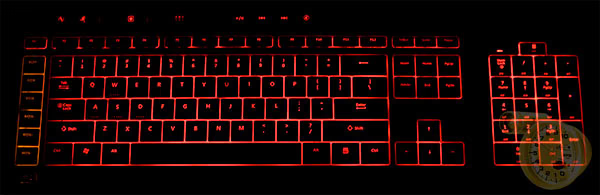
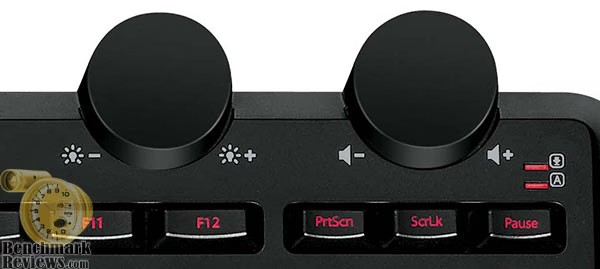
The keyboard itself is entirely plastic with an integrated wrist rest as part of the keyboard. The majority of the keys maintain a normal size and shape, but a few are shaped in an unorthodox fashion, such as the function keys at the top or the space bar. It contains a plethora of non-standard keys for Macros, knobs for volume and the backlight function, media keys and function keys for controlling the special keyboard features.
The Sidewinder X6 contains no props that stand the keyboard up at an angle forcing use flat on the desk. Many people are used to angled keyboards, but many doctors think a flat keyboard is more appropriate for ergonomic comfort.

The keyboard is only a little heavier than a regular non-gaming keyboard. Some gamers prefer a heavier keyboard to make sure it doesn't scoot around while playing, but the Sidewinder X6 has quite a few rubber stoppers on the bottom that keep the board from scooting around.
Detailed Features
Each successive gaming keyboard attempts to pack more and more features into their keyboard than previous keyboards. The Sidewinder is no different and possesses a veritable laundry list of features, options and functionality. It does stop short of the more ludicrous options, like a built in LCD screen or a machined aluminum frame around the keys. Here's a list of the features the keyboard possesses:
-
Switchable numerical keypad
-
90 programmable macro keys organized into 30 keys and 3 banks.
-
Ability to program macro keys in the game
-
Cruise control for recording keyboard movements for automation on the fly
-
Backlit keyboard controlled by a potentiometer knob
-
• Shortcut keys for audio playback including a large volume knob
The first two features are both the most impressive, but require the most explanation. The numeric pad, which typically sits on the right side of the keyboard in a standard 4x5 grid is able to be pulled off and placed on to either the left or the right side. It attaches to the keyboard by a rectangular USB-looking plug and a pair of magnets. I say USB-like, because it's wider and has no pins. What's very cool about this is that attaching the keypad is effortless. The magnets just pull it right in. This allows you to place the macros near the left hand as the right hand is typically on the mouse in many games.

The macro keys are programmable either through Microsoft's Intellitype software or in the middle of game play. The macros are programmed by button press duration and intervals between button presses. Thus, you can program a macro that holds the space bar down for 100 milliseconds, waits for 100 milliseconds and then presses ctrl+alt at the same time. Each button press performs the macro only once, so you can't hold the button down to perform the macro over and over again (for something like bunny hopping).

There are 6 macro buttons on the left side. There's a 7th button that switches the 6 macro buttons from 1-6 to 7-12. Macro buttons 13-30 lie on the number pad. There's a button at the top of the keyboard that switches from 3 different banks. All 30 button macro buttons can be programmed to function differently in each bank. This amounts to a total of 90 macros in all.

By default, the keypad macro keys are disabled on bank one, but are enabled on banks 2 and 3. The keypad shows up as red when on bank 1 for normal computer operation and amber for banks 2 and 3 to indicate that the macro keys are functioning. You can enable macro use for buttons 13-30 through the Intellitype software if you need/want all 30 Macro keys.

The macro recording button at the top also allows you to customize the macros in game. You press the recording button, then press your macro button of choice. Once the light starts to flash, you enter in your macro and press the record button again. Your macro is then saved into the macro button you just pressed. The Sidewinder X6 makes it very easy to customize the usability of these buttons.
Testing Methodology
The following platform was used for testing purposes:
- Intel E8400 @ 3ghz
- Gigabyte GA-P35-DS3L
- 4GB OCZ DDR2-800, 6-5-5-16
- EVGA Geforce 9600GT, 512mb
- Seagate 250GB 7200rpm (OS Partition)
- Seagate 500GB 7200rpm (game installation partition)
- Corsair 550w PSU
- Windows Vista Ultimate 64-bit, with Service Pack 1
- Latest 64-bit Intellitype software downloaded from Microsoft.com (v. 6.3, English)
- Portal and CounterStrike Source
Well, given all of the neat functions and features, how well does Microsoft Sidewinder X6 work? Were this a regular run of the mill keyboard, that would be a fairly straightforward and easy question to answer. Because this is for playing games, it requires a little more analysis and breaking things down:
Is the Microsoft Sidewinder X6 comfortable?
For the most part, yes. The keyboard has no stands, so it lies flat on the desk. Doctors have taken the view that laying the keyboard flat on the desk will go the longest way to preventing wrist strain and fatigue. Because I've been used to propping the keyboard up at an angle facing me, I found this difficult to get used to. However, with proper posture and sitting style, I found the keyboard easy to type on.

Does the Microsoft Sidewinder X6 perform well for games?
Yes! The Sidewinder X6 uses keys that are much shorter than typical keys and, at the same time, the keys have a shorter stroke between fully upright and fully depressed. What this means is that the keys can be pressed easier with less effort and it's easier to move the fingers from one key to another without having to lift your fingers much.
What about Microsoft's Intellitype software?
The software itself is very easy to navigate and figure out. It offers you total customization of the keyboard and its operation. In Intellitype, you can adjust the typical settings of a keyboard as well as adjusting the macro key functions, adjusting the media key functions, disabling various keys to prevent them from functioning while playing games (such as the Windows key) and to enable or disable the keypad macro keys. The macro programming involves pressing the buttons in sequence and adjusting how long the buttons are pressed as well as the delay between button presses. I found it easiest to record a macro in my game and then to adjust and edit the recording to my liking rather than to cook it up before gameplay.

Is the Microsoft Sidewinder X6 reliable?
Yes. I've had no problems with keys not registering or requiring too much force to press or any other problem that seems to plague cheaper keyboards. I used the keyboard to play Portal and Half Life 2 mostly and I found the keys to be very easy to use.
Is there anything wrong with it at all?
There are a few gripes on my part. The biggest problem I've had is that the keyboard has an unorthodox shape. The space bar extends further to the right of the center than it does from the left. While this ensures that when you strike the space bar from the right home row, you always press on the button, it makes finding the right side alt more difficult as I keep hitting the space bar instead of the alt button which is located much further right than usual. The Escape and Function keys are also thin and difficult to find by touch. I frequently find myself hitting F1 instead of Escape because the two are sitting right next to each other and feel the same size. After a few weeks of use, I still haven't gotten used to it yet.
I also am disappointed with the lack of USB ports on the keyboard. Many keyboards come with a few extra ports for your mouse and headset to connect to make things easier. A lack of it is just more of a nuisance than anything else, but I really like placing USB hubs into already hardwired devices.
Microsoft Sidewinder X6 Gaming Keyboard Final Thoughts
Gaming accessories are difficult to design. Not so much that there exists any specific difficulty in the design or manufacturing of products, but because there exists no consensus whatsoever of what gamers actually want. Thus, we find many manufacturers going all out in the design of their products, including every conceivable doo-dad and widget. Other manufacturers stick to a relatively Spartan design and attempt to perfect a single feature or two. Then there are many products in between.
The Microsoft Sidewinder X6 (AGB-00001) tips toward the more expensive end of the spectrum with a retail price of $67.99 at www.Newegg.com, but not by much. However, it's a very full featured keyboard and you get a lot of functionality for the price. The sheer functionality of the keyboard is worth the price if the functionality is needed. 90 programmable macro keys is exactly what the WoW addict needs, but may not serve much purpose for the FPS junkie. The backlight is great for those who play games late at night, but may seem like a gimmick for those who go to bed at 10pm sharp, every night.

Even if the macro key functionality, or cruise control or backlighting or media keys or a movable number pad were not needed, the keyboard still functions better than a lot of keyboards due to the shorter stroke and shorter keys, making the key presses feel easier or faster. This lends itself particularly well to any game that requires frantic key pressing.
Microsoft Sidewinder X6 Gaming Keyboard Conclusion
The Microsoft Sidewinder X6 is packaged and presented like most Microsoft products in a box that gives a lot of information on the product and shows the product in a large picture. You're given everything you need to get up and running and you're not left wondering what the product is about.
The Microsoft Sidewinder X6 looks like a gaming keyboard with a lot of sharp corners and a fair collection of auxiliary keys. The design itself is very tasteful and doesn't come off as gaudy or over done.
They construction is fairly robust with hard plastic and no flex. The attached number pad and attachment mechanism come off as very sturdy and strong without much potential to bend or break.
The Sidewinder X6 does everything it's supposed to do and does it well. The keys feel fast and the macro functionality works very well and accurately. There were few problems with the usability of any of the features.
The Sidewinder X6 is on the pricier side of keyboards out there, as NewEgg currently lists the X6 for $67.99. The keyboard feels great for all games, but the value of the keyboard depends mostly on the type of gamer. The first person shooter player will probably find very little use for the macro keys, but the MMORPG player will probably use all 90 macros at the same time.
On the whole, I found the Microsoft Sidewinder X6 keyboard to be very nice to use. The keyboard definitely aims to completely fill all facets of the gaming keyboard genre without going overboard. As such, the keyboard is not excessively priced, even if it's a higher price than most keyboards out there. Of course, the brand lends itself to a greater sense of value and quality as Microsoft products tend to be good quality. If one were in the market for a gaming keyboard of any type, the Microsoft Sidewinder X6 would definitely be worth considering.
Pros:
+ 90 Macro Keys
+ Switchable number pad
+ Solid, hard plastic
+ Good skid resistance
+ Backlit keys
+ Media keys
Cons:
- No extra USB ports
- A few awkward keys
Ratings:
-
Presentation: 9.00
-
Appearance: 9.00
-
Construction: 8.50
-
Functionality: 8.75
-
Value: 7.50
Final Score: 8.55 out of 10
Questions? Comments? Benchmark Reviews really wants your feedback. We invite you to leave your remarks in our Discussion Forum.