
Razer BlackWidow Gaming Keyboard
Razer BlackWidow Gaming Keyboard Review
Mechanical keyboards have somewhat of a cult following among those who have used them, many times they choose to use a simpler keyboards in order have the superior feeling and sound that only a mechanical keyboard can provide. A few companies have attempted to bridge this gap into the gaming market but few have cracked the code that is needed to create a proper "gaming" mechanical keyboard. Razer believes that having spent three years designing the BlackWidow from the ground up as a gaming mechanical keyboard that it will be better than the competition who just uses generic mechanical keyboards and the puts their name on it.
The Razer BlackWidows uses the Cherry MX Blue switches which feature tactile feedback, audible clicks, and also take less force to actuate then many other mechanical keyboard solutions. Razer claims these features come together to give gamers that edge they need to overtake their opponents. Other features included are a 1000Hz polling rate, programmable macro's, media controls, and a set of five extra keys specifically designed for gamers to add additional commands to.
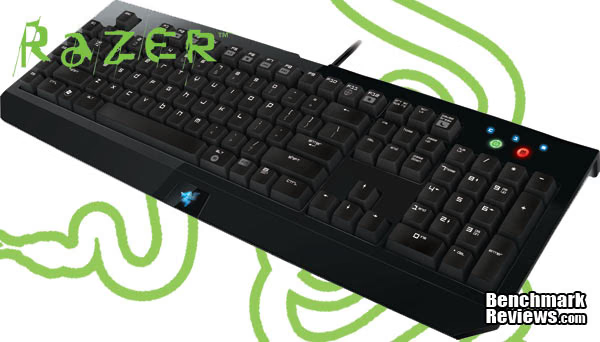
In this review Benchmark Reviews will put the BlackWidow through its paces to make sure it is worth the $79.99 Razer would like for it. In order to do this we will look at multiple areas of functionality including: gaming (MMO, RTS, and FPS) and non-gaming situations such as writing papers, photo editing, and web surfing. Hopefully this combination will help provide a well rounded view at the functionality of Razers newest creation.
Manufacturer: Razer USA Ltd
Product Name: BlackWidow
Model Number: RZ03-00390100-R3U1
Price As Tested:$79.99
Full Disclosure: The product sample used in this article has been provided by Razer.
Razer BlackWidow Features
Full Mechanical Keys for Superior Tactility and Faster Response
The Razer BlackWidow's mechanical key technology provides a distinctive tactile feedback in form of a light pronounced tap to your fingers giving you an entirely new feel on your keyboard. With its optimized actuation force of 50g and a reduced actuation distance of 2 mm the Razer BlackWidow's keys allow you to actuate your commands faster than on any other standard gaming keyboard.
On-The-Fly Macro Recording & Profiles allow Effortless Configuration
Record unlimited macros on-the-fly without having to take your eye off the game and immediately change between up to 10 profiles without the hassle of going into complex driver menus. With the simple click of two buttons you initiate and end the recording and you're all set.
Macro-Keys & Gaming Mode ensure uninterrupted gaming experienceExpand the amount of easy-to-reach commands with the additional 5 Macro keys on the side and avoid any distractions by switching on the Gaming Mode.
Razer BlackWidow Specifications
- Full mechanical keys with 50g actuation force
- 1000Hz UltrapollingTM / 1ms response time
- Programmable keys with on-the-fly macro recording
- Gaming mode option for deactivation of the Windows key
- 10 customizable software profiles with on-the-fly switching
- 5 additional macro keys
- Gaming optimized key matrix for minimized ghosting
- Multi-Media controls
- Braided cable
- Approx. size in mm: 475(L) x 171(W) x 30(H)
- Weight: 1.4kg
Closer Look: Razer BlackWidow
For some the looks of a keyboard may be a selling point, for others they care about its usability. Razer attempt to cater to both areas with a classic but refined look, while at the same time adding some uniqueness to their design that helps set it apart from many other mechanical keyboards on the market. In additions to making a visually appealing keyboard Razer has provided a wonderful typing experience for its users with a curved keyboard, mechanical switches, and a very well setup keyboard.

In typical Razer fashion the BlackWidows box is as much about transporting the product as it showing off they product. Razer went to great lengths to show that the BlackWidow is the premier gaming mechanical keyboard on the market, and as such has included some of their marketing hype on all sides of the box. A nice feature of this container is the window which lets you use a couple of the keys on the board so that you can feel and hear the tactile and auditory feedback that the BlackWidow provides.
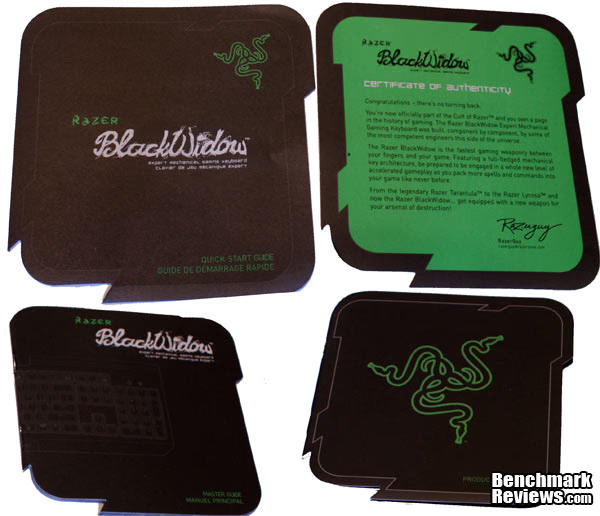
Razer includes four things with every product they sell: a quick start guide which will give you the basics of the product you have bought, a master guide which gives a detailed look at a products features, a product guide detailing some of the other competitive products that Razer produces, and finally you have the Certificate of Authenticity. Razer uses the Certificate of Authenticity for two things, it wants you to know you are using a genuine Razer product but more importantly much like Apple they want their users to feel like a special select group of people. They do this in many different ways including telling the customer that they are part of the "Cult of Razer" and describing how special the product they have built and you have bought is. Even if you don't like their products you have to admire their marketing strategy.
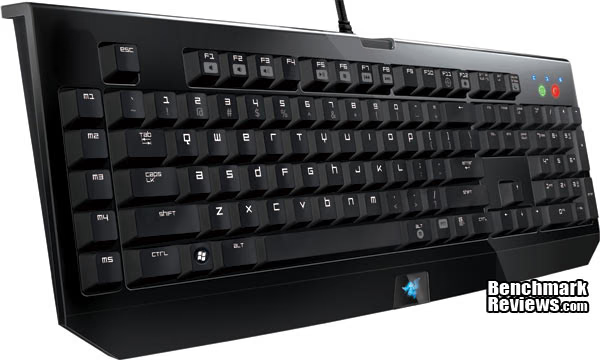
On the left side Razer has included have five customizable keys that can be used for anything that a user may deem necessary. For my purposes I have them rebound as unused keys from other portions of the keyboard allowing me to easily set actions to them in game and keep my hand from moving as far. Outside of gaming I found use for them in Photoshop making it so some repetitive actions are bound directly to my keyboard.
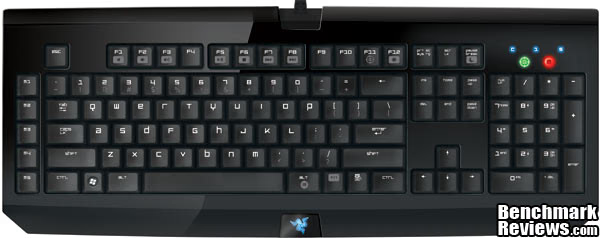
From the top down you can see that Razer has included everything you would expect from your typical keyboard with a full size key layout and traditional formatting. Rather then making a dedicated control scheme for media controls Razer has opted to use a functions key that switches between normal F1-F12 and the secondary controls they have. The function key when used with the numbers 1-10 switch between your pre-programed profiles. Along with media controls you can control the Light up Razer logo, put your computer to sleep, setup a quick macro, and turn on game mode. The on-the-fly macro is of particular interest, it allows you to quickly set a macro to any key on the keyboard without the use of the drivers.
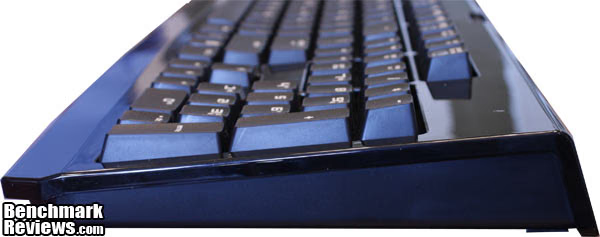
From the side it becomes clear that the Razer BlackWidow is by no means a small keyboard. Razer has used this space efficiently though, making for a very enjoyable keyboard to use. To start Razer uses full height keys instead of the half-height slim keys that have become popular. Some may question this practice as the BlackWidow is marketed as a gaming keyboard but because Razer is using a mechanical switch system your keys actually are activated at 2mm which is half of the full travel length. This means that a gamer can have a very light touch and still actuate the keys, therefore decreasing their response times. Razer has also designed the BlackWidow with a small amount of curvature which lends to a very comfortable experience when using the BlackWidow something any gamer will appreciate.
Razer BlackWidow Detailed Features
When a user spends $80 on a keyboard they expect it to be more then just a keyboard. Many companies provide software for customizing how a users peripheral will behave and adding secondary features, but Razer has a reputation for providing top notch software that gives the user the ability to really customize their keyboard to do what they need.
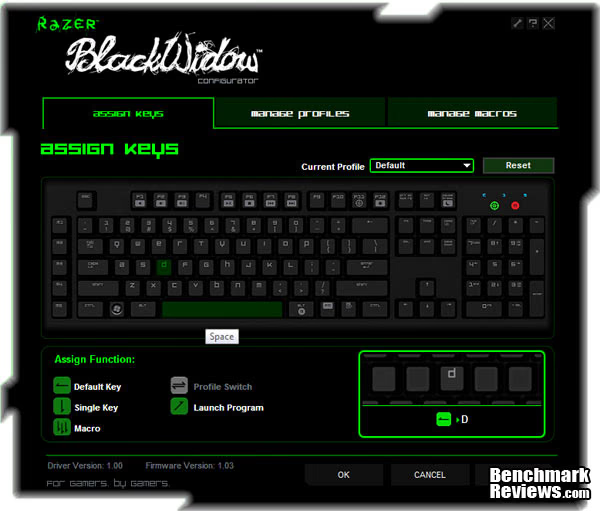
In the assign keys section you are able to assign keys different functions including: a single key press from another key, a macro, a instant profile switch, or launching a program. Razer has given this software the ability to modify any key on the keyboard making it so you can make very specific profiles for program like Photoshop that will be highly customized to make the most efficient use of the BlackWidow. In gaming these features can be used to quickly combine together actions that you may use frequently a feature that many MMO fans will be able to appreciate.
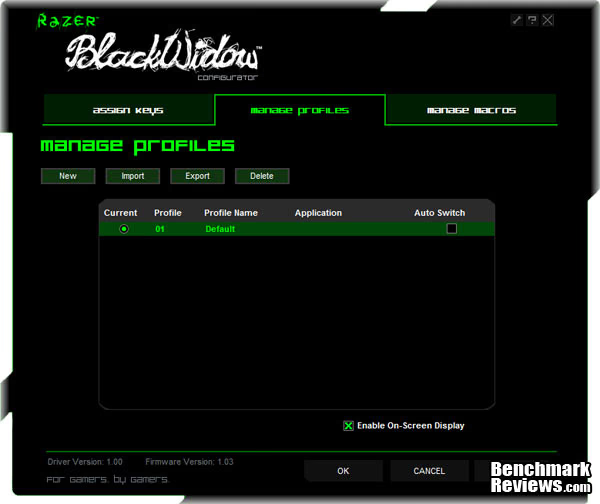
The manage profiles page of the configuration panel is dedicated to profiles, from here you can import and export your profiles or make new profiles. These profiles save every aspect of a configuration and therefore can be used to quickly switch between configurations for different gameplay styles within a game. Razer has made it so that the first 10 profiles can quickly be switched through using the functions + 1-10 keys.
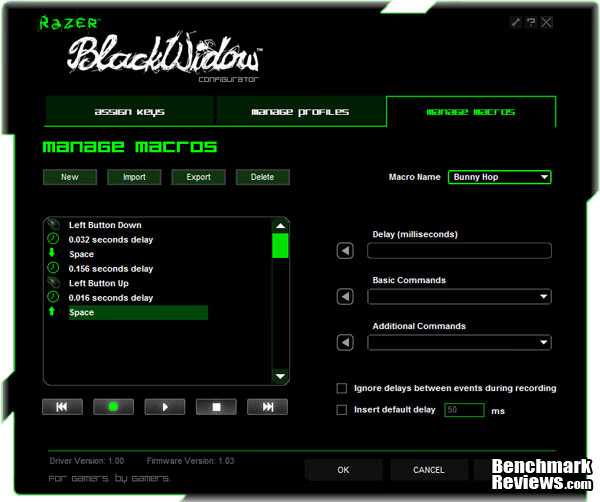
The final page of the control panel is the what gives the BlackWidow its extreme customizability. From here you can import, export, or create any macro you would like. In my testing a user could create as long of a macro as they would like, with my longest over 75 actions long. These macro's once set can be assigned to a key to be used every time a the key is press, as long as the key is pressed, multiple times as set by the user, or can be kept playing over and over till the key is pressed again.
Testing & Results
Testing Methodology
As with any peripheral, the testing of the BlackWidow is unique to the individual using it, what I like or dislike in my review may not reflect your personal feelings about a product. In order to most adequately test the Razer BlackWidow I look at a variety of games and activities to help evaluate its performance in many different settings. For quick paced gameplay I look at Team Fortress 2 and Call of Duty: Black-Ops, for strategy games I used Civilization V, and for RPG's I used Mass Effect 2 and Fallout New Vegas.
Software Tested
- Team Fortress 2
- Mass Effect 2
- Fallout New Vegas
- Civilization V
- Call Of Duty: Black-Ops
Results
When it came time to game, I found the BlackWidow to be very responsive although no more so then my Razer Lycosa that I used before the BlackWidow was sent to me. For Team Fortress and Call of Duty: Black-Ops I found that the low level of key travel needed to actuate the keys led to me having a very good reaction time even against the low profile Razer Lycosa. For some the auditory response of the BlackWidow's mechanical switches may annoy them when playing intense games especially when the keys are being actuated very quickly over and over again. Personally I found this to be a non-issue but you may want to test out the BlackWidow before you purchase to make sure that you can deal with the noise. For Civilization I found that the keys were very easy to use when it came to shortcuts and that after the initial learning curve of going to a new keyboard it all felt very natural. For Fallout New Vegas, and Mass Effect 2 I found that the lightness of touch let you have very long gaming sessions without any fatigue in your movement hand, something that other full height keyboard have given me problems with before.
Although my gaming experience with the BlackWidow was enjoyable it did not comes close to what it is like to do actually work on the BlackWidow. As a college student I spend a large amount of my time typing up papers and the BlackWidow has sold me, just from the experience of typing on it. But first let me do some explaining, this is my first mechanical keyboard I have ever used but two of my roomates have spent the best part of a semester talking up how good mechanical keyboard are to type on. This was something I did not understand until this review. Since I received the BlackWidow my typing speed has increased roughly 15-20% conservatively. The are a couple reasons for this, number one is the beautiful clicking noise that each key makes as it actuates meaning that you can get a natural rhythm going as you type just by listening. Secondly the feedback you receive from each key helps you more quickly move on to the next key as you don't actuate the key as far to actually activate it. Lastly it provides a much more comfortable experience with the slightly curved surface being very comfortable and helping my wrists to stay comfortable even after pulling a all nighter to cram out a ten page paper.
Mechanical Keyboard Final Thoughts
First let me start by saying, this is possibly the best keyboard I have ever used, any problems I had with this keyboard were easily overshadowed by how wonderful it was to use in day-to-day life. For some users the noise the BlackWidow makes is very annoying, it is loud enough to be heard at least 10+ feet away especially if like me you type very hard. Even with all the praise I have given I do have one thing I would like to see on the next iteration of the BlackWidow. I would like to see dedicated media controls instead of having to use the functions key+F1-F8.

Razer BlackWidow Conclusion
Performance for this product is a finicky thing, as a gaming keyboard I did not see the BlackWidow as any benefit over the more traditional Razer Lycosa but for non-gaming performance I would put this product near perfect with the auditory and tactile feed helping to increase my speed of typing and the comfort in doing so.
The appearance of the BlackWidow is a good mixture of traditional and modern, providing a product that is neither to flashy but still stands on its own in a group of keyboards. The custom font Razer users is different then any other keyboard out there but still looks very nice and provides a easy to read experience for those who still look at the keyboard when they type. I do like the all black appearance of the BlackWidow although it is frustrating that it attracts fingerprints so much making a for a dirty looking keyboard quickly.
The functionally of the BlackWidow with all of its included drivers provides a wonderful experience that can easily be changed based on your needs. When doing very repetitive actions a user is able to quickly create a macro for any key to help speed up that process and decrease the amount of work that they have to do.
As the BlackWidow is mechanical it is a heavy piece of hardware weighing in at 3.1Lbs, whether this attests to build quality I do not know but in the couple weeks I have been using it I will say that it is built like a tank. Both my Logitech Keyboard and The Razer Lycosa although nice keyboard had a lot of give to them and if you pressed hard enough you could make their frames warp. With the BlackWidow this is not the case, even with my abusive typing style does not warp, the keys do not wobble, and in general it feels like it could last forever.
Priced at $79.99 the Razer BlackWidow is expensive for how basic of a keyboard it is, especially when you look at other keyboard that are around its price range or even cheaper. Other keyboards come with all kinds of features that are built into them that the BlackWidow does not have, things like LCD panels, fully customizable LCD buttons, or dedicated media controls. But if you look at its real competition, other mechanical keyboards you start to see that the BlackWidow is priced very competitively. With a few exceptions other mechanical keyboards are being sold for at least $10 more if not $30-$40+ more.
The Razer BlackWidow has converted me, from this point forward I will do my best to always use a mechanical keyboard because of the comfort they bring when it comes time to actually type and do the work that I need to get done.
Pros:

+ Mechanical Key Design
+ Great Software
+ Comfortable Feel
+ Keypress Feedback Sounds
+ Price Compared to Other Mechanical Keyboard
Cons:
- Expensive Keyboard Solution
- Keypress Clicking Noise
- Shows Fingerprints
Ratings:
-
Performance: 9.50
-
Appearance: 9.00
-
Construction: 10.00
-
Functionality: 8.50
-
Value: 9.00
Final Score: 9.2 out of 10.
Questions? Comments? Benchmark Reviews really wants your feedback. We invite you to leave your remarks in our Discussion Forum.
Reader comments from the original article
9 comments were posted before commenting closed. They are preserved as written. Original avatars no longer resolve and are shown as a placeholder.
FKeys!!! Bob Permalink:
Why don't they leave well enough alone with the fkeys? I use a MS Sidewinder keyboard at home, and the FKeys are wider than default, causing the F1 key to be in the Escape keys spot on normal keyboards. On this keyboard, they are narrower, and squished to the right, leaving a gap. At work, I do a lot of editing in vim, so I use the escape key a lot. The MS keyboard moves the escape key to the left causing me to hit F1 instead of Escape. At least this keyboard leaves the Escape key in the default place. When playing games like Battlefield games, where you switch positions in vehicles with fkey 1/2/3, muscle memory is very important to getting F1 to drive a tank, for example. These kinds of changes to make it "different" are *just* *plain* *stupid*. Please, leave the basic key layout alone!
RE: FKeys Austin Downing Permalink:
I found the placement to be of no concern whatsoever, and actually they lined up better then many other keyboards I have used. If everyone went with tried and true though how would we have any innovation?
Contradictions? Joe Permalink:
OK this is confusing. You love the keypress click, but list it as both a pro and a con? You may also want to proof read your reviews in future.
RE: Contradictions? DG Permalink:
Refer to getting acknowledge of keypress, as a pro. Ie. you hear a click you know your keystroke registered. It is a con because it can be loud and annoying for those that aren't used to it. As for the pricing, if you're comparing it to other mechanical keyboards it is a good price point and cheaper than other models. If you're looking at it amongst all keyboards it is expensive for something that offers few of the extra features commonly found on cheaper non mechancial boards. But obviously if you're looking for a mechanical keyboard, the fact that is mechanical is the most important part rather than having dedicated media keys.
Proof read ASchmugge Permalink:
Love most of your reviews Austin, but dang my boy, need to start proof reading your articles, or have someone else do it with a keen eye for mistakes. A bit confused also in relation to what Joe said. In Pros you list the key clicks and also the price, then again in the Cons, you list the key clicks, and the price. So are they both a Pro, or a Con? Keyboard does look intriguing though, especially since I am in the market for a new gaming keyboard. But I have seen a LOT of reviewers having complaints about Razer Quality Control and build quality issues. Specifically key issues, and also software issues. Any input from this and other past experiences?
RE: Razer BlackWidow Gaming Keyboard Austin Downing Permalink:
Honestly it depends if you compare the price to many other keyboards its is very expensive based on what you get but compared to other mechanical keyboards it is very well priced. Just look at the recently reviewed SteelSeries 7G. In regards to quality control I have had no problems with any Razer products I have had not had any quality control and I own a Razer mouse, two keyboards, speakers, headset, and mouse pad. They have taken the abuse I give them and just kept on going.
Possibility of feature loss Tiago Permalink:
With this keyboard having a USB plug, have you tried using the PS/2 adaptor/convertor? Do you know if it will loose the anti-ghosting feature? I fear it having some sort of a delay when plugged into a computer with a few other USB devices...
No good. victory Permalink:
The Blackwidow is useless for my purposes since some three-key combinations I actually use will not work. It's ridiculous they sell a keyboard without N-key rollover at this price. Adding the diodes necessary to make it NKRO would cost what, a few bucks at most?
N-key rollover xR2 Permalink:
Thank you victory! By your comment, I google more and found other reviews mentioning the same aspect, lack of N-key rollover. I was about to buy this keyboard, but thanks to YOU, now I won't! :D