
Razer Arctosa USB Gaming Keyboard
Razer Arctosa Gaming Keyboard Review
The Arctosa Gaming Keyboard is one of Razer's entry level enthusiast peripherals to help gamers get into the world of high-end keyboards. It is a keyboard with many of the advanced features that you expect on a gaming keyboard, but with a price that won't break the bank. With such features as fully programmable macro keys and anti-ghosting technology just to name a few. Benchmark Reviews is here to test this keyboard and its many features to discover whether it lives up to the Razer name, or if it is just another regular old keyboard with some fancy logos and shiny buttons on it.
In the past, when you ask someone who considers themselves a gamer what the most important computer components to perfecting their skills are, you will hear answers like a high-end video card, large widescreen monitor, high dpi mouse, good quality speakers or headphones. Rarely will a keyboard come up as one the more sought after devices in a gamer's arsenal. Gamers are becoming more and more interested in finding ways to improve their skills and gain an edge over their opponents in any way possible, and keyboards can fit into this area.
Razer has earned its reputation as being on of the best manufacturers of quality gaming mice on the market, and they strive to bring that quality to other peripherals, including the Razer Arctosa. Both Razer and Benchmark Reviews have given me the pleasure to review one of Razer's entry level gaming keyboards to see just how much of a difference a keyboard can really make in both games, and even other boring tasks including anything that is not gaming related. Razer attempts to create a blend of form and functionality in all of its products, and this keyboard is no exception. With its sleek looks, media keys, and included software designed to help users get the most out of their keyboard, Razer aims at providing an exceptional gaming experience with a price tag you would expect from a regular keyboard.
Razer Arctosa Features
-
Gaming Cluster with anti-ghosting capability (WADS cluster)
-
Hyper response keys
-
1000Hz (1ms) response time
-
Media Keys
-
10 customizable software profiles with on-the-fly switching
-
Detachable wrist rest
-
Macro Support with fully programmable keys
Arctosa Specification
Size: 470mm(L) x 222mm (W) x 20mm (H) with wrist rest. With the wrist rest, it is 470x222x20.
Software requirements:
-
PC with USB port
-
Windows XP/Vista (32 or 64bit) (note: also works on Windows 7)
-
CD-Rom Drive
-
Internet Connection (for driver installation)
-
35mb of hard drive space
About Razer USA, Ltd.
Razer had its first big hit with the Razer Boomslang mouse back in 1999. It boasted an unheard of 2000 dpi and quickly became one of the most popular gaming mice on the market. Razer then followed up with such gaming staples as the Diamondback and Copperhead mice in 2004 and 2005, respectively. After its success with mice, Razer then went on to create its first gaming keyboard, the Tarantula. This keyboard featured programmable keys, anti-ghosting technology, and fully replaceable keys. Razer has always been a company build on the motto creating devices "for Gamers by Gamers". They continue to make mice, keyboards, and even audio solutions today for beginner gamers to hard core gamers alike.
Razer collaborates with gamers to develop, manufacture and market cutting-edge gaming peripherals utilizing proprietary technologies that give gamers the competitive edge. We reinvented the computer gaming industry by bringing this competitive edge to gamers when professional computer gaming was in its infancy. In the mid 90s, with the advent of networked gaming and competitive first-person-shooter (FPS) games, gamers found that their legacy peripherals were inhibiting rather than enhancing their gameplay.
Closer Look: Razer Arctosa
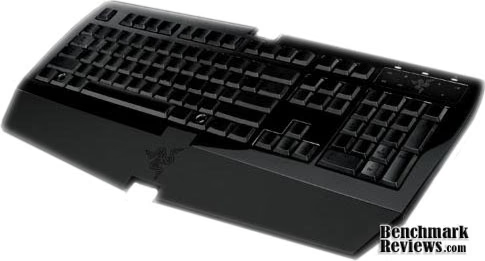
The Razer Arctosa came in a very nice package. The keyboard was packed in an all black cardboard crate with a fancy black folded sleeve for the software disk. Upon installing the software, the program connects to the internet and downloads the latest version of the software. Everything was nice and... black, including the keyboard. Not only was the keyboard and the keys black, but so was the lettering on the keyboard. Black lettering on black keys. I am no expert on colors or anything, but I know enough to realize that black on black is very difficult to see.
If you hold it at just the right angle, you can see the letters and numbers on the keys. But, without either a desk lamp, a nearby window, or an overhead light where your back is not casting a shadow over your desk like many other people, you will have trouble seeing this keyboard.
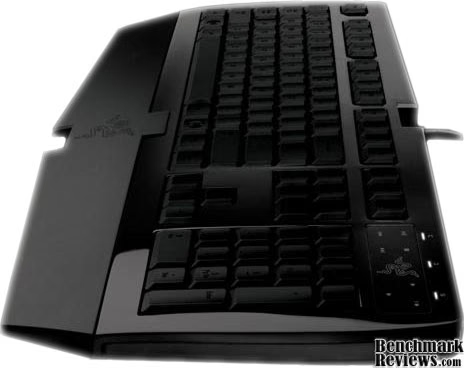
It is a very slick looking keyboard, with a nice profile to it. There are feet that flip out underneath to provide height adjustment, and the palm rest can be removed. Removing the palmrest requires loosening a few screws, so its not something that can be done very quickly.
Arctosa Detailed Features
In the upper right hand section of the keyboard, along with the almost too bright white LEDs for caps lock, numlock, and the practically useless scroll lock, there are 8 media buttons. There is the typical play/pause, stop, next, previous, volume up, volume down, and mute buttons. There also is a button in the center of the logo that is used for switching macro profiles. You can't tell by these images, but the Capslock, Numlock, and Scrollock LEDs are very bright white.

The buttons work well enough, as long as you are in the right application. The software provides a menu to tell it what program you use to listen to music or watch movies with, which includes: Winamp, Windows Media Player, iTunes, and Real Player. More on this later. Next, I will show you the software that is partnered with this keyboard.
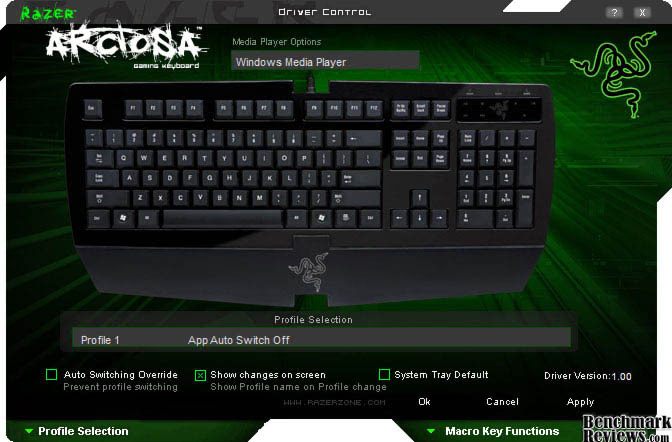
The included software with this keyboard is designed to assist users in making macros and setting up profiles for those macros.
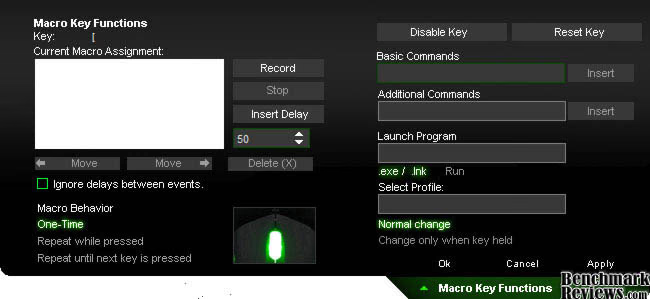
This is the Macro Key setup menu. This menu slides down from the main software window when you click on any particular key you wish to use a macro with.
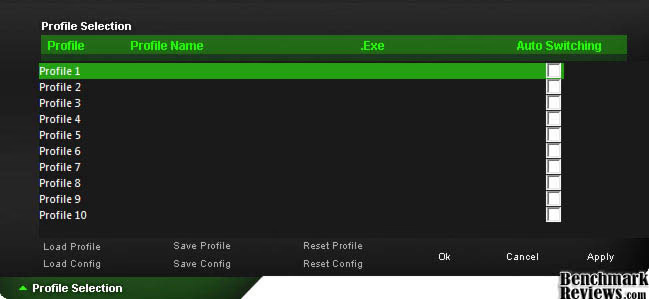
Just like the macro menu, this profile editor section slides down from the main window. This section allows you to save macros to any of 10 profiles where you can then load them based on what you are doing, e.g. playing a FPS vs playing a MMO.
Testing Methodology
I used this keyboard for the better part of three weeks before giving it my final thoughts. I typically favor split style keyboards, but I wanted to be sure that I used the Arctosa long enough to rule out that as being a factor for any of my opinions. I used this keyboard for a variety of game types including RPGs, MMOs, Action, and FPS games to get a feel for each. I also used this keyboard for the typical boring tasks of web browsing and writing. I am writing this article using the keyboard right now.
Arctosa Test Results
I like how this keyboard feels while typing. The keys seems shorter and lighter than many keyboards which leads to easier typing, and much faster keystrokes. This can also be good for gaming, the easier the keys are to press and the shorter the keys have to move up and down, the faster a person can respond to the action. This can also lead to a few problems, which I have encountered. It is almost too easy to type with this, and I sometimes find myself typing ahead of myself, if that makes any sense. This is not typically a problem when you can simply backspace a couple and retrace your steps, but with a keyboard where you cannot see the keys, if you mistype, and get your hands and fingers off even by a single key, you will have a difficult time getting your self re-orientated properly. I found myself having the most trouble with passwords. I imagine that I am not alone with the ridiculous amount of accounts across the web that need to be logged in to. And, I have a couple different passwords that I use. I never really noticed how often I reassuringly and almost subconsciously look at my keys while I am typing in my passwords until I could not see the keys that I was typing on. I often found myself picking up the keyboard to get it at just the right angle to where I can see the letters so that I could be sure I was entering in the correct characters.
The software included was hit and miss. It was a hit in the macro area. A person can make macros up to 50 instructions long, and each key can get its own macro function. With the ability to have up to 10 different profiles and using 101+ keys, the possibilities are astounding. I really liked the fact that the macro not only records the key you are pressing, but records how long you press it, allowing for even more precise macro control. The software allows you to use any keys on the keyboard for a macro. It allows you to use any key in that macro, as well as mouse clicks. There are built in functions like page up/down, tab, caps lock, and even advanced features like copy, paste, switching between windows, sleep, and etc. So, this not only serves a useful purpose for gaming, it can make a great tool for people doing office work, image editing, or anyone who likes using shortcuts. One other nice function was the ability to disable the "Windows" key during gaming. There is nothing worse than being in a fragfest and hitting the Windows key just as you are about to confront your enemy. Where the software fell short was the media control. It worked for my Windows Media Player, but I had trouble getting it to work with Winamp, my preferred media player. This could be an oversight from Razer, a miscommunication with Winamp, a 64bit issue, or a Windows 7 problem, so we won't completely hold it against Razer.
I am not a fan of the media controls at all, to be perfectly honest. I feel that they were simply thrown in there for an extra feature, and just weren't fully thought out. They feel somewhat cheap, and they have a clicking sound similar to that found on a Snapple bottle top or something similar. Also up by the media buttons are pretty intense LEDs. It is nice to have bright lights, but these are super bright white lights on a very dark black keyboard, and they just don't please my eyes, especially because they make it that much more difficult to read the keys.
Razer Arctosa Final Thoughts
My final thoughts are that Razer seems to have a fairly decent entry level product, but fell short on a few key areas that, in my opinion, could have been easily avoided. I think the keys type and respond very nicely. I think it is easy to type, and they make for great responses when gaming. I very much like the macro system, and there are so many different features, any person could really customize their layout to the point of it almost being unfair to play against that person. I think the media keys are just not necessary. Volume control is nice, but if they wanted media controls, they should have either done it properly, or not at all, instead of seemingly throwing a few buttons on it and calling it good. I think the color scheme on my keyboard is atrocious, black on black simply does not work for a keyboard. Maybe someone was going for the Das Keyboard approach, but I found it frustrating using it in the light, and if I were a gamer in a dark room, or LAN party, I would be seething if I lost my placement and had to find my way back to home row. My suggestion is to simply ditch the dark keyboard style and stick to the one that you can see. To put it simply, it has great potential to be a decent product, but it is not without some easily avoided drawbacks.
Arctosa Conclusion
Presentation was good, the package was very attractive, and the software had a cool look to it. As said before, the color scheme was very unfortunate.
The appearance was nice and elegant, but not friendly. Black on black does not work. The shape and style of the keyboard is very good looking, however.
The keyboard seems built well. The keys feel great, and it does not feel cheap or flimsy. The media control buttons feel cheap, though. It would have been nice if the palm rest was easier to remove.
The actual keys functioned well, but the media control buttons leave a bit to be desired. The macro functionality is quite good The software was hit and miss. Macro functionality was a hit, the media control was a miss.
This is not a great value for a regular keyboard, but it is not a bad entry level gaming keyboard for the price and features. As of late August 2009, NewEgg lists the Razer Arctosa for $45.99.
I would recommend this keyboard to someone looking to get started with a gaming keyboard, but would recommend shying away from the black on black keyboard, and opting for the other color scheme that Razer offers so that you can actually read the keys.
Pros:
Cons:
Ratings:
-
Presentation: 8.00
-
Appearance: 7.00
-
Construction: 8.00
-
Functionality: 7.00
-
Value: 7.00
Final Score: 7.4 out of 10.
Questions? Comments? Benchmark Reviews really wants your feedback. We invite you to leave your remarks in our Discussion Forum.
Reader comments from the original article
3 comments were posted before commenting closed. They are preserved as written. Original avatars no longer resolve and are shown as a placeholder.
matt matthew Permalink:
i have 1 and you can't see the keys i think they look good shame about the key coulor.
RE: Razer Arctosa USB Gaming Keyboard Josef Permalink:
There is a silver color theme on this keyboard where you can see the keys perfectly :)
The Problem For smodtactical Permalink:
I think the problem is that he is a bit of a novice. The black on black keys look sick and I think the design is intentional because they assume that whoever is buying it has no problem with knowing what key is what under any circumstance (including password). The fact that you need to look at the keyboard to type a password speaks more to your lack of experience with keyboards and typing rather than a design flaw.