
Das Keyboard Model S Professional
Das Keyboard Model S Professional Review
Manufacturer: Metadot Corporation
Product Name: Das Keyboard Professional Model S
Model Number: DASK3MKPROCLI
UPC: 855800001227
Price As Tested:$110.98 (Amazon) or $124.99 (Newegg)
Full Disclosure: The product sample used in this article has been provided by Metadot.
Metadot's Das Keyboard is one of the most recognized keyboards on the mechanical keyboard market. The Das Keyboard has become one of the standards to which all other mechanical keyboards are compared. The question that Benchmark Reviews will be trying to answer is Metadot's keyboard "The" keyboard to have or is it just another mechanical keyboard in the growing market of mechanical keyboards aimed at both the gamers and the professionals. In this article Benchmark Reviews tests the Das Keyboard Professional Model S Mechanical.
As our world has become more connected, the keyboard has become the main way in which many people connect to the outside world. Unfortunately, as time has gone on keyboards by many accounts have gotten worse. In recent years thought the mechanical keyboard has been making a comeback, with more and more typists realizing the benefits of the mechanical key switch. One of the leaders in this movement is the Metadot Corporation and its Das Keyboard line.
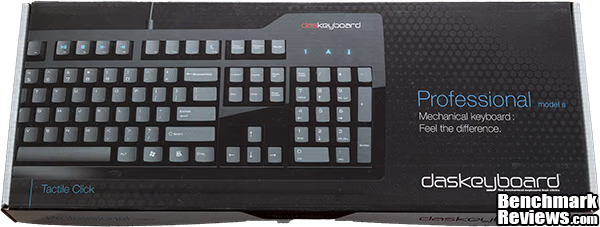
As with any other peripheral it is important look at the Das Keyboard Professional from a well-rounded standpoint, this means using it in a various situations including gaming, and from a typist standpoint.
Specifications
| Model No. | DASK3MKPROCLI |
|---|---|
| Color | Black |
| Type | Mechanical Keyboard |
| Interface | USB and PS/2 |
| Keys | 104 |
| Key Switches | Cherry MX Blue Switches |
| Key Travel | 4.0mm |
| Dimensions | 18(L) x 6.5(W) x 1.5 inches(H) |
| Weight | 3.4Lbs |
| Switch Life | 50 x 10^6 |
| Warranty | 1 Year |
Features
- German-engineered, gold-plated, mechanical key switches (Cherry MX Blue). Designed to withstand 50 million key strokes
- Special Media Keys: sleep, brightness +/-, mute, volume +/-, eject, play/pause, next and previous track
- Laser-etched inscriptions on keys to resist fading
- Two-port USB 2.0 hub allows for syncing and charging iPhone, iPod and USB compatible devices
- Extra long 2-meter (6.6-Feet) USB cable with two USB connectors: one for the keyboard, one for the USB hub
- Blue LEDs for Num Lock, Caps Lock, and Scroll Lock
- Full n-key rollover (anti-ghosting technology) with a PS2 adapter, and 6 keys with USB. Great for fast typists and gamers alike.
- KVM switch compatible
Closer Look: Das Keyboard Professional
With black body and black keys the Das Keyboard Professional look great in any environment and will be able to perform well in a multitude of areas including, a business environment, a home office, or even a gamers den.
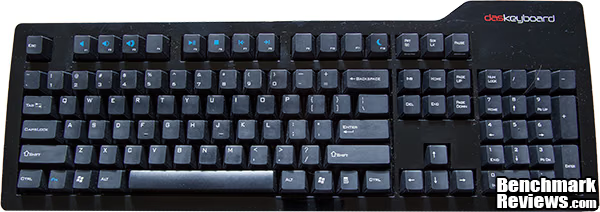
The Das Keyboard Professional is a full sized keyboard with a 10 key number pad attached. The keys used on the Das Keyboard Professional are laser etched which will help provide better longevity than pad printed letter could provide. Also visible are media and sleep keys on the Das Keyboard Professional, these are attached to the F1-F12 keys when combined with the function key on the left side of the keyboard. The case is a shiny plastic exterior, which in my experience tended build up dirt and fingerprints and was prone to scratching but when it is clean is absolutely fantastic looking.
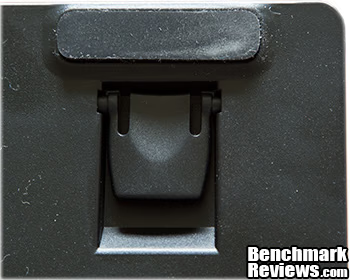
On the bottom of the Das Keyboard are the 1/2" risers which allow a user to change the angle at which the Das Keyboard sits on their desk. When laid out flat the large rubber pads on the bottom of the Das Keyboard help keep it from sliding around a user's desk as they type or game.
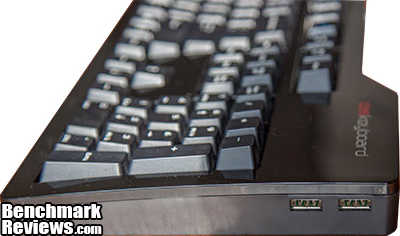
From the right you can see the USB hub that attaches through a second USB cable, this is great for users who would need to frequently attached devices to their system. Secondly, the curvature of the Das Keyboard Professional is visible; this small change makes a world of difference when it comes to comfort and a user's ability to touch type.
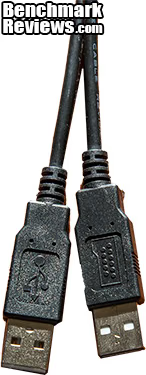
The Das Keyboard Professional comes with two USB cables, one for the USB hub and one for the actual keyboard portion of the Das Keyboard. If a user would like to have full NKRO functionality they must use the included USB -> PS/2 converter. The cables have a nice heavy feel but lack the quick disconnected functionality of some keyboards nor do they have a braided exterior like some competitors.
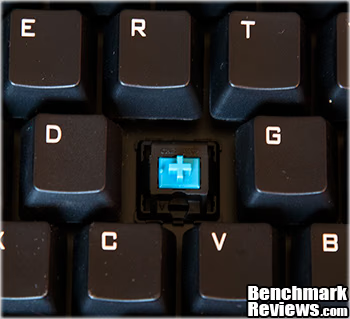
The Das Keyboard Professional utilizes the Cherry MX Blue switches. These switches are of the tactile and clicky variety, with a bump and click that signifies the switch has actuated. Due to the nature of these switches they are not ideal for gaming. The Cherry MX Blue switches also have a slightly heavier feel to them requiring 60g of force at peak and 50g of force at the point of actuation. In my ranking of switches the Cherry MX Blue is my preferred switch as a typist because the noise and tactile feedback allow me to touch type effectively at very high speeds.
Testing & Results
Testing Methodology
Testing peripherals like the Das Keyboard Professional are quite simply a matter of using them in the real world for an extended amount of time. Unfortunately, due to the nature of the product they are no standardized test that can be done but rather it is a matter of personal opinion from the time spent using the product. In order to analyze the qualities of the Das Keyboard Professional I focused on looking at the many different realms of work and play that the Das Keyboard Professional is expected to be subjected to. This means looking at both its qualities as a gaming keyboard, but more importantly its qualities as a method of input for work and school related projects.
Test System
-
Motherboard: MSI P67-GD65
-
System Memory: G.Skill Ares 1866MHz 2 x 8GB kit
-
Processor: Core i5 2500k 3.3GHz @ 4.7GHz
-
Audio: Creative X-Fi Titanium Fatal1ty
-
Video: 2 x ASUS GTX 580
-
Disk Drive 1: 240GB Mushkin Enhanced Chronos
-
Optical Drive: DVD Drive
-
Enclosure: Silverstone Raven RV02-EW
-
PSU: Cooler Master SilentPro 1000w
-
Monitor: Asus 27.5" 1920 x 1200
-
Operating System: Windows 8 x64 Profesional
Software Tested
- Planetside 2
- Far Cry 3
- Office work
Results
Planetside 2 is my current game of choice and the Das Keyboard Professional fit the bill of what was needed to quickly vanquish my enemies. The quick response and tactile feedback allows me to quickly bounce between keys as needed and helps me guarantee that button I need to press has actuated. While moving between buildings to assault a base the accurate response of the Das Keyboard Professional allows me to quickly bob between obstacles while attempting to avoid enemy fire. A negative of the Cherry MX Blue switches used is that the tactile feedback can prevent a user from quickly double tapping due to the way the spring system works.
In Far Cry 3 you play Jason Brody rich playboy who has been captured by pirates on a small island. The primary objective is to save your friends from the various perils and people around the island. Playing Far Cry 3 requires accuracy and quick reaction as the jungle is constantly trying to kill you, whether it is from pirates, tigers, bears, snakes, or even just a cliff you didn't see until the last moment. The Das Keyboard Professional works perfect in this environment allowing me to react quickly enough to survive even the direst of situations.
The most important function of a keyboard is the ability to quickly and accurately type in a work environment, as such this is where a majority of my review will focus its energy. The Cherry MX Blue switches are so far my favorite style of mechanical switch to type on. The auditory feedback and tactile kick the switch gives makes typing an absolute joy and really helps accelerate my touch typing. Some people may not like the heavier feeing the Cherry MX Blue has but as someone who types extremely hard I find that it is comfortable and it helps me not bottom my keys out which allows for both a quieter and quicker typing experience.
Mechanical Keyboard Final Thoughts
Overall, the Das Keyboard Professional is excellent providing a wonderful experience in both typing and gaming. The tactile and auditory feedback of the Cherry MX Blue switches provided one of the best typing environments that a user could ask for. Metadot added lots of little extra's though that make this keyboard special to use, first the curvature makes for a very comfortable typing experience, something that after 8 hours of typing a user will really start to appreciate. The added features of the USB hub and media keys help round out the Das Keyboard Professional into extremely functional piece of hardware that will allow the user to move through their workflow without the needing to stop to plug new devices in or to change their music, perfect for a busy work environment.
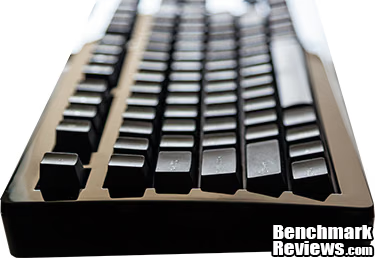
I have very few complaints about the Das Keyboard Professional, definitely not enough to dissuade our readers from ordering this fantastic keyboard. First, in future revisions I would love to see the USB2.0 hub switched out for a USB3.0 hub especially now that USB3.0 devices are becoming more common; second, I would love to see Metadot bring out a version of the Das Keyboard with a matte finish for a keyboard. I think that it would look equally nice but it would not attract as much dust or be as fingerprint prone as the current generation of Das Keyboard is.
Das Keyboard Professional Conclusion
Performance in a keyboard is about being able to type quickly and accurately. The Das Keyboard Professional succeeds on both fronts providing a wonderful platform to type on comfortably while having as few mistakes as possible with haptic and auditory feedback from its Cherry MX Blue switches.
When the Das Keyboard Professional is clean it is absolutely gorgeous but due to the glossy exterior of its case keeping it clean can be a real chore. The glossy exterior is prone to collecting dust and fingerprints and although Metadot included a cleaning cloth with the Das Keyboard Professional, it still requires daily cleaning to really look its best.
At 3.4Lbs, the Das Keyboard Professional feels like a well-constructed machine built for the long haul. The metal switches being used are designed for 50 x 10^6 key presses which means that users should get many years of faithful service from their Das Keyboard Professional. Sadly, Metadot only provides a one-year warranty on the Das Keyboard Professional but with keyboard as well built as the Das Keyboard Professional I would expect the warranty would be long gone before any problems start to crop up.
Functionally the Das Keyboard Professional is above average. Metadot provides users with media controls, a USB hub, but provides no extras when it comes to extra keys, software to allow customization, or other extras that may be seen on "gaming" keyboards.
For $110.98 (Amazon) or $124.99 (Newegg), the Das Keyboard Model S Professional (model DASK3MKPROCLI) is a relatively expensive piece of equipment even for a mechanical keyboard. Two of my previously review mechanical keyboards the Razer BlackWidow and the CM Storm Quickfire Rapid can be had for nearly half the price. This price is not high enough to be unreasonable though, as keyboards like the SteelSeries 7G are still $40 more expensive but it does put the Das Keyboard on the high end of the spectrum.
In closing, if asked I would recommend the Das Keyboard, although it may not be in my opinion the best mechanical keyboard on the market it is still a great keyboard. The Das Keyboard Professional provides a great platform for a typist, while looking beautiful (when clean), providing users with media controls, and a USB 2.0 hub.
Pros:
+ Haptic and auditory feedback can help increase a users typing speed
+ Full NKRO with included PS/2 adapter
+ Built in media keys
+ When clean it is beautiful
Cons:
- One-year warranty
- Loud key actuation
- Case prone to fingerprints and collecting dust
- No software for customization
Ratings:
-
Performance: 9.50
-
Appearance: 9.00
-
Construction: 9.50
-
Functionality: 8.50
-
Value: 8.00
Final Score: 8.8 out of 10.
COMMENT QUESTION: Does the Das Keyboard appeal to you, or do you have another favorite?
Reader comments from the original article
10 comments were posted before commenting closed. They are preserved as written. Original avatars no longer resolve and are shown as a placeholder.
RE: Das Keyboard Model S Professional Iain Permalink:
On paper, Blue switches don't make sense for anything other than typing, but having tried all the various switches, I absolutely love Blues for work and All type of gaming (mostly FPS at the moment). I've got a Razer Blackwidow right now and while its the est keyboard I own ( and I have a few mechanicals), te piano finish is a nightmare for messing up and fine scratches. My major issue with the Das is the lack of lighting. I tried a week with a Majitouch and hated the lack of backlit keys. If you're in any doubt, get one of the many lit mechanical boards out there.
RE: RE: Das Keyboard Model S Professional Karl Permalink:
No offense, but if you learn where your keys are you won't need them backlit--or even labeled. For gaming, especially, it pays to know exactly where your keys are. Some companies are even selling "blank" keyboards--though I think this is a bit silly, with the only possible benefit that hunt-and-peck types won't ask to use your computer :)
RE: Das Keyboard Model S Professional kzinti1 Permalink:
Just wondering. Why only a measly one-year warranty on high-end boards like the Das and my own Deck-Frost Tactile? If these high-end, high-priced keyboards are so great (yes, including my own) then why such a short term warranty?
RE: RE: Das Keyboard Model S Professional Olin Coles Permalink:
The short answer is money. The long answer is that they can offer an industry-standard warranty length without raising alarm with consumers, but when something goes wrong after that period they can (hope) to re-capture your business with a second purchase.
RE: RE: RE: Das Keyboard Model S Professional Austin Downing Permalink:
This is the unfortunate truth. I have yet to have a mechanical keyboard I have reviewed on here fail but it would be nice to see longer warranties. The upcoming review of the Cooler Master Quickfire TK does have a 2 year warranty on it though.
Keyboard request Jason Ganz Permalink:
Could you review one of the Topre Keyboards? They're a bit on the $$ side, but from what I've read, a joy to type on due to hybrid key-mechanisms. Thanks Jason
RealForce johndoe Permalink:
I own a RF 87U TenKeyless all 45g and it's the best keyboard I've ever had my hands on. It's very clicky, the acquisation force is very soft and it's even more of a joy to CS: GO on than to type. The only thing with it the #tiness of the ABS spacebar, which makes you feel like you're hitting the spacebar from a different keyboard. This spacebar is so #ing # it makes Painkiller MP even harder to play as you always have to spacebar to bunnyhop and the entire gameplay is built on bunnyhopping...
Nice but... Jeff DeWitt Permalink:
I've got a 25 year old IBM Model M keyboard at work. It looks and works like new with it's solid mechanical switches, removable and cleanable key caps and characters molded into the key caps. The only things that date it are the lack of a Windows key and it's PS2 (adapters are available). I've no doubt the Das Keyboard is a very nice keyboard, and it may be just the thing for gamers wanting a top notch keyboard, but I'll stick with my Model M.
RE: Nice but... David Ramsey Permalink:
That's my day to day keyboard, and a couple of spares in the garage in the unlikely case something ever happens to it...
Model M Jeff DeWitt Permalink:
I expect 50 years from now people are still going to be using those keyboards. This was one IBM got right.