
Thermaltake Knucker Plunger Gaming Keyboard
Tt eSPORTS Knucker Plunger Gaming Keyboard
Manufacturer: Thermaltake, Inc.
Product Name: Knucker
Model Number: KB-KNK008
UPC: 84116304482
Price As Tested: $39.99 (Amazon / NewEgg)
Full Disclosure: The product sample used in this article has been provided by Thermaltake.
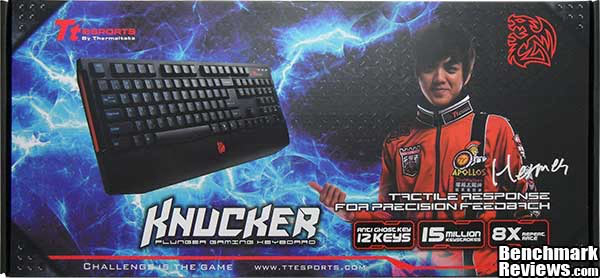
In today's throw-away culture it seems that nothing is sacred anymore. Spending ~$100 on a keyboard seems like nothing to some folks with disposable income, but not all of us have that luxury. To this end Thermaltake's Tt eSPORTS division have created the Knucker Plunger Gaming Keyboard (model: KB-KNK008).
The Knucker Gaming Keyboard was designed and priced to sit partially between regular rubber dome keyboards and mechanical switch keyboards. The end result is what Thermaltake call 'Plunger switch technology', a semi-mechanical rubber dome setup that gives tactile feel of mechanical switches at a much lower cost. Here at Benchmark Reviews we aim to give you the information you want without all the hype, so you can make an educated decision for yourself. Read on to find out if the Knucker keyboard is all that it promises to be.

Features & Specifications
Source: https://usa.ttesports.com/
KNUCKER, pro-gaming plunger-switch keyboard. Tactile Response for Precision Feedback - KNUCKER pro-gaming keyboard is designed with Tt eSPORTS' brilliant research in keycap switch development, successfully installing the plunger-switch into KNUCKER keyboard. Aiming for outstanding keystroke experience and amazing gentle feedback, KNUCKER is critically tested to make sure each key press meets the expectation.
KNUCKER gaming keyboard gives you unprecedented keycap experience - KNUCKER gaming keyboard is designed with Plunger Switch technology that simulates key response from a mechanical keyboard, but much quieter and easier to press. Keyswitch Development Center in Tt eSPORTS is proud to present the latest innovative development in gaming keyboard keyswitch that is capable of delivering incredible 15 million keystrokes of elasticity, and quite audible feedback. Yet, each time you press, you immediately experience that solid, steady key-press response with slight force from your finger tip.
S4Key-Function Design, accelerates your repeat rate switch in 4 modes - KNUCKER gaming keyboard is designed specifically for game genres that require constant switching in repeat rate, a gaming behavior also known as Repeat-Rate Rotating Movement, or R3M in short. This behavior motivates the initial creation of KNUCKER, and to apply in gaming environment, the keyboard acts as a gaming solution to allow gamers to switch the mode rapidly. Requires the PS2 adapter to experience.
Design Concept of KNUCKER gaming keyboard - Each key cap of KNUCKER keyboard is meticulously designed by Tt eSPORTS' Industrial Painting Workshop crews to select the most durable yet visually vibrant Electric Cyan silk-print technique to stand out from the commonly seen white paint in other keyboards. KNUCKER keyboard also gives you 8 replaceable red caps for gaming visual convenience. The most used keys: WASD & 4 directions. Battle Dragon logo has been well-recognized as a representation of Tt eSPORTS by the e-Sports community. KNUCKER gaming keyboard designs F12 key as the Battle Dragon key, locating at the center of keyboard's palm rest, seemingly floating between you and KNUCKER.
Specifications
| Color |
black |
|---|---|
| Interface | USB |
| Membrane, Mechanical, Plunger |
Plunger |
| On-Board Fan Device |
No |
| Anti-Ghosting Keys | 12 (USB) / 16 (PS2) |
| On-Board Memory Size | 0 |
| No. of Game Profile |
0 |
| No. of Macro Key |
0 |
| Polling Rate |
250 Hz |
| Back-Light |
No |
| PALM REST |
Yes |
| Graphical UI |
Yes |
| On-Board Audio Jacks |
No |
| Smart Cable Management |
No |
| Gold-Platted USB |
Yes |
| USB Cable Detachable |
No |
| Multimedia Keys |
0 |
| On-Board USB Port |
0 |
| Keystroke Lifecycle |
15 million |
| Cable Length |
1.8m braided |
| Dimension (LxWxH) |
450 x 185 x 28.5mm |
| Other Features |
- Plunger switch feels like CHERRY Black mechanical switch. |
Closer Look: Tt eSPORTS Knucker
In this section we will take a look at the aesthetics of the Tt eSPORTS Knucker keyboard, available now for $39.99 (Amazon / Newegg), and see how it differentiates itself from the rest of the crowd.

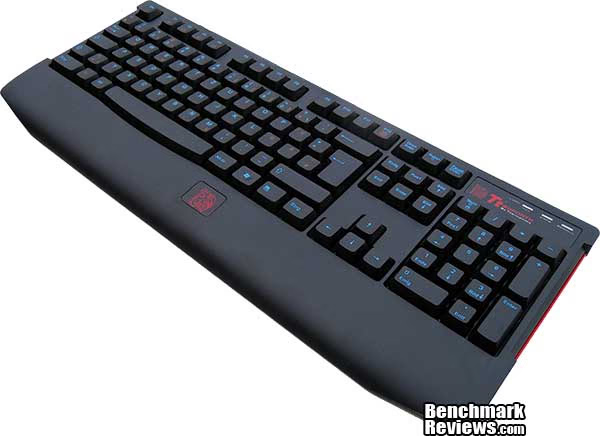
For this review we received the German layout of the Knucker keyboard, it looks pretty standard although most of the punctuation keys are in different locations. The keys look as if they are illuminated but this is just a very vibrant blue color used for the key caps. There are no special media or macro keys to make the Knucker keyboard any more productive or useful, but that was never the intention for this model. The palm rest is a little small for my liking but this should serve its purpose for the younger user with much smaller hands than my own.

Looking at the back now and once again we see no special features, it would have been nice to see some cable routing channels incorporated but it isn't a deal breaker. There are feet to adjust the slope of the keyboard to improve the writing angle, and rubber feet pads to stop the Knucker from sliding around.
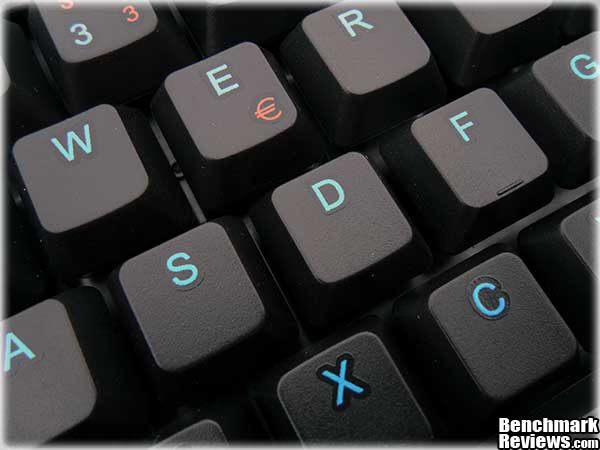
While reading through the details and specifications of the Knucker keyboard on the Tt eSPORTS website I happened across this little paragraph:
"Each key cap of KNUCKER keyboard is meticulously designed by Tt eSPORTS' Industrial Painting Workshop crews to select the most durable yet visually vibrant Electric Cyan silk-print technique to stand out from the commonly seen white paint in other keyboards"
As you can see in the images above and below, when you look up close the key caps appear to have individual stickers rather than silk printed letters.

Here's a close up look at one of the Knucker's plunger switches. There isn't much that holds the key cap to the switch but they are quite secure all the same. I would have liked to give you more detail on how the plunger switch is constructed but upon opening the keyboard casing it became apparent I would have to physically break it to access the switches. The keyboard membrane and its backplate were not secured by screws, instead they were secured in place by melted plastic tabs.
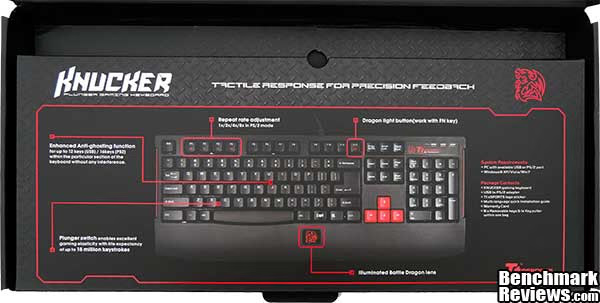
The inner partition of the box has a neat diagram detailing the main features of the Knucker keyboard which would be useful if you were looking at different keyboards in physical.
Tt eSPORTS Knucker Detailed Features
In this section we take a closer look at the Tt eSPORTS Knucker Plunger Gaming Keyboard's detailed features.

The illuminated Tt eSPORTS dragon logo on the palm rest of the Knucker keyboard serves an aesthetical purpose and helps the user identify where the middle of the keyboard is in low light conditions. The illusion cannot be seen here but there is a clear plastic piece that covers the illuminated logo which makes it look semi holographic.

The Knucker has height adjusting feet with rubber pads that stop it sliding around in the heat of battle.

More importantly though are the rubber pads on the feet when they are folded open, this is often missed by most keyboards. These feet give an extra 10mm of height and make for a much more comfortable typing position when open, and a better gaming position when closed.

The lock LED's appear to be white but actually glow red in keeping with the Tt eSPORTS color scheme. They are not quite blinding but still too bright for my liking.
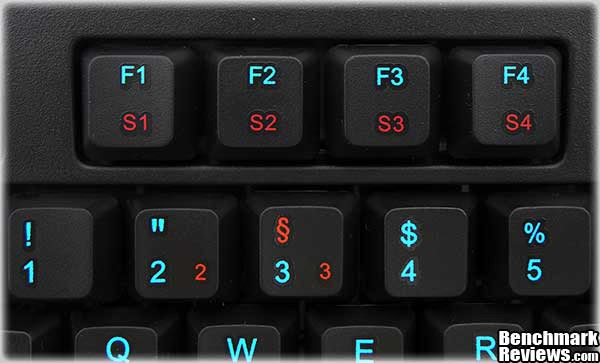
Along with introducing their newly developed plunger switch technology, Thermaltake also wanted the Knucker keyboard to be able to adjust key repeat rate on the fly. From S1 thru S4 you can adjust the key repeat rate to 1x/2x/4x/8x by holding the Fn key and pressing either of these F keys (in PS/2 mode only).
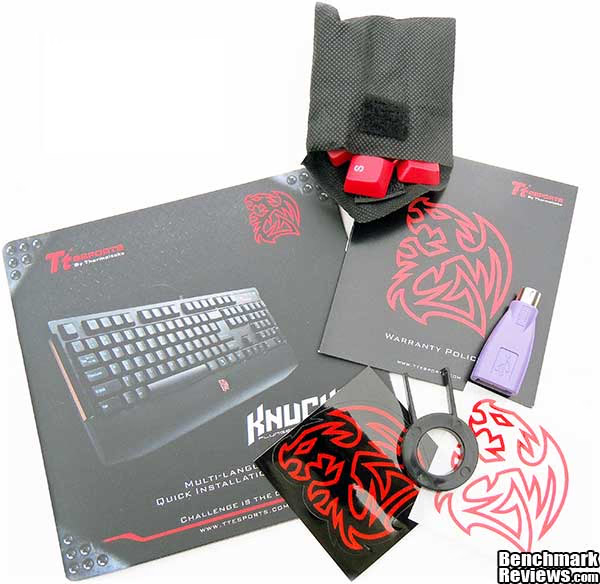
Bundled with the Knucker keyboard you will get a quick install manual and warranty card, 2 case stickers, a USB to PS/2 adapter, a key cap removal tool and red key caps for WASD and arrow keys.
Testing & Results
Testing Methodology
Testing an input device is simple, all one needs to do is use it, unfortunately there are no quantitative benchmarks to run, no numbers to compare, and no software used that can test the quality of the hardware. Testing an input device like the Tt eSPORTS Knucker Plunger Gaming Keyboard is going to be based around personal opinion and preference. For instance, I really like the simplistic approach to looks, but this might not be to everyone's taste. In this section I will present my unbiased opinion with regards to the use and operation of the Knucker and report back any improvement benefiting directly by its use in various games and programs listed below. Your mileage may vary slightly and as such this should be taken as a guide only.
Test System
- Motherboard: ASUS P8Z68-V Pro
- Audio: Realtek ALC892 8-Channel On-Board Audio
- System Memory: 8GB Corsair LP CL9 1600MHz
- Processor: Core i7 2600K @ 4.2GHz
- Disk Drive 1: OCZ Vertex 2 60GB
- Disk Drive 2: Seagate Barracuda 7200.12 1TB
- Enclosure: Lancool PC-K63
- PSU: Corsair HX750W 750 watt Modular
- Monitor: HKC 22" Widescreen (1920x1080)
- Operating System: Windows 7 Ultimate x64 (SP1)
Test Software
- Firefox and Internet Explorer web browsers
- Microsoft Office applications
- Call of Duty: Black Ops 2 (zombies)
- Battlefield 3
- Need for Speed: World
- Saints Row: The Third
- Just Cause 2
- Left 4 Dead 2
Results
I have been using the Tt eSPORTS Knucker gaming keyboard on my main PC for around two weeks now and in comparison to a mechanical keyboard it has some catching up to do, but not much. The keys are of the semi-mechanical rubber dome variety which Thermaltake have called "Plunger Switch Technology". They respond really well and have a nice amount of tactile feedback, but they have an annoying cheap plastic sound. Thermaltake claim that these plunger switches will last up to 15 million keystrokes, but we know that rubber dome keyboards are only good for a few years of heavy use. The anti-ghosting allows up to 12 keys via USB and 16 keys via PS/2.
The Knucker feels quite solid and well built while still remaining light and portable. I didn't find any use for the red key caps because I instinctively know where the keys are on a keyboard without looking, if you are new to PC gaming I'm sure these will come in quite useful. The blue print on the keys is nice for aesthetics and show up ok in the dark compared to standard and non illuminated keyboards. I found the palm rest too small for my huge hands but for a younger person with smaller hands it should be just ideal.
Tt eSPORTS Knucker Gaming Keyboard Final Thoughts
Thermaltake have introduced two novelties with the Knucker Keyboard; Repeat rate adjustment and Plunger switch technology. While I found no use for adjusting the key repeat rate, it doesn't really make it useless - I simply don't play any games that will benefit from altering the key repeat rate. The plunger switches are a step in the right direction for lowering the cost of responsive tactile feedback keyboards, no longer will we need to break the bank in order to fulfill that requirement. My main gripe is the sound of the keys, they just don't sound like mechanical keys and it somewhat lowers the overall usage experience. I won't complain too much though as you will not be able to pick up a brand new mechanical gaming keyboard at this price point. The Knucker really does bridge the gap and I expect we will see the plunger switches being used in more stylish and feature rich products from the Tt eSPORTS division in the future.
Tt eSPORTS Knucker Conclusion
In this section I am going to write a brief five point summary on the following categories; Performance, Appearance, Construction, Functionality and Value. These views are my own and help me to give the Tt eSPORTS Knucker plunger Gaming Keyboard a rating out of 10. A high or low score does not necessarily mean that it is better or worse than a similar gaming keyboard that has been reviewed by another writer here at Benchmark Reviews, which may have got a higher or lower score. It is however a good indicator of whether the Knucker keyboard is good or not. I would strongly urge you to read the entire review, if you have not already, so that you can make an educated decision for yourself.
I was skeptical of any performance advantage that might be gained from using a mechanical keyboard before I had used one, but they have made a massive comeback in recent years. Once you have had the pleasure of using one you will not want to go back to your regular keyboard, so when I heard about the Knucker and its Plunger switches bridging the gap between the two types I just had to give it a try. With regards to gaming though, I cannot really say if I have noticed any real benefit other than longevity promised due to the semi mechanical nature of the key switches. I have got through many regular keyboards that have simply broken due to their cheap nature. Since I only play FPS style games I won't notice the anti-ghosting or increased actions per minute afforded by the Knucker, but I really appreciate the tactile and feedback while typing.
The appearance of the Tt eSPORTS MEKA G1 is going to get mixed ratings, and due to the graphical nature of this review you can easily make up your own mind. The Knucker has very minimalistic looks and the color scheme seems to work quite well.
The Knucker is very well constructed but feels very lightweight. There aren't too many occasions where your keyboard would get an absolute pounding but it would be nice to know that your keyboard would be able to stand up to it should such an event occur. If I were to release some rage onto the Knucker keyboard I think it would be able to take it. After all, in the heat of the moment it wouldn't be too unusual for a gamer to release some frustration into their keyboard.
The Tt eSPORTS Knucker keyboard supports up to 12-key anti-ghosting in USB mode and 16 anti-ghosting in PS/2 mode. For gamers that need to adjust key repeat rate on the fly the Knucker is the only keyboard that supports this feature to my knowledge. The plunger switches will give you a better experience in comparison to a regular rubber dome keyboard and come very close to real mechanical switch with regards to tactile feedback.
Considering the features and benefits of the Tt eSPORTS Knucker gaming keyboard, I think the $39.99 (Amazon / NewEgg) price is hard to argue with. Sure it won't last as long as a fully mechanical keyboard, but they charge a much higher premium.
The Knucker gaming keyboard isn't going to appeal to everyone, but if you are just starting out or can't afford a mechanical keyboard then the Knucker would be a great choice that you won't regret.
Pros:
+ Tactile feedback
+ Semi-mechanical switches
+ Simplistic design
+ 12-key anti ghosting (USB)
+ 16-key anti ghosting (PS/2)
+ Vibrant key color
+ On-the-Fly repeat rate adjustment
+ Lightweight but sturdy construction
+ Great price point
Cons:
- Lock LED's are too bright
- Key-press noise
- Minimal gaming features
- Palm rest too small for me
Ratings:
-
Performance: 9.00
-
Appearance: 8.25
-
Construction: 8.50
-
Functionality: 8.00
-
Value: 9.00
Final Score: 8.55 out of 10.
Recommended: Benchmark Reviews Seal of Approval.
COMMENT QUESTION: What do you demand most from a gaming keyboard?
Reader comments from the original article
2 comments were posted before commenting closed. They are preserved as written. Original avatars no longer resolve and are shown as a placeholder.
RE: Thermaltake Knucker Plunger Gaming Keyboard Leonard Permalink:
I want my keys to be bright and easily seen in dimly lit to semi dark room. But the most important is that the markings last. Next would be that the keys last. Most of my keyboards have went to the grandkids (3 and under) or the trash due to the lettering that has left the building. My newest fix has been to put clear nail polish, but I still only get a few extra months before it wears out anyways.
RE: RE: Thermaltake Knucker Plunger Gaming Keyboard David Ramsey Permalink:
Ideally, you'd want keyboards with double-shot keys, where the legend is molded all the way through the key in a different color plastic. Sadly I don't know any keyboards made with double shot keys any more; although various methods like dye sublimation (such as used on old IBM Model M keyboards) can last quite a while.