
StarTech Dual-SATA Docking Station SATADOCK22UE
StarTech SATADOCK22UE Review
Benchmark Reviews has put a plethora of storage enclosures and systems through their paces and all of the predecessors fell neatly into readily recognizable categories. The StarTech SATADOCK22UE is a horse of a slightly different color offering features that bridge the existing product categories it's neither a case nor storage array, but has the capacity to allow access to single data drives as well as two drives independently or as a RAID array. It's a niche product with stealth appeal for main stream users who think outside the box. The SataDock product line comes in 4 flavors: single drive USB only desktop bay (SATADOCKU2E), single drive USB & eSATA desktop bay (SATADOCKU2), 5.25" Bay Dual Drive eSATA (SATADOCK525) and the top of the line dual drive, dual eSATA desktop dock SATADOCK22UE which we will be reviewing. While no doubt the intended audience for the SataDock product line is mainly corporate or professional PC repair and maintenance organizations, this small wonder has the potential to simplify the lives of a much broader audience if they can related to it's less obvious uses.

As a long time PC Enthusiast I have a constantly growing pool of hard drives from systems that are "removed from service" as they are replaced with newer, better, faster equipment. Those drives have typically sat in ASD bags on shelf until a drive failure or additional drive space is needed on a particular system. I have often thought it would great to find a better way to tap my unused storage resources and my hope is that the SATADOCK22UE from StarTech will give me that opportunity. I had visions of backing up entire systems to HDD, faster migration of HD movies from my desktop to my Media PC, easier imaging of systems when upgrading, offline archival of photo and home video and the list goes on... While most of these goals arguably can be accomplished with a NAS the issue I have is that I am always running out of space (in spite of having a THECUS N5200Pro), and yet I have a significant amount of available storage effectively unusable because it is inconvenient to pry open a machine to drop a drive in if I need to get some data off of it. We'll put the SATADOCK22UE through its paces and see how effectively it can help leverage my data storage resources.
About the company: StarTech
Since 1985 StarTech.com has provided a complete range of IT and A/V products for a diverse customer base that spans many channels, including government, education and industrial facilities to name just a few. Our product offerings include I/O Cards, Data Storage, Cables, Converters, Extenders, A/V Switches, KVM and server management equipment.
StarTech SATADOCK22UE Features
• Hot Swap compatible and ejectable
• Plug and Play support for most operating systems
• Supports both SATA 2.5 and SATA 3.5" hard drives without any adapters
• Supports SATA I/II (SATA 150/300)
• The maximum 2.5in hard drive capacity is 500GB; the maximum 3.5in hard drive capacity is 2TB
StarTech SATADOCK22UE Specifications
Warranty 1 Year warranty
Product Height 2.76 in [70 mm]
Product Length 5.79 in [147 mm]
Product Width 5.2 in [132 mm]
Product Weight 19.31 oz [547 g]
Internal Connectors
General Specifications 2 x SATA Power 15 Pin Female; 2 x SATA Data 7 Pin
External Connectors: USB B Female to Host; 2 x eSATA to Host
Max. HD Capacity 500GB (2.5in), 2TB (3.5in)
Closer Look: SATADOCK22UE
The SATADOCK22UE packaging is plain vanilla by anyone's definition - a white box with black lettering and a black and white photo of the product. There is no marketing hype or hyperbole just a list of basic features that seems to assume the user knows what they are getting. While the packaging won't win any marketing awards, the box felt unusually well constructed - so much so that I opened and closed the flaps several times before I unpackaged the unit. The flaps fit so precisely into the slots and the tactile feedback as they locked in place was so obvious that I had a momentary vision of an engineer with a micrometer measuring the slots and flaps to ensure they were within spec. Yes it is just a cardboard box, but that is actually the reason I bring it up - when is the last time you noticed the quality construction of the cardboard box a product came in? I can't remember the last time I did, and my hopes were high that the product inside would provide me the same reaction.
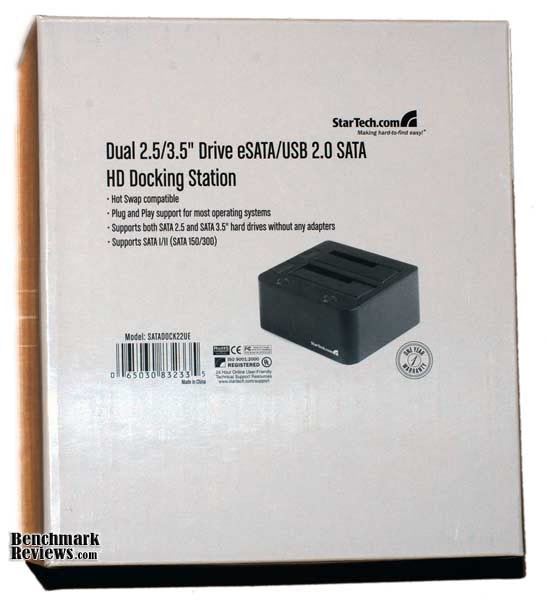
The SATADOCK22UE itself was bubble wrapped neatly and slid out of the box with that satisfying slowness associated with a snug but not too tight fit.

The box also contained all of the possible peripheral connection cables, a power adapter and instruction manual. Kudos to StarTech for providing two eSATA cables in addition to a USB cable as some manufacturers seem to forget that the last thing a consumer wants to do when they get a product is to make a trip back to the store to get a cable, connector or adapter that a product needs to operate but the manufacturer didn't include.

The dock itself is well constructed - the buttons, dust flaps and connections are all solid and move as they're supposed to without rattling around. Given that the stand looks like it was precision carved out of a chuck of solid black plastic, I was initially surprised at how light it was. Of course the stand is hollow as one would expect, and the kinetic disconnect is a great example of how quality material and well thought out construction can lend a product visual "weight" far beyond it's actual mass. The docking station offers clean lines broken only by two well placed power buttons and equally well place eject buttons.
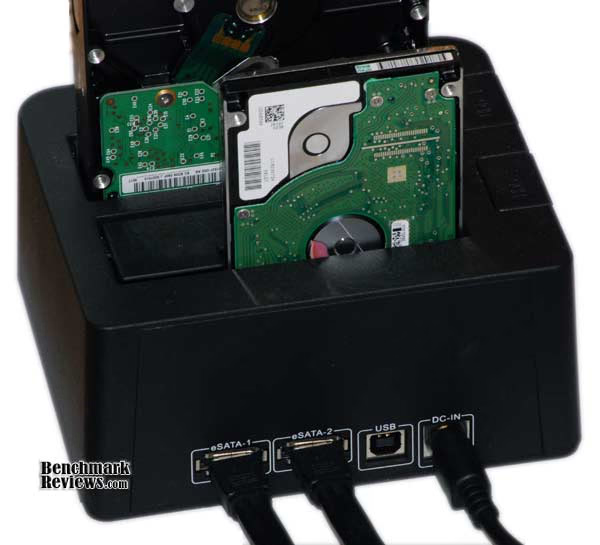
The rear panel is similarly inspired, offering clearly labeled but unobtrusive connections. The connections were very solid showing none of the flexing and wiggling that are evident when they have no support other than the PCB board they're attached to. In addition, the SATADOCK22UE sports separate eSATA connections for each drive.

SATADOCK22UE Detailed Features
The SATADOCK22UE features drive specific power buttons that light up to ensure you know which drives are on. The dock allows hot drive swapping assuming your operating system supports it.
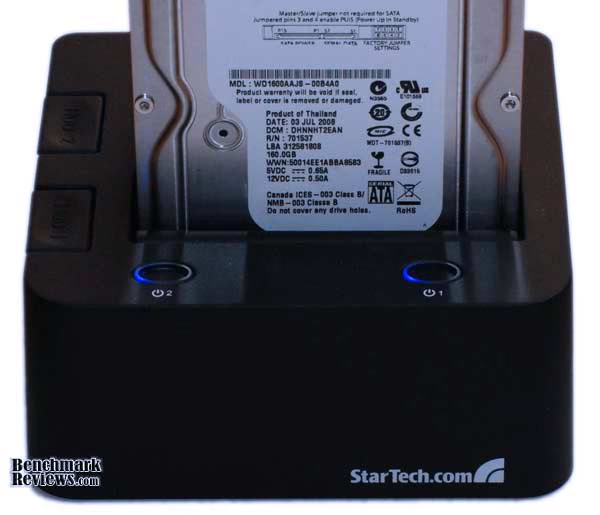
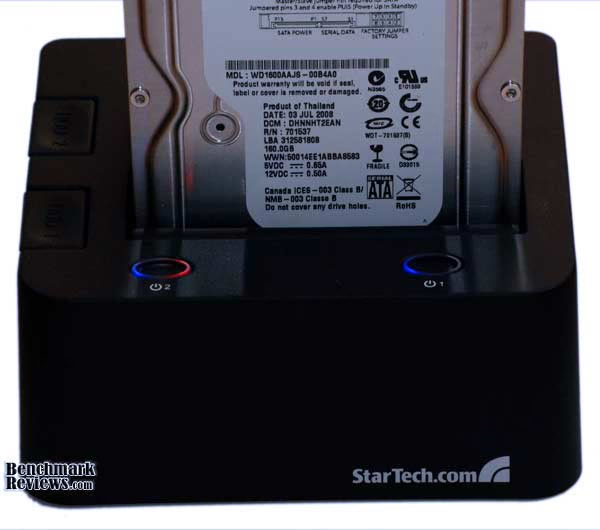
File transfer activity is marked by a second red LED making it easy to distinguish which drive is getting traffic.
The SATADOCK22UE supports 2 drives - and each bay can handle either a 2.5" or 3.5" drive via a simple but effective spring loaded dust flap which ensures the drive connectors are exposed to as little dust as possible when the dock is empty.
Testing & Results
Testing Methodology
The SATADOCK22UE does not contain a drive controller that would affect performance, so I would expect transfer rates to reflect the drives performance when connected via eSATA or the maximum USB transfer rate when connected via that port. In addition, the question of direct file transfers comes in to play - how well does the SATADOCK22UE handle direct file copying from one drive to the other. To address these questions I utilized two drives from my "parts" bin - a 160 GB Western Digital 3.5" drive (WD160AAJS) and a Seagate 100GB 7200 RPM 2.5" notebook drive (Momentus 7200.1) as well as the 1TB Western Digital WD10EACS attached to my Desktop PC. To test file transfer performance between the host system and the SATADOCK22UE I utilized ATTO Disk Benchmark to ensure that host system drive speed was not a factor. To test real world file transfers I utilized an ISO image of Windows 7 x32 RTM and a batch file that logged the start and stop time of each file transfer. Each file transfer was repeated 5 times and the results averaged for graphing. Tests were performed over both eSATA and USB connections and file transfers were completed between each of the three hard drives (local system, docked HD1, docked HD2).
Desktop Test System
-
Enclosure: Antec P182
-
PSU: Antec True Power Trio TP3-650
-
Motherboard: MSI K9A2 Platinum
-
Processor: AMD Phenom II 940 BE
-
System Memory: 4 - 2GB OCZ DDR2 PC2-8500 (Matched Pairs)
-
Video: NVidia 9600 GT
-
Monitor: Dual Dell 2001FP Monitors
-
Disk Drive 1: WD10EACS - 1TB drive
-
Optical Drive: Plextor PX-716A
-
Audio: Onboard
-
Operating System: Windows 7 x64 RC1 / Windows 7 x64 RTM / Windows Vista X64 SP2
-
Win 7 Experience Ratings (Overall): 5.9
-
Processor: 7.3
-
Memory: 7.4
-
Graphics: 5.9
-
Gaming Graphics: 5.9
-
Primary HD: 5.9
-
Results
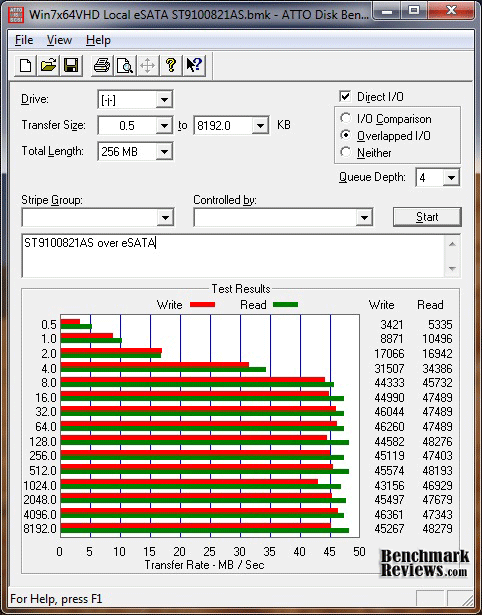
As expected, the Seagate drive showed the slowest performance of all the drives hitting a maximum transfer rate of 46MB/s write and 48MB/s read. While this is certainly not enough to saturate the eSATA connection, it is right in line with what we should expect from a 7200 RPM notebook drive.
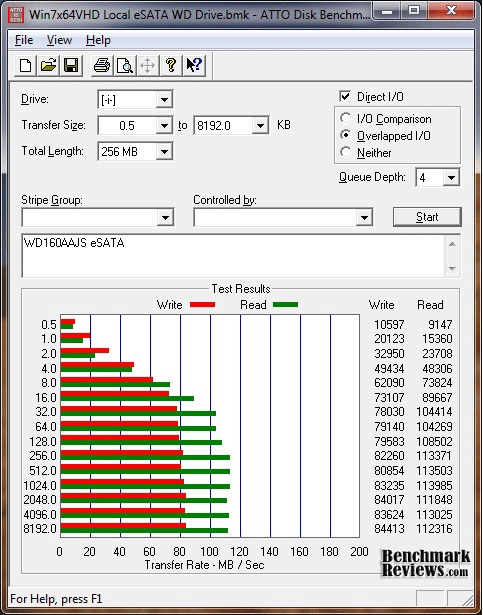
The 160 GB Western Digital drive was the fastest over eSATA reaching a maximum 84MB/s write and 113Mb/s read rate. While I was surprised at the read speed attained, I switched docking bays and tested directly attached to my SATA controller and achieved materially the same results in all cases so I have to conclude that this result is accurate.
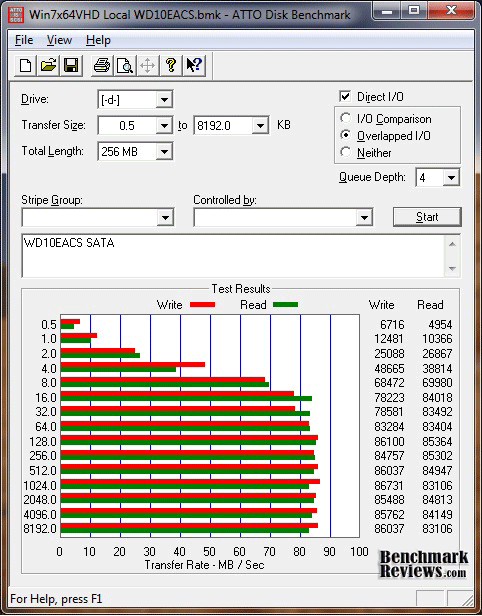
The 1TB Western Digital drive utilized by my desktop offers more symmetrical read / write performance over eSATA offering 86MB/s write and 85MB/s in read performance.
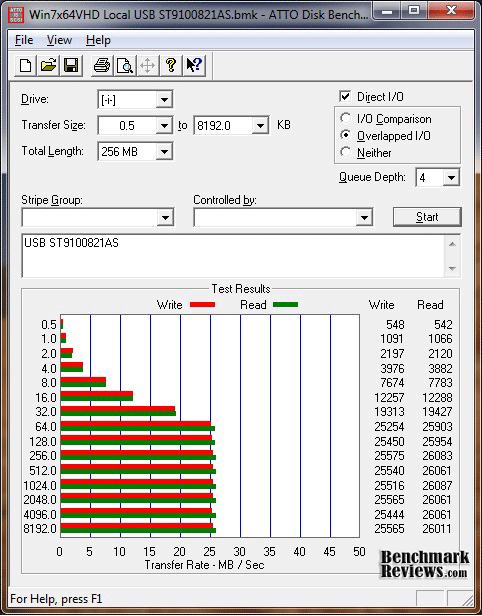
Both drives exhibited maximum possible performance over USB achieving results hovering right at 26MB/s which would seem to indicate that USB controller on the SATADOCK22UE is efficient. The 100MB Seagate drive results reflected above show we're achieving all we can expect over USB.

The 160MB WD drive performance over USB is materially the same as the Seagate drive.

The Raw Copy File Transfer Speed tests were designed to give a real world sense of how well the SATADOCK22UE performed in it's intended real world role. Of particular interest was the performance when transferring data between the two drives on the dock. As the chart above shows, the eSATA transfer speeds are highly variable and directly reflect the performance of the drives involved in the data transfer. The most interesting element of the eSATA testing was the WD to Seagate transfer rate coming in at nearly 109MB/s - due to the significantly higher score, that test was re-validated after the initial run and all 10 runs were reflected found to have materially the same performance.
Clearly the eSATA transfer rates support using the SATADOCK22UE for large file transfers and imaging whether from local disk to dock or intra-dock from drive to drive. While the USB performance was right on par with maximum USB transfer rates, I had hoped the intra-dock transfers would benefit from a direct path from drive to drive without involving the host system. In retrospect this was probably naive as each drive is mapped to a separate drive letter at the host OS so file transfers will naturally have to go all the way down the wire to the host and then back up to the other drive. Given that is the case, the intra-dock USB performance is surprisingly good and doesn't reflect any pipe saturation you might expect from the bi-directional data transfer at peak speed.
Dual-Dock Final Thoughts
While testing indicates that the SATADOCK22UE allows unfettered performance of whatever hard drive you couple with the dock, that only represents part of the equation. The other much more important question for this device is "how can it be leveraged?". As I alluded to at the top of the article, there are a number of creative uses for the SATADOCK22UE that make it potentially very useful for hardware enthusiasts.
I have had the opportunity to use the SATADOCK22UE to migrate data on my NAS to larger drives by creating a RAID0 array for temporary storage, I instituted monthly full OS backups using 60GB laptop drives following a typical tape backup rotation scheme, created "offline" archived copies of my VM images, upgraded a failing laptop drive and restored critical files from on old data drive I had replaced and archived a year ago. With the exception of the laptop drive failure, all of that was achieved without the typical crawling under a desk, disconnecting a dozen or more cables, benching the system and cracking a case open. Talk about making my life easier!

StarTech SATADOCK22UE Conclusion
While I have no hands on experience with other HDD docking stations to offer detailed comparisons, the handful I have seen in stores were of visibly inferior build quality and many competing products online have significant customer feedback to the same effect. To that end the most common complaints with this product category were:
-
Units that failed within weeks if not days of purchase
-
Difficulty engaging or disengaging drives
-
Poor host acknowledgement (ie docking unit had to be on before the OS booted)
-
Lack of controls (ie no power button or activity lights)
-
Poor Performance in eSATA or USB transfer rates
-
Single eSATA Connection
-
HDD overheating
The SATADOCK22UE suffers from none of these failings in my experience with the unit thus far. The dual SATA-drive docking unit I have has experienced daily use for several weeks and is currently trended to multiple uses per week and I have seen nothing that would indicate a quirkiness, flakiness or the likelihood of a failure. Drive insertion is smooth with 3.5" drives - 2.5" drives require a little guidance as the dust flap leaves a little more play in the insertion path, but it certainly doesn't feel awkward or unsure. Drive removal is similarly refined whether you use the eject button or just pull the drive up and out. Host acknowledgement has not been an issue either, I have inserted and removed drives a multitude of times without issue - I even twice ejected a disk without hitting the power button first and in every case the OS immediately acknowledged the existence or lack of the drive as appropriate. Poor performance was certainly not an issue with this docking station, in fact the SATADOCK22UE allowed the drives to perform at peak efficiency given the inherent constraints of each interface.
By offering 2 separate eSATA connections the SATADOCK22UE allows independent access to each drive which not only ensures maximum bandwidth capacity, but also allows for mounting 2 drive RAID arrays if the Host systems drive controller supports it. Finally, a fairly common issue with some of the physically taller docking stations is that the hard drives overheat due to the additional casing covering the drives vertically. The SATADOCK22UE seems to represent a nice middle of the road size that gives the drives enough support and stabilty that you don't wonder if they will fall out, but also leaves them exposed enough that air can keep the drives cooled.
All in all, the SATADOCK22UE does exactly what you would expect without any fuss, muss or mess. While it won't win any creative art awards, it is well designed, solidly constructed and actually looks pretty cool sitting on the corner my desk. While I was disappointed that drive to drive file transfers weren't direct, which negatively affected the USB transfer rates in particular, I believe that is a technological hurdle that can't be overcome without a dedicated controller and OS for the device which would both drive the cost of the unit up significantly and increase operational complexity.
The ability to create or rebuild a RAID array over the eSATA connection using the host system's drive control is potentially a life saver and certainly adds a degree a flexibility not possbile with docks that have a single eSATA connection. The USB connectivity while significantly slower than eSATA ensures maximum compatibility and accessibility while offering top shelf USB transfer rates. As of early November NewEgg is selling the SATADOCK22UE for $74.99 and additional retailers were found using our Price Comparison Tool with prices under $60 - at that pricepoint the SATADOCK22UE quickly pays for itself in the form of saved time and less frustration.
If like me you're looking to utilize a bevy of hard drives in both 2.5" and 3.5" form factors, HDD Docks offer the most flexible, efficient and functional approach and the SATADOCK22UE is at the top of that heap when considering construction quality, ease of use and performance. As such the SATADOCK22UE earns a Golden Tachometer Award with a Final Score of 9.15 out of 10.
Pros:
+ Easily Swap Drives
+ Supports 2.5" and 3.5" drives without requiring brackets or trays
+ RAID support over eSATA (using the Host system's drive controller)
+ No apparent overhead or impact from the Dock's drive interfaces
+ Solid Construction
+ Dual eSATA connectivity for maximum performance
+ USB connectivity for maximum compatibility and data portability
Cons:
- USB intra-dock transfer rates restricted to USB maximum transfer speed
Ratings:
-
Performance: 9.25
-
Appearance: 9.00
-
Construction: 9.00
-
Functionality: 9.25
-
Value: 7.25
Final Score: 8.75 out of 10.
Questions? Comments? Benchmark Reviews really wants your feedback. We invite you to leave your remarks in our Discussion Forum.