
Genius HS-03U USB Gaming Headset
Genius HS-03U USB Gaming Headset Review
If you are a gamer, then chances are you enjoy the sounds and music of your favorite games. A good set of headphones is a great addition to any gamer's equipment, especially if you play in a common area such as a dorm room, living room, or just like to become fully immersed in the sounds. Additionally, if you play a game that uses voice chat, an attached microphone is essential for hassle-free communication with your friends or foes. Genius has provided Benchmark Reviews their USB Circumaural Headset, model HS-03U. This headset boasts features such as noise-cancellation, in-line volume control, and vibration. Stay tuned as Benchmark Reviews tests out these features, and many more on the Genius HS-03U Headset.I find that many headsets offer a nice alternative to speakers and a desk microphone. Often, however, you sacrifice sound quality and the rumble of the bass notes using headsets. Genius tries to offset this with the vibration function. By syncing vibrations with the bass notes, users get the sensation of having a large subwoofer at their disposal without the added trouble of offending people nearby (e.g. downstairs, next door).

The HS-03U headset will be tested in a variety of settings. The headset will be used while playing a selection of games ranging from First-Person Shooters, to Real-Time Strategy, to Racing and Action games. The Genius HS-03U will also be used with popular voice chat programs such as Ventrillo and Team Speak. Additionally, the HS-03U will be used to listen to a variety of music. The HS-03U will be evaluated in the following areas of interest: Performance, Value, Functionality, Appearance, and Construction. Some of these categories may have a tendency to be more subjective than others. At Benchmark Reviews, we strive for professionalism and aim to provide the most fair and unbiased reviews as possible.
Manufacturer: Genius, a division of KYE Systems Corporation
Product Name: Circumaural USB Gaming Headset
Model Number: HS-03U
Price As Tested:$32.60 (Compare Other Prices)
Full Disclosure: The product sample used in this article has been provided by KYE Systems.
HS-03U Headset Features
- Foldable USB gaming headset with vibration function
- Easy installation; plug and play with USB
- In-line volume control for volume and microphone
- Noise-canceling microphone assures clear voice
- Microsoft Vista Compatible
HS-03U Specifications
| Interface | USB |
|---|---|
| Frequency response | 20Hz~20KHz |
| Sensitivity | 112dB |
| Impendence (@1KHz) | 32ohm |
| Weight | 200g |
| Cable length | 1.5M |
| Vibration | Yes |
| Frequency response | 10Hz ~ 20KHz |
| Impedanc | 32ohm +/- 20% |
| Sensitivity | 112dB +/-3dB@ 1KHz |
| Distortion (THD) | <3% @1KHz for 1mW |
| Max input | 5mW |
Note: This information was obtained from the Genius website.
Closer Look: Genius Headset
The Genius HS-03U is a Circumaural Headset. This type of headset is designed to fit over the top of your head and go over your ears. This helps provide the advertised Noise-Cancellation in the HS-03U. The headband is adjustable just above the hinges on either side, and has roughly an inch of movement on either side. The HS-03U Headset is all black with some lime green highlights on the earpieces, microphones, and in-line volume control. Take a look at the following sections to see more on these and many of the other features.
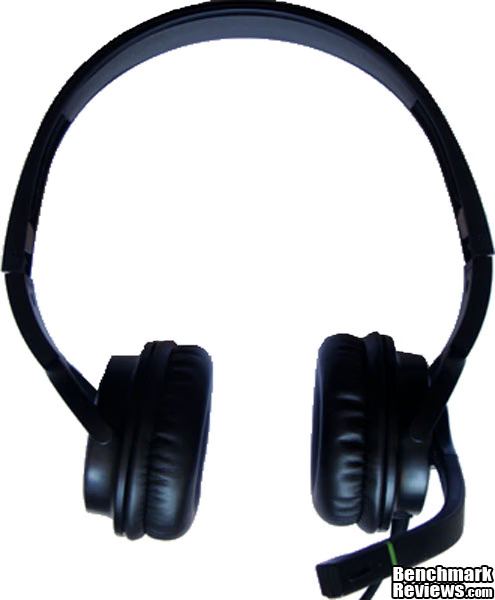
The image above shows the full HS-03U headset with the Microphone set out to be used. The earpieces are cushioned with vinyl, and the microphone boom is composed of rubber.
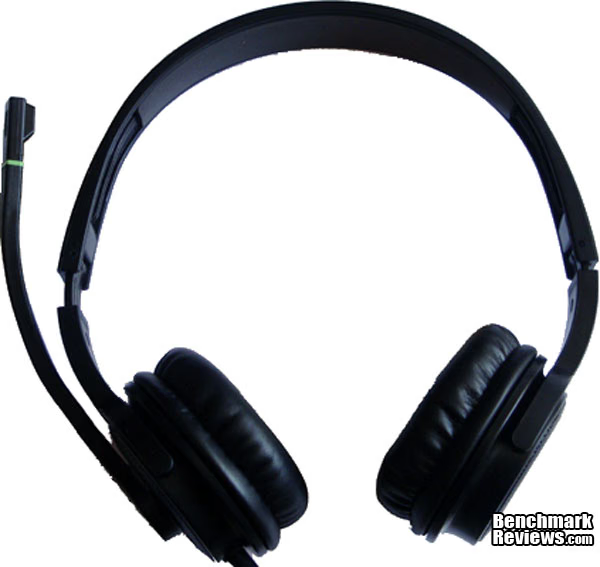
This is an image of the HS-03U from the rear. The microphone boom rotates up so as to not be in the way when you are not using it. The microphone only swivels 90 degrees, so the headset cannot be used with the left and right side reversed if you plan on also using the microphone. You can also see on either side of the headset where the adjustments can be made by sliding the headband. Often you find that these sliding adjustments are very loose, and have the tendency to move around and get out of shape while wearing them. This does not seem the case with the HS-03U. The sliding seems very stiff, and that is what I would prefer.
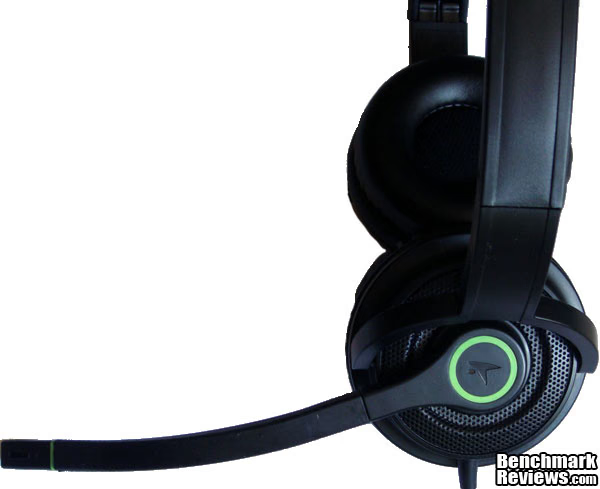
This in an image of the microphone boom on the HS-03U. The microphone boom is made of flexible rubber which allows you to maneuver it into position and it will stick there. This is very useful, as sometimes you find headsets with a very limited range of motion on the microphones, so allowing the boom to be bent to whatever position you like is very nice.
Genius HS-03U Detailed Features
Some of the detailed features of the Genius HS-03U Headset include the ability to fold for portability, an in-line volume control, and a vibration feature. In this section, we will take a look at these features and see how useful they are, and how well they are implemented.
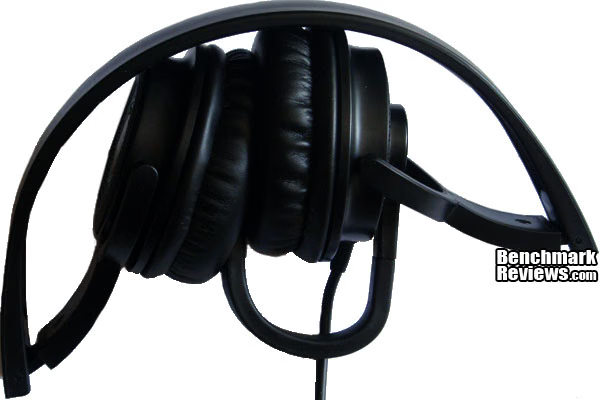
This is a picture of the way the HS-03U folds for portability. I like that it folds inside of itself, but it seems to leave the microphone boom sticking out there. As you can see in the picture, the microphone can be folded back into the earpieces, but it almost seems like an afterthought. It seems like it may put unnecessary strain on the microphone, and from my experience, the mic is the first thing to go bad on headsets due to a bad cable.
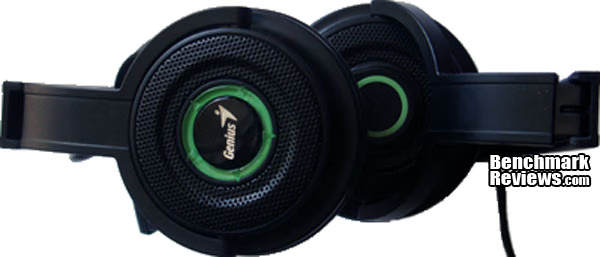
Here is a side shot of the HS-03U Headset folded. Inside these earpieces are the motors that drive the vibration in tune with the bass notes. The vibration is a welcome addition to headsets, as it is one of the major areas of sound that is sacrificed when using a headset over a traditional external speaker setup. I enjoy the all black color with the lime green accents.
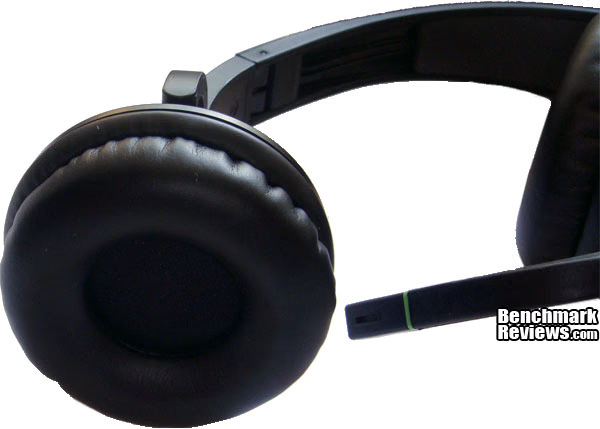
Here is a close-up image of the HS-03U earpiece. The earpieces seem a bit small to me. I have small ears, and I found that my ears would not fit comfortably inside the earpiece. After several hours of using this headset, my ears were pretty sore, especially if I was wearing my glasses. This is not to say that they are not wearable. If you take short breaks every now and then, it should not be much of a problem. As you used the headset over time, I am sure you would become accustomed to them, and after adjusting the headband exactly to your head, they may become much more comfortable.
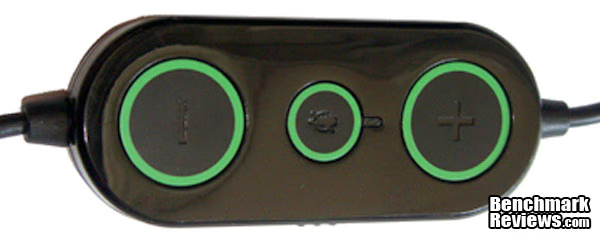
The in-line volume control on the Genius HS-03U is a nice touch. On this volume control, there are volume up/down buttons, a microphone mute toggle, and on the side there is a switch to turn on and off the vibration feature. The USB cable is 1.5m (~5ft) long, and the volume control is at a convenient distance from the headset to allow comfortable use. I found that the cord was a bit short for my liking. I had the HS-03U plugged into the top of my case, which allowed me a fair amount of extra cord, but if I were to use the plugs in the rear of my case, or even if I had USB plugs on the bottom of my case, I would feel like I could not be as "animated" as I typically am during a heated frag fest. Obviously, depending on where you plug this in will vary from user to user, but it is something to consider.
Testing & Results
Testing Methodology
The HS-03U Headset was tested playing a variety of games and software. I disabled my motherboard's onboard sound as to not conflict with any devices or drivers installed by the HS-03U. The games and software tested using the HS-03U are: Battlefield: Bad Company 2, StarCraft II, Lord of the Rings: Online, Teamspeak 3, Winamp, Windows Media Player, and Firefox. These were all tested using Windows 7 Professional 64bit.
Test System
-
Motherboard: Gigabyte P5NE-SLI
-
System Memory: Corsair XMS 4x1gb 800mhz
-
Processor: Intel Core 2 Duo e6600
-
Audio: Genius HS-03U (other sound card disabled)
-
Video:eVGA Nvida 260 GTX core 216
-
Disk Drive 1: WD Raptor 72gb
-
Disk Drive 2: WD SataII 320gb
-
Enclosure: Cooler Master Wave
-
Monitor: ASUS 24"
-
Operating System: Windows 7 Professional 64bit
Results
Plugging the Genius HS-03U into the USB port, I was immediately greeted by a baloon tip saying that Windows detected new hardware. Genius does not provide dedicated drivers, but Windows 7 immediately installed the default drivers, and I was all set. If you are unfamiliar with how USB headsets work, they simply install a Software-based sound card in your system. You then need to be sure that you configure your software and games to use this new soundcard as the default or preferred device, or else you will simply be wearing a fancy pair of ear-warmers. This is especially important if you choose to change back and forth between the headset and external speakers, as your external speakers will use your normal sound device, and your settings must be changed back accordingly. The same rule applies to both the microphone (recording device) and the headphones (playback device).
I first tried out the HS-03U headset with some of my favorite music using Winamp and Windows Media Player. I tried to find some music with a good range to fully test out the sound quality, and also find some music with some bass to test out the vibration functionality. i fired up some Daft Punk and cranked it up using the in-line volume control. The volume control buttons are very handy, and I noticed that they move the volume up and down in very small increments. This is not a good or bad thing, but it is merely a personal preference whether you would like that or not. Listening to the music without the vibration turned off sounded good. The volume gets plenty loud, and the music does not get distorted or scratchy when the volume gets turned up. After turning on the vibration, you can instantly tell the difference. You not only hear the bass, you feel it vibrate too. It gives the sensation of listening to speakers with a dedicated subwoofer. I was pleasantly surprised how much this enhanced my listening experience.
Playing Battlefield: Bad Company 2 was an equally pleasant experience, especially with the vibration turned on. Tanks, explosions, gunfire, etc. all seem a bit more real when your head is vibrating. Being only a stereo headset, it is a bit of a change using the HS-03U versus my typical 5.1 surround headset, but it is not too much of a burden. The headset and drivers do a good job of sound positioning. The other games are very similar. Racing games, MMOs, etc. all have a good amount of sounds and music that can be enhanced with a vibration feature, and I did not find any games that had any trouble outputting sound properly to the audio device.
Using voice chat software such as Ventrillo, Team Speak, and some of the games' built-in voice chat was a breeze. You simply set the input device as the HS-03U Sound device, and that is it. I asked many of my fellow gamers what they thought of my voice quality, volume, and clarity, and they all said that it sounded great. The included microphone mute button is a nice bonus, in case you use the automatic voice detection instead of push-to-talk on your games or voice-chat software, and want to have a moment to vent your frustration and not have everyone hear it.
This headset is not completely without its flaws, however. Once in a while, the headset seemed to have trouble playing sounds, or it would simply play a "screeching" sound at full volume and then sounds after that would only play a screeching noise, or would sound very distorted, and be VERY loud. It seemed to happen the most with things like YouTube videos, or other embedded clips. It happened once or twice in a game. Usually unplugging the device and plugging it back in resolved the problem, but other times it would not fully correct itself until a full system reboot. I would say out of a 3-4 week period, it happened about 5 times. It is possible that this is related to my operating system being Windows 7 64bit, and the drivers may simply not be fully compatible yet.
Gaming Headset Final Thoughts
My final thoughts on the Genius HS-03U Headset are that it is a decent all-around gaming headset. It looks sharp, it has a nice attached microphone, vibration features, in-line controls and the ease of USB. The vibration feature is very nice if you are into the vibration of bass, but would like the privacy and convenience of headphones.
Some of the problematic areas of the HS-03U can be considered subjective. The only major flaw I found with the headset was the occasional screeching sound, but that would most likely be able to be fixed with a driver update. Using it in a variety of scenarios, I found it to be a pleasant experience, and I think most people would have a similar experience.
Genius HS-03U Conclusion
The performance of the HS-03U was for the most part pleasurable. The sound quality was good, the volume and other controls worked well, and the microphone quality was good. The vibration featured worked really well, and it was very enjoyable to use. There were a few hiccups with the sound here and there, however. Having a very loud screeching noise played in your ear is not usually a pleasant experience, but is likely something that can be remedied easily.
The appearance of the Genius HS-03U is very appealing. I enjoy the all-black colors and the lime green accents.
The construction quality of the HS-03U seems good. Being that it is plastic, there may be some cause for concern if you drop them or tend to throw your headsets if you are angry. I like that the microphone boom is made from rubber, as it seems like it would be durable,
The HS-03U functions well. I like that there is an in-line volume control with the vibration and microphone switch. The USB connectivity makes it extremely plug-and-play. The headset folds nicely so that it can be easily packed in a bag to take to your local LAN party, or thrown in your laptop case.
The value of the Genius HS-03U is on par with many other headsets. I think the vibration feature sets is a bit above many of the other headsets in its price range. Headsets can be very expensive, but I think for the performance and features, Genius has this set at a very fair price point. The current price on Amazon.com is $32.60, but there are other retailers selling this headset so compare prices.
I would recommend this headset if you are in the market for an inexpensive but decent headset. If you want vibration, volume control, USB connectivity, and a microphone, then this headset is worth a look.
Pros:
+ Vibration Feedback
+ In-Line Controls
+ USB Plug-And-Play
+ Foldable for portability
+ Good looking
+ Good quality sound and voice
Cons:
- Some driver/software issues
- All plastic may affect longevity
- 5ft long cord seems slightly short
- Folding the microphone for storage seems like an afterthought
Ratings:
-
Performance: 8.25
-
Appearance: 9.50
-
Construction: 8.00
-
Functionality: 9.25
-
Value: 9.00
Final Score: 8.8 out of 10.
Quality Recognition: Benchmark Reviews Silver Tachometer Award.
Questions? Comments? Benchmark Reviews really wants your feedback. We invite you to leave your remarks in our Discussion Forum.
Reader comments from the original article
7 comments were posted before commenting closed. They are preserved as written. Original avatars no longer resolve and are shown as a placeholder.
Question... KukoCL Permalink:
I bougth these headphones, and i have a little trouble there.. when im at total silence in my room i can hear a noise in the headphones that stay there like 30 seconds after any sound, its a small noise but anoying.. someone hears that? or its only me? :o sorry for my spanglish xD
Windows 7 64 bits microphone driver Sergio Barreira Permalink:
Hi: Windows 7 64 bits ultimate can't recognize the microphone, have any drivers? Thanks.
PS3 Fernando Küpper Permalink:
Sadly it does not work with the PS3.
RE: Genius HS-03U USB Gaming Headset Woody Manly Permalink:
Can i use this product to a PS3 Slim?
No you can't Fernando Küpper Permalink:
See my last comment ...
Any Recommendation? Woody Manly Permalink:
Thanks Fernando K?pper, Do you have any recommendation USB/Wirelles Headset for using with PS3 Slim?,Range of price about under 100$. Thank You for last answer...
Hum... Fernando Küpper Permalink:
Try something with Turtle Beach or Logitech...and if you don't find anything, there's sony playstation headphone, check it out here #amazon.com/Wireless-Stereo-Headset-Playstation-3/dp/B0053OLY9O/ref=sr_1_3?ie=UTF8&qid=1344303264&sr=8-3&keywords=ps3+headset Hope it helps....reply to me here if you get any nice results! I'm looking for one ;)