
Logitech G9x Laser Gaming Mouse
Logitech G9x Laser Gaming Mouse Review
One of the primary reasons that PC video games are so popular is because they offer precision control and accuracy beyond what the gaming console can deliver. Tools are an important part of the trade, and to be the best you've got to use the best equipment. Logitech is keenly aware of these fundamentals, which is why they've created an entire business around high-performance peripherals. In this article, Benchmark Reviews tests the Logitech G9x Laser Gaming Mouse (model 910-001152) in fast-paced FPS action games such as Call of Duty: Modern Warfare 2 and Battlefield: Bad Company 2.
First Person Shooter (FPS) styled video games are extremely popular, and equally competitive for gamers. Quick muscle twitch reaction time is a must if you plan to survive the kill-or-be-killed battleground, but physical skill is meaningless if it's doesn't transfer into the PC. This is where the importance of high-quality gaming peripherals come into play. The Logitech G9x is a refined version of the original wildly popular Logitech G9 Laser Gaming Mouse. While most of the physical features are identical between the two, a few important updates have been delivered to the Logitech G9x revision.
From the first moment I fearlessly laid my hand upon the funny pointing device attached to the Apple Mac back in 1984, I felt that computers would always be approachable. I believe most enthusiasts started their love affair with computer this way, and eventually learned our way around the rest of the landscape. Times have changed, and now many of us require, nay demand, something more from our peripheral hardware than simple functions. The Logitech G9x 5700 DPI laser USB gaming mouse has arrived, and it's ready to point and click... boom, head-shot!

Logitech G9x Gaming Mouse 910-001152
Personal computer pointing devices were first made popular by their ease of use. The name "mouse" was given to these pointing devices was originally coined at the Stanford Research Institute. It was derived from the resemblance of early models which had a cord attached to the rear part of the device, suggesting the idea of a tail to the common rodent. It's another example of one of the few computer hardware components which is recognizable by anyone and everyone without much description. You can't say the same for many other computer hardware components.
Today the purpose of the computer mouse remains unchanged, with the exception of those who play computer video games, power users, graphic artists, and designers. Logitech offers the revised G9x laser mouse to these demanding user segments, which allows them to enjoy 200-5700 DPI worth of response accuracy. For the growing number of computer enthusiasts, who I regards as anything but a casual user, the mouse is more important than any other facet of the entire system's hardware. This is precisely why products such as the Logitech G9x series of laser mouse products are in such high demand.
About Logitech , Inc.
Logitech is a world leader in personal peripherals, driving innovation in PC navigation, Internet communications, digital music, home-entertainment control, gaming and wireless devices. The company's products combine essential core technologies, continuing innovation, award-winning industrial design and excellent price performance.
Logitech's origins lie in the OEM sector, which remains an important part of its business, and represented 11.6 percent of the company's total sales in Fiscal 2006. To meet the demands of its OEM customer base, which includes most of the world's largest PC manufacturers, Logitech offers high-volume manufacturing with focused quality control, worldwide distribution and logistics, and the ability to leverage its infrastructure under changing demand conditions.
Logitech continues to broaden its product offering and its presence in the retail sector. This is fueled by a trend among consumers to enhance their basic PC systems with more fully featured personal peripherals that add functionality and cordless freedom to their desktops. They are also purchasing supplementary devices designed for new applications and specific purposes such as gaming, multimedia, or audio and visual communication over the Internet. Further, Logitech's retail business includes personal peripherals for platforms beyond the PC, such as gaming consoles, portable music players, mobile phones and home-entertainment systems.
Today, Logitech's retail business accounts for 88.4 percent of its revenue. To provide the market with a broadening array of best-of-category products, Logitech's business model calls for supplementing its internal engineering and manufacturing strength with additional products and technologies through a combination of strategic acquisitions and industry partnerships.
Logitech G9x Features
Interchangeable grips
The satin texture and fuller shape of the Wide Load grip add extra comfort. The DryGrip technology and compact shape of the Precision grip give you unmatched control.
Full-speed USB laser engine with range of 200 DPI to 3200 DPI
Advanced gaming-grade laser sensor enables up to five preset settings chosen from 200 DPI to 3200 DPI.
Onboard memory
You can program up to five profiles (keyboard macros, DPI settings, and LED colors), so you can play your way on other PCs (without software installation).
Weight-tuning system
Prefer a heavier or lighter mouse? You simply use the weight cartridge and up to 28 grams of metal weights to customize your G9x for just the right feel.
 Custom-color LEDs
You can choose the color of your LEDs from a wide color spectrum to match your mouse to your PC, game, or style. LEDs show your mouse DPI and profile settings.
On-the-fly adjustable DPI
You get the right level of precision for whatever game you're playing-from pixel-precise targeting (200 DPI) to lightning-fast maneuvers (up to 5700 DPI).
Two scroll modes
Precise click-to-click scrolling is perfect for weapon selection when you're gaming. Frictionless, hyper-fast scrolling lets you fly through long Web pages.
Polytetrafluoroethylene feet
Precision-molded feet from durable, super-slick low friction polytetrafluoroethylene (PTFE) resin help the G9x glide effortlessly across almost any surface.
Optimized shape for gaming precision
With a flatter shape than other traditional, bean-shaped mice, the G9x is all about precision movement.
910-001152 Specifications
System Requirements
-
Windows XP, Windows Vista, or Windows 7
-
USB port
Warranty Information
- 3-year limited hardware warranty
Package Contents
- Logitech G9x Laser Mouse
- Wide Load and Precision grips
- Weight cartridge
- Tuning weights and case
- User Manual
Part Number
- PN 910-001152
Tracking
- Resolution: 200-5700 DPI
- Image processing:12 megapixels/second
- Max. acceleration: 30G
- Max. speed: Up to 165 inches (4.19 m)/second*
Responsiveness
- USB data format: 16 bits/axis
- USB report rate: Up to 1000 reports/second
- Sleep mode: Disabled
Glide
- Dynamic coefficient of friction - Mu (k): .09
- Static coefficient of friction - Mu (s): .14
- Tuning weight: Up to 28 grams
Durability
- Buttons (Left/Right): 8 million clicks
- Feet: 250 kilometers
Logitech G9x Closer Look
Gamers usually demand ultra-high performance out of their PCs, their game software, and their input devices. For these reasons, Logitech installed a 5700 DPI laser on their G9x USB gaming mouse. The original Logitech G9 laser mouse enjoyed a full two year product cycle prior to the G9x refresh, which translates into plenty of user feedback (in addition to Logitech's development process, which used gamer-tested prototypes and provided valuable feedback).

One of the most prominent innovations to the G9-series mouse design is interchangeable grips. The G9x Laser Mouse includes two interchangeable grips that let you adjust the comfort and design to your personal needs.
-
Use the Wide Load grip (with the red Logitech logo) for a fuller shape and wider thumb rest. The Wide Load Grip features a soft, satin finish for the ultimate in comfort.
-
Choose the Precision grip (with the silver Logitech logo) if you prefer a compact shape, optimal for smaller hands and fine fingertip control.
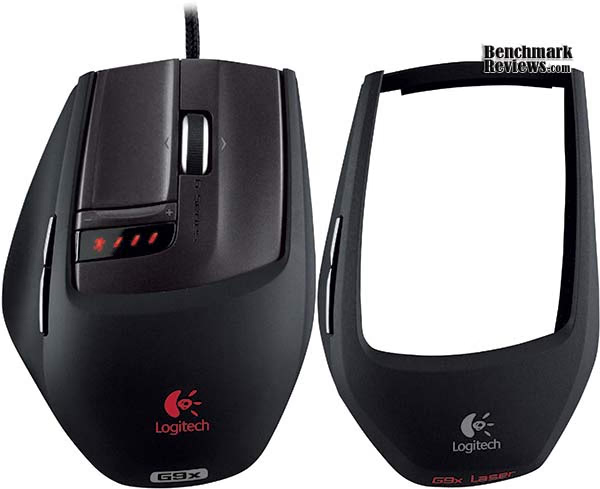
Because I have large hands (go ahead and read into that), the wide load grip works best for me, which has been coated with Logitech's DryGrip technology to wick away sweat during long, intense gaming sessions. To remove the grip shell, press the release button on the rear of the mouse to swap between the included Wide Load and Precision grips. Logitech also offers a Comfort Grip (P/N 993-000218) and Angular Grip (P/N 993-000222) available for direct purchase from the Logitech Replacement Parts website.
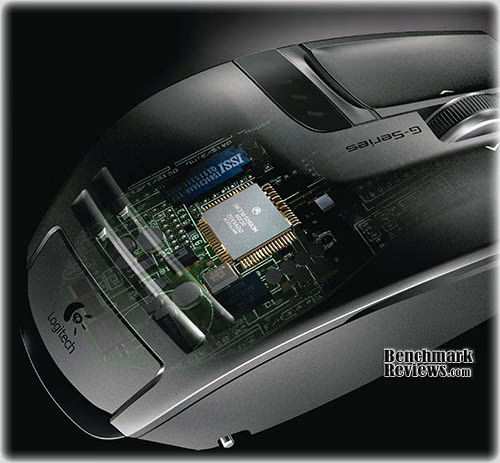
At the very heart of the Logitech G9x is the ultra-sensitive laser sensor. This mouse is a lot like a camera: as you move the mouse, the sensor takes successive snapshots of the surface medium and compares the differences among the snapshots to calculate movement and distance. The laser engine in the G9x mouse illuminates the surface medium and enables the "camera" to take its snapshots.

The Logitech G9x has the fortune of being one of the very few laser mouse products to feature an adjustable 200-5700 DPI range. This provides hardcore gamers with greater pointer precision, accuracy, speed, and smoothness. While the laser precision is available on-the-fly without Logitech's SetPoint software, additional features are unlocked with the software installed.
At 5700 DPI, all of that laser sensitivity takes serious bandwidth. The best way to get it from the mouse to the computer with minimal delay is with HiSpeed USB-2.0. Although not quite SuperSpeed USB-3.0, USB-2.0 allows the mouse to have a higher report rate - the number of times per second the mouse sends information to the operating system. More reports per second means smoother, less-jerky cursor movement. Most mice generate 125 reports per second. The G9x mouse can report up to 1000 times per second. With Logitech's SetPoint software, the report rate (polling speed) is also adjustable. (Keep in mind that as the report rate increases, more PC resources are used). Logitech recommends 500 reports per second to conserve system resources, but gamers can set the rate higher using SetPoint.
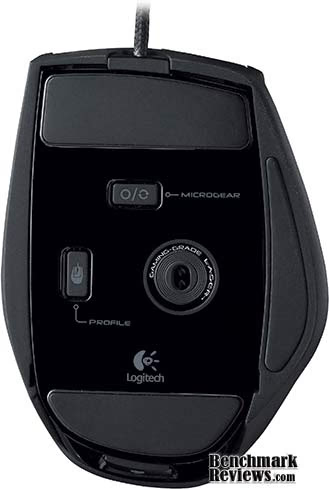
The Logitech G9x mouse boasts a 5700 DPI maximum resolution (dots per inch) with a programmed SetPoint profile. The higher the number of dots per inch (DPI), the more pixels the pointer on your screen moves for every inch you move your mouse. If you move your mouse one inch with a 1000 DPI sensor, the pointer moves 1000 pixels on the screen. If you move the same one inch with a 2000 DPI sensor, the screen cursor moves 2000 pixels (or twice the distance) moving the pointer across the screen faster.
Why does DPI matter? The higher the DPI, the faster the cursor moves across the screen. A low DPI setting means players need to move their hand farther to get a movement on the screen. With a high DPI setting, players need only move their hand a small distance to get a big screen movement. Also, as screens get larger, a higher DPI is necessary to navigate across the larger screen expanse.

Most gamers belong to the extreme end of the DPI spectrum, but many games benefit from sensitivity switching during play. In the FPS game Battlefield: Bad Company 2, a high-DPI mouse sensitivity setting helps control the tank cannon turret. However, in Call of Duty: Modern Warfare 2 a low-DPI sensitive setting may be preferable while sniping (for a slow, precision aim). A low-DPI setting is also preferred for professional applications such as Adobe Photoshop, where a measured precision movement is more desirable.
The MicroGear Precision Scroll Wheel technology offers dual modes for different types of navigation.
-
Ratchet mode provides distinct click-to-click, ratcheted scrolling, perfect for precise weapon selection.
-
Hyper-fast mode delivers frictionless scrolling, perfect for smooth zooming in games or flying through hundreds of pages in productivity applications within seconds.
-
To switch between modes, simply push the MicroGear toggle button on the bottom of your mouse.
-
The scroll wheel also has a programmable middle button and programmable tilt.
Some gamers believe 1600 DPI is too much, while others say there's really no limit. Gamers may never need the extreme 5700 DPI sensitivity from Logitech's G9x mouse, but the available settings are always there whenever the gamer needs them.
G9x Detailed Features
It's difficult to name many gaming mouse devices with nearly as many features listed in the Logitech G9x up to this point. The real kicker is that Logitech's G9x is a plug-and-play laser mouse offers integrated onboard memory for retaining sensitivity profiles without being fully dependent on supplemental software. With the onboard memory and an enhanced SetPoint configuration panel, the G9x mouse allows you to configure the mouse to your liking - and then store those settings for when you take your game on the road. For true plug-and-play performance, you can save up to five profiles in the onboard memory system. Then, no matter whose PC you’re on, your mouse will work the way you want it to. This is especially handy at commercial LAN-party environments, where you may not always have the same computer.
The G9x gaming mouse offers a weight-tuning system that accommodates your needs as a gamer. Logitech's G9x weight-tuning system allows up to four precision weight units to be added for fine-tuning the G9x to your unique style of play. Some gamers like a mouse with more heft; something that feels substantial with more control. Others (like me) prefer a lightweight mouse, especially gamers who skate over the mousing surface and lift their mouse often. A lighter mouse can offer more speed and lessen fatigue for these gamers.
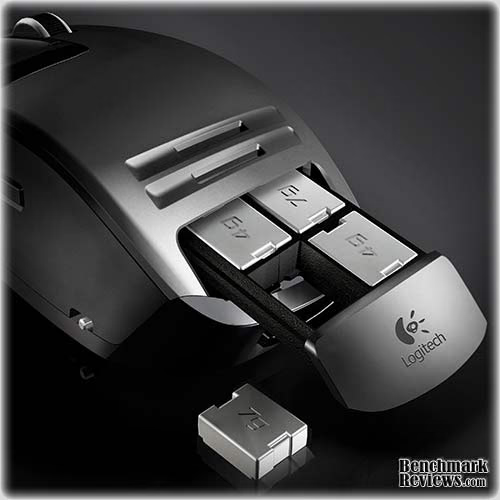
Just pop the grip off to reveal the spring-loaded inset weight cartridge. To release the cartridge, just push it in and it pops out. Insert the weights you want and push the cartridge back in. There are four 7-gram weight units, and another four 4-gram units included with the kit. Adding or subtracting just a few grams can change the gaming experience substantially. With weight tuning, you get the feel best suited to your individual style of play. Additional weights are available from Logitech's Replacement Parts website. (Logitech developed the first-ever weight tuning system for mice for the G5 Laser Mouse, released in August 2005.)

Logitech's G9x has the capability to store up to five mouse profile settings within the onboard memory. However, when you use the Logitech SetPoint software, you can save additional profiles onto a local drive (such as a USB flash drive) and swap them in and out of the mouse on demand. You can configure and store the following settings:
-
DPI Sensitivity level (200-5700 DPI)
-
Separate X and Y axis sensitivity
-
Button mapping assignments
-
Angle snapping functionality
-
Keyboard macros assignable to mouse buttons DPI settings (DPI levels, number of DPI levels)
-
LED colors (choose from a broad color spectrum)
-
Report rate (125-1000 reports/second)

Out of the box, the G9x includes three pre-configured onboard profiles groups that come loaded into the mouse's onboard memory: General, Gaming and Productivity. Unfortunately, the 5700 DPI cannot be used without the SetPoint software to initially configure the setting to one of the pre-existing profiles or a unique profile. Fortunately, if desired users can remove the software immediately after they customize settings and save them to G9x. The following chart differentiates key setting among the three factory default profiles:
|
Profile 1 |
Profile 2 |
Profile 3 |
|
|---|---|---|---|
|
Profile Name |
General |
Gaming |
Productivity |
|
LED Color |
Red |
Green |
Blue |
|
DPI Settings |
4 DPI levels (400, 800, 1600, 3200) |
3 DPI levels (200, 800, 2000) |
3 DPI levels (400, 800, 1600) |
|
Report Rate |
500 reports/sec |
1000 reports/sec |
500 reports/sec |
The productivity setting is a good choice for non-gaming applications, such as word processing or spreadsheet. The gaming profile reports its position 1,000 every second, essential for high-precision operations. Use SetPoint to create and edit profiles, and then download them to the G9x mouse. If you use your mouse on another PC or remove SetPoint, you can choose to have that PC recognize your stored custom profiles or reinitialize the mouse to its factory defaults. It should be noted that there are a few special settings work only while SetPoint is running, such as speed/acceleration and scroll wheel settings. If you move your mouse to another PC not running SetPoint, the new PC will run the profiles stored on your onboard memory.

The Logitech G9x provides large, super-slick, precision-molded Polytetrafluoroethylene (PTFE) resin gamer-grade mouse feet to minimize friction and provide smooth gliding over virtually any mousing surface. Large PTFE feet assure extra-smooth mouse movement, which is critical for heavy-handed users like me. The feet are user-replaceable, which is nice since you don't want a high-end item like this to become disposable when the feet eventually wear thin.
For easy replacement, a small groove adjacent to each foot allows gamers to pop it out with a small screwdriver. Replacement feet are supposed to be available for purchase directly from Logitech's replacement parts website, but as of July 2010 they were unavailable. Don't fret, though, because after three years of daily use with the original Logitech G9 the mouse feet appear to have many more years of life left to them.
Additionally, the durable low-friction braided cord on the G9x is made especially for full-speed USB capabilities. The braided outside covering enhances durability and simultaneously helps to reduce the possibility of cord snags - a real problem with traditional, rubberized cord coverings. It's worth noting that I did notice the braided cord likes to pick up dust that may be on the desk/table surface, so it may need an occasional wipe-down to look sharp.
Gaming Hardware Final Thoughts
Is there such a thing as the perfect mouse? This is like asking if there's a perfect color (there is: it's Canary yellow), the perfect movie (Big - 1988), or the perfect food (Sushi). I don't believe you can ever manufacturer the perfect product whenever subjective grading is involved, but that doesn't stop dozens of companies from facing consumer scrutiny with their own high-level laser gaming mouse peripherals.
Everything comes down to personal choice. Over the years I've reviewed gaming products that seemed poorly designed, or new features that were awkwardly implemented, and yet somehow these products managed to satisfy at least a small group of users. The problem is that manufacturers don't stray very far from the industries comfort zone. There's a fine line between concept and execution, a line that manufacturers cross all the time in hopes of producing the next innovative 'game-changing' device. The problem, as I stated at the beginning, is the perfect and subjective don't work hand in hand.
Think of it this way: the most elite gamers are not like everyone else. Yet, through some level of misplaced vision, manufacturers believe that their new product can transform everyone into elite gamers. I learned at an early age that simply buying a MLB-approved Louisville Slugger baseball bat would not transform me into a home run hitter, and buying a pair of Nike Air Jordan shoes would not make help my slam dunk. Talent is not simply bought and sold, but that doesn't mean that these products can't bring out the best in you.
Not everyone has the hand-eye coordination required for competitive online gaming, but occasionally a new will at least help. Gaming hardware may not turn you into a L337 PhR4993R overnight (or possibly ever), but it certainly can't hurt your game. Face it, you'll probably continue to get pwned in the face for years to come, and it has nothing to do with your mouse or keyboard. If you're really looking to place blame, it might be a matter of bad genes.
Logitech G9x Conclusion
Although the ratings and final score mentioned in this conclusion are made to be as objective as possible, please be advised that every author perceives these factors differently at various points in time. While we've done our best to ensure that all aspects of the product are considered, there are often times unforeseen market conditions and manufacturer changes which occur after publication that could render our rating obsolete. Please do not base any purchase solely on this conclusion as it represents our product rating for the sample received, which may differ from the final retail version. Benchmark Reviews begins our conclusion with a short summary for each of the areas that we rate.
Performance levels for the Logitech G9x mouse are absolutely phenomenal! There are other gaming mice that can mimic at least one of the features included on the G9x, but none of them offer the same total package. The trigger finger action is clean, and requires very little effort. Using the Logitech G9x made it seem as though technology was finally catching up to my unique personal needs. When I first learned that Logitech's G9x utilized a 5700 DPI laser unit, I wondered how this would impact my gaming. After testing the effects for myself in Battlefield: Bad Company 2, I was witness to the benefit of large DPI sensitivity whenever moving the tank turret with ease. This gaming mouse also performed extremely well for me at the low 200 DPI setting, allowing me to snipe for headshots a-plenty or make precision changes in Adobe Photoshop. The former G5 mouse was never a perfect fit for me; it came close, but it appears that the G9 is better suited for competitive gamers.
Having large hands can seem like a curse whenever I'm forced to use an ordinary mouse. I've never felt comfortable using any of the Razer mouse products, primarily because they seemed to cater to women and children... or, no offense intended... people with miniature paws. The new large 'Wide Load' molded grip allows me to rest my manly mitt atop the mouse with relative comfort, and support pad along the left side even allowed me to rest my over-sized thumb. The Logitech G9x is so close to perfect, it hurts to point out its shortcomings. While the mouse fits my hand nicely, and it glides effortlessly across my RatPadz XT, I still found that long gaming sessions were cut short because my pinkie finger would drag along the pebbled gaming surface. If the Wide Load grip offered support to both sides of the mouse (instead of just the thumb), it would extend my comfortable playing time. Additionally, I would have really preferred to have the 5700 DPI sensitivity setting already saved as one of the default profile settings.
The flat-top finger buttons take some getting used to. I was conditioned into having my forward fingers resting at a 40-degree angle on most other mouse devices. Even the old G5 has a 30-degree angle for the front buttons, and that was still very comfortable. This new angle, set somewhere in the 15-degree slope, makes me occasionally crawl my fingers up the buttons which isn't a good thing. I would suggest some depression holes included on future revisions, similar to those found on a golf ball, somewhere near the edges of these buttons.
The appearance of the Logitech G9x is a subjective matter, and every person will receive its looks differently. Not everyone likes black, and not everyone likes the flat-top design, so I don't expect everyone to like (or want) the G9x. Once the mouse is beneath your hand, looks don't matter for much. The Logitech G9x offers plenty of function, and fashion is more or less in the eye of the beholder.
Construction is completely solid, as gamers have come to expect from Logitech. Much like the former G9 gaming mouse (and legendary G5 before it), the G9x was built to sustain rugged use. The PTFE mouse feet and adjustable weight system help to maintain product longevity, allowing the G9x gaming mouse to outlast your computer. If it doesn't, then there's always Logitech's 3-year limited hardware warranty.
As of July 2010, NewEgg sells the Logitech G9x 5700 DPI laser gaming mouse (SKU 910-001152) for $81.99 with free shipping. By searching for the model part number online, our Price Comparison Tool discovered several other competitive prices. Gamers on a budget should make sure they do their price shopping!
In conclusion, the Logitech G9x 5700 DPI laser USB gaming mouse receives my recommendation for hardcore competitive gamers. It easily replaces my old G5 gaming mouse, and improves upon the legendary original Logitech G9. Overall I have been extremely happy with the convenience and wide range of feature, and once my hand became used to this mouse it became impossible to suffer with another. Among the most favorite items integrated into the G9x is the free-rolling scroll wheel, which moves between segmented clicks or unrestricted scrolling with the push of a button. There's nothing I like more than giving it a good spin to navigate down the very long web pages with complete ease. The G9x has also added a few advantage points to my gaming, thanks to the very wide-range of DPI settings. If you are serious about your mousing needs, then the Logitech G9x is going to be the best solution I can personally recommend to you.
Pros:
+ Two interchangeable grips included
+ Laser engine with 200~5700 DPI sensitivity range
+ Connects using HiSpeed USB-2.0
+ Ten pre-programmed onboard memory profiles
+ Custom weight-tuning system
+ Logitech SetPoint software expands capabilities
+ MicroGear Precision Scroll Wheel
+ Super-slick PTFE mouse feet
+ 3-year limited hardware warranty
+ Up to 1000 reports/second USB report rate
Cons:
- 5700 DPI sensitivity requires SetPoint software
- Cord may collect surface dust
- Expensive... but worth it
- Wide Load grip lacks pinkie support
Ratings:
-
Performance: 9.00
-
Appearance: 8.75
-
Construction: 9.50
-
Functionality: 9.75
-
Value: 7.00
Final Score: 9.0 out of 10.
Excellence Achievement: Benchmark Reviews Golden Tachometer Award.
Comments? Questions? Benchmark Reviews appreciates constructive feedback, so add comments below or ask questions in our Discussion Forum.
Reader comments from the original article
4 comments were posted before commenting closed. They are preserved as written. Original avatars no longer resolve and are shown as a placeholder.
Cool gadgets to buy Cool gadgets to buy Permalink:
Wow, I must say this is a good mouse. Nice review.
microgear button bottom m3kw Permalink:
I can't believe one of the CONs isn't that. You have to flip the mouse upside down to change between freespin and click-spin. Is retarded comparing to even the performance MX mouse where it is a manual mechancial button on top of the mouse(think stick shift car). Previous mouse with free spin wheels are either auto(changes gear automatically depending on how fast you spin it) or can be programmed to switch to any other(think tiptronic car).
RE: microgear button bottom Olin Coles Permalink:
This is a personal con, in my opinion. As such, I'm not a fan of this particular feature, because I have to flip the mouse every time I game to engage the wheel clicks. This was actually mentioned in the article as a minor complaint.
What about the lefty's??? Glen M Permalink:
Even though I pretty much skimmed this review at no point that stuck out, ie when talking about hand grips or in the pro's and cons, did you mention whether the Logitech G9x Laser Gaming Mouse was ambidextrous or not! (So that is a big CON for me) so once again us lefty's are out in the cold, using second rate products!