
Logitech G9 3200 dpi Laser USB Gaming Mouse
Logitech G9 Gaming Mouse 910-000173
Ever since I first laid my hand on the funny pointing device attached to the Apple Mac back in the forth grade, I felt that computers would always seem to be approachable. I think that most of us probably started this way, and eventually learned our way around the rest of the landscape. Times have changed, and now many of us require, nay demand, something more from our peripheral hardware than simple functions. The Logitech G9 3200 dpi Laser USB Gaming Mouse 910-000173 has arrived on the scene and Benchmark Reviews is ready to point and click... boom, head-shot!
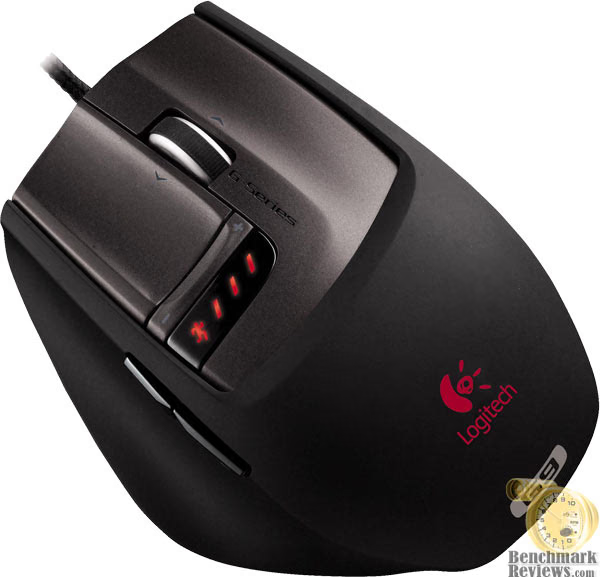
The computers' pointing device was first made popular by it's ease of use. The name "mouse" given to these pointing devices was coined at the Stanford Research Institute. It was derived from the resemblance of early models which had a cord attached to the rear part of the device, suggesting the idea of a tail to the common rodent. It's an example of one of the very few computer hardware components which is recognizable by anyone and everyone without much description.
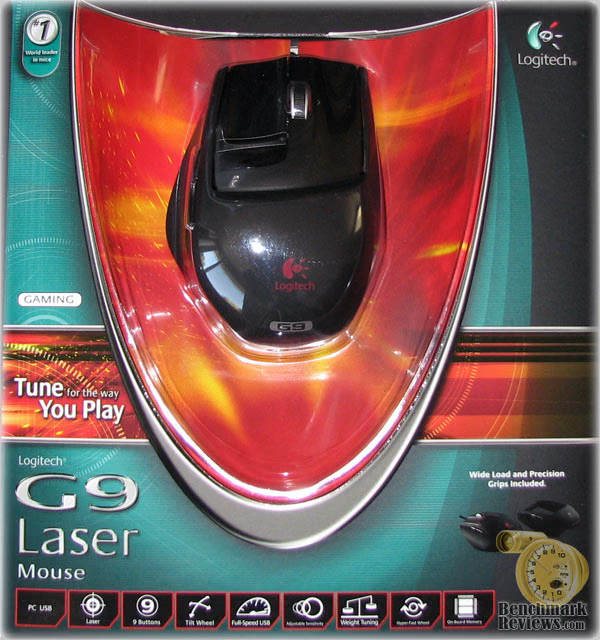
Today the purpose of the computer mouse is still in many ways unchanged, with the exception of those who play computer video games, power users, graphic artists, and designers. Logitech offers the new G9 Laser USB Gaming Mouse, which renders 3200 dpi worth of responsive accuracy. For the growing collection of computer operators who are anything but casual users, the mouse is more important than any other facet of the entire systems hardware. This is why products such as the Logitech G9 3200 dpi Laser USB Gaming Mouse (910-000173) are in such high demand.
About the Company: Logitech
Logitech is a world leader in personal peripherals, driving innovation in PC navigation, Internet communications, digital music, home-entertainment control, gaming and wireless devices. The company's products combine essential core technologies, continuing innovation, award-winning industrial design and excellent price performance.
Logitech's origins lie in the OEM sector, which remains an important part of its business, and represented 11.6 percent of the company's total sales in Fiscal 2006. To meet the demands of its OEM customer base, which includes most of the world's largest PC manufacturers, Logitech offers high-volume manufacturing with focused quality control, worldwide distribution and logistics, and the ability to leverage its infrastructure under changing demand conditions.
Logitech continues to broaden its product offering and its presence in the retail sector. This is fueled by a trend among consumers to enhance their basic PC systems with more fully featured personal peripherals that add functionality and cordless freedom to their desktops. They are also purchasing supplementary devices designed for new applications and specific purposes such as gaming, multimedia, or audio and visual communication over the Internet. Further, Logitech's retail business includes personal peripherals for platforms beyond the PC, such as gaming consoles, portable music players, mobile phones and home-entertainment systems.
Today, Logitech's retail business accounts for 88.4 percent of its revenue. To provide the market with a broadening array of best-of-category products, Logitech's business model calls for supplementing its internal engineering and manufacturing strength with additional products and technologies through a combination of strategic acquisitions and industry partnerships.
More information about Logitech is available on their company website.
Logitech G9 Features and Specifications
G9 Features
| Interchangeable grips | Wide Load and Precision grips have different shapes and materials for a customizable comfort and feel. |
|---|---|
| Full-speed USB laser engine with range of 200 dpi to 3200 dpi | Advanced gaming-grade laser sensor enables up to five preset settings chosen from 200 dpi to 3200 dpi. |
| Onboard memory profiles | Onboard memory allows up to five custom profiles for instant mouse setting recall. |
| Weight-tuning system | Mix-and-match assortment of weights lets gamers adjust mouse weight and balance by up to 28 grams. |
| Custom-color LED's | LED's on the mouse can be customized from a broad color spectrum to display color-coded profiles. |
| MicroGear Precision Scroll Wheel |
Two high-performance scrolling modes. Traditional ratchet scrolling for precise weapon selection. Hyper-fast frictionless scrolling for zooming or scrolling through long documents and lists. |
| On-the-fly sensitivity switching | Instantly switch from high dpi (best for fast action) to a lower dpi setting when precision is needed. |
| PTFE Feet | Feet precision-molded from durable, low-friction polytetrafluoroethylene (PTFE) resin help the G9 glide smoothly over virtually any surface. |
| New shape optimized for gaming precision | With a flatter shape than other traditional, bean-shaped mice, the G9 is all about precision movement. |
Logitech Specifications
| Tracking | |
|---|---|
| Resolution | 200 dpi - 3200 dpi |
| Image Processing | 6.4 megapixels per second |
| Maximum Acceleration | 20 g |
| Maximum Speed | 45-60 inches per second* |
| Responsiveness | |
| USB Data Format | 16 bits per axis |
| USB Report Rate | Up to 1000 per second |
| Sleep Mode | Disabled |
| Glide | |
| Dynamic Coefficient of Friction Mu(k) | .09** |
| Static Coefficient of Friction Mu(s) | .14** |
| Tuning Weight | Up to 28 grams |
| Durability | |
| Buttons | 8 million clicks |
| Feet | 250 kilometers |
| *Depending on surface | |
| ** Tested on wood veneer desktop |
Price
The suggested retail price of the Logitech G9 Laser Mouse is $99.99.
Windows Vista-Ready
The Logitech G9 Laser Mouse has received the Certified for Windows VistaTM logo and works on computers running the Microsoft Windows Vista operating system.
Warranty
3-year limited warranty
System Requirements
• PC running Microsoft Windows Vista or Windows XP***
• USB port
• CD-ROM drive is required for software installation
***Prior versions of Windows are not supported. The Apple Macintosh is not supported. There is also no mention of Linux included in the specifications.
G9 Closer Look
Gamers usally demand ultra-high performance out of their PCs, their game software, and their input devices. For that very simple reason, Logitech created the G9 3200 dpi Laser USB Gaming Mouse. Every aspect of the Logitech G9 Laser Mouse has been designed with gamers in mind. During Logitech's development process, gamers tested prototypes and provided valuable feedback.
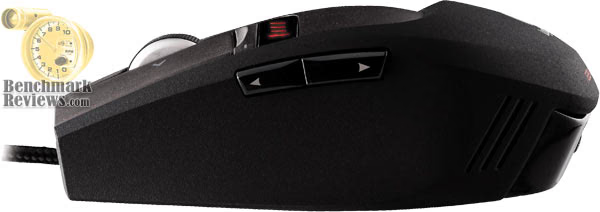
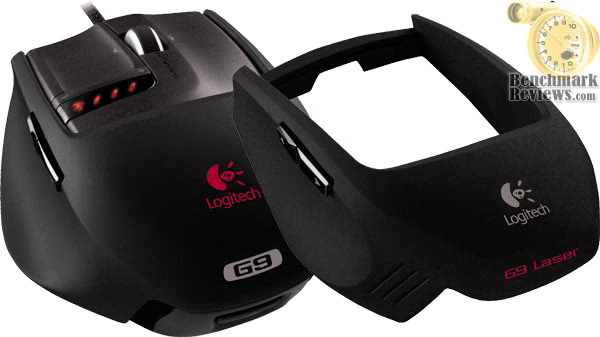
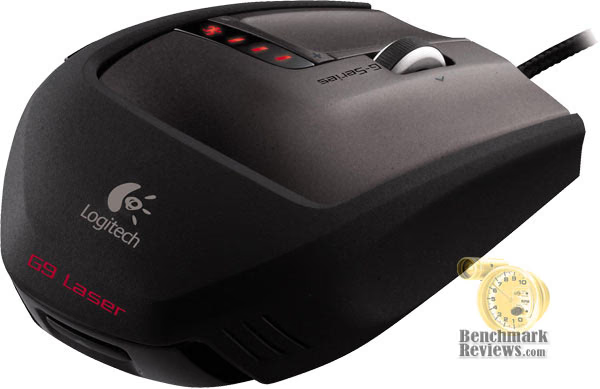
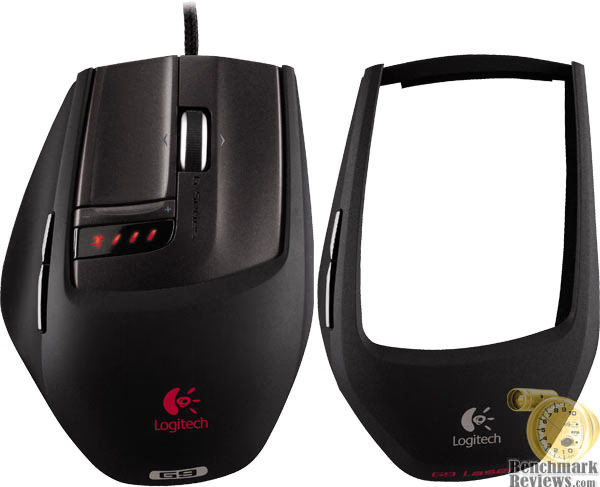
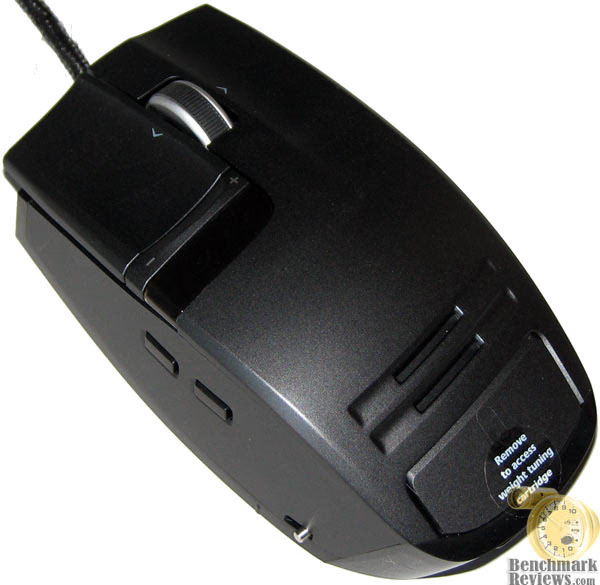
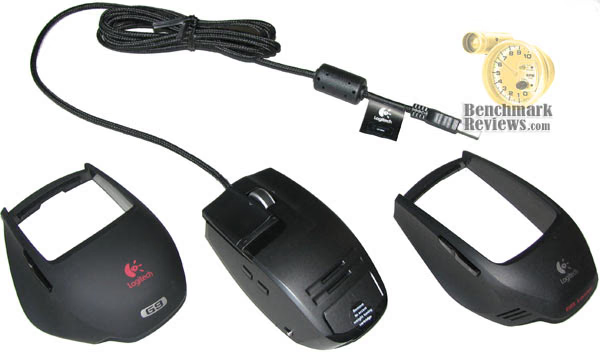
One of the first innovations to the mouse design was interchangeable grips. The G9 Laser Mouse includes interchangeable grips that let you adjust the comfort and design.
-
Use the Wide Load grip (with the red Logitech logo) for a fuller shape and wider thumb rest. The Wide Load Grip features a soft, satin finish for the ultimate in comfort.
-
Choose the Precision grip (with the silver Logitech logo) if you prefer a compact shape, optimal for smaller hands and fine fingertip control.
I really like the precision grip, which is coated with Logitech's DryGrip technology to wick away sweat during long, intense gaming sessions. To remove the grips, press the release button on the rear of the mouse. Swap between the included Wide Load and Precision grips. Logitech is developing an additional grip comfortable to larger hands, while still optimizing precision. Look for this and other additional grips to be available in 2008 at www.logitech.com.
At the very heart of the G9 is the ultra-sensitive laser sensor. A mouse is like a camera. As you move the mouse, the sensor takes successive snapshots of the surface medium and compares the differences among the snapshots to calculate movement and distance. The laser engine of the G9 mouse illuminates the surface medium and enables the "camera" to take its snapshots.
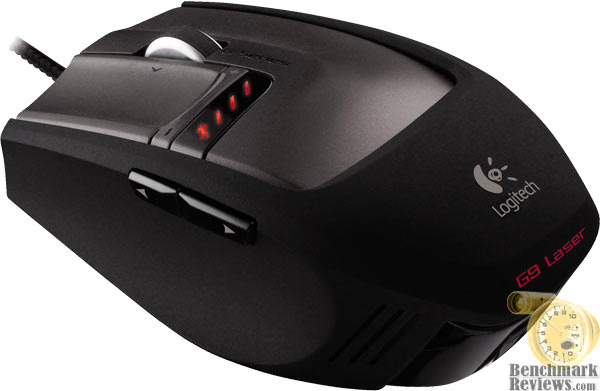
The Logitech G9 Laser Mouse is the only mouse currently on the market with a 200 to 3200 dpi range. This provides hardcore gamers with greater pointer precision, accuracy, speed and smoothness.
All of that sensitivity takes serious bandwidth, and the best way to get it from the mouse to the computer with nearly no measurable delay is with full-speed USB 2.0. Full-speed USB allows the mouse to have a higher report rate, the number of times per second the mouse sends information to the operating system. More reports per second means smoother, less-jerky cursor movement. Most mice generate125 reports per second. The G9 mouse can report up to 1000 times per second. With Logitech's SetPointsoftware, the report rate(polling speed) is also adjustable. (Keep in mind that as the report rateincreases, more PC resources are used.) Logitech recommends 500 reports per second to conserve system resources, but gamers can set the rate higher using SetPoint.
The Logitech G9 Laser USB Gaming Mouse boasts a 3200 dpi maximum resolution (Dots per Inch). The higher the number of dots per inch (dpi), the more pixels the pointer on your screen moves for every inch you move your mouse. If you move your mouse one inch with a 1000 dpi sensor, the pointer moves 1000 pixels on the screen. If you move the same one inch with a 2000 dpi sensor, the screen cursor moves 2000 pixels (or twice the distance) moving the pointer across the screen faster.
Why Does DPI Matter? The higher the dpi, the faster the cursor moves across the screen. A low dpi setting means players need to move their hand farther to get a movement on the screen. With a high dpi setting, players need only move their hand a small distance to get a big screen movement. Also, as screens get larger, a higher dpi is necessary to navigate across the larger screen expanse.
Most gamers usually stick to one end of the dpi spectrum, but some games benefit from switching during play. In Battlefield2, a high-dpi setting helps when driving a tank, while a low-dpi setting may be preferable when making a sniper shot (for a slow, precise aim). A low-dpi setting is often preferred in Counter-Strike, where gamers desire a measured, precision pace.
Though some gamers believe 1600 dpi is high enough, others say the sky's the limit. While gamers may never need the extremes of the Logitech G9 mouse's available 3200 dpi or 200 dpi settings, these options (and all the other options in between in increments of 200 dpi) are always there whenever the gamer needs them.
The MicroGear Precision Scroll Wheel technology offers dual modes for different types of navigation.
-
Ratchet mode provides distinct click-to-click, ratcheted scrolling, perfect for precise weapon selection.
-
Hyper-fast mode delivers frictionless scrolling, perfect for smooth zooming in games or flying through hundreds of pages in productivity applications within seconds.
-
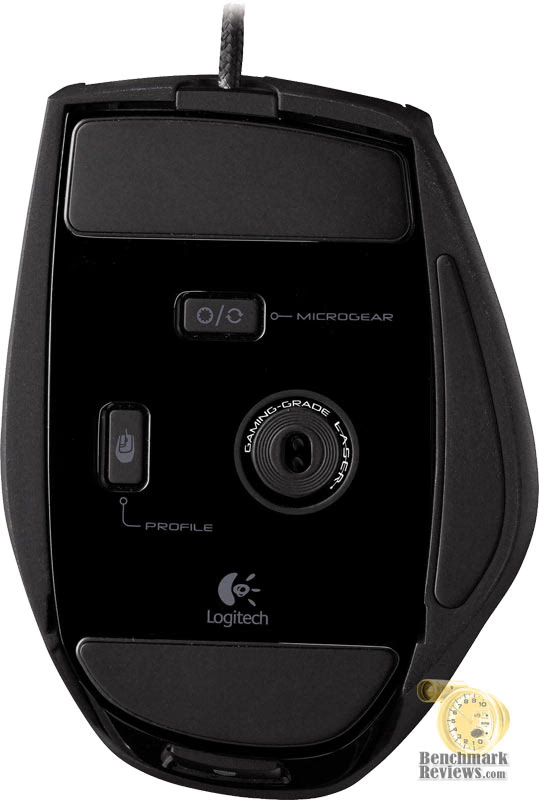
To switch between modes, simply push the MicroGear toggle button on the bottom of your mouse.
-
The scroll wheel also has a programmable middle button and programmable tilt.
G9 Detailed Features
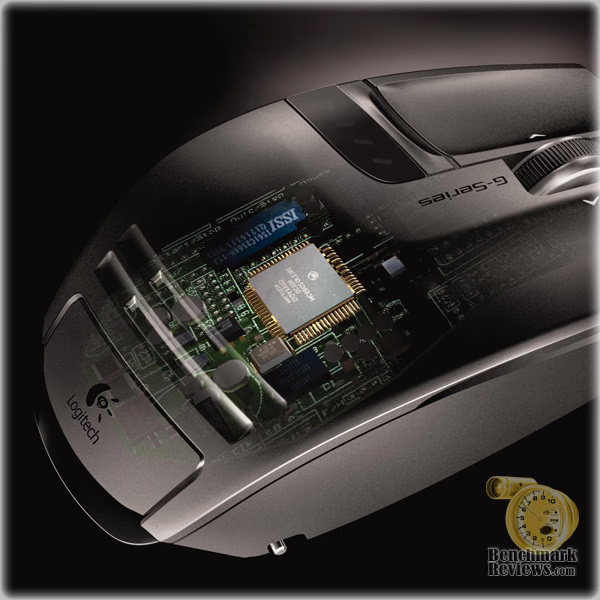
I can't name too many mouse pointing devices with nearly the number of features listed in the G9 up to this point. But it blew my mind to learn that the Logitech G9 3200 dpi Laser USB Gaming Mouse (Part# 910-000173) is a plug-and-play mouse with integrated onboard memory? With onboard memory and an enhanced SetPoint configuration panel, the G9 mouse allows you to configure your mouse to your liking - and then store those settings for when you take your game on the road. For true plug-and-play performance, you can save up to five profiles in the onboard memory system. Then, no matter whose PC you’re on, your mouse will work the way you want it to. This is especially handy at commercial LAN-party environments, where you may not always have the same computer.
The Logitech G9's weight-tuning system allows you to add up to 28 g of precision weights to fine-tune the G9 for your unique style of play. The G9 offers a weight-tuning system that accommodates your needs as a gamer. Adding or subtracting just a few grams can change the gaming experience substantially. With weight tuning, you get the feel best suited to your individual style of play. (Logitech developed the first-ever weight tuning system for mice for the G5 Laser Mouse, released in August 2005.)
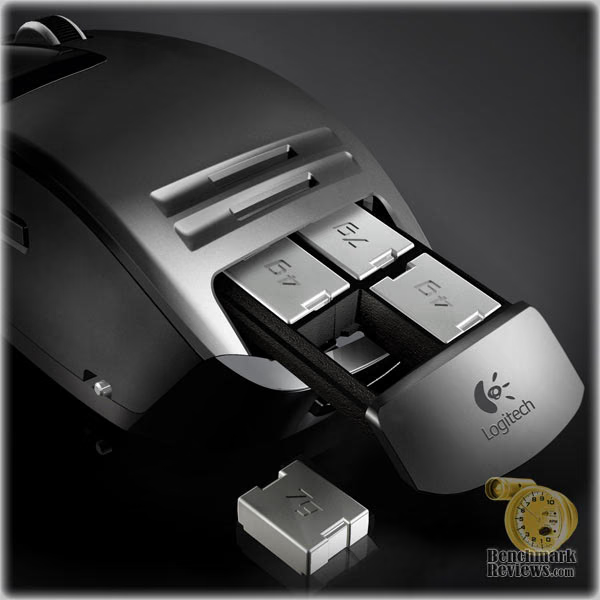
Some gamers like a mouse with more heft; something that feels substantial and is easy to control. Others prefer a lightweight mouse, especially gamers who skate and lift their mouse often. A lighter mouse can offer more speed and lessen fatigue for these gamers. The G9 Laser Mouse delivers a complete weight tuning system, including a weight tin containing eight mix-and-match metal weights of 4 g and 7 g. You can add up to 28 g of additional weight. Just pop the grip off to reveal the spring-loaded inset weight cartridge. To release the cartridge, just push it in and it pops out. Insert the weights you want and push the cartridge back in.
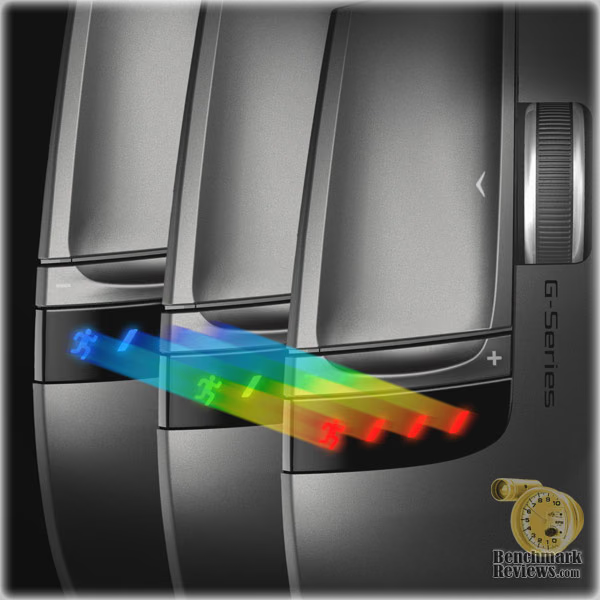
Logitech G9 3200 dpi Laser USB Gaming Mouse 910-000173 The G9 has the capability to store up to five mouse profile settings in the onboard memory. However, when you use the SetPoint software, you can save additional profiles on your local computers hard drive and swap them in and out of the mouse on demand. You can configure and store the following settings:
-
Button assignments
-
Keyboard macros assignable to mouse buttons DPI settings (DPI levels, number of dpi levels)
-
LED colors (choose from broad color spectrum)
-
Report rate (125-1000 reports/second)
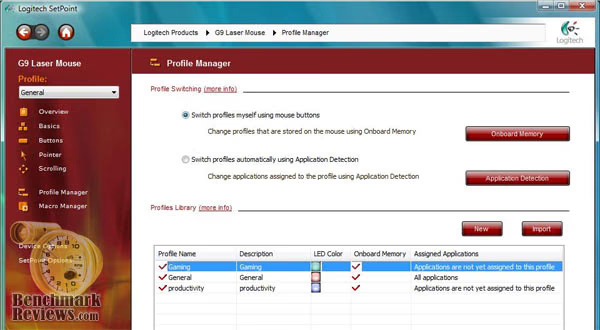
Out of the box, the G9 includes three pre-configured profiles: General, Gaming and Productivity, which are already loaded into the mouse's onboard memory. The following chart differentiates key setting among the three factory default profiles.
|
Profile 1 |
Profile 2 |
Profile 3 |
|
|---|---|---|---|
|
Profile Name |
General |
Gaming |
Productivity |
|
LED Color |
Red |
Green |
Blue |
|
DPI Settings |
4 dpi levels (400, 800, 1600, 3200) |
3 dpi levels (200, 800, 2000) |
3 dpi levels (400, 800, 1600) |
|
Report Rate |
500 reports/sec |
1000 reports/sec |
500 reports/sec |
The productivity setting is a good choice for non-gaming applications, such as word processing or spreadsheet. The gaming profile reports its position 1,000 every second, essential for high-precision operations. Use SetPoint to create and edit profiles, and then download them to the mouse. If you use your mouse on another PC or remove SetPoint, you can choose to have that PC recognize your stored custom profiles or reinitialize the mouse to its factory defaults. It should be noted that there are a few special settings work only while SetPoint is running, such as speed/acceleration and scroll wheel settings. If you move your mouse to another PC not running SetPoint, the new PC will run the profiles stored on your onboard memory.
Logitech has equipped the G9 3200 dpi Laser USB Gaming Mouse with super-slick Polytetrafluoroethylene gaming feet. Large PTFE feet assure extra-smooth mouse movement, which is critical for heavy-handed users like me. The feet are user-replaceable, which is nice since you don't want a high-end item like this to become disposable. The G9 provides large, precision-molded polytetrafluoroethylene (PTFE) resin feet to minimize friction and provide smooth gliding over virtually any surface. For easy replacement, a small groove adjacent to each foot allows gamers to pop it out with a small screwdriver. Replacement feet will be available for purchase directly from the Logitech website.
Additionally, the durable, low-friction braided cord on the G9 is made especially for full-speed USB capabilities. The braided outside covering enhances durability and simultaneously helps to reduce the possibility of cord snags - a real problem with traditional, rubberized cord coverings. It's worth noting that I did notice the braided cord likes to pick up dust that may be on the desk/table surface, so it may need an occasional wipe-down to look sharp.
Final Thoughts: Logitech G9
While using the Logitech G9 it seemed as though technology was finally catching up to my unique personal needs. Having large hands can seem like a curse when I use ordinary mouse devices. I could never use any of the Razer series of mouse products because they seemed to cater to children, or anyone else with miniature paws. The new large molded grip allows me to rest my mitt atop the mouse with relative comfort, and the side pad even allows me to rest my over-sized thumb. The former G5 mouse was never a perfect fit for me, it came close, but it appears that the G9 is better suited for me.
The flat-top finger buttons take some getting used to. I am conditioned to having my forward fingers resting at a 40-degree angle on most other mouse devices. Even the old G5 has a 30-degree angle for the front buttons, and that was still very comfortable. This new angle, set somewhere in the 15-degree slope, makes me occasionally crawl my fingers up the buttons which isn't a good thing. I would suggest some depression holes, similar to a golf ball, somewhere near the edges of these buttons.
When I first learned that the Logitech G9 was going to support a 3200 dpi Laser unit, I wondered how this would impact my gaming. Well, I am witness to the benefit of such a large dpi range, since moving the tank turret in BF2/BF2142 is a bear without it. This gaming mouse also performed extremely well for me at the low 200 dpi setting, allowing me to snipe for headshots a-plenty.
Conclusion
Logitech, being a world leader, has always painstakingly designed their product packaging. The G9 (product 910-000173) comes shipped in a very nicely presented retail package which opens from two sides to display the contents to would-be consumers. The bullet points for everything I have discussed in this review are neatly displayed, and leverage this product very well against the less informative competition.
The sppearance of the Logitech G9 is going to be different for each user. Not everyone likes black, and not everyone likes the flat-top design, so I don't expect everyone to like (or want) the G9. At first I wasn't so sure I would really like the boxing looking mouse, but the moment I placed my hand on it I felt very different. The appearance is modern, and I want my mouse to be black, so I have no problems with the design in this regard.
Construction is solid, as you come to expect from Logitech. Much like the former G5 which was built to sustain rugged use, the new G9 improves the longevity by offering some subtle design improvements (such as the weight system). I believe the replaceable PTFE feet will nearly guarantee the Logitech G9 3200 dpi laser gaming mouse to be the last you will ever need.
When it comes down to it, functionality is going to be the biggest factor in a mouse purchase. Logitech armed the G9 with a 3200 dpi laser, and that's just the start of things. As far as a USB gaming mouse goes, there isn't another product on the market which delivers anywhere near the same features and performance.
Logitech retails the G9 910-000173 for $99.99, however you shouldn't expect to pay full retail in this age of e-commerce. I found the G9 available at NewEgg for less, but with some extra searching there were some better deals to be had.
In conclusion, the Logitech G9 3200 dpi Laser USB Gaming Mouse 910-000173 receives my highest recommendation. It easily replaced my G5 mouse, and I have been extremely happy with the convenience and wide range of feature. Among the most favorite items integrated into the G9 is the free-rolling scroll wheel. There's nothing I like more than giving it a good spin to navigate down pages with complete ease. The G9 has also added a few advantage points to my gaming, thanks to the very wide-range of dpi settings. If you are serious about your mousing needs, then the Logitech G9 is going to be the best solution I can recommend to you.
Pros:
+ Interchangeable grips
+ Laser engine with range of 200 dpi to 3200 dpi
+ Full-speed USB 2.0
+ Onboard memory profiles
+ Weight-tuning system
+ Custom-color LED's
+ MicroGear Precision Scroll Wheel
+ Replacable PTFE feet
+ 3-year limited warranty
+ USB report rate: Up to 1000 reports/second
+ Image processing: 6.4 megapixels/second
Cons:
- Button angle is not steep enough
- Cord may collect surface dust
- Expensive... but worth it
- Windows XP and Vista only
Ratings:
-
Presentation: 9.00
-
Appearance: 8.75
-
Construction: 9.50
-
Functionality: 9.75
-
Value: 7.00
Final Score: 8.8 out of 10.
Questions? Comments? Benchmark Reviews really wants your feedback. We invite you to leave your remarks in our Discussion Forum.