
OCZ VBoost USB Flash Drive for Windows Vista
Introduction: OCZ VBoost
Microsoft promised the world with their latest Operating System: Windows Vista. One of the few features in Vista which wasn't scrapped to make the release deadline was Windows ReadyBoost. While dependent on a suitable flash drive to provide a faster cache, Windows ReadyBoost claimed to significantly improve system responsiveness. OCZ understood the need for high-speed flash memory, and offers the VBoost USB Flash Drive for Windows Vista. This article will test and review the hardware, but more importantly it will answer why you may not need to buy into the Microsoft marketing spin.
OCZ had no reason not to believe their partner Microsoft, and set out to design and manufacture products specifically made for the Windows ReadyBoost feature. Did OCZ get the same bait and switch we did, or has the media taken the ReadyBoost feature and given it unnecessary attention? Perhaps the OCZ VBoost USB Flash Drive is exactly what Vista needed to properly offer real-world performance from Windows ReadyBoost. We will soon find out, and the results may just surprise you.

Let me be very clear from the beginning: it's not worth it for me to try and deceive you. After all, if you are interested in this kind of reading material you are smart enough to see truth and lies for what they really are. Microsoft gave me a good reason to open a business surrounding Y2K, and they have helped me achieve my third career as a Certified System Administrator. Despite whatever thanks I owe the goodly people who helped build Microsoft, I feel the honeymoon has been long over, and the recent release of Windows Vista has me beginning to see the light.
Ever since the Windows Vista was watered down to make a release date, part of me has wanted to walk away from the Microsoft-dependent industry and forgive them while I still can. The other part of me wants to see if maybe Google can't purchase the company and actually release something worth the price. But I digress, because what this really has to do with the OCZ VBoost USB flash drive is a promise. A broken promise, on the verge of a lie.
About the company: OCZ Technology
Entering the memory market in August 2000, OCZ Technology was built around the determination to manufacture the best high speed DDR and RDRAM. OCZ was founded by enthusiasts, for enthusiasts, and our commitment to the end-user has not digressed. OCZ Technology has been an innovator in many areas.
We were the first manufacturer to make Dual Channel optimized memory available to the public, which originally took advantage of nVidia's Twinbank or Dual DDR architecture, found in their nForce chipset. We have now taken that technology and tailored it for the Canterwood, and Granite Bay chipset's. OCZ developed and was the first to implement ULN technology, which has been a critical element in our manufacturing process for some time.
We at OCZ diligently work to improve communication with CPU and motherboard chipset manufacturers prior to the release of their products. Only in this manner can we fine-tune our memory's SPD settings, ensuring a synergistic relationship between the memory module, memory controller, and microprocessor. In today's rapidly evolving semiconductor industry, such communication is not simply research, but a necessary component of our manufacturing process.
Closer Look: Windows ReadyBoost
There seems to be no shortage of information on this Windows Vista-specific feature. Although the concept began when Microsoft stated that Windows Vista notebooks would require a hybrid hard drive, the original plan changed (thanks to slow hybrid and solid state hard disk development) and ReadyBoost was born from it. The ReadyBoost Wiki is a good starting point, and even Tom Archer offers a developers perspective which is worth reading. But the most entertaining description comes from Microsoft.
On the Windows Vista site, Microsoft devotes a few paragraphs towards describing Windows ReadyBoost. They read like you would expect from a company touting their wares: Adding system memory (typically referred to as RAM) is often the best way to improve a PC's performance, since more memory means more applications are ready to run without accessing the hard drive. However, upgrading memory can be difficult and costly, and some machines have limited memory expansion capabilities, making it impossible to add RAM.
It will seem utterly obvious to any system builder of computer enthusiast that the above paragraph is clearly pure Microsoft marketing spin. Anyone who has ever spent the two minutes upgrading their system memory will know that pushing a RAM module into the slot is hardly difficult. Furthermore, if you are operating a Windows Vista computer, the chance that you're using an ancient relic of a computer with limited expansion capability is very slim. Nearly every motherboard designed and released since 2001 is capable of no less than 2GB of system memory, which is more than enough to run Windows Vista.
Windows Vista introduces Windows ReadyBoost, a new concept in adding memory to a system. You can use non-volatile flash memory, such as that on a universal serial bus (USB) flash drive, to improve performance without having to add additional memory "under the hood."
On a more relevant note, this last statement gives a little more credence to the ReadyBoost product, but you have to assume that the flash memory is inexpensive and that RAM costs a fortune. What this statement neglects to compare is the difference in performance an investment into system memory would yield.

The flash memory device serves as an additional memory cache-that is, memory that the computer can access much more quickly than it can access data on the hard drive. Windows ReadyBoost relies on the intelligent memory management of Windows SuperFetch and can significantly improve system responsiveness.
There you have it: significantly improve system responsiveness. Certainly I would be among the first to understand where theoretical performance gains can be made, but Why would Microsoft have any reason to exaggerate results? Lets just forget about that for a moment, and concentrate on the horrible comparison made between hard drive access speed and flash memory access.
In order to keep the record straight, lets go over some basic math and science. System memory (RAM) is usually has a response speed measured in single-digit nanoseconds; and keep in mind that a nanosecond is one billionth of a second. Flash Memory is usually in the low single-digit millisecond range, and at one-thousandth of a second the millisecond is nearly a million times slower than the low nanosecond response time of RAM.
Finally, take into consideration that today's average SATA-II desktop (7200RPM) and notebook (5400RPM) hard drives have access times of 9ms and 12ms respectively. So my point is this: RAM is nearly one million times faster than flash memory, and flash memory is only one-third faster than the average (notebook) hard drive. I will drive this point home in the conclusion, but I think you see where I'm heading.
It's easy to use Windows ReadyBoost. When a removable memory device such as a USB flash drive or a secure digital (SD) memory card is first inserted into a port, Windows Vista checks to see if its performance is fast enough to work with Windows ReadyBoost. If so, you are asked if you want to use this device to speed up system performance. You can choose to allocate part of a USB drive's memory to speed up performance and use the remainder to store files.
This is one of the few caveats of Windows ReadyBoost I actually like. After all, if Windows Vista doesn't need every bit of my 4GB flash drive it sure would be nice to store files on it.
Closer Look: OCZ VBoost
So that you aren't given the wrong impression, it's not that I dislike Windows ReadyBoost, because any additional performance is always appreciated. Where I the problem is that Microsoft designing a software feature that is supposed to improve performance; even though the benefit really comes from the additional hardware. It sure seems like a misleading feature, at least to me.
The point I began to develop earlier the previous section was that consumers should make the best decision possible when it comes to upgrades. And let's face it, if you go and purchase a compatible flash drive for use with Windows ReadyBoost you qualify as buying an upgrade. Microsoft just adds a spin on their new feature which runs against better logic, because if you are going to spend forty dollars on a high-speed flash drive just to use for Windows ReadyBoost, your money would be better spent on upgrading the system memory. Thankfully OCZ can help you out here, too.

I will admit that there are still a few specific times I can see where Windows ReadyBoost would be more desired:
-
The system memory is already at maximum capacity
-
RAM upgrades are cost prohibitive (it's a commodity which has seen price fixing in the very recent past)
-
You plan on using the flash drive for dual purpose: store files and ReadyBoost
Using Windows ReadyBoost is not totally out of the question then, since there are probably at least a few people that are more willing to plug in a flash drive than they are to adding system memory. So let's concentrate on that.
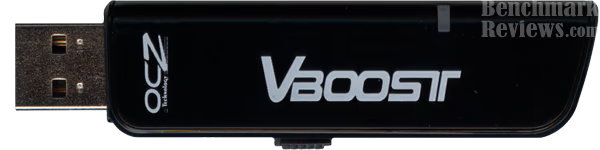
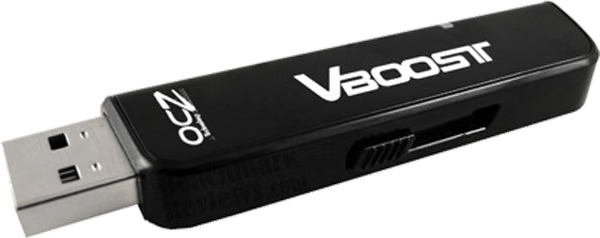
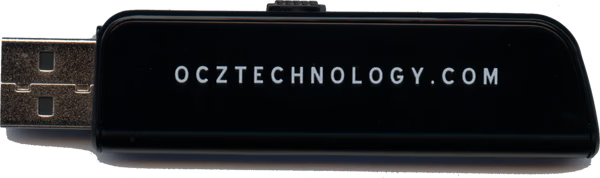
OCZ has designed a sleek lightweight flash drive with retractable connection head. There are only so many designs you can use on a flash drive while still keeping a professional appearance, so in regard to OCZ's VBoost they have done very well. The gloss black finish may show fingerprints, but it also looks great. Just like cell phones, glassy is flashy.
OCZ has been in the system memory business for just enough time to become a freshly minted success. They aren't as seasoned as the older rivals, but they didn't come to the industry to be another stale competitor. What I find most impressive is that OCZ climbed out of nowhere, and began offering nothing but the highest performance products while the competition was still traveling mainstream. When you buy OCZ, you are buying performance.

The OCZ VBoost is no exception. Even though I honestly expected this flash drive to perform with similar results as the others I test in the next section, the VBoost made a quick name for itself before I could even get the testing done. In a word: wow.
Windows ReadyBoost Testing
Microsoft has made something of an evolutionary leap in their new Windows Vista Operation System. I say this with a thick layer of sarcasm because it isn't like Microsoft to really care about the experience a WIndows users may have on their particular hardware. Previous versions of Windows did not offer the user any kind of feedback regarding the performance of their system, which has changed in Vista. Now the Operating System measures a few key area's of the systems performance (see illustration below) and generates an experience rating. In the example below, this particular system is being held back by the system memory operations per second score.

In certain cases, the data transfer rate of the primary hard disk will be the inhibiting factor. It is in this situation that Windows ReadyBoost will become most beneficial. The notebook computer system used in these reference images had just arrived at Benchmark Reviews and is made of higher-end components: Core 2 Duo E6700 processor, 2GB of 667MHz DDR2 RAM, and a 7200RPM hard disk drive. A notebook system like this, where the hard drive has been upgraded to a faster rotational speed, may not see the same benefits any average notebook will.
The same holds true for desktop workstations operating with Windows Vista. The desktop computer would need to be equipped with a 10,000 RPM hard drive or faster before the data transfer rate score would be higher than the memory operations per second score, especially since desktop RAM is getting faster every day. Alternatively, if the desktop computer was operating Windows Vista near to the minimum recommend amount of system memory, which would cause excessive hard disk access, then Windows ReadyBoost would become beneficial.

While our Windows ReadyBoost tests were not as easy to benchmark as other tests in this review, there was one trend which began to set the precedence. In a computer with modern Windows Vista-era hardware, the results are very minimal and just barely measurable. However, in an older computer which has been upgraded to Windows Vista, or in a computer with a slow (5400 RPM) hard disk drive, the results were a little more noticeable. Microsoft claimed that Windows ReadyBoost relies on the intelligent memory management of Windows SuperFetch and can significantly improve system responsiveness. This raised a few concerns, especially since the significant improvement in system response was not a result we found in our tests.
Ultimately, there were no real improvements to system responsiveness to be noticed, and what we measured was hardly significant. They did exist though, and on our Windows Vista test systems the results were very minor. When all of the Windows ReadyBoost tests were complete, the improvements were very small, and most programs would open only 2-3% faster on average. Even very small applications such as Internet Explorer, Outlook, Excel, and Project all opened at nearly identical speeds.
In the end, ReadyBoost seemed to be a waste of time for higher-end systems operating Windows Vista. Clearly, the improvements Microsoft claimed to be significant must apply to the lowest-performing hardware capable of meeting the system requirements.
Flash Drive Testing
Test System
Benchmark Reviews has been fortunate enough to compare the OCZ VBoost against a small collection of flash drives. While we the capacity of each drive may vary in some instances, we were most concerned about transfer speed in our tests. Each flash drive was formatted with prior to testing to ensure identical file allocation tables. The drives that made up our test selection were:
-
OCZ VBoost 4GB
-
Corsair Flash Voyager 1GB
-
SanDisk Cruzer Mini 1GB
-
Memorex Flash 1GB
In each test, we started the computer and moved a 100MB file from the hard disk to the flash drive, and then sent the file back. The first series of transfers was ignored in our results, but the average of the three successive series of transfers was recorded in the results. All our tests were conducted on the following equipment:
-
Motherboard: ABIT AB9 Pro v1.5 BIOS (Intel 965 chipset)
-
Processor: Intel E6600 Core 2 Duo 2.2GHz operating at 3.0 GHz (334 MHz FSB)
-
Cooling: Thermalright SI-128 CPU Cooler with 120mm fan
-
Memory: 2 GB (1,024 MB x2 modules) Corsair CM2X1024-6400C4 DDR2 SDRAM @ 835MHz
-
Audio: HT Omega CLARO 7.1 C-Media 8788 Oxygen Chipset
-
Hard Disk 1: Western Digital WD360GD 10,000 RPM SATA
-
Optical Drive: Lite-On SH-16A7S-05 SATA DVD R/W
-
Enclosure: Lian Li PC-B20A ATX Case with 2x120mm and 1x90mm cooling fans
-
Operating System: Windows XP Professional SP-2 with IE7
It should be noted that all of the flash drives were also tested with HD Tach RW, which offers USB flash drive benchmarking, however none of the results differed by any measurable amount. It concluded that HD Tach is not fit for measuring the performance of flash memory drives, as the results were not precise enough for testing. For the record, HD Tach recorded all of the drives with a 8.0ms random access time, 58.4Mb average read, and 123.8 average burst.
Results
Moving a 100MB (102,400KB) file resulted in the best measurement of performance based on our tests. In each test, the results swayed enough to declare a clear winner. The average of three tests are shown in these results:
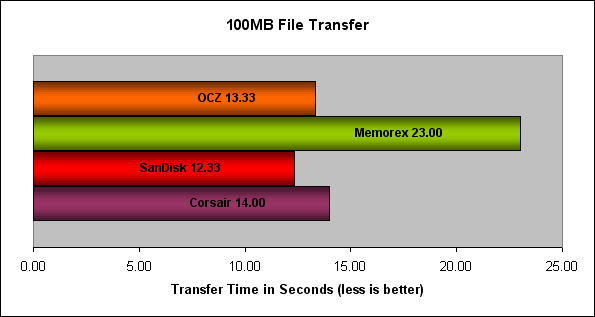
Clearly, the OCZ VBoost is a fast flash drive, especially for the capacity, but it wasn't the fastest of the bunch. The Cruzer Mini, probably the oldest model of the four tested, offered the best transfer time of the bunch. How's that for irony?
Final Thoughts
I think that OCZ really got caught up in the Microsoft hype when they set out to develope the VBoost flash drive. While it appears Windows ReadyBoost offers far less than a significant performance improvement, the novelty of this flash drive is stripped back down to its core. Underneath the ReadyBoost persona is still a solid performer in terms of file transfers and storage, and these capabilities should not be ignored. Put more directly, the OCZ VBoost may work well for Windows ReadyBoost (when ReadyBoost is used on a low-end system), but it is still a flash drive no different in functional design than the others.

Conclusion: OCZ VBoost
OCZ presents the VBoost as a flash drive optimized for ReadyBoost first, and as a functional flash drive for file storage second. I can't say too much about the presentation in this regard, because OCZ was careful not to throw in words like significantly improve system responsiveness. Instead OCZ sticks to more reliable marketing terms such as Accelerate the performance of Vista, Increase System Responsiveness, and Quicker access to common applications and files, which all turned out to be true.
VBoost is really a sleek looking flash drive, which is saying quite a lot for a product with such limited design capability. Sure you can make it look like a Christmas Tree or a Teddy bear, but only OCZ can manage to reinvent the wheel and make it look good.
The plastic construction is more than enough to protect the solid state memory for damage. Keeping in mind that this is not a delicate hard drive, the extra rubber coatings and protective metal cases are very unnecessary. Solid state RAM flash devices can take a good deal of punishment, and the VBoost is ready to handle the neglect. Just don't drop the VBoost in water, and everything will be okay.
Our file transfer test results were more than enough to prove the functionality of the VBoost. Larger capacity (technically four times the capacity of the other devices tested), and still nearly the top performer..
Value is not a term you usually see paired with an OCZ product. For a company focused on producing only the highest-performing hardware, the VBoost is available for only $42.99 at NewEgg.com, which is very fair when compared to the competition.
So can I recommend the VBoost over all other flash drives? The answer is simple: if all of the other drives are roughly the same price and capacity, I would still choose the VBoost. It does exactly what it was designed to do, and when applied to the optimal Windows ReadyBoost environment is can shine on both fronts.
Pros:
+ Extremely fast file transfers
+ Excellent storage capacity
+ Convenient retractable design
+ High-quality construction
+ Attractive gloss black finish
Cons:
- Needs less emphasis on ReadyBoost
Ratings:
-
Presentation: 8.75
-
Appearance: 9.25
-
Construction: 9.0
-
Functionality: 9.25
-
Value: 8.0
Final Score: 8.85 out of 10.
Questions? Comments? Benchmark Reviews really wants your feedback. We invite you to leave your remarks in our Discussion Forum.
Special Thanks: This review would not have been possible without the sponsorship of manufacturers such as OCZ. While we write our reviews with an unbiased opinion towards the sponsor, we realize that it would not be possible without them. Thank you OCZ.