
Belkin SOHO 4-Port DVI/USB KVM Switch F1DD104L
Belkin SOHO F1DD104L KVM
Belkin offers a wide variety of KVMs, from inexpensive dual-port VGA-PS/2 switches intended for the home to large, expensive 16-port rack-mount switches for server farms that can handle multiple computers and multiple consoles. Some even have built-in monitors! We're looking at the top of Belkin's home-office KVM switch line, the SOHO F1DD104L. This four-port switch allows you to share a single DVI monitor, USB keyboard and mouse, and microphone and speaker among four computers.
Versions of this switch are available in both VGA-PS/2 and DVI-USB versions, but really, who uses VGA any more? The SOHO F1DD104L is a premium switch with extra features to help justify its rather high price.
It's a common scenario for many of us these days: multiple computers, but no desk space for multiple monitors, keyboards, and mice. You might have a work machine and a play machine; or a home media server you access and control over the network, but it would really be nice if you had a monitor and keyboard sometimes, or maybe you just thought it would be fun to try one of those $200 nettop computers to see if it had any actual application. The solution is a KVM (keyboard/video/mouse) switch, and Benchmark Reviews looks at the Belkin SOHO F1DD104L four-port DVI-USB KVM switch to see how well it would work for you. This is a high-end switch with lots of extra features, so let's get started!

About Belkin International, Inc.
Belkin International, Inc., offers an extensive range of innovations designed to give computer and consumer electronics users seamless integration in their homes, cars, and on the go. Belkin, a privately held company founded in California in 1983, is the recognized global leader in connectivity solutions. Since our inception in 1983, Belkin has experienced an amazing 25 consecutive years of dramatic growth and remains committed to making significant strides in the areas of research and design.
Our diverse and far-reaching product mix includes award-winning innovations for easy-to-use networking solutions, accessories for mobile devices, such as iPod, iPhoneTM, laptops, and netbooks, as well as energy conservation products.
Belkin also provides business-class solutions that include KVM switches, LCD rack consoles, racks and enclosures, in addition to a broad USB and cable product mix. Belkin has developed industry-leading innovations, prized by channel partners and end users alike for their dependability, customer service, and comprehensive warranties.
Over the years, Belkin has had a number of KVM products marketed under the "SOHO" label, sometimes with the word "Omniview" in the product name. This review is specifically of the model F1DD104L. The easiest way to tell the various SOHO units apart is visually since they all look quite different. Use the pictures in this review as a guide if you're interested in buying one.
SOHO KVM Switch Features
-
OS independent - full compatibility with PC, Mac, and other operating systems
-
User-friendly design - front-panel buttons with LED indicator lights provide easy to access switching between multiple computers
-
Advanced switching capable - hot-key switching provides instantaneous access
-
Independent audio switching - allows the user to switch systems being accessed without switching audio output; great for streaming audio
-
Peripheral sharing - built-in USB 2.0 Hub (on select models)
-
Multiple video types supported - VGA and DVI available (on select models)
-
Multi-platform support - PS/2 and USB compatibility (on select models)
-
3-year warranty -Belkin's assurance
Belkin F1DD104L Specifications
| No. of users supported | 1 |
|---|---|
| No. of computers supported | 4 |
| Dimensions | 12.5"(L) x 5.5"(W) x 5.5"(D) |
| Weight | 1.5 pounds |
| Enclosure | High-impact plastic |
| USB Hub | Yes |
| Ports | USB |
| Video Supported | DVI-D Dual Link |
| Max Resolution | 2560 x 1600 @ 85Hz |
| Audio Input/Output | 3.5mm jack |
| Microphone Input/Output | 3.5mm jack |
| Platforms Supported | Mac, PC |
| LED Indicators | 8 |
| KVM Cables Included | Yes |
Closer Look: SOHO KVM Switch
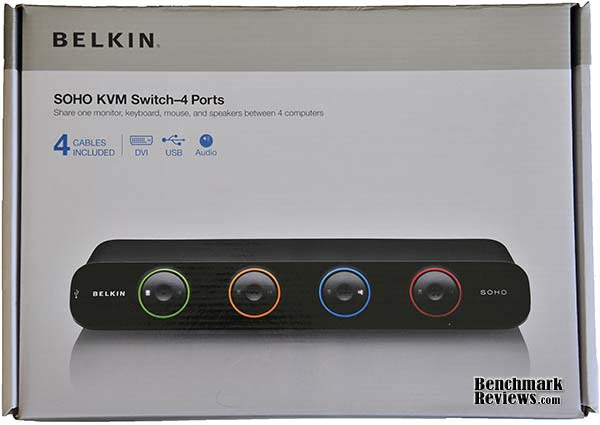
The Belkin SOHO F1DD104L packaging is an easy-to-open box with a photo and basic specifications on the front. I'm a big fan of packaging like this, that clearly shows you the product and its specifications, and isn't a clear plastic blister pack:
The back of the box has more technical details and a labeled photo of the rear of the switch:

The Belkin SOHO F1DD104L retail kit contains:
-
The switch
-
4 sets of cables
-
a small (unlabeled!) power brick
-
a quick setup pamphlet (which oddly calls the switch the "OmniviewSOHO", a term that's not used anywhere else on the switch, its manual, or Belkin's web site)
-
a detailed 36-page manual with instructions, troubleshooting, and service information.
The SOHO F1DD104L is a high-end product and looks like it. Features aside, its appearance exudes a feeling of quality. It's fairly large, but its size is dictated by the space needed for the ports on the back. Belkin's dimensional specifications as shown in the chart in the previous section are wrong: the actual height of the unit is about 1.75", not 5.5". Still, it's gonna take up some desk space. Belkin makes good use of the device's necessary size by providing large 3-way color-coded buttons on the front for switching between the connected computers.
The SOHO comes with all the cables you need: 4 six-foot DVI/USB cable assemblies and 4 separate six-foot audio/microphone cables. I'm not sure why the audio cables are separate: a previous IOGear DVI KVM I used bundled all the cables together into a single assembly, which is neater and more convenient. Retaining screws on the DVI connectors of the cables are color-coded (green, orange, blue, and red) and match the color rings around the buttons on the front of the unit. This is a handy feature if you're crawling around under your desk trying to remember which cable plugs in where...as long as you're not color-blind, of course.
Although 6 foot cable runs seem to be standard for KVM switches, they can be a little short when you're trying to arrange four tower computers within reach of the switch. Belkin offers separate 15-foot cable assemblies, but apparently only for the VGA-PS/2 version of this switch. Of course you can always use separate generic DVI, USB, and audio cables.

A small power adapter provides 9v at 1 amp. Frustratingly, the adapter is a generic part whose appearance and labeling provide no clue as to what it's intended for. Label it so you'll know in the future.
Belkin F1DD104L Detailed Features
Everything plugs into the back of the switch. Your monitor, keyboard, mouse, and audio devices plug into the console area, whose white background makes it stand out from the other connections. The computers you're controlling plug into the color-coded areas that correspond to the color-coded buttons on the front of the switch.

The SOHO offers two switched USB hub ports: one on the back of the unit, in the console area, and another on the front left side. Devices plugged into these ports are switched and will always be connected to the selected computer.
The SOHO offers the following extra features when compared to Belkin's low-end switch, the Flip F1DG102D:
-
Switching from your keyboard - no need to press a button on the actual switch
-
Separate audio switching with microphone support
-
2-port USB hub
-
Keyboard and mouse emulation
-
DDC support
The last two features are noteworthy since they prevent the delay that occurs after switching between computers that that you'll experience with lower-end switches. DDC (short for "Display Data Channel") is a VESA (Video Electronics Standards Association) specification defining how monitors identify their characteristics to computers and other devices you might plug them into. The Belkin SOHO "learns" the DDC specs of your monitor the first time the monitor is connected to the switch and turned on, and thereafter presents these specs to all computers that are plugged in, all the time. It also emulates a generic keyboard and mouse on the USB ports, and what all this means is that each computer connected to the SOHO thinks it's connected to a monitor, keyboard, and mouse all the time. This is turn means minimal delay when switching between computers: your keyboard and mouse are instantly available, and your monitor re-syncs in just a second or two; it also means that you can boot or restart a connected computer without having to switch to it first.
If you change to a new monitor, you will have to power down the SOHO, connect the new monitor, and turn the SOHO back on so it can "learn" the new monitor's DDC codes. That's OK, since you probably don't switch monitors very often. However, the keyboard and mouse emulation, while it does speed switching, has a significant down side: since your computers only "see" the generic emulated keyboard and mouse presented by the switch, special keyboards and mice lose their special features. That spiffy color LCD on your new Logitech G19 keyboard? Inoperative. Those extra buttons on that fancy gaming mouse that you've programmed with weapon-switching macros? Nope, they don't work either.
Fortunately, there's a simple work-around for this problem: plug the keyboard (and mouse, if required) into one of the two USB hub ports. These ports don't present any emulated devices to the computers, and although you'll be back to the "USB connection delay", you'll have full use of your fancy enthusiast peripherals. You will, however, give up the ability to switch computers from the keyboard (you'll have to use the buttons on the front of the unit) and won't have the two USB ports available for other items, since the keyboard and mouse ports on the back of the unit can only be used for a keyboard and a mouse.
USB Switching Functionality
The front of the Belkin SOHO F1DD104L contains four large buttons used for switching between the connected computers. Actually, each button is a three-way switch: pressing the left side switches the video, keyboard, and mouse to that computer; pressing the right side switches only the speakers and microphone to that computer, and pressing the center of the button switches everything to that computer. Frankly, I'm not sure when I'd ever want to separately switch the audio from another computer, but Belkin touts this as a feature and I've seen it on other switches, so there must be a common use I'm unaware of. (Personally I think the ability to switch the USB hub ports separately would be much more useful.) Indicator lights on the front buttons light up to show what's selected: the left indicator is for video, keyboard, and mouse, and the right indicator is for audio. In this photo the "green computer" has control of the audio, while the "blue computer" has control of the video, keyboard, and mouse:

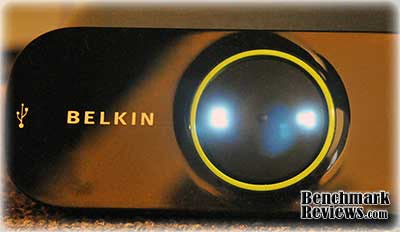
And by "light up", I mean LIGHT UP. The LEDs are annoyingly bright and the angled front of the unit ensures that they're aimed right at your eyes of you have the switch positioned under your monitor. My solution: put the switch on the floor under my desk and switch computers using the switch's keyboard commands. This photo gives a better impression of what the indicator lights actually look like in the typically dim home office environment:
To switch using the keyboard, press the "Scroll Lock" key twice... you'll hear a beep from the switch, after which you can press the numbers 1-4 (the numbers correspond to the green, orange, blue, and red buttons, respectively) to switch everything to the selected computer, which is confirmed by another beep. Other key sequences select only the audio or video, or the next or previous computer. You can re-assign the initial hot key from the Scroll Lock key to Caps Lock, Escape, F12, Num Lock, or either control key.
Testing & Results
I bought this switch when I had to add a third computer - a small Linux-based server - to the Mac and PC I already had on my desk. I've grown used to the rapid and seamless keyboard switching and really like the switch, which has performed flawlessly for me. I prefer generic-layout mechanical keyboards, and so the keyboard emulation feature doesn't cause any problems for me.
The only problem I've had so far is that I could not get keyboard switching to work at first. I finally noticed that I had the keyboard and mouse cables plugged into the wrong ports on the back of the switch (hey, USB is USB, right?) Obviously the switch only "listens" for the key sequences on the keyboard port. Plugging the cables into the correct ports solved that problem.
SOHO KVM Switch Conclusion
I've been using KVM switches for about 8 years now, starting with a (very) expensive Gefen switch, moving on to a couple of IOGear models, the Belkin Flip, and finally the Belkin SOHO F1DD104L switch I've reviewed here. Aside from making the indicator LEDs on the front panel buttons dimmer, I honestly don't see what else Belkin could do to make the switch any better (the "USB emulation precludes fancy keyboards and mice" problem is a technical issue with USB, and not anything Belkin can address).
If you only have two computers, you might be tempted to go for a less expensive switch such as Belkin's own Flip or one from another manufacturer. As of October 2009 the two-port version of this KVM switch (model F1DD102L) costs $175 online, and I think most people would find the extra features well worth it the extra cost over Belkin's Flip KVM switch. Alternatively, NewEgg offers the Belkin F1DS104J (D-Sub with PS/2) for $160 or the Belkin F1DS104L (D-Sub with USB) for $200.
Pros:
+ DDC and keyboard/mouse emulation speed switching
+ Choice of pressing a button or using keyboard commands to switch
+ Separate switching of audio
+ Handles dual-link DVI
+ LEDs indicators and color-coded cables make keeping track of things easy
Cons:
- Painfully bright indicator LEDs on front buttons
- Emulated keyboard and mouse makes special keyboard and mouse features useless (unless plugged into USB hub ports)
- Two-port version of the switch is the same (large) size as the four-port switch
- 6-foot cable assemblies might not be long enough for your application
Ratings
-
Presentation: 9.0
-
Appearance: 9.5
-
Construction: 9.0
-
Functionality: 9.5
-
Value: 9.0
Final Score: 9.2 out of 10
Questions? Comments? Benchmark Reviews really wants your feedback. We invite you to leave your remarks in our Discussion Forum.
Reader comments from the original article
23 comments were posted before commenting closed. They are preserved as written. Original avatars no longer resolve and are shown as a placeholder.
4 port kvm switch srihari b r Permalink:
please indicate whether the SOLO kvm switch supports resolution 1600X1200
RE: Belkin SOHO 4-Port DVI/USB KVM Switch F1DD104L David Ramsey Permalink:
Yes, it does. If you'll look on the "Features and Specification" page of the review, you'll see the maximum supported resolution is 2560 x 1600.
RE: Belkin SOHO 4-Port DVI/USB KVM Switch F1DD104L Brian Permalink:
Anyone tried this switch with an XBOX 360 hdmi to dvi cable?
RE: Belkin SOHO 4-Port DVI/USB KVM Switch F1DD104L David Ramsey Permalink:
Switching an Xbox 360 HDMI to DVI cable will work fine, but remember that this will only switch the video, not the audio...
I amplify your awesome. Torley Permalink:
Odd, I downloaded the manual, and it shows the maximum supported resolution is 1920x1200. Which is confirmed correct as of now? #en-us-support.belkin.com/app/answers/detail/a_id/247
RE: Belkin SOHO 4-Port DVI/USB KVM Switch F1DD104L David Ramsey Permalink:
No, the manual's probably wrong. If you go here: ##belkin.com/IWCatProductPage.process?Product_Id=404605 ...you'll see the maximum resolution for the F1DD104L is still listed as 2560x1600, which is normal for a dual-link DVI connection. This is also the resolution quoted in the PDF spec sheet you can download from the same page. I suspect the manual's specs are a cut-and-paste error from one of the VGA versions of the switch, which do have a limit of 1920x1200.
RE: Belkin SOHO 4-Port DVI/USB KVM Switch F1DD104L Torley Permalink:
Thanks David for the great followup, almost a year after your review was posted. I'm appreciative for you providing the info and knowing your personal experiences. #amzn.to/cCoMVW provided a conflicting observation about resolution, but I haven't found any others like that.
RE: Belkin SOHO 4-Port DVI/USB KVM Switch F1DD104L Gord Permalink:
Careful on this, Website and some manuals say 2560 x 1600, other manuals and Belkin tech support say 1920 x 1200. It doesn't do 2560 x 1600 well, it injects pixels and lines on to the screen. This is on three different units now so I'm almost positive it is the KVM design. Really too bad, nice otherwise and reasonably priced.
RE: Belkin SOHO 4-Port DVI/USB KVM Switch F1DD104L David Ramsey Permalink:
Hm. Either it's a dual-link DVI switch (capable of 2560x1600) or it isn't; the website specifically says it is, but I don't have a monitor of that resolution to test, and your experience argues otherwise...thanks for the info!
RE: Belkin SOHO 4-Port DVI/USB KVM Switch F1DD104L Gord Permalink:
Dell was clearing out 3007WFP-HC monitors so I treated myself. Monitor works directly connected great, all four inputs with various video cards (Nvidia & ATI) produce the same issues. Three KVM's and cables replaced each time, followed instructions to a T. The very first printed manual had 1920 x 1200 in it, the last two 2560 x 1600. Website and product sheet say 2560 x 1600. Online manual which Belkin tech support directed me to today says 1920 x 1200 and it was a hard sell to get her to belive the other documents/websites. Original 2 units came from Dell, other one directly from Belkin last week (Oct 2010). All i can reall say is the speckels appear randomly on the screen with dark colors and the lines are dark and flicker on white screens. It took Belkin just over 6 weesk to get me the "express" RMA. Used direct connection for that time and it worked great on two PC's. If anybody has ideas or sees fault in my logic, I'm all ears at this pont.
RE: RE: Belkin SOHO 4-Port DVI/USB KVM Switch F1DD104L David Ramsey Permalink:
Gord, if it wasn't a dual-link unit, you wouldn't get any video at all, not poor video. I very occasionally see green speckles on my Dell 27" (1920x1200) display. I suspect we're seeing a deficiency in the video circuitry in the switch.
RE: RE: RE: Belkin SOHO 4-Port DVI/USB KVM Switch F1DD104L Gord Permalink:
I think you hit the nail on the head, it does work in dual link just not well. The specks/lines are more than just a few and someting needs to addressed buy Belkin. The thing that really bothers me is that they first threw the manual at me saying that 1920x1200 was as high as it goes, anything higher isn't supported. I understand a misprint but that was their answer to my problem. They are working wth me but if it is bad construction then it something to consider in buying. I guess knowing what I know now, I would have a hard time buying another one of these units is all.
RE: RE: RE: RE: Belkin SOHO 4-Port DVI/USB KVM Switch F1DD104L Gord Permalink:
Just to update everybody on this I did go through three units in the end. All three did show the same problem at the higher resolution (2560 x1600 @60hz). Belkin finally did admit to bug and gave me a refund for the last unit I purchased. I eventually purchased a ATEN CS1784 and so far have been very happy with it. The only other comment is be firm with service rep, every time I contacted them we would go through a checklist of solutions. The same person helped me on three different occasions and each time told me 1920 x 1200 is the max and problems on higher resolution were my fault. Belkin also has very slow response times (3 to 4 days) from their technical support and level 2 was a tad shorter(3 days). Once I started to deal with a fellow in their California office, super helpful, quick replies, and offered constructive suggestions.
Prop Chester Tacka Permalink:
With a keyboard installed on a hub port are there any switching issues?? I have a Logitech G110 (not for gaming....) THANKS!
RE: Prop David Ramsey Permalink:
You mean on one of the ports that are switched when you select different computers? No, that works fine.
RE: RE: Prop Chester Tacka Permalink:
I am now clear that there is a difference between a USB port and a keyboard or mouse "USB-shaped" interface.... [I do share someone's confusion that the "U" that means universal doesn't mean "universal"... I know that the G110 won't "switch" if it's plugged into the USB-shaped KB interface. I think, now, that a switch must be software-independent, so that the KB can do all that it can w/the prop. software on each PC.... Disappointment: Both products have been out so long, and there isn't absolute clarity by either/any manufacturer.
RE: RE: RE: Prop David Ramsey Permalink:
Not sure what you mean here. There are several different USB connectors, but all are electrically the same (four conductors for USB 1 and 2; more for USB 3.0). On the Belkin switch, the difference is that the designated connectors for your mouse and keyboard are connected to internal circuitry that emulates a mouse and keyboard so your computer doesn't know when you've switched; the other two ports are "switched" ports. You'll use these if you have a fancy mouse or keyboard with extra features that the emulation would "hide".
RE: Prop Gord Permalink:
No, It will work fine on those USB ports. If you don't use the "keyboard/mouse" ports, there is no emulation mode. This simply means that your computer will initialize the device every time you switch (like you physically plugged in the USB each time. This isn't bad but will take a extra second while the PC "finds the new device". I have the G110 and everything works well in the keyboard port including volume/audio controls (I haven't tested the programmable keys though).
Dual-Link DVI issues Mike P Permalink:
David, have you gotten to the bottom of these Dual-Link issues? Belkin's website still says 2560x1600@60Hz but I'm reading conflicting statements all over the place about this switch. I want to buy this for a 120Hz monitor but I need to make sure its capable first. Have you personally tested resolutions like 2560x1600@60Hz or 1920x1200@120HZ to test the switch's Dual-Link capabilities? Thanks
RE: Dual-Link DVI issues David Ramsey Permalink:
Mike, I have a 1920x1200 monitor, and the switch works great with it. The only 120Hz monitor I have available is 1680x1050. I can't provide any more information since I don't have access to the monitors that would fully test the switch's purported capabilities. You could always get the switch and simply return it if it doesn't work.
RE: RE: Dual-Link DVI issues Mike P Permalink:
OK thanks, i'm starting to think Belkin did a bait and switch here
IT Consultant David Permalink:
In response to your comment about "why would you want to switch the audio independently of the Video & keyboard?". 1. If you are talking to someone on-line via a headset (ie: Skype) but need to refer to your other Computers. 2. If you are attending a webcast / web meeting & the video is less important (ie: people asking questions), you could swap & check your emails. 3. Some people listen to music from a client machine then switch to a Server or Dev/Test system to do real work. Hope this helps
Dual-Link DVI A guy Permalink:
This unit assuming non-defective works fine with dual-link monitors. I had an older 3007wfp that it worked fine with. That eventually went bad and needed to be replaced. The newer one they sent out 3008 I think or whatever went through a couple before getting one that worked right. The ones that didn't play nice with the KVM also had fluctuation problems in image plugged in direct. The biggest issue I've been having with mine lately is that is likes to go into input hopping mode if all machines aren't on at once.