
Belkin Flip 2-port DVI USB KVM Switch F1DG102D
Belkin Flip F1DG102D DVI-USB KVM
Belkin offers a wide variety of KVMs, from inexpensive dual-port switches intended for the home to large, expensive 16-port rack-mount switches that can handle multiple computers and multiple consoles. Some even have built-in monitors! Today Benchmark Reviews is examining the Belkin Flip F1DG102D, a very basic KVM switch.
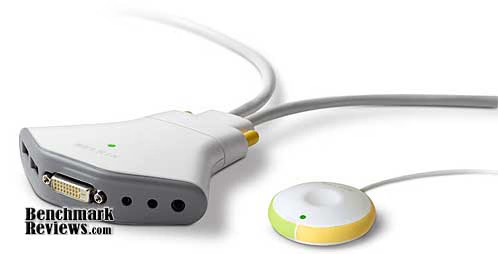
This switch allows you to share a monitor, keyboard, mouse, and speakers between two computers. It's one of a variety of Flip models, which range from a simple VGA-PS/2 switch with no audio for $39.00 to the DVI-USB model reviewed, which is $159.99. The Flip is a simple, modular design with a two-cable assembly that connects to the rear of the switch, and a set of connectors in the front:

About Belkin
Belkin International, Inc., offers an extensive range of innovations designed to give computer and consumer electronics users seamless integration in their homes, cars, and on the go. Belkin, a privately held company founded in California in 1983, is the recognized global leader in connectivity solutions. Since our inception in 1983, Belkin has experienced an amazing 25 consecutive years of dramatic growth and remains committed to making significant strides in the areas of research and design.
Our diverse and far-reaching product mix includes award-winning innovations for easy-to-use networking solutions, accessories for mobile devices, such as iPod, iPhoneTM, laptops, and netbooks, as well as energy conservation products.
Belkin also provides business-class solutions that include KVM switches, LCD rack consoles, racks and enclosures, in addition to a broad USB and cable product mix. Belkin has developed industry-leading innovations, prized by channel partners and end users alike for their dependability, customer service, and comprehensive warranties.
Belkin Flip Features
-
Shares 1 DVI monitor, and 1 USB keyboard and mouse, between 2 computers
-
Shares 1 set of speakers between 2 computers
-
Supports single- and dual-link DVI video modes
-
Supports high video resolutions of up to 2560x1600 (dual-link)
-
Fully supports all USB-based Mac and PC keyboards and mice, including all special-function keys
-
Installs in 3 easy steps with no software required
-
Includes cabling to connect computers
-
Features 2-color LED to indicate which computer is being accessed
-
Supports Mac and PC notebook and desktop computers
-
Comes with a Belkin 2-Year Warranty
(Belkin's web site seems slightly confused about the Flip: the feature list on one web page lists "Lets you listen to music files on one computer while you work on the other" as a feature, along with a 3-year warranty. These features are actually apply to the company's higher-end "SOHO" KVM switches. Another Flip web page correctly omits the separate audio switching feature and lists a 2-year warranty.)
F1DG102D KVM Switch Specifications
The Belkin Flip comes with:
-
Remote
-
KVM Switch with Cables
-
Power Adapter
-
Optional fastener strap
(Another web site error: one specification page for the Flip lists an "audio extension cable" as part of the package, while another shows an "Optional fastener strap" in its place. The latter is correct.)
Closer Look: Belkin Flip
The Belkin Flip F1DG102D is a basic two-port device that allows you to share a single monitor, keyboard, and mouse between two computers. The Flip package comprises the switch mechanism, the cable assembly, a small power adapter, and a wired remote. The switch module is quite small: just large enough to accommodate the cables that plug into the front and the larger cable assembly at the read. The front connections are labeled with icons on the bottom of the switch.

The wired remote is a single button; simply press down on the top of it to switch between the connected computers. Belkin uses a green and yellow color coding scheme to distinguish the two computers connected to the switch: cable thumbscrews are appropriately colored, and LEDs at the top of the switch and at the front of the remote shine green or yellow to indicate the selected computer. The remote's 6-foot cable gives you enough room to place it where you want it.

The two cable assemblies terminate in a common plug that attaches to the back of the switch. Each assembly has DVI, USB, and speaker cables. Oddly, the yellow cable assembly is much shorter (2 feet) than the green cable assembly (6 feet) as you can see in the photo below.

A generic, unlabeled power adapter plugs into the front of the switch assembly. If you're like me, you have a drawer full of these things. This is why label makers were invented.

Belkin Flip Detailed Features
The Flip F1DG102D is the "minimum DVI KVM switch", so there's really nothing in the way of "extra features". The angled front of the switch contains all the connectors except for the cable assembly. From left to right in the picture below, they're the USB ports for the keyboard and mouse, the DVI connector for the monitor, the power adapter, the wired remote, and the speaker outputs. The LED indicator is visible just below the Belkin logo.

The ports are labeled on the bottom of the switch. Since the design of the switch has everything plugging into the front, the switch will likely live in a tangle of cables behind your monitor or under your desk, something like this:

There's no software to install, nor any parameters to set or adjustments to make. You just plug it in and go.
One nice feature that I didn't expect in a low-end switch like this was dual-link DVI support: if you've a 30" monitor, or anything with a resolution higher than 1920 x 1200, you're good to go with this switch.
Testing & Results
The Flip comes in a clear plastic blister pack - you know, the kind where you count yourself lucky if you can open it without losing any blood - and a folded pamphlet showing how to set it up, not that you'll need it. I've used two of these switches for almost two years: one to connect my work Mac and my game PC, and another to connect a Apple XServe and a Mac Mini used as business and personal servers. The switches have never failed or given me any problems at all. The Flip is a very basic KVM switch and potential buyers should be aware of its limitations:
-
You can only switch between two systems.
-
You can't switch between the connected computers via keyboard commands, you must use the remote.
-
No microphone switching; only audio output from the computers is switched.
-
When you first turn on a connected computer, the switch must be set to that computer, or you won't have any video when you switch to that computer later.
-
Noticeable lag for computers to recognize that they've been selected.
The last two limitations can be irritating. Numerous times (especially with the servers), I've forgotten to have the switch set to the computer I just turned on, and been forced to reboot the affected system (with no video!) And Windows systems can take several seconds to recognize that they've been "switched to". This is a consequence of the switch's design: switching between computers is electrically equivalent to physically pulling all the cables and plugging them into the other computer. Windows computers seem to react to this much more slowly than Macs for some reason; you'll get the "USB connected" sounds when you switch to the Windows machine (you won't hear the "USB disconnected" sound since you've switched away the audio as well), and although video appears almost instantly, your keyboard and mouse might not be recognized for several seconds.
Although the USB connection delay can be annoying, it's actually an advantage in some cases. Higher-end switches emulate USB keyboards and mice for all connected computers so there's no delay when switching...but since your computers only "see" the emulated generic keyboard and mice, the extra keys, buttons, LCD screens, and other features of these fancy peripherals won't work. With the Flip, connected computers "see" the actual connected keyboard and mouse, so any advanced features will work fine.
The only other issue is the oddly-mismatched cable lengths. The two-foot length of the yellow cable means that the switch will have to be positioned very close to at least one of the computers. Depending on the layout of your computers, this could be a problem.
The DVI version of the Flip is much more expensive than the VGA versions-- at $159.99, it's exactly twice as much as the next most expensive model, an otherwise identical VGA-USB model with a wireless remote. However, this price is in line with prices on similar DVI switches offered by other vendors. The IOGear Miniview Micro DVI-D KVM is $20 cheaper, but lacks dual-link DVI support.
Belkin F1DG102D Conclusion
KVM switches perform a single, well-defined function: they share a monitor, keyboard, and mouse among multiple computers. Fancier switches add features like peripheral switching/sharing, keyboard and mouse emulation, and so forth...but this isn't a fancy switch: it's a no-frills device that performs the minimum necessary KVM functions and nothing more. This isn't a criticism; it's how the switch was designed.
I've had less than satisfactory experiences with "fancier" switches in the past. A software-controlled high-end four-port switch from another manufacturer would crash my Mac about 25% of the time I switched to it, and my monitor would sometimes take a long time to re-sync with the video from the computer I switched to. The manufacturer was no help and I had to quit using the switch, so it's nice to use a switch that "just works". As I mentioned earlier, I've used two of these switches for about two years now, and they have been utterly reliable and caused no problems with the computers they're connected to. Although the price of the DVI version reviewed here is relatively high, it's competitive with other DVI-USB switches, and the VGA models are much cheaper (but, seriously, you don't use VGA, do you?).
If you only need to switch between two computers, and don't want or require the advanced functions of a higher-end switch such as DDC support, switching from the keyboard, and so forth, the Belkin Flip F1DG102D is an excellent basic two port DVI KVM switch that should provide years of reliable service. As of October 2009, NewEgg offers this switch for $139.99, as well as the Flip F1DG102U 2 Port USB/VGA version for only $34.99 and the USB/VGA version with wireless remote for $49.99.
Pros:
+ Small, can be stored under desk or behind monitor
+ Simple to operate: only control is one button
+ Handles dual-link DVI, unusual in this class of switch
+ Dual-color LEDs on remote and switch indicate which computer is selected
+ USB pass-through supports extra keyboard/mouse features
Cons:
- Expensive compared to VGA switches
- One short cable limits placement options
- Design encourages "cable tangle" at front
- Lag time when switching
Ratings
-
Performance: 8.0
-
Appearance: 5.0
-
Construction: 7.5
-
Functionality: 8.5
-
Value: 8.0
Final Score: 7.4 out of 10
Questions? Comments? Benchmark Reviews really wants your feedback. We invite you to leave your remarks in our Discussion Forum.
Reader comments from the original article
7 comments were posted before commenting closed. They are preserved as written. Original avatars no longer resolve and are shown as a placeholder.
Question Bartlomiej Permalink:
I have a question about this switcher and it's: if I don't plug in to it any mouse or keyboard, can I still use two different mouses and keyboards from a different computers ( dell, iMac ) wirelessly, because both of them are using wireless connections...???
RE: Question David Ramsey Permalink:
I don't understand what you're asking.
Its ok Bartlomiej Permalink:
Question is so simply, but tats ok... Reards
RE: Its ok David Ramsey Permalink:
Well, I'll try: I think you're asking if you can connect the switch to two different computers' video and audio, but each computer has a wireless mouse and keyboard, right? That would work: you can press the switch to select the computer you'd like to see on the monitor, and simply use the correct keyboard. You would have to remember that the keyboards would not be switched, and it would probably be more convenient to use a keyboard and mouse connected to the switch. But it would work, if I understand what you're asking.
Thanks Bartlomiej Permalink:
Yes u got it, I was asking that because both mouses and keyboards are wireless so I don't have usb connectors from them but to use one set of keyboard and mouse to operate both computers I will use synergy software..... Thank you for your answer....you are the best !!!
linux experience mwf104 Permalink:
The delay in recognizing the keyboard and mouse is definitely a Windows problem. I have used this switch for several years to switch between a windows laptop/docking station and Linux workstation, and the Linux machine picks up the keyboard/mouse immediately whereas the windows laptop does not. That is annoying, so I keep the laptop open enough that I can use its keyboard/mouse to unlock the screen lock while I wait for it to recognize the other input devices. This low-end switching is also a benefit if you have a smart card reader integrated to your keyboard because it switches that also. If it emulated the keyboard, the smart card reader probably wouldn't work. I thought the video did not work properly and was only using it to switch the keyboard and mouse but later found out it was the DVI cable and not the switch at all. Once I switched DVI cables, it seems to be working perfectly with a 1600x1200 monitor. The different length cables is weird, but chances are it will be close to one or the other, so it's really only a problem if you care which machine is "green" and which is "yellow." Otherwise, whichever one it's close to is yellow. Having one computer on each side of the desk or one under the desk worked ok for me. If they were both long it'd just be more rat's nest behind the desk.
RE: Belkin Flip 2-port DVI USB KVM Switch F1DG102D David Ramsey Permalink:
I still use this switch, even after all these years. The sad thing is that Belkin doesn't seem to make it anymore.