
nMedia MCESKB 2.4GHz Wireless Slim Trackball Keyboard
nMedia MCESKB Keyboard
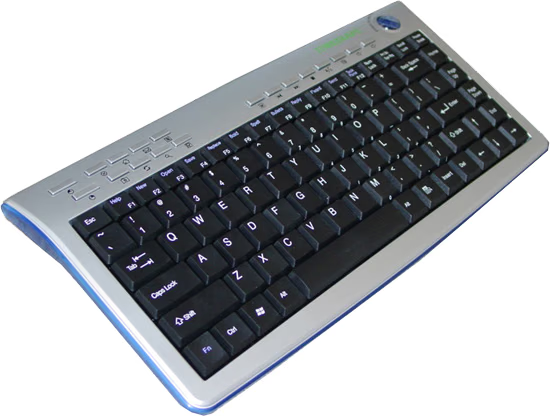
nMedia System has delivered big with the MCESKB second generation wireless keyboard. By using the 2.4GHz Radio Frequency (RF) wireless signal, mobility of the new HTPC keyboard is much improved over the previous version. Do not ignore the importance of this RF Wireless Keyboard in any HTPC or Media Center PC system building because it is actually critical for functionality. There is great convenience in controlling an HTPC from the comfort of the couch. Sure, remotes will help browse the menu, but an RF keyboard is a must-have device in terms of data input or computing. The 2.4GHz RF signal will enable your keyboard to communicate at any angle without difficulty.
About the company: nMedia System
There is a company out there that is thinking of you, and they have built a line of enclosures that will have you replacing your DVD player, DVR, and stereo, all for a stylish HTPC. This company is nMedia System. Like most emerging companies that have made a success in the enthusiast market, nMedia System originates from overseas. With offices in Hong Kong and GunagZhou, China, as well as a stateside presence in Fremont, California, nMedia System offers a wealth of research and development for their enthusiast line of products.
Packaging
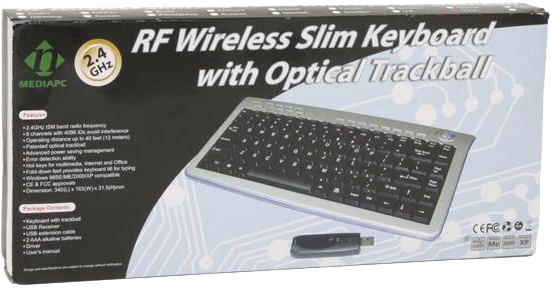
The nMedia MCESKB 2.4GHz Wireless Slim Trackball Keyboard is packaged in a conservative yet effective cardboard box with illustrated box sleeve. Compared to standard keyboard packaging, the MCESKB is roughly the same height with two-thirds the length. If you are super-protective of your equipment, it would be possible to repackage the keyboard to avoid dirt and dust; and possibly store it under a sofa or couch.
nMedia MCESKB Contents
Once you understand that nMedia System is building a product for every facet of your Home Theater Personal Computer space, you begin to recognize that they want to make sure their products complete your Media Center. In the MCESKB keyboard set you will find everything you could possibly need to make this component fuctional with your system.

Are you using an older Operating System like Windows 98SE, ME, or 2000? Not a problem - at least as far as this keyboard is concerned. Drivers are included. Don't have any batteries on hand? Don't worry, two AAA batteries are in the box. Is it a cramped fit reaching into your last remaining USB port? nMedia System is aware of the perils of USB ports, and has included a slim USB extension adapter. Is this going to be a gift for the not-so-computer savvy? Good. They will enjoy it, right after they read the simple to follow user's manual.
Specifications
| Brand | nMEDIAPC |
|---|---|
| Model | MCESKB |
| Features | * 2.4GHz ISM band radio frequency* 8 channels with 4096 IDs avoid interference* Operating distance up to 50 feet (15 meters)* Patented optical trackball* Error detection ability* Multimedia, Internet and Office hot keys* Auto Sleep Mode to save battery life* Windows 98SE/ME/2000/XP/Vista compatible* MAC OS X (10.2 compatible and later edition)* CE & FCC approvals |
| Interface | USB |
| Type | 2.4GHz RF Wireless |
| Mouse included | Track Ball |
| Distance | 50 feet / 15 meters |
| Design Style | Slim |
| Color | Silver and Black |
| Dimension | 13.4” (L) x 6.4” (W) x 1.2” (H)*340mm x 163mm x 31.5mm |
| Package Content | * Keyboard with trackball * USB Receiver & Extension Cable * 2 AAA Alkaline Batteries * Driver & User's manual |
Wireless Keyboard Performance
While the standard keyboard is plug and play, the nMedia System MCESKB does require just a few steps before you are functional. These steps were short and sweet, and I found installation was simple enough for any user regardless of skill level. Here are the steps performed:
-
Plug the USB reviever into any available port.
-
Install two AAA batteries, which are included.
-
Turn on the keyboard with the power button at the rear of the unit.
-
Connect to the receiver using the switch located on the underside.
-
Install device drivers to utilize hot key functionality.

As previously listed in the specifications, the nMedia System MCESKB claims to have a range of 50 feet. My living room only offered me 46 feet between the HTPC which the receiver was connected to, and the keyboard sitting on the dining room table. There was a clear line of sight, and so therefore the performance was good; but I did notice some loss of range when I used the keyboard near it's indicated maximum range with other 2.4GHz products nearby. This was an extreme exaggeration of normal use, because most people will not even see the screen from 50 feet away, much less have the living room space to accommodate the maximum range.
Also of great benefit is the auto-power feature. Even though there is a power switch, the nMedia MCESKB Keyboard will go into a standby mode after two minutes of inactivity. This is the secret behind the decent battery life I received with tiny AAA batteries.
Conclusion: nMedia MCESKB
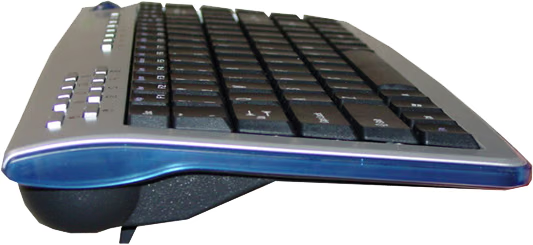
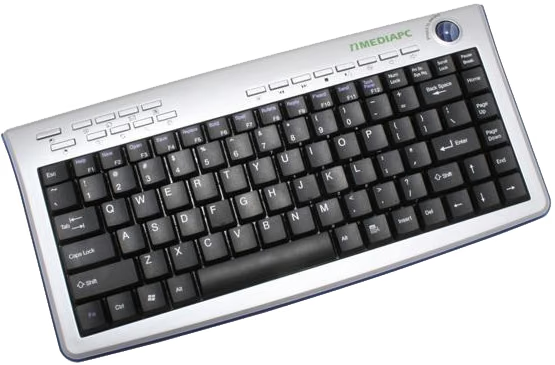
The nMedia System MCESKB is a keeper, and I will continue to use it with my HTPC. The 2.4GHz RF range is more then adequate for even large living room use, and yet still allows for expanded functionality in board room presentations or the classroom. Battery life was ample, since I do not use the keyboard for prolonged daily use it seems that AAA batteries are well tailored for the slim keyboard. While accountants may not appreciate the missing 10-key, everyone else will enjoy the same familiar feel that these keys maintain in comparison to a standard keyboard. The upper hotkeys were decent enough, considering they rarely get used, but the left/right mouse function keys could use a bit more separation. Finally, the trackball is a perfect fit: not too small, and not too large.
So where's the bad news? Well, aside from minor mouse button placement, there weren't too many flaws to be found at all. Over the past few months I have twice been a consumer shopping for a wireless keyboard for use with my living room HTPC. The first thing I learned while shopping was that these keyboards can be very expensive, however the nMedia System MCESKB offers excellent functionality with terrific value. At the time of this writing, the nMedia MCESKB 2.4GHz Wireless Slim Trackball Keyboard is available for a mere $44.99 at NewEgg.com. If this product were any less expensive, the good people at nMedia System would be giving them away. If you are looking for a wireless slim keyboard with great range and exceptional functionality, I highly recommend you purchase this product.
I will admit that I could go the extra mile and report if this unit is spill proof or if I could throw it accross the room and see if it still works, but I'm not going to. I want to keep mine. But if you purchase one and happen to conduct these extreme tests (not recommended) please come back and let us know the results.
Pros:
+ High-quality construction can withstand damage
+ USB Interface offers great compatibility
+ Batteries are included
+ Attractive design
+ Available in 17 languages/layouts
+ Comfortable lightweight material
+ Exceptional RF range
Cons:
- Left/Right mouse button placement
- Not spill proof
Ratings:
-
Presentation: 8.25
-
Appearance: 8.75
-
Construction: 9.25
-
Functionality: 9.0
-
Value: 9.0
Final Score: 8.85 out of 10.
Special Thank-you:
This review would not be possible if it weren't for nMedia System and their staff. I am grateful, and certainly appreciate the opportunity.